APIPA (Automatic Private IP Addressing) is what a device does when it’s set to get its address from DHCP and no DHCP server answers. It gives itself an address in 169.254.0.0/16 with a 255.255.0.0 mask and no default gateway. So a 169.254 address means one thing: DHCP failed. The device can reach its neighbours on the same link, and nothing else.
That’s the short answer. Most explanations stop there, or get the range slightly wrong. This one goes further: the exact addresses a host is allowed to pick (it’s 65,024, not 65,534), what happens in the first 60 seconds, why the ARP probe exists, a fix order that starts at the cable, and a CCNA lab where you break DHCP on purpose and watch APIPA take over.
What is APIPA (automatic private IP addressing), and what does it stand for?
APIPA stands for Automatic Private IP Addressing. It’s Microsoft’s name for the feature, and it’s the name CompTIA and most exam guides use. The IETF calls the same thing IPv4 link-local addressing, and the standard behind it is RFC 3927, published in 2005.
Same idea, two names. Windows has done it since Windows 98, macOS does it, and plenty of printers and industrial control panels do it too. Whether a Linux machine does it depends on the network stack and how it’s set up (more on that under disabling APIPA).
Here’s the APIPA meaning in one line: “I asked for an address, nobody answered, so I made one up that only works on this wire.”
Nobody answered the DHCP request, so the laptop made its own address: 169.254.x.y, mask 255.255.0.0, no gateway, no DNS.
Why would anyone want that? Two reasons:
- Zero-configuration networks. Two laptops joined by one cable, a camera plugged straight into a PC, a printer on a desk with no router. APIPA lets them talk without anyone typing an address.
- A clear failure signal. On a managed network, nobody plans for APIPA. Seeing 169.254 tells you exactly which service failed. That’s why it’s such a useful thing to spot in
ipconfig.
The second reason is the one you’ll actually use.
What is the APIPA address range?
The APIPA address range is the block 169.254.0.0/16, reserved by IANA for link-local use. But a host doesn’t pick from the whole block. RFC 3927 says the first 256 and last 256 addresses are reserved and must not be self-assigned. So the addresses a host can actually choose run from:
169.254.1.0 to 169.254.254.255
That’s 254 × 256 = 65,024 addresses. You’ll often see the APIPA range given as “169.254.0.1 to 169.254.255.254”, which is 65,534. That’s the usable host count of any /16, but it isn’t what APIPA uses. The difference is 510 addresses, and it’s the kind of detail an exam question can hinge on.
| Setting | APIPA value |
|---|---|
| Reserved block | 169.254.0.0/16 |
| Addresses a host may pick | 169.254.1.0 to 169.254.254.255 (65,024) |
| Reserved, never self-assigned | 169.254.0.0 to 169.254.0.255 and 169.254.255.0 to 169.254.255.255 |
| APIPA subnet mask | 255.255.0.0 (/16) |
| Default gateway | None |
| DNS server | None |
| Routable? | No. RFC 6890 lists the block as not forwardable |
169.254.0.0/16 is reserved for link-local use. Hosts self-assign only from 169.254.1.0 to 169.254.254.255 (65,024 addresses); the first and last 256 are reserved.
Notice the mask. A /16 means every APIPA host thinks the whole 169.254 block is local. Two hosts that picked 169.254.3.10 and 169.254.200.7 can still talk directly, because they’re in the same subnet. If /16 maths feels rusty, our guide to subnetting with practice questions covers it, and the free subnet mask cheat sheet puts every mask on one page.
How can you tell this is an APIPA address?
Check the first two octets. If an address starts with 169.254, it’s an APIPA (link-local) address. On Windows, ipconfig /all gives it away in three places:
Autoconfiguration Enabled . . . . : Yes
Autoconfiguration IPv4 Address. . : 169.254.83.17(Preferred)
Subnet Mask . . . . . . . . . . . : 255.255.0.0
Default Gateway . . . . . . . . . :
(Representative output. The host part of the address will differ on your machine.)
The word “Autoconfiguration” in front of the address, the /16 mask, and the empty gateway line. If all three are there, the machine is using APIPA.
Which of the following is a valid APIPA address?
This is a favourite exam format. Try these before reading the right-hand column:
| Address | In 169.254.0.0/16? | Could a host self-assign it? | Why |
|---|---|---|---|
| 169.254.47.12 | Yes | Yes | Inside 169.254.1.0 to 169.254.254.255 |
| 169.254.1.0 | Yes | Yes | The first selectable address. Looks like a network address, isn’t one in a /16 |
| 169.254.254.255 | Yes | Yes | The last selectable address |
| 169.254.0.5 | Yes | No | First 256 are reserved |
| 169.254.255.10 | Yes | No | Last 256 are reserved |
| 169.254.169.254 | Yes | Yes, in theory | Inside the range, but it’s the cloud metadata address (see below) |
| 169.255.1.1 | No | No | Different block entirely |
| 192.168.0.100 | No | No | RFC 1918 private, handed out by DHCP or set by hand |
On a multiple-choice question, the answer is the one starting 169.254. The reserved-slice rows are the trap if the question asks what a host can assign itself.
How does APIPA work?
APIPA isn’t a protocol you configure. It’s a fallback built into the DHCP client. Here’s the sequence, with the timings Microsoft and RFC 3927 actually document.
1. DHCP gives up. A Windows client broadcasts DHCPDISCOVER messages. Microsoft’s DHCP architecture docs list the intervals as 0, 4, 8, 16 and 32 seconds (plus or minus one second). Add those up and you get 60, which matches Microsoft’s line that the client moves on “after one minute” without an answer.
2. It picks an address. The client chooses a pseudo-random address between 169.254.1.0 and 169.254.254.255. RFC 3927 says the random generator should be seeded from something unique to the host, like its MAC address. That’s why a machine often lands on the same 169.254 address every time it fails. Handy when you’re debugging.
3. It checks nobody else has it. Before using the address, the host sends three ARP probes. An ARP probe asks “who has 169.254.x.y?” with the sender IP set to 0.0.0.0, so it doesn’t pollute anyone’s ARP cache if the address turns out to be taken.
4. It claims the address. If nothing answers, the host sends two ARP announcements, two seconds apart, now using the new address as its sender. Other hosts update any stale cache entries.
5. It defends the address. Conflict detection doesn’t stop after the probes. If another host later shows up using the same address, RFC 3927 requires the host to either defend it once or pick a new one. It must not ignore the conflict.
6. It keeps asking for DHCP. APIPA is a stopgap. The DHCP client keeps sending Discovers in the background, and the moment a server answers, the host drops the 169.254 address and takes the real one.
Here are the probe numbers from RFC 3927’s constants table:
| Constant | Value | What it controls |
|---|---|---|
| PROBE_WAIT | 1 s | Random wait (0 to 1 s) before the first probe |
| PROBE_NUM | 3 | Number of probes |
| PROBE_MIN / PROBE_MAX | 1 s / 2 s | Random gap between probes |
| ANNOUNCE_WAIT | 2 s | Wait after the last probe before claiming |
| ANNOUNCE_NUM | 2 | Number of announcements |
| ANNOUNCE_INTERVAL | 2 s | Gap between announcements |
| MAX_CONFLICTS | 10 | Conflicts allowed before slowing down |
| RATE_LIMIT_INTERVAL | 60 s | After 10 conflicts, at most one new attempt per minute |
| DEFEND_INTERVAL | 10 s | Minimum gap between defensive ARPs |
Work it through and claiming an address takes 4 to 7 seconds: a 0 to 1 second wait, three probes 1 to 2 seconds apart, then the 2-second ANNOUNCE_WAIT. Add the one minute of failed Discovers before it, and a Windows box typically shows a 169.254 address a little over a minute after it starts asking.

About a minute of unanswered DHCP Discovers (gaps of 4, 8, 16 and 32 seconds on Windows), then three ARP probes and two announcements. Claiming the address takes 4 to 7 seconds.
How often does a client retry DHCP after APIPA?
Every few minutes, but Microsoft’s own documents don’t agree on the number. The archived Windows Server 2008 DHCP architecture page says the client checks for a server every five minutes. Microsoft’s current troubleshooting article (updated 2025-09-22) says every three minutes when the client has no previous lease or its previous gateway doesn’t answer, and repeats the whole cycle every five minutes when a lease expired and no server is found.
Bottom line for troubleshooting: once you’ve fixed the DHCP problem, don’t wait. Run ipconfig /renew and the client asks right away.
Why does APIPA bother with ARP probes?
Because random picks collide more often than you’d think. It’s the birthday problem. Assume each host picks one address uniformly from the 65,024 available. Here’s the chance that at least two hosts pick the same first address:
| Hosts losing DHCP at once | Chance of at least one duplicate first pick |
|---|---|
| 10 | 0.07% |
| 50 | 1.87% |
| 100 | 7.33% |
| 200 | 26.4% |
| 300 | 49.9% |
| 500 | 85.4% |
So if a DHCP server dies under a floor of 300 laptops, it’s a coin flip whether two of them grab the same address on the first try. Without the probe, both would start using it. With the probe, one of them hears the other, picks again, and moves on. Real hosts seed their picks from their MAC address, so the numbers aren’t exact, but the point stands: 65,024 addresses sounds like plenty until a few hundred hosts pick at random.
Two hosts can pick the same random address. With 300 hosts the chance of at least one duplicate first pick is 49.9%, so every host sends ARP probes before using one.
APIPA vs DHCP: what’s the difference?
DHCP is a server handing out a planned address with everything a host needs. APIPA is the host inventing a temporary address because the server didn’t show up.
| DHCP | APIPA | |
|---|---|---|
| Who assigns the address | A DHCP server | The host itself |
| Address range | Whatever the admin configured (often RFC 1918) | 169.254.1.0 to 169.254.254.255 |
| Subnet mask | Set by the server (option 1) | Always 255.255.0.0 |
| Default gateway | Yes (option 3) | None |
| DNS server | Yes (option 6) | None |
| Reaches the internet | Yes, through the gateway and NAT | No |
| Reaches other subnets | Yes | No |
| Conflict check | Server ping and client ARP (both optional in RFC 2131) | Three ARP probes, required |
| Lease | Yes, with T1 and T2 renewal timers | No lease. Kept until DHCP answers |
| When you see it | Normal operation | DHCP failed |
They aren’t competitors. APIPA only kicks in when DHCP fails, and DHCP takes over again as soon as it works. Our guide to what DHCP is and how DORA works covers the server side, including relays and lease timers.
One more thing APIPA doesn’t do: get you online through NAT. A 169.254 address never leaves the link, so it never reaches the router doing the translation. What is NAT explains which private addresses do get translated, and our guide to private IP address ranges explains why 169.254 isn’t one of the RFC 1918 ranges, even though it looks private.
Why am I getting an APIPA address?
Because your device asked for an address and got no usable answer. That’s all APIPA tells you. The cause can sit anywhere between your network card and the DHCP server, so work from the bottom up.
If you’ve used Cisco Packet Tracer, you’ve probably seen the PC’s IP configuration show “DHCP failed. APIPA is being used.” Same thing, spelled out.
The usual causes, roughly in the order worth checking:
| Layer | Cause | What gives it away |
|---|---|---|
| Physical | Unplugged or bad cable, dead wall port, wrong switch port | No link light, or show interfaces status says notconnect |
| Wi-Fi | Wrong passphrase or failed 802.1X login | Connected to the SSID but no traffic passes. Fix the authentication first |
| Switch port | Port is err-disabled (BPDU Guard, port security) | show interfaces status says err-disabled. See BPDU Guard and err-disabled recovery |
| VLAN | Port is in the wrong access VLAN, or a VLAN with no DHCP | Other ports on the same VLAN fail too. Our VLAN guide covers access ports |
| Relay | ip helper-address missing or on the wrong interface | DHCP works on one subnet but not another |
| Server | Service stopped, pool deleted, no pool for this subnet | Every client in the subnet fails |
| Pool | All addresses leased | New devices fail, devices with leases keep working |
| Security | DHCP snooping dropping the server’s replies on an untrusted uplink | The server logs Offers that never reach the client |
| Host | Disabled DHCP client service, broken driver, aggressive VPN or firewall software | Only this one machine fails |
The fastest way to narrow it down: does anything else on the same port, VLAN or SSID get a normal address? If yes, the problem is the host. If no, it’s the network.
How do you fix an APIPA address?
You fix the thing that stopped DHCP. Here’s the order that wastes the least time:
- Check the link. Cable seated, link light on, Wi-Fi actually authenticated. A surprising share of APIPA tickets end here.
- Ask again. On Windows, run
ipconfig /releasethenipconfig /renew(Microsoft ipconfig reference). If/renewsits there for a minute and then gives up, DHCP is still failing and you’ve confirmed it’s not a one-off. - Test another device on the same port or SSID. This splits host problems from network problems in one step.
- Check the switch port. Status, access VLAN, err-disabled. One
show interfaces statusanswers all three on a Cisco switch. - Check the relay. If the server sits on another subnet, the client-facing interface (or SVI) needs
ip helper-address, and the server needs a route back. With router on a stick, that’s one helper per subinterface: our router on a stick guide shows where each one goes. - Check the server and pool. On a Cisco IOS DHCP server,
show ip dhcp poolshows how many addresses are leased, andshow ip dhcp server statisticsshows whether Discovers are arriving at all. - Set a static address only as a test. If the host works with a static address in the right subnet, the cable, port and VLAN are fine, and the fault is DHCP. Then put it back to automatic. A static address hides the problem, it doesn’t fix it.
On Linux, ip -4 addr shows whether the interface holds a 169.254 address, and your distribution’s DHCP client or NetworkManager logs say why the lease failed. Our free network troubleshooting commands PDF lists the Windows, Linux and Cisco versions side by side.
Worked example: break DHCP in a CCNA lab and watch APIPA take over
Reading about APIPA is fine. Causing it is better. This uses the same topology as our DHCP guide, so if you built that lab, you’re two commands away.
- R1 is the DHCP server: G0/0 10.0.12.1/30, pool GUEST for 192.168.50.0/24
- R2 is the relay: G0/0 10.0.12.2/30 toward R1, G0/1 192.168.50.1/24 toward the guest LAN, with
ip helper-address 10.0.12.1 - PC1 and PC2 sit on a switch behind R2 G0/1, both set to DHCP
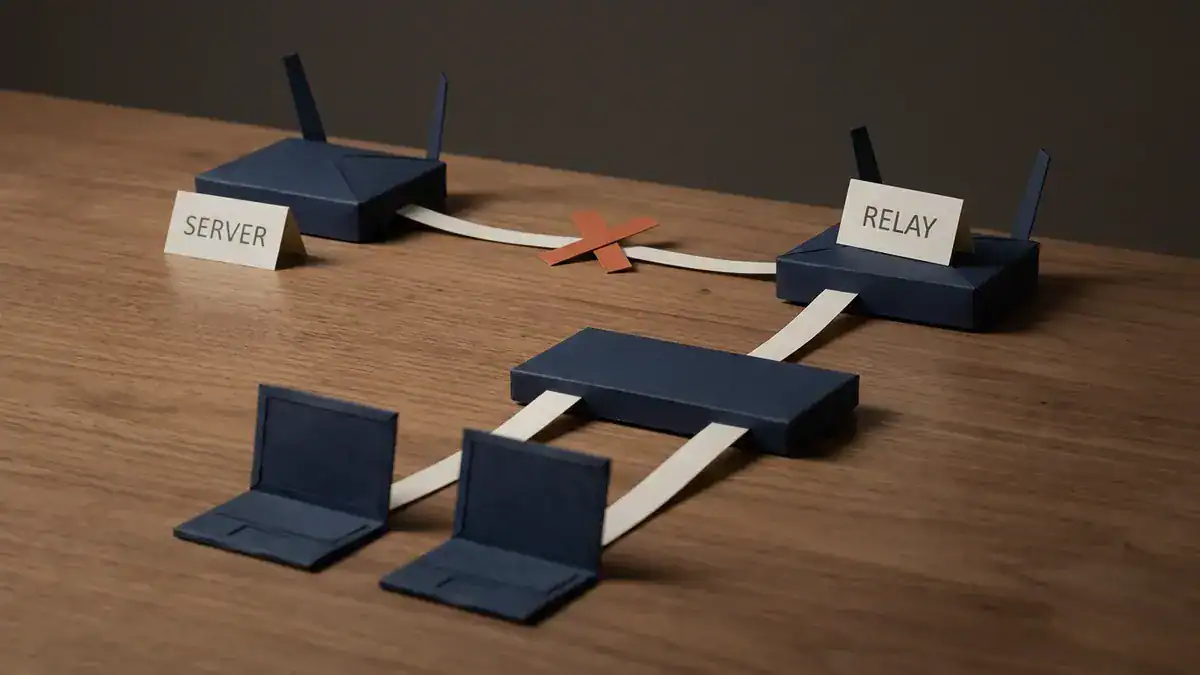
R1 is the server (10.0.12.1), R2 the relay (192.168.50.1 on the LAN). Remove ip helper-address and the PCs’ Discovers stop at R2, so both fall back to APIPA and can still reach each other.
Step 1: confirm it works. Both PCs get addresses from the pool, somewhere in 192.168.50.11 to 192.168.50.254 (the server excludes .1 to .10). On R1, show ip dhcp binding lists both.
Step 2: break the relay. On R2:
interface GigabitEthernet0/1
 no ip helper-address 10.0.12.1
Step 3: make the clients ask again. On each PC, release and renew (on Windows, ipconfig /release then ipconfig /renew; in Packet Tracer, select DHCP again in the PC’s IP Configuration window). The Discovers now hit R2 G0/1 and stop there, because routers don’t forward broadcasts and nothing is relaying them. After the client gives up, it falls back to APIPA. In Packet Tracer you’ll see “DHCP failed. APIPA is being used.”
Step 4: see what still works. These are the results the RFC 3927 rules predict, so run them and check your lab agrees:
| Test from PC1 | Result | Why |
|---|---|---|
| Ping PC2’s 169.254 address | Works | Same /16, same link. PC1 ARPs for PC2 directly |
| Ping R1 at 10.0.12.1 | Fails | PC1 has no gateway. RFC 3927 says an APIPA-only host must “ARP for everything” on its own link and never hand a packet to a router |
| Ping 8.8.8.8 | Fails | Same reason. And the standard tells routers not to forward 169.254 traffic anyway |
nslookup cisco.com | Fails | No DNS server was ever configured |
That first row surprises people. APIPA isn’t “no network”. Two APIPA hosts on the same switch talk fine. That’s exactly what it was designed for.
Step 5: watch the server go quiet. On R1, show ip dhcp server statistics stops counting new Discovers. Compare that with a broken return route (covered in the DHCP guide), where Discovers keep arriving but Requests never come back. Two failures, two different fingerprints, same 169.254 symptom on the client.
Step 6: fix it. Put ip helper-address 10.0.12.1 back on G0/1. The clients will pick up a real address on their next background retry, which per Microsoft’s docs is within three to five minutes. Or run ipconfig /renew and it’s immediate.
Want this lab, and the relay, snooping and IPv6 versions, ready to boot? See the end of the post. To build it yourself, our list of free CCNA labs in EVE-NG gets the routers running, and if you’re deciding between simulators, here’s Packet Tracer vs EVE-NG.
What is a link-local address, and how is an IPv6 link-local address different?
A link-local address is an address that’s only valid on one physical or logical link: one VLAN, one cable, one Wi-Fi network. Routers don’t forward it. APIPA is the IPv4 version. IPv6 has its own, and it behaves very differently.
The IPv6 link-local address range is fe80::/10 (RFC 4291). In practice every IPv6 link-local address you’ll see starts fe80:: followed by a 64-bit interface ID, because the 54 bits after the prefix are set to zero.
| IPv4 link-local (APIPA) | IPv6 link-local | |
|---|---|---|
| Range | 169.254.0.0/16 | fe80::/10 (fe80::/64 in practice) |
| When it appears | Only when DHCP fails (or no address is set) | Always, on every IPv6-enabled interface |
| Is it a problem? | Usually yes | No. It’s normal |
| Used for | Fallback, zero-config links | Neighbour discovery, router advertisements, routing protocol next hops |
| Duplicate check | ARP probes (RFC 3927) | Duplicate address detection (RFC 4862) |
| Routable | No | No |
That “always” matters. If an interface has an fe80:: address, don’t panic. It’s supposed to. IPv6 depends on link-local addressing: RFC 5340 says OSPFv3 sends its packets from the interface’s link-local address and uses neighbours’ link-local addresses as next hops. That’s why IPv6 routes learned from OSPFv3 point at fe80:: next hops. If you’re still choosing a routing protocol, our EIGRP vs OSPF comparison covers the IPv4 side first.
So, APIPA vs link-local? APIPA is one type of link-local address. Every APIPA address is link-local. Not every link-local address is APIPA.
Where else will you see 169.254?
Not every 169.254 address is a DHCP failure. The big one is in the cloud.
On AWS EC2, the instance metadata service lives at 169.254.169.254 (AWS EC2 user guide). AWS calls it a link-local address that’s only valid from inside the instance. Scripts query it to learn the instance’s IP, region and role credentials. Seeing traffic to 169.254.169.254 on a cloud VM is normal.
Notice that 169.254.169.254 sits inside the range an APIPA host may pick from. The metadata service and APIPA share the block, which is a nice reminder that “169.254” means “link-local” first and “DHCP failed” second. On a desktop, it’s almost always the second. On a cloud server, it may well be the first.
How do you disable APIPA?
Usually you shouldn’t. On most networks APIPA is harmless, and it hands you a clear symptom when DHCP breaks. Turning it off doesn’t fix DHCP. It just means a failed client ends up with no IPv4 address instead of a 169.254 one.
That said, Microsoft notes two cases where you might want to: networks with routers, and networks connected to the internet without NAT or a proxy.
On Windows, Microsoft documents a registry value. Under
HKEY_LOCAL_MACHINE\SYSTEM\CurrentControlSet\Services\Tcpip\Parameters\Interfaces\<Adapter GUID>add a DWORD named IPAutoconfigurationEnabled with the value 0. A value of 1, or no value at all, leaves APIPA on (Microsoft Learn). Two cautions. Editing the registry wrongly can break things, so back it up first. And the Windows versions Microsoft’s article names for this key are 2000, XP and Server 2003, so test on your build before rolling it out.
The cleaner Windows option is the Alternate Configuration tab in the adapter’s IPv4 properties. Choose “User configured” and the client falls back to an address you choose instead of a 169.254 one.
On Linux with NetworkManager, link-local behaviour is a per-connection setting called ipv4.link-local. The values are default, auto, disabled, enabled and fallback, according to the NetworkManager reference. disabled turns it off. fallback (added in version 1.52) only assigns a 169.254 address when no other IPv4 address is set, which is the APIPA behaviour Windows users expect:
nmcli connection modify "<connection name>" ipv4.link-local fallbackIs APIPA on the CCNA and Network+ exams?
Yes, on both, but it’s named outright only on Network+.
| Exam | Domain (weight) | Topic | Where APIPA fits |
|---|---|---|---|
| CompTIA Network+ N10-009 | Networking Concepts (23%) | 1.7 Given a scenario, use appropriate IPv4 network addressing | “Automatic Private IP Addressing (APIPA)” is listed by name under Public vs. private |
| CCNA v1.1 | Network Fundamentals (20%) | 1.7 Describe private IPv4 addressing | Telling 169.254 apart from RFC 1918 |
| 1.9.a Unicast (global, unique local, and link local) | IPv6 link-local | ||
| 1.10 Verify IP parameters for Client OS (Windows, Mac OS, Linux) | Reading a 169.254 address in ipconfig | ||
| CCNA v2.0 | Network Infrastructure and Connectivity (25%) | 1.3 Troubleshoot IPv4 address configuration, assignment, and subnetting (public and private) | Recognising a failed assignment |
| 1.6 Troubleshoot wired and wireless client connectivity (IP configuration, network reachability, and wireless security parameters on Windows, MacOS, and Linux) | The client side of the symptom | ||
| 1.7 Troubleshoot DHCPv4 client, server, and relay on IOS devices | The cause behind the symptom |
Look at the verbs in v2.0. “Describe” and “verify” become “troubleshoot”, four times in domain 1 alone (1.3, 1.4, 1.6 and 1.7). A client stuck on 169.254 behind a broken relay is exactly the kind of fault that fits. Cisco says CCNA v1.1 is available until 2027-02-02 (Cisco Learning blog). Our breakdown of what changed in CCNA v2.0 covers the rest.
Choosing between the two? CCNA vs Network+ compares them. For practice, our Network+ practice test has APIPA questions, and there’s a free CCNA 200-301 practice test PDF for the Cisco side.
Frequently asked questions
Is APIPA a private IP address?
Not in the RFC 1918 sense. The three private ranges are 10.0.0.0/8, 172.16.0.0/12 and 192.168.0.0/16. APIPA’s 169.254.0.0/16 is a separate block reserved for link-local use. It’s even more restricted than private space: private addresses can be routed inside your network, while 169.254 addresses can’t leave the link at all.
Is 169.254.0.0/16 APIPA?
Yes. 169.254.0.0/16 is the IPv4 link-local block, and APIPA is Microsoft’s name for using it. Hosts only self-assign from 169.254.1.0 to 169.254.254.255, because the first and last 256 addresses are reserved.
What is the APIPA subnet mask?
255.255.0.0, which is a /16. Every APIPA host treats the whole 169.254 block as its local subnet, so any two APIPA hosts on the same link can reach each other directly without a router.
Can two devices with APIPA addresses talk to each other?
Yes, if they’re on the same link (same switch, same VLAN, same Wi-Fi network, or one cable between them). That’s what APIPA was built for. They can’t reach anything on another subnet, and they won’t get to the internet.
Is a 169.254 address bad?
On a network that’s supposed to have DHCP, yes. It means the device didn’t get a lease and can’t reach anything off its own link. On a direct cable between two devices, or for cloud metadata at 169.254.169.254, it’s normal.
What is the APIPA RFC?
RFC 3927, “Dynamic Configuration of IPv4 Link-Local Addresses”, published in May 2005. It defines the selectable range, the ARP probe and announcement rules, conflict defence, and the rule that routers must not forward link-local traffic. The IPv6 link-local equivalent comes from RFC 4291 and RFC 4862.
Bottom line
APIPA is a device telling you DHCP failed. The address is 169.254-something, the mask is /16, there’s no gateway, and the host can only reach its own link. Read it as a symptom, not a setting. Check the cable, then the port and VLAN, then the relay, then the server. The address itself almost never needs fixing.
The best way to make this stick is to cause it. Build the two-router lab from the DHCP guide, pull the helper, and watch both PCs land on 169.254 and still ping each other. If each VLAN gets its own pool, VLAN vs subnet explains why. Keep the Cisco commands cheat sheet open while you work.
If you’d rather boot the lab than build it, the CCNA lab workbook has 75 labs for EVE-NG and Packet Tracer, with chapters on IPv4 addressing, IPv6 addressing, DHCP and relay agents, and DHCP snooping.