Your lab has two connections to the same ISP. Both links are up. Routes are flowing in both directions. But all the inbound traffic keeps coming through the secondary link instead of the primary. You’ve checked the basics twice. Nothing looks wrong. Going deeper on BGP? The 148-page BGP guide is free.
That’s exactly where multi-exit discriminator comes in.
BGP multi-exit discriminator, or MED, is a BGP path attribute that tells neighbouring autonomous systems which entry point to use when sending traffic into your network. It doesn’t guarantee anything. But when configured correctly, it works as a clear signal to your ISP or peer: “Please use this link.”. On the service provider side, the OSPF and MPLS LDP guide covers best practice in 47 pages.
This article breaks down exactly how MED works, how to configure it on Cisco IOS, where it fits in the BGP decision process, and the mistakes that trip up most CCNP and CCIE candidates. You’ll also find working lab configs you can test in EVE-NG today. That distinction trips up nearly everyone, so we wrote VLAN vs subnet on its own.
What Is Multi-Exit Discriminator in BGP?
Multi-exit discriminator is a BGP optional, non-transitive path attribute. Its type code is 4. You’ll see it referred to as MED, the BGP metric, or just “metric” in Cisco documentation. For the routing protocol detail, the free EIGRP cheat sheet is an 18-page study guide.
MED is designed for a specific situation: when your AS has more than one connection to the same neighbouring AS. Think dual ISP links, two peering sessions at an IXP, or multiple data centre interconnects. MED lets you tell the neighbour which path you’d prefer for inbound traffic.
The rule is simple. Lower MED wins. A route advertised with MED 100 is preferred over the same route advertised with MED 200.
One thing to know right away: MED is a suggestion, not an instruction. Your neighbour’s local policy can override it. But most well-configured ISPs and enterprise peers do respect MED values.
MED is optional. If you don’t set it, your router may or may not send one depending on configuration. When no MED is present, Cisco IOS treats the route as if it has MED 0 by default. But there’s a catch with that, which we’ll get to.
How Does BGP MED Actually Work?
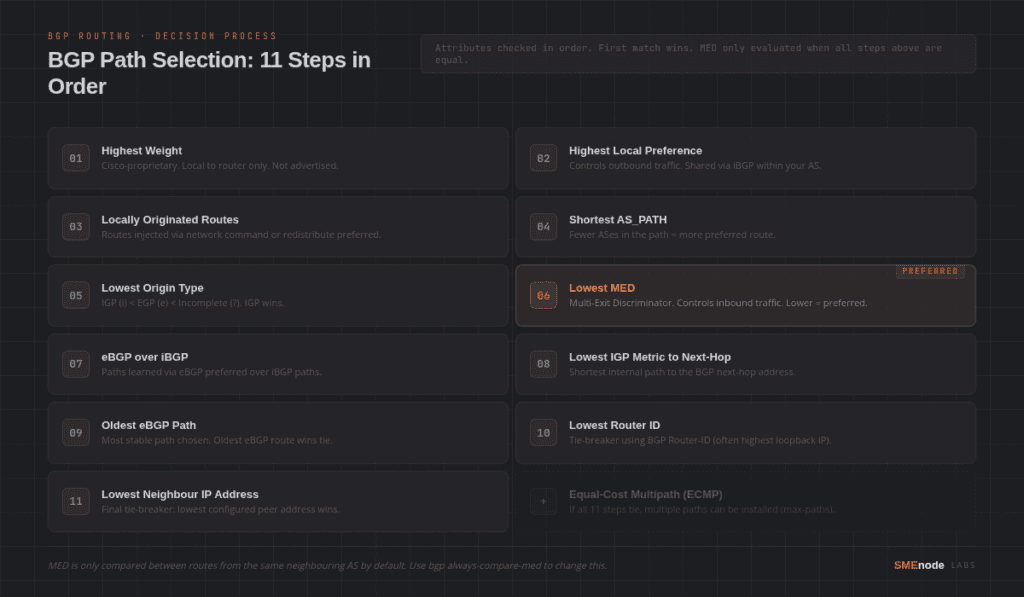
MED lives at step six of the BGP path selection process. Here’s the full order so you can see where it sits:
- Highest Weight (Cisco-proprietary, local only)
- Highest Local Preference
- Locally originated routes
- Shortest AS_PATH
- Lowest Origin code (IGP < EGP < incomplete)
- Lowest MED
- eBGP path over iBGP path
- Lowest IGP metric to next-hop
- Oldest eBGP path
- Lowest BGP Router ID
- Lowest Neighbour IP address
MED only comes into play if all the attributes above are equal. In practice, that means Local Preference, AS_PATH length, and Origin all have to match before MED even gets a look. Knowing which layer owns what saves hours of troubleshooting, and the OSI model cheat sheet PDF is a free one-pager.
The same-AS rule
Here’s the part most people miss. By default, Cisco IOS only compares MED values from routes learned from the same neighbouring AS.
Say you’re receiving the same prefix from two different ASes: AS100 and AS200. Even if AS100 advertises with MED 50 and AS200 advertises with MED 200, your router will not compare those values directly. It treats them as incomparable.
To change that behaviour, you can add bgp always-compare-med under the BGP process. This forces the router to compare MED across all routes regardless of which AS advertised them. Use it carefully. It changes path selection in ways that can produce unexpected results in complex topologies.
What about missing MED?
If a route arrives with no MED, it’s a bit of a grey area. The default behaviour in Cisco IOS is to treat a missing MED as 0, which makes it the most preferred. That seems counterintuitive, but it’s the default.
You can flip this with bgp bestpath med missing-as-worst. With that command, a missing MED is treated as the worst possible value (4,294,967,295), making it the least preferred. Most production networks use this to avoid surprises.
A worked example: unbalanced inbound traffic
Take a mid-size logistics company with two 1Gbps connections to the same upstream ISP, one at the main data centre and one at a secondary site. Both connections sit in the same AS.
For months, the secondary site was handling about 80% of the inbound traffic, even though the main DC link had twice the capacity. The reason? Neither link was advertising MED, so the ISP’s routers were selecting paths based on their own internal metrics, which happened to favour the secondary site.
Set MED 100 on prefixes advertised from the primary site and MED 200 on the secondary. The ISP prefers the lower value, so inbound traffic shifts to the primary as the updates propagate, and the secondary settles back to a standby share. That’s the design working as intended.
MED vs Local Preference: What’s the Difference?
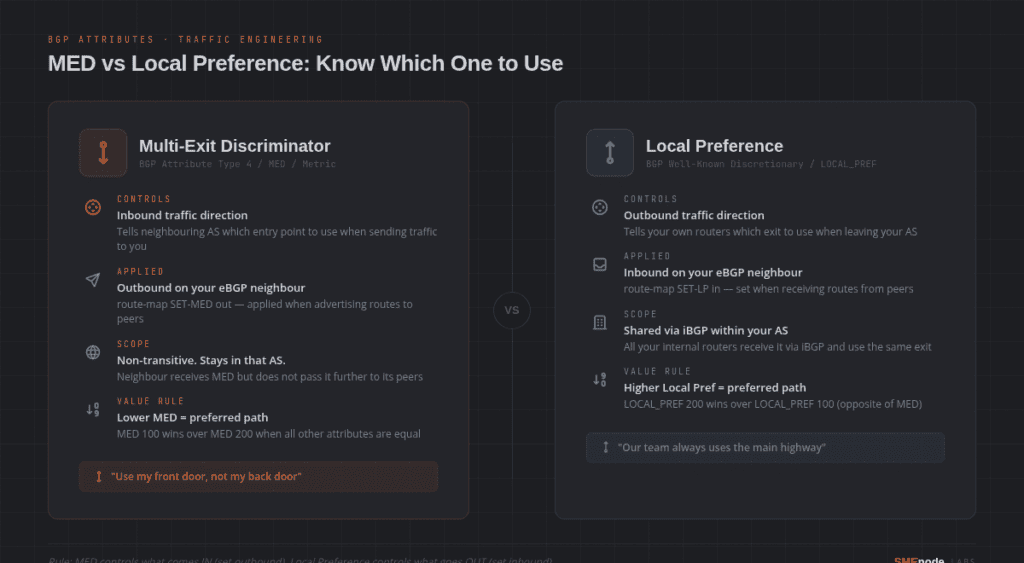
This is one of the most common points of confusion in BGP. MED and Local Preference both influence path selection, but they work in completely opposite directions.
| Attribute | Controls | Direction | Scope |
|---|---|---|---|
| Local Preference | Outbound traffic (which exit to use) | Stays within your AS | iBGP only |
| MED | Inbound traffic (which entry to suggest) | Advertised to neighbours | eBGP, received by others |
Local Preference is your decision. You set it on routes you receive from eBGP peers, then share it internally via iBGP. It tells your own routers which exit to use when leaving your AS.
MED is your suggestion to others. You set it on routes you advertise outbound. It tells the neighbouring AS which entry point you’d prefer them to use when sending traffic to you.
Think of it this way. Local Preference is the sign inside your building that says “use the front door to leave.” MED is the sign on the outside that says “visitors, please use the south entrance.”
If you’re studying for CCNP Enterprise or CCIE, getting this distinction clear early will save you a lot of confusion later.
How to Configure BGP Multi-Exit Discriminator on Cisco IOS
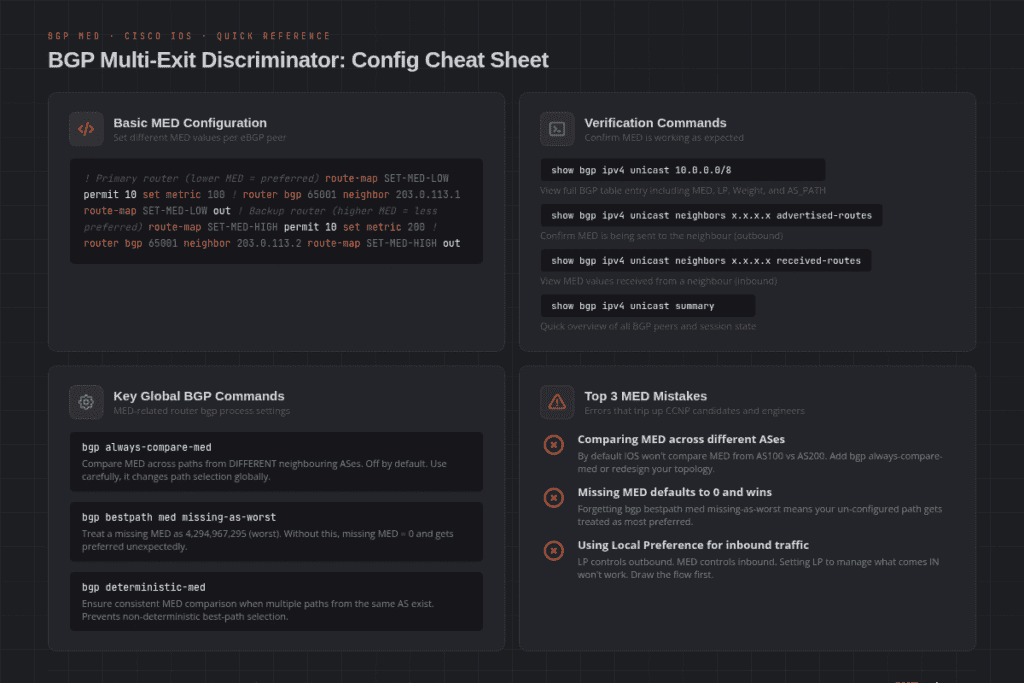
Configuring MED is straightforward. You use a route-map to set the metric value, then apply it outbound to the neighbour.
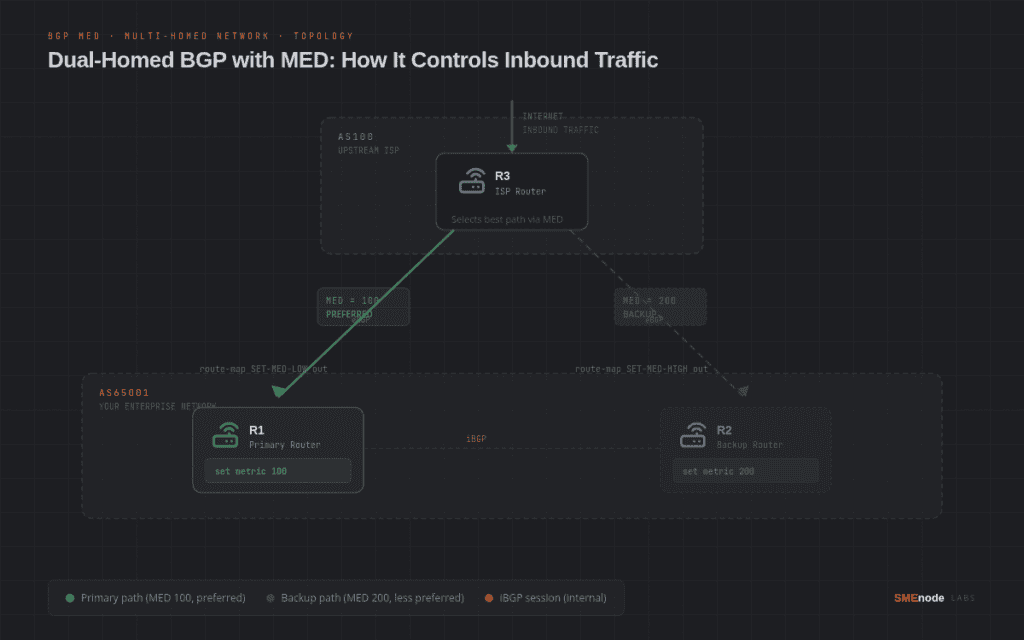
Here’s a basic example. Two routers in your AS (R1 and R2) are both connected to the same ISP (AS100). You want inbound traffic to prefer R1.
On R1 (primary path, lower MED = preferred):
route-map SET-MED-LOW permit 10
 set metric 100
!
router bgp 65001
 neighbor 203.0.113.1 route-map SET-MED-LOW out
On R2 (secondary path, higher MED = less preferred):
route-map SET-MED-HIGH permit 10
 set metric 200
!
router bgp 65001
 neighbor 203.0.113.2 route-map SET-MED-HIGH out
The ISP receives the same prefixes from both routers but with different MED values. As long as all other attributes are equal, Local Preference, AS_PATH, Origin, the ISP will prefer R1 for inbound traffic.
Verification commands:
show bgp ipv4 unicast 10.0.0.0/8
show bgp ipv4 unicast neighbors 203.0.113.1 advertised-routes
show bgp ipv4 unicast summary
In show bgp ipv4 unicast [prefix], you’ll see the MED value listed alongside Weight, Local Preference, and AS_PATH.
Ready to practice this in a real lab environment? The CCIE Enterprise Infrastructure Workbook includes over 20 BGP labs covering MED, Local Preference, route policies, and full multi-homed designs with tested EVE-NG topologies. Over 3,800 students have used it for CCIE prep.
Real-World Use Cases for BGP MED
Dual-homed enterprise with one ISP
This is the classic use case. Your company has two physical links to the same ISP. You want the primary link to carry all inbound traffic, with the secondary as a failover.
Set MED 50 on routes advertised via the primary link. Set MED 150 on routes via the secondary. The ISP prefers the lower MED and routes inbound traffic to your primary link. If the primary drops, the ISP falls back to the secondary.
IXP with multiple peering sessions
At an Internet Exchange Point, you might have peering sessions with 50+ networks. Some of those peers might reach you via multiple paths. Advertising different MED values across those sessions lets you shape which paths carry the most load.
Multi-site network with shared ASN
If you have multiple sites running under the same BGP ASN, MED helps you tell upstream providers which site should receive traffic for which prefixes. This is common in SD-WAN designs and enterprise multi-cloud setups. Both are heavily tested in the CCIE Enterprise lab exam.
BGP MED Mistakes That Cost Exam Points and Production Uptime
Mistake 1: Forgetting the same-AS comparison rule
Most common mistake. You configure MED on two paths, but they’re coming from different ASes. Your router doesn’t compare them. Traffic doesn’t shift. You spend 45 minutes troubleshooting a working configuration.
Check first: Are both paths coming from the same neighbouring AS? If not, either use bgp always-compare-med or reconsider your design.
Mistake 2: Not setting bgp bestpath med missing-as-worst
If one path has MED and one doesn’t, the missing MED defaults to 0 and wins. Your un-configured path gets preferred over your carefully configured one. Decide explicitly how you want missing MEDs handled.
Mistake 3: Confusing MED with Local Preference
You want to control inbound traffic, so you set Local Preference. But LP controls outbound. The traffic keeps flowing the wrong way. Draw the traffic direction on paper, then pick the right attribute.
Mistake 4: Assuming ISPs always honour MED
MED is a suggestion. Some ISPs ignore it entirely. Always verify with your upstream that they’re honouring MED values. In most commercial peering relationships this is stated in the peering agreement or NOC documentation.
Priya’s The CCIE lab trap
Picture a mock lab three weeks out from a CCIE Enterprise attempt, with months of BGP path selection study behind you. The task asks you to influence inbound traffic across two ISP links.
She set Local Preference on the routes. Outbound traffic shifted perfectly. But inbound didn’t move at all. She went back through her config twice. Everything looked right. If VLANs are still fuzzy, start at what a VLAN is and work up..
Then she remembered the direction. LP is for outbound. MED is for inbound.
She added the route-map, set the MED values, applied them outbound to the neighbours, and verified with show bgp ipv4 unicast. Traffic shifted in under 60 seconds.
She passed her CCIE lab on that attempt.
Want to test your BGP knowledge before the real thing? Start with the CCNA Workbook for foundational routing labs, then move into the CCIE Enterprise Workbook for full advanced BGP scenarios.
Where Does MED Fit in the Full BGP Decision Process?
Let’s revisit this with a bit more depth, because understanding the order matters.
Weight and Local Preference are evaluated first. Both are local only. If you’re comparing two iBGP paths and one has a higher Local Preference, MED never gets checked.
AS_PATH and Origin come before MED. If one path has AS_PATH length 2 and another has length 3, the shorter one wins regardless of MED.
MED is only compared when everything above it is equal. In real networks that’s not always the case, which is why MED can sometimes look like it’s not working. Before blaming MED, check the attributes above it in the decision process.
After MED, tie-breaking continues with eBGP preference, IGP metric, oldest path, Router ID, and finally neighbour IP address. But if you’ve configured MED correctly and the paths are otherwise equal, MED will be the deciding factor. Picking addressing you won’t regret is its own job, covered in private IP ranges and IP classes.
One more thing worth knowing: MED is non-transitive. When the neighbouring AS receives your route with a MED value, it doesn’t pass that MED to its own peers. It stays within that AS. So MED only influences the immediate neighbour, not the wider internet.
How to Practice BGP Multi-Exit Discriminator in EVE-NG
Reading about MED only gets you so far. You need to build the topology, configure the attributes, break things, fix them, and run show bgp a few hundred times.
EVE-NG is the standard platform for CCNP and CCIE lab practice. It runs Cisco IOS, IOS-XE, NX-OS, and most other vendor images in a browser-based environment.
For a basic MED lab, you need:
- Three routers: R1 in AS65001, R2 in AS65001, R3 in AS100 simulating the ISP
- Two eBGP sessions from R3 to both R1 and R2
- An iBGP session between R1 and R2
- A test prefix advertised from R1 and R2 with different MED values
Run the lab, verify with show bgp ipv4 unicast, then deliberately break it by removing the route-map and watching traffic shift back. That’s how you internalise it.
If you’re new to EVE-NG, our guide on how to install EVE-NG on VMware Workstation walks you through the full setup. Once your environment is running, the CCNA lab practice guide is a good warm-up before moving into CCNP and CCIE-level BGP topics. The CCNA Lab Workbook ships the EVE-NG ISO plus graded lab scenarios, so you practise on a topology that’s already built.
What Comes After MED?
Once you’ve got MED down, the natural next step is building a full BGP policy toolkit.
Local Preference and MED work together in most enterprise designs. You use LP to control where your traffic exits, and MED to influence where inbound traffic enters. Together they give you full control over traffic engineering across AS boundaries.
From there, you’d move into:
- AS_PATH prepending (making your path look longer to become less preferred)
- Communities (tagging routes with metadata that peers can act on)
- Route reflectors (scaling iBGP in large enterprise and service provider networks)
- BGP PIC (Prefix Independent Convergence for faster failover)
These are all part of the CCNP Enterprise Advanced Routing track and the CCIE Enterprise lab exam.
Bottom Line
BGP multi-exit discriminator is a path attribute that lets you suggest which entry point a neighbouring AS should use when sending traffic into your network. Lower MED wins. It’s non-transitive. By default it’s only compared across paths from the same neighbouring AS. And it’s one of the most commonly misconfigured BGP attributes in both production networks and lab exams.
If you’re studying for CCNP Enterprise or CCIE Enterprise, MED will come up. Know it cold: what direction it influences, where it sits in the BGP decision process, and how to configure it with a route-map.
The fastest way to lock it in is to build the lab and configure it yourself.
Start your CCIE prep today. The CCIE Enterprise Infrastructure Workbook includes 120+ BGP and routing labs, SD-WAN configs, and EVE-NG topology files, all aligned to the current 400-401 v1.1 blueprint. Used by 3,800+ engineers worldwide.