You’ve aced every quiz in the networking class. Then the interviewer slides a whiteboard marker across the table and says, “Walk me through subnetting 192.168.1.0 for four equal networks.” The math you memorised the night before evaporates.
That gap, between recognising subnetting and actually doing it under pressure, is where most beginners get stuck.
Here’s the good news. Subnetting isn’t hard. It feels hard because most guides bury you in binary before they tell you what you’re even trying to do. So let’s flip that around.
By the end of this guide, you’ll know what subnetting is, why it exists, and a shortcut method that lets you subnet in your head. You’ll also get a CIDR cheat sheet, a walkthrough of VLSM for when your subnets need different sizes, and 20 practice questions with full answers. No calculator needed. That’s the whole point.
Quick promise: if you can do basic arithmetic, you can subnet.
One thing before we start. Subnetting sticks through reps, not reading. So keep our CCNA subnetting practice workbook open and work the drills as you go. It’s built around the exact addressing questions the 200-301 throws at you, with full answer breakdowns. Now let’s get into it.
What Is Subnetting? (The Plain Answer)
Subnetting is splitting one big network into smaller networks.
That’s it. That’s the core idea.
Think of a large office building with one giant open floor. Everybody’s in the same room, shouting over each other, and you can’t control who hears what. Subnetting is putting up walls. You turn that one floor into separate rooms, each with its own address, its own space, and its own door.
In networking terms, you take a single block of IP addresses and carve it into smaller blocks called subnets. Each subnet is its own little broadcast domain. Traffic stays contained. Security improves. And you stop wasting addresses on devices that don’t need them.
Why does anyone care? Three reasons.
- Control: You decide which devices share a network and which stay separated.
- Efficiency: A point-to-point link between two routers needs 2 addresses, not 254. Subnetting stops the waste.
- Performance: Smaller broadcast domains mean less noise on the wire.
Subnetting shows up everywhere in the field, and it’s a graded skill on the Cisco CCNA. The current 200-301 exam still asks you to configure and verify IPv4 subnetting cold, and there’s no on-screen calculator during the test. If you want to pass, mental subnetting isn’t optional.
Want to practise this the way the exam tests it? Our CCNA workbook’s subnetting section gives you a full set of timed drills, so you build the speed before exam day, not during it.
The Building Blocks You Actually Need
Before you subnet, you need three things straight: the IP address, the subnet mask, and a tiny bit of binary. Don’t worry. We’ll keep the binary to a minimum.
An IP Address Is Just 32 Bits
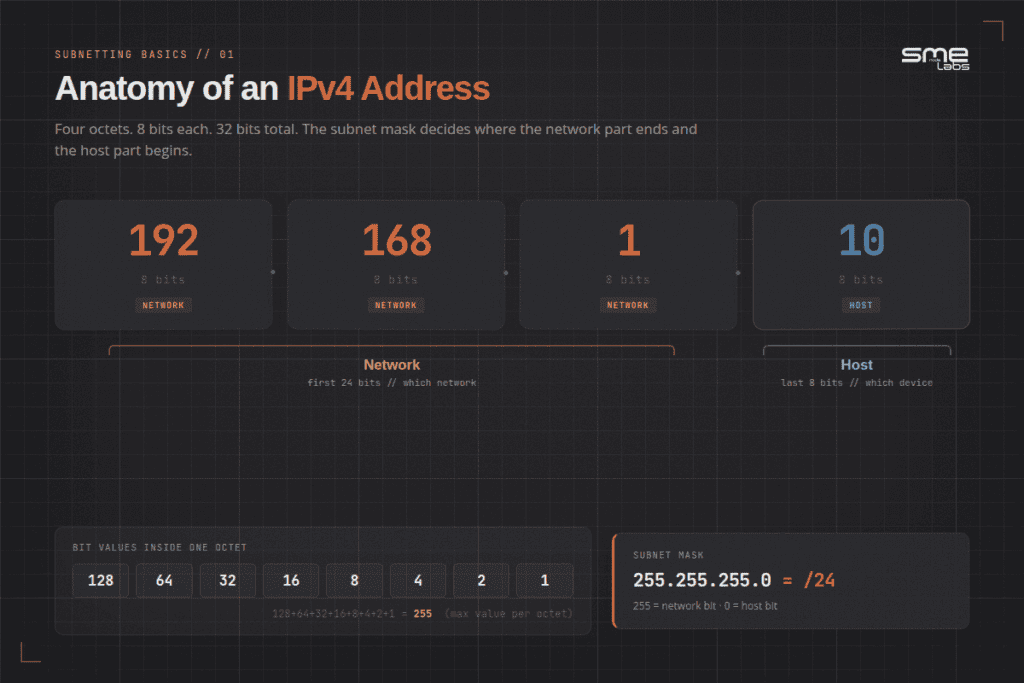
An IPv4 address looks like 192.168.1.10. Four numbers, separated by dots. Each number is called an octet, and each octet is 8 bits. Four octets, 8 bits each. That’s 32 bits total.
Each octet can range from 0 to 255. Why 255? Because 8 bits can count up to 255 (and 0 makes 256 possible values). Hold that number in your head. It matters in a minute.
The Subnet Mask Draws the Line
Every IP address has two parts: a network part and a host part. The subnet mask tells you where the network part ends and the host part begins.
A common mask is 255.255.255.0. Read it like this. Where you see 255, that’s network. Where you see 0, that’s host. So in 192.168.1.10 with a 255.255.255.0 mask, the network is 192.168.1 and the host is 10.
Same building analogy. The network part is the building address. The host part is your specific desk inside.
Binary, the Short Version
Each octet is 8 bits, and each bit is worth a value. From left to right:
| Bit position | 1 | 2 | 3 | 4 | 5 | 6 | 7 | 8 |
|---|---|---|---|---|---|---|---|---|
| Value | 128 | 64 | 32 | 16 | 8 | 4 | 2 | 1 |
Add them all up: 128 + 64 + 32 + 16 + 8 + 4 + 2 + 1 = 255. There’s your 255 again.
A subnet mask is just a run of 1s followed by a run of 0s. The 1s are network bits. The 0s are host bits. That’s the only binary you truly need for now.
CIDR Notation: The Slash Number
You’ll see addresses written like 192.168.1.0/24. That /24 is CIDR notation, and it’s a shortcut.
The number after the slash counts how many bits are network bits. A /24 means 24 network bits. Since each octet is 8 bits, 24 bits fills the first three octets. That’s the same as a 255.255.255.0 mask. Same thing, shorter to write.
Here are the three defaults beginners see most:
| CIDR | Subnet mask | Network bits | Host bits |
|---|---|---|---|
| /8 | 255.0.0.0 | 8 | 24 |
| /16 | 255.255.0.0 | 16 | 16 |
| /24 | 255.255.255.0 | 24 | 8 |
When you subnet, you push that slash number higher. You borrow bits from the host side and hand them to the network side. Borrow 1 bit from a /24 and you get a /25. Borrow 2 and you get a /26. Each borrowed bit doubles your number of subnets and halves your hosts per subnet.
That trade-off is the heart of subnetting. More networks, fewer hosts each. Your job is finding the right balance.
How to Subnet in Your Head (The Block Size Method)
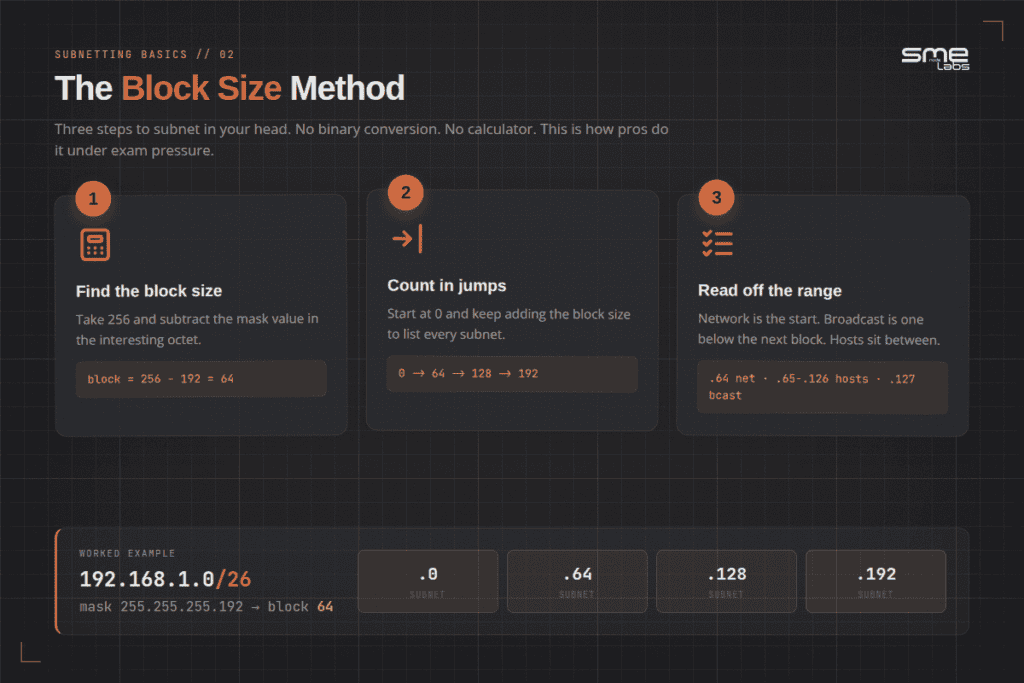
Forget converting every address to binary. Pros use a faster trick called the block size method, sometimes called the magic number. Here’s the whole thing.
Step 1: Find the block size.
Block size = 256 minus the mask value in the interesting octet.
Step 2: Count subnets in jumps of that block size.
Start at 0 and keep adding the block size.
Step 3: Read off the network, hosts, and broadcast.
Let me show you with a real example.
Worked Example: 192.168.1.0 /26
A /26 mask is 255.255.255.192. The interesting octet is the fourth one, and its value is 192.
Block size = 256 – 192 = 64.
Now count your subnets in jumps of 64: 0, 64, 128, 192. Four subnets. Done.
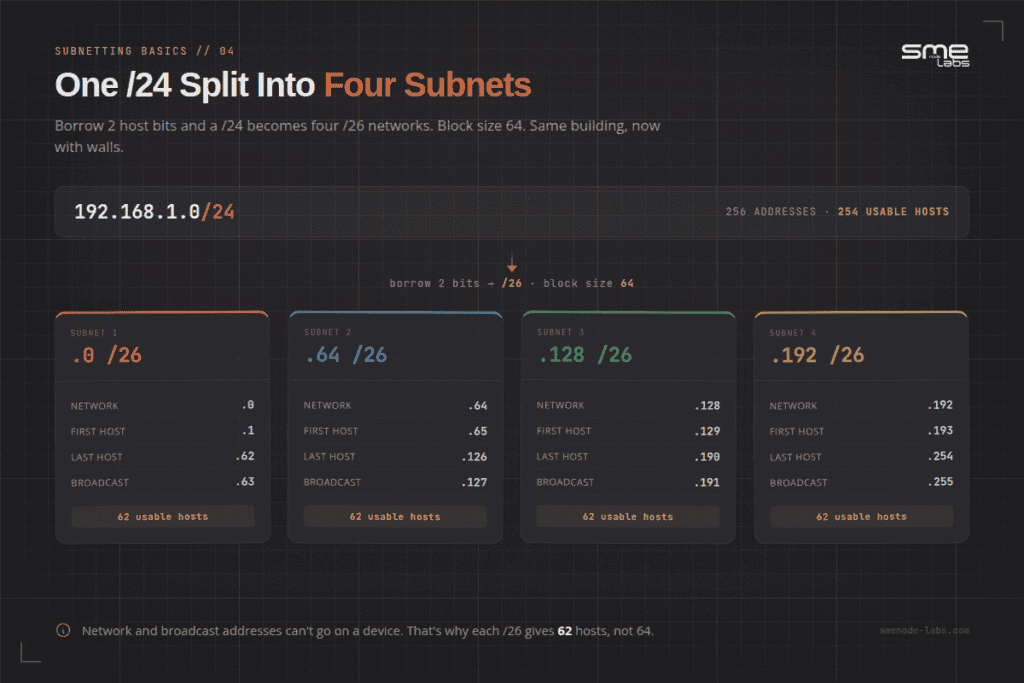
Take the second subnet, the one starting at 64. Here’s how to read it:
- Network address: 192.168.1.64 (the start of the block)
- First usable host: 192.168.1.65 (one above the network)
- Last usable host: 192.168.1.126 (one below the broadcast)
- Broadcast address: 192.168.1.127 (one below the next block, which starts at 128)
That’s the full pattern. The network address and the broadcast address can’t be assigned to devices, so usable hosts always sit between them.
How many usable hosts per /26? You’ve got 6 host bits left (32 minus 26). So 2 to the power of 6 is 64, minus 2 for the network and broadcast addresses. That’s 62 usable hosts.
Remember that whiteboard question from the start? This is it. Four equal networks from a /24 means borrowing 2 bits, which gives you a /26, block size 64, subnets at 0, 64, 128, 192. Thirty seconds, no binary, no calculator.
If you can run those three steps, you can subnet most CCNA-level questions. The trick is reps. Speed comes from doing 20 of these, not reading about one. The graded subnetting drills in our CCNA workbook build that muscle memory the way the exam demands, from easy warm-ups to full VLSM scenarios. If VLANs are still fuzzy, start at what a VLAN is and work up.
The Subnet Mask Cheat Sheet
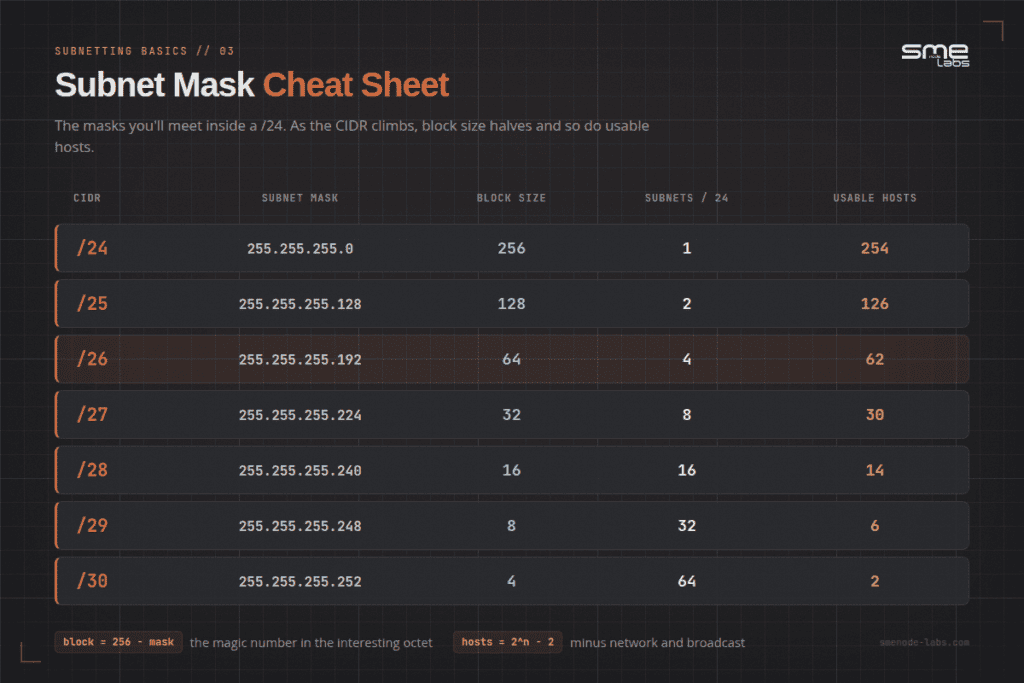
Print this. Tape it to your monitor. These are the masks you’ll meet inside a /24, where most subnetting questions live.
| CIDR | Subnet mask | Block size | Subnets in a /24 | Usable hosts |
|---|---|---|---|---|
| /24 | 255.255.255.0 | 256 | 1 | 254 |
| /25 | 255.255.255.128 | 128 | 2 | 126 |
| /26 | 255.255.255.192 | 64 | 4 | 62 |
| /27 | 255.255.255.224 | 32 | 8 | 30 |
| /28 | 255.255.255.240 | 16 | 16 | 14 |
| /29 | 255.255.255.248 | 8 | 32 | 6 |
| /30 | 255.255.255.252 | 4 | 64 | 2 |
Notice the pattern. As the CIDR number climbs, the block size halves and so do your usable hosts. The /30 at the bottom gives you exactly 2 hosts, which is perfect for a link between two routers. Nothing wasted.
You don’t have to memorise all of this. If you remember the powers of 2 (2, 4, 8, 16, 32, 64, 128, 256) and the block size formula, you can rebuild the whole table from scratch in under a minute. Knowing which layer owns what saves hours of troubleshooting, and the OSI model cheat sheet PDF is a free one-pager.
Worked Example #2: Subnetting in the Third Octet
Beginners get comfortable subnetting the fourth octet, then panic when the interesting octet moves. Let’s defuse that now.
Take 172.16.0.0 /22.
A /22 mask is 255.255.252.0. The interesting octet here is the third one, and its value is 252.
Block size = 256 – 252 = 4.
So your subnets jump by 4 in the third octet: 172.16.0.0, 172.16.4.0, 172.16.8.0, and so on.
Look at the 172.16.4.0 subnet:
- Network: 172.16.4.0
- First host: 172.16.4.1
- Last host: 172.16.7.254
- Broadcast: 172.16.7.255
The broadcast sits one below the next block, which starts at 172.16.8.0. Same logic as before, just in a different octet. The method never changes. Only the column you’re working in changes.
This is the moment subnetting clicks for most people. Once you trust the block size method works in any octet, the fear drops away.
VLSM: When Subnets Need Different Sizes
Every example so far splits a network into equal pieces. Real networks rarely need that. Your Sales floor might have 50 people. Your server room might have 4 devices. A router-to-router link needs exactly 2 addresses. Handing every one of those a same-sized subnet wastes hundreds of addresses on the link alone.
Variable Length Subnet Masking, VLSM for short, just means: subnet the same network more than once, at different mask lengths, so each piece is sized for what it actually needs. It’s the same block size method you already know. You just run it more than once.
The one rule that matters: always size the biggest requirement first, then work down to the smallest. If you start small, you’ll carve up address space that a bigger chunk needed later, and you’ll have to start over.
Worked Example: VLSM on 192.168.20.0 /24
Say you’re handed 192.168.20.0/24 and told to build four subnets for these needs:
- Sales: 50 hosts
- Engineering: 25 hosts
- Guest Wi-Fi: 10 hosts
- Router link between two branch offices: 2 hosts
Step 1: Sort biggest to smallest. Sales (50), Engineering (25), Guest Wi-Fi (10), router link (2).
Step 2: Size Sales first. You need 2 to the power of n, minus 2, to be at least 50. Six host bits gives 62 usable, which is the smallest mask that covers 50. Six host bits means a /26. Block size 64. Sales gets 192.168.20.0/26, network .0, usable hosts .1 to .62, broadcast .63.
Step 3: Size Engineering next, starting right after Sales ends. The next available address is 192.168.20.64. You need at least 25 hosts, so 5 host bits (30 usable) is the smallest fit. Five host bits means a /27, block size 32. Engineering gets 192.168.20.64/27, network .64, usable hosts .65 to .94, broadcast .95.
Step 4: Size Guest Wi-Fi next, starting at the next free address. That’s 192.168.20.96. You need 10 hosts, so 4 host bits (14 usable) fits. Four host bits means a /28, block size 16. Guest Wi-Fi gets 192.168.20.96/28, network .96, usable hosts .97 to .110, broadcast .111.
Step 5: Size the router link last. Next free address is 192.168.20.112. A point-to-point link only ever needs 2 usable hosts, so 2 host bits (2 usable) fits exactly. Two host bits means a /30, block size 4. The link gets 192.168.20.112/30, network .112, usable hosts .113 to .114, broadcast .115.
Add it up and you’ve used addresses .0 through .115, roughly 45% of the original /24, with every subnet sized to what it actually needs instead of one wasteful blanket mask. That’s the entire payoff of VLSM: no wasted addresses, and every subnet is exactly as big as its job requires.
Want more VLSM reps before exam day? The CCNA workbook includes a full set of VLSM design scenarios, not just the equal-split kind.
20 Subnetting Practice Questions (With Answers)
Cover the answers. Work each one with pen and paper. No calculator, just like the real exam. Answers and full explanations follow the list.
- How many usable host addresses are on a /29 network?
- What is the subnet mask for a /27 in dotted-decimal form?
- Which subnet does the host 192.168.10.70 belong to if the mask is /26? Give the network and broadcast addresses.
- What is the broadcast address for 172.16.4.0 /22?
- You need at least 50 hosts per subnet. What is the smallest mask (largest CIDR number) that works?
- You borrow 3 host bits from a /24. How many subnets do you create?
- On the network 192.168.1.0 /26, is 192.168.1.63 a valid host address? Why or why not?
- Convert the mask 255.255.255.240 to CIDR notation.
Answers and Explanations
1. Six usable hosts.
A /29 leaves 3 host bits. 2 to the power of 3 is 8, minus 2 for the network and broadcast addresses. 8 – 2 = 6.
2. 255.255.255.224.
A /27 means 27 network bits. The first three octets use 24, leaving 3 bits in the fourth octet: 128 + 64 + 32 = 224.
3. The 192.168.10.64 subnet. Network 192.168.10.64, broadcast 192.168.10.127.
Block size for a /26 is 256 – 192 = 64. Subnets fall at .0, .64, .128, .192. The host .70 sits in the .64 block (which runs 64 to 127). So the network is .64 and the broadcast is .127.
4. 172.16.7.255.
Block size for a /22 is 256 – 252 = 4, in the third octet. The 4.0 subnet covers 172.16.4.0 through 172.16.7.255. The broadcast is the top of that range: 172.16.7.255.
5. A /26.
You need 2 to the power of n, minus 2, to be at least 50. With 5 host bits you get 30 (too few). With 6 host bits you get 62 (enough). Six host bits means 32 – 6 = 26 network bits, so /26.
6. Eight subnets.
Borrowing 3 bits gives you 2 to the power of 3 combinations. 2 cubed is 8.
7. No. It’s the broadcast address.
Block size for a /26 is 64. The first subnet runs 192.168.1.0 through 192.168.1.63. The .63 is the broadcast for that block, so it can’t be assigned to a device.
8. /28.
The 240 in the fourth octet is 128 + 64 + 32 + 16, which is 4 bits. 24 + 4 = 28.
How did you do? If you nailed 6 or more, your foundation is solid. If a few tripped you up, that’s normal at this stage. The fix is more reps, not more reading. Not sure which cert path fits you? Our CCNA vs Network+ comparison breaks down both. Our Network+ practice test includes addressing questions if you’re prepping for CompTIA instead of Cisco, and the CCNA workbook goes deeper on Cisco-style subnetting scenarios.
Intermediate
- A /24 network needs to support 6 equal-sized subnets. What’s the smallest mask that provides at least 6 subnets, and how many hosts does each get?
- What is the network address for the host 10.10.55.130 with a /25 mask?
- You’re given 172.20.0.0/20. What’s the block size, and in which octet does it apply?
- Convert /29 to a dotted-decimal subnet mask.
- A device has the address 192.168.5.29/28. What’s the valid host range for its subnet?
- How many total subnets can you create by borrowing 4 bits from a /24?
- What’s the broadcast address for the network 10.0.16.0/22?
Answers and Explanations
9. A /27, 30 usable hosts per subnet.
You need at least 6 subnets. Borrowing 2 bits gives 4 subnets (too few). Borrowing 3 bits gives 8 subnets (enough). Three borrowed bits from a /24 gives a /27, leaving 5 host bits, so 2 to the power of 5 minus 2 equals 30 usable hosts.
10. 10.10.55.128.
A /25 mask is 255.255.255.128, block size 128 in the fourth octet. Subnets fall at .0 and .128. The host .130 sits in the .128 block, so the network address is 10.10.55.128.
11. Block size 16, in the third octet.
A /20 mask is 255.255.240.0. The interesting octet is the third one, with a value of 240. Block size = 256 – 240 = 16.
12. 255.255.255.248.
A /29 means 29 network bits, leaving 3 in the fourth octet: 128 + 64 + 32 = 248.
13. 192.168.5.17 to 192.168.5.30.
A /28 mask gives a block size of 16. Subnets fall at .0, .16, .32, and so on. The address .29 sits in the .16 block, which runs .16 to .31. The network is .16, broadcast is .31, so usable hosts run .17 to .30.
14. 16 subnets.
Borrowing 4 bits gives 2 to the power of 4 combinations. 2 to the fourth power is 16.
15. 10.0.19.255.
A /22 mask is 255.255.252.0, block size 4 in the third octet. Subnets fall at .16, .20, and so on. The address 10.0.16.0 starts a block that runs through 10.0.19.255, which is the broadcast.
Advanced (VLSM and design)
- You’re handed 192.168.30.0/24 and must build 3 subnets sized for 100 hosts, 40 hosts, and 20 hosts, in that order. What CIDR mask does each subnet get?
- Using the same 192.168.30.0/24 network from question 16, what is the network address of the third subnet (the 20-host one), assuming the 100-host and 40-host subnets are allocated first?
- Why does VLSM require you to size the largest subnet first?
- A network engineer needs two subnets of exactly 2 usable hosts each, for two separate router links, carved out of 10.5.5.0/29. Is this possible? Why or why not?
- You’ve been given 172.16.8.0/22 and need one subnet supporting 200 hosts and four subnets supporting 2 hosts each (for point-to-point links). List all five subnets with their CIDR masks.
Answers and Explanations
16. /25 for 100 hosts, /26 for 40 hosts, /27 for 20 hosts.
For 100 hosts you need 2 to the power of n minus 2 to be at least 100; 7 host bits gives 126, so a /25. For 40 hosts, 6 host bits gives 62, so a /26. For 20 hosts, 5 host bits gives 30, so a /27.
17. 192.168.30.192.
The 100-host subnet (/25) takes 192.168.30.0 through .127. The 40-host subnet (/26) takes the next block, 192.168.30.128 through .191. The 20-host subnet starts right after, at 192.168.30.192.
18. Because VLSM subnets are carved out sequentially, in order, from the remaining address space.
If you size a small subnet first, it can land in the middle of the address block that a larger, later subnet needs as one continuous range. Sizing biggest to smallest guarantees every later subnet still has enough contiguous room.
19. No, not as written.
A /29 only has 8 addresses total and 6 usable hosts as a single subnet; it can’t be split further into two usable point-to-point subnets without borrowing more bits, and there’s no room left to borrow inside a /29. You’d need to start from at least a /28 to carve out two /30 links (4 usable… 2 each) alongside anything else.
20. 172.16.8.0/24 for 200 hosts, then 172.16.9.0/30, 172.16.9.4/30, 172.16.9.8/30, and 172.16.9.12/30 for the four links.
The 200-host requirement needs 2 to the power of n minus 2 of at least 200, which takes 8 host bits (254 usable), a /24. That consumes the entire first half of the /22 (172.16.8.0 to 172.16.8.255). The four point-to-point links each need only 2 usable hosts, a /30 with block size 4, and are carved from the next available space starting at 172.16.9.0.
How did you do? If you nailed 14 or more, your foundation is solid, VLSM included. If a few tripped you up, that’s normal at this stage. The fix is more reps, not more reading. Not sure which cert path fits you? Our CCNA vs Network+ comparison breaks down both. Our Network+ practice test includes addressing questions if you’re prepping for CompTIA instead of Cisco, and the CCNA workbook goes deeper on Cisco-style subnetting scenarios.
21 More Subnetting Questions: Traps, Design, Summarisation and IPv6
The 20 questions above cover the core skill: given an address and a mask, find the network, broadcast and usable range. These 15 go further: spotting addresses that look valid but aren’t, carving a block into subnets instead of just reading one, summarising routes, and a first look at IPv6. All of them use the same block size method.
Address Validity Traps
- Can 10.1.1.63 be assigned to a PC on a /26 network?
- Can 192.168.10.32 be assigned to a host with a /27 mask?
- Is 10.10.10.10/30 a valid host address?
- Can 172.16.16.0 be assigned to a server using a /20 mask?
- Can 192.168.1.62/27 and 192.168.1.66/27 talk without a router?
- Are 192.168.20.14/28 and 192.168.20.17/28 on the same subnet?
Answers and Explanations
21. No, it’s a broadcast address.Block size for a /26 is 64. The first subnet runs 10.1.1.0 through 10.1.1.63. Address .63 is the broadcast for that block, so it can’t go on a device.
22. No, it’s a network address.Block size for a /27 is 32. Subnets fall at .0, .32, .64. The address .32 lands exactly on a block boundary, making it the network address of 192.168.10.32/27.
23. Yes.Block size for a /30 is 4. Subnets fall at .8, .12. Address .10 sits in the .8 block, which runs .8 to .11. Network is .8, broadcast is .11, so .9 and .10 are both usable. It’s easy to reject this one because it looks close to a boundary, but the maths says otherwise.
24. No, it’s a network address.Block size for a /20 is 16 in the third octet. Subnets fall at .0, .16, .32. The address 172.16.16.0 lands exactly on a boundary, making it the network address. The reverse trap exists too: an address ending in .0 is a perfectly valid host in a wider subnet, say 172.16.17.0, because that’s just a host inside the .16 block.
25. No, they need a Layer 3 device.Block size for a /27 is 32. Address .62 falls in the .32 block (.32 to .63). Address .66 falls in the .64 block (.64 to .95). Different subnets, even though the addresses are only four apart.
26. No.Block size for a /28 is 16. Address .14 sits in the .0 block (.0 to .15). Address .17 sits in the .16 block (.16 to .31). Three addresses apart, different broadcast domains. Being numerically close says nothing about being on the same subnet. The mask decides.
Subnet Design: Working Backwards
- How many /26 subnets fit inside a /24?
- You need to split 192.168.1.0/24 into 8 equal subnets. What mask do you use?
- Same /24, but you only need 6 subnets. What mask?
- A campus needs one flat subnet for 4,000 devices. What’s the smallest mask?
Answers and Explanations
27. 4 subnets, each with 62 usable hosts.You’re borrowing 26 minus 24, or 2 bits. 2 squared is 4.
28. /27 (255.255.255.224), 30 hosts each.8 subnets needs 3 borrowed bits, since 2 cubed is 8. 24 plus 3 is /27.
29. Still /27.Bits come in powers of 2, so there’s no mask that gives exactly 6. Two borrowed bits gives 4, not enough. Three gives 8. You always round up to the next power of 2, which leaves 2 subnets spare.
30. /20 (255.255.240.0).A /21 gives 2,046 usable hosts, too small. A /20 gives 2 to the 12th minus 2, or 4,094. In practice you’d never put 4,000 devices in one broadcast domain, but the maths is the maths.
Route Summarisation and Overlaps
- Summarise 172.16.0.0/24, 172.16.1.0/24, 172.16.2.0/24 and 172.16.3.0/24 into one route.
- Summarise 192.168.8.0/24 through 192.168.15.0/24.
- Does 10.1.0.0/22 overlap with 10.1.2.0/24?
Answers and Explanations
31. 172.16.0.0/22.Four consecutive /24s means you can shave 2 bits, since 2 squared is 4. 24 minus 2 is 22. Boundary check: the third octet values 0 to 3 all sit inside the block that starts at 0 with a size of 4, so the summary is valid.
32. 192.168.8.0/21.That’s 8 consecutive /24s, so shave 3 bits. 24 minus 3 is 21. Block size for a /21 in the third octet is 8, and blocks start at 0, 8, 16. The range 8 to 15 fits the 8 block exactly.
33. Yes.10.1.0.0/22 covers 10.1.0.0 through 10.1.3.255, which is the four /24s from 10.1.0.0 to 10.1.3.0. The subnet 10.1.2.0/24 sits inside that range. This exact kind of boundary check is what catches a bad static route before it drops half a network during a change.
IPv6 Subnetting
- How many /64 subnets are inside an IPv6 /48?
- What’s the subnet of 2001:db8:acad:15::1/64?
Answers and Explanations
34. 65,536 subnets.64 minus 48 leaves 16 bits to play with. 2 to the 16th is 65,536. For reference, a /48 also holds 256 /56s, and each /56 holds 256 /64s.
35. 2001:db8:acad:15::/64.A /64 splits the address exactly in half at the fourth hextet. Everything after that is the interface ID and gets zeroed out. IPv6 subnetting is easier than IPv4 for one reason: you almost always use /64, and there’s no broadcast address to subtract.
Common Subnetting Mistakes Beginners Make
Here’s the mistake that costs the most points. A month of subnetting practice at home, every problem solved, but the calculator habit never broken. On exam day the addressing questions run the clock out. The math was never the problem. Speed was.
Here’s what trips people up most.
Forgetting the minus 2. Total addresses in a subnet and usable hosts are not the same number. Always subtract the network and broadcast addresses.
Assigning the network or broadcast address to a device. The first address in a block is the network ID. The last is the broadcast. Neither goes on a computer.
Mixing up subnets and hosts. Borrowing bits adds subnets and removes hosts. If a question asks for more networks, you push the CIDR number up. If it asks for more hosts per network, you pull it down.
Working in the wrong octet. Find the interesting octet first, the one where the mask isn’t 255 or 0. That’s where your block size lives.
Leaning on a calculator. Tools are fine while you learn the concept. But the CCNA gives you no calculator, so wean yourself off early. Drill until block sizes are automatic.
The career payoff is real, by the way. Network and computer systems administrator roles in the US sit around a $99K median wage per the Bureau of Labor Statistics (May 2025), and subnetting fluency is one of the gatekeeper skills hiring managers screen for. Get it solid and a lot of doors open.
Frequently Asked Questions
Do I really need to subnet without a calculator?
For the CCNA, yes. The exam has no calculator, and subnetting questions are timed alongside everything else. The block size method is built for mental math, so practise it that way.
What’s the difference between a /24 and a /25?
A /24 is one network with 254 usable hosts. A /25 splits that into two networks of 126 hosts each. The /25 borrows one bit from the host side to create the extra network.
Why subtract 2 from the host count?
Every subnet reserves its first address as the network ID and its last as the broadcast address. Devices can’t use either one, so usable hosts always equal the total minus 2.
Is subnetting still relevant with IPv6?
Yes. The concept carries straight into IPv6, though the math is cleaner there. IPv4 subnetting is still tested heavily and still runs most enterprise networks, so it’s the right place to start.
What’s the difference between subnetting and VLSM?
Subnetting is the general technique of borrowing bits to create smaller networks. VLSM is subnetting applied more than once, at different mask lengths, so each subnet is sized for its own host count instead of forcing every subnet to be the same size.
Will subnetting still be tested on CCNA v2.0?
Yes. Cisco announced v2.0 on 2026-05-20, with the current v1.1 exam retiring on 2027-02-02 and v2.0 going live the next day. The refresh leans harder into troubleshooting and AI topics, but IP addressing stays foundational. A troubleshooting-heavy exam needs faster subnetting, not less.
Bottom Line
Subnetting is splitting one network into smaller ones, and the block size method makes it something you can do in your head.
Here’s what to take away:
- A subnet mask separates the network part of an address from the host part.
- CIDR (the slash number) counts network bits. Higher number, smaller subnet.
- Block size = 256 minus the mask value in the interesting octet.
- Usable hosts = 2 to the power of host bits, minus 2.
- Speed beats theory. Drill, don’t just read.
The learners who pass don’t have special brains. They just put in 20 minutes a day until the patterns became automatic. You can get there in a couple of weeks.
Ready to build that speed? Our CCNA practice workbook gives you timed subnetting drills modelled on the real 200-301 exam, with full answer breakdowns.