How good are you at networking fundamentals? Really.
Not the theory. Not what you think you know from reading the study guide. The actual thing, where a question puts you in the middle of a troubleshooting scenario and you’ve got about 60 seconds to pick the right answer before the clock eats your confidence.
That’s where most Network+ candidates discover their gaps. The N10-009 gives you 90 of those moments, back to back, in 90 minutes.
This guide gives you 100 practice test questions mapped to all five exam domains, with full explanations. You’ll also get domain weightings, a study schedule, and a breakdown of the performance-based questions that trip up candidates who relied on flashcards alone.
Quick exam facts:
| Detail | Value |
|---|---|
| Exam code | N10-009 |
| Questions | Up to 90 (multiple-choice + PBQ) |
| Time limit | 90 minutes |
| Passing score | 720 out of 900 |
| Launched | June 2024 |
| Est. retirement | December 2027 |
What the CompTIA N10-009 Network+ Practice Test Covers
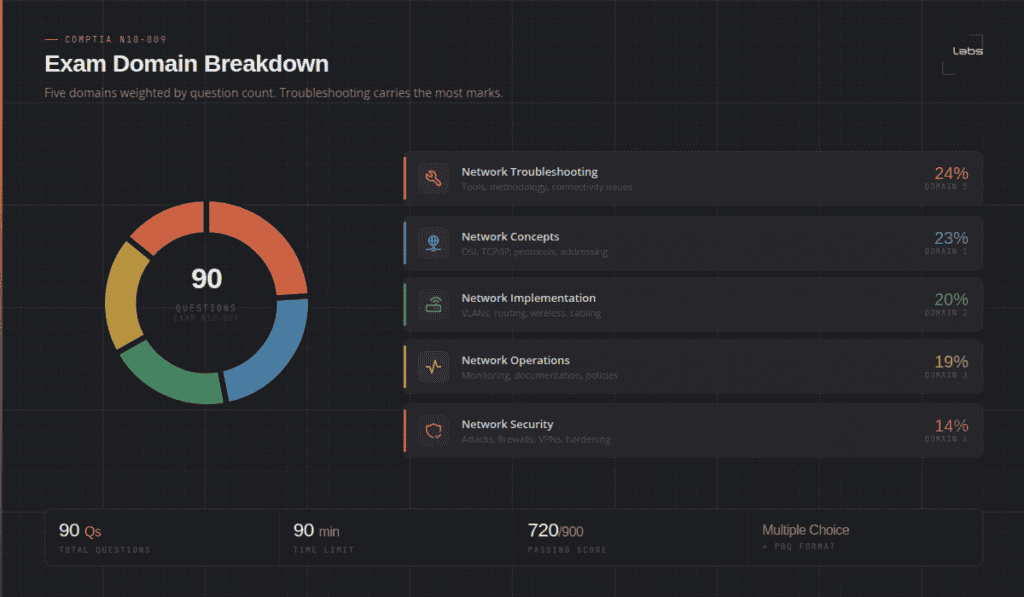
The N10-009 is organised around five domains. Each domain carries a different weight, and that weight tells you exactly where to spend your study time.
| Domain | Weight |
|---|---|
| 1.0 Network Concepts | 23% |
| 2.0 Network Implementation | 20% |
| 3.0 Network Operations | 19% |
| 4.0 Network Security | 14% |
| 5.0 Network Troubleshooting | 24% |
Troubleshooting is the biggest domain. Concepts is close behind. Together they’re 47% of the exam. Your practice test scores in those two domains will make or break your result.
About 10-15% of the questions are performance-based (PBQs). These show up as drag-and-drop labs, simulated CLI environments, or packet capture analysis. No amount of reading prepares you for PBQs if you haven’t done hands-on work. More on that later. An emulator with nothing in it teaches you nothing. Here are 10 free CCNA labs you can build in EVE-NG.
Domain 1 Network+ Practice Questions: Network Concepts (23%)
This is the foundation. If you can’t answer these questions cold, the rest of the exam will feel like guesswork.
What this domain covers:
- OSI model and TCP/IP model – layers, protocols, what happens where
- IPv4 and IPv6 addressing and subnetting
- Common ports and protocols (DNS, HTTP, HTTPS, FTP, SSH, SNMP, RDP)
- Cloud concepts (IaaS, PaaS, SaaS, public/private/hybrid)
- Network topologies and types (LAN, WAN, MAN, WLAN, PAN)
- Networking appliances – routers, switches, hubs, access points, firewalls
Q1. A host sends a packet to a destination on a different subnet. At which OSI layer does the router make its forwarding decision?
A) Layer 2
B) Layer 3 ✓
C) Layer 4
D) Layer 7
Routers operate at Layer 3 and forward packets based on IP addresses. Switches operate at Layer 2 using MAC addresses.
Q2. Which of the following IP addresses is NOT a valid host address in the 192.168.10.0/26 subnet?
A) 192.168.10.1
B) 192.168.10.30
C) 192.168.10.62
D) 192.168.10.63 ✓
The /26 subnet gives you 64 addresses (.0-.63). The .63 address is the broadcast. Usable host range is .1 to .62.
Q3. A network engineer needs to allow remote desktop access to a Windows server through a firewall. Which port should be opened?
A) 22
B) 23
C) 3389 ✓
D) 5900
Port 3389 is RDP (Remote Desktop Protocol). Port 22 is SSH, port 23 is Telnet, port 5900 is VNC.
Q4. Which cloud service model gives a customer the most control over the operating system and middleware?
A) SaaS
B) PaaS
C) IaaS ✓
D) DaaS
IaaS gives you control over the OS, storage, and networking. PaaS manages the OS for you. SaaS manages everything.
Q5. A switch is flooding traffic out all ports except the one it came in on. What is the MOST likely cause?
A) STP is blocking the port
B) A routing loop exists
C) The MAC address table is full ✓
D) VLAN tagging is misconfigured
When the MAC table is full, the switch reverts to flooding for unknown destinations. An attacker can trigger this deliberately, it’s called a MAC flooding attack.
Q6. Which of the following is a Class B private IP address range?
A) 10.0.0.0 – 10.255.255.255
B) 172.16.0.0 – 172.31.255.255 ✓
C) 192.168.0.0 – 192.168.255.255
D) 169.254.0.0 – 169.254.255.255
The three private ranges: 10.0.0.0/8 (Class A), 172.16.0.0/12 (Class B), 192.168.0.0/16 (Class C). The 169.254.x.x range is APIPA, used for link-local when DHCP fails.
Q7. A company needs to connect two buildings 500 metres apart. They want a wired connection that isn’t affected by electromagnetic interference. Which cable type should they use?
A) Cat6
B) Cat6a
C) Single-mode fibre ✓
D) Coaxial
Single-mode fibre is immune to EMI and supports distances of several kilometres. Copper cable (Cat6/Cat6a) maxes out at 100 metres for Ethernet and is susceptible to EMI.
Q8. What is the purpose of the TTL field in an IP packet header?
A) Encrypt the packet payload
B) Identify the transport layer protocol
C) Prevent packets from looping indefinitely in the network ✓
D) Specify the packet’s QoS priority
TTL (Time to Live) is decremented by 1 at each hop. When it reaches 0, the router discards the packet and sends an ICMP Time Exceeded message back to the source.
Q9. Which protocol translates domain names to IP addresses?
A) DHCP
B) ARP
C) DNS ✓
D) NTP
DNS (Domain Name System) resolves FQDNs to IP addresses. DHCP assigns IP addresses dynamically. ARP resolves IP to MAC addresses. NTP synchronises time.
Q10. A technician needs to verify the IP configuration on a Windows workstation. Which command shows the IP address, subnet mask, and default gateway?
A) netstat
B) tracert
C) ping
D) ipconfig /all ✓
ipconfig /all shows full IP configuration including DNS servers and MAC address. ipconfig alone shows IP, subnet, and gateway but not DNS or physical address.
Domain 2 Network+ Practice Questions: Network Implementation (20%)
This domain is where a lot of candidates lose points. It’s practical. You need to know how to set things up, not just what they are.
What this domain covers:
- VLANs, inter-VLAN routing, and trunking
- Routing concepts (static routes, OSPF, default routes)
- Wireless standards (802.11a/b/g/n/ac/ax) and channel planning
- IPv4/IPv6 addressing schemes and DHCP
- NAT and PAT
- Spanning Tree Protocol (STP)
Q11. A switch port needs to carry traffic from multiple VLANs to a router. Which port mode should be configured on the switch?
A) Access
B) Trunk ✓
C) Dynamic auto
D) Loopback
Trunk ports carry 802.1Q tagged traffic from multiple VLANs. Access ports carry untagged traffic for a single VLAN.
Q12. Two wireless clients on the same access point are experiencing poor performance. The AP is on channel 6. A neighbouring AP is also on channel 6. What is the MOST likely cause?
A) Signal attenuation
B) Co-channel interference ✓
C) Multipath interference
D) Channel saturation
Co-channel interference happens when two APs on the same channel compete for airtime. Use non-overlapping channels (1, 6, 11 for 2.4GHz) to fix this.
Q13. A small office has a single public IP from their ISP. All internal clients need internet access. Which technology makes this possible?
A) VPN
B) VLAN
C) PAT (Port Address Translation) ✓
D) BGP
PAT (also called overloaded NAT) maps multiple private internal IPs to a single public IP by tracking unique port numbers per session.
Q14. Which 802.11 standard supports speeds up to 9.6 Gbps and operates on both 2.4GHz and 5GHz bands?
A) 802.11ac (Wi-Fi 5)
B) 802.11n (Wi-Fi 4)
C) 802.11ax (Wi-Fi 6) ✓
D) 802.11g
Wi-Fi 6 (802.11ax) supports up to 9.6 Gbps theoretical throughput and works on both 2.4GHz and 5GHz. Wi-Fi 5 (802.11ac) is 5GHz only.
Q15. A switch port is in the STP “blocking” state. What does this mean?
A) The port is forwarding traffic and learning MAC addresses
B) The port is down at the physical layer
C) The port is preventing Layer 2 loops by discarding frames ✓
D) The port is in a transitional state between forwarding and blocking
A blocking port discards frames (except BPDUs) to prevent loops. STP elects one root bridge and blocks redundant paths to create a loop-free topology.
Q16. A network admin needs to connect a router to a Layer 3 switch using a routed port, not a switched VLAN interface. Which command removes switching behaviour from the port on a Cisco switch?
A) no switchport mode trunk
B) no vlan
C) no switchport ✓
D) no spanning-tree
The no switchport command converts a Layer 2 switch port to a Layer 3 routed port. This is how you enable routing directly on a physical interface of a multilayer switch.
A quick note: These questions mirror the style and difficulty of the real N10-009, but they’re not from the actual exam. Brain dump sites that share real exam questions violate CompTIA’s testing policies and can get your certification revoked. Stick to legitimate prep resources.
Q17. Which spanning tree variant uses “instances” to map multiple VLANs to a single spanning tree process, reducing overhead compared to PVST+?
A) STP (802.1D)
B) RSTP (802.1w)
C) PVST+
D) MST (802.1s) ✓
MST (Multiple Spanning Tree) groups VLANs into instances. Each instance runs one spanning tree process instead of one per VLAN, which is more scalable in large environments.
Q18. A DHCP server assigns IP addresses using lease times. A client’s lease expires and the server is unavailable. What IP address will the client likely show?
A) 0.0.0.0
B) 255.255.255.255
C) 169.254.x.x (APIPA) ✓
D) The last known IP address permanently
When DHCP fails, Windows clients assign themselves an APIPA address (169.254.0.1 – 169.254.255.254). This allows local LAN communication but not internet access.
Q19. A technician configures inter-VLAN routing using a “router on a stick” setup. What does this require on the router?
A) A separate physical interface for each VLAN
B) Subinterfaces with 802.1Q encapsulation ✓
C) A Layer 3 switch in the path
D) Static routes for each VLAN
Router on a stick uses a single physical trunk link to the switch. Subinterfaces on the router handle traffic for each VLAN with 802.1Q encapsulation.
Q20. Which of the following is a distance-vector routing protocol used in Cisco environments?
A) OSPF
B) IS-IS
C) BGP
D) EIGRP ✓
EIGRP (Enhanced Interior Gateway Routing Protocol) is a Cisco-proprietary advanced distance-vector protocol. OSPF and IS-IS are link-state. BGP is path-vector.
Why this matters: short quizzes and full-length exams test different things. Scoring well on 10-question quizzes from a free site tells you almost nothing about how you’ll hold up across 90 questions in 90 minutes, with PBQ simulations you’ve never seen under time pressure. Sustained focus is its own skill, and full-length timed practice is the only way to build it.
Domain 3 Network+ Practice Questions: Network Operations (19%)
Operations covers the day-to-day reality of running a network. Most of these questions test whether you actually know what tools and processes network teams use.
What this domain covers:
- Network monitoring tools (SNMP, NetFlow, syslog, SIEM)
- Documentation (network diagrams, IP address management, change logs)
- Change management policies and procedures
- High availability and disaster recovery (MTTR, MTBF, RTO, RPO)
- Physical installations (cabling, patch panels, rack layout)
- Remote access (VPN, SSH, jump servers)
Q21. A network admin wants to receive alerts when CPU usage on a router exceeds 80%. Which protocol should be configured?
A) NetFlow
B) Syslog
C) SNMP ✓
D) NTP
SNMP supports threshold-based trap notifications. NetFlow tracks traffic flows. Syslog captures log messages but doesn’t natively trigger threshold alerts.
Q22. A company’s RTO is 4 hours and RPO is 1 hour. What do these values define?
A) RTO = data loss tolerance; RPO = time to full recovery
B) RTO = time to restore service; RPO = maximum data loss tolerance ✓
C) RTO = backup frequency; RPO = failover time
D) RTO = MTBF; RPO = MTTR
RTO defines how long restoration can take before business impact is unacceptable. RPO defines how much data loss is acceptable, which directly drives backup frequency.
Q23. During a site audit, a technician finds an undocumented switch in a server room. Which document should be updated FIRST?
A) Acceptable use policy
B) Incident response plan
C) Network diagram ✓
D) Change management log
The network diagram should always reflect the current physical and logical state of the network. An undocumented device is both a security risk and a documentation gap.
Q24. Which metric describes the average time it takes to repair a failed component?
A) MTBF
B) RPO
C) RTO
D) MTTR ✓
MTTR (Mean Time to Repair) measures repair time. MTBF (Mean Time Between Failures) measures reliability. RTO and RPO are disaster recovery targets.
Q25. A technician is connecting a new switch to a patch panel. Which tool is used to terminate individual conductors into the patch panel punch-down blocks?
A) Crimper
B) Cable stripper
C) Punch-down tool ✓
D) Loopback adapter
A punch-down tool (like a 110 tool) seats conductors into keystone jacks and patch panels. Crimpers terminate connectors on cable ends.
Q26. An admin uses NetFlow to monitor traffic patterns. A sudden spike in outbound traffic to an unknown external IP is detected at 2 AM. What type of tool would best correlate this event with login logs and other security events?
A) SNMP manager
B) Protocol analyser
C) SIEM ✓
D) Bandwidth monitor
A SIEM (Security Information and Event Management) system correlates logs from multiple sources – firewalls, authentication servers, NetFlow – to identify patterns and generate alerts.
Q27. A junior technician makes an undocumented change to a router configuration and the network goes down. Which process would have prevented this?
A) Acceptable use policy
B) Disaster recovery plan
C) Change management ✓
D) Business continuity planning
Change management requires documenting, approving, and testing changes before production. It also creates rollback plans for when changes go wrong.
Domain 4 Network+ Practice Questions: Network Security (14%)
The smallest domain by weight. Don’t skip it. Security knowledge also shows up indirectly in troubleshooting questions.
What this domain covers:
- Common attack types (DoS, DDoS, MITM, spoofing, social engineering, phishing)
- Security frameworks and concepts (AAA, zero trust, DMZ, network segmentation)
- Wireless security (WPA2, WPA3, EAP, RADIUS)
- Firewalls, IDS/IPS, and network access control
- VPNs and encryption (IPsec, TLS)
- Physical security
Q28. An attacker sends thousands of TCP SYN packets to a web server but never completes the three-way handshake. What type of attack is this?
A) Session hijacking
B) MAC flooding
C) SYN flood ✓
D) VLAN hopping
A SYN flood exhausts server connection resources by leaving half-open TCP connections. It’s a classic DoS attack.
Q29. A company needs wireless users to authenticate against Active Directory before getting network access. Which combination should be deployed?
A) WPA2-Personal + RADIUS
B) WPA2-Enterprise + RADIUS + 802.1X ✓
C) WPA3-Personal + TACACS+
D) WEP + RADIUS
WPA2-Enterprise uses 802.1X port-based authentication. RADIUS is the backend authentication server that talks to AD. WPA2-Personal uses a shared passphrase with no per-user authentication.
Q30. A network admin places the company’s web servers in a zone that’s accessible from the internet but can’t directly reach the internal LAN. What is this zone called?
A) Honeypot
B) NAT
C) VLAN
D) DMZ ✓
A DMZ (Demilitarised Zone) sits between the internet and the internal LAN. It’s the correct location for publicly accessible servers like web, email, and DNS.
Q31. An attacker intercepts traffic between two hosts and alters it without either host knowing. What type of attack is this?
A) DoS
B) Replay attack
C) Man-in-the-middle ✓
D) Social engineering
A man-in-the-middle (MITM) attack positions the attacker between two communicating parties to intercept, alter, or eavesdrop on traffic.
Q32. Which wireless security protocol is recommended for new deployments in 2026 and offers simultaneous authentication of equals (SAE)?
A) WEP
B) WPA
C) WPA2
D) WPA3 ✓
WPA3 replaces the pre-shared key (PSK) handshake with SAE (Simultaneous Authentication of Equals), which is resistant to offline dictionary attacks.
Q33. A user receives an email claiming to be from the IT helpdesk asking them to reset their password via a link. What type of attack is this?
A) Vishing
B) Tailgating
C) Phishing ✓
D) Watering hole
Phishing uses fraudulent emails to trick users into revealing credentials or clicking malicious links. Vishing is voice-based. Tailgating is physical.
Q34. Which of the following BEST describes the principle of zero trust?
A) Trust all internal traffic but verify external traffic
B) Block all traffic by default, including internal
C) Never trust, always verify – regardless of network location ✓
D) Only trust traffic from the DMZ
Zero trust assumes no user or device is trusted by default, even inside the network perimeter. Every access request is verified based on identity, device health, and context.
Q35. An IDS detects an attack but takes no action. An IPS detects the same attack and drops the malicious packets. What is the key difference?
A) IDS requires more hardware than IPS
B) IDS is passive; IPS is inline and can actively block traffic ✓
C) IPS uses signatures; IDS uses behaviour analysis
D) IDS is for wireless networks; IPS is for wired
IDS (Intrusion Detection System) monitors and alerts. IPS (Intrusion Prevention System) sits inline in the traffic path and can drop packets in real time.
Domain 5 Network+ Practice Questions: Network Troubleshooting (24%)
The biggest domain. You can’t fake your way through troubleshooting questions. They test systematic thinking, not just memorised facts.
CompTIA’s 7-step troubleshooting methodology is fair game here:
- Identify the problem
- Establish a theory of probable cause
- Test the theory
- Establish a plan of action
- Put the solution in place and test
- Verify full system functionality
- Document everything
Q36. A user can ping the default gateway but can’t access any websites. They can access websites by IP address directly. What is the MOST likely cause?
A) Incorrect default gateway
B) Duplicate IP address
C) DNS resolution failure ✓
D) Physical link failure
If IP works but names don’t, DNS is broken. Pinging the default gateway successfully rules out routing and physical layer issues.
Q37. A technician runs a cable between two switches and notices a flapping interface. The port goes up and down repeatedly. What is the MOST likely cause?
A) Duplex mismatch
B) Spanning Tree Protocol reconverging ✓
C) VLAN misconfiguration
D) QoS misconfiguration
A new link between switches triggers STP to recalculate the topology. During reconvergence, ports transition through states (blocking, listening, learning, forwarding) which can look like flapping.
Q38. A wireless laptop loses connectivity every few minutes. Other wireless clients in the same area are fine. What should be checked FIRST?
A) Access point firmware
B) SSID broadcast settings
C) Laptop wireless driver and power management settings ✓
D) Channel overlap
If only one client has the problem, start at that client. Windows power management settings often put the wireless adapter to sleep, causing intermittent drops. This is one of the most common causes of “my WiFi keeps disconnecting.”
Q39. A technician uses a cable tester and finds that pins 1-2-3-6 on one end map to 3-6-1-2 on the other end. What type of cable is this?
A) Straight-through
B) Rollover
C) Crossover ✓
D) Loopback
A crossover cable swaps the TX/RX pairs. Pins 1 and 3 swap, pins 2 and 6 swap. Used historically to connect two similar devices directly (switch-to-switch, PC-to-PC).
Why this matters: performance-based simulations land first and they eat the clock. Weeks of subnetting in text form doesn’t prepare you for dragging IP addresses into a topology diagram against a timer. Spend 18 minutes on the first three questions and you’ve left 72 minutes for the remaining 87, which is where a comfortable pass turns into a narrow one. Do the hands-on labs. Even cheap simulator time changes how you handle PBQs.
Q40. A network admin runs ping 192.168.1.1 from a workstation and gets “Request timed out.” Which of the following is a valid next troubleshooting step?
A) Replace the network cable
B) Reboot the router
C) Check if the workstation’s default gateway is correctly configured ✓
D) Call the ISP
Systematic troubleshooting: start at the client. A timed-out ping to the default gateway most commonly means the gateway is misconfigured on the client, not that the router itself is down.
Q41. A user reports their connection speed is slow. A speed test shows 5 Mbps download on a gigabit switch. The technician runs show interface and sees high input errors and output drops. What is the MOST likely cause?
A) DNS misconfiguration
B) VLAN mismatch
C) Duplex or speed mismatch on the port ✓
D) MTU mismatch
Input errors and output drops on a switch port typically indicate a duplex or speed mismatch between the switch port and the connected device. This causes late collisions, which generate errors and drops.
Q42. A fibre cable connects two switches in a building. One switch shows the link as down, but the other shows it as up. What is the MOST likely cause?
A) VLAN mismatch
B) STP blocking
C) Reversed fibre TX/RX pair ✓
D) MTU mismatch
Fibre connections have separate TX (transmit) and RX (receive) strands. If one end is swapped, one switch sees a signal and the other doesn’t. This is one of the most common fibre troubleshooting issues.
Q43. A technician uses tracert (Windows) to trace a path to an external server and notices the trace stops at a specific hop with * * * responses. What does this indicate?
A) The destination server is down
B) The local DNS is not responding
C) A router at that hop is blocking ICMP or dropping packets ✓
D) The packet is being re-routed
* * * means no response was received from that hop. It usually means a firewall or router ACL is blocking ICMP TTL-exceeded messages. It doesn’t necessarily mean the path is broken, as traffic may still reach the destination.
Q44. After replacing a NIC in a workstation, the user can communicate with hosts on the local subnet but not with hosts on other subnets. What should the technician check?
A) VLAN configuration on the switch
B) DNS server address
C) Default gateway setting on the workstation ✓
D) Switch port speed
Inability to reach other subnets while local communication works is a classic default gateway problem. When you replace hardware, IP configuration settings sometimes reset.
Q45. Which command-line tool on Windows shows all active TCP/UDP connections and the ports the local system is listening on?
A) ipconfig
B) ping
C) netstat ✓
D) nslookup
netstat (or netstat -an) shows active connections, listening ports, and connection states. Useful for troubleshooting services that aren’t responding or detecting unexpected connections.
6 More Questions Candidates Often Miss
These cross domain lines, but they come up constantly on the real exam and in candidate post-mortems. Worth knowing cold.
Q46. Port security is configured with a maximum of 1 MAC address and violation mode shutdown. A second MAC address appears on the port. What happens?
A) The frame is dropped silently B) The port enters err-disabled state ✓ C) The port keeps forwarding and logs a message D) The new MAC address replaces the old one
Shutdown mode disables the port entirely and sets it to err-disabled, which needs manual recovery. Protect mode drops violating frames silently. Restrict mode drops frames and logs the violation while the port stays up.
Q47. A single DHCP server sits on one subnet, but clients on a different subnet also need addresses from it. What lets a router forward their DHCP broadcasts across the subnet boundary?
A) NAT B) A DHCP relay agent ✓ C) Spanning Tree D) A routing protocol
Routers don’t forward broadcasts by default. A DHCP relay agent, configured on the router interface, converts the client’s DHCP broadcast into a unicast packet aimed at the real DHCP server on another subnet.
Q48. In syslog, which severity level is the most critical?
A) Level 7, Debugging B) Level 5, Notifications C) Level 0, Emergencies ✓ D) Level 3, Errors
Syslog severity runs 0 to 7, and lower numbers are more severe. Level 0 (Emergencies) means the system is unusable. Level 7 (Debugging) is the least urgent.
Q49. Why does an NTP client care about a time server’s stratum number?
A) It sets the time zone B) It shows how close the source is to an authoritative clock ✓ C) It defines the polling interval D) It encrypts the time updates
Stratum measures distance from a reference clock. Stratum 1 sits directly on an atomic or GPS source, and each hop away adds one. Lower stratum means a more trusted time source.
Q50. Where should you place a standard access control list for best practice?
A) Closest to the source B) Closest to the destination ✓ C) On every interface D) Only on the WAN link
Standard ACLs filter only on source address, so placing one near the source risks blocking traffic you meant to allow somewhere else on the network. Extended ACLs, which match both source and destination, go closest to the source instead.
Q51. Which feature stops a rogue DHCP server from handing out addresses on the network?
A) Port security B) DHCP snooping ✓ C) Dynamic ARP inspection D) BPDU guard
DHCP snooping marks switch ports as trusted or untrusted and drops DHCP server responses arriving on untrusted ports. Dynamic ARP inspection protects against ARP spoofing instead, and BPDU guard protects spanning tree.
What Are Performance-Based Questions and How Do You Prepare for Them?
PBQs are the part of the exam that catches candidates off guard. You can’t memorise your way through them.
A typical PBQ might ask you to:
- Configure an IP addressing scheme for a given network layout
- Match network devices to the correct OSI layer in a drag-and-drop diagram
- Read a packet capture and identify the issue
- Troubleshoot a scenario in a simulated command-line interface
- Place networking hardware in the correct rack position using a visual tool
PBQs usually appear at the start of the exam. A common strategy is to skip them, answer the multiple-choice questions first, then come back with remaining time. The trade-off: you lose the time buffer if the PBQs are harder than expected.
Most PBQs take 5-10 minutes each. If you’re spending more than 12 minutes on one, flag it and move on.
The only real preparation is hands-on work. Reading about how to configure a VLAN is very different from typing the commands and watching traffic behave in a simulated environment.
How to Use a Network+ Practice Test Effectively
A practice test isn’t just a score. It’s a diagnostic tool.
Here’s the approach that actually works:
1. Do a baseline test first. Before studying anything, take one full 90-question practice test without notes. The score doesn’t matter. You need to know your starting point and your weakest domain.
2. Study domains in order of weakness. If you score 45% on Troubleshooting but 75% on Security, don’t give them equal time. Fix the gaps first.
3. Review every wrong answer, not just the right one. Understand why each distractor is wrong. Exam questions often test your ability to eliminate plausible-but-wrong answers.
4. Take full-length timed tests at least twice before exam day. 90 questions in 90 minutes is a different experience from 20-question quizzes. Mental stamina is a real factor.
5. Track your domain scores over time. A single overall score doesn’t show you where you’re improving or still weak.
Study Schedule: Network+ in 8-12 Weeks
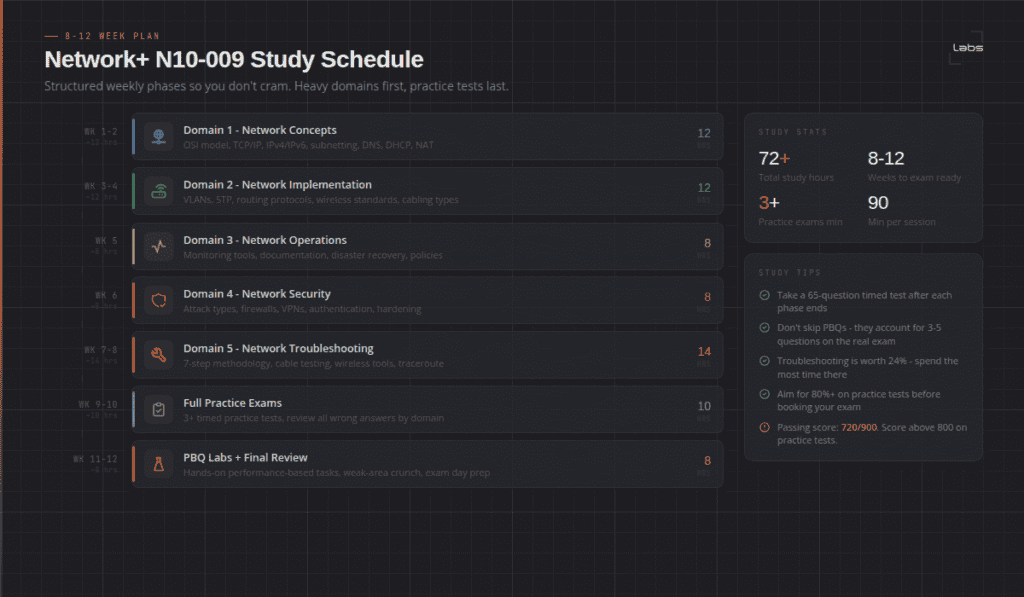
This schedule assumes 1-2 hours daily.
| Week | Focus |
|---|---|
| 1-2 | Domain 1: Network Concepts (subnetting, OSI, ports, cloud) |
| 3-4 | Domain 2: Network Implementation (VLANs, wireless, routing, NAT) |
| 4-5 | Domain 3: Network Operations (monitoring, documentation, HA/DR) |
| 5-6 | Domain 4: Network Security (attacks, firewalls, wireless security) |
| 6-8 | Domain 5: Network Troubleshooting (methodology, cabling, tools) |
| 8-10 | Full practice exams + weak domain review |
| 10-12 | Hands-on labs for PBQ prep + final timed mock exam |
Already working in networking? Compress this to 6-8 weeks. Brand new to IT? Give yourself 12 weeks minimum, that’s not slow, that’s thorough. One honest note on demand: the US Bureau of Labor Statistics’ latest 2024-2034 outlook actually projects computer support specialist roles declining 3%, as automated tools absorb more routine troubleshooting. That doesn’t make Network+ less useful, it makes it more important to pair with skills that move you past entry-level support, which is exactly what the CCNA track on the other side of this cert is for.
What Comes After Network+?
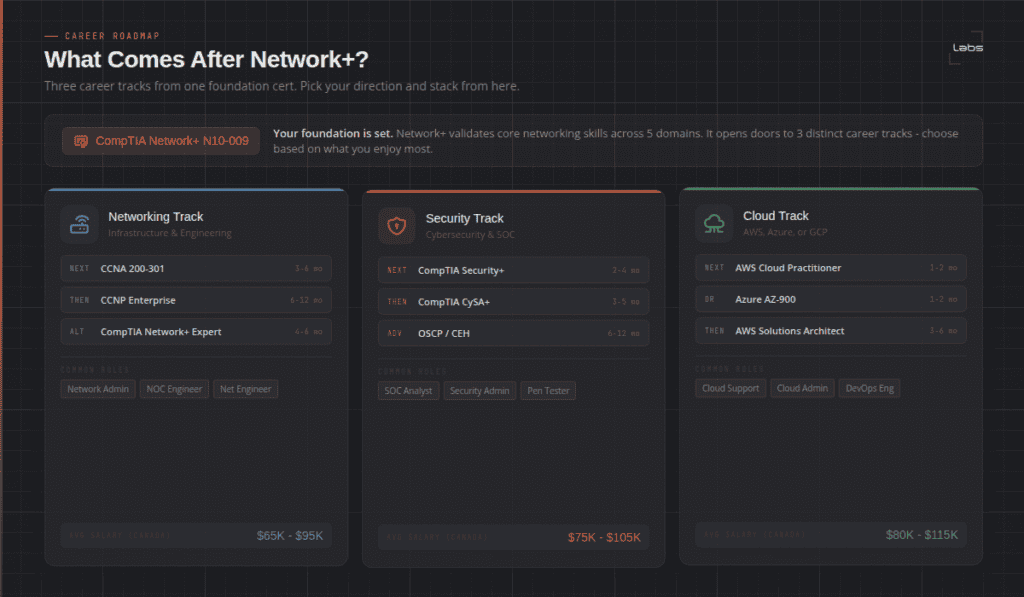
Network+ is a solid foundation cert. Here’s where most people go from here.
Going deeper into networking:
Cisco’s CCNA is the natural next step. It builds directly on Network+ but goes much further on routing, switching, and vendor-specific configuration. Our CCNA Workbook is built for exactly that transition – hands-on lab exercises mapped to the 200-301 exam objectives. Want the condensed version to revise from? The free CCNA 200-301 PDF is 27 pages with Packet Tracer commands.
Deciding between CCNA and Network+ right now:
They serve different purposes. One doesn’t make the other unnecessary. Our CCNA vs Network+ comparison breaks down which cert makes more sense depending on where you are in your career and what role you’re aiming for.
Moving into security:
Many Network+ holders move to Security+, then CySA+. If that’s you, our SY0-701 practice test covers all five current exam domains. CySA+ is the intermediate analyst cert that gets you into SOC roles. Our CySA+ certification guide covers the exam format, study timeline, and salary expectations.
Frequently Asked Questions
Is the Network+ hard?
It’s a legitimate exam. Not the hardest cert out there, but not a pass-if-you-read-the-guide either. Most candidates need 60-90 hours of study. The PBQs add difficulty for people who skipped hands-on lab work.
How many practice tests should I do before the real exam?
At minimum: three full-length (90-question) timed practice tests. Five or more is better. Each one gives different questions and different diagnostic data.
Does CompTIA give a domain score breakdown?
Yes. After the exam, your score report shows performance by domain. If you fail, this tells you exactly where to focus before retaking.
How long is the N10-009 valid?
Three years from your pass date. Renew through CompTIA’s continuing education programme or by passing a higher-level exam.
Which study resources are best for Network+?
The CompTIA official study guide is the authoritative source for exam objectives. Pair it with a practice test bank, hands-on labs, and a structured workbook.
Bottom Line
The N10-009 isn’t a test you can wing. 90 questions. 90 minutes. Five domains. PBQs that need hands-on preparation.
Candidates who pass on the first attempt have a few things in common: they took full-length timed practice tests (not just short quizzes), they focused on their weak domains, and they didn’t skip the labs.
Use the questions in this guide as a starting point. Track your domain scores. When you’re consistently hitting 75%+ on full mock exams, you’re ready. Book the exam and go.
Final CTA: Want more practice with full explanations? The SMEnode Labs CCNA Workbook includes 200+ questions and lab scenarios mapped to the CCNA 200-301 domains, with a dedicated PBQ-style simulation section, for when you’re ready to go past Network+.


