If you’re choosing between EVE-NG and Cisco Modeling Labs (CML), here’s the short answer: CML is better for pure Cisco cert prep. EVE-NG is better for multi-vendor environments and CCIE-scale labs.
Both are browser-based network emulators that run real operating system images. Neither requires you to install a client app. The differences that actually matter are image licensing, node limits, vendor breadth, and price. This article breaks all of it down.
Quick Comparison: EVE-NG vs CML at a Glance

| Feature | EVE-NG Community | EVE-NG Pro | CML Free | CML Personal | CML Personal Plus |
|---|---|---|---|---|---|
| Price | Free | ~150 EUR/year | Free | $199/year | $349/year |
| Node limit | 63/lab | 1,024/lab | 5 | 20 | 40 |
| Cisco images included | No | No | Partial | Yes | Yes |
| Multi-vendor support | 40+ platforms | 40+ platforms | Limited | Limited | Limited |
| Multi-user | No | Yes (RBAC) | No | No | No |
| Image licensing | Grey area | Grey area | Official | Official | Official |
| Docker containers | Yes (v6.5+) | Yes (v6.5+) | Yes (v2.9+) | Yes | Yes |
What Are EVE-NG and CML?
EVE-NG (Emulated Virtual Environment Next Generation) is an independent network emulation platform. You install it on Ubuntu, bring your own images, and you can run Cisco, Juniper, Palo Alto, Fortinet, Arista, MikroTik, and 40+ other vendors. The Community edition is free. The Pro edition (~150 EUR/year) unlocks multi-user access, 1,024-node labs, and cluster support.
CML (Cisco Modeling Labs) is Cisco’s own, officially licensed network emulator. The images are included with your subscription. No hunting for QCOW2 files. No licensing grey area. It runs as a VM on your laptop or server. The Free tier gives you 5 nodes. Personal ($199/year) gives you 20.
Both run entirely in your browser. Both support modern Cisco platforms. That’s where the similarities end.
Pricing: What You Actually Pay
EVE-NG Pricing
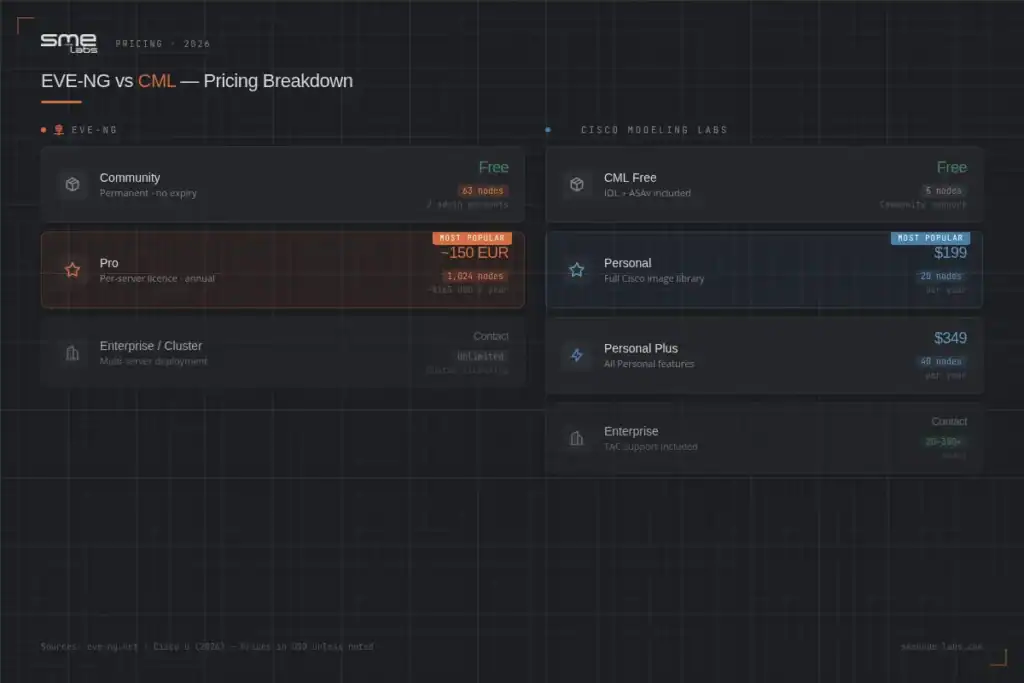
EVE-NG Community is permanently free. No expiry, no trial clock. The 63-node cap per lab is the main constraint for complex topologies, but it covers most CCNA and CCNP scenarios without spending a dollar.
EVE-NG Pro runs about 150 EUR/year (~$165 USD) per server licence. That unlocks 1,024 nodes per lab, multi-user role-based access control (up to 32K accounts), a backup manager, and EVE cluster support across multiple physical servers.
CML Pricing
| Tier | Price | Nodes | Support |
|---|---|---|---|
| CML Free | Free | 5 | Community only |
| CML Personal | $199/year | 20 | Community only |
| CML Personal Plus | $349/year | 40 | Community only |
| CML Enterprise | Contact Cisco | 20-300+ | TAC included |
CML Free doesn’t expire. It shows an “evaluation expired” message after the trial period, but the product keeps working. The 5-node cap is tight – you can run a basic CCNA topology, but not much else.
CML Personal at $199/year is the most popular entry point. 20 nodes covers the majority of CCNA and most CCNP labs comfortably.
For the complete 2026 price ladder, including Personal Plus, Enterprise, and Education tiers, plus who each tier actually fits, see our complete CML pricing guide.
Image Licensing: The Biggest Real Difference
This is where most engineers make their decision.
CML includes officially licensed Cisco images in your subscription. IOS, IOS-XE, IOS-XR, NX-OS, ASAv, Catalyst 9800-CL, ISE, and more – all downloaded directly from Cisco. There’s no question about whether you’re authorised to run them. You pay for the subscription, you get the images.
EVE-NG does not include images. You source them yourself. This is a legal grey area. Technically, you need a valid Cisco software licence to run IOS images. EVE-NG’s documentation directs you to source images from your workplace, active Cisco accounts, or legitimate trials. Many engineers already have access through their employer. Others don’t.
If image sourcing sounds like a headache, go with CML. If you already have legitimate access to the images you need, EVE-NG’s flexibility is hard to beat.
Vendor Support: Cisco-Only vs. Multi-Vendor
CML is built for Cisco. Multi-vendor support exists through custom node templates, but it takes real effort to set up. The out-of-the-box experience is Cisco-centric.
EVE-NG supports 40+ vendors with dedicated image guides:
- Cisco: IOS, IOS-XE, IOS-XR, NX-OS, ASAv, FTD, FMCv
- Juniper: vMX, vSRX 3.0, vQFX, vJunos EVO
- Fortinet: FortiOS 5.x through 7.x, FortiManager
- Palo Alto: PAN-OS VM, Panorama
- Arista: cEOS, vEOS (via Docker in v6.5+)
- MikroTik, CheckPoint, F5, HP, Huawei, and more
If your lab work involves anything beyond Cisco, EVE-NG is the practical choice.
Related reading: If you’re studying for the CCIE Enterprise Infrastructure, you’ll likely run multi-vendor topologies that push you toward EVE-NG Pro.
Node Limits and Hardware Requirements
Node limits matter more than people expect. A CCNA lab might use 4-6 nodes. A CCNP BGP lab might use 8-12. A CCIE Enterprise lab can hit 50-100 nodes easily.
EVE-NG Hardware Requirements
| Edition | Minimum RAM | Recommended | Deployment |
|---|---|---|---|
| Community | 8 GB | 16 GB | VM or bare metal |
| Pro | 16 GB | 32 GB+ | Bare metal preferred |
EVE-NG allows overprovisioning. You can technically start more nodes than your hardware RAM would suggest. This is intentional – not all nodes need full memory all the time.
CML Hardware Requirements
CML runs as an OVA file imported into VMware or KVM. It requires nested virtualisation enabled on the host.
| Tier | Minimum RAM | Practical Minimum |
|---|---|---|
| Free/Personal | 8 GB host | 16 GB host |
| Enterprise | 16 GB host | 32 GB host |
CML enforces hardware limits strictly. If you don’t have enough RAM to start a node, CML won’t let you start it. No overprovisioning.
Getting started with EVE-NG? Our guide on how to install EVE-NG walks through the full setup from bare metal to first lab.
Which Tool for Which Certification?
CCNA (200-301)
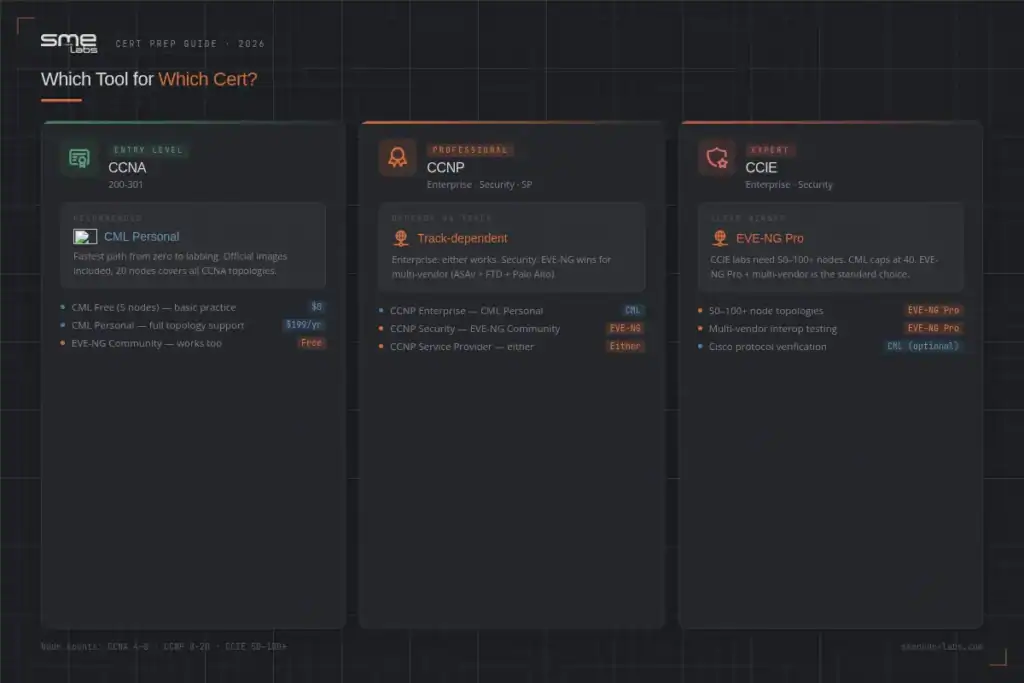
CML is the easier starting point. CML Personal’s 20-node cap covers every CCNA topology. Images are already there. You boot the OVA and start labbing in under an hour.
EVE-NG Community also works well for CCNA – 63 nodes is plenty – but you’ll spend time sourcing and importing images first.
If you’re just starting out and want the fastest path from “nothing” to “labbing,” use CML Free or CML Personal.
Pair your labs with our CCNA Workbook for structured practice exercises that match real exam scenarios.
CCNP (Enterprise, Security, Service Provider)
It depends on the track.
- CCNP Enterprise: CML Personal (20 nodes) handles most topologies. EVE-NG Community works too.
- CCNP Security: EVE-NG wins. Running ASAv, FTD, Palo Alto, and Fortinet side by side is where CML’s single-vendor focus becomes a genuine limitation.
- CCNP Service Provider: Both work. CML includes IOS-XR; EVE-NG supports it via BYOI.
CCIE
EVE-NG Pro is the dominant choice among serious CCIE candidates. The reasons are straightforward:
- CCIE labs regularly hit 50-100+ nodes. CML Personal’s 20-node cap blocks entire topologies.
- Multi-vendor interop testing (Cisco + Juniper + Linux tools) requires EVE-NG’s breadth.
- EVE-NG Pro supports persistent, long-running labs shared across a team – important for group study.
Some candidates run both: CML to verify Cisco-specific protocol behaviour with officially licensed images, and EVE-NG Pro for full-scale topology work.
For structured CCIE lab practice, our CCIE Enterprise Infrastructure Workbook and CCIE Security Workbook include EVE-NG compatible topologies.
Network Automation and DevOps
Both platforms have strong automation support, but they approach it differently.
CML has a well-documented Python SDK and REST API. You can spin up labs, push configs, and tear them down through code. It fits cleanly into Infrastructure-as-Code workflows. CML 2.10 added an MCP server – you can now create and configure labs using natural language through AI tools like Claude.
EVE-NG connects directly to Docker containers and supports YAML-based scripting. Engineers use it heavily for CI/CD pipeline testing and config validation in multi-vendor environments.
If your automation work is Cisco-focused, CML’s SDK is cleaner. If you’re testing change management across vendors, EVE-NG’s Docker flexibility is a better fit.
If you’re studying network automation with Python, our CCNA Automation Workbook covers the fundamentals alongside real lab practice.
What’s New in 2026?
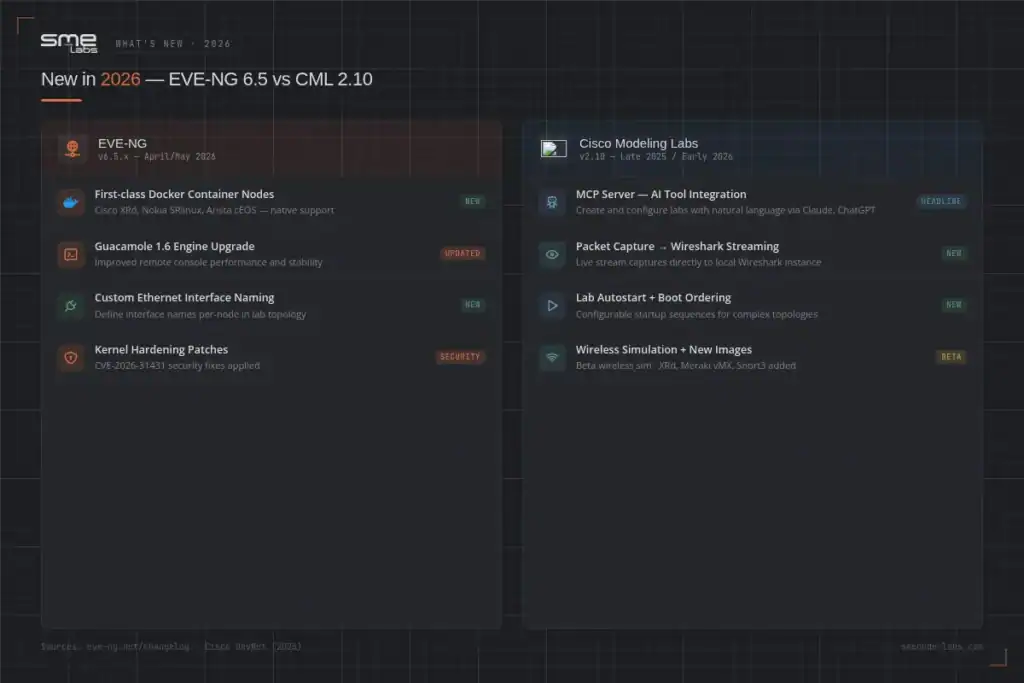
EVE-NG 6.5.x (April-May 2026)
- First-class Docker container node support for Cisco XRd, Nokia SRlinux, and Arista cEOS
- Guacamole 1.6 engine upgrade for improved remote console performance
- Custom ethernet interface naming
- Kernel hardening patches (CVE-2026-31431)
CML 2.10 (Late 2025/Early 2026)
- MCP server for AI tool integration – create and configure labs with natural language
- Packet capture streaming directly to local Wireshark
- Lab autostart with configurable boot ordering
- Wireless simulation (Beta)
- New images: XRd, Meraki vMX, Snort3
Both platforms are actively developed. CML’s MCP integration is the headline feature for automation-focused engineers this year.
Who Should Use Each Tool?
Choose CML if you:
- Are studying for CCNA or CCNP Enterprise and want the fastest setup
- Want zero image sourcing friction and fully licensed Cisco images
- Work exclusively with Cisco platforms
- Want to try it free first – CML Free (5 nodes) and the Cisco DevNet Sandbox are both available at no cost
Choose EVE-NG if you:
- Work in a multi-vendor environment (Juniper, FortiGate, Palo Alto)
- Are preparing for CCIE and need 50+ node topologies
- Need multiple engineers sharing labs simultaneously
- Already have legitimate access to the image files you need
- Are labbing with MikroTik, Huawei, or other non-Cisco platforms
Not sure which to try first? Start with EVE-NG Community – it’s free, covers 63 nodes, and you can upgrade later. Our GNS3 vs EVE-NG guide also covers a third option worth considering.
Frequently Asked Questions
Is EVE-NG free to use?
Yes. EVE-NG Community is permanently free with no expiry date. The main restriction is a 63-node cap per lab and a limit of two admin accounts. For CCNA and most CCNP scenarios, that’s enough. The Pro edition (~150 EUR/year) removes these limits and adds multi-user access, cluster support, and a backup manager.
Does CML include Cisco IOS images?
Yes. All paid CML tiers include officially licensed Cisco images – IOS, IOS-XE, IOS-XR, NX-OS, ASAv, and more. CML Free includes IOL, IOL-L2, and ASAv. You don’t need to source images separately; they download directly through the CML interface after you log in.
Is it legal to run Cisco images in EVE-NG?
This is a grey area. You need a valid Cisco software licence to run IOS images regardless of the platform. EVE-NG doesn’t provide images – you must source them from a legitimate location such as your employer, an active Cisco account, or an authorised trial. CML sidesteps this entirely because Cisco images are included in the licence.
Which is better for CCIE lab preparation?
Most CCIE candidates use EVE-NG Pro. CCIE labs often require 50-100+ nodes, which exceeds CML Personal’s 20-node cap. EVE-NG Pro also supports multi-vendor interop testing that CCIE Security and Enterprise tracks require. Some candidates run both: CML for verifying Cisco-specific protocol behaviour, and EVE-NG Pro for full-scale topology work.
Can I run CML on my laptop?
Yes, with realistic expectations. CML runs as an OVA file on VMware or KVM and requires nested virtualisation enabled on the host. 16 GB of host RAM is the practical minimum for useful labs. A modern laptop with 16 GB RAM can handle CCNA and smaller CCNP topologies. Larger CCIE-scale labs need a dedicated server.
Does EVE-NG Pro support multiple users?
Yes. EVE-NG Pro includes role-based access control (RBAC) supporting up to 32,000 user accounts with different permission levels. Community is limited to two admin accounts. This makes Pro the standard choice for study groups, training centres, and enterprise teams sharing a lab environment.
What to Do Next
If you’re prepping for CCNA or CCNP and want the fastest setup, start with CML Personal ($199/year). Official images, 20 nodes, no configuration headaches.
If you’re working toward CCIE, dealing with multi-vendor environments, or need shared team access, EVE-NG Pro (~150 EUR/year) is the practical choice.
Not sure where to start your labs? Check our EVE-NG installation guide to get your environment up in under an hour – or browse our CCNA Workbook and CCIE Enterprise Workbook for structured lab exercises compatible with both platforms.