A meaningful share of first-time AZ-104 candidates don’t pass, though Microsoft doesn’t publish an official number. Brutal, right?
Here’s the thing. Most of them didn’t fail because Azure is impossible. They failed because they memorized documentation and never touched the portal. This AZ-104 study guide fixes that. You’ll get the real 2026 exam objectives, a domain-by-domain plan, the labs that actually move the needle, and honest numbers on what the Azure Administrator certification does for your pay.
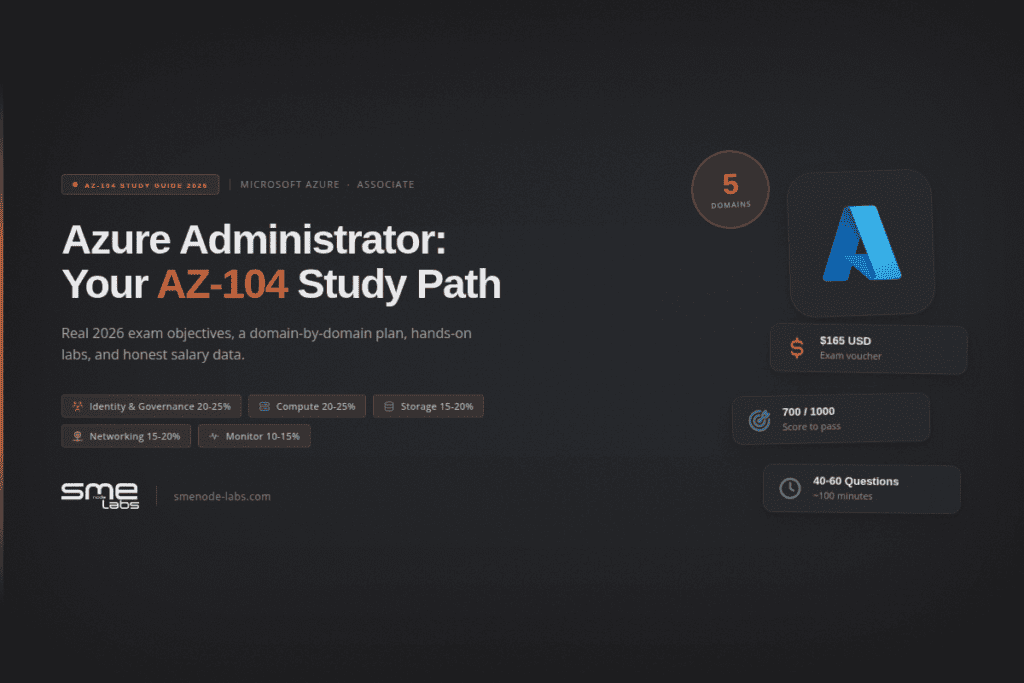
Quick version? The AZ-104 costs $165 USD, runs about 100 minutes, and you need 700 out of 1000 to pass. Five skill areas. Roughly 40 to 60 questions. And yes, some of them are hands-on tasks in a live environment, not just multiple choice.
So if you booked your exam and you’re staring at a wall of Microsoft docs wondering where to start, you’re in the right place. Let’s build you a plan.
What’s on the AZ-104 exam in 2026?
The AZ-104 tests whether you can actually run an Azure environment. Not talk about it. Run it. Identity, storage, compute, networking, and monitoring.

Microsoft updated the skills measured on 2026-04-17, so anything older than that is out of date. Here’s the current breakdown straight from the official Microsoft study guide:
| Skill area | Weight |
|---|---|
| Manage Azure identities and governance | 20-25% |
| Implement and manage storage | 15-20% |
| Deploy and manage Azure compute resources | 20-25% |
| Implement and manage virtual networking | 15-20% |
| Monitor and maintain Azure resources | 10-15% |
Notice the two heavy hitters. Identity and compute together can make up half your exam. That’s where your study hours should go first.

The exam facts, in plain terms:
- Cost: $165 USD (varies a bit by country)
- Passing score: 700 out of 1000
- Question types: multiple choice, case studies, drag-and-drop, and live scenario tasks
- Renewal: free online assessment on Microsoft Learn, once a year
That renewal detail matters. Your Azure Administrator certification doesn’t sit still. You keep it current with a free open-book assessment, no re-paying the $165. Nice.
The renewal window opens six months before your certification expires, and you can retake the assessment as many times as you need before that deadline. Miss it entirely and the only way back is the full $165 exam.
What a retake actually costs
Fail once and the fee doubles. Fail more than that and the wait times escalate fast.
| Attempt | Wait before you can retake | Running cost |
|---|---|---|
| 1st | None | $165 |
| 2nd | 24 hours | $330 |
| 3rd | 14 days | $495 |
| 4th | 14 days | $660 |
| 5th | 14 days | $825 |
| 6th | Not allowed, 12 months from your first attempt | $825 so far |
Five attempts is a hard ceiling in any 12 month window, counted from your first attempt date, not your last. The 24 hour retake is worth skipping if you failed on content you hadn’t actually practiced. Booking the next day just spends another $165 to prove the same gap exists. Take the 14 days you’d be forced into anyway and go build the labs you skipped.
Two ways to cut the cost if you do need a second shot. Microsoft’s Exam Replay bundles one retake with your original exam voucher at a discount, and Microsoft periodically runs free exam vouchers through Cloud Skills Challenge events. Availability isn’t guaranteed, so don’t plan around one.
Want a shortcut through all of this? Our Azure Workbook maps every objective above to a practice question and a lab task, so you study the exam, not the entire Azure catalogue. That’s the fastest way to stop drowning in docs.
What actually changed on the AZ-104 this year?
Less than you’d think. Microsoft’s own change log for the 17 April 2026 update marks every functional group “No change.” Only six sub-objectives inside storage, compute, networking and monitoring got minor edits.
Entra ID, Bicep, Container Apps, Private Endpoints and Network Watcher are not new. They’re all listed as prerequisite knowledge in the exam’s own audience profile and were already in scope before April. If a study guide tells you otherwise, it’s wrong.
So can you still use a 2024 or 2025 study guide? Mostly, yes. Spot-check these four areas against the current objective list: blob lifecycle management and versioning, VM encryption at host, Azure Container Apps scaling, and Network Watcher plus Connection monitor. Those sit inside the sub-objectives that actually took edits.
Don’t rebuild your notes from scratch. Just diff them.
Is AZ-104 worth it? The honest salary answer
Short answer: for most people breaking into cloud, yes.
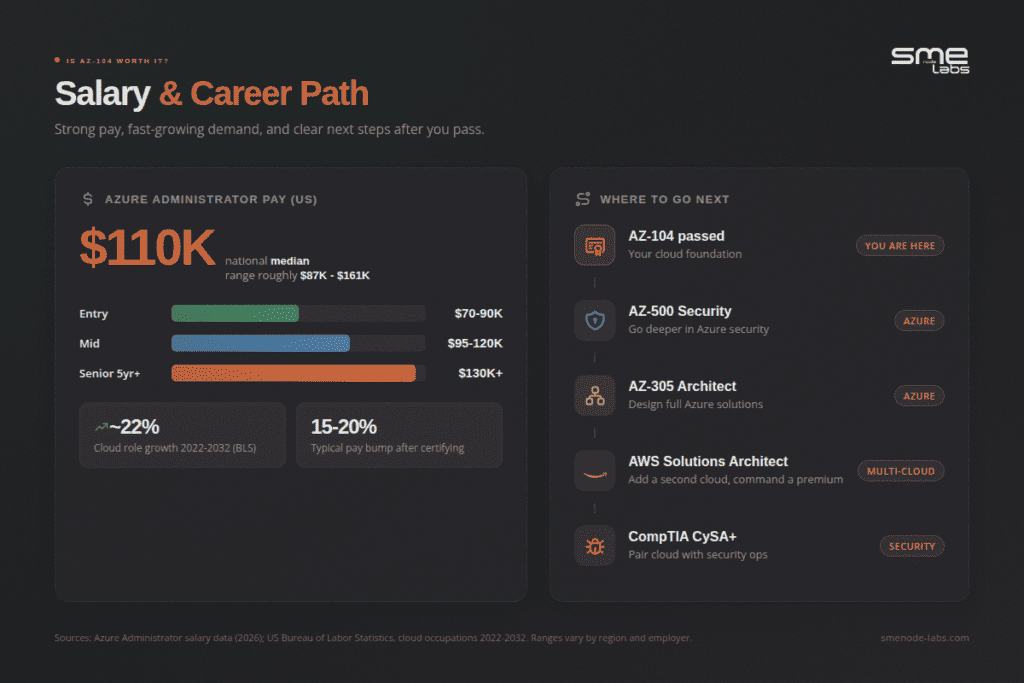
Roles that specifically name AZ-104 average around $121K in the US, against $88.9K for the general Azure Administrator pool (ZipRecruiter, 2026). That gap isn’t proof the certification alone causes it, since certified-specific postings skew senior, but it’s the clearest signal in the public data.
Canadian numbers hold up well. Ontario averages $119K, with a $95K to $145.5K middle band (ZipRecruiter, 2026). Toronto specifically averages $113,779 (ZipRecruiter, May 2026).
The bigger picture is demand. The US Bureau of Labor Statistics’ latest 2024-2034 projections show computing infrastructure and data processing roles growing 20.3%, and computer systems design services growing 15.8%, both well ahead of the economy wide average. Cloud isn’t cooling off.
The AZ-104 study plan, domain by domain
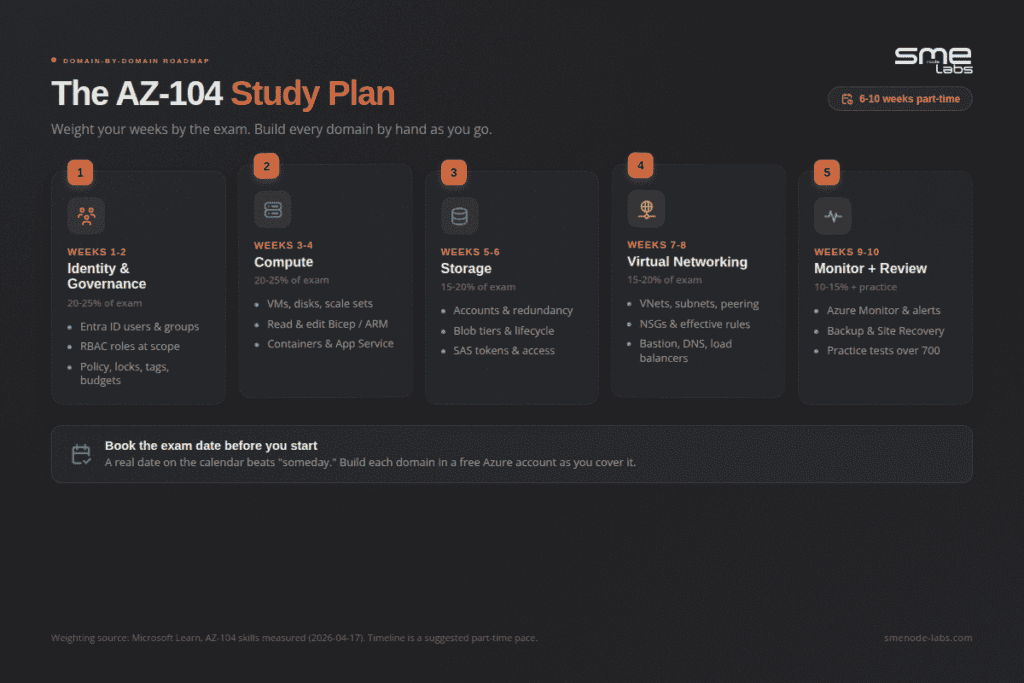
Here’s how to actually structure your weeks. Match your hours to the exam weights. Don’t spend three weeks on monitoring (10-15%) and skim identity (20-25%). People do this constantly and it costs them.
Manage Azure identities and governance (20-25%)
Start here. It’s the biggest chunk and it underpins everything else.
Know how to create Entra ID users and groups, assign built-in roles at the right scope, and read an access assignment when a scenario throws one at you. Then governance: Azure Policy, resource locks, tags, management groups, and cost alerts with budgets.
The trap? Role-based access control questions look easy until they ask “at which scope.” Practice reading scope, not just definitions.
Implement and manage storage (15-20%)
Storage accounts, redundancy options, blob tiers, and access. This domain rewards flashcard-style repetition.
Get comfortable with SAS tokens, access keys, and identity-based access for Azure Files. Then blob lifecycle rules, soft delete, and versioning. Know when you’d pick LRS versus GRS versus ZRS without hesitating.
Deploy and manage Azure compute resources (20-25%)
The other heavy domain. And the one most theory-only students bomb.
You need to create and size VMs, work with disks and availability sets, and handle scale sets. But the part that trips people up is infrastructure as code. You’ll get questions asking you to read or modify an ARM template or a Bicep file. Reading Bicep cold is hard if you’ve never opened one.
This is where automation skills pay off beyond the exam. If you want to go deeper into Bicep, pipelines, and infrastructure as code as a career path, our DevOps Workbook picks up right where AZ-104 stops. Thinking past the exam? The 200-901 DevNet skills that get you hired shows what employers ask for.
Implement and manage virtual networking (15-20%)
VNets, subnets, peering, NSGs, Azure Bastion, private endpoints, DNS, and load balancers.
Quick reality check. If subnetting still feels shaky, this domain will hurt. Azure virtual networking assumes you can look at a CIDR block and know what fits. Shore that up first with our subnetting guide and practice questions, then come back to NSG rules and effective security rules.
Make sense so far? Good.
Monitor and maintain Azure resources (10-15%)
Smallest domain, still worth easy points. Azure Monitor metrics and logs, alert rules and action groups, Network Watcher, and backup with Recovery Services vaults plus Site Recovery.
Don’t overstudy this one. Know the backup and restore flow and how to read a metric, and you’ve captured most of the marks here.
AZ-104 labs: how to practice without spending a dime
This is the section that separates passers from re-takers. So pay attention.
You cannot pass the AZ-104 by reading. The exam includes live tasks, and even the multiple-choice questions are written by people who assume you’ve actually clicked through the portal. Reading about a load balancer and building one are different skills.
The good news? Azure gives you a free account with $200 in credit for the first 30 days, plus a batch of always-free services. That’s your lab. No expensive home server needed.
If you came from networking certs, this is a mental shift. Your CCNA labs ran in EVE-NG or Packet Tracer on your own machine. Azure labs run in the cloud, on Microsoft’s dime, in the real portal. Same discipline of building things by hand. Different sandbox.
If you only have time to build five things properly, build these. Each one maps to a real trouble spot, and each one is a scenario question you’d otherwise have to guess at.
- Two NSGs, one VM. Put one NSG on the subnet and one on the NIC with conflicting rules, then use the effective security rules view to work out which wins. This is the single most common networking question format.
- A SAS token you can revoke. Issue an ad-hoc SAS, then issue one tied to a stored access policy. Revoke the second without rotating your account keys.
- A Bicep file you didn’t write. Export an existing resource group as an ARM template, convert it to Bicep, change two parameters, redeploy. You’re tested on reading and modifying, not authoring from scratch.
- Overlapping RBAC scopes. Assign Reader at the subscription and Contributor at the resource group to the same user. Predict the effective permission, then verify it. Most people predict wrong the first time.
- An alert that actually fires. Build a metric alert with an action group and force it to trigger. The monitoring domain is small and gets skipped, which makes it cheap marks.
That’s roughly 10 hours of lab work. It’s the highest return 10 hours in the whole plan.
Watch the free-tier trap while you’re at it. Azure’s free account gives you $200 in credit for 30 days plus a set of always-free services, but your study labs run on Azure consumption billing, which is completely separate from the $165 exam fee. Leave a VM and a load balancer running over a long weekend and you’ll wake up to a real charge, especially from an Azure Bastion host, which bills hourly whether you connect to it or not.
Three rules that fix it. Deallocate VMs, don’t just shut down the guest OS. Delete Bastion hosts and public load balancers after each lab. Set a budget alert at $20 in Cost Management on day one.
Here’s the most common way this exam goes wrong. Six weeks of cramming on a video course and a question bank, walk in confident, walk out short. The case study on deploying a VM scale set and the drag-and-drop on NSG rules catch people who have never actually done either. The fix is the same every time: build every objective in a free Azure account, one lab a night, then retake. Reading about a scale set and deploying one are different skills.
Our Azure Workbook is built around that idea. Every domain comes with a guided lab you build in your free Azure account, plus the exam-style questions to check yourself after. Ready to study the way the exam actually tests you? That’s the resource.
How long to study, and who should take it first
Most people need 6 to 10 weeks studying part-time. Coming in with real IT experience? Closer to 6. Total beginner? Give yourself 12 and don’t rush the booking.
Here’s an honest gut-check most guides skip. AZ-104 is an associate-level exam, not a beginner one. Microsoft expects you to already know operating systems, networking, servers, and virtualization. If you’re brand new to IT, you’ll struggle, and not because of Azure.
Not sure whether you’ve got the networking base? This breakdown of CCNA vs Network+ helps you figure out where your foundation actually stands before you drop $165 on an exam that assumes it.
Bottom line on timing: book the exam before you start studying. A real date on the calendar beats “someday” every time.
Already working in IT, with some exposure to cloud, servers, or networking? Skip AZ-900. It’s Microsoft’s $99 fundamentals exam, built for career changers with no technical background, and it won’t move your salary once you’re ready for AZ-104. Start here instead if you’ve got any admin or networking experience at all.
What to do after you pass AZ-104
Passing is the start, not the finish. So where next?
Three common paths:
- Go deeper in Azure. AZ-500 for security, or AZ-305 for solutions architecture. Natural steps up. AZ-305 is the bigger jump. Architects earn $135K to $215K+ in the US, but the exam assumes real AZ-104 admin experience, not just the badge. Case studies trip up anyone who’s never actually built and managed an Azure environment. AZ-500 is the closer pairing. It builds directly on the identity and governance skills this exam already tested, and security engineers earn $125K to $175K. Both exams run $165.
- Go multi-cloud. One cloud is good. Two makes you rare. Our AWS Solutions Architect guide is the fast route to pairing Azure with AWS, and multi-cloud people command real premiums.
- Go into security. Cloud plus security is one of the hottest combos out there. A cert like CompTIA CySA+ pairs well with your Azure base. Start with this CySA+ certification guide to see if it fits your goals.
Going multi-cloud? The AWS workbook range covers the Solutions Architect path.
Whatever you pick, keep momentum. The gap between passing your first cert and your second is where most careers stall out.
5 mistakes that fail AZ-104 candidates
Want to skip the pain? Avoid these. They show up over and over in retake stories.
Studying an outdated version. Anything before 2026-04-17 misses Entra ID naming, Bicep, and Private Endpoints. You’ll walk in prepped for the wrong exam.
Reading instead of building. Said it already, saying it again. The portal tasks and case studies eat theory-only candidates alive. No lab time, no pass.
Ignoring the exam weights. Spending equal hours on every domain feels fair. It isn’t. Identity and compute are worth up to 50% combined. Weight your time accordingly.
Skipping cost management and governance. People love the flashy compute stuff and skip Policy, locks, tags, and budgets. Those are easy, reliable points. Don’t leave them on the table.
Booking “when ready.” Ready never comes. A booked date creates the pressure that actually gets you studying. Set it first, then work backward.
One more, honestly. Don’t rely on brain-dump question sites. Half the answers are wrong and Microsoft changes questions constantly. Use real labs and legitimate practice questions, like the free practice assessment on Microsoft Learn and a workbook built for the current objectives.
AZ-104 study guide FAQ
How hard is the AZ-104 exam?
It’s associate-level and moderately hard. The concepts aren’t wild, but the hands-on tasks and case studies punish anyone who only studied theory. Build labs and it becomes very passable.
How much does the AZ-104 cost?
$165 USD as of 2026, with prices varying slightly by country. Retakes cost the full fee again, so prep properly the first time.That $165 is Microsoft’s Associate-tier price, the same as AZ-305 or AZ-400 later. Fundamentals exams like AZ-900 cost less, $99, which is why most people treat AZ-900 as optional rather than a required first step.
Do I need experience before taking AZ-104?
Yes, some. Microsoft expects familiarity with operating systems, networking, servers, and virtualization. It’s not a first-ever IT cert.
How long does it take to study for AZ-104?
Around 6 to 10 weeks part-time for most people. Beginners should plan for 12 weeks and heavy lab time.
Does the AZ-104 expire?
Your certification renews yearly through a free online assessment on Microsoft Learn. You don’t re-pay the exam fee to stay current.
Bottom line
AZ-104 is one of the better bets in IT right now. Strong demand, a $110K-ish median, and a credential recruiters actually filter for.
Your five-step path:
- Study the 2026 objectives, not an old version. Entra ID, Bicep, Private Endpoints.
- Match your hours to the exam weights. Identity and compute first.
- Build every domain by hand in a free Azure account.
- Test yourself with exam-style questions until you’re consistently over 700.
- Book the date before you feel ready. Momentum beats perfection.
Do the labs. That’s the whole secret, honestly.
When you’re ready to study the exam instead of the entire internet, grab the Azure Workbook, objective-mapped labs and practice questions in one place. Or browse the full range of certification workbooks to plan your next few certs while you’re at it.
You’ve got this. Now go build something.