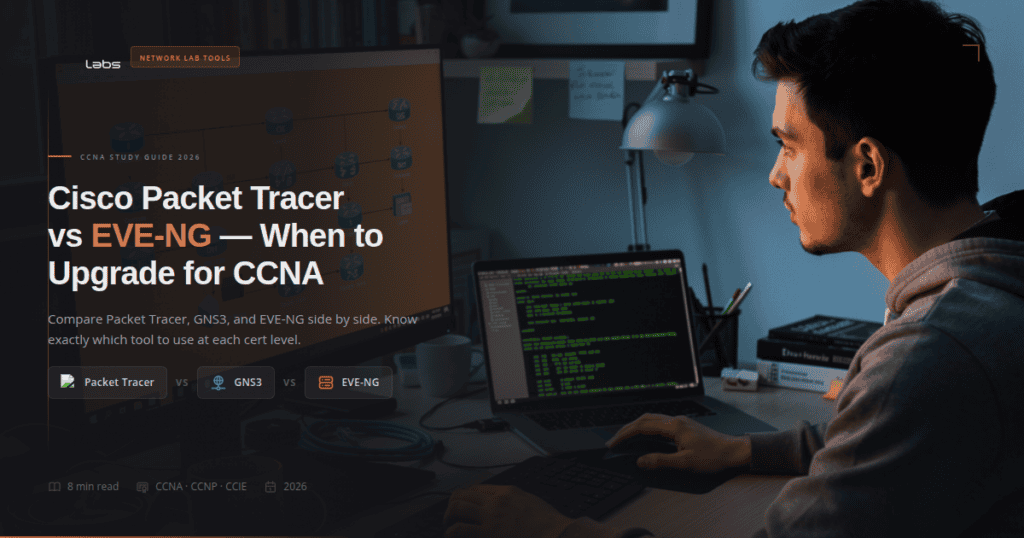
Packet Tracer is good enough to pass CCNA. Most people do exactly that, and they’re right.
But here’s the thing. Packet Tracer simulates Cisco devices. GNS3 and EVE-NG emulate them. That distinction doesn’t matter for your 200-301 exam. It matters a lot for everything after it.
The short answer: finish CCNA with Packet Tracer, then switch to EVE-NG or GNS3 for CCNP. This article explains why, compares GNS3 vs EVE-NG side by side, and tells you exactly what changes when you upgrade.
Quick Comparison: Packet Tracer vs GNS3 vs EVE-NG
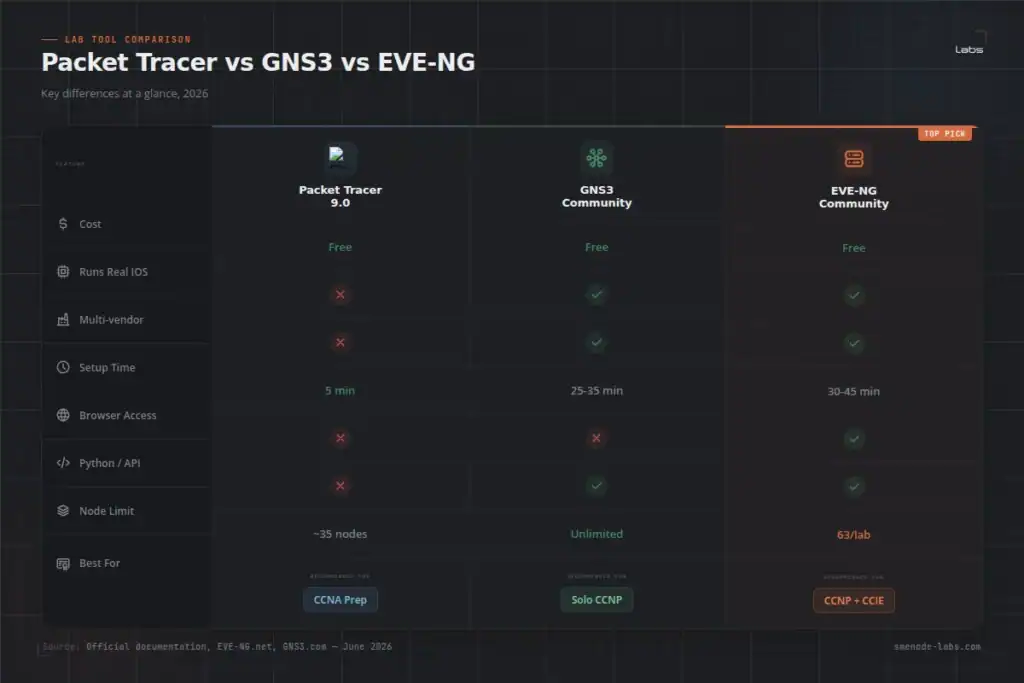
| Feature | Packet Tracer 9.0 | GNS3 | EVE-NG Community |
|---|---|---|---|
| Cost | Free | Free | Free |
| Runs real IOS | No (simulated) | Yes | Yes |
| Multi-vendor | No (Cisco only) | Yes (40+ vendors) | Yes (40+ vendors) |
| Browser-based | No | No | Yes |
| Python automation | No | Yes | Yes |
| Setup time | 5 minutes | 25-35 minutes | 30-45 minutes |
| RAM needed | 4 GB | 4 GB (16 GB for labs) | 8 GB minimum |
| Images included | Yes | Bring your own | Bring your own |
| Node limit | ~35 per topology | Unlimited | 63 per lab |
| Best for | CCNA beginners | Solo CCNP/intermediate | Multi-user, CCIE prep |
Simulation vs Emulation: Why This Matters
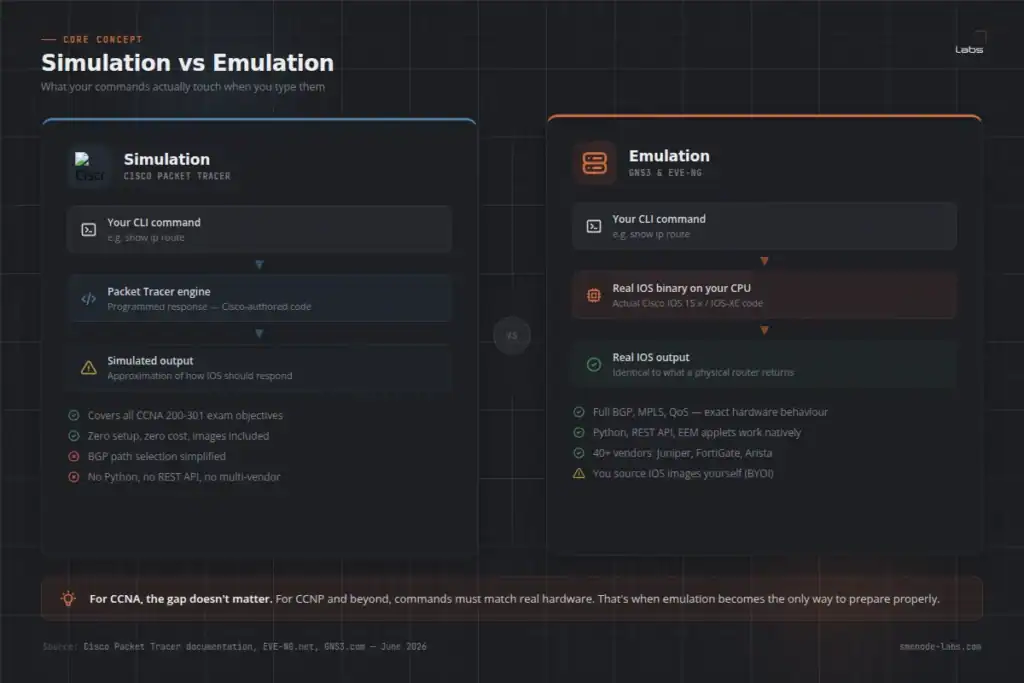
Most people skip this. They shouldn’t.
Packet Tracer simulates Cisco devices. Cisco built the software to behave like a router. The commands work. Routing protocols work. But you’re interacting with Cisco’s programmed version of how IOS should respond, not actual IOS code.
GNS3 and EVE-NG emulate real devices. They run actual Cisco IOS images on your CPU. The same binary that runs on a physical 3945 router is the same code running inside your EVE-NG lab. Full stop.
For CCNA, this gap is small. The 200-301 exam covers foundational topics, and Packet Tracer handles all of them: VLANs, routing protocols, NAT, wireless basics, access control, basic security. You won’t hit its limits studying for 200-301.
For CCNP and beyond, the gap becomes a real problem. BGP path manipulation, MPLS, QoS policies, Python on IOS-XE, SD-WAN configs – Packet Tracer either skips these or gives simplified output that doesn’t match real exam conditions.
What Packet Tracer 9.0 Can’t Do
Packet Tracer 9.0 (released October 2025) added Cisco 8200 series routers and better fibre optics simulation. It’s genuinely improved. These gaps remain:
- No IOS-XE, IOS-XR, or NX-OS (only a subset of legacy IOS behaviour)
- No Python scripting against device CLI (
guestshelldoesn’t exist) - No multi-vendor devices (no Juniper, FortiGate, Palo Alto, Arista)
- BGP is simplified – advanced path selection attributes behave differently than real hardware
- QoS output doesn’t match physical hardware behaviour
- No REST API to call against virtual devices
- No real SPAN/RSPAN traffic capture
- No
EEMPython applets
For CCNA? You won’t run into these walls during exam prep. For CCNP or CCIE? You will, and it’ll cost you time when you’re already under study pressure.
Pair your CCNA labs with structure. The SMEnode Labs CCNA Workbook includes 75 labs mapped directly to the 200-301 exam blueprint. Works with both Packet Tracer and EVE-NG so you can start with one tool and switch later without redoing your work.
GNS3 vs EVE-NG: What’s the Real Difference?
This is the comparison most engineers want when they search “gns3 vs eve-ng.” Both run real IOS. Both are free at the entry level. The differences come down to architecture and where you’re headed.
GNS3 installs as a desktop app on Windows, macOS, or Linux. You run it locally. The GUI is straightforward, the community is massive, and thousands of free lab files exist online. Setup takes 25 to 35 minutes on a typical laptop.
EVE-NG installs as a server, on bare metal or a VM. You access labs through a browser. No client software to install or update. Multiple users can work on the same lab simultaneously in the Pro edition. Setup takes 30 to 45 minutes but after that, everything runs in any browser on any machine.
| Factor | GNS3 | EVE-NG Community |
|---|---|---|
| Install model | Desktop app | Server (VM or bare metal) |
| Access method | Local GUI | Browser |
| Multi-user | No | No (Pro only) |
| Docker node support | Yes | Yes (v6.5+) |
| Community lab files | Very large | Growing |
| Performance | Good | Roughly 40% faster on same hardware |
| Setup complexity | Lower | Slightly higher |
| CCIE scalability | Workable | Strong |
For solo CCNP study, GNS3 and EVE-NG are close. GNS3 wins on setup simplicity and community resources. EVE-NG wins on performance and long-term scalability.
For CCIE prep, teams, or any scenario where multiple engineers share labs, EVE-NG is the practical choice. The browser model means you can access your topology from any machine. Nothing breaks when you switch laptops.
The CCNP Security case. You’ve used GNS3 since your CCNA days, and now you’re running ASAv, FTD and several Cisco routers at once. A 32 GB workstation gets close to its ceiling fast. Moving the same topology to EVE-NG Community on the same machine is the usual answer, because EVE-NG’s KVM-based node handling is lighter per node than GNS3’s. Measure it with your own topology before you commit to the move.
Is GNS3 or EVE-NG Better for CCNA?
Here’s what a lot of people ask early on: do you even need GNS3 or EVE-NG for CCNA? Or is Packet Tracer enough?
Packet Tracer is enough for CCNA. Thousands of engineers pass 200-301 using nothing else. You don’t need real IOS to pass the exam.
That said, two reasons to set up GNS3 or EVE-NG during CCNA:
- You want habits that carry forward. GNS3 and EVE-NG work exactly the same at CCNP. Learn the tools now and you won’t be relearning your environment in the middle of harder study.
- Your job already uses them. If your employer runs EVE-NG for team labs, get comfortable with it now.
For pure exam prep with no other context, Packet Tracer carries you through CCNA. Switch when you start CCNP.
Signs You’ve Outgrown Packet Tracer
You’ll usually know when it’s time. These are the most common signals:
- A command runs in Packet Tracer but gives different output than your study notes or instructor describe
- Your CCNP syllabus mentions BGP communities, MPLS, NETCONF, or Python automation
- Your course instructor is using EVE-NG for lab sections
- You’re trying to run Python scripts against a virtual router and there’s no
guestshellto connect to - You want to add a FortiGate, Juniper, or Arista device to your topology
- You need to match the exact lab environment your certification exam uses
Any of these? It’s time. The switch is a one-time cost.
Getting EVE-NG running takes under an hour. Our EVE-NG installation guide walks through setup from bare metal to first lab. If you prefer GNS3, the GNS3 install guide covers the Windows setup in five steps. Still choosing a platform? We put them side by side in GNS3 vs EVE-NG.
Which Tool at Which Certification Level
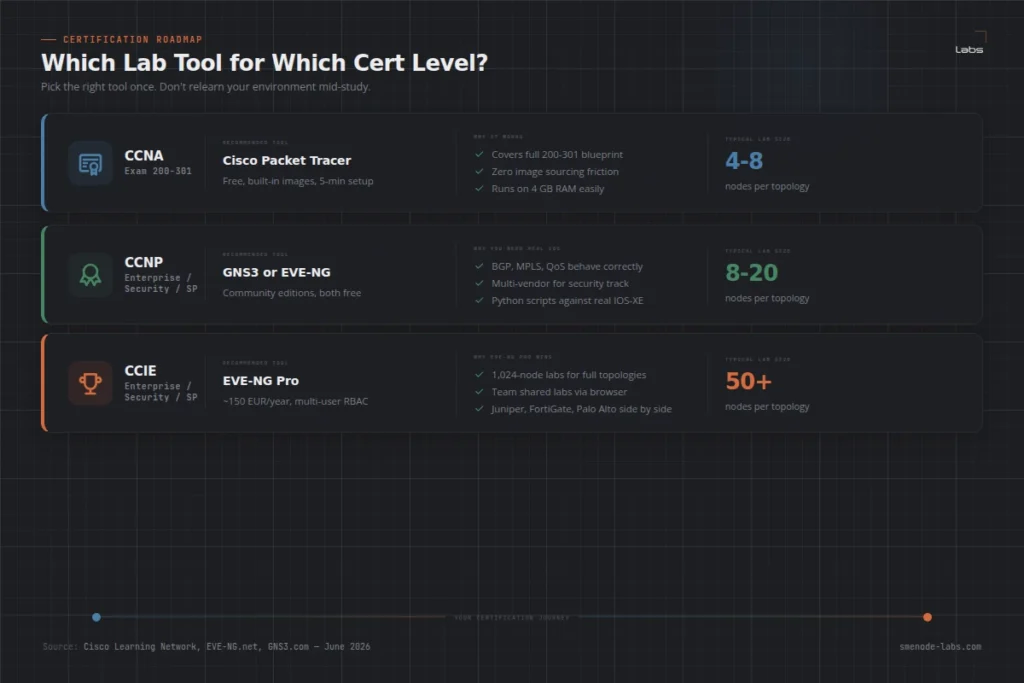
| Certification | Best Tool | Why |
|---|---|---|
| CCNA 200-301 | Packet Tracer | Covers the full blueprint, zero setup friction |
| CCNP Enterprise | GNS3 or EVE-NG Community | Real IOS behaviour, 20 nodes is enough |
| CCNP Security | EVE-NG Community | Multi-vendor (Cisco + FortiGate/Palo Alto) |
| CCNP Service Provider | EVE-NG Community | IOS-XR support |
| CCIE Enterprise/Security | EVE-NG Pro | 50-100+ node labs, multi-user study |
Don’t buy EVE-NG Pro for CCNA or early CCNP. Community covers it. Save Pro for when you’re building CCIE-scale topologies.
What Actually Changes When You Switch to EVE-NG
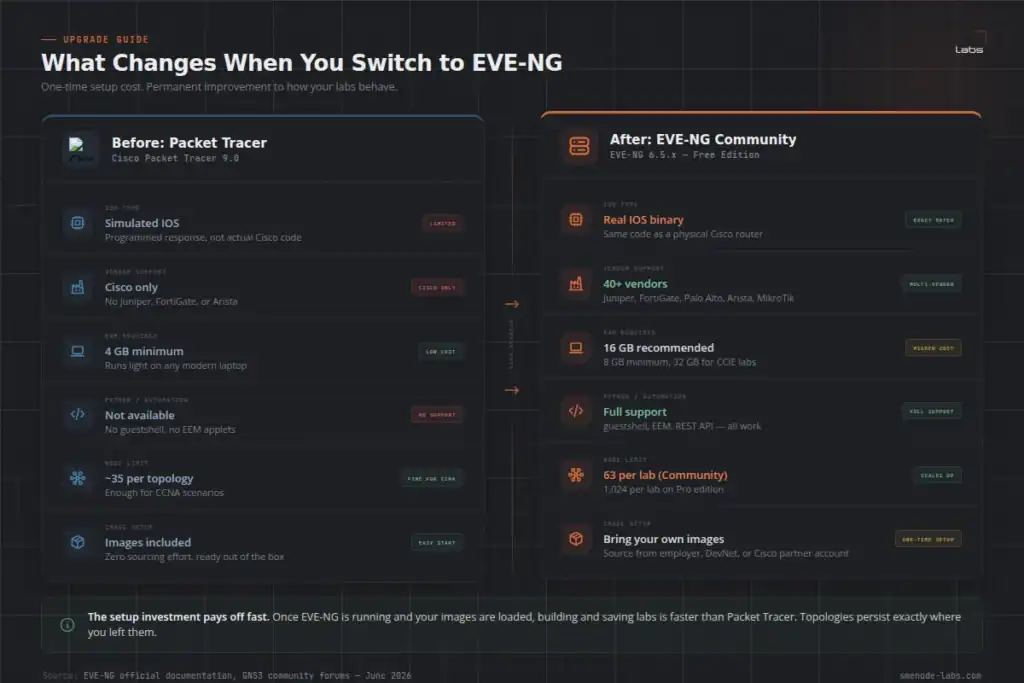
Three months in Packet Tracer is enough to work through a CCNA study plan and pass the 200-301. Then you sign up for a CCNP Enterprise bootcamp, day one the instructor opens EVE-NG, and the interface looks completely different.
The concept was the same, drag-and-drop devices, connect cables, boot the topology. But now he had to import IOS images himself. And when he ran commands, everything felt different. show version returned real Cisco IOS 17.x strings. debug ip ospf adj showed actual state machine transitions instead of simplified output. The first week felt slower. By week three, he said going back to Packet Tracer would feel like studying with a textbook screenshot instead of a live lab.
Here’s what actually changes when you make the switch:
Commands behave like real hardware. IOS simulation in Packet Tracer rounds off some outputs. With real IOS in EVE-NG or GNS3, you get complete output including OSPF debug messages, BGP update logs, QoS statistics, and everything the real exam expects you to read and interpret.
Image sourcing is on you. Packet Tracer comes pre-loaded. With GNS3 or EVE-NG, you need to bring your own IOS images from a legitimate source (your employer, a Cisco partner account, or a DevNet programme). This is the main friction point for most people.
Hardware requirements go up. Packet Tracer runs well on 4 GB RAM. A real EVE-NG lab with 8 to 10 routers needs 16 GB minimum. For CCNP-scale labs with firewalls and switches included, 32 GB is more comfortable.
The setup curve is steeper upfront, smoother after. Once EVE-NG is running and your images are loaded, building and saving labs is faster than Packet Tracer. Topologies are persistent. You can reload exactly where you left off without reconfiguring from scratch.
Already running EVE-NG or GNS3? The SMEnode Labs CCNA Workbook includes EVE-NG-compatible topology files alongside Packet Tracer versions. Start on either platform and switch without redoing your lab prep.
Frequently Asked Questions
Can I pass CCNA using only Packet Tracer?
Yes. Most CCNA candidates do exactly that. Packet Tracer covers the entire 200-301 blueprint including VLANs, routing protocols, NAT, wireless basics, and security fundamentals. You won’t hit its limits preparing for CCNA. For CCNP and beyond, switch to EVE-NG or GNS3.
Is Packet Tracer still good for CCNA in 2026?
Yes. Packet Tracer 9.0 is actively maintained for the 200-301 exam. The 2025 release added Cisco 8200 series support and improved wireless simulation. For CCNA prep, it’s completely adequate and has zero setup cost.
Why is GNS3 better than Packet Tracer for advanced certs?
GNS3 runs actual Cisco IOS images, not a simulation. Every command behaves exactly like a physical router because it’s running the same binary. You get the full IOS feature set including BGP communities, MPLS, Python scripting, and REST API access. The tradeoff is a longer setup and higher hardware requirements.
GNS3 vs EVE-NG: which one should I start with?
For solo study on a Windows or Mac laptop, GNS3 is easier to set up. For browser-based access and better long-term scalability, EVE-NG is worth the slightly longer initial setup. Both support the same device images. If you’re heading toward CCIE or will study with a group, go straight to EVE-NG and skip the GNS3 migration later.
Does EVE-NG run on a laptop?
Yes. EVE-NG Community runs as a VM inside VMware Workstation or VirtualBox. A 16 GB laptop handles basic CCNA and CCNP topologies without problems. For CCIE-scale labs with 50+ nodes, a dedicated server or high-spec workstation with 32 GB or more is the practical path.
Is EVE-NG Community free?
Yes. EVE-NG Community is permanently free with no expiry. The main constraint is a 63-node cap per lab. That covers most CCNA and CCNP scenarios without spending anything. EVE-NG Pro (~150 EUR/year) removes the node cap, adds multi-user access via role-based control, and includes a cluster manager for distributed labs.
What is the difference between EVE-NG and GNS3 for CCIE prep?
At CCIE level, EVE-NG Pro is the dominant choice. CCIE topologies regularly need 50 to 100 nodes, which GNS3 can handle but which gets unwieldy on a local workstation. EVE-NG Pro adds role-based multi-user access, so study groups can work on the same environment simultaneously. Many CCIE candidates also weigh EVE-NG against Cisco Modeling Labs. See our EVE-NG vs CML comparison for a full breakdown of that choice.
Can Packet Tracer run Python scripts against devices?
No. Packet Tracer doesn’t support Python scripting against the device CLI. There’s no guestshell, no EEM Python applets, and no REST API to interact with. If Python on IOS-XE is in your study plan (relevant for CCNA Automation or CCNP DevNet), you need GNS3 or EVE-NG with IOSv or CSR1000v images loaded.
Bottom Line
Packet Tracer is the right starting point for CCNA. It’s free, fast to set up, and covers everything 200-301 tests.
When you move to CCNP, switch to EVE-NG or GNS3. Both run real IOS. Both are free at the Community level. GNS3 is slightly simpler to start with. EVE-NG scales better and performs faster on the same hardware.
For CCIE prep, EVE-NG Pro is the standard choice.
If you’re studying for CCNA right now, the CCNA Workbook from SMEnode Labs includes 75 structured labs with both Packet Tracer and EVE-NG formats. You can start on Packet Tracer and migrate to EVE-NG later without losing any of your lab work. The CCIE Enterprise Infrastructure Workbook ships ready-made topologies with verified solutions.