Picture three months of study behind you. Every video in the course watched, two full textbooks read, practice tests coming back in the eighties. Then you sit the real 200-301. Interviews ask what you’ve configured. 50 CCNA interview questions with answers is the free prep.
720 out of 1000. Fail.
The problem wasn’t what he knew. He could define OSPF states. He understood VLANs. What he couldn’t do was look at show ip ospf interface output and immediately spot the hello-interval mismatch. That skill only comes from CCNA lab practice, and he hadn’t done nearly enough of it. To check where you actually stand, 20 free CCNA practice questions is a quick self-test.
He passed on his second attempt with a 912. The difference was six weeks of daily EVE-NG labs.
Here’s what he built – and what you should build too.
In this guide:
- 6 EVE-NG labs covering all five CCNA 200-301 exam domains
- Complete topologies and Cisco IOS configs for each
- Troubleshooting scenarios that mirror real exam simlets
- How to set up EVE-NG and get started fast
If you want all six labs pre-built as importable EVE-NG topology files, the CCNA Lab Workbook includes them alongside 75+ structured exercises and compatible IOS images. An emulator with nothing in it teaches you nothing. Here are 10 free CCNA labs you can build in EVE-NG.
Why EVE-NG Is Better for CCNA Prep Than Packet Tracer
Packet Tracer limits which commands you can run. That’s a big problem.
The CCNA 200-301 exam includes simlet questions where you run show commands against a live topology and answer questions based on the real output. If you’ve only ever used Packet Tracer, you’ll hit commands that don’t work, outputs that look different, and scenarios that simply can’t be recreated. Want the condensed version to revise from? The free CCNA 200-301 PDF is 27 pages with Packet Tracer commands.
EVE-NG runs actual Cisco IOS. Every command works. Every output looks exactly like production. That’s the environment you need.
Not sure how to set it up? The EVE-NG installation guide for VMware Workstation walks you through the full process. Check EVE-NG hardware requirements first if you want to confirm your laptop can handle it (most can). Not certain which cert to start with? We compare them in CCNA vs Network+.
Now, here are the six labs.

Lab 1: VLANs and Inter-VLAN Routing (Router-on-a-Stick)
Exam domain: Network Access – 20% of exam
VLANs are almost guaranteed to show up. Not a definition question. A troubleshooting scenario where inter-VLAN traffic isn’t flowing and you need to identify why from show command output. Worth knowing before you go deep: what changed in CCNA v2.0, including the new AI domain.
Topology:
[R1 Gi0/0] --- trunk --- [SW1]
                          |
           Gi0/1 (VLAN 10)  Gi0/2 (VLAN 20)  Gi0/3 (VLAN 30)
Switch config:
vlan 10
 name SALES
vlan 20
 name HR
vlan 30
 name MANAGEMENT
!
interface GigabitEthernet0/1
 switchport mode access
 switchport access vlan 10
!
interface GigabitEthernet0/0
 switchport mode trunk
 switchport trunk allowed vlan 10,20,30
Router subinterface config:
interface GigabitEthernet0/0.10
 encapsulation dot1Q 10
 ip address 10.1.10.1 255.255.255.0
!
interface GigabitEthernet0/0.20
 encapsulation dot1Q 20
 ip address 10.1.20.1 255.255.255.0
!
interface GigabitEthernet0/0.30
 encapsulation dot1Q 30
 ip address 10.1.30.1 255.255.255.0
Troubleshooting scenario to build:
Get everything working. Then change the native VLAN on the switch trunk to VLAN 99 without touching the router. Watch traffic break for native VLAN hosts.
Diagnosis: show interfaces trunk on the switch shows the mismatch immediately. This exact scenario – native VLAN mismatch – shows up in CCNA simlets more than most students expect.
What you’ll learn: Trunk port configuration, dot1Q encapsulation, subinterface creation, and why native VLAN consistency matters.
Lab 2: STP Root Bridge Election and Port Roles
Exam domain: Network Access – 20% of exam
Spanning Tree Protocol is one of those topics where students can recite the theory but struggle to explain which port is blocked in a given topology. The exam tests the latter.
Topology:
       [SW1]
      /     \
  [SW2] --- [SW3]
Three switches with redundant links forming a triangle. STP blocks one port to prevent loops.
Start by checking the default state:
show spanning-tree vlan 1Read the output. Find the Root Bridge, the Root Port on each non-root switch, and the blocked port.
Force SW1 to become Root Bridge:
SW1(config)# spanning-tree vlan 1 priority 4096Or use the shortcut:
SW1(config)# spanning-tree vlan 1 root primaryVerify the port roles after each change:
show spanning-tree vlan 1
show spanning-tree interface GigabitEthernet0/1
Troubleshooting scenario:
After you’ve set SW1 as root, unplug the link between SW1 and SW2. Watch STP reconverge. Note how long it takes (around 30-50 seconds with classic 802.1D). Check which ports transition to Forwarding.
The exam often presents a scenario where traffic is looping or a port is unexpectedly blocked, and you need to identify the root cause from show spanning-tree output. Practise reading that output until it’s second nature.
Know these three port roles cold: Root Port (best path to Root Bridge), Designated Port (forwards traffic on each segment), Alternate/Blocked Port (backup path, discards frames).
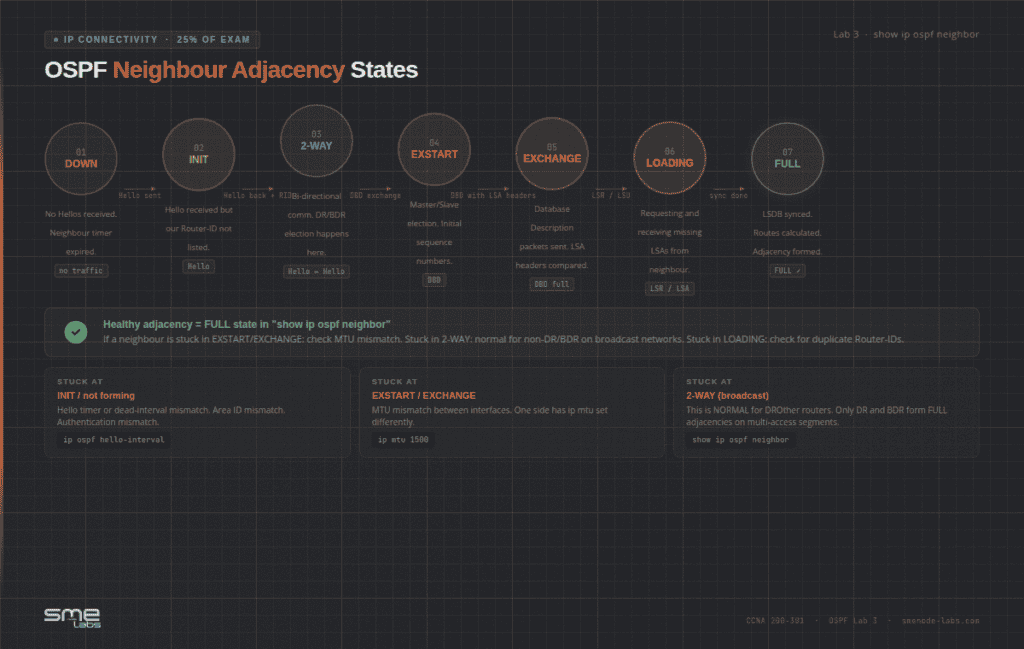
Lab 3: OSPF Single-Area Neighbour Adjacency
Exam domain: IP Connectivity – 25% of exam
OSPF is explicitly listed in the CCNA 200-301 exam topics. It’s the highest-weight routing protocol on the exam. You need to configure it, verify adjacencies, and troubleshoot when neighbours won’t form.
Topology:
[R1 10.0.12.1] --- [R2 10.0.12.2] --- [R3 10.0.23.2]R1 and R2 share a broadcast segment (good for DR/BDR practice). R2 and R3 are point-to-point.
R1 config:
interface Loopback0
 ip address 1.1.1.1 255.255.255.255
!
router ospf 1
 router-id 1.1.1.1
 network 10.0.12.0 0.0.0.255 area 0
 network 192.168.1.0 0.0.0.255 area 0
 passive-interface GigabitEthernet0/1
 auto-cost reference-bandwidth 10000
Verification commands to memorise:
show ip ospf neighbor
show ip ospf interface brief
show ip ospf database
show ip route ospf
Run these until you know exactly what healthy output looks like. That’s the only way simlet questions become manageable.
Troubleshooting scenario:
Get the adjacency up. Then mismatch hello timers on R1:
R1(config-if)# ip ospf hello-interval 20
R1(config-if)# ip ospf dead-interval 80
The R1-R2 adjacency drops. R3 loses its routes. Diagnose it using only show ip ospf interface Gi0/0. You’ll see the timer mismatch. Fix it without looking at your original config.
Also practise: Adding default-information originate on R1 and verifying R3 receives a default route with show ip route. The exam tests this specifically.
Lab 4: DHCP Server + NAT Overload (PAT)
Exam domain: IP Services – 10% of exam
DHCP and NAT together in one topology. This is how they appear in real networks, and it’s how the exam tends to present them.
Topology:
[LAN hosts 10.0.0.x] --- [R1] --- [ISP 203.0.113.x]
                          inside       outside
DHCP config on R1:
ip dhcp excluded-address 10.0.0.1 10.0.0.10
!
ip dhcp pool LAN_POOL
 network 10.0.0.0 255.255.255.0
 default-router 10.0.0.1
 dns-server 8.8.8.8
 lease 7
NAT overload (PAT) config:
interface GigabitEthernet0/0
 ip nat inside
!
interface GigabitEthernet0/1
 ip nat outside
!
ip nat inside source list 1 interface GigabitEthernet0/1 overload
access-list 1 permit 10.0.0.0 0.0.0.255
Verification:
show ip dhcp binding
show ip dhcp pool
show ip nat translations
show ip nat statistics
The mistake every student makes at least once:
Build the lab without the ip dhcp excluded-address line. The default gateway IP (10.0.0.1) gets handed out as a host address. Traffic breaks in a weird, hard-to-diagnose way – hosts get an address, ARP doesn’t resolve cleanly, pings fail intermittently.
Build it wrong first. Then fix it. That kind of hands-on mistake sticks better than any video walkthrough.
Why ip nat inside and ip nat outside matter: Forget one and NAT silently fails. No error message. Just broken connectivity. show ip nat translations shows zero entries. That’s your clue.
Lab 5: Standard and Extended ACLs
Exam domain: Security Fundamentals – 15% of exam
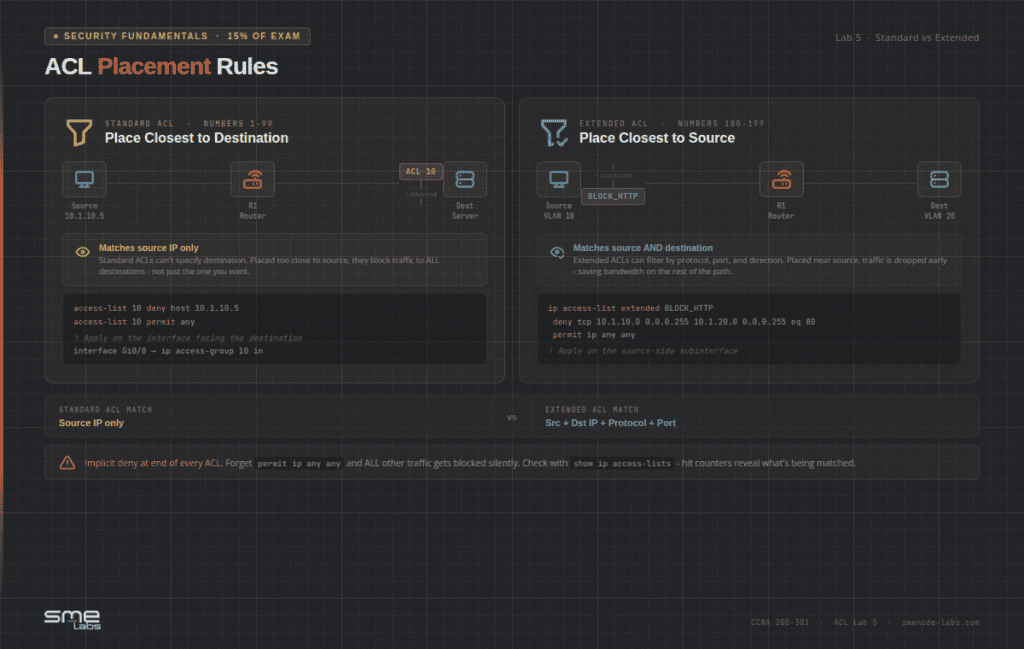
ACL syntax isn’t what trips people up. Placement is. The exam tests whether you know where to put an ACL, not just how to write one.
Standard ACL – block a specific host:
access-list 10 deny host 10.1.10.5
access-list 10 permit any
!
interface GigabitEthernet0/0
 ip access-group 10 in
Extended ACL – block HTTP traffic between VLANs:
ip access-list extended BLOCK_HTTP
 deny tcp 10.1.10.0 0.0.0.255 10.1.20.0 0.0.0.255 eq 80
 permit ip any any
!
interface GigabitEthernet0/0.10
 ip access-group BLOCK_HTTP in
The implicit deny scenario:
Write an ACL. Forget the permit ip any any at the end. Watch everything break. Run show ip access-lists and look at the hit counters – the implicit deny at the bottom matches everything you didn’t explicitly permit.
This is the most common ACL mistake in CCNA exams. Build it, break it, understand it.
Placement rules to drill:
- Standard ACL: Apply closest to the destination – it can only match source IP, so placing it near the source risks blocking too broadly
- Extended ACL: Apply closest to the source – it matches both source and destination, so you can be specific without blocking unintended traffic
Sound familiar? The exam almost always asks about placement in the context of a troubleshooting scenario, not a pure configuration question.
Lab 6: EtherChannel (LACP) and Port Security
Exam domain: Network Access – 20% of exam
Two important access-layer features in one lab. EtherChannel bundles physical links into one logical link. Port Security restricts which MAC addresses can connect.
EtherChannel topology:
[SW1] === (2x GigE, bundled as Port-channel 1) === [SW2]LACP config on SW1:
interface range GigabitEthernet0/1 - 2
 channel-group 1 mode active
 channel-protocol lacp
!
interface Port-channel1
 switchport mode trunk
Verify the bundle formed:
show etherchannel summary
show etherchannel port-channel
Look for the SU flags in the summary output. S = Layer 2, U = in use. If you see SD, the bundle is down.
Port Security config:
interface GigabitEthernet0/3
 switchport mode access
 switchport access vlan 10
 switchport port-security
 switchport port-security maximum 2
 switchport port-security mac-address sticky
 switchport port-security violation shutdown
!
show port-security interface GigabitEthernet0/3
Trigger the violation:
Set violation mode to shutdown. Connect a third device to the port. Watch it go err-disabled. Then practise the recovery:
interface GigabitEthernet0/3
 shutdown
 no shutdown
Know all three violation modes before exam day:
| Mode | What Happens | Counter Increments? |
|---|---|---|
| protect | Drops violating frames silently | No |
| restrict | Drops + syslog message | Yes |
| shutdown | Port goes err-disabled | Yes |
The exam distinguishes between these three. Don’t guess.
How to Run These Labs in EVE-NG
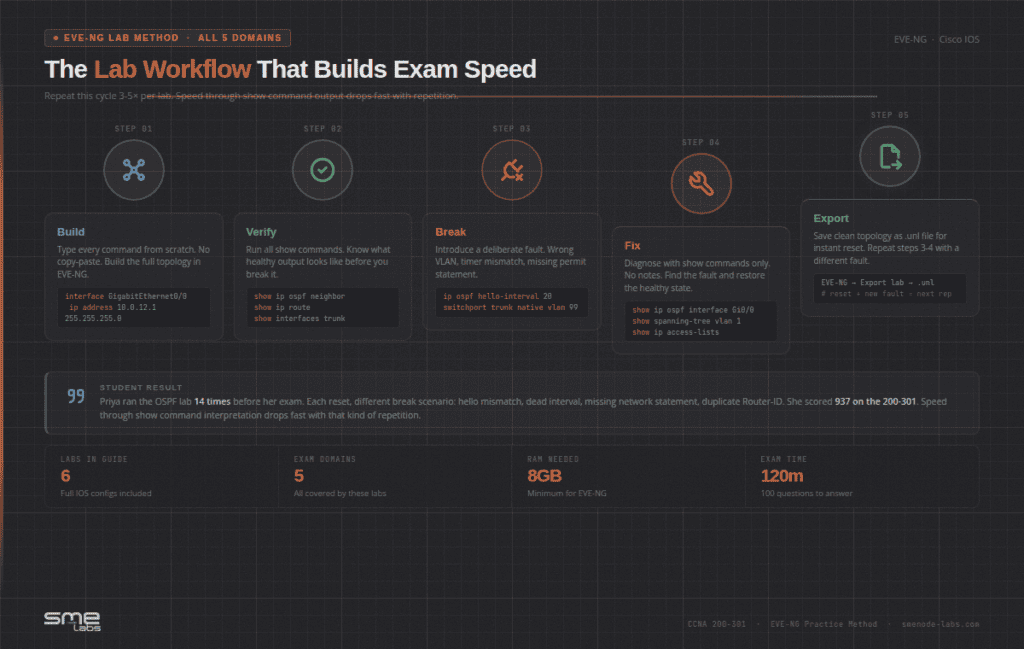
You don’t need a powerful machine. A laptop with 8GB RAM runs most of these topologies fine. 16GB is more comfortable if you’re running all six simultaneously.
The main requirement is getting the right Cisco IOS images. EVE-NG needs IOSv (for routers) and IOSvL2 (for switches). Finding compatible versions independently can take hours. The SMEnode Labs CCNA Workbook includes compatible IOS ISO images packaged with the workbook, so you skip that headache entirely.
For image installation details, check the EVE-NG images setup guide.
The lab workflow that works:
- Build the topology from scratch – typing every command
- Verify everything is healthy – run all the show commands
- Break something deliberately (wrong VLAN, mismatched timer, missing permit)
- Troubleshoot using only show commands – no looking at notes
- Export the clean topology as a
.unlfile for future resets
Repetition is what makes this lab pay off. Run the OSPF lab, reset to the clean topology, then break it a different way and fix it again. Ten passes or more isn’t excessive. Speed through show command interpretation drops fast with that kind of repetition, and that’s the part the exam puts a clock on.
What the 200-301 Exam Actually Tests
The exam is 100 questions in 120 minutes. That’s 72 seconds per question on average – but simlets take longer, so you need to move fast on the rest. If you’re still deciding whether CCNA is the right cert, the CCNA vs Network+ comparison breaks down which one to go for first.
The lab-heavy domains by weight:
| Domain | Weight | Labs Above |
|---|---|---|
| Network Access | 20% | Labs 1, 2, 6 |
| IP Connectivity | 25% | Lab 3 |
| Network Fundamentals | 20% | Background for all |
| IP Services | 10% | Lab 4 |
| Security Fundamentals | 15% | Lab 5 |
| Automation | 10% | Not lab-based |
Simlets are the questions that separate first-attempt passers from repeaters. They give you a running network and ask you to interpret show output. No Packet Tracer-style shortcuts. Just the real CLI.
The only prep for simlets is time in a real CLI. That’s EVE-NG.
Bottom Line
The CCNA isn’t a memory test. It’s a pattern recognition test. The exam is looking for students who’ve seen enough real CLI output that they can spot a misconfiguration in seconds, not minutes.
These six labs cover all five high-weight exam domains. Build each one from scratch. Break each one deliberately. Fix each one without notes. Do that cycle three to five times per lab and the exam starts feeling very familiar.
Want all six topologies pre-built as importable EVE-NG files? The SMEnode Labs CCNA Workbook includes them alongside 75+ structured labs, detailed solutions, and the compatible IOS images – everything you need to start practising today.