What is DHCP? It’s the Dynamic Host Configuration Protocol, the service that hands a device its IP address, subnet mask, default gateway and DNS server the moment it joins a network. It does it in four messages, Discover, Offer, Request and Acknowledge (DORA), over UDP port 67 on the server side and 68 on the client side.
That’s the short answer. The rest of this guide covers the parts most explanations skip: which of the four messages are really broadcast, why a relayed reply goes to port 67 and not 68, how lease timers work in real numbers, and the Cisco IOS config for a server, a relay and a client. There’s also a worked example of a guest Wi-Fi pool that runs dry at 17:45 every day, and why halving the lease doesn’t fix it.
What is DHCP, in plain terms?
Every device on an IP network needs four things before it can talk to anything off its own subnet:
- an IP address
- a subnet mask, so it knows which addresses are local
- a default gateway, so it knows where to send everything else
- a DNS server, so it can turn names into addresses
You could type those into every laptop, phone, printer and camera by hand. That’s how duplicate addresses happen: two machines, one address, and a printer that keeps dropping off the network.
DHCP moves that job to one place. A DHCP server holds a pool of addresses (Windows calls it a scope, Cisco calls it a pool) plus the settings that go with them. A DHCP client asks for an address when it connects. The server lends it one for a fixed time called a lease, and keeps a record of who has what.
RFC 2131, the standard that defines DHCP for IPv4, describes three ways a server can hand out addresses:
| Allocation | What happens | Where you’ll see it |
|---|---|---|
| Dynamic | The address is lent for a limited time and goes back to the pool when the lease ends | Almost every client network |
| Automatic | The server assigns a permanent address the first time a client asks | Rare now |
| Manual | An admin ties a specific address to a specific client, and DHCP just delivers it | Printers, cameras, anything you need to find at the same address. Usually called a DHCP reservation |
Dynamic allocation is the only one of the three that lets addresses be reused. That’s the whole point on a busy network, and it’s where the interesting failures live.
How does DHCP work? The DORA process step by step
A client with no address can’t send a normal unicast packet. It doesn’t know its own address, the server’s address, or even whether a server exists. So the DHCP process starts with a shout.

Discover and Request go to UDP 67 on the server; Offer and ACK come back to UDP 68 on the client. Discover and Request are always broadcast.
| Step | Message | Sent by | IP destination | Why |
|---|---|---|---|---|
| D | DHCPDISCOVER | Client, source 0.0.0.0 | 255.255.255.255 (broadcast) | “Is there a DHCP server out there?” |
| O | DHCPOFFER | Server | Unicast to the offered address, or broadcast if the client asked for it | “You can have 192.168.50.11 for a day” |
| R | DHCPREQUEST | Client, source still 0.0.0.0 | 255.255.255.255 (broadcast) | “I’ll take the one from server X” |
| A | DHCPACK | Server | Same rule as the Offer | “Confirmed. It’s yours until the lease runs out” |
Two details in that table trip people up.
First, the Offer and the ACK aren’t always broadcasts. RFC 2131 says the server unicasts them straight to the client’s hardware address and the new IP, unless the client sets the BROADCAST bit in its request, in which case the server broadcasts them to 255.255.255.255. The bit exists because some clients can’t accept a unicast IP packet before their address is configured. Cisco IOS XE routers acting as DHCP clients set it by default and only clear it if you configure ip dhcp client broadcast-flag clear (Cisco IOS XE 17 DHCP client guide). So “the Offer is a broadcast” is sometimes true. It’s not the rule.
Second, the client source address really is 0.0.0.0 for both the Discover and the Request. The standard requires it: until the ACK arrives, the client has no address to use.
Why is the Request broadcast when the client already knows the server?
Because there might be more than one server. If two DHCP servers both answer the Discover, the client gets two Offers. It picks one and broadcasts a Request that carries the chosen server’s address in the server identifier option. Every server hears it. The one that was picked commits the lease. The others see they lost and put their offered address back in the pool.
A unicast Request would leave the losing server holding an address for a client that’s never coming back. The broadcast settles it in one packet.
What happens after the ACK?
The client doesn’t just start using the address. RFC 2131 says the client should check that nobody else already has it, usually with an ARP probe. If something answers, the client sends a DHCPDECLINE and starts again.
The server can check too. By default a Cisco IOS XE DHCP server pings a pool address twice before assigning it. If something replies, the address is pulled from the pool and stays out until an admin clears the conflict (Cisco IOS XE 17 DHCP server guide). That’s what show ip dhcp conflict lists. More on that in the troubleshooting section.
Is the DHCP port 67 or 68?
DHCP uses UDP port 67 for the server and UDP port 68 for the client. Messages to a server go to port 67. Messages to a client go to port 68. Those numbers come from BOOTP, the older protocol DHCP grew out of, which is why RFC 1542 and plenty of tools still call them bootps and bootpc.
That’s the whole answer on a single subnet. Add a relay and one leg changes, and almost nobody mentions it.
RFC 2131 says that when the giaddr field (the relay agent’s address) is filled in, the server sends its reply to the ‘DHCP server’ port on the relay. That’s port 67, not 68. RFC 1542’s delivery table says the same thing. The relay then sends it on to the client on port 68.
Here’s every DHCP port leg, destination only, for the lab used later in this post (server R1 at 10.0.12.1, relay R2 with its LAN interface at 192.168.50.1):
| Leg | From | To (IP) | UDP destination port |
|---|---|---|---|
| Same subnet | |||
| Discover, Request | Client | 255.255.255.255 | 67 |
| Offer, ACK | Server | Client’s new address, or 255.255.255.255 if the BROADCAST bit is set | 68 |
| Through a relay | |||
| 1. Discover, Request | Client | 255.255.255.255 (stays on the client’s LAN) | 67 |
| 2. Relayed request | R2 | 10.0.12.1 (unicast, giaddr = 192.168.50.1) | 67 |
| 3. Server reply | R1 | 192.168.50.1, the giaddr (unicast) | 67 |
| 4. Relayed reply | R2 | Client’s new address, or broadcast | 68 |
| Renewal at T1 | Client | Server identifier (unicast, no relay involved) | 67 |
So the DHCP port number answer is “67 and 68”, with one exception: between a server and a relay, it’s 67 in both directions. If you write a firewall rule or ACL for DHCP between sites, that’s the one to get right.
Look at the last row too. When a client renews, it unicasts straight to the server, and RFC 2131 says no relay agent is involved. So a branch client renewing through R2 sends UDP 67 packets from its own address to R1, and any ACL between them has to allow that as well as the relay traffic.
Why does DHCP use UDP and not TCP?
TCP needs a three-way handshake between two known addresses. A client asking for its first address has no address and doesn’t know the server’s either. UDP just sends a datagram, which works fine from 0.0.0.0 to 255.255.255.255. DHCP handles its own reliability with retransmissions and the transaction ID in every message.
Does DHCP use port 53?
No. Port 53 is DNS. DHCP only tells the client which DNS server to use, in option 6.
Here’s the twist, though. On a Cisco router, ip helper-address doesn’t only relay DHCP. By default it also forwards UDP broadcasts to port 53, among others. More on that under the relay section.
What is DHCP lease time, and when does a client renew?
A DHCP lease is the length of time the client may use its address. The DHCP lease time is set by the server (option 51, in seconds). The client doesn’t wait for it to run out. It tries to extend it at two points, set by options 58 and 59 or by the defaults in RFC 2131:
| Timer | Default | What the client does |
|---|---|---|
| T1 (renewal) | 50% of the lease | Unicasts a DHCPREQUEST to the server that gave it the lease |
| T2 (rebinding) | 87.5% of the lease | Gives up on that server and broadcasts a DHCPREQUEST to any server |
| Expiry | 100% | Stops using the address and starts again from Discover |
On a Cisco IOS XE server the default lease is one day unless you set one. So in numbers:
- 1-day lease: renew at 12 hours, rebind at 21 hours
- 8-hour lease: renew at 4 hours, rebind at 7 hours
- 2-hour lease: renew at 60 minutes, rebind at 105 minutes
Does a client keep its address when it renews? Normally, yes. RFC 2131 has the server offer, in order, the client’s current address, then its previous address if it’s still free, then the one it asked for, and only then a fresh one from the pool. So “my IP changed” usually means the old lease expired and someone else got the address while the device was off.
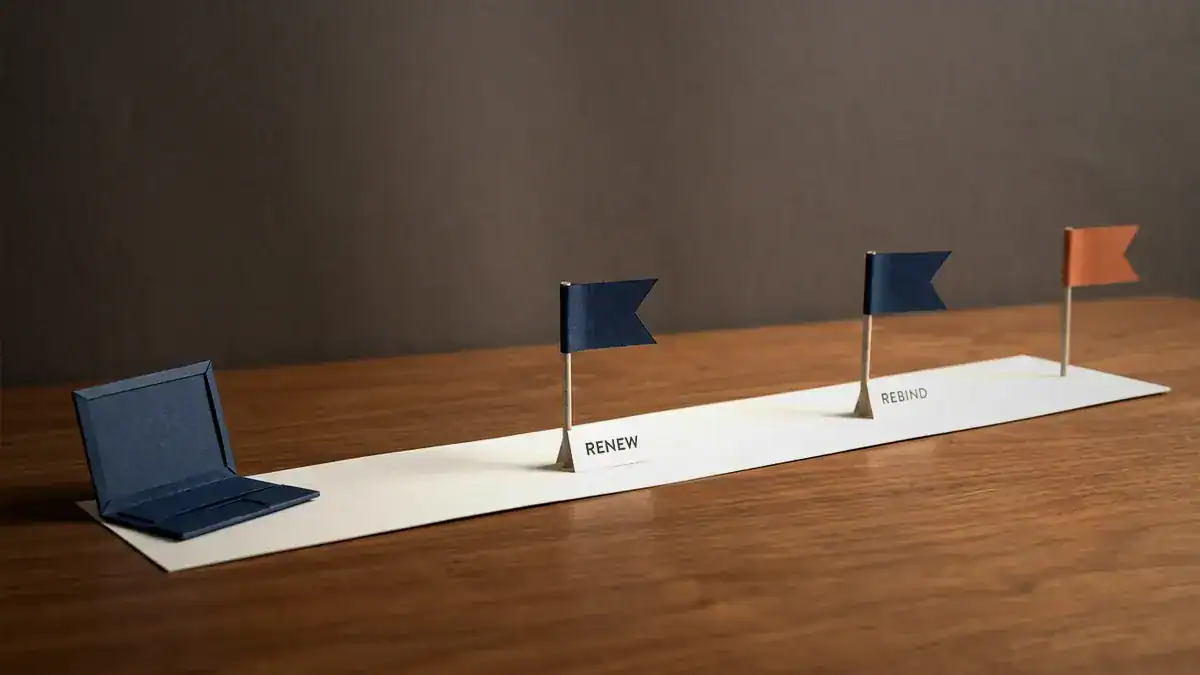
T1 at 50% of the lease: renew with the same server by unicast. T2 at 87.5%: rebind with any server by broadcast. At 100% the address is gone. On a 1-day lease that’s 12 hours and 21 hours.
What is DHCP relay, and what does a relay agent do?
DHCP starts with a broadcast, and routers don’t forward broadcasts. So without help, every subnet needs its own DHCP server.
A DHCP relay agent fixes that. It’s a router interface (or a Layer 3 switch SVI) that listens for DHCP broadcasts on its subnet, writes its own interface address into the giaddr field, and unicasts the message to a server somewhere else. The server reads giaddr to decide which pool to use. Cisco’s wording: the server “matches the DHCPDISCOVER with a DHCP pool that has the subnet that contains the IP address in the giaddr field.”
That one field does two jobs. It picks the pool, and it’s where the reply goes. So the server needs a route back to the giaddr address. Forget it and the Discover arrives, the server builds an Offer, and the Offer goes nowhere.
On Cisco IOS, the relay is enabled on an interface only when you add ip helper-address. And the helper forwards more than DHCP. Cisco’s ip forward-protocol reference lists nine UDP ports forwarded by default once a helper is set (Cisco IOS IP Application Services Command Reference):
| Port | Service |
|---|---|
| 67, 68 | BOOTP/DHCP server and client |
| 69 | TFTP |
| 53 | DNS |
| 37 | Time |
| 137, 138 | NetBIOS name and datagram |
| 49 | TACACS |
| 42 | IEN-116 name service |
Plenty of lists give eight and miss 42. If you only want DHCP relayed, turn the others off with no ip forward-protocol udp <port>.
Relays can also add option 82, the relay agent information option from RFC 3046, which tags a request with details like the circuit or port it came in on. Switches running DHCP snooping use it too, and that’s a topic of its own.
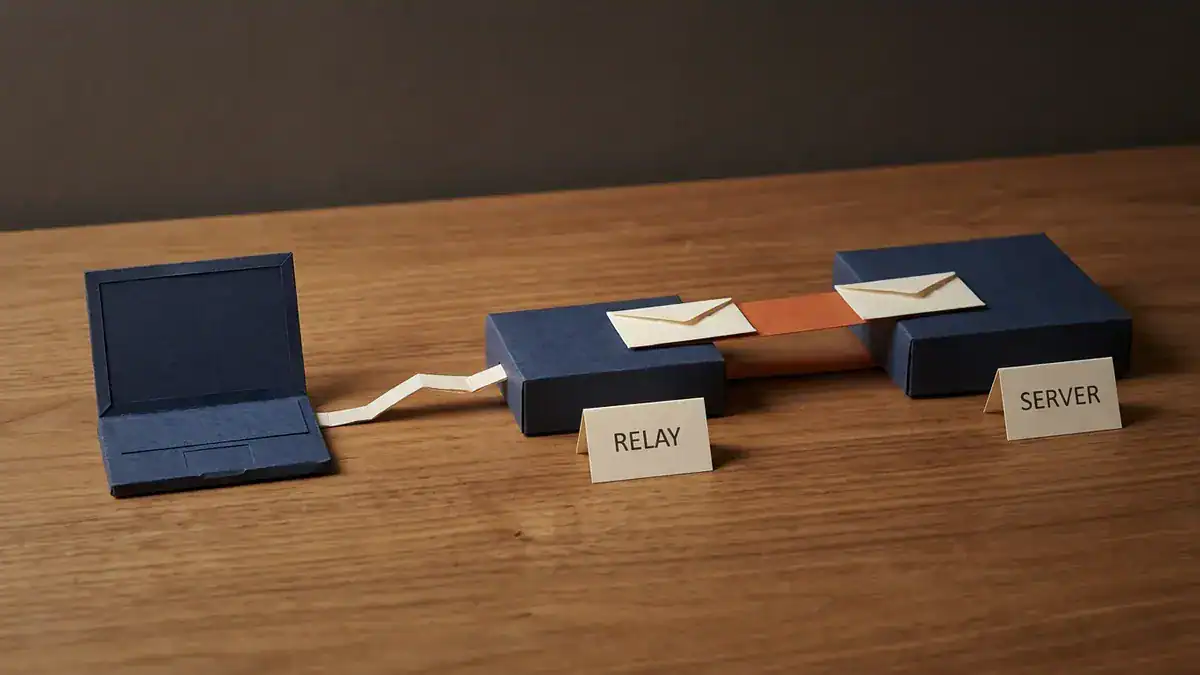
The relay (R2, 192.168.50.1) turns the client’s broadcast into a unicast to the server (R1, 10.0.12.1). The orange leg runs UDP 67 in both directions.
How do you configure DHCP on a Cisco router?
Here’s a small lab you can build in EVE-NG or Packet Tracer. R1 at head office is the DHCP server. R2 at a branch is the relay for a guest LAN.
- R1 G0/0: 10.0.12.1/30, toward R2
- R2 G0/0: 10.0.12.2/30, toward R1
- R2 G0/1: 192.168.50.1/24, the guest LAN (the clients’ default gateway)
R1: the DHCP server
! Keep the first ten addresses out of the pool. This goes on the SERVER.
ip dhcp excluded-address 192.168.50.1 192.168.50.10
!
ip dhcp pool GUEST
 network 192.168.50.0 255.255.255.0
 default-router 192.168.50.1
 dns-server 10.0.99.53
 domain-name guest.lab
 lease 0 2
!
interface GigabitEthernet0/0
 ip address 10.0.12.1 255.255.255.252
 no shutdown
!
! The reply goes to giaddr 192.168.50.1, so R1 needs a way back
ip route 192.168.50.0 255.255.255.0 10.0.12.2
A few things worth knowing:
lease 0 2means 0 days, 2 hours. The syntax islease {days [hours [minutes]] | infinite}. Leave it out and you get one day.default-routeris the gateway on the client’s subnet, R2’s 192.168.50.1. Not R1. It’s an easy mistake with relays and with router on a stick.10.0.99.53stands in for your DNS resolver. Use whatever your clients should query.- The Cisco DHCP server and relay services are on by default. The pool is what actually starts R1 handing out addresses.
R2: the relay
interface GigabitEthernet0/1
 ip address 192.168.50.1 255.255.255.0
 ip helper-address 10.0.12.1
 no shutdown
!
interface GigabitEthernet0/0
 ip address 10.0.12.2 255.255.255.252
 no shutdown
The helper goes on the interface facing the clients, the one that hears the broadcast. Not the uplink. And there’s no pool and no exclusion on R2. An ip dhcp excluded-address on the relay does nothing for a pool that lives on R1.
A router as a DHCP client
For a router interface that should get its own address by DHCP, like an internet-facing port on a small branch:
interface GigabitEthernet0/2
 ip address dhcp
On Windows, the client-side commands are ipconfig /all to see the lease, ipconfig /release (which sends a DHCPRELEASE to the server) and ipconfig /renew (Microsoft ipconfig reference).
How do you verify it?
| Command (on R1) | What it tells you |
|---|---|
show ip dhcp binding | Every leased address, the client it’s bound to and when the lease expires |
show ip dhcp pool | How big each pool is and how many addresses are leased |
show ip dhcp conflict | Addresses the server pulled from the pool because a ping got an answer |
show ip dhcp server statistics | Counts of the messages the server has sent and received. Discovers climbing with no Requests means your Offers aren’t getting back |
That last check is the fastest relay test there is. Discovers arriving means the helper works. No Requests means the reply path is broken, so check the route to giaddr first.
Worked example: why the guest Wi-Fi runs out of addresses at 17:45
Take the guest LAN above, but with the lease left at the default. Here are the numbers:
- Subnet 192.168.50.0/24: 254 usable addresses
- Excluded .1 to .10: 244 addresses left in the pool
- Open 08:00 to 20:00, about 300 devices a day, spread evenly: 25 an hour, one every 2.4 minutes
- Each device stays about an hour
- Worst case: phones leave without sending a DHCPRELEASE, so their bindings sit there until they expire
With the IOS default of one day, nothing a guest takes today comes back today. Device 245 arrives 244 × 2.4 = 585.6 minutes after opening, which is 9 hours 45 minutes and a bit. That’s 17:45, and it gets nothing. From then until close, 56 guests join the Wi-Fi and never get an address.
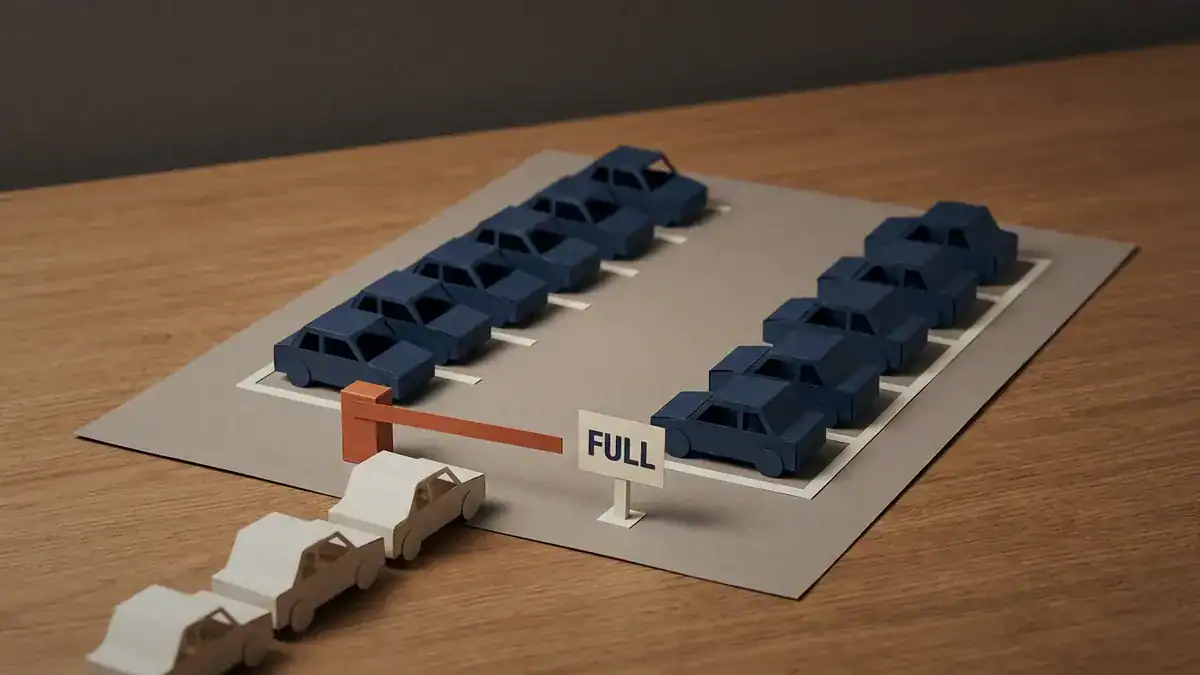
244 addresses, 25 new guests an hour and a 1-day lease: the pool fills at 17:45 and the last 56 guests of the day get nothing.
Now the fix everyone tries first: halve the lease to 12 hours. It changes nothing. The earliest guest arrives at 08:00, and their lease can’t end before 08:00 + 12 hours = 20:00. That’s closing time. So at 17:45 every one of the 244 bindings is still live, and the same 56 people get turned away at the same minute.
What actually works is a lease shorter than the day, close to how long guests stay. When a visit is shorter than T1, the client never renews, so each binding lasts exactly one lease. The number in use settles at roughly arrivals per hour × lease hours:
| Lease | T1 / T2 | Peak addresses in use | Guests refused | First refusal |
|---|---|---|---|---|
| 1 day (default) | 12 h / 21 h | 244 (full) | 56 | 17:45 |
| 12 hours | 6 h / 10.5 h | 244 (full) | 56 | 17:45 |
| 4 hours | 2 h / 3.5 h | 101 | 0 | none |
| 2 hours | 1 h / 1.75 h | 51 | 0 | none |
(Peak figures come from a minute-by-minute simulation of the numbers above, and they match the rule of thumb: 25 × 4 ≈ 100, 25 × 2 ≈ 50.)
The other fix is a bigger subnet. A /23 gives 510 usable addresses, enough for all 300 guests at the default lease with room to spare. The short lease is the smaller change: one line on the server and no renumbering. And don’t copy it everywhere. On a staff VLAN where the same 150 laptops come back every morning, the one-day default is fine, because those devices renew and keep their addresses.
Which DHCP options matter?
DHCP options are numbered fields that carry everything beyond the address itself. RFC 2132 defines most of them. These are the ones you’ll actually meet:
| Option | Name | Cisco pool command, if any |
|---|---|---|
| 1 | Subnet mask | set by network |
| 3 | Router (default gateway) | default-router |
| 6 | DNS servers | dns-server |
| 50 | Requested IP address | client sends it |
| 51 | IP address lease time | lease |
| 53 | DHCP message type (1 Discover, 2 Offer, 3 Request, 4 Decline, 5 ACK, 6 NAK, 7 Release, 8 Inform) | n/a |
| 54 | Server identifier | server sends it |
| 58 / 59 | Renewal (T1) / rebinding (T2) time | derived from the lease |
| 82 | Relay agent information (RFC 3046) | added by relays and switches |
Option 53 is the one to know for packet captures. Every DHCP packet carries it, and it’s how Wireshark knows a Request from an ACK.
What breaks DHCP, and how do you find it?
Most DHCP faults show up as one of these five.
Why does a device get a 169.254 (APIPA) address?
That’s APIPA, or IPv4 link-local (RFC 3927). The client sent Discovers, nothing answered, and it gave itself an address from 169.254.0.0/16 so it can at least talk to its neighbours. It’s a symptom, not a cause. Check the access VLAN, the cable, whether the helper is on the right interface, and whether the server’s pool exists. Our guide to private IP address ranges covers what 169.254 is and why it never routes.
Why does DHCP work on one subnet but not another?
It’s a relay problem. Walk the four legs from the port table: helper on the client-facing interface, route from the server back to giaddr, ACLs allowing UDP 67 in both directions between the routers, and a pool whose network matches the giaddr subnet.
Why do clients get an address that’s already in use?
Somebody gave a printer a static address inside the pool. Cisco’s ping check usually catches it and parks the address in show ip dhcp conflict. The real fix is an ip dhcp excluded-address on the server for every static in that range.
Why do new devices stop getting addresses mid-afternoon?
The pool is full. Run show ip dhcp pool and compare leased addresses with the pool size, then do the worked example’s maths with your own numbers.
Why do clients get an address from the wrong network?
Someone plugged in a home router, and now there are two DHCP servers on the VLAN. The client can’t tell the rogue one from the real one. On a Cisco switch the fix is DHCP snooping: every port starts untrusted, and server messages like Offers and ACKs are dropped unless they arrive on a port you’ve marked with ip dhcp snooping trust (Cisco, DHCP snooping on Catalyst 9000). That’s covered in our guide to DHCP snooping.
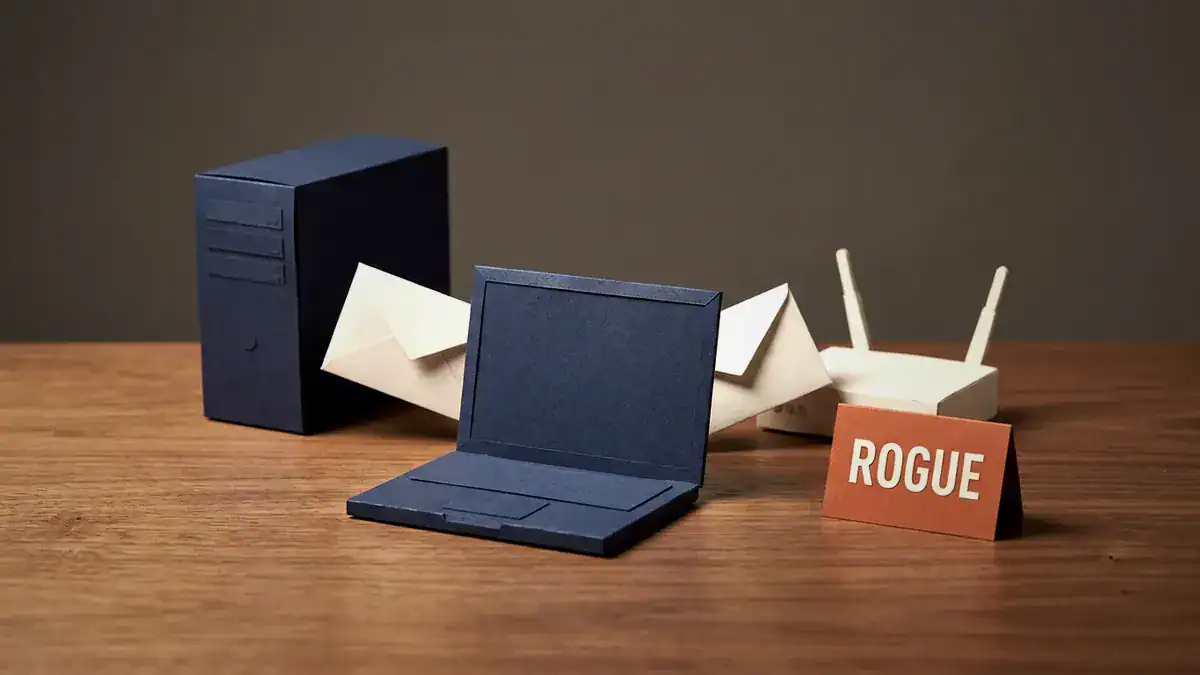
Two servers answer the same Discover, and many clients simply take the first Offer. DHCP snooping drops Offers that arrive on untrusted ports.
Is DHCP on the CCNA exam?
Yes, and the weight shifts with the new version. Straight from Cisco’s exam topic PDFs:
| Exam | Topic | Wording |
|---|---|---|
| CCNA v1.1, IP Services (10%) | 4.3 | Explain the role of DHCP and DNS within the network |
| 4.6 | Configure and verify DHCP client and relay | |
| CCNA v1.1, Security Fundamentals (15%) | 5.7 | Configure and verify Layer 2 security features (DHCP snooping, …) |
| CCNA v2.0, Network Infrastructure and Connectivity (25%) | 1.7 | Troubleshoot DHCPv4 client, server, and relay on IOS devices |
| CCNA v2.0, Network Services and Security (20%) | 4.7.a | DHCP snooping |
Two changes in v2.0. The server joins the client and relay, so the ip dhcp pool config above is now fair game. And the verb goes from “configure and verify” to “troubleshoot”, which means reading broken output, not typing a clean config. The fault list above is close to what that looks like.
Timing: Cisco says CCNA v1.1 is available through 2027-02-02 (Cisco Learning blog), and v2.0 starts on 2027-02-03. For everything else that changed, see our breakdown of what’s new in CCNA v2.0.
Studying for CompTIA Network+ instead? Our Network+ practice test includes DHCP questions you can check yourself against.
One scope note. Everything here is DHCPv4. IPv6 hosts get addresses through SLAAC, DHCPv6 or both, and DHCPv6 is a separate protocol with its own messages and ports.
Frequently asked questions
Should DHCP be on or off?
On, for client devices on nearly every network. Laptops, phones and guests should all use DHCP. Give routers, switches and servers static addresses outside the pool, and give printers and cameras either a static address or a DHCP reservation.
Does DHCP change your IP address?
It can, but usually doesn’t. A client that renews before its lease runs out normally keeps the same address, and a server tries to give a returning client its previous address if it’s still free. The address changes when the lease expires while the device is away and someone else takes it.
What’s the difference between DHCP and DNS?
DHCP gives a device its address and network settings. DNS turns names like cisco.com into addresses. They meet in option 6, where the DHCP server tells the client which DNS server to ask.
Should DHCP and DNS be on the same server?
They can be. Nothing in either protocol needs them apart, and plenty of small networks run both on one box. The protocols don’t depend on each other, so splitting them is a design choice about redundancy and who manages what.
What’s the difference between DHCP and a static IP?
A static IP is typed onto the device and never changes unless someone changes it. A DHCP address is lent by a server and can be reclaimed when the lease ends. Use static for infrastructure the network depends on, and DHCP for everything that comes and goes.
What is a DHCP reservation?
A reservation is manual allocation: the server always gives one specific client, identified by its MAC address or client ID, the same address. You still manage it from the DHCP server, which beats walking to the printer to change a static IP
Bottom line
DHCP is four messages and two ports, and that’s enough to pass the definition questions. What breaks real networks is the next layer down: the relay that needs a route back to giaddr, the port 67 leg between routers, the exclusion typed on the wrong box, and a one-day default lease on a VLAN where people stay for an hour.
So build it. Set up R1 and R2 as above, watch the Discover counter climb in show ip dhcp server statistics, then delete the static route and watch the Requests stop. Our list of free CCNA labs in EVE-NG gets the topology running, and if you’re serving several VLANs from one router, router on a stick shows where each pool’s gateway comes from. The VLAN vs subnet guide explains why each VLAN gets its own pool, and once addresses are flowing, what is NAT takes them out to the internet.
If you’d rather have the labs ready to boot, the CCNA lab workbook covers DHCP server, relay and snooping with verified solutions. Keep the Cisco commands cheat sheet open while you work, and grab the free CCNA 200-301 study notes PDF for revision.