Two laptops. Same room, same switch, same cable run. And they can’t ping each other.
That isn’t a fault. That’s a VLAN doing exactly what it was built to do.
A VLAN, or virtual LAN, splits one physical switch into several separate networks. Devices on VLAN 10 can’t reach devices on VLAN 20 without a router, even when they’re plugged into the same switch. That’s the whole idea. If the lab isn’t built yet, start at the EVE-NG installation guide and come back.
If you’re studying for the CCNA, this topic isn’t optional. VLANs sit under exam topic 2.1 of the Cisco 200-301 blueprint, and interswitch connectivity, which covers trunks, 802.1Q and the native VLAN, sits under 2.2. Between them they account for a solid chunk of the Network Access section.
This guide walks the whole topic: what a VLAN is, how tagging works at the byte level, the difference between access and trunk ports, the native VLAN trap that catches people on exam day, the Cisco commands to configure the lot, and a lab you can build tonight to prove it.
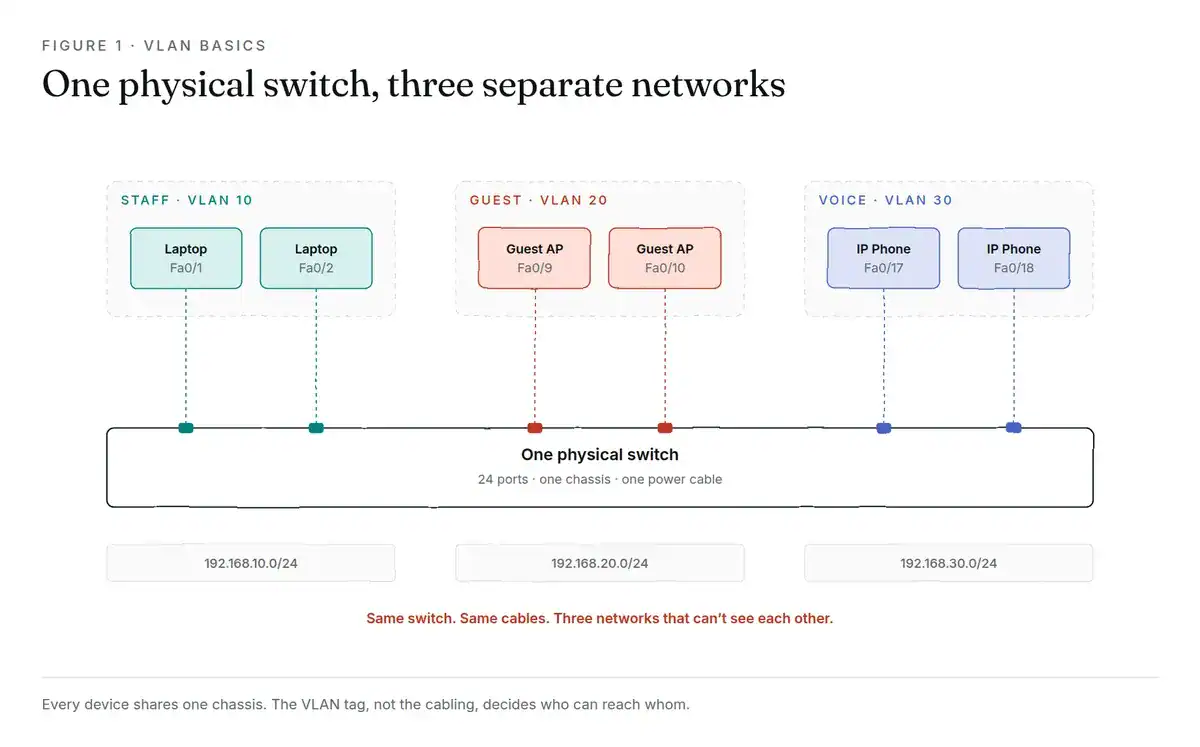
Figure 1: every device shares one chassis. The VLAN tag, not the cabling, decides who can reach whom.
Why Split a Switch at All?
Picture a 24-port switch in a small office. Ports 1 to 12 go to staff laptops. Ports 13 to 24 feed the guest Wi-Fi access points.
Without VLANs, every one of those devices sits in one flat network. A visitor on guest Wi-Fi can scan the network and find the accounting server. Not because anyone made a mistake, but because a switch’s default job is to let everything talk to everything.
Put staff on VLAN 10 and guests on VLAN 20, and that same scan returns nothing. Same switch. Same cables. Two networks that don’t know the other exists.
How Does a VLAN Actually Work?
VLANs operate at Layer 2, the data link layer. The switch keeps a separate MAC address table per VLAN, so it never learns that a VLAN 20 device is reachable from VLAN 10.
Broadcast traffic is where this really pays off. A broadcast is a frame sent to every device on the network: ARP requests, DHCP discovery, and a steady stream of background chatter. The set of devices that receives those broadcasts is called a broadcast domain.
One flat network is one big broadcast domain. Every ARP request from every device reaches every other device. Split that into four VLANs and you get four smaller broadcast domains, each quieter than the original.
Fewer broadcasts means less wasted bandwidth and less CPU burned on frames a device was only ever going to discard.
Building your first lab? Our free CCNA labs in EVE-NG include a VLAN topology you can boot in a few minutes and break on purpose.
VLAN vs Subnet: What’s the Difference?
This one trips up almost everyone, and the confusion is understandable, because in practice you nearly always map one VLAN to one subnet.
They’re different things doing different jobs at different layers.
| VLAN | Subnet | |
|---|---|---|
| Layer | 2 (data link) | 3 (network) |
| Identified by | VLAN ID, 1 to 4094 | IP range plus mask |
| Configured on | Switch ports | Router interfaces, DHCP scopes |
| Controls | Which devices share a broadcast domain | Which IP addresses talk without a router |
| Enforced by | The switch | The router |
Here’s the short version. A VLAN decides who’s in the same broadcast domain. A subnet decides who’s in the same IP neighbourhood. You pair them because a broadcast domain with two subnets in it, or a subnet spread across two broadcast domains, is a troubleshooting headache nobody wants. That distinction trips up nearly everyone, so we wrote VLAN vs subnet on its own.
Put VLAN 10 with 192.168.10.0/24 and VLAN 20 with 192.168.20.0/24, and everything behaves predictably.
If the subnet half of that feels shaky, work through our subnetting guide with practice questions first. VLANs make a lot more sense once the addressing does.
Types of VLANs
The types below aren’t really technical categories, more like job descriptions. The switch treats them all the same way, and you name them by what they carry.
| Type | Carries | Why it exists |
|---|---|---|
| Data | Normal user traffic | The default job. Laptops, printers, servers. |
| Voice | IP phone traffic | Phones get their own tag and priority marking, so a big file download doesn’t wreck a call. |
| Management | SSH, SNMP, switch administration | Keeps admin access off the network your users sit on. |
| Native | Untagged traffic on a trunk | Backwards compatibility. More on this below. |
| Default | Everything, out of the box | VLAN 1. Every port starts here. |
One rule worth memorising now: don’t leave user traffic on VLAN 1. It’s the default on every Cisco switch, every attacker knows it, and control-plane protocols like CDP and DTP use it. Move your users somewhere else.
VLAN Tagging and 802.1Q
Here’s the question that follows naturally. If a single cable between two switches carries traffic for VLAN 10 and VLAN 20, how does the switch on the far end tell them apart?
It reads the tag.
What’s Inside the 4-Byte Tag
IEEE 802.1Q, which engineers say out loud as “dot1q”, defines a 4-byte tag inserted into the Ethernet frame right after the source MAC address. Four bytes, four fields:
| Field | Size | What it does |
|---|---|---|
| TPID | 16 bits | Set to 0x8100. Flags the frame as tagged. |
| PCP | 3 bits | Priority, 0 to 7. This is the field QoS uses to push voice ahead of file transfers. |
| DEI | 1 bit | Marks a frame as safe to drop first if the link congests. |
| VID | 12 bits | The VLAN ID itself. |
That 12-bit VLAN ID field is where the famous number comes from. Twelve bits gives 4,096 values, and two of them are reserved, so you get 4,094 usable VLANs.
The tag goes on when a frame enters a trunk and comes off when it leaves for an end device. Your laptop never sees a VLAN tag. It has no idea it’s on a VLAN at all, which is exactly the point. Knowing which layer owns what saves hours of troubleshooting, and the OSI model cheat sheet PDF is a free one-pager.
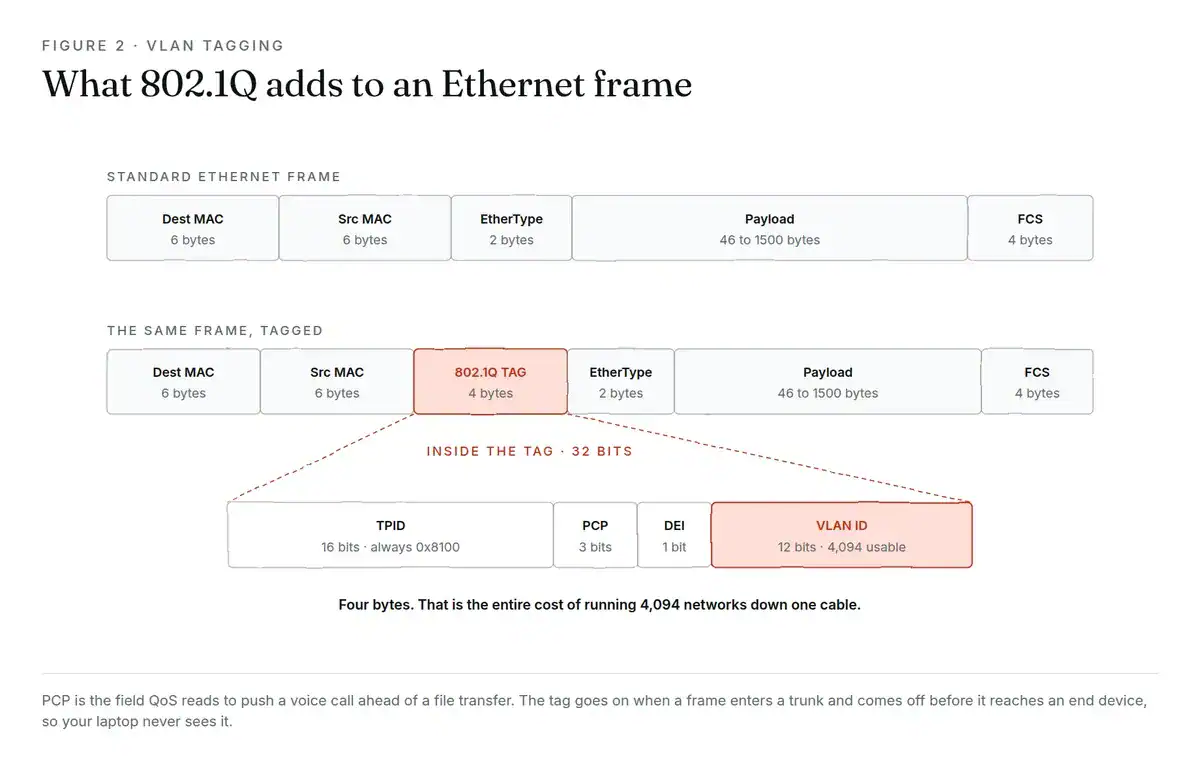
Figure 2: four bytes, inserted after the source MAC, is the entire cost of running 4,094 networks down one cable.
VLAN ID Ranges You Need to Know
| Range | Name | Notes |
|---|---|---|
| 0 and 4095 | Reserved | Not usable |
| 1 | Default VLAN | Every port lives here until you move it |
| 2 to 1001 | Normal range | What the CCNA tests. Stored in vlan.dat on flash. |
| 1002 to 1005 | Reserved | Legacy FDDI and Token Ring |
| 1006 to 4094 | Extended range | Needs VTP transparent mode on older switches |
Access Ports vs Trunk Ports
Every switch port does one of two jobs. Get this distinction solid and half of VLAN troubleshooting becomes obvious.
| Access port | Trunk port | |
|---|---|---|
| VLANs carried | One | Many |
| Tagging | Untagged | Tagged, except the native VLAN |
| Connects to | PC, printer, camera, access point | Another switch, or a router |
| Command | switchport mode access | switchport mode trunk |
An access port faces an end device and carries exactly one VLAN. Frames arrive untagged, the switch tags them internally, and they leave untagged. The device on the end never knows.
A trunk port faces another piece of network gear and carries traffic for many VLANs at once, each frame tagged so the far end can sort them. One cable between two switches, all your VLANs across it.
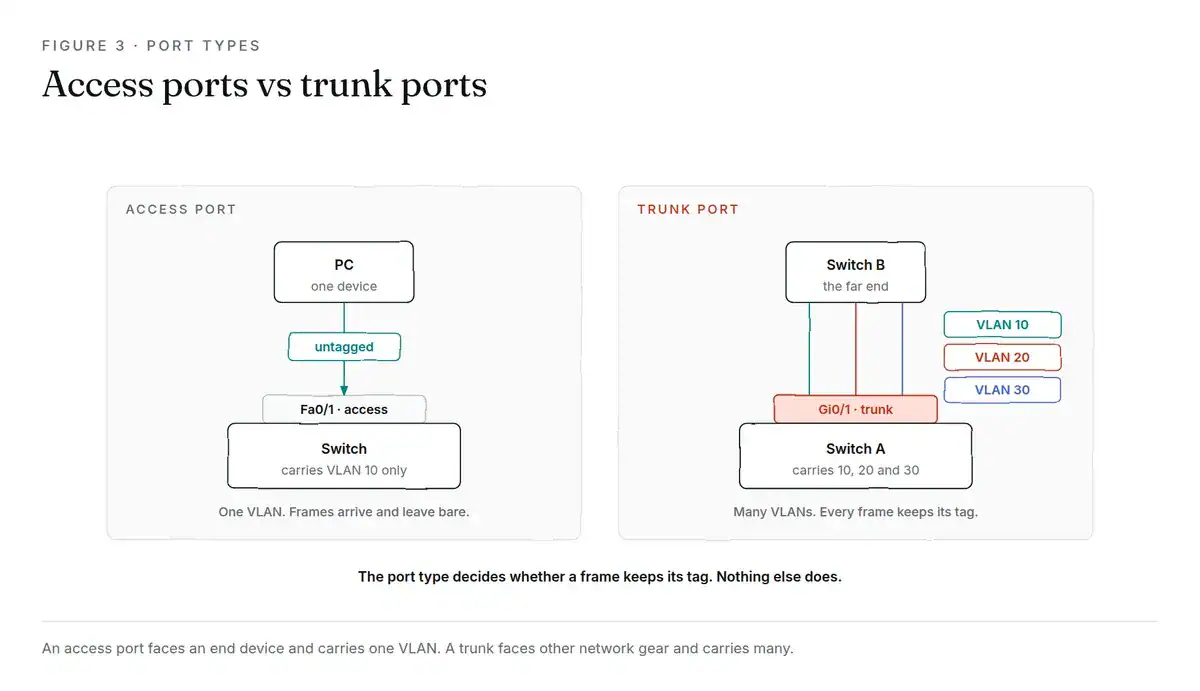
Figure 3: the port type decides whether a frame keeps its tag. Nothing else does.
What Is a Native VLAN, and Why Does It Break Things?
The native VLAN is the one VLAN on an 802.1Q trunk whose traffic crosses untagged.
It exists for backwards compatibility. When 802.1Q was new, plenty of devices couldn’t read a tag at all, so the standard kept one VLAN untagged so those devices could still work over a trunk.
Two rules govern it:
- Inbound: an untagged frame arriving on a trunk port gets placed in that port’s native VLAN.
- Outbound: a frame belonging to the native VLAN has its tag stripped before it crosses the trunk.
Now the part that catches people. The native VLAN is configured per port and it’s locally significant. Nothing stops you setting native VLAN 1 on one end of a trunk and native VLAN 99 on the other.
When that happens, traffic leaving switch A untagged in VLAN 1 arrives at switch B and gets dropped straight into VLAN 99. Two VLANs quietly merge. No error, no interface going down, just traffic in the wrong place and a network that behaves strangely on Tuesdays.
CDP will log a native VLAN mismatch, which is your one clue. That mismatch is a favourite exam question precisely because the symptom looks nothing like the cause.
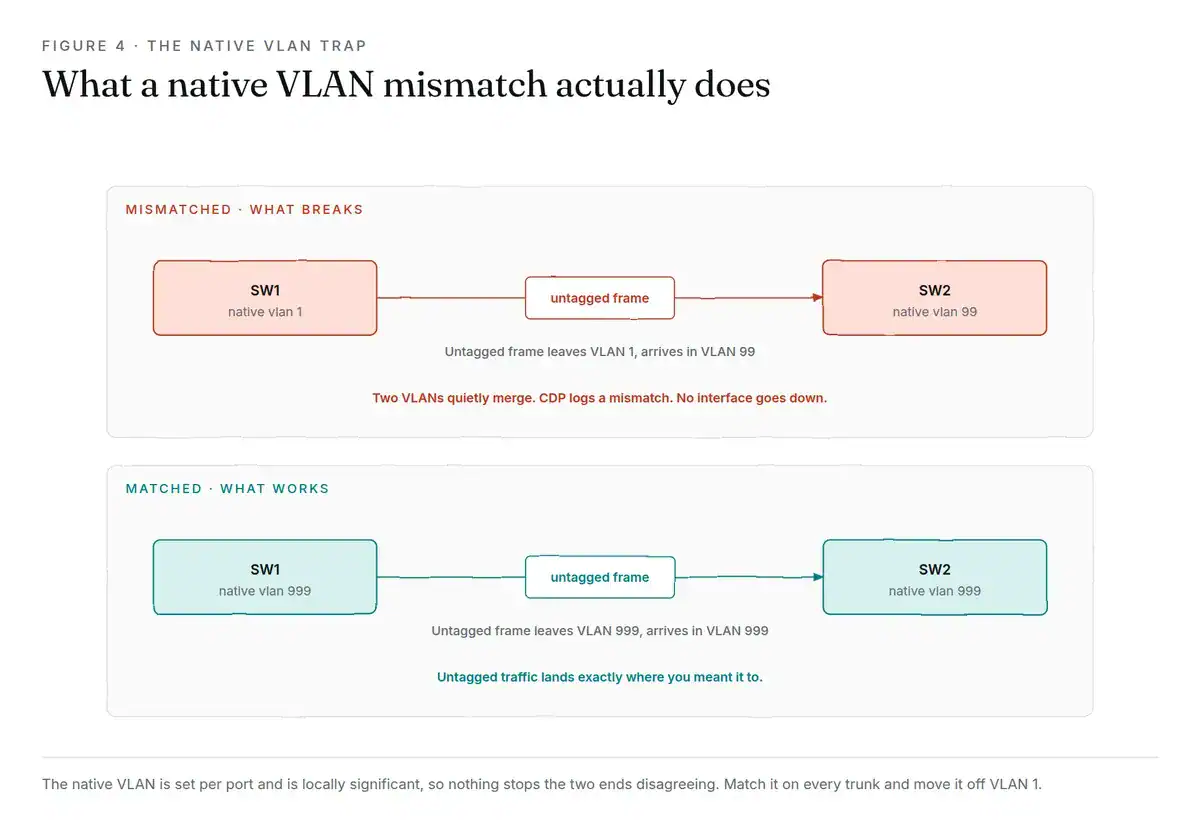
Figure 4: mismatch the native VLAN and two VLANs merge silently. Nothing goes down.
Cisco’s hardening guidance says to move it off VLAN 1 to a dedicated, unused ID, and to match it on both ends of every trunk:
Switch(config)# interface gigabitEthernet 0/1
Switch(config-if)# switchport trunk native vlan 999
How to Configure a VLAN (Cisco Commands)
Time to build it. Two VLANs, access ports for each, and a trunk between two switches.
Create the VLANs
Switch> enable
Switch# configure terminal
Switch(config)# vlan 10
Switch(config-vlan)# name STAFF
Switch(config-vlan)# exit
Switch(config)# vlan 20
Switch(config-vlan)# name GUEST
Switch(config-vlan)# exit
Naming them is optional. Do it anyway. Six months from now show vlan brief reading STAFF and GUEST is worth far more than reading 10 and 20.
Assign the Access Ports
Switch(config)# interface range fastEthernet 0/1 - 12
Switch(config-if-range)# switchport mode access
Switch(config-if-range)# switchport access vlan 10
Switch(config-if-range)# exit
switchport mode access matters more than it looks. Without it the port stays in dynamic auto mode and can be talked into becoming a trunk by anything that speaks DTP. Which brings us to VLAN hopping shortly.
Build the Trunk
Switch(config)# interface gigabitEthernet 0/1
Switch(config-if)# switchport trunk encapsulation dot1q
Switch(config-if)# switchport mode trunk
Switch(config-if)# switchport trunk native vlan 999
Switch(config-if)# switchport trunk allowed vlan 10,20
Switch(config-if)# switchport nonegotiate
Switch(config-if)# end
On newer switches that only support 802.1Q, the encapsulation line is rejected as unnecessary. That’s fine, skip it.
switchport trunk allowed vlan is worth the extra keystrokes. A trunk carries every VLAN by default. Listing only what you need keeps traffic off links that shouldn’t see it.
Verify It Worked
Configuration you haven’t verified is a guess. Two commands:
Switch# show vlan brief

VLAN Name                             Status    Ports
---- -------------------------------- --------- -------------------------------
1    default                          active    Fa0/13, Fa0/14, Fa0/15
10   STAFF                            active    Fa0/1, Fa0/2, Fa0/3, Fa0/4
20   GUEST                            active    Fa0/16, Fa0/17, Fa0/18
999  NATIVE-UNUSED                    active
Switch# show interfaces trunk
Port Mode Encapsulation Status Native vlan
Gi0/1 on 802.1q trunking 999
Port Vlans allowed on trunk
Gi0/1 10,20Check three things in that output. Status says trunking, not not-trunking. Native VLAN matches the other end. The allowed list holds the VLANs you expect.
If a port you assigned doesn’t appear next to its VLAN in show vlan brief, it’s almost always still a trunk, or it’s shut down.
Ready to practise this properly? The CCNA lab workbook ships every VLAN topology in this article as a lab file that boots in EVE-NG, with the configs, the verification output and the broken versions you’re meant to fix.
Getting Between VLANs: Inter-VLAN Routing
The CCNA lab workbook has these labs ready to boot, with configs and answers included. Once routing between sites matters, read how BGP MED decides inbound paths.
Anything moving between VLANs has to pass through something that routes. Two ways to do that.
Router on a stick. One physical router interface, split into logical subinterfaces, one per VLAN, connected to the switch over a single trunk:
Router(config)# interface gigabitEthernet 0/0.10
Router(config-subif)# encapsulation dot1Q 10
Router(config-subif)# ip address 192.168.10.1 255.255.255.0
Cheap and fine for small networks. Every packet between VLANs crosses that one link twice, so it becomes the bottleneck as you grow.
Layer 3 switch with SVIs. A switched virtual interface is a virtual interface for a VLAN, living on the switch itself:
Switch(config)# ip routing
Switch(config)# interface vlan 10
Switch(config-if)# ip address 192.168.10.1 255.255.255.0
Routing happens in switching hardware at wire speed. This is what real networks run.
VLAN Hopping and How to Stop It
That separation is only as good as your port configuration, and there are two known ways around it.
Switch spoofing. An attacker plugs into a port left in dynamic mode, speaks DTP, and negotiates a trunk. Now they receive tagged traffic for every VLAN on that trunk.
Double tagging. The attacker sends a frame carrying two 802.1Q tags. The first switch strips the outer one and forwards the frame, still carrying the inner tag, to a VLAN it was never meant to reach. This one only works when the attacker sits in the native VLAN, which is the practical reason that best practice exists.
Three fixes, all one-liners:
- Disable DTP on every port with
switchport nonegotiate, and set access ports explicitly toswitchport mode access. - Move the native VLAN off VLAN 1 to an unused ID, matched at both ends.
- Shut unused ports and park them in a dead VLAN. An empty port in VLAN 1 is an invitation.
Build This VLAN Lab Yourself
Reading about a native VLAN mismatch teaches you the definition. Causing one teaches you the symptom, and the symptom is what the exam actually asks about.
The topology is small:
- Two switches, connected by a single trunk
- Two VLANs, 10 and 20
- One PC in each VLAN, on each switch
- Addresses from 192.168.10.0/24 and 192.168.20.0/24
Four tests tell you whether it works:
- PC in VLAN 10 on switch A pings PC in VLAN 10 on switch B. Should succeed. Your trunk is carrying tagged traffic.
- PC in VLAN 10 pings PC in VLAN 20. Should fail. That’s the separation working.
- Change the native VLAN on one end of the trunk only. Watch the console for the CDP mismatch message.
- Add a router or an SVI, then repeat test 2. Should now succeed.
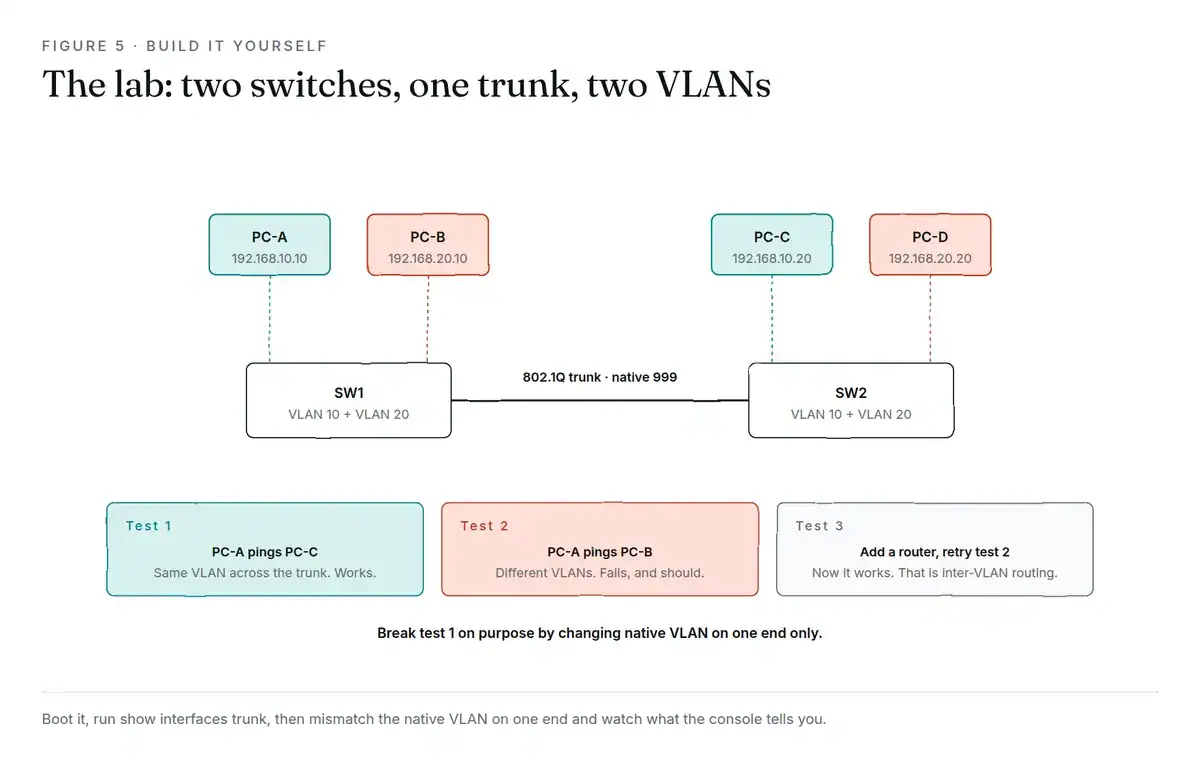
Figure 5: two switches, one trunk, two VLANs. Build it, then break it on purpose.
Test 3 is the one to spend time on. Break it, read what the switch tells you, then fix it.
If you haven’t got an environment yet, our home lab guide covers what you need, and the EVE-NG CCNA labs to build before exam day walks the setup end to end. The CCNA Lab Workbook ships the EVE-NG ISO plus graded lab scenarios, so you practise on a topology that’s already built.
VLAN FAQ
What’s the difference between a LAN and a VLAN?
A LAN is a physical network: the switches, cables and devices in one location. A VLAN is a logical network created inside that physical one. One LAN can hold dozens of VLANs, and one VLAN can stretch across several switches. The cables are physical, the boundaries are software.
Is a VLAN like a VPN?
No, and the similar names cause a lot of confusion. A VLAN segments a local network at Layer 2 inside a building. A VPN creates an encrypted tunnel across an untrusted network like the internet. VLANs don’t encrypt anything. Different layer, different job, different threat model.
Are VLANs still used in 2026?
Yes, everywhere. They’re still the default segmentation method in campus and branch networks and still a core CCNA topic. Newer approaches like microsegmentation and SD-Access add policy on top, and vendors selling those products will tell you VLANs are finished. In practice they usually run over a VLAN foundation rather than replacing it.
What are the disadvantages of VLANs?
Three real ones. They’re configured by hand, so they drift as networks grow and nobody documents the change. They don’t inspect traffic, so a device that’s compromised inside VLAN 10 can still reach everything else in VLAN 10. And a misconfigured trunk can undo the separation completely without anything appearing to be broken.
How do you explain a VLAN in an interview?
Keep it to two sentences and one example. “A VLAN splits a physical switch into separate logical networks, so devices on different VLANs need a router to talk even though they share the same hardware. We used them to keep guest Wi-Fi off the corporate network on the same switches.” Then wait. If they want 802.1Q and native VLANs, they’ll ask.
What to Do Next
It comes down to four ideas. A VLAN is a Layer 2 broadcast domain you create in software. 802.1Q tags frames with a 12-bit ID so a single trunk can carry many at once. Access ports carry one untagged, trunks carry many tagged. And the native VLAN crosses a trunk untagged, which makes it both useful and the most common way people break a working network.
Reading it once isn’t enough for the exam. Build the two-switch topology, run show interfaces trunk, then deliberately mismatch the native VLAN and watch what happens. Twenty minutes of that beats an hour of video.
The CCNA lab workbook has these labs ready to boot, with configs and answers included.
Still deciding between certifications? CCNA vs Network+ breaks down which one to sit first, and the Network+ practice questions include a VLAN section if you want to test yourself right now. Planning the MikroTik route? The MTCNA syllabus, cost and pass strategy covers it.