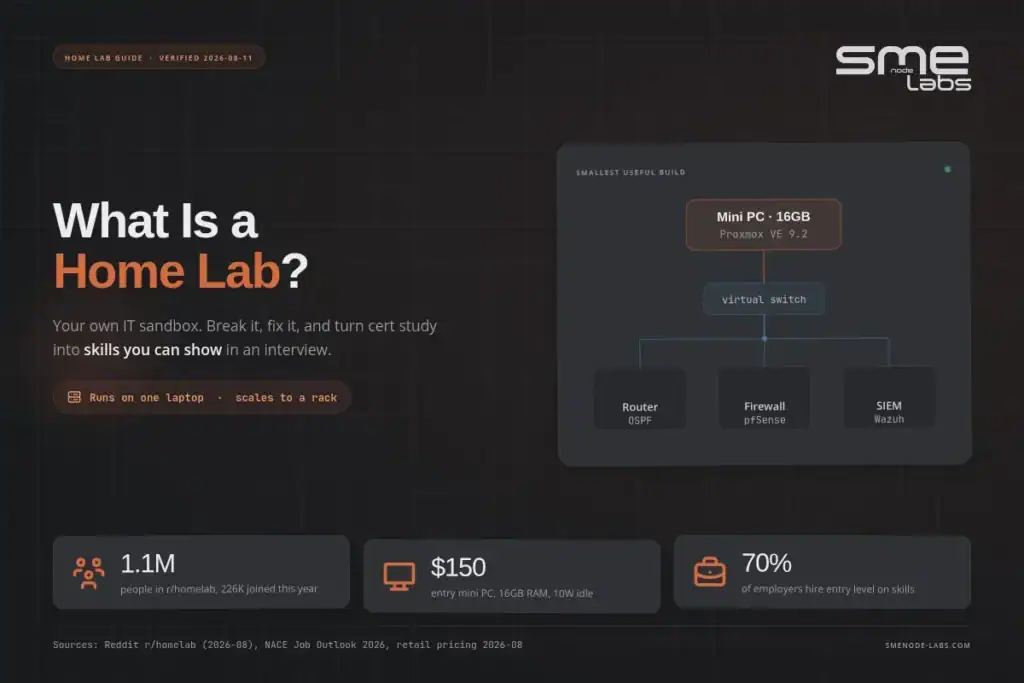
A home lab is your own IT sandbox for hands-on practice. What it is, what it really costs in 2026, and how to build one that matches your cert exam, whichever track you’re on.
Seventy percent of employers now use skills-based hiring for entry-level roles, up from 65% the year before, and GPA screening has collapsed from 73% of employers in 2019 to just 42% today (NACE Job Outlook 2026). Read that again. The paper matters less every year. What you can actually do matters more.
Which brings us to the question you came here for. What is a home lab? It’s a small IT environment you run at home, on your own gear, so you can build things, break things, and fix them without anyone paging you at 2am. Servers, switches, virtual machines, containers. Yours. That’s it.
You’ve probably read the same cert study advice five times by now: watch videos, take practice tests, repeat. And you still feel like you’d freeze if someone handed you a console cable. Fair. That gap between “I passed the quiz” and “I can configure this” is exactly what a home lab closes.
Here’s what this guide covers: the plain definition, how a home lab differs from a home server, what to build for your specific certification track, whether that’s CCNA, Security+, AWS, Azure, or DevOps, what it honestly costs in 2026, and a weekend plan to get your first one running.
Studying for Security+ specifically? Our SY0-701 exam questions are mapped to all five current domains.
What is a home lab, exactly?
A home lab is a personal computing and networking setup you build at home to learn, test, and experiment with IT systems, safe from any production network. We wrote the build out properly: a weekend home lab build with three budgets.
Why does that matter to you? Because everything in a home lab is disposable. Delete a VM, misconfigure a routing protocol, lock yourself out of a firewall. No change ticket. No angry Slack message. You just rebuild it and you understand it better than you did an hour ago.
The technical shape is flexible. A home lab can be one old laptop running a hypervisor with four virtual machines on it. It can be a $180 mini PC running Proxmox with a dozen containers. It can be three used enterprise servers, a managed switch, and a rack in the basement that makes your spouse ask questions. All of those count.
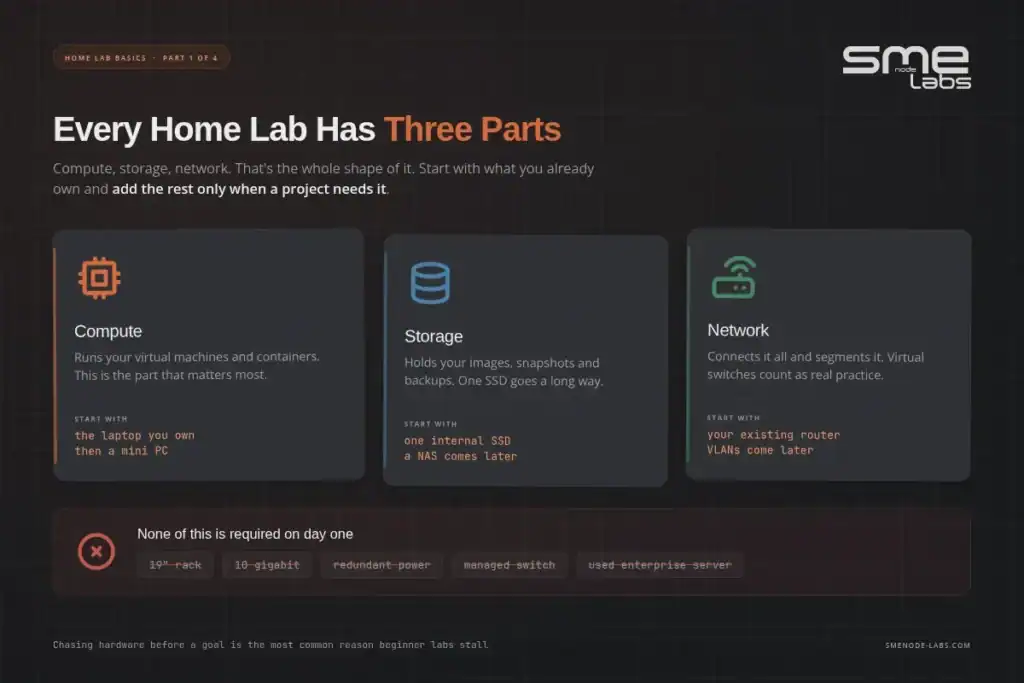
Three parts show up in nearly every build:
| Part | What it does | Typical starting point |
|---|---|---|
| Compute | Runs your VMs and containers | Mini PC, old desktop, laptop |
| Storage | Holds images, backups, shared files | Internal SSD, later a NAS |
| Network | Connects everything, segments it | Your existing router, later a managed switch or VLANs |
Home lab or homelab? And is it different from a home server?
Both spellings are fine. “Homelab” is the community’s word, especially on Reddit, where r/homelab has passed 1.1M members and added roughly 226K of them in the past year alone. “Home lab” is what people type into Google. Same thing.
The home server question is more useful. A home server runs services you depend on: your media library, your file shares, your photo backups. It needs to stay up, because your household notices when it doesn’t. A home lab is the opposite. It exists to be torn down.
Most people end up running both on one box, which is fine, right up until you nuke the VM your family was streaming from. Keep the stuff people rely on separate from the stuff you’re experimenting on. Learn that lesson cheap.
Why bother? The point of a home lab
Because reading about OSPF and configuring OSPF live in two different parts of your brain.
Picture the resume problem. Network+ certified, eight months into a help desk job, applying to junior network roles and hearing nothing back. Your resume says “knowledge of routing and switching.” So does every other applicant’s. In the third interview the hiring manager asks you to describe a time you troubleshot a network problem end to end. You talk about a practice question. You don’t get the job.
Now picture the same person after six weekends of lab work: three routers in EVE-NG, OSPF between them, a deliberately broken area border to figure out, plus a pfSense firewall and a Wazuh box catching simulated attacks. Same certification. Completely different interview. You’ve got stories, screenshots and a GitHub repo of configs. That’s the whole difference.
This is what the hiring data is telling us. McKinsey found hiring for skills is roughly five times more predictive of job performance than hiring on education. Employers know it. More than half of mid-to-large tech employers have dropped degree requirements for many roles. Portfolios and demonstrable ability are doing the filtering now.
A home lab is how you build that portfolio when nobody’s paying you to yet.
There’s a second payoff people underrate. Your lab is where you find out what you actually enjoy. Some people set up a firewall, spend a weekend reading logs, and realise security is the thing. Others touch Ansible once and never want to configure anything by hand again. You can’t discover that from a video course.
Home lab ideas, track by track
Here’s where most “what is a home lab” articles wander off into media servers and ad blockers. Useful hobby stuff. Not what gets you hired.
If you’re studying for a certification, build the lab that matches the exam blueprint, not a generic setup you found in a forum post. The quick map:
| Studying for | Build this in your lab | Skills it proves |
|---|---|---|
| CompTIA Network+ | 2-3 routers, VLANs, DHCP, DNS, subnet a /24 by hand | Addressing, switching, basic troubleshooting |
| Cisco CCNA | OSPF, EtherChannel, ACLs, NAT, static and dynamic routing | Configuration under time pressure, CLI fluency |
| CompTIA Security+ | pfSense or FortiGate firewall, segmented lab VLAN, a vulnerable VM to scan | Firewall rules, hardening, scanning |
| Cybersecurity roles | Wazuh SIEM, Suricata IDS, a Kali box attacking your own lab | Detection, log analysis, incident writeups |
| Azure or AWS | Hybrid setup: local VMs plus a free-tier cloud VPN | Cloud networking, identity, hybrid design |
| DevOps | Docker, Kubernetes on 3 nodes, a Git server, a CI runner | Containers, pipelines, infrastructure as code |
| Automation | Ansible pushing configs to your lab routers, Python with Netmiko | Scripting, idempotency, real automation |
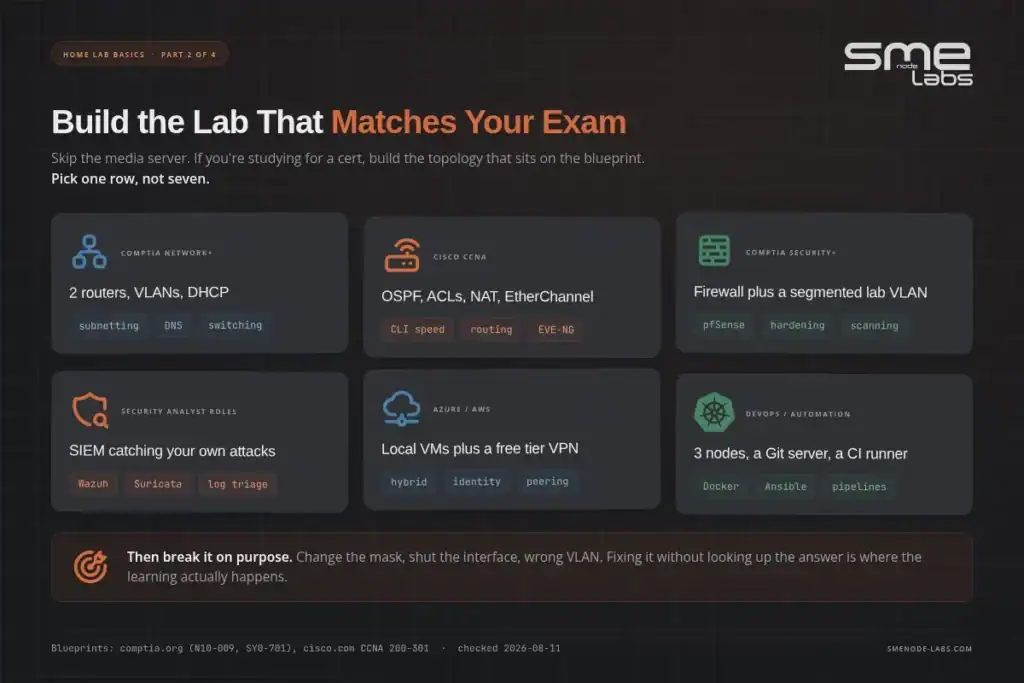
Home lab for CCNA and networking certs
This is the classic build, and it’s the cheapest one on the list: three to five routers or Layer 3 switches, OSPF or EIGRP between them, a couple of ACLs, and NAT on the edge. Run it entirely virtual in EVE-NG or Cisco Modeling Labs to start. Add a deliberately broken configuration once a week and fix it without the answer key.
Our CCNA workbook is built around exactly this: lab topologies with the configs you need to produce yourself, not copy. If your track leans automation instead of pure routing and switching, the CCNA Automation workbook pairs Python and Ansible with the same topology style. For a shortlist of specific builds to start with, we wrote up CCNA labs you can build free in EVE-NG.
Home lab for Security+ and cybersecurity roles
Start with a firewall you control end to end: pfSense is free, or use the same FortiGate most enterprise shops run. Segment your lab into a “trusted” VLAN and a “target” VLAN, drop a deliberately vulnerable VM (Metasploitable is the usual choice) into the target side, and scan it. Add Wazuh for log collection and alerting once the basics feel routine.
This track is where SMEnode Labs’ Wazuh workbook and FortiGate NSE4 workbook pick up. For a concrete first project, see installing Wazuh SIEM in a home lab with Docker.
Home lab for AWS and Azure certs
This is the track most “what is a home lab” guides skip entirely, and it’s a mistake, because cloud certs still reward hands-on practice, just not with your own hardware.
Run your identity and network fundamentals locally (a couple of Linux VMs, a small VPN), then use the actual free tier on AWS or Azure for the services that only exist in the cloud: IAM, S3 or Blob Storage, a managed database, a load balancer. The free tier genuinely covers a full Solutions Architect or Cloud Practitioner study plan if you watch your usage and tear resources down after each session. That habit, provisioning and destroying cleanly, is itself something the exam and the job both expect of you.
Our AWS Solutions Architect Professional workbook and Azure workbook map their labs to this exact free-tier-first approach.
Home lab for DevOps and automation
Three virtual nodes running Docker, a small Kubernetes cluster (k3s is the easy entry point on modest hardware), a Git server, and a CI runner you configure yourself. This is the track where your existing laptop goes furthest: containers don’t need much RAM until you start layering services.
The DevOps workbook walks the same stack with the pipeline tasks laid out.
What your build costs, by track
The tiered breakdown below (free, $200, $400+) applies to every track, but how far you need to go up that ladder depends on what you’re building. Rough guide:
| Track | Where most people land | Why |
|---|---|---|
| Network+ / CCNA | Free to Tier 1 (~$200) | Router and switch emulation is CPU-light; a mini PC runs a full topology comfortably |
| Security+ / cybersecurity | Tier 1, sometimes Tier 2 | SIEM and IDS tooling wants more RAM once you add log volume; most people are fine on one mini PC |
| AWS / Azure | Free (your side) plus a few dollars a month in cloud usage | Your local hardware only needs to run identity and networking basics; the cloud is the lab |
| DevOps | Free to Tier 1 | Containers are efficient; a Kubernetes cluster of 3 light nodes runs fine on 16GB total |
Nobody needs Tier 2 enterprise gear to pass a certification. Save that tier for when a specific project (large-scale virtualisation, out-of-band management practice) actually calls for it.
What is a home lab going to cost you in 2026?
Less than the internet thinks. But the cheap-option answer changed this year, and most articles still ranking haven’t caught up.
Tier 0: free
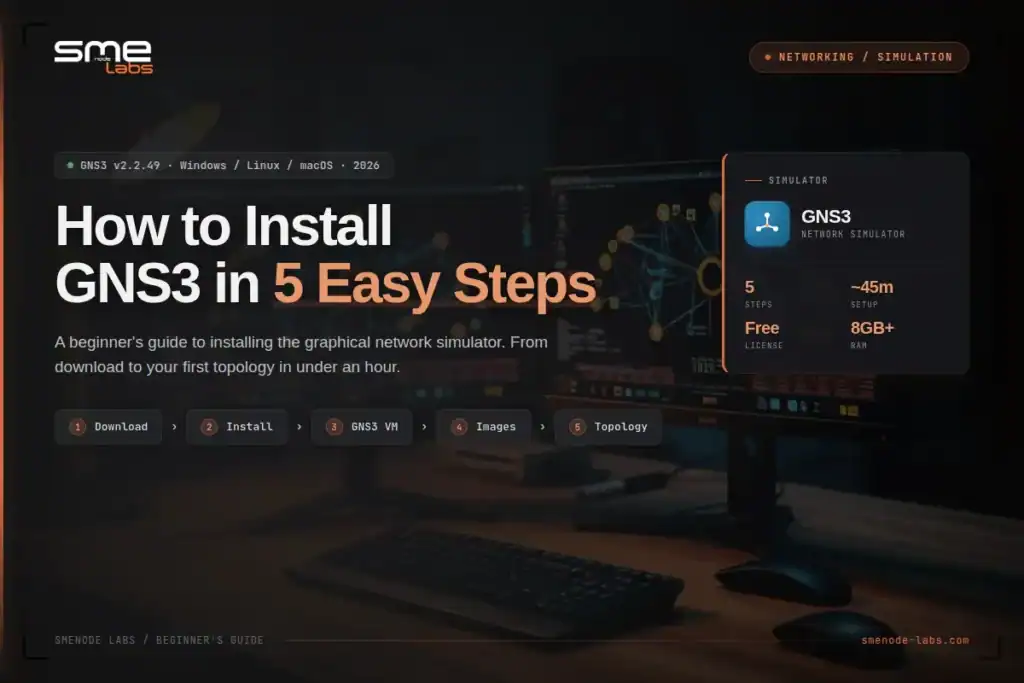
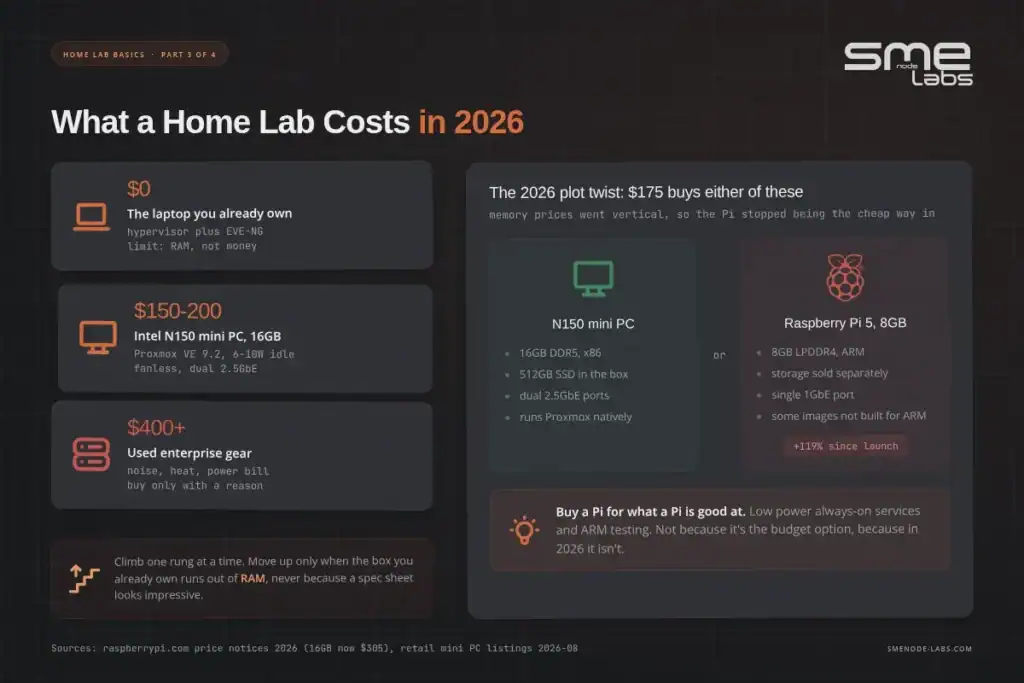
Your current laptop, plus a hypervisor. VirtualBox, Hyper-V, or VMware Workstation. Add a network emulator like EVE-NG, GNS3, or Cisco Modeling Labs and you can run a multi-router topology on hardware you already own.
Cost: nothing. Real limit: RAM. Eight gigs gets you three or four network nodes before things crawl. Sixteen is the practical floor for anything interesting. We broke the numbers down in detail in EVE-NG hardware requirements, and if you’re deciding between platforms, CML vs EVE-NG vs GNS3 compares all three honestly.
Do this first. Seriously. Spend $0 for a month and find out whether you keep opening the lab or keep avoiding it.
Tier 1: around $200
A small x86 mini PC. Intel N150 boxes from GMKtec, Beelink and similar sell for roughly $150 to $200 with 16GB of RAM and an SSD already in them. They idle around 6 to 10 watts, most are fanless, and many now ship with dual 2.5GbE ports, which matters more than you’d think once you start playing with VLANs.
Install Proxmox VE, currently at version 9.2, and you’ve got a proper always-on lab that costs almost nothing to run.
Here’s the plot twist for 2026. The Raspberry Pi is no longer the budget king. Memory prices have gone vertical because AI data centre buildouts are eating the fab capacity, and the Pi 5 has taken two price increases in three months: the 8GB board now sits at $175 and the 16GB at $305, which is 119% and 154% above their launch prices. So a Pi 5 with 8GB costs about the same as a complete N150 mini PC with double the RAM, x86 compatibility, and an SSD in the box.
Tier 2: $400 and up
Used enterprise gear. Off-lease Dell and HP servers, a managed switch, maybe a small rack. You get serious RAM capacity, out-of-band management, and hardware that behaves like what you’ll meet at work.
You also get noise, heat, and a power bill. Run the maths before you buy, because this is where people get burned.
At the current US residential average of about 17.5 cents per kWh (EIA), every single watt running 24/7 costs you roughly $1.53 a year. So:
| Setup | Rough draw | Yearly power cost |
|---|---|---|
| N150 mini PC | 10W | ~$15 |
| Small desktop tower | 45W | ~$69 |
| One used 2U server, idling | 150W | ~$230 |
| Two servers plus a switch | 320W | ~$490 |
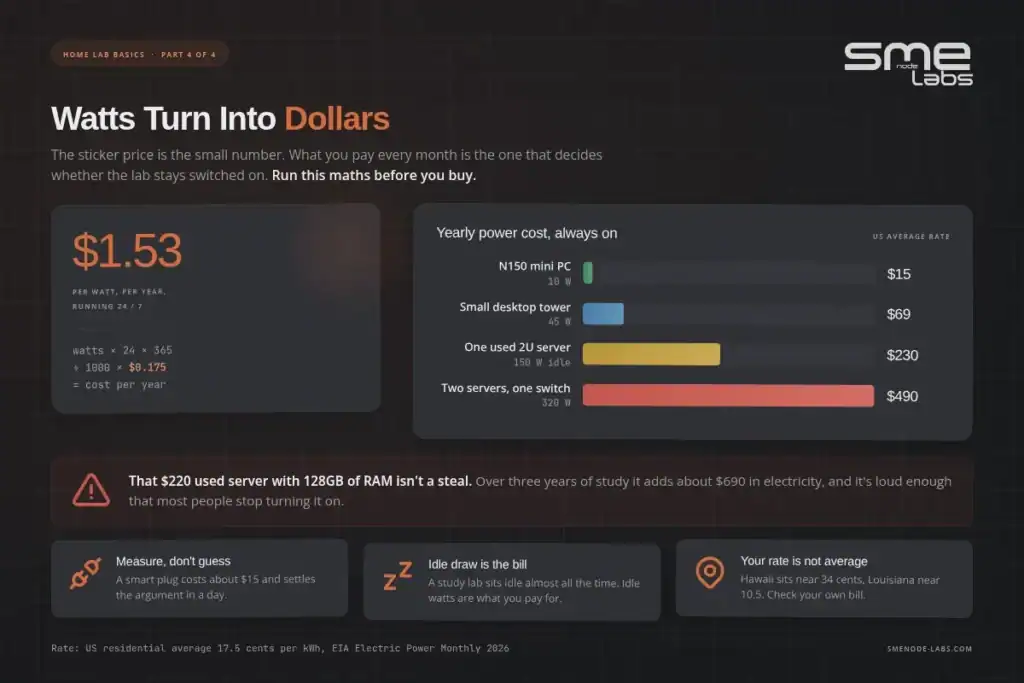
Over three years of study, that server costs her $220 plus about $690 in electricity, call it $910, and it lives in a closet because she can’t stand the noise. Two mini PCs clustered would’ve cost $380 plus $90 of power, run silently on her desk, and taught her the same Kubernetes concepts.
Buy the enterprise box when you have a reason that needs it. Not because the RAM number looks impressive.
Do you need physical hardware at all?
No. And this is the part beginners most need to hear.
A virtual home lab, everything running as VMs and containers on one machine, teaches you the majority of what a cert exam tests. Routing protocols don’t care whether the router is silicon or software. Firewall rules behave the same. Linux is Linux. Kubernetes doesn’t know it’s on your laptop.
Physical gear earns its place for a short list of things: real cabling and physical layer faults, PoE, wireless, console access and password recovery, and the specific muscle memory of racking and patching. Worth doing eventually. Not worth doing first.
The practical path most people should follow looks like this. Start virtual on the laptop you own. Move to a mini PC when your laptop can’t hold enough VMs or you want the lab always on. Add one managed switch when you genuinely need physical VLANs. Add anything bigger only when a specific project demands it.
Want structure instead of guessing? Every SMEnode Labs workbook gives you the lab topology, the tasks, and the verification steps, so your home lab has a syllabus instead of a vibe. Browse the workbooks →
How to build your first home lab this weekend
Six steps. No shopping required for the first four.
- Pick one goal and write it down. “Pass CCNA by December” or “understand how a SIEM detects a brute force attack.” One sentence. Everything else follows from it.
- Check what you already have. How much RAM in your laptop? Any old desktop in a cupboard? A spare SSD? Most people are one hypervisor install away from a working lab and don’t realise it.
- Install a hypervisor. VirtualBox if you want free and simple. Proxmox VE if you have a spare machine to dedicate. Both are free downloads.
- Build the smallest useful topology. Two routers and a link. Or one Linux VM and one Windows VM on the same subnet. Get it to ping. That’s a win, log it.
- Break it on purpose. Change the subnet mask. Shut the interface. Wrong VLAN. Then fix it without looking up the answer. This step is where the learning actually happens, and it’s the one everyone skips.
- Document it. A markdown file, a Notion page, a repo. Topology diagram, configs, what broke, how you fixed it. This becomes your interview material. Six months from now you won’t remember any of it otherwise.
Then repeat step 4 through 6 with something slightly harder. That’s the whole loop. No shortcuts, but no mystery either.
One more thing on the software side. Free doesn’t mean limited. Proxmox, pfSense, Wazuh, Docker, Kubernetes, Ansible, Suricata, and most Linux distributions cost nothing and are the same tools running in production at real companies. We walked through one of these end to end in installing Wazuh SIEM in a home lab with Dockerif you want a concrete first security project.
Mistakes that stall home labs
Buying hardware before knowing the goal. The single most common one. Gear arrives, sits unused, becomes guilt. Start with what you own.
Chasing the rack aesthetic. Those photogenic setups on Reddit are the end of a multi-year hobby, not the entry requirement. Nobody’s lab looked like that in month one.
Ignoring noise and power. A server in a small apartment is a genuinely bad time. Check the decibels and the watts before you buy, not after.
Never breaking anything. If your lab always works, it’s a demo, not a lab. Deliberate failure is the curriculum.
No notes. Undocumented labs teach you something for a week and then it’s gone. Write it down as you go.
Building forever, never testing. The lab is meant to get you certified and hired. Book the exam. Let the deadline shape the build.
FAQ
What’s the difference between a home lab and a home server?
A home server runs services your household depends on, like media or backups, so it needs to stay up. A home lab exists to be experimented on and rebuilt. Many people run both on one machine, which works fine as long as you keep the important services separate from whatever you’re currently breaking.
What’s the difference between a home lab and a home server?
A home server runs services your household depends on, like media or backups, so it needs to stay up. A home lab exists to be experimented on and rebuilt. Many people run both on one machine, which works fine as long as you keep the important services separate from whatever you’re currently breaking.
Do I need a NAS for a home lab?
Not to start. A single SSD in your lab machine is plenty for VM images and configs. A NAS makes sense later, once you have multiple machines that need shared storage or you’re testing things like iSCSI, NFS, or backup jobs. Adding one on day one is a common way to spend $500 before learning anything.
Why is it called a homelab?
It borrows the word from a physical laboratory. Same idea: a controlled space where you run experiments and the results don’t hurt anyone. The term grew out of the sysadmin community and stuck once Reddit’s r/homelab made it the default label for the hobby.
How much RAM do I need for a home lab?
Eight gigabytes gets you started with a handful of light VMs or three or four network nodes. Sixteen is the practical floor for comfortable multi-node network labs or a small Kubernetes cluster. Thirty-two gives you room to stop thinking about it. RAM is almost always the first thing you run out of, well before CPU.
Is a home lab worth it for a complete beginner?
Yes, and arguably more so, because it stops abstract concepts from staying abstract. Start virtual on the computer you already own. If you spend a month and never open it, you’ve lost nothing. If you keep opening it, you’ve found something that will carry your whole career.
Can you make money with a home lab?
Indirectly, and that’s the part that counts. The lab itself doesn’t earn anything. What it earns you is the certification, the portfolio, and the interview answers that move you into a better-paid role. People who try to monetise the hardware directly, hosting or mining, usually find the power bill eats the margin.
How long before a home lab actually helps?
You’ll feel the difference in cert study within two or three weekends, because the topics stop feeling like trivia. For interviews, give it a couple of months of consistent building so you have real projects to talk about rather than one tutorial you followed.
Bottom line
A home lab is the cheapest career move available to an IT student right now. Quick recap:
- It’s a personal IT environment for learning and testing, safe from production, and it can be entirely virtual.
- The point is proof. Skills-based hiring is the norm now, and a lab is how you get something to show.
- Match the build to your exam blueprint. One goal at a time.
- Start free on hardware you own. Move to a $150 to $200 mini PC when you outgrow it.
- Skip the Pi as a budget play in 2026, and run the power maths before buying used enterprise gear.
- Break things on purpose and write down what you learned.
Your lab only needs one thing to be worth building: a reason. Pick the certification you’re chasing, then build the smallest topology that teaches you its first objective.
Ready to give your lab a syllabus? Our certification workbooks hand you the topologies, the tasks, and the verification steps for CCNA, Wazuh, FortiGate, Azure, DevOps and more, so every weekend in your lab moves you closer to a pass. If the lab isn’t built yet, start at the EVE-NG installation guide and come back.