Five nodes. That’s what Cisco gives you for free, and it’s the number that decides whether Cisco Modeling Labs works for you or wastes a weekend.
You’ve probably seen CML recommended as the “official” way to lab Cisco gear. That part’s true. It’s Cisco’s own emulator, the images are legitimate, and nobody’s hunting sketchy download links. But the free tier is tighter than most people expect, and the paid tiers cost more than the alternatives.
Here’s what you’ll get from this article: the actual 2026 prices straight from Cisco’s pages, what the 5-node limit does and doesn’t allow, the hardware you need before spending anything, and a straight answer on whether CML beats EVE-NG now that EVE-NG’s free tier collapsed in June.
All prices and limits below were checked against Cisco’s own documentation on Five nodes. That’s what Cisco gives you for free, and it’s the number that decides whether Cisco Modeling Labs works for you or wastes a weekend.
You’ve probably seen CML recommended as the “official” way to lab Cisco gear. That part’s true. It’s Cisco’s own emulator, the images are legitimate, and nobody’s hunting sketchy download links. But the free tier is tighter than most people expect, and the paid tiers cost more than the alternatives.
Here’s what you’ll get from this article: the actual 2026 prices straight from Cisco’s pages, what the 5-node limit does and doesn’t allow, the hardware you need before spending anything, and a straight answer on whether CML beats EVE-NG now that EVE-NG’s free tier collapsed in June.
All prices and limits below were checked against Cisco’s own documentation on 2026-09-13. Current release is CML v2.10.. Current release is CML v2.10.

The short answer: what Cisco Modeling Labs costs in 2026
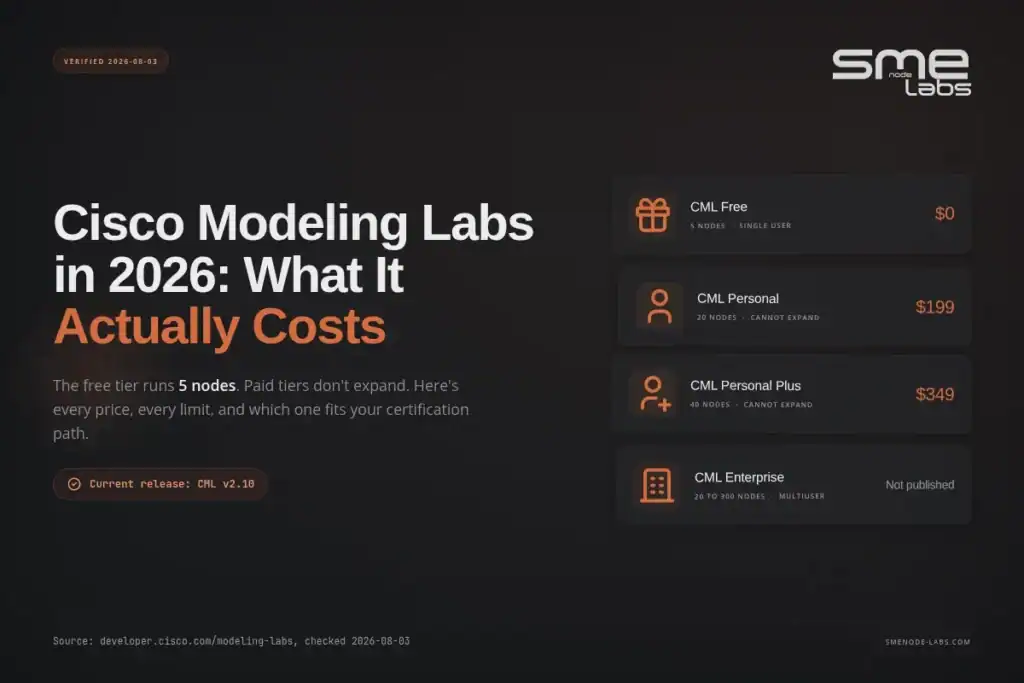
| Edition | Price | Nodes | Users | Expandable |
|---|---|---|---|---|
| CML Free | $0 | 5 at once | 1 | No |
| CML Personal | $199 (or 2 Cisco Learning Credits) | 20 | 1 | No |
| CML Personal Plus | $349 (or 4 Cisco Learning Credits) | 40 | 1 | No |
| CML Enterprise | Not published | Starts at 20, expands to 300 | Multiple | Yes |
| CML Education | Not published | Not published | Multiple | For colleges and universities |
Source: Cisco DevNet, Cisco Modeling Labs.
Two notes before you reach for a credit card.
Cisco lists Personal at $199 and Personal Plus at $349 without stating on that page whether the charge repeats yearly. Confirm the term at checkout. Some third-party write-ups describe these as annual subscriptions, but we couldn’t verify that against Cisco’s own pricing page or its licensing PDF, so treat the renewal question as open.
The purchase channel has also been moving. Cisco’s DevNet page points to the Cisco Learning Network Store, while a CML Personal product page now exists on Cisco U. Check both if one shows nothing.
What you actually get in CML Free
CML Free is genuinely free. No license to buy, nothing to register, and no expiry. Cisco’s CML-Free documentation is direct about this: the instance shows “days remaining” in evaluation mode, but it keeps running after that counter hits zero.
Here’s the deal on limits.
You get 5 nodes running at the same time. A node is a router, switch, firewall, or Linux host. Two node types don’t count against that ceiling: the Unmanaged Switch and the External Connector. You can drop in as many of those as you want.
That exemption matters more than it sounds. An unmanaged switch lets you build a shared segment without burning one of your five slots. So a topology with three routers, one Linux host, and a switch fabric connecting them costs you four nodes, not five.
The included image set covers IOL, IOL-L2, and ASAv, plus host images for Ubuntu, Alpine, and a desktop build with a GUI. That ASAv inclusion is quietly useful. A free firewall image you’re licensed to run is not a small thing.
Two catches worth knowing:
- Telemetry can’t be turned off. Cisco’s documentation states disabling telemetry isn’t possible on CML-Free. Paid tiers allow it.
- It’s community-supported. No official support path. You’re in forums, same as with any open-source emulator.
Say you’re three weeks out from your CCNA exam and you need to drill OSPF adjacency behaviour, VLAN trunking, and static routing. Five nodes handles all three. You’d build two routers and a switch for the routing labs, tear it down, then rebuild as a switching topology. The constraint isn’t node count. It’s the rebuild time between labs.
Now flip it. You’re studying CCNP ENCOR and the topic is SD-WAN or a multi-area OSPF design with redistribution. Five nodes runs out fast, and you’ll spend more time working around the limit than learning the protocol.
Not sure which topologies your exam actually needs? Our CCNA workbook maps every lab to a specific exam objective, so you build what’s tested instead of guessing.
CML Personal vs Personal Plus: is $150 worth 20 more nodes?
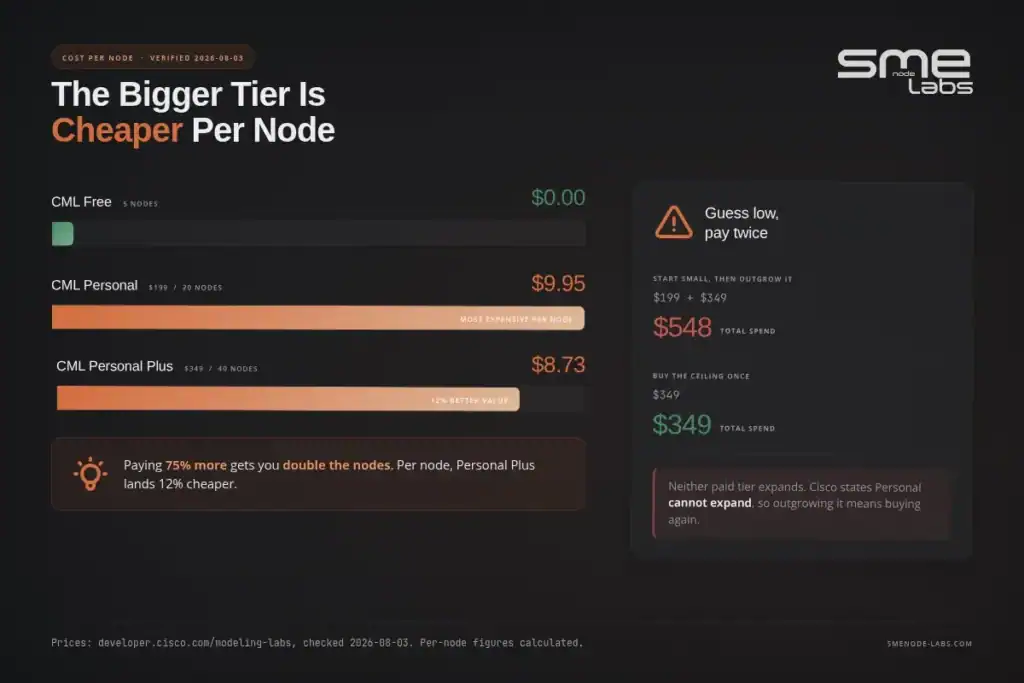
Personal gets you 20 nodes for $199. Personal Plus gets you 40 for $349. Both are single-user, and neither expands later. You pick a ceiling and you live with it.
Cisco is explicit that Personal “ships with 20 Cisco nodes and cannot expand.” So this isn’t an upgrade path. Buying Personal and outgrowing it means buying Personal Plus separately.
That changes the maths. If there’s a real chance you’ll need more than 20 nodes inside a year, the $150 gap is cheaper than paying $199 and then $349.
Rough guidance by track:
- CCNA: Free tier is workable. Personal is comfortable.
- CCNP: 20 nodes is the practical floor. Larger enterprise designs push past it.
- CCIE: Plan for 40 or an Enterprise licence. Full lab topologies are big, and you want the whole thing running at once rather than in pieces.
- Security focus: Depends on how many firewall instances your topology needs. ASAv nodes are heavy on RAM, which usually bites before the node count does.
Take a scenario. You buy Personal for CCNP study, pass ENCOR, then decide to push toward CCIE Enterprise Infrastructure. Now you need a topology that won’t fit in 20 nodes. You’re at $199 spent and $349 still to spend, for a total of $548. Buying Personal Plus at the start would have cost $349. The lesson isn’t “always buy the bigger one.” It’s that CML’s non-expanding tiers punish uncertainty, so decide your ceiling before you buy.
Anyway. Hardware next, because node count isn’t the real limit for most people.
The hardware you need before you pay anything

This is where CML plans die. People buy a licence, then find out their laptop can’t run it.
Cisco’s stated minimums:
- RAM: 8 GB
- CPU: 4 or more physical cores, Intel, with VTx and EPT support
- Disk: 32 GB or more
Source: Cisco Modeling Labs system requirements.
Read the word “minimum” carefully. Cisco says these baselines may hold back both simulation capacity and performance, and that real requirements depend on how many nodes you plan to run at once and what type they are. An 8 GB machine running five IOL routers is fine. The same machine running two ASAv firewalls is not.
If you’re deploying to a cloud instance, nested virtualization is required. Cisco’s docs are clear that many CML node types won’t work correctly without it, which rules out a lot of cheap VPS options.
A practical way to think about it: budget RAM per node type, not per node. Lightweight IOL routers are cheap. Firewall and full IOS-XE images are expensive. Forty nodes of the second kind needs a server, not a laptop.
Our breakdown of EVE-NG hardware requirements covers the same sizing logic in more depth, and the per-node reasoning carries over to CML almost directly.
How CML compares to EVE-NG after the June 2026 shakeup
This comparison changed completely a few weeks ago, and most articles still have it wrong.
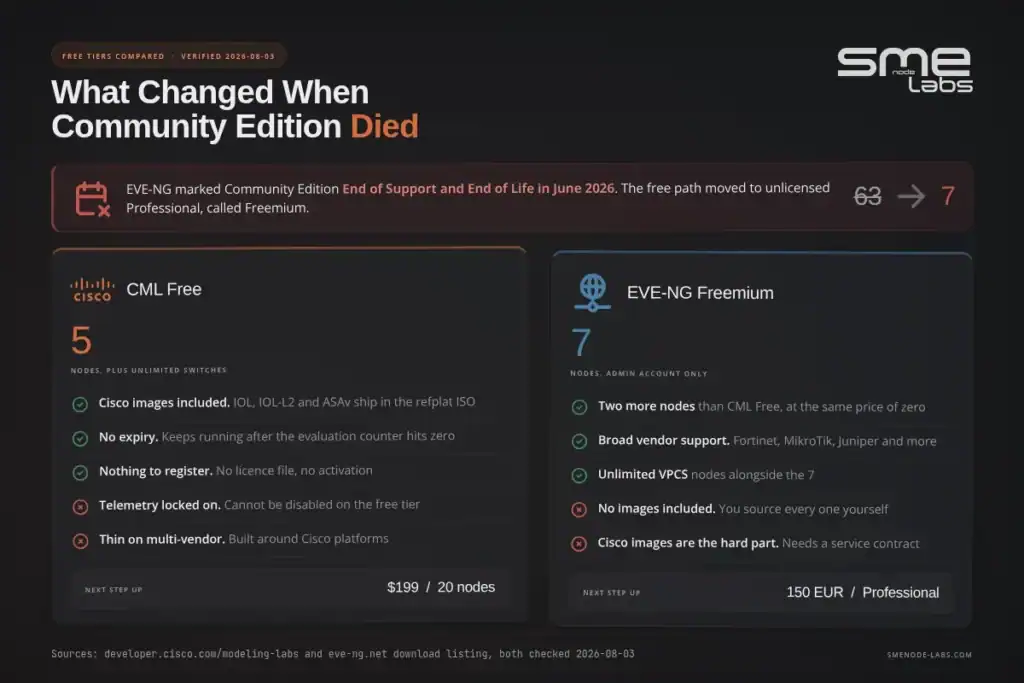
EVE-NG marked its Community Edition as End of Support and End of Life in June 2026, according to the version listing on its own download page. The free path shifted to running the Professional ISO unlicensed, which Cisco’s competitor calls Freemium mode. That drops you to 7 nodes. The old Community build allowed 63. Still choosing a platform? We put them side by side in GNS3 vs EVE-NG.
So the free-tier comparison now looks like this:
| CML Free | EVE-NG Freemium | |
|---|---|---|
| Nodes | 5 (plus unlimited unmanaged switches and external connectors) | 7 |
| Cost | $0 | $0 |
| Cisco images included | Yes: IOL, IOL-L2, ASAv | No, you supply your own |
| Multi-vendor images | Limited | Broad, if you source them |
| Support | Community | Community |
| Paid step-up | $199 for 20 nodes | 150 EUR for Professional |
Two nodes’ difference is not the story. The story is what comes in the box.
CML Free hands you licensed Cisco images. That’s the whole pitch. You download, you boot, you lab. EVE-NG hands you a better platform with more nodes and broader vendor support, and then you have to find images yourself, which for Cisco gear means either a service contract or a grey area nobody at work wants to explain.
For a learner studying purely Cisco material, CML Free removes a genuine headache. For anyone labbing Fortinet, MikroTik, Juniper, or mixed topologies, EVE-NG still wins on flexibility even at 7 nodes.
Price-wise, EVE-NG Professional at 150 EUR undercuts CML Personal at $199 and gives you far more nodes. But you’re back to sourcing images.
Our CML vs EVE-NG vs GNS3 comparison goes deeper on the platform differences, and if you’re leaning toward EVE-NG, the install guide walks the current setup path.
Studying for CCIE and weighing lab platforms? Our CCIE Enterprise Infrastructure workbook and CCIE Security workbook both ship with topology files, so the platform choice stops being a blocker.
Who Cisco Modeling Labs is actually for
Straight answers.
Buy CML if:
You study Cisco-only material and you want zero friction around images. You’re in a corporate environment where downloading emulator images from forums is a policy problem. You have Cisco Learning Credits sitting unused, since Personal costs 2 credits and Personal Plus costs 4. Or you’re at a college or university, where the Education edition exists precisely for this.
Use CML Free and stop there if:
You’re a CCNA candidate. Five nodes and the included IOL images cover a large share of the blueprint, and you’d be paying $199 for headroom you won’t use before exam day.
Skip CML if:
Your labs are multi-vendor. Paying for CML then sourcing non-Cisco images anyway defeats the point. Skip it too if your hardware is marginal, because a licence doesn’t add RAM. And skip it if you need many people on one lab environment, since Personal tiers are single-user and Enterprise pricing isn’t published, which usually means a sales conversation.
The honest limitation nobody mentions: CML’s tiers don’t expand. Every other option on the market lets you grow into it. CML makes you guess your ceiling up front and pay again if you guess low.
Bottom line
CML Free is the best no-cost way to lab genuine Cisco images, full stop. Five simultaneous nodes, no expiry, ASAv included, and the unmanaged switch exemption stretches small topologies further than the number suggests.
Key takeaways:
- Free means free. No licence, no expiry, 5 nodes, mandatory telemetry.
- $199 buys 20 nodes, $349 buys 40. Neither expands, so pick your ceiling once.
- Confirm the renewal term at checkout. Cisco’s pricing page doesn’t state it, and we couldn’t verify it independently.
- Hardware decides more than licence tier. 8 GB and 4 cores is the floor, and heavy node types eat that fast.
- EVE-NG’s free tier dropped to 7 nodes in June 2026. CML Free is now competitive on nodes and ahead on included Cisco images.
Start with CML Free. Run five nodes for two weeks. If you hit the ceiling repeatedly on labs that matter to your exam, you’ve earned the upgrade decision with real evidence instead of a guess.
For structured lab sequences that tell you which topologies to build and why, browse the SMEnode Labs workbook library.
FAQ
Is Cisco Modeling Labs free?
Yes. CML Free costs nothing, needs no licence, and has no time limit. You get 5 nodes running at once, plus unlimited Unmanaged Switch and External Connector nodes that don’t count toward the limit.
How much does CML Personal cost?
Cisco lists CML Personal at $199 or 2 Cisco Learning Credits, and Personal Plus at $349 or 4 Cisco Learning Credits. Personal includes 20 nodes, Personal Plus includes 40. Neither expands.
How many nodes can CML run?
Free gives you 5, Personal 20, Personal Plus 40, and Enterprise starts at 20 and expands to 300. Your hardware often caps you before the licence does.
Is CML better than EVE-NG?
For Cisco-only study, yes, mainly because licensed Cisco images are included. For multi-vendor labs, EVE-NG stays more flexible. EVE-NG’s free tier fell to 7 nodes in June 2026 after Community Edition reached end of life.
Can I run CML on a laptop?
If it has at least 8 GB RAM, 4 physical Intel cores with VTx and EPT, and 32 GB free disk, yes. Expect to run light node types only. Firewall images and full IOS-XE nodes need considerably more RAM.