Every SOC analyst job posting wants “hands-on SIEM experience.” But nobody hands you a $50K enterprise platform to practice on. So you’re stuck, right?
Not really. You can run a full Wazuh SIEM on your own laptop, for free, in about 30 minutes. Same tool plenty of real security teams use in production. Same alerts, same dashboards, same log pipeline.
This guide walks you through the Docker install step by step. You’ll get the exact commands, the settings people forget, and the two errors that break most first-time deployments. By the end you’ll have a working Wazuh stack you can point real endpoints at.
Here’s the deal: a Wazuh install isn’t hard. It’s just fiddly if you skip one config line. We’ll cover that line. Let’s go.
What Is Wazuh SIEM, and Why Run It at Home?
Wazuh is a free, open-source SIEM and XDR platform. It collects logs from your servers and endpoints, checks them against detection rules, and flags suspicious activity on a dashboard. Think intrusion detection, file integrity monitoring, vulnerability detection, and compliance reporting, all in one place.
It’s also one of the most-starred security projects on GitHub. That matters. Popular open-source tools get better docs, more community answers, and more employer recognition.
Why build a home lab with it? Three reasons.
First, cost. It’s genuinely free. No trial clock, no locked features.
Second, employers know it. When a hiring manager sees “deployed and tuned Wazuh” on a resume, that reads as real experience, not a certificate you crammed for.
Third, it teaches the whole SIEM workflow. Log ingestion. Rule tuning. Alert triage. You can’t learn that from slides.
Here’s the gap that keeps coming up. You’ve passed Security+ but you keep getting rejected for SOC analyst roles, and every interview circles back to the same question: “Have you actually used a SIEM?” Spinning up Wazuh in Docker over a weekend, connecting a couple of old laptops as agents, and spending two weeks triaging your own alerts gives you a real answer. Walking an interviewer through a detection you tuned yourself is a different conversation.
That’s the whole point of a lab. You stop talking about SIEM and start showing it.
New to blue-team work? Our CySA+ certification guide walks through the analyst skills this lab puts into practice: log analysis, SIEM basics, and alert triage. Worth a five-minute read if this is all new. Adding a firewall to the picture? Start with what FortiGate is and how an NGFW works.
Is Wazuh SIEM Free? How It Compares to Splunk, ELK, and Graylog
Yes, Wazuh is free. Fully open source, no per-GB fee, no seat license. The only cost is the server it runs on, and for a home lab, that’s whatever spare hardware or VM you’ve already got.
That matters more once you see what the alternatives charge. Splunk’s free tier caps out at 500MB of data a day and drops alerting, authentication, and distributed search once you hit it (Splunk, 2026). Past that, Splunk bills $8.21 to $39.98 per GB, per day, depending on tier. A home lab doesn’t need enterprise volume, but that pricing model is exactly why most people building a SOC lab skip Splunk entirely and never look back.
The closer comparisons are Graylog and the ELK stack (Elasticsearch, Logstash, Kibana), both genuinely open source at the core. Graylog is free and highly configurable, with an enterprise tier for the extras (SigNoz, 2026). ELK’s core is free and self-managed too, powerful once tuned, but Elastic’s more advanced detection features sit behind a paid tier, and running Elasticsearch well takes real hands-on tuning (SigNoz, 2026).
Wazuh’s edge for a home lab specifically: it ships SIEM correlation, file integrity monitoring, and vulnerability detection in one agent, out of the box, no separate ingest pipeline to configure before you see your first alert. Graylog and ELK can get you there too, but both expect you to wire up the pipeline yourself first, choose your own detection rules, connect your own threat feeds. That’s the difference between a weekend project and a month of tuning. If the goal is a SOC lab that shows real detections fast, not a production-grade log pipeline, Wazuh’s the shorter path to that payoff. The install steps below get you there in under 30 minutes.
What You Need Before the Wazuh Install

Docker does the heavy lifting here. You don’t install Wazuh components one by one. You pull pre-built containers and start them together. Much cleaner.
Here’s your checklist:
- A host machine. Linux is easiest (Ubuntu 22.04 or 24.04 works great). Windows and macOS work too through Docker Desktop. Already running a networking home lab? The same box you use for your EVE-NG labs works fine here too.
- RAM. Plan for 8 GB. You can squeak by on 6 GB, but the indexer gets cranky under load.
- Disk. At least 50 GB free for images and log data.
- Docker Engine and Docker Compose. Both need to be current. Compose ships with Docker Desktop; on plain Linux you may install it separately.
One more thing, and this is the line everyone forgets. The Wazuh indexer is built on OpenSet, and it creates a lot of memory-mapped files. Linux caps that too low by default. You have to raise it.
Run this before anything else:
sudo sysctl -w vm.max_map_count=262144Want it to survive a reboot? Add vm.max_map_count=262144 to /etc/sysctl.conf too.
Skip this step and your indexer container will start, then crash, then restart, then crash again. Silent loop. No obvious error unless you read the logs.
This one costs people an afternoon. You deploy Wazuh on a fresh cloud VM, watch the dashboard container come up, then spend three hours wondering why the login page times out. The indexer is crash-looping the whole time on the default vm.max_map_count of 65530. One sysctl command fixes it. Three hours gone over one line.
Don’t lose the afternoon. Set the value first.
How to Install Wazuh With Docker: Step by Step
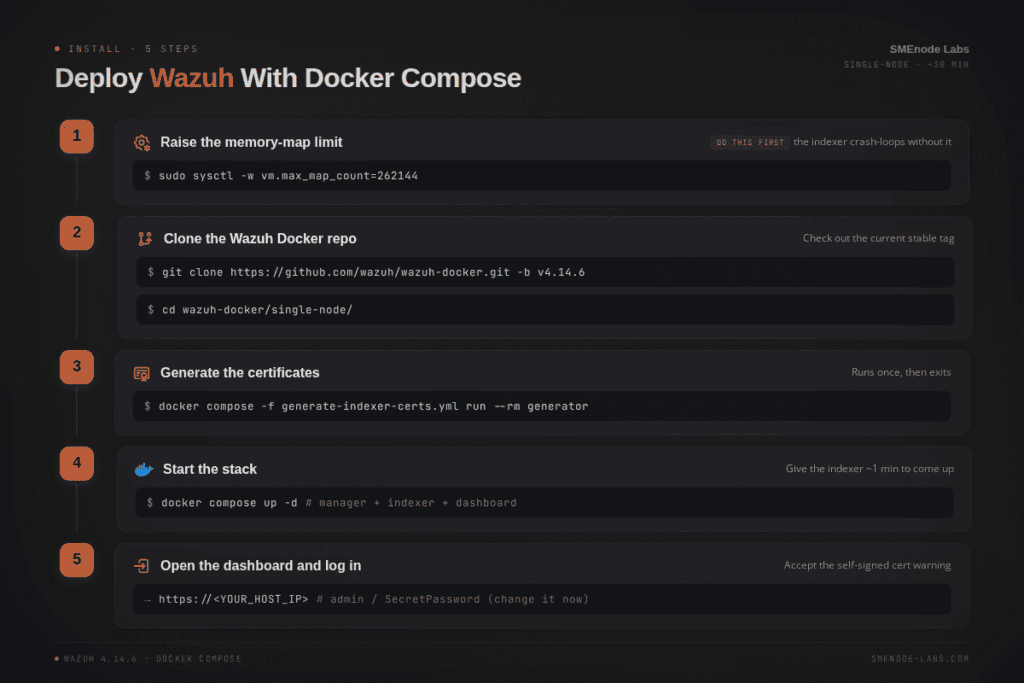
Alright, the main event. This is the single-node deployment, which is exactly right for a home lab. It runs three containers: the Wazuh manager, the indexer, and the dashboard.
Step 1: Clone the Wazuh Docker repository
Grab the official repo and check out the current stable version:
git clone https://github.com/wazuh/wazuh-docker.git -b v4.14.8
cd wazuh-docker/single-node/
Quick note on versions. As of October 2026, v4.14.8 is the current stable release, and Wazuh 5.0 is in public beta. Stick with 4.x for a stable lab. Once 5.0 goes stable, the same steps apply, just swap the version tag. Always check the releases page for the latest tag.
Step 2: Generate the certificates
Wazuh encrypts traffic between its components. The repo ships a helper that creates self-signed certificates for you:
docker compose -f generate-indexer-certs.yml run --rm generatorThis runs once, drops the certs into the right folders, and exits. You won’t see much output. That’s normal.
Step 3: Start the stack
Now bring everything up:
docker compose up -dThe -d flag runs it in the background. Docker pulls the images (a few GB, so give it a minute on first run), then starts all three containers.
Then wait. The indexer takes about a minute to fully initialize. Grabbing the dashboard too early just gives you a connection error, which makes people think it’s broken. It isn’t. Be patient.
Check progress if you like:
docker compose psYou want all three containers showing as running.
Step 4: Log in to the dashboard
Open a browser and go to:
https://<YOUR_HOST_IP>On the same machine, https://localhost works. Your browser will warn you about the self-signed certificate. That’s expected in a lab. Click through it.
Default credentials:
- Username:
admin - Password:
SecretPassword
And you’re in. That’s a full Wazuh SIEM running on your own hardware. Took what, half an hour?
Set up your lab once, then use it for months. If you’re studying for a security cert alongside this, our Wazuh Workbook pairs guided detection exercises with a Wazuh environment just like this one. It turns “I installed it” into “I know how to use it.”
Secure Your Wazuh SIEM Before You Do Anything Else
That default password? SecretPassword? Change it now. Seriously.
Even in a home lab, a SIEM with default creds is a bad habit to build. And if you ever expose the dashboard beyond localhost, it’s an open door.
Wazuh ships a password-management tool inside the container. The official docs walk through running it to rotate both the dashboard and internal component passwords. Follow the password-change guide in the Wazuh documentation exactly, because the indexer, manager, and dashboard each hold their own copy of the credentials. Miss one and components stop talking to each other.
A few more lab hygiene tips:
- Keep the dashboard bound to localhost or a private network. Don’t port-forward it to the open internet.
- Snapshot your VM after a clean install. When you inevitably break something while tuning rules, you roll back in seconds.
- Watch container logs when something misbehaves:
docker compose logs wazuh.indexer.
Basically, treat your lab like a tiny production system. That mindset is half of what employers are actually hiring for.
Connect Your First Agent and Get Real Data
An empty SIEM is boring. The magic starts when logs flow in.
Wazuh collects data through agents, small programs you install on the endpoints you want to monitor. A Windows laptop. A Linux server. An old machine gathering dust. Each one reports back to your manager container.
Installing an agent and enrolling it are two separate jobs, and mixing them up is the single most common reason people get stuck. Install puts the software on the endpoint. Enrollment registers that endpoint with your manager and hands it the key it needs to send data. Skip enrollment, or block the wrong port, and the dashboard shows a grey “Never connected” dot no matter how many times you reinstall.
Three ports do the work:
| Port | Protocol | Purpose |
|---|---|---|
| 1514 | TCP | Agent-to-manager data feed |
| 1515 | TCP | Automatic enrollment requests |
| 55000 | TCP | API-based enrollment operations |
Block 1515 and the agent never enrolls. Block 1514 and it enrolls but never sends data.
Installing the agent. On Debian or Ubuntu:
WAZUH_MANAGER="10.0.0.2" WAZUH_AGENT_NAME="ubuntu-web-01" apt-get install wazuh-agent
systemctl daemon-reload
systemctl enable wazuh-agent
systemctl start wazuh-agent
On RHEL, CentOS, Rocky or AlmaLinux, same idea with yum install wazuh-agent instead. On Windows, run the MSI installer and enter the manager IP in the wizard, or script it quietly with /q WAZUH_MANAGER="10.0.0.2" WAZUH_AGENT_NAME="win-finance-03". On macOS, install the .pkg and run sudo /Library/Ossec/bin/wazuh-control start.
Enrolling the agent. You’ve got two routes. For a handful of agents, register manually: on the manager, run /var/ossec/bin/manage_agents, pick A to add the agent and E to extract its key, then on the agent run the same tool and pick I to import that key. Restart the agent and you’re done. For dozens of agents, turn on the authd daemon on the manager instead, and agents self-register over port 1515 the first time they start, no manual key-copying needed.
Verify it actually connected. On the agent: /var/ossec/bin/wazuh-control status should show every process running. On the manager: /var/ossec/bin/agent_control -l should list your endpoint as “Active,” not “Never connected” or “Disconnected.” Or just check Agents management > Summary in the dashboard.
Common Agent Connection Problems
Most agent issues come down to one of these.
| Symptom | Likely Cause | Fix |
|---|---|---|
| “Never connected” in dashboard | Agent never enrolled, or port 1515 blocked | Run enrollment, open 1515/TCP |
| Enrolls but no data | Port 1514 blocked | Open 1514/TCP on firewall and security groups |
| “Unable to add agent” | Duplicate agent name or IP on manager | Remove the old entry with manage_agents |
| Agent shows “Disconnected” | Service stopped or network dropped | Restart wazuh-agent, check connectivity |
| Wrong key error | Key mismatch after re-register | Re-extract and re-import the key |
| Auth password rejected | Password differs on agent and manager | Match authd.pass on both sides |
Nine times out of ten it’s ports or a skipped enrollment step. Check those two before anything else.
Then the fun begins. Trigger a failed SSH login. Add a suspicious file to a monitored folder. Run a fake malware sample in an isolated VM. Watch Wazuh catch it and raise an alert. That loop, cause then detection, is exactly the SOC analyst muscle memory that interviews test.
Remember that SOC interview from earlier? Triage is the part worth practising, not the install. Anyone can copy-paste docker compose up. Reading an alert and deciding whether it’s real, that’s the skill that gets paid.
And the demand is real. The U.S. Bureau of Labor Statistics projects information security analyst jobs to grow 21% from 2025 to 2035, with a median wage of $129,180 (May 2025), both far ahead of the average occupation. A working home lab is one of the cleanest ways to prove you belong in that pool.
What a Wazuh SIEM Home Lab Actually Catches
Installing Wazuh is the easy part. The reason to run a Wazuh SIEM home
lab is what shows up in the dashboard once real traffic hits it. Here’s
what to expect in the first week, with a live agent reporting in.
Failed login attempts, tagged and scored. Try an SSH brute-force
test against your own agent (a few wrong passwords in a row is enough).
Wazuh’s default ruleset catches it within seconds and raises the alert
level automatically, no custom rule needed.
File integrity alerts. Wazuh’s File Integrity Monitoring (FIM) watches
directories you tell it to. Edit a file inside a monitored path,/etc/passwd is the classic test, and watch the change show up as an
alert with the exact file, user, and timestamp.
MITRE ATT&CK mapping, built in. Every triggered rule that matches a
known attack pattern gets tagged with its MITRE ATT&CK technique ID
automatically. This is the part that turns a home lab into interview
material: you can point at a real alert and say which technique it maps
to, not just that “something happened.”
A vulnerability scan of your own lab. Wazuh’s vulnerability detector
cross-references installed packages against CVE feeds. On most first
scans, it finds something, an outdated package, a missing patch. That’s
the moment a home lab stops being a tutorial and starts being a small,
real SOC.
None of this requires attacking anything outside your own lab network.
Everything above triggers from actions against your own agent.
Want the guided version, pre-tuned rules, sample attack scenarios, a
structured lab, instead of building it from scratch? Grab the Wazuh
Workbook and build it alongside the stack
you just deployed.
Common Wazuh Install Problems (and Quick Fixes)

Most first-time deployments hit one of these. Here’s the short troubleshooting list.
Dashboard won’t load / connection refused. Nine times out of ten, it’s vm.max_map_count. Confirm it with sysctl vm.max_map_count. If it reads 65530, you skipped Step 0. Fix it and restart with docker compose restart.
Indexer container keeps restarting. Same root cause usually, or not enough RAM. Check docker compose logs wazuh.indexer for memory errors. Close other apps or bump your VM’s RAM.
Certificate errors between components. You probably skipped the cert generation step, or ran it after starting the stack. Tear it down with docker compose down, regenerate certs, then bring it back up.
Login fails after a password change. You almost certainly updated one component but not the others. All three need matching credentials. Redo the password steps carefully.
Out of disk space after a week. Logs pile up fast. Set a retention policy in the indexer, or clear old indices. A busy lab can eat 10 GB a week.
None of these are hard. They’re just the kind of thing that costs an evening if you don’t know to look for them. Now you do.
Turn Your Home Lab Into a Job-Ready Skill
A Wazuh install is step one. The real value is what you do with it over the next few weeks.
Document everything. Screenshot alerts you tuned. Write up a detection you built, what it caught, why it mattered. That documentation becomes your portfolio, and it’s the thing you screen-share in interviews.
That three-hour detour on vm.max_map_count? Keep a running log of every problem you solve like it. By the time you interview you’ll have a dozen real troubleshooting stories of your own. Hiring managers want those. Fixing broken things is the job.
If you want structure instead of wandering, that’s where guided practice helps. Our Security+ practice test drills the SIEM and log-analysis concepts this lab brings to life, so the theory and the hands-on reinforce each other. Wazuh is one of several open-source tools we build labs around. See the open source workbook range.
Ready to build the skill employers keep asking for? Grab the Wazuh Workbook and pair it with the Wazuh stack you just deployed. Install today, triage tomorrow, interview-ready in a month.
Bottom Line
Running a Wazuh SIEM at home is one of the highest-return moves a security learner can make. Here’s what to remember:
- Set
vm.max_map_count=262144first. It’s the single most common reason installs fail. - Use the single-node Docker deployment. Three containers, four commands, done in 30 minutes.
- Change the default password immediately, and never expose the dashboard to the open internet.
- Connect a real agent and practice the alert-to-triage loop. That’s the skill interviews test.
- Document what you build. Your lab notes become your portfolio.
You don’t need a corporate budget to learn enterprise security tools. You need a laptop, half an hour, and the willingness to break things and fix them.
So go set it up. Then point an agent at it and see what it catches. Your future SOC role starts with docker compose up.