Open shortest path first (OSPF) is an open-standard, link-state routing protocol that routers use inside one organisation’s network. Every OSPF router builds the same map of its area, runs Dijkstra’s shortest path first algorithm on that map, and installs the path with the lowest total cost. It runs straight over IP as protocol 89, and Cisco gives it an administrative distance of 110.
That’s the 30-second answer. The rest of this post is what you need to actually run it: how neighbours form, how the DR gets elected (with a worked example that catches a lot of people out), the LSA and area types, and a single-area Cisco config with the show output you should expect to see.
One scoping note before we start. The CCNA tests single-area OSPF. LSA types and area types are ENCOR depth. They’re here because you’ll meet them the moment you open show ip ospf database, and because they explain why OSPF behaves the way it does.
OSPF meaning: what does OSPF stand for?
OSPF stands for Open Shortest Path First. Both halves of the name mean something.
- Open: it’s a public IETF standard, not one vendor’s property. OSPFv2 for IPv4 is defined in RFC 2328, and OSPFv3 for IPv6 in RFC 5340. Any vendor can build it, so routers from different vendors can share routes.
- Shortest Path First: the algorithm. Each router runs Edsger Dijkstra’s SPF calculation over its own copy of the topology to work out the best path to every destination.
So if a quiz asks “what type of routing system is OSPF considered to be?”, the answer is a link-state interior gateway protocol (IGP). Link-state, because routers share the state of their links rather than their routing tables. Interior, because it runs inside one autonomous system. Between organisations, that’s BGP’s job.
Compare that with a distance-vector protocol like RIP. A RIP router only knows what its neighbours tell it (“I can reach 10.1.1.0 in 3 hops”). An OSPF router knows the whole map of its area and does its own maths. Think of it as the difference between asking for directions at every corner and carrying the map yourself.
The OSPF protocol at a glance
| Property | OSPFv2 (IPv4) |
|---|---|
| Type | Link-state IGP |
| Standard | RFC 2328 (OSPFv3 for IPv6: RFC 5340) |
| Transport | Directly over IP, protocol number 89. No TCP, no UDP |
| Multicast | 224.0.0.5 (all OSPF routers), 224.0.0.6 (DR and BDR). OSPFv3 uses FF02::5 and FF02::6 |
| Metric | Cost, summed along the path. Cost = reference bandwidth / interface bandwidth |
| Administrative distance (Cisco) | 110 |
| Default timers on Ethernet | Hello 10 s, dead 40 s (4 x hello). Nonbroadcast networks default to a 30 s hello |
| Router ID | 32-bit number written like an IPv4 address |
| Hierarchy | Areas, all attached to backbone area 0 |
| Refresh | Every LSA is re-flooded by its originator every 30 minutes, and ages out after 1 hour |
That last row surprises people. OSPF isn’t silent between changes. Hellos go out every 10 seconds, and each router re-originates its own LSAs every 30 minutes even if nothing moved. The 30-minute refresh and the 1-hour MaxAge both come straight from RFC 2328.
How does OSPF work?
OSPF routing happens in four stages. Here’s the short version.
- Find neighbours. Each router sends Hello packets out its OSPF interfaces, to the multicast address 224.0.0.5 on Ethernet. When two routers see each other’s router ID in the Hellos, they’re neighbours.
- Sync the database. Neighbours that need to become fully adjacent swap summaries of what they know, ask for what they’re missing, and receive it. Now both have the same link-state database, the OSPF LSDB.
- Run SPF. Each router puts itself at the root of a tree, runs Dijkstra’s algorithm over the LSDB, and finds the lowest-cost path to every network.
- Install routes. The winners go into the routing table, marked
O.
When a link changes, the router that sees it floods a new LSA, everyone in the area updates their LSDB, and everyone reruns SPF. No waiting for a periodic update.
Five packet types do all the work. You’ll see them named in debug output and exam questions:
| Type | Packet | What it does |
|---|---|---|
| 1 | Hello | Discovers and keeps neighbours, elects DR/BDR |
| 2 | Database Description (DBD) | Summarises the sender’s LSDB as a list of LSA headers |
| 3 | Link State Request (LSR) | “Send me the full copy of these LSAs” |
| 4 | Link State Update (LSU) | Carries the actual LSAs |
| 5 | Link State Acknowledgment (LSAck) | Confirms an LSU arrived |
So what is DBD in OSPF? It’s packet type 2, the table of contents. Routers compare DBDs to spot what they’re missing, then use LSRs to ask for it. And notice that the acknowledgement is an LSAck packet. An LSA is the advertisement itself, not the ack.
What are the OSPF neighbor states?
There are eight OSPF neighbor states, from Down to Full. These OSPF states are tracked per neighbour, so one router can be Full with one neighbour and stuck in Init with another. Lists that show seven usually leave out Attempt, which only appears on nonbroadcast networks with manually configured neighbours.
| State | What’s going on |
|---|---|
| Down | No Hello heard from this neighbour yet (or the dead timer expired) |
| Attempt | NBMA only: the router is sending unicast Hellos to a manually configured neighbour |
| Init | A Hello arrived, but it doesn’t list my router ID yet. One-way so far |
| 2-Way | Both routers see their own ID in the other’s Hello. DR/BDR election happens here |
| ExStart | The pair decides who leads the database exchange and picks a starting sequence number |
| Exchange | DBD packets go back and forth |
| Loading | LSRs ask for missing LSAs, LSUs deliver them |
| Full | Databases match. This is the normal end state |
Here’s the bit that confuses people in labs. 2-Way can be a perfectly healthy final state. On an Ethernet segment, routers that are neither DR nor BDR (DROthers) only go Full with the DR and BDR. With each other, they stop at 2-Way, and show ip ospf neighbor shows 2WAY/DROTHER. Cisco calls that normal behaviour. Don’t go hunting for a fault that isn’t there.
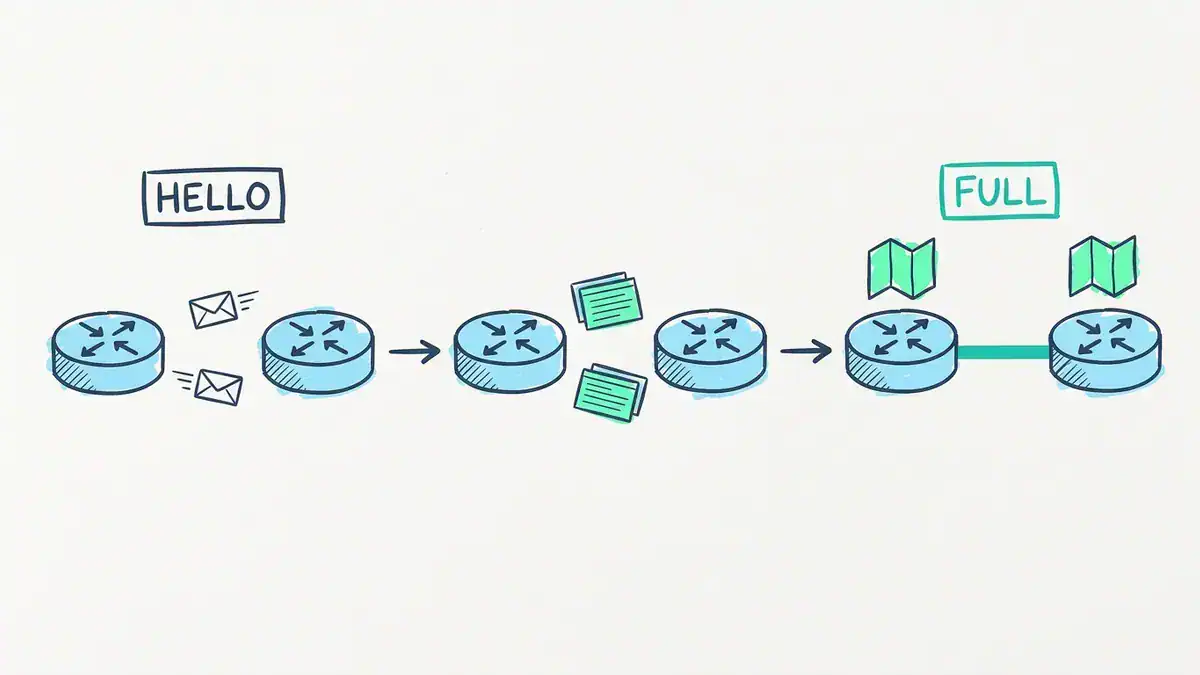
Hello packets find the neighbour (multicast 224.0.0.5, every 10 s on Ethernet). DBD, LSR and LSU packets sync the database. The pair ends Full with identical LSDBs.
What has to match before two routers become neighbours?
When a Hello arrives, RFC 2328 says the receiving router checks it against its own interface settings and silently drops it on any mismatch. That’s why a typo on one side means no neighbour at all. It simply never shows up. Check these:
- Area ID. Both interfaces in the same area.
- Subnet and mask. Same network mask on a broadcast link. (Ignored on point-to-point links.)
- Hello and dead intervals. Must be identical. Change one side to 5 s and the pair never meets.
- Stub area flag. Both sides must agree whether the area is a stub.
- Authentication type. Must match. (The CCNA v2.0 objective excludes authentication, but you’ll hit it at work.)
- MTU. Checked later, in the DBD packets. A mismatch doesn’t stop the Hello, it leaves the pair stuck in ExStart or Exchange.
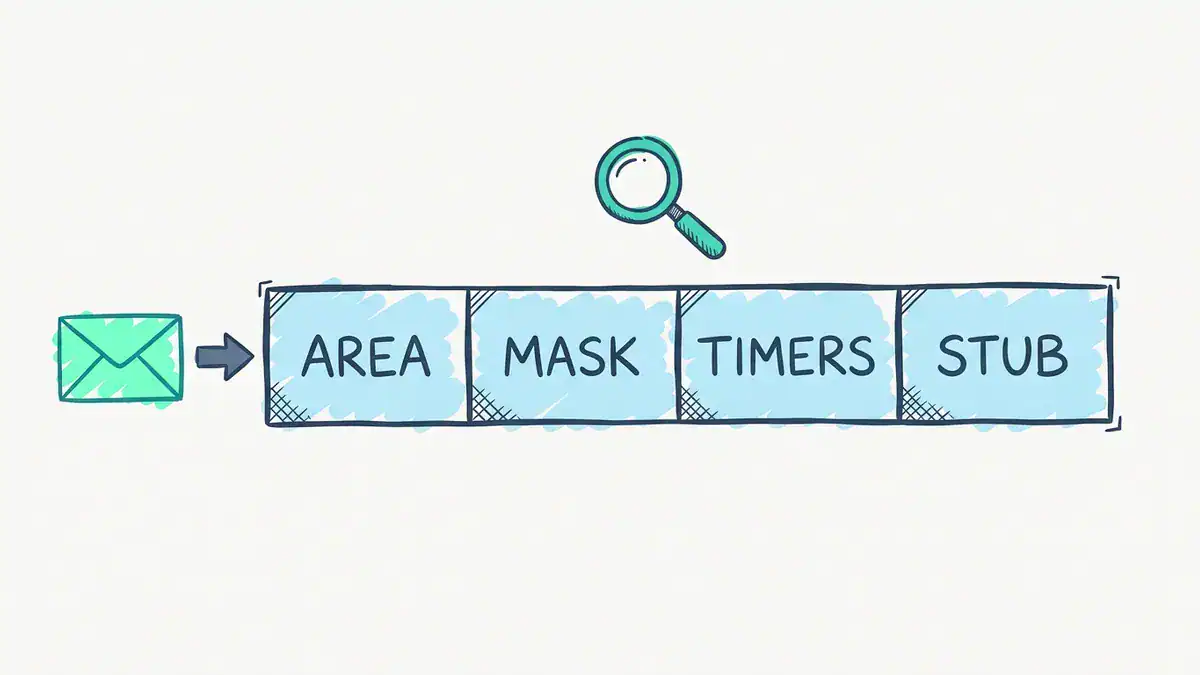
The four Hello fields both ends must agree on: area ID, network mask (ignored on point-to-point links), hello and dead intervals (10 s and 40 s by default on Ethernet) and the stub flag. RFC 2328 section 10.5. MTU is checked later, in the DBD packets.
And one more: router IDs must be unique. Two routers with the same ID make a mess of the database.
What is OSPF cost, and how does it pick the best path?
The OSPF metric is called cost, and OSPF picks the path with the lowest total cost. Each outgoing interface has a cost, and the path cost is the sum of the costs along the way. On Cisco, the default is:
OSPF cost = 100 Mb/s reference bandwidth / interface bandwidth, truncated to a whole number, never lower than 1.
| Interface | Cost at the default reference |
|---|---|
| 64 kb/s serial | 1562 |
| T1 (1.544 Mb/s) | 64 |
| 10 Mb/s Ethernet | 10 |
| 100 Mb/s | 1 |
| 1 Gb/s | 1 |
| 10 Gb/s | 1 |
See the problem? With defaults, OSPF can’t tell 100 Mb/s from 10 Gb/s. Everything fast costs 1, so OSPF quietly turns into a hop counter. The fix is one line under router ospf, on every router:
auto-cost reference-bandwidth 100000The value is in Mb/s, so that’s a 100 Gb/s reference. Now 1 Gb/s costs 100 and 10 Gb/s costs 10. Set it the same everywhere, or routers will compute costs from different scales. We worked through a full three-router example of this trap, side by side with the EIGRP metric, in our OSPF vs EIGRP comparison. It’s the clearest way to see why the default bites.
You can also skip the formula and set a cost directly on an interface with ip ospf cost <value>. Handy when you want one link to be the backup on purpose.
What is the OSPF admin distance?
The OSPF admin distance (administrative distance) on Cisco is 110. Administrative distance only matters when a router learns the same prefix from two different sources. Lower wins.
| Route source | Default AD |
|---|---|
| Connected | 0 |
| Static | 1 |
| eBGP | 20 |
| Internal EIGRP | 90 |
| OSPF | 110 |
| IS-IS | 115 |
| RIP | 120 |
| External EIGRP | 170 |
| iBGP | 200 |
Source: Cisco, What Is Administrative Distance (updated 2026-07-20).
So if a router hears 10.5.0.0/16 from both EIGRP and OSPF, the EIGRP route goes in the table and OSPF’s sits unused. You’ll see both numbers in every OSPF route as [110/200]: administrative distance first, then the OSPF cost. That pair is exactly what CCNA objective 3.1 asks you to read off a routing table.
How are the DR and BDR elected?
On a multi-access segment like an Ethernet switch, OSPF elects a Designated Router (DR) and a Backup Designated Router (BDR). Everyone goes Full with those two, and the DR floods updates on behalf of the segment. The rules:
- The highest OSPF priority wins. Priority runs from 0 to 255, and the default is 1.
- On a tie, the highest router ID wins.
- A router with priority 0 never becomes DR or BDR.
- The election is not preemptive. A router that joins later accepts the existing DR, whatever its own priority.
Rule 4 is the one exams and real networks love. Let’s run it.
Worked example: four routers, then a fifth with priority 255
Four routers share segment 10.0.0.0/24. R1, R2 and R3 keep the default priority of 1. R4 is set to priority 0 because it’s a small branch box you never want as DR.
| Router | Router ID | Priority |
|---|---|---|
| R1 | 1.1.1.1 | 1 |
| R2 | 2.2.2.2 | 1 |
| R3 | 3.3.3.3 | 1 |
| R4 | 4.4.4.4 | 0 |
Step 1, all four boot together. R4 is out (priority 0). R1, R2 and R3 tie on priority, so router ID decides. R3 becomes DR, R2 becomes BDR. R1 and R4 are DROthers.
Step 2, you add R5 with router ID 5.5.5.5 and priority 255. Highest priority on the segment by a mile. Does it take over? No. RFC 2328 says a router joining a network that already has a DR accepts it “regardless of its Router Priority”. R3 stays DR, R2 stays BDR. R5 is a DROther.
Step 3, R3 fails. Now the election reruns, but it starts from who currently holds which role. The BDR, R2, is promoted to DR. Then a new BDR is chosen from the rest, and that’s where R5’s priority finally counts: R5 becomes BDR.
Step 4, the twist. If all five had booted at the same moment, R5 would’ve been DR and R3 BDR. Same routers, same settings, different result, just because of timing. That’s why “highest priority wins” is only true at the very first election.
So if you want a specific router to be DR, set its priority, then reset OSPF on the segment (or bring the current DR and BDR down) so a fresh election happens.
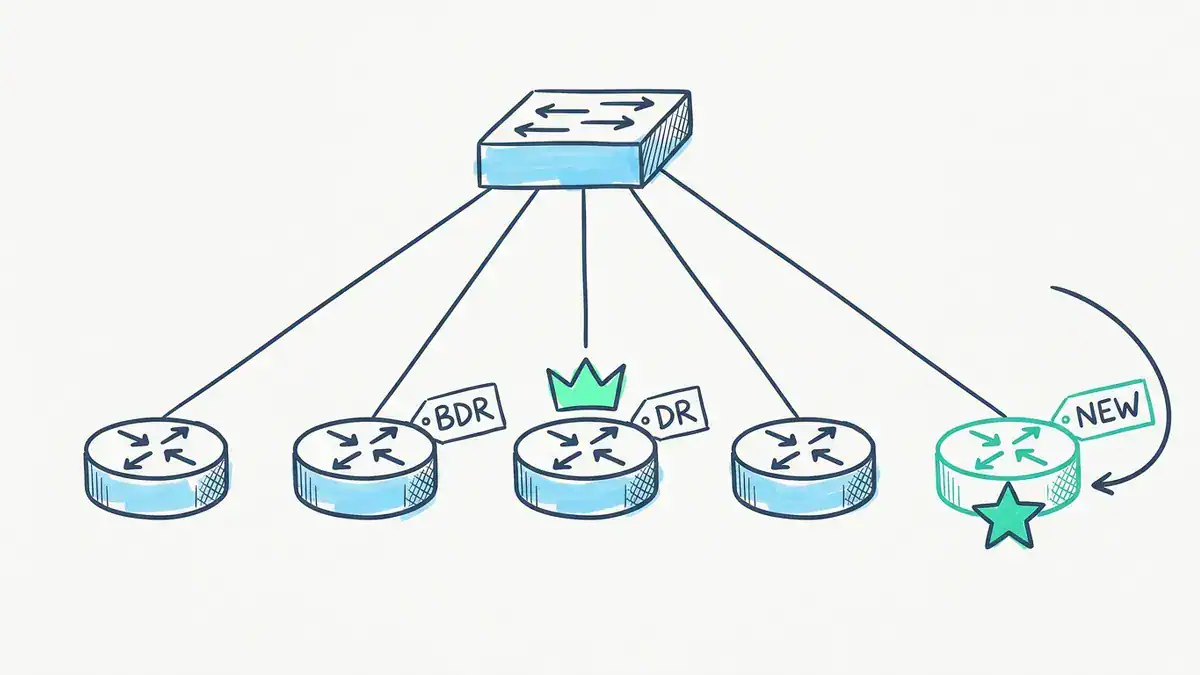
R3 (router ID 3.3.3.3) is DR and R2 (2.2.2.2) is BDR, both at priority 1. R5 joins with priority 255, the star, and stays a DROther. It only becomes BDR after R3 fails, when R2 is promoted to DR.
Why bother with a DR at all?
Because full-mesh adjacencies grow fast. Without a DR, every router on a segment would go Full with every other. With a DR and BDR, each DROther only needs two Full adjacencies, plus one between the DR and BDR. That’s 2n – 3 instead of n(n – 1) / 2.
| Routers on the segment | Full mesh | With DR/BDR |
|---|---|---|
| 4 | 6 | 5 |
| 6 | 15 | 9 |
| 10 | 45 | 17 |
At four routers the saving is small. At ten it’s 45 vs 17 adjacencies, each with its own database sync and flooding.
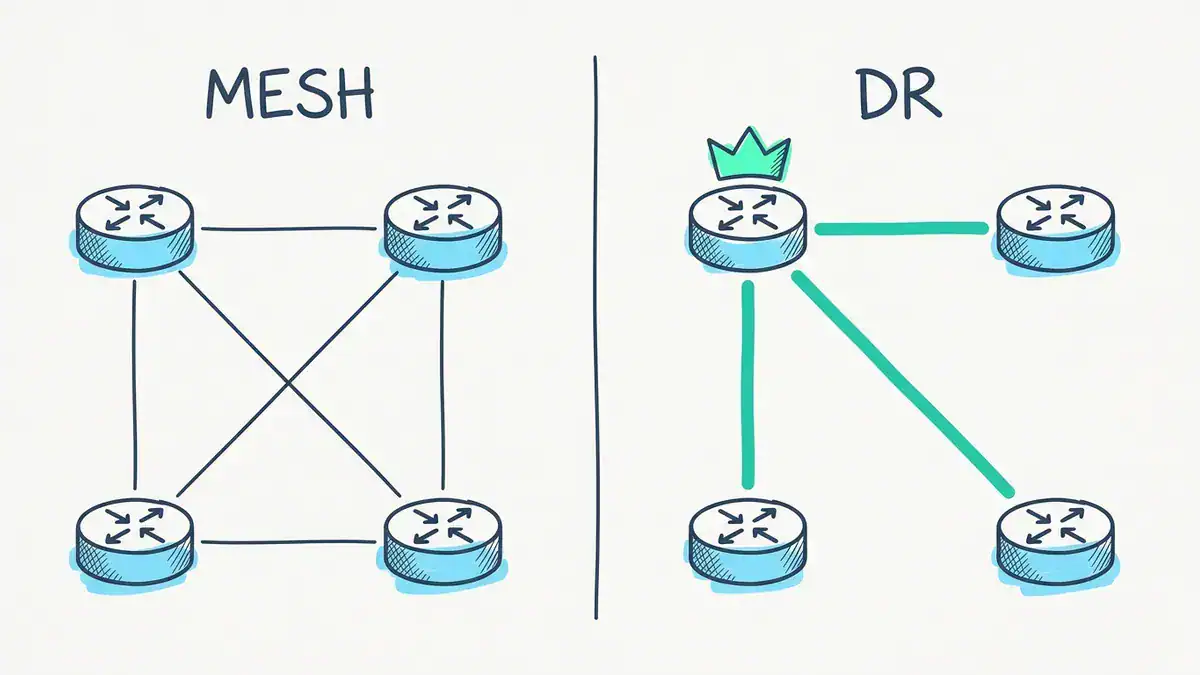
Four routers: 6 Full adjacencies in a full mesh, 3 to the DR. The drawing leaves out the BDR, which adds 2 more, so the real figure is 5 (2n – 3). At ten routers it’s 45 vs 17.
How do OSPF network types change the election?
On a link with exactly two routers there’s nothing to coordinate, so OSPF skips the election. Links running HDLC or PPP are point-to-point by default. Ethernet isn’t. Cisco treats every Ethernet interface as the broadcast type, so even a two-router Ethernet link waits a full dead interval (40 s) and then elects a DR. One interface command fixes that:
interface GigabitEthernet0/2
 ip ospf network point-to-point
Set it on both ends. You get a faster adjacency (no 40-second wait for an election) and no DR/BDR role on that link. This broadcast vs point-to-point difference is exactly objectives 3.4.b and 3.4.c on the CCNA.
How is the OSPF router ID chosen?
Every OSPF router needs a 32-bit router ID, written like an IPv4 address. Cisco picks it in this order:
- The
router-idcommand underrouter ospf, if you set one. - Otherwise, the highest IP address on an up loopback interface.
- Otherwise, the highest IP address on any active interface.
Set it by hand. It makes show output readable and stops the ID changing when an interface goes down. One catch: if OSPF is already running with neighbours, a new router-id doesn’t take effect until you reload or run clear ip ospf process, which drops every adjacency for a moment. Do it in a maintenance window, not mid-afternoon.
What are OSPF areas, and what is multi area OSPF?
OSPF areas split a big network into smaller link-state domains. Routers only keep the full map of their own area, so a flapping link in one area doesn’t force every router in the company to rerun a full SPF. The other areas just get an updated summary.
Three roles to know:
- Backbone (area 0). Every other area must connect to it. Inter-area traffic always crosses area 0.
- Area Border Router (ABR). Sits in area 0 and at least one other area. It summarises one area’s routes into the other.
- Autonomous System Boundary Router (ASBR). Brings in routes from outside OSPF, like a default route from the internet edge or routes redistributed from another protocol.
Single-area OSPF just means everything is in area 0. That’s what the CCNA tests, and it’s perfectly fine for small networks. Multi area OSPF means two or more areas joined through area 0. That’s where ENCOR picks up, and it’s the depth our CCIE Enterprise workbook labs end to end.
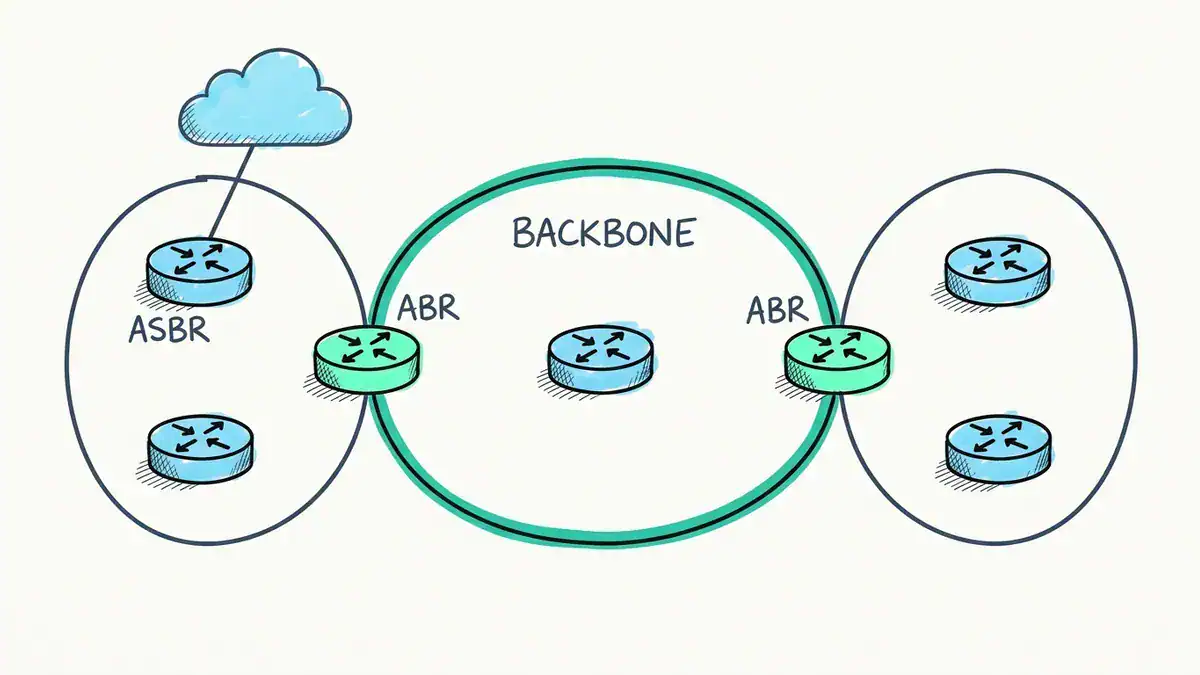
Area 0 is the backbone. Each ABR sits in area 0 and one other area and carries routes across as type 3 summary LSAs. The ASBR brings routes from outside OSPF in as type 5 LSAs.
What are the OSPF area types?
Area types control which LSAs an ABR lets in. Fewer LSAs, smaller database, less to recompute.
| Area type | Blocks | What replaces it | Config |
|---|---|---|---|
| Standard (normal) | Nothing | – | Default |
| Backbone (area 0) | Nothing | – | Default |
| Stub | Type 5 (external routes) | A default route, as a type 3 LSA | area 1 stub (every router in the area) |
| Totally stubby (Cisco) | Types 3, 4 and 5 (except the default) | A single default route | area 1 stub no-summary (ABR only adds no-summary) |
| NSSA | Type 5 | Local externals enter as type 7, converted to type 5 at the ABR | area 1 nssa |
| Totally NSSA | Types 3, 4 and 5 (except the default) | Default route plus local type 7 | area 1 nssa no-summary |
An OSPF stub area still gets inter-area routes. It’s only external routes that it swaps for a default. Lots of explanations blur that line. Every router in a stub area must agree it’s a stub, because that flag is checked in every Hello.
What are the OSPF LSA types?
An OSPF link state advertisement (LSA) is a single entry in the link-state database. Each type describes a different kind of thing, and each has a flooding scope. Here are the ones you’ll actually see in show ip ospf database:
| Type | Name | Created by | Describes | Flooded to |
|---|---|---|---|---|
| 1 | Router LSA | Every router | Its own links and their costs | Its area only |
| 2 | Network LSA | The DR | Which routers sit on a multi-access segment | Its area only |
| 3 | Summary LSA | ABR | A network in another area | The area it’s sent into |
| 4 | ASBR Summary LSA | ABR | How to reach an ASBR in another area | The area it’s sent into |
| 5 | AS External LSA | ASBR | A route from outside OSPF | The whole OSPF domain, except stub areas and NSSAs |
| 7 | NSSA External LSA | ASBR inside an NSSA | An external route inside an NSSA | That NSSA only. The ABR converts it to type 5 |
So how many types of LSA are there in OSPF? For practical purposes, six: 1, 2, 3, 4, 5 and 7. Type 6 was for multicast OSPF (MOSPF) and Cisco routers don’t support it. Types 9, 10 and 11 are “opaque” LSAs, carrying extra data for features like MPLS traffic engineering. You’ll meet those later, if at all.
In a single-area network, you’ll only see types 1 and 2, plus type 5 if someone injects a default route with default-information originate. Want the multi-area and service-provider side on one page? Our free OSPF and MPLS LDP PDF covers it in 47 pages.
How does single-area OSPF configuration work on a Cisco router?
Let’s build the segment from the DR example. Four routers on 10.0.0.0/24, each with its own user LAN behind it. Everything’s in area 0, using private address ranges throughout.
| Router | Gi0/0 (shared segment) | Gi0/1 (user LAN) | Router ID | Priority |
|---|---|---|---|---|
| R1 | 10.0.0.1/24 | 192.168.1.1/24 | 1.1.1.1 | 1 |
| R2 | 10.0.0.2/24 | 192.168.2.1/24 | 2.2.2.2 | 1 |
| R3 | 10.0.0.3/24 | 192.168.3.1/24 | 3.3.3.3 | 1 |
| R4 | 10.0.0.4/24 | 192.168.4.1/24 | 4.4.4.4 | 0 |
Step by step on R1
R1(config)# router ospf 1
R1(config-router)# router-id 1.1.1.1
R1(config-router)# auto-cost reference-bandwidth 100000
R1(config-router)# passive-interface GigabitEthernet0/1
R1(config-router)# exit
R1(config)# interface GigabitEthernet0/0
R1(config-if)# ip ospf 1 area 0
R1(config-if)# interface GigabitEthernet0/1
R1(config-if)# ip ospf 1 area 0
Line by line:
router ospf 1starts process 1 (any number from 1 to 65535). The process ID only matters on this router. It isn’t carried in OSPF packets, so neighbours don’t need the same number.router-id 1.1.1.1pins the ID so it never depends on interface addresses.auto-cost reference-bandwidth 100000fixes the 1G = 10G costing problem. Same value on all four routers.passive-interface GigabitEthernet0/1is the OSPF passive-interface setting. It stops Hellos on the user LAN. The subnet is still advertised, but nobody on that LAN can form a neighbour with your router. Use it on every interface that faces users, servers or the internet.ip ospf 1 area 0under each interface puts it into OSPF. Cisco’s IOS XE guide recommends this interface method over the oldernetworkcommand. It also means you can see what’s in OSPF just by reading the interface config.
Repeat on R2, R3 and R4 with their own router IDs. On R4, add one more line under Gi0/0:
R4(config-if)# ip ospf priority 0The network command alternative
You’ll still see the classic form everywhere, including exam questions:
R1(config)# router ospf 1
R1(config-router)# network 10.0.0.0 0.0.0.255 area 0
R1(config-router)# network 192.168.1.0 0.0.0.255 area 0
It takes a wildcard mask, not a subnet mask, and enables OSPF on any interface whose address matches. 0.0.0.255 matches the whole /24. If wildcard maths isn’t automatic yet, our subnet mask cheat sheet has the masks and wildcards side by side. Both methods give the same result. Just don’t mix them on the same interface and then wonder which one won.
How do you verify it?
Start with sh ip ospf neighbor (the full command is show ip ospf neighbor). On R1 you’d expect something like this (representative output, built from the layout in Cisco’s documentation):
R1# show ip ospf neighbor

Neighbor ID     Pri   State           Dead Time   Address         Interface
2.2.2.2           1   FULL/BDR        00:00:36    10.0.0.2        GigabitEthernet0/0
3.3.3.3           1   FULL/DR         00:00:38    10.0.0.3        GigabitEthernet0/0
4.4.4.4           0   2WAY/DROTHER    00:00:33    10.0.0.4        GigabitEthernet0/0
Read it like this. R1 is Full with the DR (R3) and BDR (R2), exactly as the election predicted, as long as all four came up together. If R1 had booted a minute before the others, it could be sitting as DR right now. That’s the non-preemption rule again. R4 shows 2WAY/DROTHER, which is correct: R1 and R4 are both DROthers, so they stop at 2-Way. The Pri column shows R4’s priority of 0. Dead Time counts down from 40 and resets with every Hello. If it hits zero, the neighbour goes Down.
Then check the routes:
R1# show ip route ospf
O     192.168.3.0/24 [110/200] via 10.0.0.3
(Representative. The codes legend, timestamp and interface columns are trimmed.) The [110/200] is AD 110 and a cost of 200: R1’s Gi0/0 (100) plus R3’s Gi0/1 (100), both 1 Gb/s at the 100 Gb/s reference. With the default reference it would read [110/2].
Two more commands worth knowing: show ip ospf interface brief (one line per OSPF interface) and show ip protocols (a summary of every routing process on the router). Our Cisco commands cheat sheet keeps all of them on one page.
What about OSPFv3 for IPv6?
CCNA v2.0 adds OSPFv3 to the same objective, so expect it from February 2027. The shape is the same, with three differences: you enable IPv6 routing first, you enable OSPF per interface with an ipv6 command, and the router ID is still a 32-bit number. On a router with no IPv4 addresses there’s nothing to borrow it from, so set it yourself.
ipv6 unicast-routing
!
ipv6 router ospf 1
 router-id 1.1.1.1
!
interface GigabitEthernet0/0
 ipv6 ospf 1 area 0
Newer IOS XE releases prefer the router ospfv3 1 syntax and convert the old form automatically. Neighbours form over link-local addresses and the multicast groups are FF02::5 and FF02::6. Everything else on this page (states, DR election, areas, cost) works the same way.
Want to practise all of this on real images? Our post on CCNA labs you can build for free in EVE-NG walks through the setup, and the home lab setup guide covers the hardware.
Why won’t my OSPF neighbor come up?
Look at the state it’s stuck in. The state tells you where to look.
| What you see | Likely cause | Check |
|---|---|---|
| No neighbour at all | A Hello mismatch (area, mask, hello/dead timers, stub flag), passive interface, or no Layer 3 path | show ip ospf interface on both sides, compare values |
| Stuck in INIT | Hellos only get through one way: an ACL dropping 224.0.0.5, or authentication on one side only | ACLs inbound, authentication on both ends |
| Stuck in 2WAY | Usually nothing. Two DROthers stop here by design | Is one of them meant to be DR or BDR? |
| Stuck in EXSTART or EXCHANGE | MTU mismatch, so the DBD packets get dropped | show interface MTU on both sides. Make them match |
| Neighbour flaps | Dead timer expiring: Layer 2 loss, or Hellos delayed or dropped on the way | Interface errors, show ip ospf interface timers |
For the MTU case, Cisco’s advice is to match the MTUs. ip ospf mtu-ignore exists, but it’s meant for rare cases, not as a habit.
OSPF vs EIGRP vs RIP vs BGP: which one do you use?
| OSPF | EIGRP | RIP | BGP | |
|---|---|---|---|---|
| Type | Link-state IGP | Advanced distance-vector IGP | Distance-vector IGP | Path-vector EGP |
| Standard | Open (RFC 2328) | Cisco-developed, informational RFC 7868 | Open (RFC 2453) | Open (RFC 4271) |
| Metric | Cost (bandwidth) | Bandwidth and delay | Hop count, 15 max | Path attributes |
| AD (Cisco) | 110 | 90 internal, 170 external | 120 | 20 eBGP, 200 iBGP |
| Use it for | Multi-vendor enterprise and campus cores | All-Cisco shops that want simple config | Small legacy networks and labs | The internet edge and between organisations |
The decision rule is short:
- Inside your network, mixed vendors or no strong reason otherwise: OSPF.
- All-Cisco and you want the easiest config: EIGRP is fine. Our EIGRP vs OSPF post runs both on the same topology.
- Between your network and an ISP, or between organisations: BGP. See BGP vs OSPF for how the two work together, and BGP MED for one of the knobs you get there.
- RIP: basically only when something old forces it. Its maximum of 15 hops (16 means unreachable) and hop-count metric don’t scale.
So is OSPF better than RIP? For anything beyond a handful of routers, yes. It converges faster, understands bandwidth, and has no hop limit.
Where does open shortest path first sit on the CCNA exam?
OSPF is the only dynamic routing protocol you configure on the CCNA. Here’s where it lives in both versions of the 200-301 blueprint.
| CCNA v1.1 (current, until February 2027) | CCNA v2.0 (from 2027-02-03) | |
|---|---|---|
| Domain | 3.0 IP Connectivity, 25% | 3.0 IP Routing, 20% |
| Objective | 3.4 Configure and verify single area OSPFv2 | 3.3 Configure single area OSPFv2 for IPv4 and OSPFv3 for IPv6 |
| Sub-topics | Neighbour adjacencies, point-to-point, broadcast (DR/BDR selection), router ID | Same four, with “excluding authentication” on adjacencies |
| Related | 3.1 routing table (AD, metric), 3.2 forwarding decision | 3.1 read a routing table (AD, metric) |
Sources: CCNA v1.1 exam topics, CCNA v2.0 exam topics.
Neither version lists LSA types or multi-area design. Those are in ENCOR 350-401 (objectives 3.2.a and 3.2.b: area types, multiple normal areas, summarisation, filtering, passive-interface). If you’re sitting the CCNA after February 2027, add OSPFv3 to your lab list now. Our post on what CCNA v2.0 changes covers the rest of the new blueprint, and the CCNA 200-301 practice test PDF is a good check on whether this has stuck.
FAQ
What is OSPF in networking?
OSPF is a routing protocol that organisations run inside their own network so routers can share routes automatically. Each router learns the full map of its area, calculates the lowest-cost path to every subnet, and recalculates when a link or neighbour fails. It’s an open standard, so routers from different vendors can run it together.
Is OSPF obsolete?
No. It’s an active IETF standard, and Cisco keeps adding to it on its exams. The CCNA v2.0 blueprint that starts on 2027-02-03 expands the OSPF objective to include OSPFv3, and ENCOR tests multi-area OSPF.
What are the 7 stages of OSPF?
The usual “7 stages” are the neighbor states Down, Init, 2-Way, ExStart, Exchange, Loading and Full. There’s an eighth, Attempt, which only appears on nonbroadcast networks with manually configured neighbours. That’s why some sources say seven and others say eight.
What is the difference between DHCP and OSPF?
They do different jobs. DHCP hands IP addresses and settings to end devices. OSPF lets routers share routes with each other. An ordinary PC doesn’t run OSPF, and OSPF never hands out an address. Our DHCP guide covers the other side.
What is an LSA in OSPF?
An LSA (link-state advertisement) is one record in the OSPF database. A router LSA (type 1) lists a router’s links and costs, a network LSA (type 2) lists the routers on a segment, and so on. Routers flood LSAs to each other, and the full set is the map that SPF runs on.
How many types of LSA are there in OSPF?
Six matter in practice: types 1, 2, 3, 4, 5 and 7. Type 6 (multicast OSPF) isn’t supported on Cisco routers, and types 9, 10 and 11 are opaque LSAs used by extensions like MPLS traffic engineering.
What is DBD in OSPF?
DBD (Database Description) is OSPF packet type 2. During the Exchange state, two routers send each other DBDs listing the headers of every LSA they hold, then request whatever they’re missing with Link State Request packets.
Bottom line
OSPF is the link-state IGP you’ll configure on the CCNA and run for most of your career. The core is small. Neighbours form when their Hellos match. Everyone in an area builds the same map. SPF picks the lowest cost, and AD 110 decides when another protocol offers the same route. Get the DR election right, including the fact that it doesn’t preempt, and get comfortable reading show ip ospf neighbor. Then you’ve covered every OSPF sub-topic on both CCNA blueprints.
The fastest way to make it stick is to build the four-router segment above and break it on purpose: mismatch a hello timer, set a priority to 0, change an MTU. Our CCNA workbook has OSPF and break/fix labs like this, with a ready-to-load EVE-NG ISO, so you spend your time on the protocol rather than the setup.