The network automation tools you’ll meet first each do a different job. Netmiko sends CLI commands over SSH. NAPALM gives you the same getters and config replace across vendors. pyATS parses, tests and diffs network state. Ansible pushes config from YAML without you writing Python. And Nornir runs Python tasks on many devices at once.
So don’t ask which one is best. Ask which job you need done.
To show the difference, we ran one show ip interface brief through all five. They didn’t even agree on how many interfaces had a problem. That run is the middle of this post, with the code and the real output.
| Tool | Its one job | You write | Version (2026-10-22) |
|---|---|---|---|
| Netmiko | Send commands over SSH, get text or parsed rows back | Python | 4.8.0 |
| NAPALM | Same getters and config workflow on every supported vendor | Python | 5.2.0 |
| pyATS (with Genie) | Parse, snapshot, test and diff device state | Python + YAML testbed | 26.9 |
| Ansible | Declare config and push it to a fleet | YAML playbooks | ansible-core 2.21.5 |
| Nornir | Run Python tasks on many devices in parallel | Python + YAML inventory | 3.6.0 |
What are network automation tools, and what do they actually do?
Network automation tools are the software that configures, checks and tests network devices for you, instead of you typing into one CLI session at a time.
So what is network automation, exactly? Cisco defines network automation as automating the “configuring, managing, testing, deploying, and operating” of physical and virtual devices.
That definition covers two very different shelves.
On one shelf are network automation platforms: commercial network automation software like Cisco Crosswork, NSO or a config manager with a GUI and a licence. They’re bought by teams.
On the other shelf are the open-source libraries and frameworks you install with pip on your own laptop. That’s the shelf this post covers, because it’s the one you can learn this weekend for free and the one the CCNA Automation exam expects you to recognise.
Network automation tools compared: which job does each one do?
Here’s the side-by-side. Versions, licences and Python support come from PyPI on 2026-10-22. The install sizes are ours: we installed each tool into its own clean virtual environment on Python 3.14.4 and measured it.
| Netmiko | NAPALM | pyATS + Genie | Ansible | Nornir | |
|---|---|---|---|---|---|
| Talks to devices by | SSH / Telnet CLI | Per-vendor driver (IOS driver uses Netmiko) | SSH CLI via its own connection library | SSH via network_cli, or APIs | Whatever plugin you load (Netmiko, NAPALM, …) |
| Gives you back | Raw text, or a list of dicts with TextFSM | Normalised dicts with fixed keys | Nested dicts keyed by object | Task results in YAML/JSON | A result object per host |
| Platforms | 177 platform names | 7 drivers: ios, iosxr, iosxr_netconf, nxos, nxos_ssh, eos, junos | Genie lists 6,440 command strings, 4,420 with an IOS XE parser | Collections per vendor (cisco.ios 11.6.0) | Inherits from its plugins |
| Licence | MIT | Apache-2.0 | Apache 2.0 | GPL-3.0-or-later | Apache-2.0 |
| Python needed | 3.10+ | 3.10+ | 3.10-3.14 wheels | 3.12+ on the control node | 3.10+ |
| Runs on Windows? | Yes, with pip | Not listed (Linux, macOS) | No wheels, use WSL | Control node needs WSL | Core does, with pip |
| Install size we measured | 38 MB, 17 packages | 78 MB, 42 packages | 395 MB, 98 packages | 30 MB core + 22 MB of collections | 79 MB, 48 packages (with both plugins) |
Two numbers in that table surprise people.
pyATS is ten times the size of Netmiko. It isn’t one library, it’s a whole test system (pyATS stands for Python Automation Test System), so that’s fair. Just don’t install it on a 20 GB lab VM and wonder where the disk went.
And NAPALM pulls in Netmiko. Its IOS driver imports Netmiko’s ConnectHandler, so on Cisco IOS, NAPALM is a normalising layer sitting on top of the same SSH session Netmiko would open.
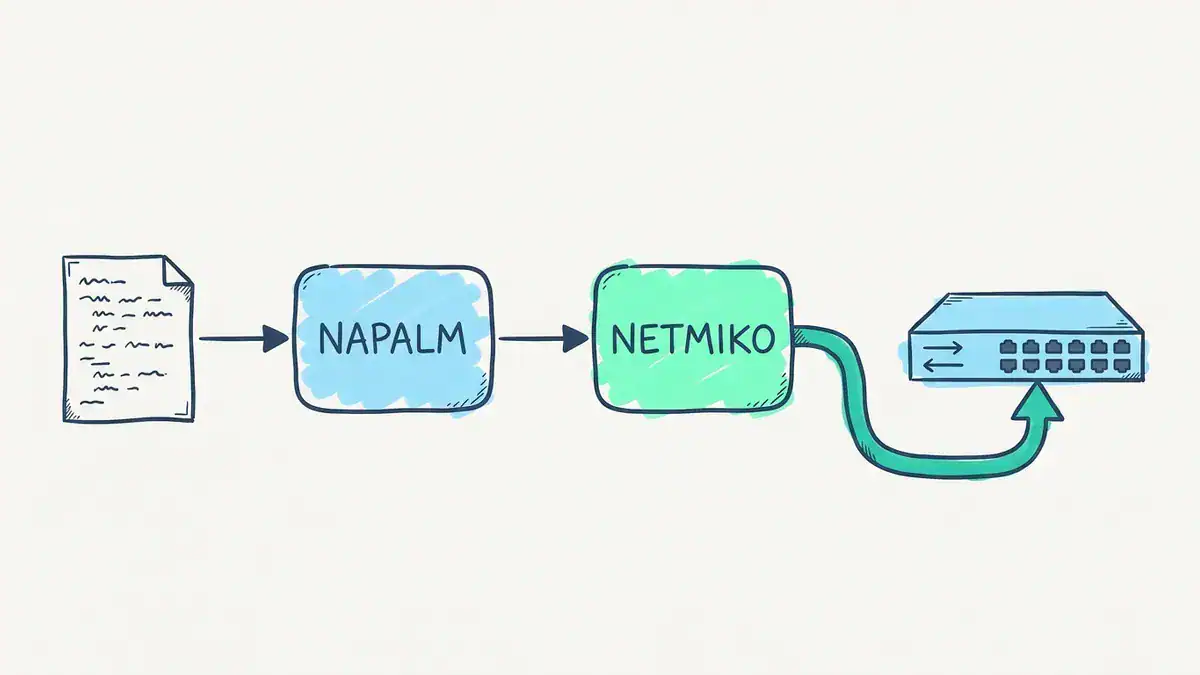
Your script calls NAPALM, and on IOS NAPALM opens the connection through Netmiko. Installing NAPALM 5.2.0 pulled in Netmiko as one of its 42 packages.
What happens when you run the same check through every tool?
Here’s the task. You’ve got three access switches and you want every interface that isn’t up/up. Simple, right?
We built the switch output below in the exact column layout of Cisco’s Catalyst 9300 command reference, then fed it to each tool’s real parser on 2026-10-22. No live switch was involved. The parsed output you’ll see is what the tools actually returned. The device versions of each script were compiled and syntax-checked, and the Nornir inventory and pyATS testbed loaded for real, but they weren’t run against hardware.
Interface              IP-Address      OK? Method Status                Protocol
Vlan1                  unassigned      YES NVRAM  administratively down down
Vlan10                 192.0.2.11      YES NVRAM  up                    up
GigabitEthernet1/0/1   unassigned      YES unset  up                    up
GigabitEthernet1/0/2   unassigned      YES unset  up                    up
GigabitEthernet1/0/3   unassigned      YES unset  down                  down
GigabitEthernet1/0/4   unassigned      YES unset  administratively down down
GigabitEthernet1/0/24  unassigned      YES unset  up                    up
Three lines aren’t up/up. Vlan1 and Gi1/0/4 are shut on purpose. Gi1/0/3 is a real problem: it’s enabled and it’s down.
Keep that in mind. One tool is going to notice the difference.
Netmiko: how do you send a command and get data back?
Netmiko is the shortest path from “I type this in the CLI” to “Python types it for me”. You open a session, send the command, and with use_textfsm=True you get rows instead of a wall of text.
import os
from netmiko import ConnectHandler

switches = ["192.0.2.11", "192.0.2.12", "192.0.2.13"]

for host in switches:
    with ConnectHandler(device_type="cisco_ios", host=host,
                        username=os.environ["NET_USER"],
                        password=os.environ["NET_PASS"]) as conn:
        rows = conn.send_command("show ip interface brief", use_textfsm=True)
    for r in rows:
        if r["status"] != "up" or r["proto"] != "up":
            print(host, r["interface"], r["status"], r["proto"])
The parsing comes from the ntc-templates package (version 9.3.0, 979 templates, 143 of them for cisco_ios). Here’s what it actually returned for the first two rows:
[
  {
    "interface": "Vlan1",
    "ip_address": "unassigned",
    "status": "administratively down",
    "proto": "down"
  },
  {
    "interface": "Vlan10",
    "ip_address": "192.0.2.11",
    "status": "up",
    "proto": "up"
  }
]
It’s a list of 7 dicts. Notice the key is proto, not protocol. And the OK? and Method columns are gone.
Result: 3 interfaces flagged (Vlan1, Gi1/0/3, Gi1/0/4).
If you want ten more Netmiko scripts like this one, our Python for network engineers post walks through backups, Jinja2 templates and safe config pushes.
NAPALM: why does it find one problem instead of three?
NAPALM doesn’t hand you the vendor’s columns. It hands you its own model. get_interfaces() returns the same keys on every driver: is_up, is_enabled, description, last_flapped, mtu, speed and mac_address.
import os
from napalm import get_network_driver

switches = ["192.0.2.11", "192.0.2.12", "192.0.2.13"]
driver = get_network_driver("ios")

for host in switches:
    with driver(host, os.environ["NET_USER"], os.environ["NET_PASS"]) as dev:
        for name, i in dev.get_interfaces().items():
            if i["is_enabled"] and not i["is_up"]:
                print(host, name, "enabled but down")
We ran NAPALM 5.2.0’s real IOS getter on the same switch state. Here’s how it scored each port:
| Interface | is_enabled | is_up |
|---|---|---|
| Vlan1 | False | False |
| Vlan10 | True | True |
| GigabitEthernet1/0/1 | True | True |
| GigabitEthernet1/0/2 | True | True |
| GigabitEthernet1/0/3 | True | False |
| GigabitEthernet1/0/4 | False | False |
| GigabitEthernet1/0/24 | True | True |
Result: 1 interface flagged. Just Gi1/0/3.
That’s not a bug. The driver sets is_enabled to False whenever the status says “administratively”, so a port you shut on purpose stops looking like an outage. Honestly, that’s usually the answer you wanted in the first place.
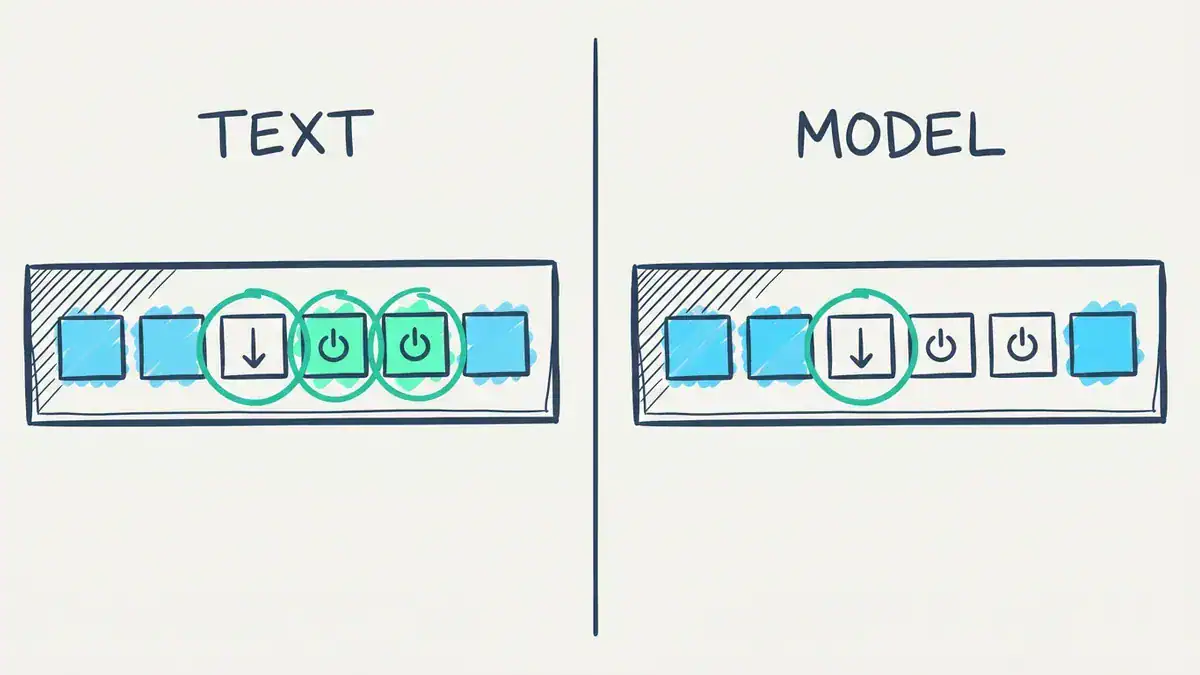
TEXT is what TextFSM and Genie see: status and protocol strings, so Vlan1, Gi1/0/3 and Gi1/0/4 all fail an up/up test. MODEL is NAPALM’s is_enabled and is_up: the two shut ports (power-off symbols) are disabled, so only Gi1/0/3 is enabled but down.
The other half of NAPALM is config. Every driver has the same six methods: load_merge_candidate, load_replace_candidate, compare_config, commit_config, discard_config and rollback. You load a change, read the diff, then commit or throw it away. Same workflow on IOS, NX-OS, EOS or Junos.
pyATS: what is pyATS, and why is the diff the real feature?
pyATS is Cisco’s Python test framework. Cisco says it was “originally developed for internal Cisco engineering use” and still runs millions of tests a month inside the company, according to its pyATS developer page. Genie is the library on top that holds the parsers and the device models. Since pip install "pyats[library]" installs both, people write “pyATS Genie” as one thing.
You describe your devices once in a testbed file:
devices:
  sw1:
    os: iosxe
    type: switch
    connections:
      cli:
        protocol: ssh
        ip: 192.0.2.11
    credentials:
      default:
        username: "%ENV{NET_USER}"
        password: "%ENV{NET_PASS}"
Then the script is short:
from genie.testbed import load

testbed = load("testbed.yaml")

for name, dev in testbed.devices.items():
    dev.connect(log_stdout=False)
    out = dev.parse("show ip interface brief")
    for intf, d in out["interface"].items():
        if d["status"] != "up" or d["protocol"] != "up":
            print(name, intf, d["status"], d["protocol"])
    dev.disconnect()
Genie 26.9 parsed the same output into this:
{
  "Vlan1": {
    "ip_address": "unassigned",
    "interface_is_ok": "YES",
    "method": "NVRAM",
    "status": "administratively down",
    "protocol": "down"
  },
  "Vlan10": {
    "ip_address": "192.0.2.11",
    "interface_is_ok": "YES",
    "method": "NVRAM",
    "status": "up",
    "protocol": "up"
  }
}
Different shape. It’s a dict keyed by interface name, it keeps the OK? and Method columns, and the key is protocol. Copy your Netmiko loop over and it breaks straight away.
Result: 3 interfaces flagged, same as Netmiko.
So why bother with pyATS? Because of what you do next. Take a snapshot before a change window and another after. Genie’s Diff tells you exactly what moved. We parsed the switch with Gi1/0/3 up, then with it down, and ran the diff:
 interface:
  GigabitEthernet1/0/3:
-  protocol: up
+  protocol: down
-  status: up
+  status: down
Six interfaces didn’t change, so they aren’t in the output. On a 48-port switch, or 200 switches, that’s the whole point. You stop reading output and start reading only what changed.

Two parses of the same switch, one before and one after Gi1/0/3 went down. Genie’s Diff drops the 6 interfaces that didn’t change and shows only Gi1/0/3’s status and protocol going from up to down.
One catch: pyATS 26.9 ships wheels for Linux and macOS only. On Windows, run it inside WSL or a Linux VM.
Ansible network automation: what does the playbook version look like?
With Ansible you don’t write the loop. You write what you want, and the cisco.ios collection plus ansible.utils do the SSH and the parsing.
- name: Find interfaces that are not up/up
  hosts: switches
  gather_facts: false
  tasks:
    - name: Run and parse show ip interface brief
      ansible.utils.cli_parse:
        command: show ip interface brief
        parser:
          name: ansible.netcommon.ntc_templates
      register: brief

    - name: Report the ones that are not up/up
      ansible.builtin.debug:
        msg: "{{ item.interface }} is {{ item.status }}/{{ item.proto }}"
      loop: "{{ brief.parsed }}"
      when: item.status != 'up' or item.proto != 'up'
And the inventory:
[switches]
sw1 ansible_host=192.0.2.11
sw2 ansible_host=192.0.2.12
sw3 ansible_host=192.0.2.13

[switches:vars]
ansible_connection=ansible.netcommon.network_cli
ansible_network_os=cisco.ios.ios
ansible_user=admin
Run it with ansible-playbook -i hosts.ini ansible_check.yml -k so it asks for the SSH password. We ran the same parse step on our saved output (cli_parse accepts text: instead of command:), and the debug task printed:
"msg": "Vlan1 is administratively down/down"
"msg": "GigabitEthernet1/0/3 is down/down"
"msg": "GigabitEthernet1/0/4 is administratively down/down"
Result: 3 interfaces flagged, and the keys are proto again. That’s because this parser is ntc-templates, the same one Netmiko used. Ansible didn’t parse anything itself. It called the same TextFSM template.
Ansible’s real strength isn’t this read-only check, though. It’s config. Resource modules like cisco.ios.ios_vlans and cisco.ios.ios_interfaces take the state you want and work out the commands. If you want to see how that behaves when you delete something, our Terraform vs Ansible post runs the same VLAN lab through both.
What about Nornir?
Nornir isn’t another way to talk to a switch. It’s a way to run Python tasks on lots of switches at once, with an inventory. The talking is done by plugins, usually Netmiko or NAPALM.
# config.yaml
inventory:
  plugin: SimpleInventory
  options:
    host_file: inventory/hosts.yaml
runner:
  plugin: threaded
  options:
    num_workers: 10
import os
from nornir import InitNornir
from nornir_netmiko.tasks import netmiko_send_command
nr = InitNornir(config_file="config.yaml")
nr.inventory.defaults.username = os.environ["NET_USER"]
nr.inventory.defaults.password = os.environ["NET_PASS"]
results = nr.run(task=netmiko_send_command,
command_string="show ip interface brief", use_textfsm=True)
for host, multi in results.items():
for r in multi[0].result:
if r["status"] != "up" or r["proto"] != "up":
print(host, r["interface"], r["status"], r["proto"])Same proto key, because under the hood it’s Netmiko and TextFSM again. What changed is that all three switches run in parallel. The threaded runner defaults to 20 workers if you don’t set num_workers.

Nornir’s threaded runner sends the task to every host at once. Our config.yaml sets num_workers: 10 for three switches. Leave it out and the default is 20.
Think of Nornir as Ansible’s job (inventory plus “run this everywhere”) done in plain Python, so you can use if, loops and your debugger instead of YAML and Jinja2.
One small flag: the nornir-netmiko plugin hasn’t had a release since 2023-12-07 (version 1.0.1). It still installed cleanly next to Netmiko 4.8.0 for us. Worth knowing before you build a team workflow on it.
So what did the five runs teach you?
Same switch. Same question. Here’s the scorecard:
| Tool | Parser behind it | Data shape | Key for line protocol | Interfaces flagged |
|---|---|---|---|---|
| Netmiko | ntc-templates (TextFSM) | list of dicts | proto | 3 |
| Ansible | ntc-templates (TextFSM) | list of dicts | proto | 3 |
| Nornir | ntc-templates via Netmiko | list per host | proto | 3 |
| pyATS | Genie | dict keyed by interface | protocol | 3 |
| NAPALM | its own IOS getter | booleans | is_up | 1 |
Three lessons fall out of that table.
- Your code is tied to the parser, not the device. Swap TextFSM for Genie and every
r["proto"]becomes aKeyError. - Normalised beats raw when you have mixed vendors. NAPALM’s
is_enabled/is_upreads the same on IOS and Junos. TextFSM column names don’t. - Three of the five are the same parser in different clothes. Learn TextFSM once and you’ve learned it for Netmiko, Nornir and Ansible’s
cli_parse.
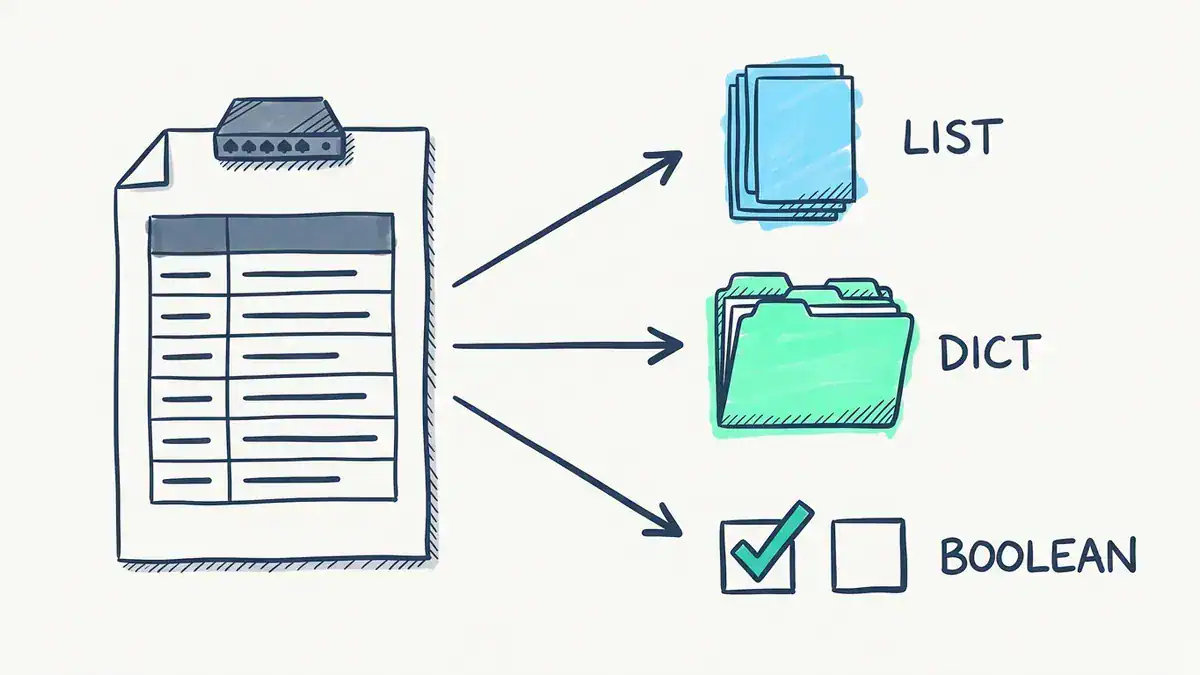
One show ip interface brief, three shapes. LIST: TextFSM, used by Netmiko, Nornir and Ansible, gives 7 rows with the key proto. DICT: Genie gives one entry per interface with the key protocol. BOOLEAN: NAPALM gives is_enabled and is_up.
Which of these network automation tools should you learn first?
Our recommendation, if you’re working toward CCNA or CCNA Automation:
- Netmiko first. It’s the closest thing to the CLI you already know, it installs on Windows with pip, and you can see every command it sends. A week of scripts with it teaches you SSH sessions, prompts and parsing.
- Ansible second. It’s named in the 200-901 blueprint, you’ll be asked to read playbooks, and it’s what most network teams already run for config changes.
- pyATS third. It’s also named in the blueprint, and the snapshot-and-diff habit will make you better at change windows straight away.
- NAPALM or Nornir when you need them. NAPALM when you’ve got more than one vendor or want config replace with rollback. Nornir when your Python scripts start crawling because they run one device at a time.
Your situation might flip that order. If you’re on a team that already runs Ansible, start there. If you’re in a test or QA role at a vendor or service provider, pyATS might be day one.
Ansible vs Python for network automation: do you have to pick one?
No. Ansible is written in Python, and its network parsing runs on the same libraries you’d call from a script. The real choice is how you want to describe the work.
Pick Ansible for config you want to keep in a known state across a fleet: VLANs, ACLs, NTP, users. You declare it, the resource module works out the commands, and the next run changes nothing if nothing drifted.
Pick Python (Netmiko, NAPALM, pyATS, Nornir) for logic: checks, reports, “if this then that”, calling an API and a switch in the same breath. Network automation Python scripts are just easier to debug when the job is mostly decisions.
Most people end up with both. A playbook makes the change, a Python check proves it worked.
Where do network automation tools show up on the CCNA Automation exam?
DevNet Associate became CCNA Automation (200-901 CCNAAUTO) on 2026-02-03. Cisco’s own rebrand session slides say the associate exam was “only rebranded, no updates to exam content”, so the v1.1 topics still apply. It’s a 120-minute exam, per Cisco’s CCNAAUTO course outline.
Tools are named in domain 5.0, Infrastructure and Automation, which is 20% of the 200-901 v1.1 exam topics:
| Objective | What it says | Tools in this post |
|---|---|---|
| 5.3 | “Describe the use and roles of network simulation and test tools (such as Cisco Modeling Labs and pyATS)” | pyATS |
| 5.6 | “Describe the capabilities of automation tools such as Ansible, Terraform, and Cisco NSO” | Ansible |
| 5.8 | “Identify the workflow being automated by an Ansible playbook” | Ansible |
| 3.1 | “Construct a Python script that uses a Cisco SDK given SDK documentation” | Python skills from Netmiko and pyATS help here |
Here’s the honest bit. Netmiko, NAPALM and Nornir aren’t named in the blueprint. You learn them because they’re what you’ll use at work, and because writing Python against real devices makes the exam’s API and parsing objectives far easier. For the exam itself, you need to know what pyATS and Ansible are for and be able to read a playbook.
Our CCNA 200-901 skills guide covers the rest of the blueprint, and Terraform’s place in 5.6 is in the Terraform vs Ansible comparison.
What mistakes do people make with these tools?
These all trip people up in the first month.
- Hard-coding key names, then switching parser. You saw it above:
protovsprotocol. Wrap parsing in one function so a parser swap is a one-line fix. - Thinking NAPALM avoids screen-scraping on IOS. It doesn’t. Its IOS driver uses Netmiko and regex. What it gives you is a stable output model, not a different transport.
- Installing pyATS on plain Windows. There’s no Windows wheel. Use WSL, a Linux VM or your lab server.
- Running
pip install ansible-coreand expecting Cisco modules. Core doesn’t include them. Addansible-galaxy collection install cisco.ios, which also pullsansible.netcommonandansible.utils. You also needparamikooransible-pylibsshfor the SSH connection. ansible-core 2.21 wants Python 3.12 or newer on the control node. - Counting shut ports as outages. Decide whether “administratively down” is a problem before you alert on it. NAPALM already made that call for you.
- Putting passwords in the script. Every example here reads them from environment variables. Keep it that way, and use Ansible Vault for playbooks.
Where can you practise without breaking a real network?
You need something with an SSH prompt that answers show ip interface brief. Three options:
- EVE-NG or GNS3 on a home lab box. Our home lab setup guide gets you there in a weekend.
- Cisco Modeling Labs. It’s the simulation tool named next to pyATS in objective 5.3. Check the tiers in our CML pricing and limits post.
- Cisco DevNet Sandbox. Free always-on and reservable labs run by Cisco, with nothing to install.
If you want a guided path, our CCNA Automation workbook has 60 labs built on DevNet Sandbox, including Netmiko scripts for pulling device data, Ansible playbooks that push VLANs and ACLs to IOS XE, and pyATS validation in its study plan. For deeper Ansible, the DevOps workbook goes further. Keep the free Ansible commands cheat sheet and Cisco commands cheat sheet open while you work.
FAQ
What is pyATS?
pyATS is Cisco’s Python Automation Test System, a framework for connecting to network devices, parsing their output into structured data, and testing or comparing that state. Cisco built it for internal engineering and released it publicly. Genie, the library that ships with it, holds the parsers: version 26.9 lists 6,440 command strings, 4,420 of them with an IOS XE parser.
What best describes a pyATS testbed?
A pyATS testbed is the top-level object that holds every device you want to work with: each device’s OS, how to connect to it, its credentials, and optionally the links between interfaces. You usually write it as a YAML file and load it with genie.testbed.load(). Your scripts then refer to devices by name instead of IP.
What are the benefits of pyATS?
The big ones are structured output, vendor-neutral device models, and snapshot comparison. You get Python dicts instead of screen text, you can learn a feature’s state before and after a change, and Diff shows only what moved. It’s also named in the CCNA Automation blueprint (objective 5.3), so time spent on it counts for the exam.
Is Ansible better than Python for network automation?
Neither is better overall. Ansible is better for keeping config in a declared state across many devices without writing code. Python is better for checks, reports and anything with logic. Ansible itself runs on Python, and most teams use both: a playbook to change, a script to verify.
Are network automation tools free?
The ones in this post are. Netmiko is MIT-licensed, NAPALM, Nornir and pyATS are Apache 2.0, and ansible-core is GPL-3.0-or-later, all free to install from PyPI. You pay for commercial network automation platforms such as Red Hat Ansible Automation Platform, Cisco NSO or Crosswork, which add vendor support and management features on top.
What does a network automation engineer use day to day?
Usually Python with Netmiko or NAPALM, Ansible for config changes, Git for version control, and a source of truth such as NetBox for inventory. pyATS shows up wherever testing and change validation matter. Our network automation engineer salary guide maps those skills to pay, and the NetBox Ansible inventory post shows the source-of-truth half. If you’re interviewing, try our Ansible interview questions.
Bottom line
Network automation tools aren’t rivals. They’re layers. Netmiko talks, NAPALM normalises, pyATS tests, Ansible declares, Nornir scales.
Start with Netmiko so you see what’s happening on the wire. Add Ansible and pyATS because the exam and most network teams expect them. Then reach for NAPALM and Nornir when your network or your scripts outgrow the basics.
And whichever you pick, remember the proto vs protocol lesson. The tool’s data model is part of the tool.