HSRP (Hot Standby Router Protocol) is Cisco’s first hop redundancy protocol. Two or more routers share one virtual IP address and one virtual MAC address, so your hosts keep a working default gateway when a router dies. VRRP does the same job as an open IETF standard. GLBP is Cisco’s too, and it adds load balancing across up to four gateways.
That’s the short version.
If you’re studying for the CCNA, here’s the part most guides miss. The CCNA v2.0 blueprint, which replaces v1.1 from 2027-02-03, names HSRP and VRRP in objective 3.4, and the verb is “interpret the operational status”. GLBP isn’t named. So you need to read show standby and show vrrp output, not just recite a table.
This guide covers all three. You’ll get the states, priority and preemption, the virtual MACs, Cisco configs, the failover maths, and one tracking mistake that quietly breaks a lot of HSRP setups.
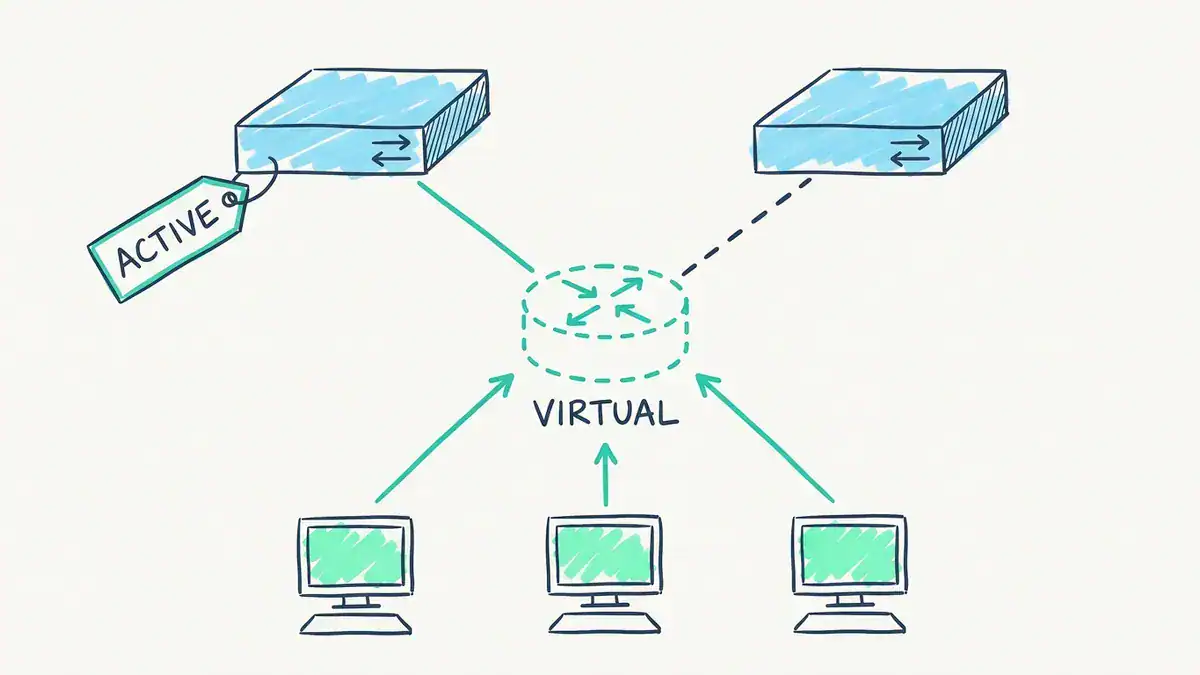
Hosts use one virtual gateway, here 10.10.10.1 for HSRP group 10. DSW1 (10.10.10.2) is Active and forwards. DSW2 (10.10.10.3) is Standby and waits.
What is HSRP in networking?
The HSRP protocol is a first hop redundancy protocol (FHRP). It lets a group of routers act as one virtual router, so the default gateway your hosts use never depends on a single box. One router is Active and forwards the traffic. A second is Standby and takes over if the Active router stops sending hellos.
Your PCs never know any of this happened. They keep sending to the same gateway IP and the same gateway MAC.
What problem does HSRP solve?
Every host has exactly one default gateway, usually handed out by DHCP’s default-router option. Point it at a real router interface and that router becomes a single point of failure. If it reboots, every host on the subnet loses everything off-net.
Adding a second router doesn’t fix it on its own. The hosts still point at the first one.
HSRP fixes it by inventing a gateway that doesn’t belong to any one router:
- A virtual IP, say 10.10.10.1, which you hand to hosts as their gateway
- A virtual MAC, which the Active router answers ARP with. HSRP version 1 uses
0000.0c07.acXX, where XX is the group number in hex - Hellos every 3 seconds by default, sent over UDP port 1985
If the Standby router doesn’t hear from the Active router for the hold time (10 seconds by default), it takes over the virtual IP and MAC. The hosts’ ARP entries stay valid because the MAC never changed.
This is the same reason a router on a stick design is fragile. One router, one trunk, one failure away from an outage.
Is HSRP Cisco proprietary?
Yes. HSRP is Cisco’s protocol. Cisco published version 1 as RFC 2281 in 1998, but it’s an informational RFC, not a standards-track one. If you need gateway redundancy between Cisco and non-Cisco gear, use VRRP.
And FHRP vs HSRP? FHRP is the category. HSRP, VRRP and GLBP are all first hop redundancy protocols.
What are the six HSRP states?
Every HSRP router moves through a set of states before it settles as Active or Standby. RFC 2281 defines them, and Cisco’s HSRP configuration guide uses the same names (Cisco shows Initial as “Init”).
| State | What the router is doing |
|---|---|
| Initial | HSRP is configured but not running yet, often because the interface is down |
| Learn | No virtual IP configured locally, and no hello heard from the Active router yet |
| Listen | Knows the virtual IP and hears hellos, but isn’t Active or Standby |
| Speak | Sends and receives hellos and takes part in the election |
| Standby | Next in line. Ready to take over if the Active router fails |
| Active | Forwards traffic sent to the virtual MAC and sends hellos |
With three or more routers in a group, only one is Active and one is Standby. The rest sit in Listen. To cut traffic, only the Active and Standby routers keep sending hellos once the election is over.
Which action does the HSRP standby router perform?
The Standby router monitors the Active router’s hellos and sends its own, ready to take over. It doesn’t forward user traffic for the virtual MAC. When the Active router’s hold timer expires, the Standby router becomes Active and starts answering for the virtual IP and MAC. Then a Listen router, if you have one, is elected the new Standby.
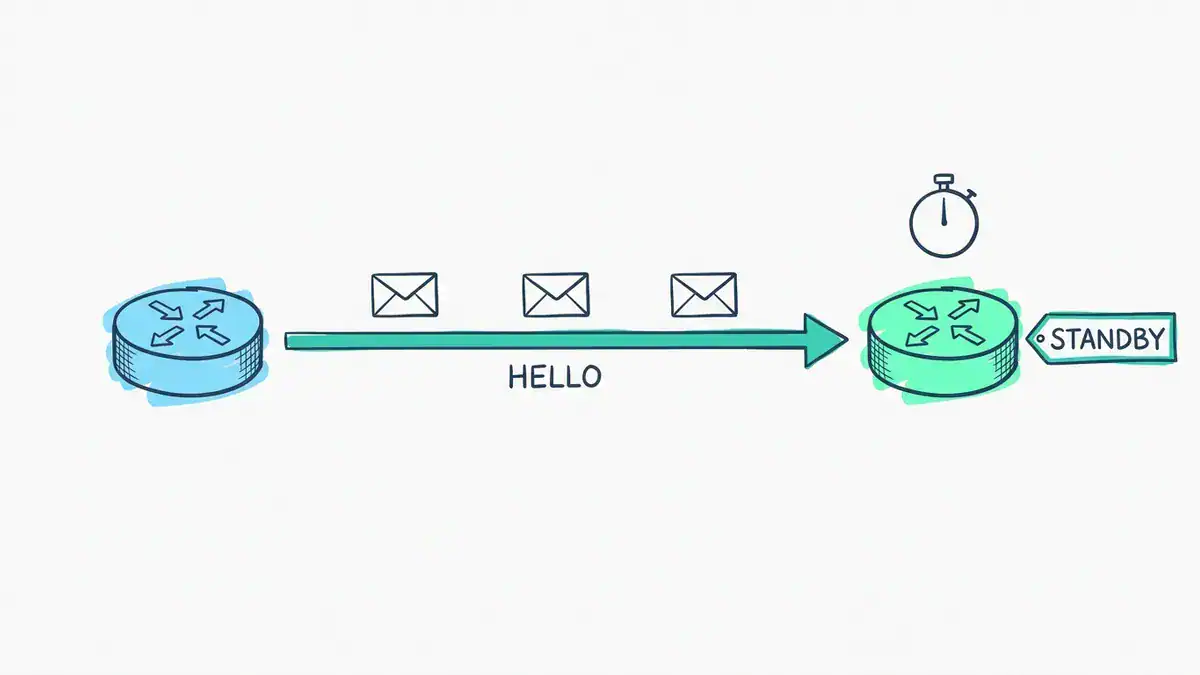
By default HSRP sends a hello every 3 seconds. If the Standby router hears nothing from the Active router for the 10-second hold time, it takes over as Active.
How do HSRP priority and preemption work?
HSRP priority decides who becomes Active. It ranges from 1 to 255, and the default is 100. The highest priority wins. If priorities tie in the initial election, the higher interface IP address wins.
Preemption decides whether a better router can take the Active role back. It’s off by default. Without standby preempt, whichever router came up first stays Active, even if a higher-priority router joins later.
Two details catch people out:
- Equal priority never preempts. Cisco says it outright: “A standby router with equal priority but a higher IP address will not preempt the active router.” The IP tie-breaker only counts when nobody is Active yet.
- Preempt has to be on the router taking over. A router with a higher priority and no
preemptjust waits.
Cisco also lets you hold preemption back with standby 10 preempt delay minimum 60. That gives a rebooted switch time to build its routing table before it grabs the Active role.
Is a higher or lower HSRP priority better?
Higher. Priority 110 beats the default 100. (If you’ve just come from OSPF DR election, that’s the same direction, so you won’t have to unlearn anything.)
What’s the difference between HSRP version 1 and version 2?
Version 1 is still the default on Cisco IOS XE. Version 2 fixes its limits, and you turn it on per interface with standby version 2.
| HSRPv1 | HSRPv2 | |
|---|---|---|
| Group numbers | 0 to 255 | 0 to 4095 |
| Virtual MAC | 0000.0c07.acXX | 0000.0c9f.f000 to 0000.0c9f.ffff |
| Hello multicast | 224.0.0.2 | 224.0.0.102 |
| Millisecond timers | Not advertised or learned | Advertised and learned |
| IPv6 | No | Yes |
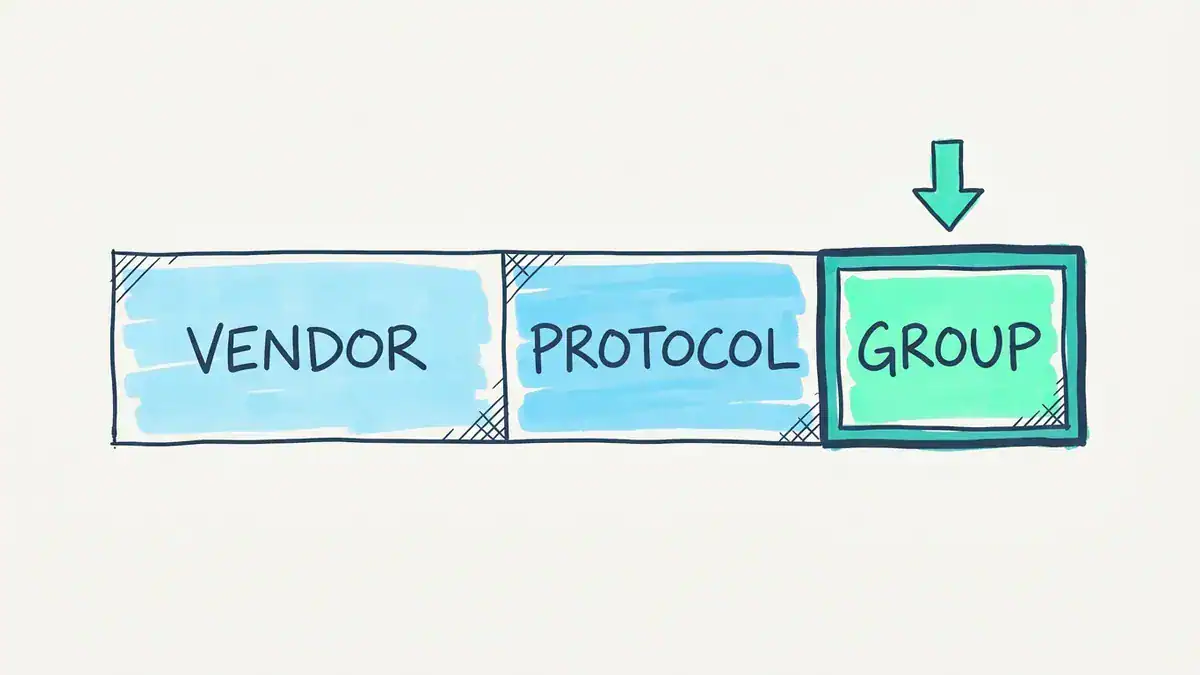
The HSRP version 1 virtual MAC, 0000.0c07.acXX. 0000.0c is Cisco’s vendor prefix, 07.ac is the block HSRP version 1 uses (version 2 uses 0000.0c9f.f), and XX is the group number in hex. Group 10 gives 0000.0c07.ac0a.
The two versions can’t interoperate on the same interface, so both switches in a group must run the same version. A version mismatch is a classic reason two switches both claim to be Active.
HSRPv2 group numbers go up to 4095 for a reason. You can match the group number to the VLAN ID, which makes the config much easier to read.
How do you configure HSRP on a Cisco switch?
Here’s a two-switch HSRP configuration on Layer 3 switch SVIs. It’s the same set of standby commands you’ll use in Packet Tracer HSRP activities.
The plan: VLAN 10, subnet 10.10.10.0/24, virtual IP 10.10.10.1, HSRP group 10. DSW1 (10.10.10.2) should be Active. DSW2 (10.10.10.3) is Standby.
DSW1(config)# interface Vlan10
DSW1(config-if)# ip address 10.10.10.2 255.255.255.0
DSW1(config-if)# standby version 2
DSW1(config-if)# standby 10 ip 10.10.10.1
DSW1(config-if)# standby 10 priority 110
DSW1(config-if)# standby 10 preempt

DSW2(config)# interface Vlan10
DSW2(config-if)# ip address 10.10.10.3 255.255.255.0
DSW2(config-if)# standby version 2
DSW2(config-if)# standby 10 ip 10.10.10.1
DSW2(config-if)# standby 10 preempt
DSW2 keeps the default priority of 100, so DSW1 wins at 110. Both have preempt, which matters in a minute.
Check it with show standby brief. Representative output from DSW1, built from Cisco’s documented format:
DSW1# show standby brief
Interface   Grp  Pri P State   Active          Standby         Virtual IP
Vl10        10   110 P Active  local           10.10.10.3      10.10.10.1
Read it left to right: group 10, priority 110, P means preempt is on, this switch is Active, DSW2 at 10.10.10.3 is Standby, and the virtual IP is 10.10.10.1. That’s exactly the “interpret the operational status” skill the new blueprint asks for.
One design habit worth copying: make DSW1 the spanning tree root bridge for VLAN 10 as well. Then the Layer 2 path from the access switch leads straight to the Active gateway, rather than across the inter-switch link first.
Why doesn’t my HSRP fail over? The tracking trap
Here’s a failure no comparison table will show you.
Say DSW1’s uplink to the core goes down. DSW1 is still alive, still sending hellos, still Active. So the hosts keep sending traffic to a switch that’s just lost its way out. HSRP alone can’t see that.
The fix is object tracking: when the uplink drops, lower DSW1’s priority so DSW2 takes over.
DSW1(config)# track 1 interface GigabitEthernet1/0/48 line-protocol
DSW1(config)# interface Vlan10
DSW1(config-if)# standby 10 track 1
Looks right. It isn’t.
Cisco’s default track decrement is 10. So when the uplink fails:
| DSW1 | DSW2 | Who’s Active? | |
|---|---|---|---|
| Uplink up | 110 | 100 | DSW1 |
| Uplink down, default decrement 10 | 100 | 100 | Still DSW1 |
110 minus 10 is 100. That’s a tie, and an equal-priority standby router doesn’t preempt, even though DSW2 has the higher IP. DSW1 stays Active with no uplink. Whether your users notice depends on whether DSW1 has another way out. Without one, their traffic is dropped.
Representative show standby output from DSW1 in that state (trimmed):
DSW1# show standby
Vlan10 - Group 10
  State is Active
  Virtual IP address is 10.10.10.1
  Hello time 3 sec, hold time 10 sec
  Preemption enabled
  Active router is local
  Standby router is 10.10.10.3, priority 100
  Priority 100 (configured 110)
    Track object 1 state Down decrement 10
The giveaway is “Priority 100 (configured 110)” sitting next to “Standby router … priority 100”.
The rule: the decrement must be bigger than the gap between the two priorities. Here the gap is 110 – 100 = 10, so you need a decrement of at least 11. Use 20 and leave room:
DSW1(config-if)# standby 10 track 1 decrement 20| Scenario | DSW1 | DSW2 | Result |
|---|---|---|---|
| Decrement 20, uplink down | 90 | 100 | DSW2 takes over |
Decrement 20, uplink down, no preempt on DSW2 | 90 | 100 | No change, DSW1 stays Active |
| Decrement 20, uplink restored | 110 | 100 | DSW1 takes back Active (needs its own preempt) |
So tracking needs three things to work: a big enough decrement, preempt on the standby, and preempt on the primary if you want it to come back. Miss any one and the failover you tested on paper doesn’t happen.
Cisco’s preempt and track tech note doesn’t hit this, because its primary starts at 105 and a decrement of 10 drops it to 95. But Cisco’s Catalyst 9000 HSRP guide uses 110 in its own example, and so do plenty of lab write-ups. Check your numbers.

Priority 110 with the default decrement of 10 drops DSW1 to 100, a tie with DSW2, so DSW1 stays Active. A decrement of 20 drops it to 90, and DSW2 (with preempt) takes over.
What is VRRP, and how is it different from HSRP?
VRRP (Virtual Router Redundancy Protocol) is the open-standard version of the same idea. It’s an IETF protocol, so Cisco, Juniper and most other vendors’ routers can share one VRRP group. The current spec is VRRP version 3 in RFC 9568 (April 2024), which replaced RFC 5798 and covers IPv4 and IPv6.
The core model matches HSRP: one router forwards for a virtual IP, and the others wait. The differences are in the defaults.
| HSRP | VRRP | |
|---|---|---|
| Standard | Cisco | Open (IETF) |
| Roles | Active, Standby, Listen | Master (RFC 9568 says Active), Backup |
| Default priority | 100 | 100 |
| Preemption | Off by default | On by default |
| Virtual IP | A spare address in the subnet | A spare address, or a router’s own interface IP (that router is the “owner”, priority 255) |
| Virtual MAC | 0000.0c07.acXX (v1) | 0000.5e00.01XX |
| Messages | Hellos every 3 s, UDP 1985 | Advertisements every 1 s, IP protocol 112, to 224.0.0.18 |
One naming wrinkle. RFC 9568 renamed the Master router to Active, but Cisco IOS XE output still prints MASTER and “Master Down interval”. Expect both words in study material.
The other practical difference is preemption. On VRRP it’s already on, so a higher-priority router that reboots takes the role back the moment it’s up. On Cisco you can soften that with preempt delay minimum.
How fast does VRRP fail over?
Faster than HSRP at the defaults. Here’s the maths.
A VRRP backup declares the master dead after the Active_Down_Interval, which RFC 9568 defines as three advertisement intervals plus a skew time:
- Skew_Time = ((256 – Priority) x Advertisement_Interval) / 256
- Active_Down_Interval = (3 x Advertisement_Interval) + Skew_Time
For a backup at the default priority 100 and the default 1-second interval:
- Skew = (256 – 100) x 1,000 ms / 256 = 609 ms
- Down interval = 3,000 ms + 609 ms = 3,609 ms, about 3.6 seconds
You don’t have to take our word for it. The sample output in Cisco’s VRRP configuration guide shows “Master Down interval is 3609 msec”.
The skew term is clever. A backup at priority 200 waits only about 3.2 seconds, so the best backup always notices first, and two backups don’t race each other.
Compare that with 10 seconds for HSRP and GLBP at their default hold times. You can tune HSRP down (HSRPv2 carries millisecond timers), but out of the box VRRP reacts in about a third of the time.
These numbers cover a silent failure, like a power cut. If the Active router shuts down cleanly, HSRP sends a Resign message and VRRP sends a priority-0 advertisement, so the takeover is quicker.
How do you configure VRRPv3?
On Cisco IOS XE you turn on VRRPv3 globally, then build the group under an address family. Same VLAN as before, with VRRP group 10 this time:
DSW1(config)# fhrp version vrrp v3
DSW1(config)# interface Vlan10
DSW1(config-if)# ip address 10.10.10.2 255.255.255.0
DSW1(config-if)# vrrp 10 address-family ipv4
DSW1(config-if-vrrp)# address 10.10.10.1 primary
DSW1(config-if-vrrp)# priority 110
DSW1(config-if-vrrp)# track 1 decrement 20
No preempt line. It’s already on. DSW2 gets the same group with the default priority.
Representative show vrrp output from DSW2 as the backup (trimmed):
DSW2# show vrrp
Vlan10 - Group 10 - Address-Family IPv4
  State is BACKUP
  Virtual IP address is 10.10.10.1
  Virtual MAC address is 0000.5E00.010A
  Advertisement interval is 1000 msec
  Preemption enabled
  Priority is 100
  Master Router is 10.10.10.2, priority is 110
  Master Down interval is 3609 msec
Note the virtual MAC: VRRP group 10 is 0a in hex, so the address ends in 010A.
What is GLBP, and how does it load balance?
GLBP (Gateway Load Balancing Protocol) is Cisco’s FHRP that uses every router in the group, not just one. HSRP and VRRP leave the standby router idle. GLBP doesn’t.
It works by splitting two jobs:
- One router is the AVG (Active Virtual Gateway). It owns the virtual IP and answers every ARP request for it.
- Up to four routers are AVFs (Active Virtual Forwarders). Each gets its own virtual MAC, like
0007.b400.0101,0007.b400.0102and so on for group 1.
When a host ARPs for the gateway, the AVG replies with one of the AVF MACs. Different hosts get different MACs, so their traffic leaves through different routers. Same gateway IP, several real forwarders.
The default method is round robin. Say three AVFs and seven hosts ARP in order:
| AVF MAC | Hosts |
|---|---|
0007.b400.0101 | 1, 4, 7 |
0007.b400.0102 | 2, 5 |
0007.b400.0103 | 3, 6 |
That’s a 3/2/2 split by host, not by traffic. If host 4 is a backup server pushing most of the bytes, router 1 still carries most of the load. GLBP balances who uses which gateway, not how much each one sends. You can change the method to weighted (by each AVF’s weighting, default 100) or host-dependent (a host always gets the same MAC).
Other defaults to know, from Cisco’s GLBP configuration guide: hellos every 3 seconds to 224.0.0.102 on UDP port 3222, a 10-second hold time, priority 100, AVG preemption off, and forwarder preemption on with a 30-second delay.
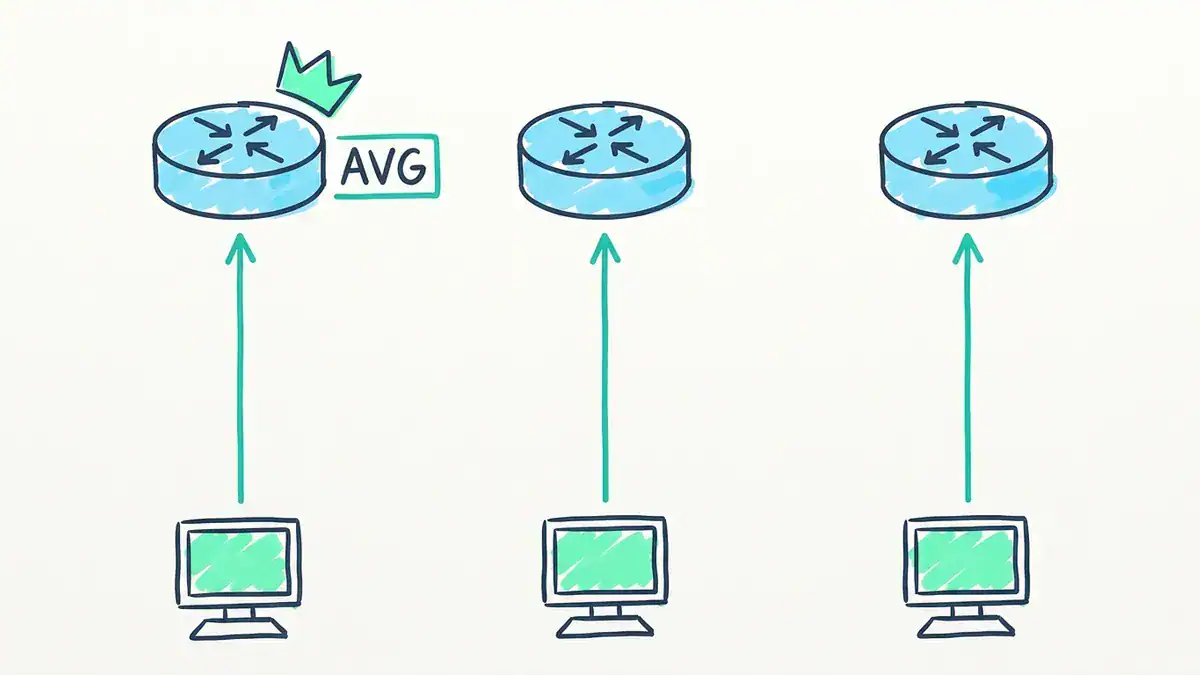
The AVG answers ARP and hands each host one forwarder’s virtual MAC (0007.b400.0101 to 0007.b400.0103 for group 1), so all three routers carry traffic. Seven hosts in round robin split 3/2/2.
Can HSRP or VRRP load balance?
Not inside one group. One router forwards, the rest wait. You can share load across groups, though. Run two VLANs, make DSW1 Active for VLAN 10 and DSW2 Active for VLAN 20, and both switches carry traffic. That’s what people usually mean by VRRP load balancing.
It’s per VLAN, not per host. It’s also simple, and it works with any vendor.
HSRP vs VRRP vs GLBP cheat sheet
| HSRP | VRRP | GLBP | |
|---|---|---|---|
| Full name | Hot Standby Router Protocol | Virtual Router Redundancy Protocol | Gateway Load Balancing Protocol |
| Owner | Cisco | IETF open standard | Cisco |
| Spec | RFC 2281 (informational, v1) | RFC 9568 (VRRPv3, 2024) | Cisco only |
| Roles | Active, Standby | Master/Active, Backup | 1 AVG, up to 4 AVFs |
| Routers forwarding per group | 1 | 1 | Up to 4 |
| Default priority | 100 | 100 | 100 |
| Preemption default | Off | On | AVG off, AVF on (30 s delay) |
| Hello / hold (defaults) | 3 s / 10 s | 1 s advert / about 3.6 s down | 3 s / 10 s |
| Transport | UDP 1985 | IP protocol 112 | UDP 3222 |
| Multicast | 224.0.0.2 (v1), 224.0.0.102 (v2) | 224.0.0.18 | 224.0.0.102 |
| Virtual MAC | 0000.0c07.acXX (v1), 0000.0c9f.fXXX (v2) | 0000.5e00.01XX | 0007.b400.XXYY |
| Load balancing | Multiple groups only | Multiple groups only | Built in |
| Named in CCNA v2.0 | Yes | Yes | No |
Which first hop redundancy protocol should you use?
Use this decision rule:
- Any non-Cisco device in the gateway pair? Use VRRP. It’s the only one of the three that’s an open standard.
- All Cisco, and you just want failover? HSRP and VRRP both work. Pick the one your team already runs, so the configs stay consistent.
- All Cisco, and the standby router sitting idle bothers you? GLBP spreads hosts across up to four gateways. Check first that your platform and software release support it.
- Studying for an exam? Learn HSRP and VRRP to the level of reading their output. Know what GLBP’s AVG and AVF do, and stop there.
Also ask whether you need an FHRP at all. Switch stacking and VSS turn two switches into one logical gateway, so there’s nothing to fail over between. Our switch stacking vs VSS vs vPC guide covers when that’s the better design.
What does the CCNA exam test on FHRP?
The blueprint changed, and the change tells you how to study. Straight from Cisco’s exam topic PDFs:
| Exam | Objective | Wording |
|---|---|---|
| CCNA v1.1 (valid until February 2027) | 3.5, in 3.0 IP Connectivity (25%) | “Describe the purpose, functions, and concepts of first hop redundancy protocols” |
| CCNA v2.0 (from 2027-02-03) | 3.4, in 3.0 IP Routing (20%) | “Interpret the operational status of First Hop Redundancy Protocols (HSRP and VRRP)” |
| ENCOR 350-401 v1.2 | 3.3.c | “Configure first hop redundancy protocols, such as HSRP, VRRP” |
Two takeaways. v2.0 moves from “describe” to “interpret”, so expect show standby and show vrrp output in questions, and practise reading state, priority, preempt and track lines like the ones above. And GLBP isn’t named in v2.0 or ENCOR. It’s still fair game as a concept, but it’s no longer worth the same study time as HSRP and VRRP. (If you want the full list of v2.0 changes, see what CCNA v2.0 changes.) FHRP sits right next to single-area OSPF in the v2.0 IP Routing domain, so study the two together.
When a question asks which statement describes HSRP, the right answer is nearly always some form of this: a Cisco-proprietary protocol where one Active and one Standby router share a virtual IP and virtual MAC to give hosts a redundant default gateway, with no load balancing inside a single group.
Want to see it break and recover? Build the two-switch lab above in EVE-NG, shut the uplink, and watch the priority drop. Our list of EVE-NG CCNA labs to build before exam day shows how to set up the topology.
Frequently asked questions
What is the default HSRP priority?
The default HSRP priority is 100, and the range is 1 to 255. VRRP and GLBP also default to 100. A router configured with any higher value, like 110, wins the Active role as long as preemption is on or it’s up first.
What is the HSRP virtual MAC address?
HSRP version 1 uses 0000.0c07.acXX, where XX is the group number in hex, so group 10 is 0000.0c07.ac0a. HSRP version 2 uses 0000.0c9f.f000 to 0000.0c9f.ffff, so group 10 is 0000.0c9f.f00a. The Active router answers ARP for the virtual IP with this MAC.
What’s the difference between HSRP and VRRP?
HSRP is Cisco-only, while VRRP is an open IETF standard that works across vendors. VRRP preempts by default, HSRP doesn’t. VRRP sends an advertisement every second and fails over in about 3.6 seconds at the defaults, against HSRP’s 3-second hellos and 10-second hold time. VRRP also lets a router’s own interface IP serve as the virtual IP, with that router as the address owner.
GLBP vs HSRP: which is better?
GLBP is better only if you want every gateway forwarding at once and everything is Cisco. It load balances hosts across up to four routers using one virtual IP. HSRP is simpler to run and troubleshoot, and it’s named in the CCNA v2.0 blueprint, while GLBP isn’t.
Does HSRP preempt by default?
No. HSRP preemption is off by default, so the first router up stays Active until it fails. Add standby <group> preempt on any router that should take the role back. VRRP is the opposite: preemption is on unless you turn it off.
What does HSRP stand for?
HSRP stands for Hot Standby Router Protocol. The name describes the design: a “hot” standby router stays fully running and ready to forward, so it can take over the gateway role within the hold time.
Bottom line
HSRP, VRRP and GLBP all solve the same problem: a host can only have one default gateway, so you make that gateway virtual. HSRP is Cisco’s version and the one most CCNA material starts with. VRRP is the open-standard version, it preempts by default, and it fails over faster. GLBP adds load balancing, but the CCNA v2.0 blueprint no longer names it.
If you remember one thing from this page, make it the tracking rule. Your decrement has to be bigger than the priority gap, and the standby router needs preempt. Otherwise you’ve built a failover that never fires.
Want structured practice on FHRP and the rest of the IP Routing domain? See the CCNA Workbook, which pairs exam-mapped exercises with a lab environment you can boot. Going further, ENCOR asks you to configure HSRP and VRRP, which the CCIE Enterprise Workbook covers. For free material, grab the CCNA 200-301 PDF and keep the Cisco commands cheat sheet next to your lab.