An open source SIEM is a security information and event management platform you can download, run and modify under an OSI-approved licence, with no per-GB bill. For most learners and small teams, Wazuh is the one to start with in 2026. It’s GPLv2, runs all-in-one in 8 GiB of RAM, and ships detection rules and alerting out of the box.
That’s the short answer. The longer one is messier.
Most “open source SIEM tools” lists name eight or nine products. We checked each project’s own licence file and release page on 2026-11-09, and only four of the eight usual names are open source in the strict sense. Three more are free to run but source-available, one is retired, and the free tier of the most famous SIEM can’t send an alert. So the real question isn’t “which is best”. It’s “which one is actually open, and which one fits on your hardware?”
What Is SIEM, and What Does SIEM Stand For?
SIEM stands for security information and event management. It’s the platform a security operations centre (SOC) uses to pull logs from firewalls, servers, endpoints and cloud apps into one place, analyse them, and raise alerts. Microsoft’s SIEM explainer puts it plainly: a SIEM collects, aggregates and analyses security data from across the organisation in real time.
So what is SIEM in cybersecurity, in one line? The SIEM is the technology and the SOC is the team. One feeds the other.
What Does a SIEM Do?
What is a SIEM tool, in practice? One that does five jobs, in this order:
- Collect logs and events from agents, syslog, APIs and cloud connectors.
- Normalise them, so a failed login from Windows and one from Linux land in the same fields.
- Correlate events against detection rules (five failed logins then a success, from a new country, inside ten minutes).
- Alert a human, or trigger an automated response.
- Retain the data so you can investigate after the fact, and prove compliance.
Anything that skips step 3 or step 4 is a log manager, not a SIEM. Keep that test in mind. It knocks a few “free SIEM” options off the list below.
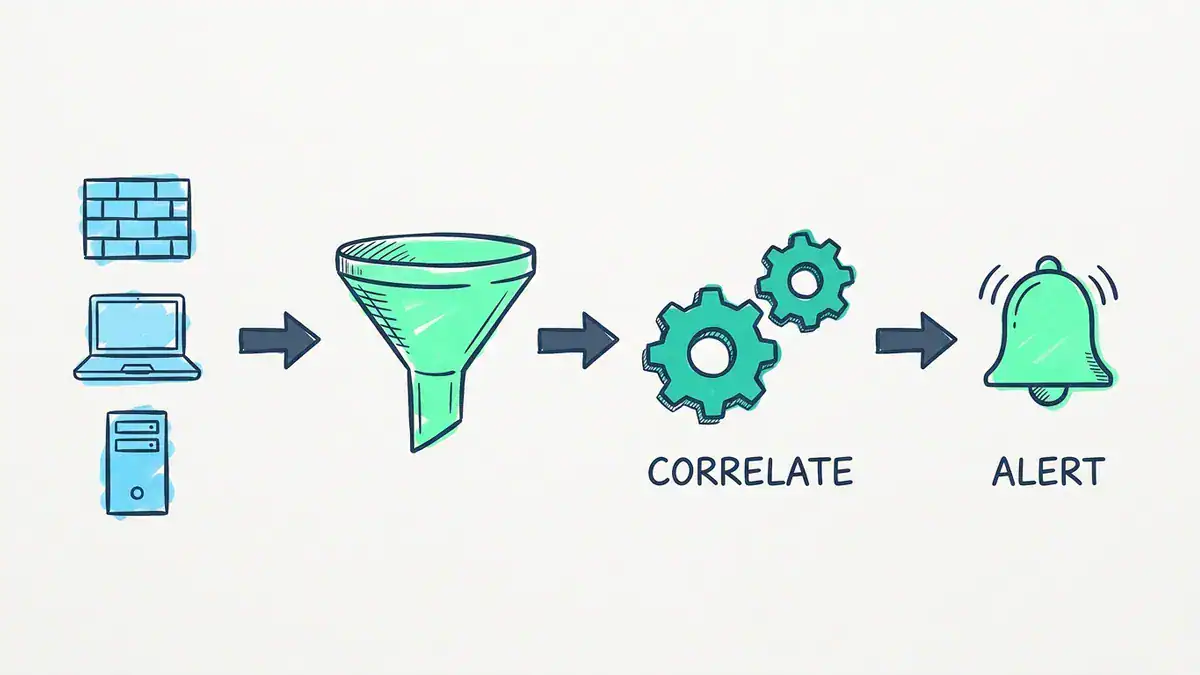
Logs from firewalls, endpoints and servers are collected and normalised, matched against detection rules, then raised as alerts. A tool that stops before correlation and alerting is a log manager, not a SIEM.
Which Open Source SIEM Tools Are Actually Open Source?
Here’s the open source SIEM comparison that matters first: the licence. Every row comes from the project’s own LICENSE file or documentation, read on 2026-11-09.
| Tool | Latest stable release | Licence | OSI open source? |
|---|---|---|---|
| Wazuh | 4.14.10 (2026-11-05) | GPLv2 (server, agent), Apache 2.0 (indexer, dashboard) | Yes |
| OSSEC | 4.4.1 (2026-10-18) | GPLv2 | Yes, but it’s a host IDS, not a full SIEM |
| OpenSearch Security Analytics | OpenSearch 3.9.0 (2026-09-29) | Apache 2.0 | Yes |
| UTMStack | 11.3.0 (2026-10-28) | AGPLv3 | Yes (open edition) |
| Elastic Security | 9.5.6 (2026-11-02) | Core: AGPLv3 option. Security app and detection rules: Elastic License 2.0 only | No, source-available (free Basic tier) |
| Security Onion | 3.4.0 (2026-11-02) | Elastic License 2.0 | No, free and source-available |
| Graylog Open | 7.2.2 (2026-11-04) | SSPL | No |
| AlienVault OSSIM | Retired | n/a | No longer offered |
Four out of eight. Surprising, right?
A few of these need explaining, because most roundups get them wrong.
Wazuh’s licence is changing, slowly. The 4.x releases you’d install today are GPLv2 for the manager and agent, with the indexer and dashboard under Apache 2.0. On the main branch heading to Wazuh 5.0 (release candidate 2 landed 2026-10-30), the root LICENSE was updated on 2026-10-14 to state that the new analysis engine is AGPLv3. Both are OSI-approved, so Wazuh stays open source either way.
Security Onion is free, but it isn’t open source. Its repository and its own v3 documentation say the Security Onion components are licensed under the Elastic License 2.0, which the OSI doesn’t approve. The practical limit: you can’t offer it to others as a hosted or managed service. For a home lab or an internal SOC, it costs nothing.
“Elastic is open source again” is only half true for SIEM. Elastic added AGPLv3 as a licence option for Elasticsearch and Kibana on 2024-08-29. But the Security app inside Kibana (the code under x-pack/solutions/security) and Elastic’s detection-rules repository are Elastic License 2.0 only. The engine is open source. The SIEM on top of it is source-available.
Graylog’s server is SSPL, the licence MongoDB wrote. You can self-host it for free, but the OSI has never approved SSPL as open source.
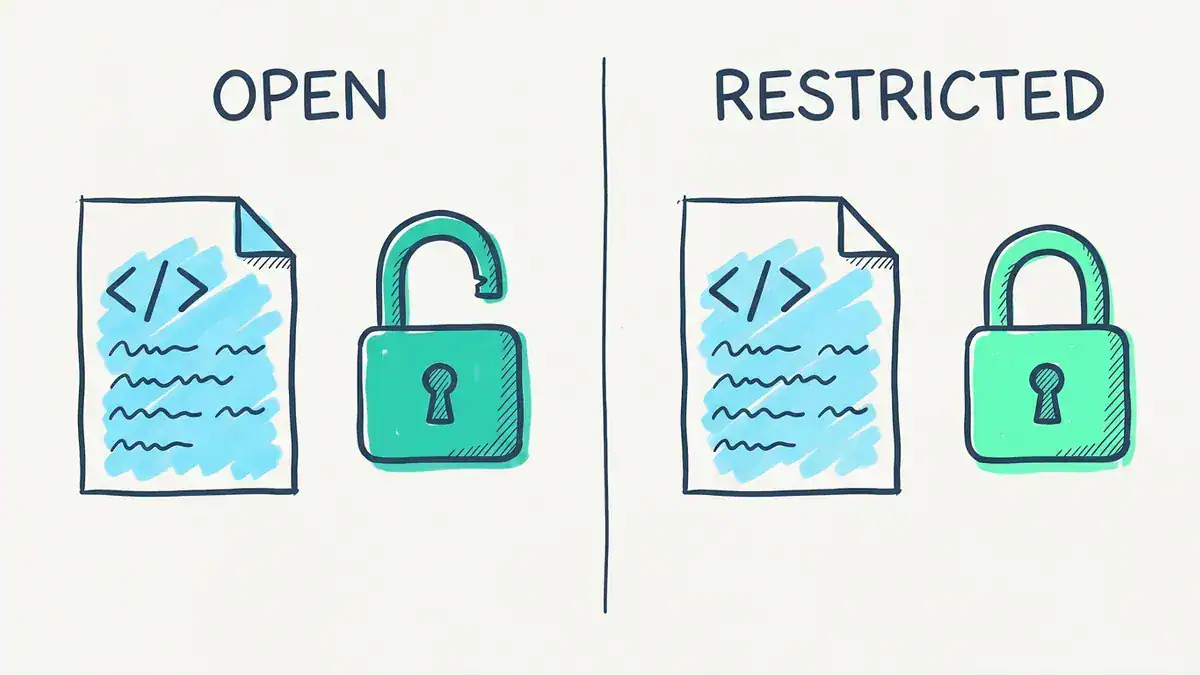
Same idea, different licence. Wazuh and OSSEC (GPLv2), OpenSearch (Apache 2.0) and UTMStack (AGPLv3) are OSI open source. Security Onion and Elastic’s Security app (Elastic License 2.0) and Graylog (SSPL) are free to run but source-available.
Does licence matter for a home lab? Not much. It matters the day your employer asks whether you can run it for a client, or ship it inside a product. Know which bucket your tool sits in before that conversation.
How Does Wazuh Compare to the Other Free SIEM Options?
Licence is one filter. Hardware and out-of-the-box detection are the other two. Here’s the comparison, using each vendor’s own published minimums.
| Tool | What it really is | Vendor minimum for one box | Detection rules included free? | Alerting free? | Best for |
|---|---|---|---|---|---|
| Wazuh | Agent-based SIEM + XDR | 4 vCPU, 8 GiB RAM, 50 GB (1-25 agents, 90 days) | Yes, plus FIM and vulnerability detection | Yes | Learners, small SOCs, compliance |
| Security Onion | Network security monitoring distro (Suricata, Zeek, Elastic) | Eval: 4 cores, 8 GB, 200 GB, 2 NICs. Standalone: 24 GB | Yes (Suricata NIDS rules) | Yes | Network traffic hunting |
| Elastic Security | SIEM app on Elasticsearch + Kibana | No single published floor | Yes, prebuilt rules on Basic | Yes | Teams that want deep search and will tune |
| OpenSearch Security Analytics | SIEM plugin in OpenSearch | No single published floor | Yes, prepackaged Sigma rules | Yes | AWS-heavy or OpenSearch shops |
| Graylog Open | Log management with alerting | No single published floor | No Sigma, no MITRE mapping | Yes, basic | Log search first, security second |
| UTMStack | SIEM + SOAR | 4 cores, 16 GB, 150 GB (50 sources) | Yes | Yes | Small teams wanting SOAR in one box |
| OSSEC | Host intrusion detection | Very light agent | Host rules only | Yes | Legacy hosts, very small footprints |
Wazuh vs Security Onion: Which One Do You Need?
They watch different things.
Wazuh lives on the endpoint. Its agent reads Windows event logs, Linux auth logs and file changes, then ships them to the Wazuh server, which decodes and matches them against rules. Security Onion lives on the wire. It sniffs a SPAN or TAP port and runs Suricata for alerts and Zeek for network metadata, with Elastic underneath for search.
So the question is: what’s attacking you, a process or a packet? If you’re studying for Security+ or CySA+, start with Wazuh. It’s lighter, it needs one network interface instead of two, and it reads the Windows and Linux logs your target VMs already produce. Add Security Onion when you want to see the network side, and you’ll need the extra NIC and RAM for it. Security Onion’s own docs say even its Eval mode wants two network interfaces.
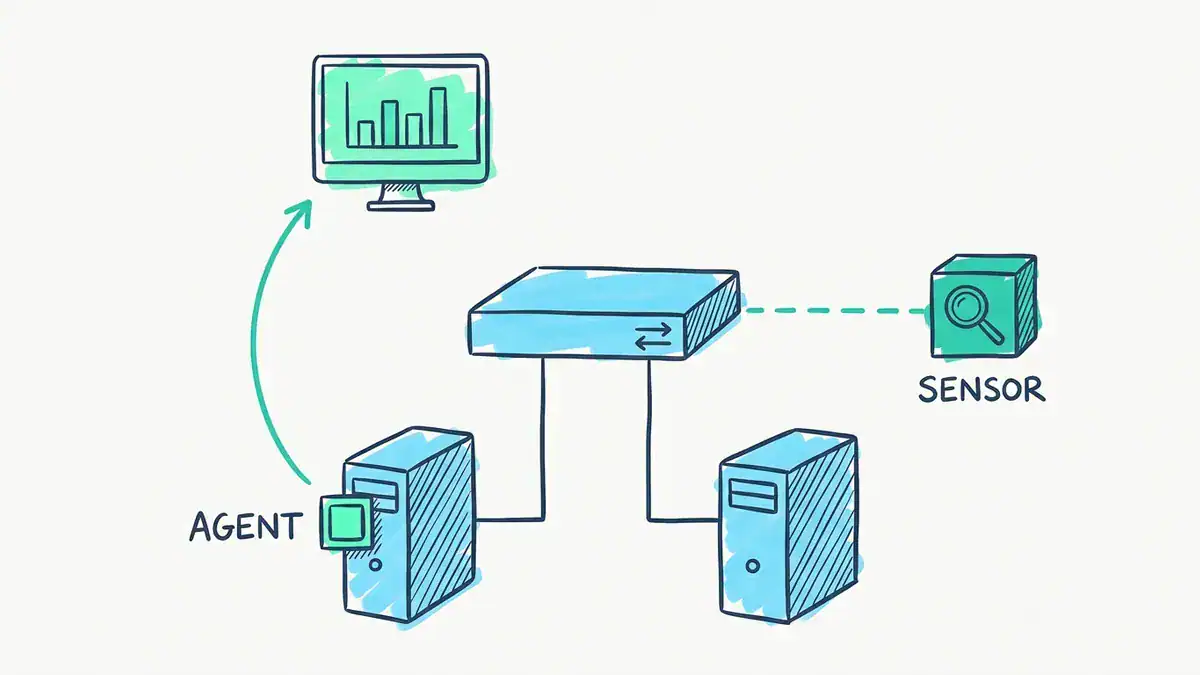
Wazuh’s agent ships each host’s own logs to the SIEM. Security Onion’s sensor watches traffic copied from the switch through a SPAN or TAP port, so it needs a second, sniffing-only network interface.
Is Elastic SIEM Open Source?
Partly, as covered above. The Elasticsearch and Kibana core can be used under AGPLv3, but the Security app is Elastic License 2.0. On the free Basic tier you still get the SIEM, prebuilt detection rules and malware prevention. Machine learning anomaly detection starts at the paid Platinum tier, per Elastic’s subscription matrix.
That’s why “open source SIEM ELK” builds feel different from Wazuh. ELK gives you a brilliant search engine, then expects you to bring the pipelines, parsers and tuning. Wazuh actually uses an OpenSearch-based indexer under the hood, so you get a similar search experience without assembling it yourself. Honestly, that’s the main reason it wins for beginners.
How Does OpenSearch Security Analytics Compare?
OpenSearch is the Apache 2.0 fork of Elasticsearch, now run by the Linux Foundation’s OpenSearch Software Foundation (AWS handed it over on 2024-09-16). Its Security Analytics plugin is a genuine SIEM: OpenSearch’s docs describe it as one, it ships with every distribution, and it uses prepackaged open source Sigma rules you can import and customise.
It’s the most “pure” open source option on this list. The catch is maturity. You’ll do more wiring than with Wazuh, and the community is far smaller: the Security Analytics plugin repository had 114 GitHub stars on 2026-11-09, against 17.6K for wazuh/wazuh.
Is Graylog a SIEM?
Search for open source SIEM log management and Graylog comes up fast. But Graylog Open is a log management platform first, and its licence is SSPL. Graylog’s own Spring 2026 feature list shows Open with log collection, pipelines, dashboards and basic alerting. Sigma rules, MITRE ATT&CK mapping and the correlation engine are ticked only for paid tiers.
Run the test from earlier: no correlation means it fails step 3. Great log search. Not a SIEM on its own.
What About UTMStack?
UTMStack is the newest serious name here. It’s AGPLv3, bundles SIEM with SOAR playbooks, and has its own entry in CISA’s resources and tools directory. Its README sizes the smallest box at 4 cores, 16 GB of RAM and 150 GB for 50 data sources. The open edition is free under AGPLv3. The enterprise edition adds support, faster correlation, more frequent threat intelligence updates and AI features, according to the project’s own FAQ.
It’s worth a look if you want response automation without bolting on a separate SOAR. The community is much smaller, though (592 GitHub stars against Wazuh’s 17.6K), so expect fewer tutorials.
What Happened to AlienVault OSSIM and OSSEC?
OSSIM is gone. LevelBlue (formerly AT&T Cybersecurity, formerly AlienVault) states that “OSSIM is no longer in use”. If an “alienvault open source siem” guide recommends it for a new build, the guide is out of date. Its free threat-intel feed, OTX, still exists separately.
OSSEC is alive. It shipped five releases between 2026-05-27 and 2026-10-18, ending at 4.4.1. But it’s a host intrusion detection system: log analysis, integrity checking, rootkit detection and real-time alerting on each machine, with no search indexer of its own. Wazuh started as a fork of OSSEC and added the indexer, dashboard and much more. If you’re choosing between them for a SIEM, the answer is Wazuh.
Is Splunk a SIEM, and Is Splunk Free Good Enough?
Splunk Enterprise is a data platform. Splunk Enterprise Security, the paid app on top, is the SIEM. So “is Splunk a SIEM” gets a “yes, with the right licence” answer. Cisco closed its purchase of Splunk on 2024-03-18, so you’ll keep meeting it in job ads.
Splunk Free is the trap. Per Splunk’s Admin Manual on Splunk Free, the free licence indexes 500 MB a day, alerting isn’t available, and there’s no login or user accounts. Go over the cap three times in 30 days and search is switched off until you’re back under.
So how far does 500 MB stretch? Here’s the maths:
500,000,000 bytes/day / 500 bytes per event = 1,000,000 events/day
1,000,000 / 86,400 seconds                  = 11.6 events per second

At 300 bytes per event:  19.3 EPS
At 1 KB per event:        5.8 EPS
Another way to see it. UTMStack’s sizing guide assumes 60 devices produce about 100 GB a month. That’s roughly 55.6 MB per device per day, so 500 MB covers about 9 devices. A domain controller, a firewall, a few servers and a laptop, and you’re done.
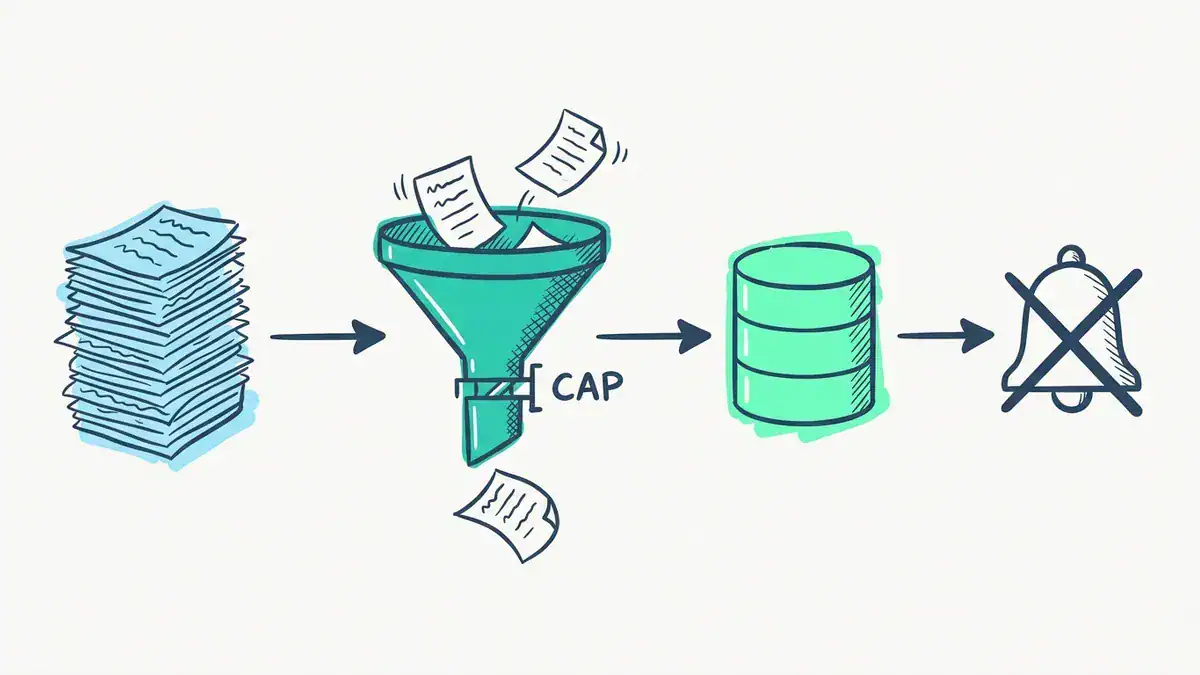
Splunk Free indexes 500 MB a day, about 11.6 events per second at 500 bytes per event, or roughly 9 devices. And on the free licence, alerting isn’t available at all.
Bottom line: Splunk Free is fine for learning SPL. It isn’t a free SIEM, because a SIEM that can’t alert fails the basic test. If Splunk is your career target, our Splunk certification cost guide covers what the exams actually run you.
Which Open Source SIEM Fits on Your Lab Hardware?
This is the question the top results skip. Let’s do it with real numbers, and include the free, source-available options too.
Your open source SIEM server is only half the lab. You also need something worth watching. Assume one Windows 11 victim VM to generate interesting logs. Microsoft’s Windows 11 specifications list 4 GB of RAM as the minimum. Add each SIEM’s vendor minimum:
| Lab build | RAM needed | 16 GB host | 32 GB host |
|---|---|---|---|
| Wazuh all-in-one + Windows 11 | 8 + 4 = 12 GB | Fits, about 4 GB left for the host OS | Easy |
| Wazuh + Security Onion Eval + Windows 11 | 8 + 8 + 4 = 20 GB | Doesn’t fit | Fits, 12 GB spare |
| Security Onion Standalone + Windows 11 | 24 + 4 = 28 GB | Doesn’t fit | 4 GB spare, tight |
| UTMStack (smallest tier) + Windows 11 | 16 + 4 = 20 GB | Doesn’t fit | Fits |
These are floors, not comfort levels. Security Onion’s docs say that at 24 GB you may need swap, and to consider 32 GB if you monitor any real traffic. Graylog, Elastic and OpenSearch don’t publish a single one-box minimum, so we haven’t invented one.
Storage matters too. Wazuh’s quickstart sizes 50 GB for 90 days of alerts across 25 agents. Work it through and that’s about 22.2 MB of indexed alert data per agent per day. So a five-agent home lab needs about 10 GB for three months of alerts.

On a 16 GB machine: Wazuh all-in-one takes 8 GiB, a Windows 11 target VM takes 4 GB, and about 4 GB is left for the host OS. Security Onion Standalone (24 GB) and UTMStack (16 GB) need a 32 GB host.
If you’re still picking the host itself, our guides to building a home lab and a Proxmox homelab from bare metal cover the hardware side.
What’s the Best Open Source SIEM for You?
There’s no single best open source SIEM. There’s a best one for your situation:
- You’re studying for Security+ or CySA+, on a 16 GB laptop: Wazuh. Its published all-in-one spec is 8 GiB on one network interface, with rules, alerts, FIM and a dashboard included.
- You want to hunt in network traffic: Security Onion, on a 32 GB box with two NICs.
- Your employer runs Elastic or OpenSearch already: Elastic Security or OpenSearch Security Analytics, so your lab skills transfer.
- You need SOAR playbooks in the same box: UTMStack.
- You need OSI open source, end to end, for licensing reasons: Wazuh, OpenSearch Security Analytics or UTMStack.
- You mostly need log search, not detection: Graylog Open.
Get this wrong and you’ll spend a weekend fighting RAM instead of writing your first detection rule.
How Do You Get Wazuh Running? (OVA, Docker or Packages)
Three routes, from fastest to most flexible:
- The Wazuh OVA. A pre-built virtual machine on Amazon Linux 2023 with the manager, indexer and dashboard at 4.14.10. Wazuh’s docs set it at 4 cores, 8 GB and 50 GB. It’s a 5 GB download, it imports into VirtualBox or any other OVA-compatible hypervisor, and it’s x86_64 only.
- Docker. Clone the
wazuh/wazuh-dockerrepository on GitHub, generate certificates, and bring the stack up. Our step-by-step guide to installing Wazuh with Docker walks through it, including the fixes for the usual indexer crashes. - The install script. On a supported Linux host, Wazuh’s quickstart runs one script that installs all three central components.
Then add agents. The free Wazuh agent installation PDF covers Windows and Ubuntu, and the Linux commands cheat sheet helps if the manager’s shell is new to you.
For log sources beyond endpoints, point your firewall’s syslog at the manager. If you’re unsure what each firewall generation actually logs, our types of firewalls guide explains it, and the FortiGate NSE 4 workbook has a section on FortiGate logging and FortiAnalyzer integration, the same logs you’d forward to a SIEM.
Where Does SIEM Show Up on Security+ and CySA+?
Everywhere that matters for a junior SOC role.
The CompTIA Security+ SY0-701 objectives list SIEM by name under objective 4.4, “Explain security alerting and monitoring concepts and tools”, inside Domain 4 (Security Operations), which carries 28% of the exam. Log aggregation, alerting and alert tuning sit in the same objective. Our Security+ practice test has a full Domain 4 section to check yourself against.
CySA+ goes further. Its performance-based questions can hand you a simulated SIEM dashboard or a raw log file and ask you to work a realistic scenario, like finding the compromised host. The CySA+ certification guide covers the CS0-004 changes and the CS0-003 retirement on 2026-12-22.
Reading about correlation rules won’t prepare you for that. Writing one will. And if you want to see where the SIEM sits next to your detection sensors, the IDS vs IPS guide shows one SSH brute force through both.
Frequently Asked Questions
Is Wazuh SIEM free?
Yes. Wazuh is a free open source SIEM, with no licence fee, agent limit or data cap. The manager and agent are GPLv2 and the indexer and dashboard are Apache 2.0. You pay only for the hardware it runs on, or for Wazuh’s optional cloud service and support if you want them.
Which technology is an open source SIEM system?
Wazuh, OpenSearch Security Analytics and UTMStack are all SIEMs under OSI-approved licences, and Wazuh has by far the biggest community of the three (17.6K GitHub stars). Older course quizzes often expect the ELK Stack as the answer. That’s reasonable as a building block, but Elastic’s SIEM app itself is now Elastic License 2.0, not open source.
Does Microsoft have a SIEM tool?
Yes. Microsoft Sentinel is Microsoft’s cloud-native SIEM. Microsoft describes it as combining AI, automation and threat intelligence for detection, investigation, response and hunting. It’s a paid Azure service, not open source.
Does Google have a SIEM?
Yes. Google Security Operations, formerly called Chronicle, is Google Cloud’s SIEM with an integrated SOAR component. Like Sentinel, it’s a commercial cloud service rather than something you’d run in a home lab. If you want an open source cloud SIEM, run Wazuh or OpenSearch on a cloud VM yourself.
Is SIEM still relevant, or will XDR replace it?
SIEM is still relevant. It’s named in the Security+ SY0-701 objectives and sits at the centre of CySA+. XDR adds deeper endpoint telemetry and response. A SIEM’s job is broader: firewall, identity, cloud and application logs in one place, kept for investigations and audits. Wazuh already describes itself as unifying XDR and SIEM, which tells you where things are heading: convergence, not replacement.
Is there an open source SIEM on GitHub?
Yes. The Wazuh GitHub repository (wazuh/wazuh) is the best known, and OpenSearch Security Analytics, UTMStack and OSSEC also develop in public on GitHub under OSI-approved licences. Security Onion, Elastic and Graylog are on GitHub too, but under source-available licences. Check the LICENSE file before you assume “on GitHub” means “open source”.
Bottom Line
Most lists of open source SIEM solutions mix four genuinely open projects with free-but-restricted ones and a retired product. Check the licence, then check your RAM.
For a learner or a small team, the Wazuh open source SIEM is the answer in 2026: GPLv2, 8 GiB all-in-one, detection rules and alerting on day one. Add Security Onion when you’re ready to watch the network, and skip Splunk Free if you need alerts.