
Kubernetes vs Docker isn’t an either-or choice. Docker builds container images and runs them on one machine. Kubernetes runs those same images across a group of machines, restarts them when they die and rolls out updates without taking the service down. Most people need Docker first. You add Kubernetes when one host stops being enough.
That’s the short version. The rest of this post makes it concrete: one small monitoring stack written both ways, with the line counts, the failure behaviour and the one rollout setting that catches almost everyone on a small lab cluster.
Kubernetes vs Docker: what’s the difference at a glance?
| Docker | Kubernetes | |
|---|---|---|
| Main job | Build images, run containers | Schedule and manage containers across many nodes |
| Scope | One host (Swarm mode adds a cluster) | A cluster: control plane plus worker nodes |
| Unit you work with | Container | Pod (one or more containers) |
| Multi-container apps | Docker Compose file | Deployments, Services, ConfigMaps, Secrets, PVCs |
| If a container crashes | Restart policy restarts it on the same host | Controller replaces it, on another node if needed |
| If the host dies | Nothing restarts the app | Pods are recreated on healthy nodes after a timeout |
| Updates | Stop and recreate | Rolling update with readiness checks |
| Learning curve | An afternoon to be useful | Weeks to be comfortable |
| Exam that tests it | Cisco CCNA Automation, CCNP Automation | CNCF/Linux Foundation KCNA, CKA, CKAD |
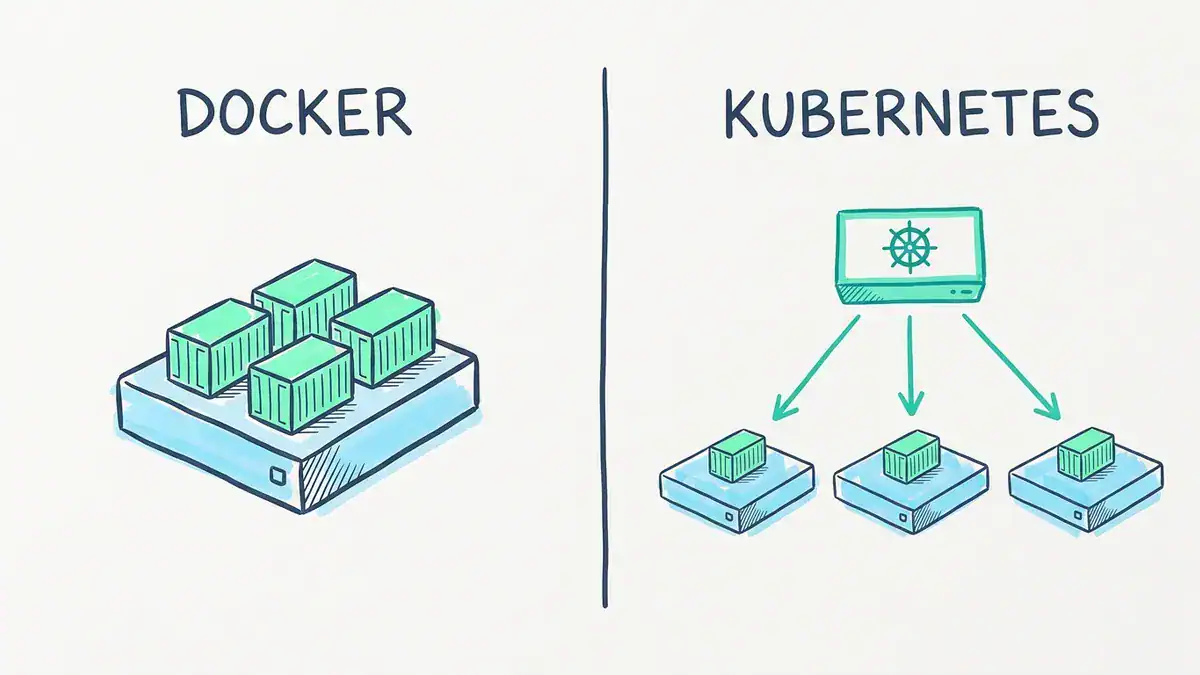
Docker runs every container on the one host it’s installed on. Kubernetes’ control plane places pods across worker nodes, so losing one node doesn’t take the whole app down.
What does Docker actually do?
Docker packages an app and everything it needs into an image, then runs that image as a container. You write a Dockerfile, run docker build, and you get an image you can push to a registry and run anywhere Docker runs.
Docker vs containerd: what’s the difference?
Under the hood, Docker Engine hands the actual running of containers to containerd, a lower-level runtime. So containerd runs containers, and Docker is the toolset on top that builds images and gives you the friendly CLI. You’ll meet containerd again in a minute, because it’s what most Kubernetes clusters run.
Docker vs Docker Compose: do you need both?
Plain docker run starts one container. Docker Compose reads a YAML file and starts a whole multi-container app with one command, networks and volumes included. So docker vs docker compose isn’t really a contest either. Compose is how you describe several containers that belong together. Today you run it as docker compose. The hyphenated docker-compose command is the old V1 tool.
Honestly, for a home lab, a dev laptop or a single small server, Docker plus Compose is often all you’ll ever need.
What does Kubernetes actually do?
Kubernetes is an orchestrator. You tell it the desired state (“run 3 copies of this image, reachable on port 9116”) and its controllers keep working until reality matches.
A cluster has two halves:
- Control plane: the API server, the scheduler that decides which node runs what, the controllers that fix drift, and etcd, which stores the cluster’s state.
- Worker nodes: the machines that actually run your pods, each with a container runtime such as containerd.
Kubernetes pod vs Docker container: what’s the difference?
The smallest thing Kubernetes schedules is a pod, not a container. A pod wraps one or more containers that share a network address. Most pods hold exactly one container, so in daily use a pod is Kubernetes’ wrapper around the same container you’d run with Docker.
Think of Docker as a shipping container and Kubernetes as the port. The container holds the cargo. The port decides which ship it goes on, and reroutes it when a ship breaks down.
Does Kubernetes still use Docker?
Not as its runtime. Kubernetes removed dockershim, the built-in adapter that let it talk to Docker Engine, in version 1.24. Clusters now use a CRI runtime such as containerd or CRI-O directly. Microsoft’s AKS, for one, documents that its Linux node pools use containerd from Kubernetes 1.19 onward.
Here’s the part that confuses people. Images built with Docker still run on every Kubernetes cluster. The containerd runtime runs them without any changes. The Kubernetes project’s dockershim FAQ says so directly.
So keep using docker build on your laptop. What broke in 1.24 was narrower: tools on the nodes that called the Docker socket. Your images were never the problem.
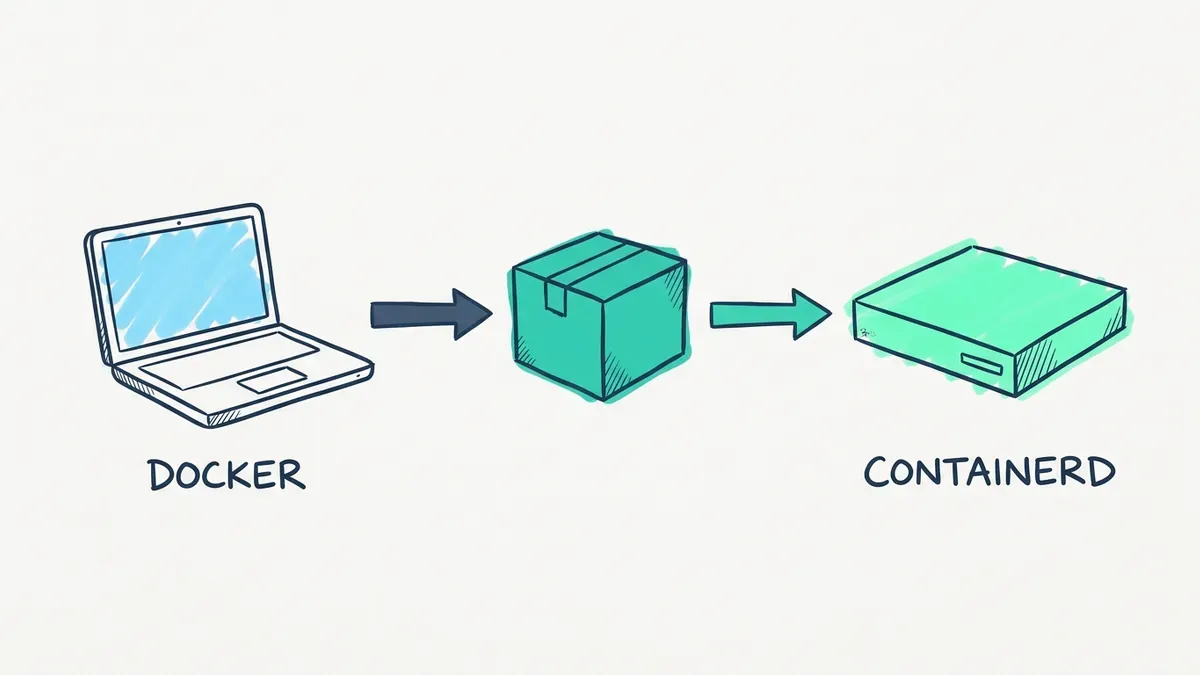
Build with docker build on your laptop, push the image, and a Kubernetes node runs it through containerd. Kubernetes removed dockershim in 1.24, and Docker-built images kept working.
The current release line is Kubernetes 1.37 (1.37.1 shipped on 2026-09-15).
Kubernetes vs Docker Compose: what changes when you move the same stack?
This is where most comparisons stop at prose. Let’s not.
Take a small network monitoring stack you might run in a lab: an SNMP exporter that polls your switches, Prometheus to store the metrics, and Grafana to graph them. Here it is as a Compose file:
services:
  snmp-exporter:
    image: prom/snmp-exporter:v0.31.0
    restart: unless-stopped

  prometheus:
    image: prom/prometheus:v3.16.0
    volumes:
      - ./prometheus.yml:/etc/prometheus/prometheus.yml:ro
      - prom-data:/prometheus
    ports:
      - "9090:9090"
    depends_on:
      - snmp-exporter
    restart: unless-stopped

  grafana:
    image: grafana/grafana:13.3.0
    environment:
      GF_SECURITY_ADMIN_PASSWORD: ${GRAFANA_PASSWORD}
    volumes:
      - grafana-data:/var/lib/grafana
    ports:
      - "3000:3000"
    depends_on:
      - prometheus
    restart: unless-stopped

volumes:
  prom-data:
  grafana-data:
Plus a 17-line prometheus.yml that tells Prometheus to scrape the switches through snmp-exporter:9116. Total: 45 lines. docker compose up -d and you’re graphing interface counters.
The same stack on Kubernetes took us 186 lines and 10 objects: 3 Deployments, 3 Services, 2 PersistentVolumeClaims, 1 ConfigMap and 1 Secret. Same three images, same scrape config. That’s about four times the YAML. Here’s the snmp-exporter piece, which is the part that gains the most:
apiVersion: apps/v1
kind: Deployment
metadata:
  name: snmp-exporter
spec:
  replicas: 3
  selector:
    matchLabels:
      app: snmp-exporter
  template:
    metadata:
      labels:
        app: snmp-exporter
    spec:
      containers:
        - name: snmp-exporter
          image: prom/snmp-exporter:v0.31.0
          ports:
            - containerPort: 9116
          readinessProbe:
            tcpSocket:
              port: 9116
          resources:
            requests:
              cpu: 100m
              memory: 64Mi
---
apiVersion: v1
kind: Service
metadata:
  name: snmp-exporter
spec:
  selector:
    app: snmp-exporter
  ports:
    - port: 9116
      targetPort: 9116
One small win worth noticing. The scrape target snmp-exporter:9116 didn’t change at all. Compose gives every service a DNS name, and so does a Kubernetes Service. Name them the same and your config files move across untouched.
We checked both files with a script rather than by eye: every selector matches its pod labels, every Service points at a real container port, every volume, ConfigMap and Secret reference resolves, and the embedded Prometheus config is identical to the Compose one. We didn’t run them on a live cluster, so treat the YAML as a tested starting point, not a production template.
What does each Compose line turn into?
| In Compose | In Kubernetes | Why it changes |
|---|---|---|
| A service | A Deployment plus a Service | Running the pods and reaching them are separate jobs |
image: | containers[].image | Same image, no rebuild |
| Named volume | PersistentVolumeClaim | Storage has to follow a pod between nodes |
| Bind-mounted config file | ConfigMap | Nodes don’t share your project folder |
environment: with a password | Secret plus secretKeyRef | Credentials get their own object and access rules |
ports: "3000:3000" | Service of type NodePort (30300 here) or an Ingress | Traffic can land on any node |
healthcheck: | livenessProbe / readinessProbe in the pod spec | Readiness also gates traffic and rollouts |
restart: unless-stopped | Built in: the controller keeps replicas running | Restarts aren’t per host any more |
depends_on: | Nothing direct | Pods start in any order. Readiness probes and retries do the job |
That last row trips people up. Kubernetes has no start order between Deployments. Your app has to cope with Prometheus coming up before the exporter, which it does, because it simply retries the scrape.
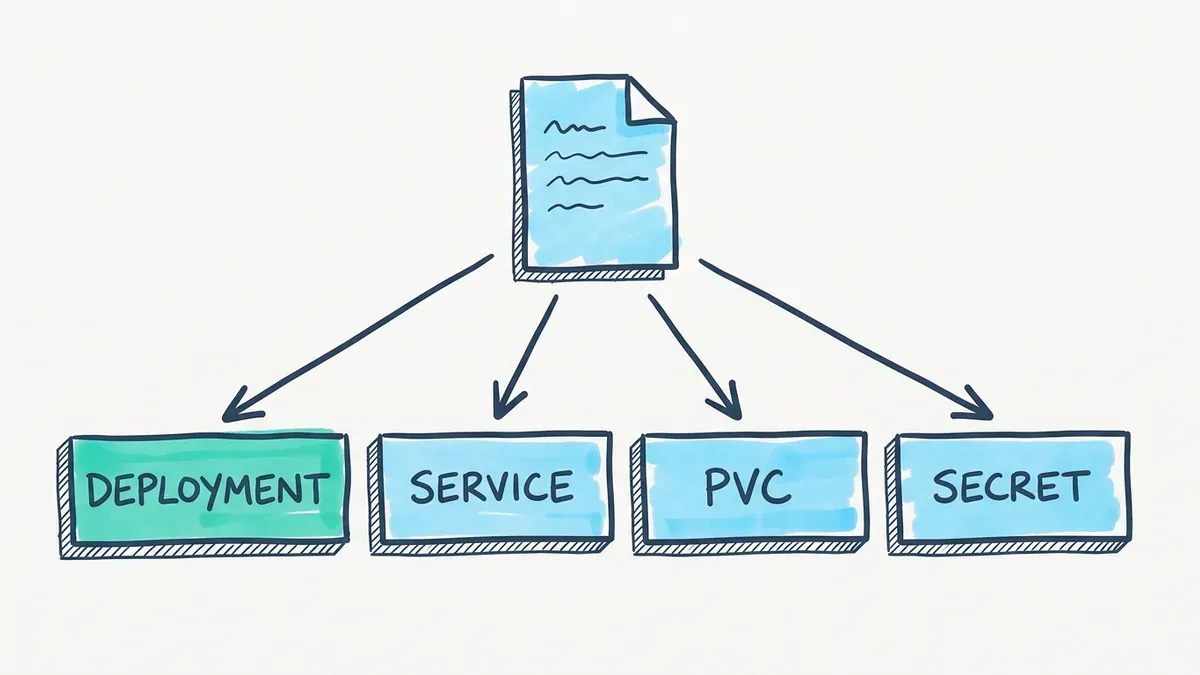
Our grafana service shows the pattern: one Compose service becomes a Deployment, a Service (NodePort 30300), a 1Gi PersistentVolumeClaim and a Secret for the admin password. Across the three services, the stack is 10 objects and 186 lines.
What do the extra 141 lines buy you?
Fair question. Here’s what each setup does when something breaks:
| Event | Docker Compose on one host | Kubernetes on three nodes |
|---|---|---|
| Exporter process crashes | unless-stopped restarts it on the same host | The Deployment replaces the pod. The other 2 replicas keep serving |
| The host or node dies | Whole stack is down until you fix the box | After a timeout, pods are recreated on the surviving nodes (storage permitting) |
| You change an image tag | docker compose up -d stops and recreates the container, so there’s a gap | Rolling update: new pods must pass readiness before old ones go |
| You need 5 exporters, not 3 | Edit and redeploy, all on one host | kubectl scale deployment snmp-exporter --replicas=5 |
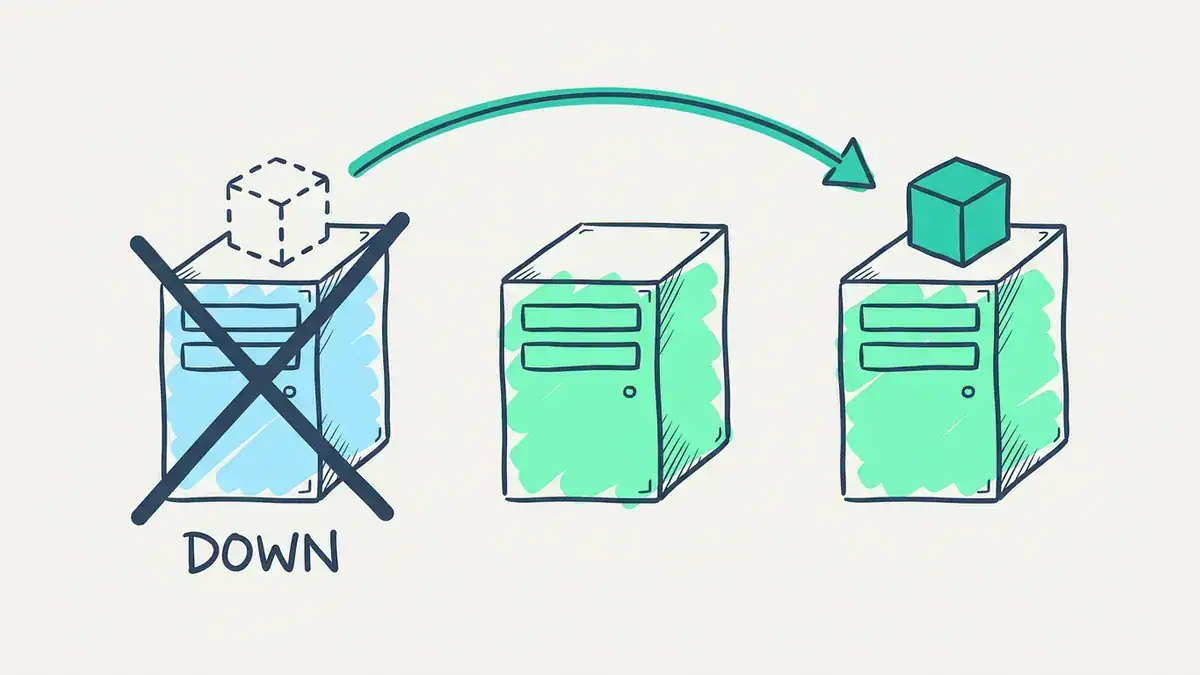
Compose’s restart: unless-stopped brings a container back on the same host, so a dead host takes the app with it. A Deployment recreates the pod on a healthy node after a timeout.
If none of those events worries you, the 141 lines are pure cost. If any of them would page you at 3 a.m., that’s what Kubernetes is for.
Can you convert Docker Compose to Kubernetes automatically?
Yes. Kompose, an official Kubernetes project (v1.38.0, released 2026-01-15), runs kompose convert -f compose.yaml and writes the manifests for you. It’s a good first draft.
But it can’t make the decisions that bit us while writing this stack:
- Rollout strategy for stateful pods. Prometheus and Grafana each write to a ReadWriteOnce volume, so we set
strategy: Recreate. With the default rolling update, the new pod can get stuck waiting for a volume the old pod still holds. - Volume permissions. Prometheus runs as user 65534 and Grafana as 472, so we set a matching
fsGroupon each pod. Without it, a fresh volume may not be writable. - What becomes a Secret. A password sitting in
environment:should move to a Secret, not stay in plain text.
So convert, then read every line.
Why does a Kubernetes rolling update stall on a small cluster?
This one catches people in home labs and exam practice alike.
A Deployment’s default rolling update uses maxSurge: 25% and maxUnavailable: 25%. The Kubernetes docs spell out the rounding: surge rounds up, unavailable rounds down. Run the numbers for small replica counts:
| Replicas | Extra pods allowed (surge) | Pods that may be down | Minimum available | Maximum pods during update |
|---|---|---|---|---|
| 1 | 1 | 0 | 1 | 2 |
| 2 | 1 | 0 | 2 | 3 |
| 3 | 1 | 0 | 3 | 4 |
| 4 | 1 | 1 | 3 | 5 |
See the zeros? With 1 to 3 replicas, Kubernetes must start a new pod before it removes an old one.
Say your snmp-exporter runs 3 replicas on a lab node whose spare capacity fits exactly 3 of them. You bump the image tag. Kubernetes creates a 4th pod, the scheduler has nowhere to put it, and it sits in Pending. The old pods can’t go, because the minimum available is 3. Nothing moves. Representative output:
$ kubectl rollout status deployment/snmp-exporter
Waiting for rollout to finish: 1 out of 3 new replicas have been updated...
error: deployment "snmp-exporter" exceeded its progress deadline
That error lands after progressDeadlineSeconds, which defaults to 600. Ten minutes of waiting for nothing.
The tempting fix is “just run 4 replicas”. It doesn’t work here. The node only fits 3, so the 4th replica would be Pending too. The real fix is one setting:
spec:
  strategy:
    rollingUpdate:
      maxSurge: 0
      maxUnavailable: 1
Now the maximum is 3 pods and the minimum available is 2. Kubernetes removes one old pod, schedules its replacement in the space that frees up, and repeats. You trade one pod of capacity during the update for a rollout that actually finishes.
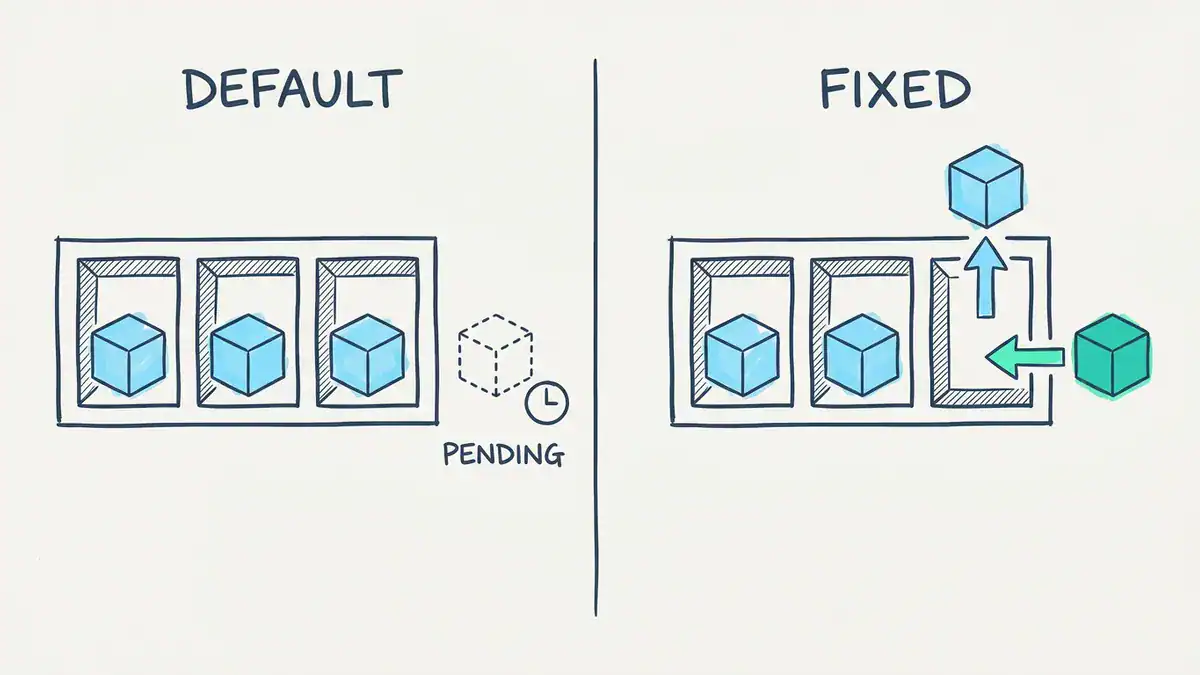
With 3 replicas, the default maxSurge of 25% rounds up to 1 and maxUnavailable rounds down to 0, so a 4th pod must start first and sits Pending on a full node. With maxSurge: 0 and maxUnavailable: 1, one pod leaves before its replacement arrives.
Docker Compose never hits this, because it doesn’t do rolling updates at all. It just stops and recreates.
Kubernetes vs Docker Swarm: is Swarm still worth learning?
Docker Swarm is Docker’s own orchestrator, built into Docker Engine as “Swarm mode”. It clusters several Docker hosts and runs Compose-style stacks across them. For kubernetes vs docker swarm, the trade-off is simple: Swarm is far easier to learn, and Kubernetes has the ecosystem, the managed cloud services and the jobs.
Is Docker Swarm dead? No, but it isn’t growing. The classic standalone Swarm is deprecated. Swarm mode still ships in Docker Engine, and Mirantis has committed to supporting Swarm in its enterprise platform through 2030. Interest is falling: US searches for “docker swarm” dropped from 2,900 a month in 2025-10 to 1,300 in 2026-09 (Google Ads data via DataForSEO).
Our take? If you already run Swarm for a few hosts and it works, there’s no fire. If you’re picking something new to learn, learn Kubernetes.
When should you use Kubernetes vs Docker?
Here’s the decision rule we’d use:
- One host, any number of containers: Docker plus Compose. Kubernetes adds cost here and nothing else.
- You need the app to survive a host failure: that needs at least 2 nodes and some orchestration. Kubernetes is the default answer. Swarm is the simpler one.
- You need rolling updates with health gates, autoscaling or per-team access control: Kubernetes.
- You’re on AWS or Azure and want orchestration without running a control plane: a managed service. On Amazon EKS, AWS runs the Kubernetes control plane for you. AWS also offers ECS, its own orchestrator, which AWS compares to Kubernetes here.
- You’re studying: learn Docker first, always. Every Kubernetes workflow assumes you can build and debug an image.
Notice what’s missing from that list: “Kubernetes or Docker” as a pure either-or. You build with Docker either way.
If you’re also weighing VMs against containers, our Proxmox vs Docker comparison covers that layer.
What hardware do you need to practise each one?
Docker runs on whatever laptop you’ve got. Kubernetes needs a bit more. These are the vendors’ own minimums:
| Setup | Minimum (vendor docs) | Good for |
|---|---|---|
| Docker plus Compose | Any machine that runs Docker | Everything in the Compose example above |
| minikube | 2 CPUs, 2 GB free memory, 20 GB free disk | First steps, single node |
| k3s | Server: 2 cores, 2 GB RAM. Agent: 1 core, 512 MB | Lightweight multi-node labs |
| kubeadm | 2 GB RAM per machine, 2 CPUs for the control plane | CKA-style clusters built the real way |
| Docker Desktop | Built-in cluster: kubeadm (single node) or kind (multi-node) | A quick local cluster on your desktop |
Do the maths before you buy RAM. A 3-node kubeadm cluster needs 3 × 2 GB = 6 GB just for the nodes, before your host OS and before the pods themselves. And kubeadm’s docs warn that 2 GB leaves little room for apps.
For how a container lab fits next to your networking or cloud lab, see what a home lab looks like for each cert track. If you want a first Docker project with real output, try installing Wazuh SIEM with Docker.
Which certifications test Docker and which test Kubernetes?
This is the bit most comparisons skip, and it matters if you’re a network engineer.
Cisco tests Docker, not Kubernetes. We read both automation exam blueprints line by line:
- The CCNA Automation 200-901 v1.1 blueprint puts Application Deployment and Security at 15%. It includes 4.3.c Containers, 4.6 “Interpret contents of a Dockerfile” and 4.7, which covers working with Docker images in a local developer environment.
- The CCNP Automation 350-901 AUTOCOR v2.0 blueprint has 2.5 “Interpret a Docker Compose file including services, networks, volumes, and links”, inside Infrastructure as Code at 30%.
- Neither PDF contains the word “Kubernetes”.
So if your goal is a Cisco automation cert, Dockerfiles and Compose files are exam material and Kubernetes isn’t. Our 200-901 guide covers the rest of that exam.
Kubernetes is tested by the CNCF exams, run through the Linux Foundation:
| Exam | Format | Price (US) |
|---|---|---|
| KCNA (Kubernetes and Cloud Native Associate) | 90 minutes, multiple choice | $250 |
| CKA (Certified Kubernetes Administrator) | 2 hours, hands-on tasks on a live cluster, Kubernetes v1.37 | $445, one retake included |
| CKAD (Certified Kubernetes Application Developer) | 2 hours, hands-on tasks, Kubernetes v1.37 | $445, one retake included |
Prices are from the Linux Foundation’s pages on 2026-11-08 and they change. Check before you book.
A sensible order for a network engineer: Docker skills through the Cisco automation track, then KCNA if you want the vocabulary, then CKA if you’ll actually run clusters. If you’re also choosing between cloud tracks, our AWS vs Azure vs Google Cloud certifications guide helps with that.
What about Podman and OpenShift?
Two names come up in almost every kubernetes vs docker thread. Each one sits on one side of the line.
Docker vs Podman: which should you use?
Podman is a daemonless container engine for OCI containers. No background daemon, and its CLI copies Docker’s closely enough that its own docs say most users can simply alias docker=podman. It sits on the Docker side: it builds and runs containers, it doesn’t orchestrate a cluster. Learn one and the other takes an afternoon.
Kubernetes vs OpenShift: what’s the difference?
Red Hat OpenShift is a commercial application platform built on Kubernetes. It adds a router, an image registry, CI/CD tooling and paid support on top. It sits on the Kubernetes side. Learn plain Kubernetes and OpenShift is mostly familiar.
Kubernetes vs Docker FAQ
Is Kubernetes replacing Docker?
No. Kubernetes stopped using Docker Engine as its runtime in version 1.24, but it still runs images built with Docker. Docker remains the usual way to build and test images, and Kubernetes is where many of those images end up running. They sit at different layers.
Can I learn Kubernetes in 2 days?
You can learn the core objects in 2 days: pods, Deployments, Services, ConfigMaps and Secrets. Running clusters with confidence takes weeks of hands-on practice. The CKA, for one, gives you 2 hours of live tasks on a real cluster, and that’s a different skill from reading about it.
What is the difference between containerization and orchestration?
Containerization packages an app and its dependencies into an image that runs the same everywhere. That’s Docker’s job. Orchestration decides where those containers run, how many copies exist, and what happens when one fails or needs an update. That’s Kubernetes’ job.
Does AWS use Kubernetes?
Yes. Amazon EKS is AWS’s managed Kubernetes service, and AWS runs the control plane for you. AWS also has ECS, its own container orchestrator that isn’t Kubernetes. Both run standard Docker-built images.
Can you use Docker Compose with Kubernetes?
Not directly. Kubernetes doesn’t read Compose files. You convert them with Kompose, an official Kubernetes project, then review the output. Rollout strategy for stateful pods, volume permissions and secrets usually need hand edits.
Is Docker Swarm dead?
No. Swarm mode still ships in Docker Engine, and Mirantis has committed to supporting Swarm in its enterprise platform through 2030. It’s in maintenance rather than growth, though. Pick Kubernetes for anything new you plan to learn or run long term.
Bottom line
Kubernetes vs Docker comes down to scale, not rivalry:
- Docker builds your images and runs them on one host. Learn it first.
- Compose describes a multi-container app in a few dozen lines. Enough for most labs and small servers.
- Kubernetes costs roughly four times the YAML and buys you survival across node failures, health-gated rollouts and scaling.
- On small clusters, watch the rollout defaults: with 1 to 3 replicas, set
maxSurge: 0andmaxUnavailable: 1if your nodes are full. - For exams, Cisco automation tests Docker and Compose. CKA and CKAD test Kubernetes.
Want the hands-on version? The CCNA Automation workbook maps its labs to the 200-901 blueprint, Docker objectives included. See the workbook for what’s inside.
Keep these free PDFs open while you practise: the Docker commands cheat sheet, the Dockerfile instructions cheat sheet, the Docker Compose commands cheat sheet and the kubectl troubleshooting cheat sheet, which walks through 16 common pod failures. And if infrastructure as code is next on your list, read Terraform vs Ansible.