Running five docker run commands by hand every time you start a project gets old fast, and it’s easy to typo a port or forget a flag. Docker Compose fixes that with one file and one command. This Docker Compose commands cheat sheet covers every command you’ll use day to day, a real working docker-compose.yml, and the one setting most tutorials skip: how to make services wait for each other correctly. Grab the free PDF and keep it next to your terminal.
docker-compose command not found
If your terminal throws docker-compose: command not found, or docker: ‘compose’ is not a docker command, you’re not missing any docker compose commands, you’re just using the wrong version of the tool. Mixing up the two versions of Compose is the single most common reason this error shows up, and it trips up more people than any actual command on this cheat sheet.
docker-compose (with a hyphen) is Compose V1, a separate standalone binary. It stopped receiving updates in July 2023 and no longer ships with current Docker installs. docker compose (a space, no hyphen) is Compose V2, built directly into the Docker CLI as a plugin. If your machine only has the old binary installed, or nothing at all, the hyphenated command fails with exactly this error.
Quick fix on Linux:
sudo apt update
sudo apt install docker-compose-plugin
docker compose version
On macOS or Windows: install Docker Desktop. It bundles Compose V2 automatically, no separate install step needed.
Still failing? Check that your Docker Engine version is current enough to include the plugin, and make sure you’re typing docker compose with a space everywhere, not docker-compose with a hyphen. Run docker compose version on its own to confirm the plugin is actually installed before you blame your docker-compose.yml file for something that’s really a setup problem. Every command in this cheat sheet uses the current V2 syntax, so once this is fixed, the rest of the page works exactly as written.
This is the one setup step most tutorials skip entirely. If you want the full picture, not just this one fix, but a real understanding of how Docker Compose fits into a production DevOps toolchain, the DevOps Certification Workbook walks through installing, configuring and troubleshooting the whole stack as hands-on labs.
Why This Docker Compose Commands Cheat Sheet Actually Saves You Time
Search “docker compose commands” and the top results are Docker’s own CLI reference (39 subcommands, zero explanation) and one dense community cheat sheet, devhints.io, that lists 22 commands with no beginner context and no worked example. Even the most-shared “Ultimate Docker Compose Cheat Sheet” on Reddit and GitHub turns out to have almost no real docker-compose.yml syntax behind the name, just four commands for one specific project.
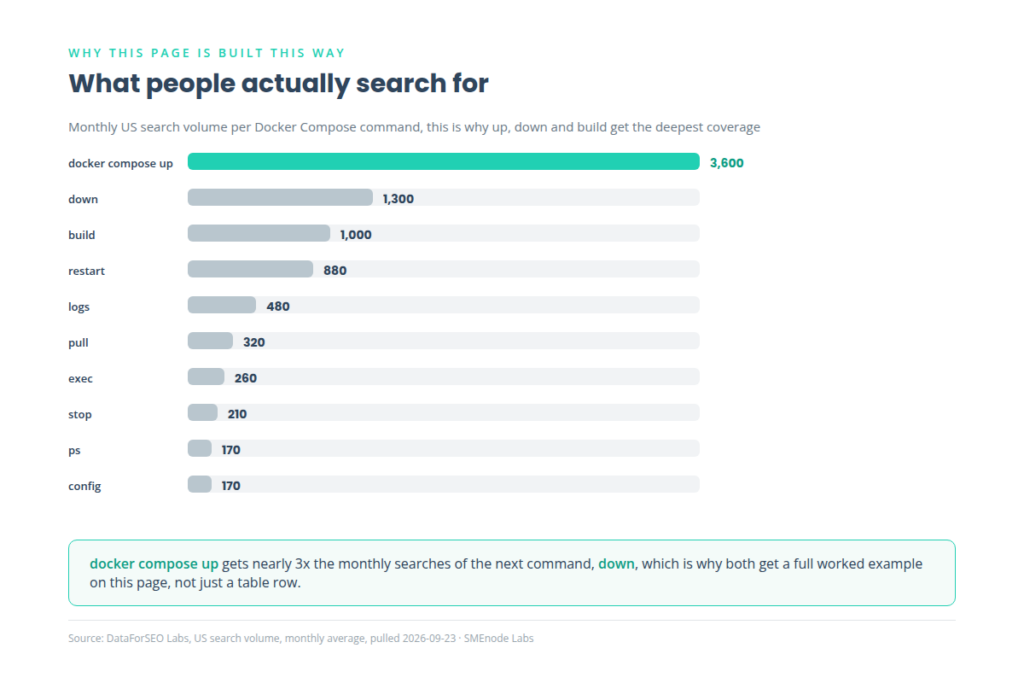
That gap is why this page exists: every command explained in plain language, two real docker compose examples you can copy straight into a docker-compose.yaml file, and the reasoning behind the part that trips people up most, startup order versus real readiness.
A Real docker-compose.yml, Line by Line
Here’s a real docker compose file example, a working Compose file for a web app with a database.
services:
  web:
    build: .
    ports:
      - "8080:80"
    environment:
      DB_HOST: db
    depends_on:
      - db
  db:
    image: mysql:8.4
    volumes:
      - mysql-data:/var/lib/mysql
volumes:
mysql-data:| Field | What it does |
|---|---|
services | Defines each part of your app, web, db, cache, whatever you’re running |
build | Builds an image from a local Dockerfile |
image | Uses a ready-made image instead, like mysql:8.4 |
ports | Publishes a container port to your machine, "8080:80" means host port 8080 maps to container port 80 |
volumes | Persists data outside the container so it survives a rebuild |
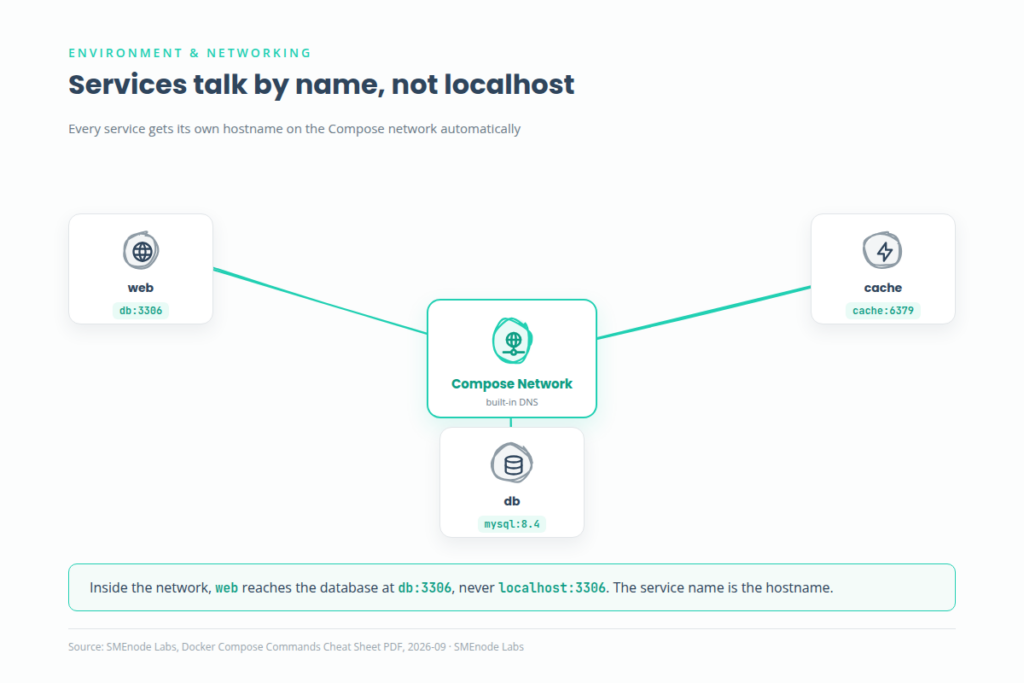
Inside Compose, services talk to each other by name, not localhost. The web service reaches the database at db:3306, not localhost:3306, because Compose creates a docker compose network automatically and gives every service its own hostname on it.
Every command below fits into one of three jobs: lifecycle commands start and stop your stack, build and update commands refresh images, and inspect and debug commands tell you what’s actually happening.
Core Commands: Up, Down, Build, Logs
The four commands you’ll run more than any others.
| Command | What it does |
|---|---|
docker compose up | Creates and starts every service in the file |
docker compose up -d | Same thing, detached, so it doesn’t block your terminal |
docker compose down | Stops and removes containers and networks (not volumes, see below) |
docker compose ps | Lists what’s running right now |
docker compose logs | Shows output from all services |
docker compose logs -f | Follows the logs live, the one you’ll use most while debugging |
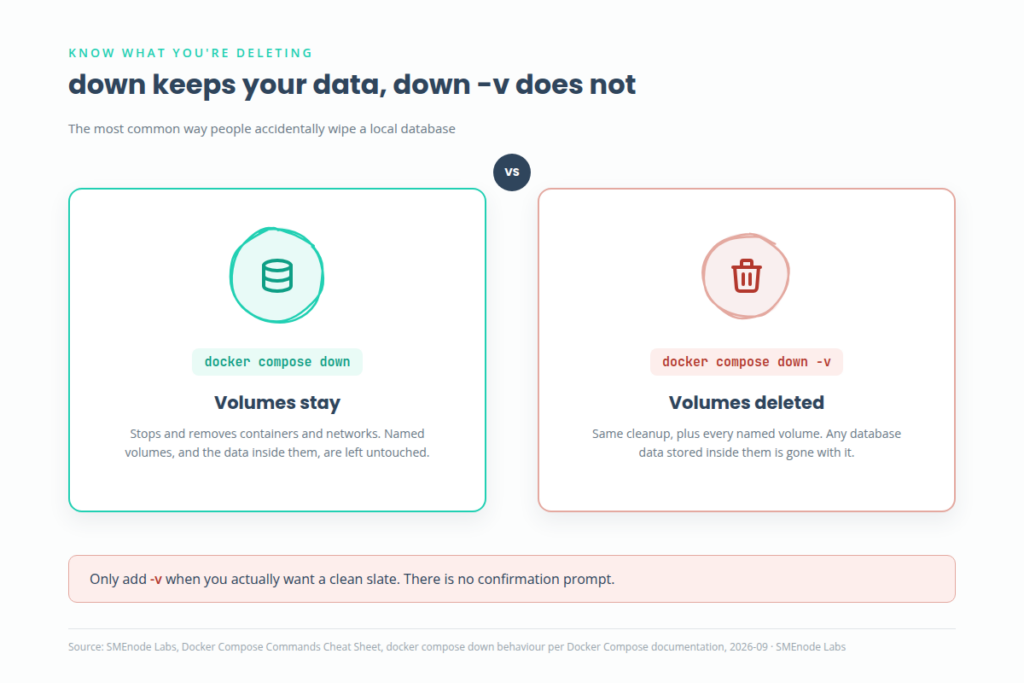
docker compose down versus docker compose down -v: the plain version leaves your named volumes alone. Add -v and it deletes them too, including your database data. This is the single most common way people accidentally wipe a local database. Use -v only when you actually want a clean slate.
Build, Exec and Cleanup Commands
For rebuilding images, getting a shell inside a container, and general housekeeping.
| Command | What it does |
|---|---|
docker compose build | Builds (or rebuilds) service images from their Dockerfiles |
docker compose up --build | Rebuilds and starts in one step, the one you want after changing a Dockerfile |
docker compose exec web bash | Opens a shell inside the running web service |
docker compose restart | Restarts services without rebuilding |
docker compose pull | Pulls the latest version of any image-based services |
docker compose stop | Stops services without removing them, faster to start back up than down |
docker compose config | Validates the file and prints the fully merged configuration, useful when something isn’t behaving as written |
Getting Startup Order Right: depends_on vs Healthcheck
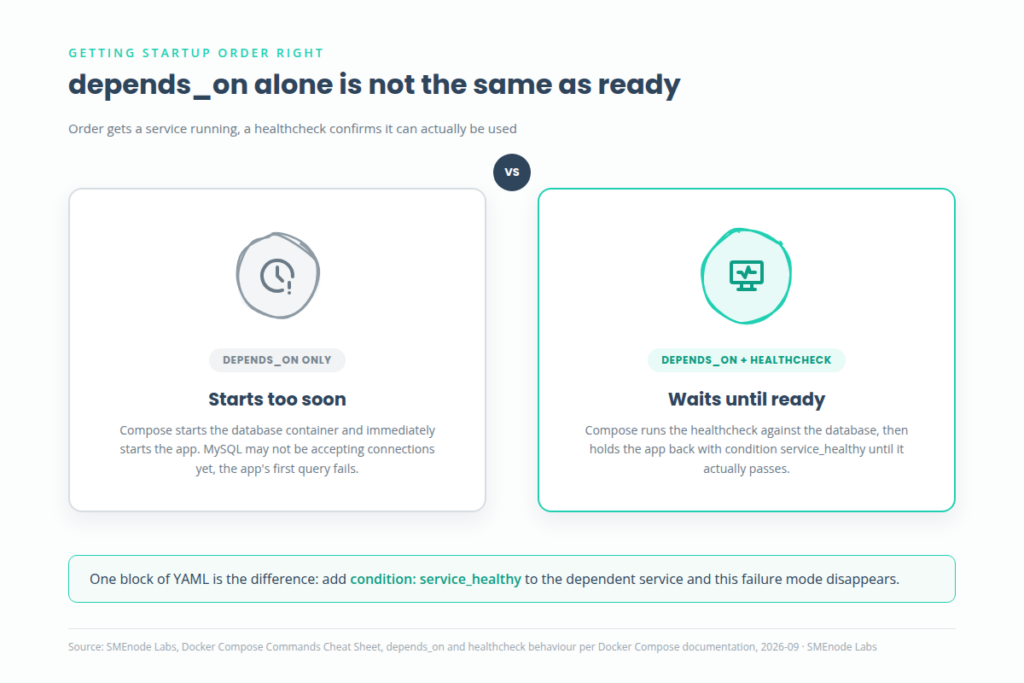
A docker compose healthcheck is how you fix the most common startup bug in Compose. depends_on controls the order services start in, but it does not wait for a service to actually be ready. A database container can report “started” seconds before MySQL is actually accepting connections, and if your app connects during that gap, it fails.
db:
  image: mysql:8.4
  healthcheck:
    test: ["CMD", "mysqladmin", "ping", "-h", "localhost"]
web:
  depends_on:
    db:
      condition: service_healthy
Add a healthcheck to the dependency and set condition: service_healthy, and Compose waits for the database to genuinely be ready before starting web. Short version: depends_on alone handles ordering, depends_on plus condition: service_healthy handles readiness. Use the second one whenever one service actually depends on another being usable, not just running.
Docker Compose vs docker run vs Kubernetes
| Tool | What it does | Best for |
|---|---|---|
docker run | Starts one container at a time, imperative, you type every flag | Quick one-off containers |
| Docker Compose | Defines a full multi-container app in one YAML file, declarative | Local development, demos, small deployments |
| Kubernetes | Orchestrates containers across a cluster of machines | Production at scale, multiple servers |
Compose is not a replacement for Kubernetes and was never meant to be. It’s the right tool for running your app stack on one machine. Already comfortable with single containers and want the Dockerfile side of this? Check the Dockerfile Commands Cheat Sheet. Need the plain docker CLI commands instead? The Docker Commands Cheat Sheet covers those.
What’s Inside the Free PDF
The PDF puts everything on this page into one reference sheet you can keep open while you work:
- All 12 essential Docker Compose commands in one table
- Both real
docker-compose.yamlexamples, ready to copy - The
depends_onvs healthcheck explanation, so your services start in the right order - A quick reference for environment variables, networking and volumes
It’s built to sit next to your editor, not to be read once and archived.
Who This Cheat Sheet Is For
If you’re new to multi-container apps, this covers the commands and the YAML structure from zero. If you already run Compose day to day but keep forgetting the exact healthcheck syntax or whether down deletes your volumes, this is the fast lookup. And if you’re studying for a DevOps certification or building real container skills for a job, this cheat sheet is the free preview of a much deeper resource: the DevOps Certification Workbook walks through building, networking and troubleshooting multi-container apps as full hands-on labs, alongside Jenkins CI/CD, Terraform and Kubernetes. Get the DevOps Certification Workbook →
This cheat sheet gives you the commands. The workbook gives you the practice: hands-on labs for Docker, Docker Compose, Kubernetes, Jenkins CI/CD pipelines and Terraform, the same toolchain covered across this entire free PDF series. If you’re studying for a certification or building real DevOps skills for a job, start with the DevOps Certification Workbook →