Running a container is easy. Remembering the flag that keeps it alive after a crash, three months later, at 11pm, is the hard part. This Docker commands cheat sheet covers 70+ commands: containers, images, networking, volumes, cleanup, and the production flags (restart policies, resource limits, health checks) most cheat sheets skip entirely.
Grab the PDF for the quick-reference version. Keep reading for the reasoning behind it.
Why a Docker commands cheat sheet still saves you time
This is a Docker CLI cheat sheet first: everything here is something you type, not a file you write. Docker’s own documentation is accurate. It’s also split across dozens of pages, one per command, written for people who already know which one they need.
When a deploy is failing at 11pm and you can’t remember --restart=always from --restart=on-failure, you don’t want four documentation pages, you want the answer in five seconds.
A Docker cheat sheet doesn’t replace hands-on time with Docker. It’s what you keep open while you’re still building that time up.
Installing Docker and managing the service
sudo yum install docker -y       # install on RHEL/CentOS
sudo systemctl start docker      # start the service
sudo systemctl enable docker     # start Docker automatically on every reboot
docker --version                 # check the installed version
docker info                      # full system-wide info
New to systemctl? Our Linux Commands Cheat Sheet covers process and service management in more depth, the same command family you just used to start and enable Docker.
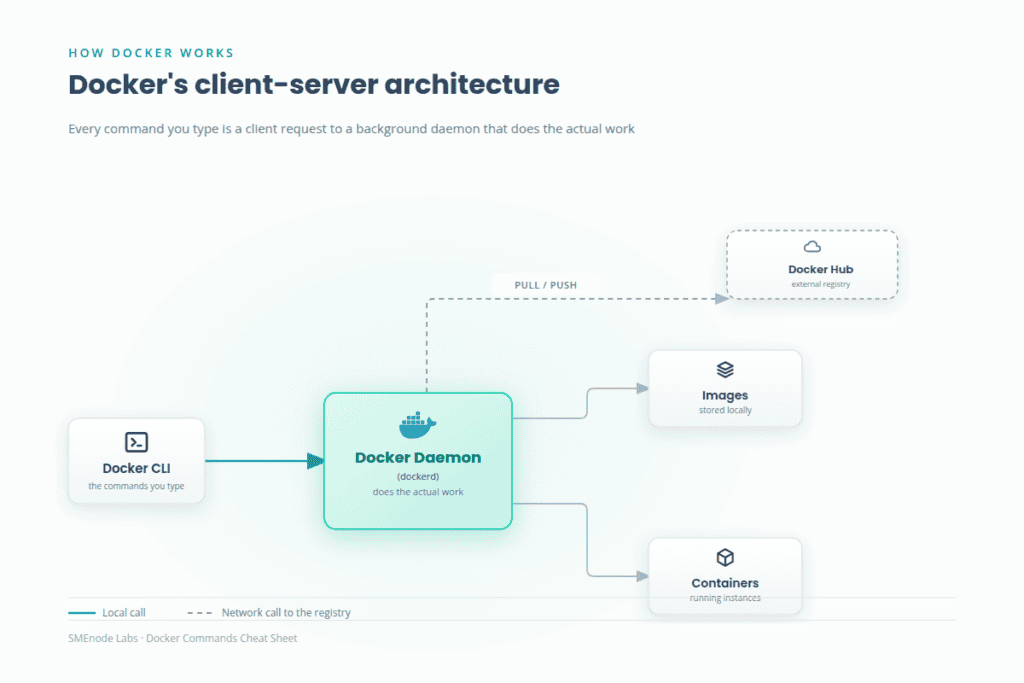
Docker runs on a client-server architecture: the docker command you type talks to a background daemon that does the actual work. Default storage lives at /var/lib/docker/, worth knowing the first time a host runs low on disk.
Running containers: the flags that actually matter
Most cheat sheets stop at -d and -p. The flags below are what separate a container that survives production from one that doesn’t.
docker run -d -p 8080:80 --name web nginx          # background, port mapping, a real name instead of a random ID
docker run -d -e NODE_ENV=production -e PORT=3000 myapp    # environment variables
docker run -d --restart=unless-stopped nginx        # restart after a crash or reboot, unless someone stopped it deliberately
docker run -d --memory="256m" --cpus="0.5" myapp     # cap resource usage so one container can't take the host down
docker run -d --health-cmd="curl -f http://localhost/ || exit 1" --health-interval=30s --health-retries=3 nginx    # tell Docker "running" isn't the same as "working"
unless-stopped is the restart policy most production services want. Plain always will bring a container back even after you’ve explicitly stopped it, which surprises people exactly once, usually during an incident.
These four flags are also where reading a cheat sheet stops being enough. Knowing the syntax for --health-cmd and knowing what to put in it when a real service is actually failing are two different skills, the second one only comes from breaking something on purpose and fixing it. That’s the whole premise behind the labs in our DevOps Certification Workbook.
Container lifecycle and troubleshooting
docker ps -a                                 # list every container, running or stopped
docker start|stop|restart <container_id>     # control a container's state
docker rm $(docker ps -aq)                   # remove every container at once
docker exec -it <container_id> /bin/bash     # open a shell inside a running container
docker logs <container_id>                   # the first place to look when something's wrong
docker inspect <container_id>                # full JSON detail: network, mounts, env vars, everything
docker stats                                 # live CPU, memory and I/O per container
If a container keeps exiting immediately, docker logs almost always has the reason. If it exits before you can attach, drop -d from docker run so it stays in the foreground and you see the error live.
Image management: pull, build, tag
docker pull <image_name>                            # download from Docker Hub
docker images                                       # list what's stored locally
docker build -t <image_name> .                       # build from a Dockerfile in the current directory
docker tag <image_id> <username>/<repo>:<tag>        # rename/retag an image
docker rmi <image_id>                                 # remove an image
docker image prune                                   # remove every unused image
Building from a Dockerfile is its own topic with its own syntax (FROM, RUN, COPY, CMD). This page covers the command that reads it, not the file itself.
Docker Hub, networking and volumes
docker login                                          # authenticate to Docker Hub
docker push <username>/<repo>:<tag>                   # publish an image
docker network create <network_name>                 # containers on the same custom network reach each other by name
docker network connect <network_name> <container>    # attach a running container to it
docker volume create <volume_name>                    # persist data past a container's lifetime
docker run -d -v <volume_name>:/usr/share/nginx/html nginx    # mount it in
Popular pulls worth knowing on sight: nginx and httpd for web servers, mysql, postgres and redis for data, node and python for runtimes, alpine when you want the smallest possible base image.
Cleanup commands
docker container prune       # remove all stopped containers
docker image prune           # remove all unused images
docker system prune -a       # remove everything unused, the nuclear option
docker system prune -a is the command you’ll actually reach for most, right before a host runs out of disk. Cleanup commands are easy to memorize. Knowing when a production host should run one, and when it’s about to delete something you still needed, is a judgment call the DevOps Certification Workbook‘s labs put you in front of on purpose, in a sandboxed environment where getting it wrong costs nothing.
What’s inside the PDF
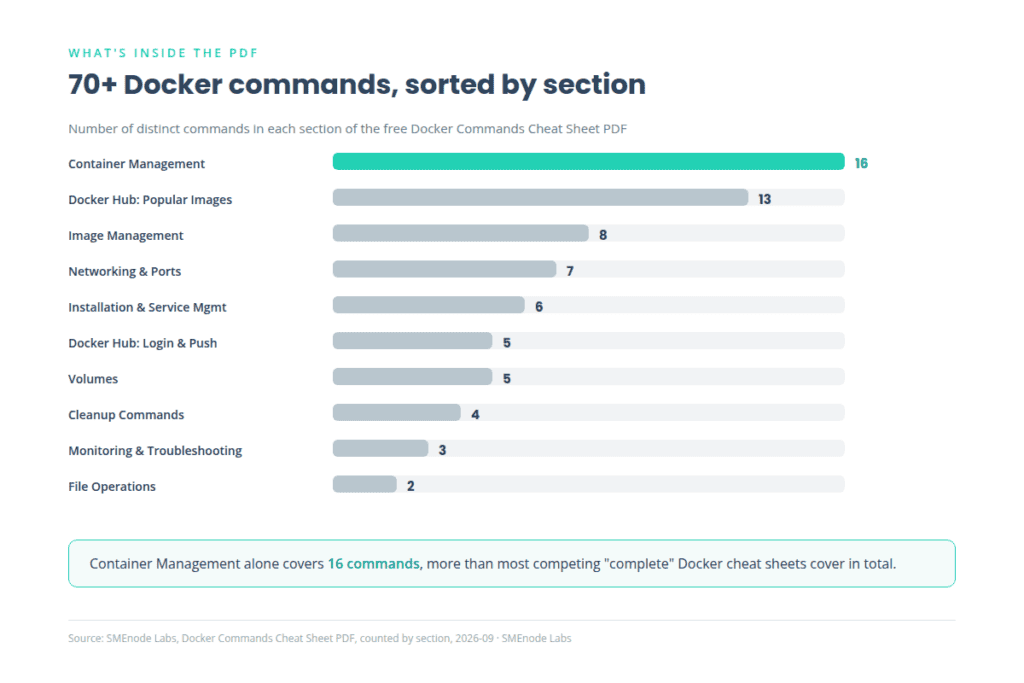
- A complete Docker commands list across 8 sections: installation, running containers (restart policies, resource limits, health checks included), lifecycle and troubleshooting, image management, Docker Hub, networking, volumes, and cleanup
- Every command paired with a plain-English purpose
- A quick-reference table of the most-pulled Docker Hub images
- Print-ready, built to sit next to your keyboard
Who it’s for
- Anyone learning Docker for the first time, no prior experience assumed
- DevOps career switchers studying containers as part of a bigger toolchain (Docker, Kubernetes, CI/CD, Terraform)
- Developers and sysadmins who need a fast sanity check before reaching for the full documentation
- Anyone prepping for a DevOps interview, our Free DevOps Interview Questions PDF has a dedicated Docker section that pairs directly with the commands here
Here’s the honest limit of a cheat sheet, ours or anyone else’s: it tells you what --restart=unless-stopped does. It does not put you in front of a container that’s crash-looping in a real environment at 2am and make you figure out why, with nobody to ask but the logs. That’s a different skill, and it’s the one that actually gets tested in interviews and actually breaks production.
The DevOps Certification Workbook is built for exactly that gap: 95 hands-on labs across 280+ pages, Docker, Kubernetes, CI/CD and Terraform, tested against real AWS, Azure and GCP scenarios, not toy examples. If any command on this page felt like something you’d want to actually practice rather than just read, that’s the workbook.