DMVPN (Dynamic Multipoint VPN) is Cisco’s way of building one hub-and-spoke VPN that grows without per-site tunnel config. Each branch builds a single tunnel to the hub, registers its public address, and can build direct spoke-to-spoke tunnels on demand. Phase 1 sends everything through the hub. Phase 2 adds direct tunnels. Phase 3 adds direct tunnels while the hub sends summaries.
That’s the short version. The three phases come down to one question: how does a spoke find out it should talk to another spoke directly? Phase 1 never does. Phase 2 works it out from its routing table. Phase 3 gets told by the hub.
| Phase 1 | Phase 2 | Phase 3 | |
|---|---|---|---|
| Spoke tunnel | Point-to-point GRE | Multipoint GRE (mGRE) | mGRE |
| Hub tunnel | mGRE | mGRE | mGRE |
| Spoke-to-spoke traffic | Always through the hub | Direct, after NHRP resolution | Direct, after an NHRP redirect from the hub |
| What triggers the direct tunnel | Nothing | A route whose next hop is the remote spoke | A redirect when traffic hairpins through the hub |
| Hub can summarise routes to spokes | Yes | No | Yes |
| Key hub commands | ip nhrp map multicast dynamic | plus no ip next-hop-self eigrp | plus ip nhrp redirect |
| Key spoke commands | tunnel destination | tunnel mode gre multipoint | plus ip nhrp shortcut |
What Is DMVPN?
DMVPN is a Cisco IOS and IOS XE design that combines multipoint GRE tunnels, the Next Hop Resolution Protocol (NHRP) and, usually, IPsec, so that many branch routers can join one VPN through a hub without the hub being reconfigured for each new branch. That’s the meaning in one sentence.
Cisco calls it a “Cisco IOS Software-based security solution for building scalable enterprise VPNs” on its DMVPN data sheet. The same data sheet lists what made Cisco DMVPN popular in the first place:
- Spokes can use dynamic public IP addresses, which suits cable and DSL links.
- Spokes can sit behind NAT.
- The tunnels carry multicast, so EIGRP, OSPF and BGP can run over them. A plain crypto-map IPsec tunnel only carries unicast.
Add a spoke, and you configure the spoke. The hub learns about it on its own. That’s the whole appeal.
Is DMVPN Cisco proprietary?
Mostly, yes. The building blocks are open standards: GRE (RFC 2784), NHRP (RFC 2332) and IPsec. But DMVPN as a packaged design is Cisco’s, and Cisco’s NHRP configuration guide says Cisco’s NHRP “supports and extends” RFC 2332. The Phase 3 shortcut and redirect behaviour is a Cisco enhancement.
A few other platforms offer their own DMVPN support. VyOS, for one, documents it. Fortinet’s equivalent idea is ADVPN, which our FortiGate overview touches on. If you plan to mix vendors in one cloud, test it first. Cisco’s docs only cover Cisco routers.
What Is a Hub and Spoke Topology?
A hub and spoke topology is a design where every remote site (spoke) connects to one central site (hub), and spokes reach each other through the hub rather than through direct links. In networking it’s the default shape for branch WANs. One data centre, many offices.
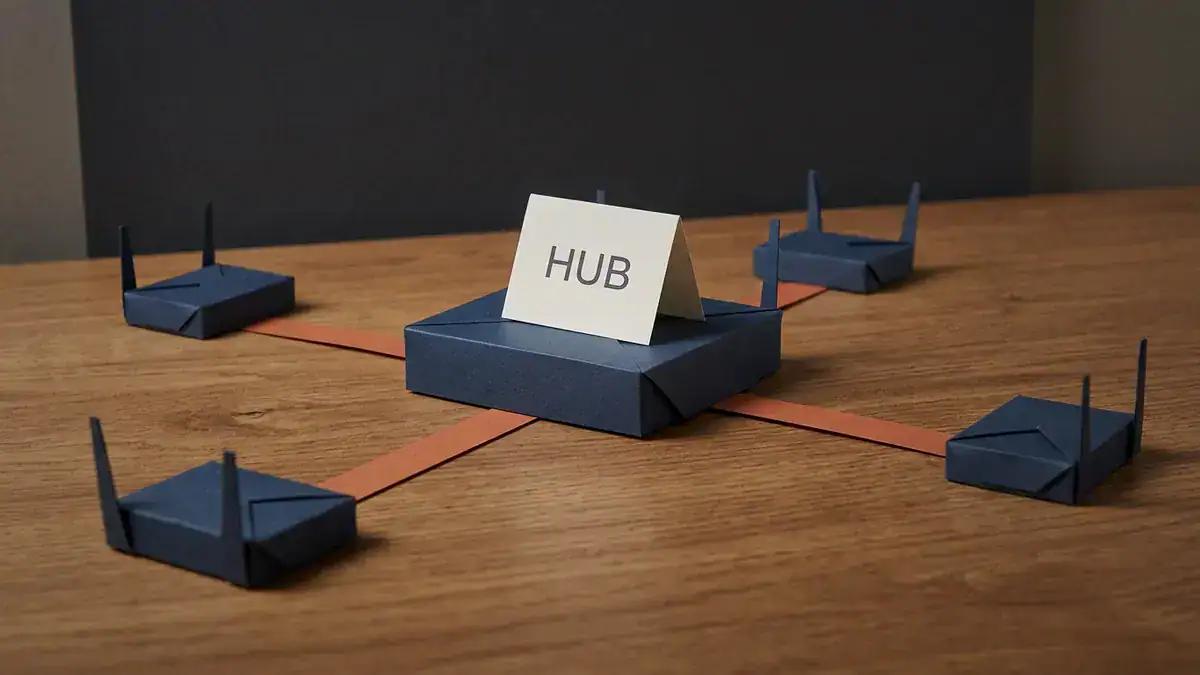
Hub and spoke: four branches, four links, every one of them to the hub. A full mesh of the same five sites would need ten.
It’s popular for three reasons:
- Fewer links. N branches need N connections. A full mesh needs N × (N+1) / 2 once you count the hub.
- One place for policy. Firewalling, inspection and internet breakout live at the hub.
- Easy growth. A new branch only touches the hub.
The cost? The hub is a single point of failure and a bottleneck, and branch-to-branch traffic takes the long way round. DMVPN keeps the hub and spoke network topology for setup, then fixes the long-way-round problem with on-demand spoke-to-spoke tunnels. If you want the bigger picture of bus, ring, mesh and the rest, grab our free network topology types PDF.
Is hub and spoke the same as star topology?
Same shape, different context. “Star” usually describes a physical LAN, like hosts cabled to one switch. “Hub and spoke” usually describes a logical WAN or cloud design, like branches tunnelled to a data centre or Azure VNets peered to a hub VNet. If an exam asks you to draw either one, you’ll draw the same picture.
How Does DMVPN Work?
Three parts, each with one job.
| Part | Job | Without it |
|---|---|---|
| mGRE | One tunnel interface that talks to many endpoints | One tunnel interface per peer |
| NHRP | Maps tunnel (overlay) addresses to public (NBMA) addresses | Nobody knows where a spoke actually is |
| IPsec | Encrypts the GRE packets | Your WAN traffic crosses the internet in clear text |
A routing protocol runs on top. That’s what tells each router which LANs sit behind which tunnel address.
What does mGRE give DMVPN?
Multipoint GRE lets a single tunnel interface reach many peers, because the tunnel has no fixed destination. A classic GRE tunnel has tunnel destination hard-coded. Ten peers means ten tunnel interfaces and ten subnets. With tunnel mode gre multipoint, there’s one interface and one subnet, and the destination for each packet comes from NHRP.
Cisco’s IOS XE 17 DMVPN guide puts the choice plainly. Use multipoint “if data traffic can use dynamic spoke-to-spoke traffic”. Use a fixed tunnel destination if traffic only ever goes hub-and-spoke.
What does NHRP do?
NHRP is the address book. Cisco describes it as “an Address Resolution Protocol (ARP)-like protocol”. ARP maps an IP to a MAC address. NHRP maps a tunnel IP to a public IP.
Two terms you’ll see everywhere:
- Tunnel address: the overlay IP on Tunnel0, like 172.16.0.2.
- NBMA address: the underlay IP the tunnel rides on, usually the router’s public internet address, like 198.51.100.2. NBMA stands for non-broadcast multi-access. Cisco’s NHRP guide says that’s what an mGRE hub-and-spoke cloud becomes.
The hub is the Next Hop Server (NHS). Each spoke is a client. Spokes send registration requests to the hub saying “tunnel IP 172.16.0.2 lives at 198.51.100.2”. When a spoke needs another spoke, it sends a resolution request. Phase 3 adds a traffic indication message, which Cisco calls the NHRP redirect. You’ll see all of these counted in show ip nhrp traffic.
Because spokes register, their public IPs can change. The hub just learns the new address at the next registration.
Where does IPsec fit?
GRE doesn’t encrypt anything. DMVPN over IPsec means one line on the tunnel interface, tunnel protection ipsec profile NAME, and an IPsec profile behind it. There’s no crypto map and no per-peer ACL. Each spoke-to-spoke tunnel brings up its own IPsec security association when it’s needed.
The CCIE EI lab specifically lists IPsec/IKEv2 using pre-shared key, so that’s what the config below uses.
What Are the DMVPN Phases?
DMVPN has three phases. Phase 1 is hub-and-spoke only, Phase 2 adds spoke-to-spoke tunnels that need full routing tables on every spoke, and Phase 3 adds spoke-to-spoke tunnels triggered by the hub, so spokes can live on a summary route. The phases describe how traffic flows. They’re not separate features you license.
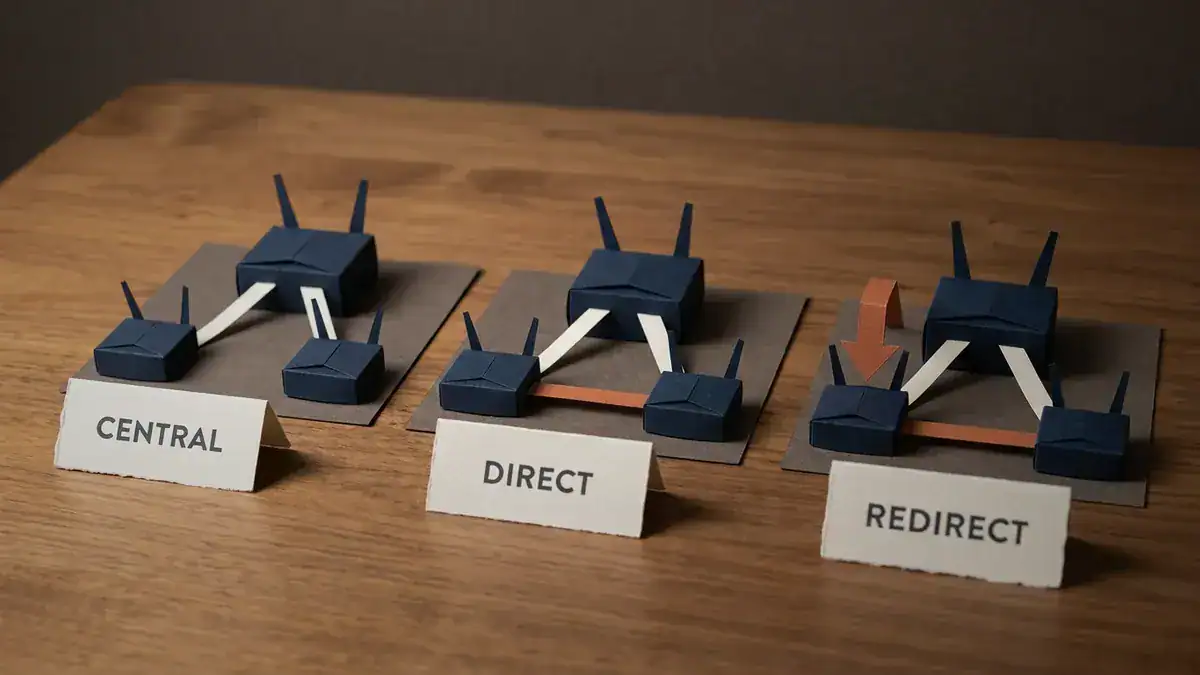
CENTRAL is Phase 1: every packet goes through the hub. DIRECT is Phase 2: spokes tunnel straight to each other because their routing table says so. REDIRECT is Phase 3: the hub tells the spoke about the shortcut.
DMVPN Phase 1: everything through the hub
The hub runs mGRE. Spokes run ordinary point-to-point GRE with tunnel destination pointing at the hub. Spokes still register with NHRP, which is what lets the hub accept them without per-spoke config.
Spoke-to-spoke traffic always hairpins through the hub. Routing is simple. The hub can send each spoke a default route or a summary and be done.
When is that the right design? When you want every packet inspected at the hub. Otherwise Phase 1 is mostly a stepping stone.
DMVPN Phase 2: direct tunnels, full routing tables
Spokes switch to mGRE. Now a spoke can build a tunnel to another spoke, but only if its routing table tells it to.
Cisco’s shortcut-switching guide spells out the catch: for a spoke to send an NHRP resolution request, “the spoke must have a route in its routing table for the remote network (behind the remote spoke) with an IP next-hop of the tunnel IP address of the remote spoke.” So the hub has to pass every spoke’s routes to every other spoke, unchanged. With EIGRP that means two hub commands:
no ip split-horizon eigrp 100, so routes learned on Tunnel0 go back out Tunnel0.no ip next-hop-self eigrp 100, so the next hop stays the remote spoke, not the hub.
No summarisation. Every spoke carries every branch prefix. With OSPF, Cisco says Phase 2 needs the broadcast network type, and since a broadcast segment has only a DR and BDR, that caps you at two hubs.
DMVPN Phase 3: redirect and shortcut
Phase 3 flips the trigger. Spokes no longer need a specific route. They send traffic to the hub, and the hub tells them there’s a shorter way.
The hub notices a packet came in on Tunnel0 and is going straight back out Tunnel0. It forwards the packet anyway, then sends an NHRP redirect to the spoke that sent it. That spoke sends a resolution request, the far spoke answers directly, and from then on traffic goes spoke to spoke. Two commands:
ip nhrp redirecton the hub.ip nhrp shortcuton the spokes.
Cisco lists what this buys you: summarisation from hub to spokes, OSPF in point-to-multipoint mode with more than two hubs, and hierarchical designs where regional hubs are spokes of a central hub. If the shortcut can’t be built, Cisco says “the data packets will continue to be forwarded via the hub(s)”. So a broken shortcut costs you latency, not reachability.
One IOS XE detail trips people up. Cisco’s IOS XE 17 guide lists ip nhrp shortcut as a smart default that’s on or off depending on whether the interface is multipoint, and smart defaults don’t show in show run. Cisco’s own 2025 Phase 3 example puts ip nhrp redirect on the hub and no shortcut line on the spokes at all. On older IOS, you must configure it. Typing it explicitly does no harm either way.
DMVPN Phase 2 vs 3: what actually changes?
| Phase 2 | Phase 3 | |
|---|---|---|
| Spoke learns the shortcut from | Its routing table (next hop = remote spoke) | A redirect from the hub |
| Hub routing | Full table, next hop unchanged | Summary or default is enough |
| Routes per spoke at 250 branches | About 250 | As few as 1 |
| OSPF network type | Broadcast, two hubs max | Point-to-multipoint, more hubs |
| Hierarchical hubs | No | Yes |
| First packets of a flow | Through the hub | Through the hub |
| Why you’d still pick it | Legacy config you don’t want to touch | Almost always the better pick |
Cisco also warns: don’t configure shortcut switching on a network where spokes already hold routes with the other spoke as next hop. That’s Phase 2 territory. Pick one model.
Worked Example: One Phase 3 Packet, Step by Step
Here’s a three-router Phase 3 cloud. The public addresses come from the documentation ranges, so you can copy the whole thing into a lab.
| Router | Role | NBMA (public) | Tunnel0 | LAN |
|---|---|---|---|---|
| R1 | Hub, NHS | 203.0.113.1 | 172.16.0.1/24 | 10.1.0.0/24 |
| R2 | Spoke | 198.51.100.2 | 172.16.0.2/24 | 10.2.0.0/24 |
| R3 | Spoke | 192.0.2.3 | 172.16.0.3/24 | 10.3.0.0/24 |
The hub sends spokes a single EIGRP summary, 10.0.0.0/8, out Tunnel0. So R2’s routing table has its own LAN, and one route for everything else via 172.16.0.1.
A host at 10.2.0.10 pings 10.3.0.10. Here’s what happens, following the sequence in Cisco’s shortcut-switching guide:
- R2 looks up 10.3.0.10. The best match is 10.0.0.0/8 via the hub. NHRP has no entry for it, so the packet goes to R1.
- R1 forwards it to R3. R1 has the specific 10.3.0.0/24 route via 172.16.0.3. The packet arrived on Tunnel0 and leaves on Tunnel0.
- R1 sends R2 a redirect. Cisco calls it a “redirect traffic indication”. Like an ICMP redirect, it carries the original IP header and the first eight bytes of the data packet.
- R2 sends a resolution request for 10.3.0.10. It follows the routed path, R2 to R1 to R3.
- R3 sees it’s the exit point for 10.3.0.0/24. It builds IPsec straight to 198.51.100.2 and replies directly to R2. The reply covers the whole prefix 10.3.0.0/24, not just the one host.
- R2 installs the mapping. 10.3.0.0/24 now lives at tunnel address 172.16.0.3, public address 192.0.2.3. The next packet goes straight to R3.
The reply traffic from 10.3.0.10 starts out on R3’s own summary route to the hub, so R1 redirects R3 too, and R3 resolves 10.2.0.0/24 the same way. A few packets in, both directions run direct.

R1 forwards the first packet and sends R2 a redirect. R2 resolves 10.3.0.10, R3 answers directly from 192.0.2.3, and traffic for 10.3.0.0/24 takes the shortcut from then on.
What you’d see on R2 afterwards. This is representative output in the IOS XE 17 format Cisco documents, built from the addresses above. It’s not a capture from a lab run.
R2# show dmvpn
Legend: Attrb --> S - Static, D - Dynamic, I - Incomplete
        N - NATed, L - Local, X - No Socket
        T1 - Route Installed, T2 - Nexthop-override
...
Interface: Tunnel0, IPv4 NHRP Details
Type:Spoke, NHRP Peers:2,

 # Ent  Peer NBMA Addr Peer Tunnel Add State  UpDn Tm Attrb
 ----- --------------- --------------- ----- -------- -----
     1 203.0.113.1          172.16.0.1    UP 00:41:07     S
     1 192.0.2.3            172.16.0.3    UP 00:00:12     D

R2# show ip route nhrp
...
H        10.3.0.0/24 [250/1] via 172.16.0.3, 00:00:12, Tunnel0
Read it like this. S is the hub, the static entry you configured. D is R3, learned dynamically a few seconds ago. The H route is NHRP’s shortcut. Cisco’s IOS XE 17 guide says NHRP installs these paths into the routing table, and an H route is only valid while a less specific IGP route (the summary) still covers it. Pull the summary and the shortcut goes with it.
On older IOS releases you won’t see the H route. Cisco’s 15M&T guide notes the routing table and CEF still show the hub as next hop, and you have to check show ip nhrp to see the shortcut.
What breaks if you get it wrong?
Most DMVPN mistakes don’t cause outages. They cause detours. That makes them easy to miss in a lab.
- Phase 2, hub summarising. Spokes only see the hub as next hop, so they never send a resolution request. Everything still works, through the hub.
- Phase 2,
next-hop-selfleft on. Same result. Cisco’s own hub example comments thatno ip next-hop-self eigrp“enables dynamic, direct spoke-to-spoke tunnels”. - Phase 3, no covering route on the spoke. Cisco’s IOS XE 17 guide: “If the summary route is absent, NHRP cannot discover a shortcut path.”
- PAT at both ends. Cisco lists PAT on both spokes’ NAT devices as a restriction that blocks spoke-to-spoke sessions. Traffic falls back to the hub.
So when ping works but traceroute shows the hub in the middle, check these four first.
How Much Does Phase 3 Save? The Maths at 250 Branches
Cisco’s guide uses 1,000 spokes to make the point. Here’s the same maths at a size more of you will actually meet: one hub and 250 branches.
| Design | What scales | Count |
|---|---|---|
| Static IPsec full mesh | Tunnels (251 sites × 250 / 2) | 31,375 |
| DMVPN, any phase | Permanent tunnels (spoke to hub) | 250 |
| DMVPN Phase 2 | Routes each spoke must hold | About 250 |
| DMVPN Phase 2 | Hub route advertisements (250 routes × 250 spokes) | About 62,500 |
| DMVPN Phase 3, one summary | Hub route advertisements | 250 |
That’s 250 times less routing work on the hub, counted the way Cisco counts its own example (1,000 routes to 1,000 spokes, which it calls “the equivalent of 1,000,000 routes”). The spoke-to-spoke tunnels still happen. They just happen when traffic needs them, not because a routing table forced them.

Phase 2 at 250 branches: about 62,500 route advertisements from the hub. Phase 3 with one 10.0.0.0/8 summary: 250.
Honestly, this table is the real answer to “why does Phase 3 exist”. The redirect trick is clever, but the summary is the point.
How Do You Configure DMVPN?
Here’s a Cisco DMVPN configuration for the topology above, built up one phase at a time. EIGRP AS 100 runs over the tunnel. Interface names assume a CSR or Catalyst 8000V style router, so adjust them for your platform.
Hub (R1), base config for all phases:
interface Tunnel0
 ip address 172.16.0.1 255.255.255.0
 ip mtu 1400
 ip tcp adjust-mss 1360
 ip nhrp network-id 1
 ip nhrp map multicast dynamic
 tunnel source GigabitEthernet1
 tunnel mode gre multipoint
 tunnel key 100
ip nhrp map multicast dynamic lets the hub send routing protocol multicast to every spoke that registers. Cisco notes it’s needed only on the hub. The MTU and MSS values are the pair Cisco’s IOS XE 17 guide uses: MTU 1400, MSS 1360. That leaves room for the GRE and IPsec headers, so packets get fragmented before encryption, not after.
Phase 1 spoke (R2):
interface Tunnel0
 ip address 172.16.0.2 255.255.255.0
 ip mtu 1400
 ip tcp adjust-mss 1360
 ip nhrp network-id 1
 ip nhrp map 172.16.0.1 203.0.113.1
 ip nhrp map multicast 203.0.113.1
 ip nhrp nhs 172.16.0.1
 tunnel source GigabitEthernet1
 tunnel destination 203.0.113.1
 tunnel key 100
The three NHRP lines say: the hub’s tunnel IP lives at 203.0.113.1, send multicast there, and register with it. You can also collapse them into one line, ip nhrp nhs 172.16.0.1 nbma 203.0.113.1 multicast, which Cisco documents in its DMVPN FQDN guide. Both forms work. Exams and older docs use the three-line form.
Phase 2 changes:
! Spokes: drop the fixed destination
interface Tunnel0
 no tunnel destination
 tunnel mode gre multipoint

! Hub: pass spoke routes on, unchanged
interface Tunnel0
 no ip split-horizon eigrp 100
 no ip next-hop-self eigrp 100
Phase 3 changes (on top of Phase 2):
! Hub: redirect, and summarise instead of passing everything
interface Tunnel0
 ip nhrp redirect
 ip summary-address eigrp 100 10.0.0.0 255.0.0.0
 ip next-hop-self eigrp 100

! Spokes
interface Tunnel0
 ip nhrp shortcut
ip next-hop-self goes back to its default, since the summary’s next hop is the hub anyway. Cisco’s 2025 Phase 3 example keeps no ip split-horizon eigrp on the hub, and you can leave it there.
IPsec with IKEv2 and a pre-shared key (all routers):
crypto ikev2 keyring DMVPN-KR
 peer ANY
  address 0.0.0.0 0.0.0.0
  pre-shared-key YourLabKey123
!
crypto ikev2 profile DMVPN-IKEV2
 match identity remote address 0.0.0.0
 authentication remote pre-share
 authentication local pre-share
 keyring local DMVPN-KR
!
crypto ipsec transform-set DMVPN-TS esp-aes 256 esp-sha256-hmac
 mode transport
!
crypto ipsec profile DMVPN-IPSEC
 set transform-set DMVPN-TS
 set ikev2-profile DMVPN-IKEV2
!
interface Tunnel0
 tunnel protection ipsec profile DMVPN-IPSEC
Three notes. Transport mode matters when spokes sit behind NAT, because Cisco’s DMVPN guide says NAT-transparency support needs it. The wildcard key (0.0.0.0 0.0.0.0) is fine for a lab, but Cisco discourages wildcard pre-shared keys, and its own 2025 production-style example uses certificates. And there’s no crypto map anywhere. That’s normal.
A couple of things that must match across the cloud: the tunnel key, and NHRP authentication if you use it. ip nhrp network-id is documented by Cisco as local only, never sent in packets. Keep it the same everywhere anyway. Cisco recommends it, and your future self will thank you.
Running OSPF instead of EIGRP? In Phase 3, use ip ospf network point-to-multipoint on every tunnel. Cisco notes the DMVPN cloud must sit in one OSPF area, so spokes still carry every route, because OSPF can’t summarise inside an area. If summarisation is the goal, EIGRP or BGP does it better. Our EIGRP vs OSPF breakdown covers the trade-offs, and the free EIGRP cheat sheet has the commands on one page.
What About Dual Hub DMVPN?
One hub is one point of failure. Two hubs fix that, and the CCIE EI lab blueprint asks for exactly this: “Troubleshoot DMVPN Phase 3 with dual hub”.
There are two common layouts:
- Dual hub, single cloud. One tunnel on each spoke, two NHS entries (one per hub), one tunnel subnet. Less config. The routing protocol picks the active hub.
- Dual hub, dual cloud. Two tunnels on each spoke, one per hub, each in its own subnet with its own
tunnel key. More config, but you steer traffic with per-tunnel metrics like delay or OSPF cost.
Cisco guidance quoted over the years has favoured each of them at different times, so don’t treat either as “the right answer”. In Phase 3 the hubs also need to reach each other, so a redirect and resolution can cross from one hub’s spokes to the other’s. In the lab, check that first when shortcuts work within one hub’s spokes but not across hubs.

Dual hub: every spoke reaches both hubs, and the hubs reach each other, so a redirect can cross between them. The CCIE EI v1.1 lab asks you to troubleshoot exactly this, on Phase 3.
How Do You Troubleshoot DMVPN?
Start with show dmvpn, then work down the stack: NHRP, then IPsec, then routing. Here’s the order that saves the most time:
| Symptom | Check | Likely cause |
|---|---|---|
Spoke missing from hub’s show dmvpn | show ip nhrp nhs detail on the spoke | Wrong NHS or NBMA map, tunnel key mismatch, underlay can’t reach the hub |
| Peer stuck in NHRP or IKE state | show crypto ikev2 sa, show crypto ipsec sa | Key, proposal or profile mismatch |
| Tunnel up, no EIGRP or OSPF neighbour | show ip nhrp multicast | Missing ip nhrp map multicast (spoke) or map multicast dynamic (hub) |
| Spoke-to-spoke works but always via the hub | show ip nhrp traffic, traceroute | Phase 2 summary or next-hop-self, no redirect on hub, PAT on both ends |
| Shortcut forms then disappears | show ip route on the spoke | Covering summary removed or flapping |
| Large transfers hang, small pings work | show interface tunnel0 | MTU and MSS not set |
show ip nhrp traffic is the one people forget. Cisco says it shows how many traffic indication packets (redirects) a router has sent or received. Zero redirects on the hub while spokes hairpin through it means ip nhrp redirect is missing.
A few of Cisco’s documented restrictions explain odd lab results too. GRE tunnel keepalives aren’t supported on DMVPN tunnels. Bidirectional PIM isn’t supported over DMVPN. Want more commands in one place? Our free network troubleshooting commands PDF collects them.
DMVPN vs IPsec, FlexVPN, GETVPN, MPLS and SD-WAN
| What it is | Best fit | |
|---|---|---|
| Crypto-map IPsec | One static tunnel per peer pair, unicast only | A handful of fixed sites |
| DMVPN | mGRE + NHRP + IPsec, one hub config, dynamic spoke-to-spoke | Many branches over the internet, Cisco routers |
| FlexVPN | Cisco’s IKEv2 framework, point-to-point and virtual-template tunnels | Per-spoke policy, IKEv2 everywhere |
| GETVPN | Tunnel-less group encryption with a key server | Encrypting a private WAN like MPLS |
| MPLS L3VPN | A provider’s private WAN service | Predictable paths and SLAs |
| Catalyst SD-WAN | Controller-run overlay with central policy | Large WANs that want central management and app-aware routing |
DMVPN vs IPsec: DMVPN uses IPsec. The difference is the crypto-map model. A full mesh of 251 sites means 31,375 tunnels and 250 peer entries on every router, and native IPsec carries only unicast, so no routing protocol multicast. DMVPN needs one tunnel interface per router.
DMVPN vs GETVPN: GETVPN has no tunnels at all. Every member shares one group security association handed out by a key server, and packets keep their original IP headers. Cisco says that’s why it only fits private WANs, since those headers would expose internal addresses on the internet. DMVPN is the internet-facing option.
DMVPN vs MPLS: not competitors, really. MPLS is a transport you buy. DMVPN is an overlay you build over whatever transport you have, internet included. Plenty of designs run DMVPN over broadband next to an MPLS circuit.
DMVPN vs SD-WAN: what’s the difference?
DMVPN is configured box by box in the CLI. Catalyst SD-WAN runs from controllers. Cisco’s SD-WAN design material describes controllers acting as route reflectors over OMP, a BGP-like protocol that carries routes, keys and policy, while BFD runs on every tunnel to measure loss, latency and jitter for app-aware routing. Keys get distributed without IKE.
So SD-WAN gives you central policy, path selection by application and one dashboard. DMVPN gives you something you can build with two routers and a CLI, with no controllers to license or run. ENCOR v1.2 tests SD-WAN concepts (item 1.2), so you’ll need both in your head.
FlexVPN vs DMVPN: what do they have in common?
More than you’d think. Cisco’s DMVPN to FlexVPN migration doc compares them side by side. Both can run GRE over IPsec, and both use NHRP for spoke-to-spoke, with the hub sending redirects. The differences:
- DMVPN spokes register with the hub over NHRP. FlexVPN uses NHRP for resolution only.
- DMVPN typically runs IKEv1 (IKEv2 works too, as above). FlexVPN is IKEv2 only.
- DMVPN uses one mGRE interface. FlexVPN uses point-to-point tunnels and virtual templates, which allows per-spoke policy.
Cisco’s migration doc also says it recommends BGP with FlexVPN, because it scales better.
Which Cisco Exams Test DMVPN?
Straight from Cisco’s blueprint PDFs, checked 2026-10-13:
| Exam | Blueprint item | What it means for you |
|---|---|---|
| ENCOR 350-401 v1.2 | 2.2.b GRE and IPsec tunneling (Virtualization, 10%) | DMVPN isn’t named. Know GRE, IPsec and the tunnel basics this post builds on |
| ENARSI 300-410 v1.1 | 2.3 Configure and verify DMVPN (single hub): GRE/mGRE, NHRP, IPsec, dynamic neighbor, spoke-to-spoke (VPN Technologies, 20%) | Phases 1 and 2, the config, and verification with show dmvpn |
| CCIE EI v1.1 lab | 3.3.a Troubleshoot DMVPN Phase 3 with dual hub: NHRP, IPsec/IKEv2 using preshared key (Transport, 15%) | Phase 3, two hubs, IKEv2 PSK, all broken on purpose |
Notice the word in the CCIE line: troubleshoot. You won’t get a blank page. You’ll get a cloud that half works, and the symptom table above is the skill being tested.
Is DMVPN Still Used in 2026?
Yes. Cisco still documents and extends it in the IOS XE 17 configuration guides. NHRP picked up a Route Watch feature in IOS XE 17.10.1a, and Cisco published a new DMVPN Phase 3 with IKEv2 configuration doc in August 2025. Both ENARSI and the CCIE EI lab still test it.
Is it Cisco’s strategic WAN direction? No, that’s SD-WAN. But a working DMVPN network doesn’t need replacing just because something newer exists, and lots of WANs and labs still run it. For an exam candidate, the question isn’t open: you need it.
Practise It Where It Actually Breaks
Reading about NHRP redirects is one thing. Watching show ip nhrp traffic count them while you fix a broken dual-hub cloud is how it sticks.
Our CCIE Enterprise Workbook ships with a lab environment that boots, so you can build the three-router topology above, push it to Phase 3, add the second hub and break it on purpose. Want more depth on the crypto side, like IKEv2 profiles and certificates? The CCIE Security Workbook goes there.
Building your own lab instead? Start with installing EVE-NG, then add router images that support DMVPN. Running BGP over the tunnels? The free 148-page BGP guide and our post on BGP MED are worth a look. Spokes behind NAT? Brush up on NAT and PAT first. And if you’re working through the rest of the CCIE EI blueprint, switch stacking vs VSS vs vPC is the campus-side companion to this one.
Frequently Asked Questions
Which type of topology is required by DMVPN?
DMVPN needs a hub-and-spoke topology to start. Every spoke has a permanent tunnel to the hub, which acts as the NHRP server. Phases 2 and 3 then add temporary spoke-to-spoke tunnels on top, so the running network becomes a partial mesh. Hub and spoke is also the most common topology seen with a DMVPN.
Which capability is supported by all three DMVPN phase models?
Spokes registering their public (NBMA) address with the hub over NHRP. That’s what lets spokes use dynamic IP addresses and lets the hub accept new spokes without new config. All three also run mGRE on the hub and support dynamic routing protocols and IPsec.
What functionality does mGRE provide to the DMVPN technology?
mGRE lets one tunnel interface reach many peers, because the tunnel has no fixed destination. The hub needs only one interface for every spoke, and in Phases 2 and 3 spokes can reach each other over the same interface, with NHRP supplying the destination address for each packet.
What is the NBMA address in DMVPN?
The NBMA address is the underlay address a tunnel rides on, usually the router’s public internet IP and the tunnel source. The tunnel address is the overlay IP on the tunnel interface. NHRP maps one to the other, much like ARP maps an IP to a MAC address.
What is a DMVPN tunnel?
A GRE tunnel, usually protected by IPsec, between a spoke and the hub (permanent) or between two spokes (built on demand). On the hub, all of them live on one multipoint tunnel interface, and in Phases 2 and 3 the spokes work the same way. The show dmvpn output lists each one, with S for static entries and D for dynamic ones.
What’s the difference between mGRE and DMVPN?
mGRE is one ingredient. DMVPN is the recipe. mGRE gives you a multipoint tunnel interface. DMVPN adds NHRP so the tunnel knows where to send each packet, IPsec to encrypt it, and a routing protocol to carry the LANs. mGRE alone, without NHRP, doesn’t know any destinations.
What is a commonality between DMVPN and FlexVPN technologies?
Both use NHRP to build spoke-to-spoke tunnels, with the hub sending NHRP redirects, and both can run GRE over IPsec. Cisco’s own comparison shows Phase 3 DMVPN and FlexVPN both using NHRP redirection and summary routes from the hub. The main difference is that FlexVPN uses IKEv2 only and doesn’t use NHRP registration.