Dynamic Trunking Protocol (DTP) is a Cisco protocol that lets two switch ports agree, on their own, whether the link between them becomes a trunk. Every Ethernet port on a current Catalyst switch ships in dynamic auto, so DTP is running on your switches right now. The fix is short: hard-code every port as access or trunk and add switchport nonegotiate.
That’s the answer. The rest of this guide is the why: the five modes, the full mode matrix (with the combinations that break), how an attacker uses DTP to join every VLAN, a 52-port audit, and the order to switch it off without dropping a trunk.
What is Dynamic Trunking Protocol (DTP)?
Cisco’s own definition is one line. DTP is “a Cisco proprietary Layer 2 protocol. It operates between Cisco switches to negotiate the formation of a trunk link” (Cisco, Catalyst 9000 VLAN Configuration Guide).
A trunk carries many VLANs over one cable, each frame tagged with its VLAN ID. An access port carries one VLAN, untagged. DTP is the small chat two neighbouring ports have to decide which of those the link will be.
Here’s the part that matters. On that same guide, Cisco says “The default switchport mode for all Ethernet interfaces is dynamic auto.” So a port you never touched isn’t an access port. It’s a port that will become a trunk if something on the other end asks nicely.
Older platforms were even more eager. On the Catalyst 6500 and 4500, the default was dynamic desirable, which actively asks the neighbour to trunk (Cisco, Best Practices for Catalyst 6500/6000 and 4500/4000). Defaults vary by platform and software. Never assume. Check.
What’s inside a DTP frame?
Not much, which is the point. Cisco’s best-practice doc lists DTP’s destination as the Cisco multicast MAC 01-00-0c-cc-cc-cc with SNAP protocol type 0x2004, the same MAC that CDP, VTP, PAgP and UDLD use (Cisco).
Wireshark’s DTP dissector decodes four fields:
| Field | What it carries |
|---|---|
| Domain | The VTP domain name |
| Trunk status | Operational state (access or trunk) plus admin mode (on, off, desirable, auto) |
| Trunk type | The encapsulation, 802.1Q or ISL, or “negotiate” |
| Sender ID | The sending port’s MAC address |
And the timers, again from Cisco: DTP frames go out “every second throughout negotiation and every 30 seconds after negotiation. If a port in auto or desirable mode does not detect a DTP packet within 5 minutes (min), the port is set as nontrunk.” On 802.1Q links they ride in the native VLAN.
Remember that 5-minute number. It turns up again in the outage example below.
One more rule from the same doc: the VTP domain name has to match on both ends, or a negotiated trunk won’t come up. That’s why a switch from another VTP domain won’t negotiate a trunk with yours, which our VTP guide covers in detail.
What are the DTP modes?
You set the mode with switchport mode on the interface. Four modes, plus one modifier that switches DTP off. Wording in quotes is Cisco’s (Catalyst 9300 VLAN Configuration Guide, IOS XE 17.13):
| Mode | Command | Sends DTP? | Becomes a trunk when… |
|---|---|---|---|
| Access | switchport mode access | Yes, unless nonegotiate | Never. “Permanent nontrunking mode” |
| Trunk | switchport mode trunk | Yes, unless nonegotiate | Always. “Even if the neighboring interface is not a trunk interface” |
| Dynamic desirable | switchport mode dynamic desirable | Yes, and asks | Neighbour is trunk, desirable or auto |
| Dynamic auto | switchport mode dynamic auto | Yes, but only answers | Neighbour is trunk or desirable |
| Nonegotiate | switchport nonegotiate (with access or trunk) | No | Doesn’t negotiate. The far end must be hard-coded |
Two details trip people up.
First, switchport nonegotiate isn’t a mode. It’s an add-on, and Cisco only lets you use it “when the interface switchport mode is access or trunk.” You can’t put it on a dynamic port. It “prevents the interface from generating DTP frames”. Nothing more.
Second, an access port still talks DTP. Cisco’s table says access mode “negotiates to convert the link into a nontrunk link”. So an access port can’t be turned into a trunk, but it isn’t silent either. Make sense?
Dynamic auto vs dynamic desirable: what’s the difference?
Desirable asks. Auto waits to be asked.
Put two desirable ports together and they trunk. Desirable and auto: they trunk, because desirable asks and auto agrees. Two auto ports? Neither asks, so the link stays access. Learn that last one cold. It’s the reason a fresh switch plugged into another fresh switch gives you an access link, not a trunk.
Think of it like two people at a door. Desirable says “after you”. Auto just stands there. Two autos stand there forever.

Desirable asks, auto waits. Desirable plus auto forms a trunk. Auto plus auto stays an access link, because neither side asks.
Which DTP mode combinations form a trunk?
Here’s the full matrix. “Nonegotiate” means switchport mode trunk plus switchport nonegotiate, because that’s the only way anyone uses it on a trunk. Each cell is the result for the link, built from Cisco’s mode rules above.
| Port A \ Port B | Access | Trunk | Trunk + nonegotiate | Desirable | Auto |
|---|---|---|---|---|---|
| Access | Access | Mismatch | Mismatch | Access | Access |
| Trunk | Mismatch | Trunk | Trunk | Trunk | Trunk |
| Trunk + nonegotiate | Mismatch | Trunk | Trunk | Mismatch | Mismatch |
| Desirable | Access | Trunk | Mismatch | Trunk | Trunk |
| Auto | Access | Trunk | Mismatch | Trunk | Access |
“Mismatch” means one end trunks and the other doesn’t. Cisco calls that “a dangerous/inconsistent state in which one side is trunking and the other is not trunking” (Cisco). The trunk end tags frames for VLANs 10, 20, 30 and so on. The access end isn’t expecting tags. Traffic for those VLANs doesn’t get where it should.
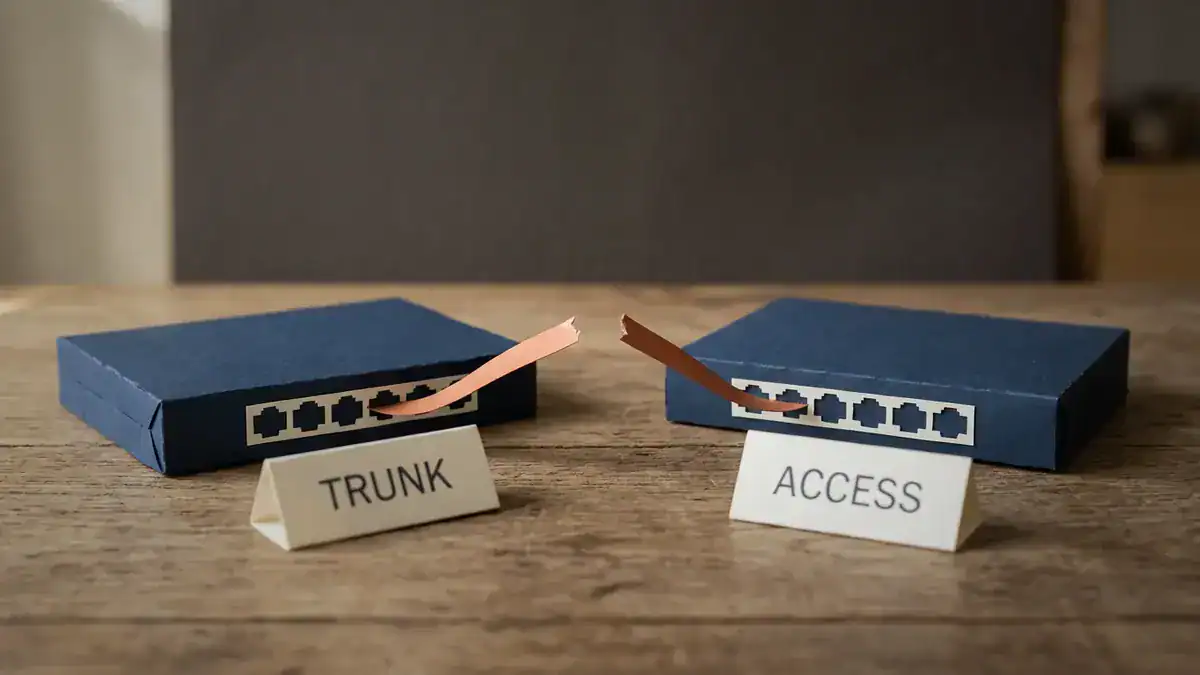
The mismatch cell: one end trunks, the other stays access. Tagged VLANs such as 10, 20, 30 and 99 stop crossing the link; only untagged traffic still lines up.
Three rules cover the whole table:
- Hard-coded beats dynamic. Access and trunk ignore what the neighbour wants.
- Somebody has to ask. A dynamic port only trunks if the other end sends a DTP frame asking for it. Auto plus auto never does.
- Nonegotiate is silence. A dynamic port facing a nonegotiate port hears nothing, so it stays access. That’s the cell that causes real outages.
Why is Dynamic Trunking Protocol a security risk?
Look back at those four fields: domain name, trunk status, trunk type, sender MAC. Nothing in a DTP frame proves who sent it. Any device that sends a correctly formed one gets treated as a switch.
So the default works like this: every untouched port says “I’ll become a trunk if you ask.” Most of the time the thing plugged in is a laptop or a printer, and it never asks. But anything that can send a DTP frame can ask.
How does switch spoofing work?
Cisco’s own Layer 2 security material spells it out: “A station can spoof as a switch with ISL or 802.1Q signaling (DTP signaling is usually required as well). The station is then member of all VLANs.” It needs “a trunking favorable setting on the port” (Cisco, Layer 2 Attacks and Their Mitigation).
Walk through it from the attacker’s side:
- You plug a laptop into a wall jack whose switch port was left at
dynamic auto. - Your laptop sends DTP frames saying “desirable”.
- The port agrees. Auto forms a trunk when the neighbour is desirable. That’s just the matrix.
- The port is now a trunk. By default, Cisco says, “All VLAN IDs, 1 to 4094, are allowed on each trunk” (Cisco, Catalyst 9300 guide).
- You tag your own frames with any VLAN ID you like. Broadcasts from every VLAN on that switch now reach you.
No password, no exploit code against the switch. Just the protocol doing what it was built to do.

Switch spoofing: the laptop sends DTP, a port left at dynamic auto agrees, and the new trunk carries every allowed VLAN (1-4094 by default) to the laptop.
Worked example: auditing a 52-port access switch
Say you inherit an access switch with 48 copper downlinks and 4 uplinks, 52 ports in all. The previous engineer configured what they used:
- 2 uplinks hard-coded
switchport mode trunk - 36 user ports set to
switchport mode access - Everything else left alone
Count what’s left alone. 48 minus 36 gives 12 spare downlinks. 4 minus 2 gives 2 spare uplinks. That’s 14 ports sitting at the default dynamic auto, or 26.9% of the switch. Fourteen jacks where a laptop speaking DTP gets a trunk.
Now what does a trunk get? The switch carries VLAN 1 (default), 10 (users), 20 (voice), 30 (printers) and 99 (management). The allowed list is 1-4094 by default, so all 5 live VLANs, including management, reach whoever trunked that port.
It gets worse. Cisco’s 9300 guide says that if you try to enable IEEE 802.1X on a dynamic port, “an error message appears, and IEEE 802.1x is not enabled.” So those 14 ports can’t even be put behind 802.1X until you fix their mode. Same guide: “A trunk port cannot be a secure port”, so port security is off the table for any of them that gets trunked.
Here’s how you’d find them. One command, filtered to the two lines that matter (representative output, trimmed):
SW-ACC1# show interfaces switchport | include Name|Administrative Mode
Name: Gi1/0/36
Administrative Mode: static access
Name: Gi1/0/37
Administrative Mode: dynamic auto
Name: Gi1/0/38
Administrative Mode: dynamic auto
...
Name: Gi1/1/3
Administrative Mode: dynamic auto
Name: Gi1/1/4
Administrative Mode: dynamic auto
Every dynamic auto or dynamic desirable line is a port to fix. On this switch, you’d count 14.

The audit: 14 of 52 ports (26.9%) still at dynamic auto. Every flagged port gets hard-coded as access or trunk, plus switchport nonegotiate.
What feature of 802.1Q do VLAN hopping attacks exploit?
The native VLAN. And this is where two very different attacks usually get lumped together.
802.1Q tags every frame on a trunk except one VLAN. Cisco puts it plainly: “802.1Q does not tag frames on the native VLAN. It tags all other frames that are transmitted and received on the trunk” (Cisco, ISL and IEEE 802.1Q Frame Format). The native VLAN is VLAN 1 unless you change it.
The double tagging attack abuses that. An attacker on an access port in VLAN 1 sends a frame with two 802.1Q tags: the outer one says VLAN 1, the inner one says the target VLAN. The first switch strips the outer tag (it’s the native VLAN, so it goes out untagged) and forwards the frame onto the trunk. The next switch sees only the inner tag and delivers the frame into the target VLAN.
Cisco’s notes on it are worth reading carefully (Cisco, Layer 2 Attacks and Their Mitigation):
- “Only Works if Trunk Has the Same Native VLAN as the Attacker”
- “Unidirectional traffic only”
- “Works even if trunk ports are set to off”
That last line is the one people miss. Turning DTP off stops switch spoofing. It does nothing for double tagging. Different attack, different fix:
| Attack | Abuses | Fix |
|---|---|---|
| Switch spoofing | DTP on a dynamic port | Hard-code the mode, add switchport nonegotiate |
| Double tagging | Untagged native VLAN | Native VLAN that no access port uses, or tag the native VLAN |
For the second fix, Catalyst 9300 has a global command, vlan dot1q tag native. Cisco: “When enabled, native VLAN packets going out of all IEEE 802.1Q trunk ports are tagged.” It’s disabled by default (Cisco, Catalyst 9300 VLAN Commands).

Double tagging: the first switch strips the outer tag because it matches the native VLAN (VLAN 1 unless you change it), and the inner tag carries the frame into the target VLAN. Turning DTP off doesn’t stop this one.
How do you disable Dynamic Trunking Protocol on a Cisco switch?
Hard-code every port, then silence DTP. Two templates cover almost every port you’ll ever configure.
User-facing access port:
interface GigabitEthernet1/0/5
 switchport mode access
 switchport access vlan 10
 switchport nonegotiate
Switch-to-switch trunk:
interface GigabitEthernet1/1/1
 switchport mode trunk
 switchport trunk native vlan 999
 switchport trunk allowed vlan 10,20,30,99
 switchport nonegotiate
VLAN 999 here is a native VLAN that no access port uses. It must match on both ends. Cisco warns that a native VLAN mismatch can cause spanning-tree loops (Cisco, Catalyst 9300 guide). Trimming the allowed list is the other half. Even if something does trunk, it gets four VLANs, not 4,094.
Unused ports? Same access template, put them in an unused VLAN and shutdown.
Then verify. The line you want is Negotiation of Trunking: Off (representative output):
SW1# show interfaces gi1/1/1 switchport
Name: Gi1/1/1
Switchport: Enabled
Administrative Mode: trunk
Operational Mode: trunk
Administrative Trunking Encapsulation: dot1q
Negotiation of Trunking: Off
Is switchport nonegotiate needed on access ports?
switchport mode access alone already stops the port becoming a trunk. That’s the security win against switch spoofing.
nonegotiate on top makes the port stop sending DTP at all. Since Cisco’s own table says access mode still “negotiates to convert the link into a nontrunk link”, adding it means the port isn’t advertising anything to whatever’s plugged in. It costs nothing, so we add it to every access port.
Worked example: the outage you can cause switching DTP off
Here’s the mistake. It’s easy to make on a Friday afternoon.
You have SW1 and SW2 joined on Gi1/1/1. SW1 is hard-coded switchport mode trunk. SW2 was never touched, so it’s dynamic auto. The link is a trunk, because SW1’s DTP frames ask and auto agrees. Check the matrix: trunk and auto, trunk.
You start hardening on SW1 and add one line:
SW1(config)# interface gi1/1/1
SW1(config-if)# switchport nonegotiate
SW1 stops sending DTP. SW2 is auto, so it only trunks while someone asks. Nobody’s asking now. Cisco’s mode table is clear that with nonegotiate, “You must manually configure the neighboring interface as a trunk interface to establish a trunk link.”
And here’s the nasty bit. On the platform covered by Cisco’s best-practice doc, an auto or desirable port that hears no DTP for 5 minutes is set to nontrunk. So the link can look perfectly healthy when you check it straight after the change, then drop a few minutes later. You’ve already moved on to the next switch. Sound familiar?
When it falls over, the two ends look like this (representative output):
SW1# show interfaces gi1/1/1 switchport | include Mode|Negotiation
Administrative Mode: trunk
Operational Mode: trunk
Negotiation of Trunking: Off

SW2# show interfaces gi1/1/1 switchport | include Mode|Negotiation
Administrative Mode: dynamic auto
Operational Mode: static access
Negotiation of Trunking: On
That’s the mismatch cell. Only untagged traffic still lines up. VLANs 10, 20, 30 and 99 between the two switches are gone, and if 99 is management, so is your SSH to SW2.
Undo that one line on SW1 and the trunk comes back, so it really is the one-sided nonegotiate that broke it. Nothing else changed.
The safe order, per link:
- On the dynamic end (SW2), set
switchport mode trunk. SW1 is already a trunk, so the link stays a trunk. - Check both ends show
Operational Mode: trunk. - Add
switchport nonegotiateon both ends. - Check both show
Negotiation of Trunking: Off, then check again after a few minutes.
Do the far end first, always. And book a change window anyway. Mode changes on a live uplink are not the time to find out your console cable is in the other building.
How do you check every port at once?
Use the filtered command from the audit, extended to show negotiation too:
show interfaces switchport | include Name|Administrative Mode|Negotiation of TrunkingYou’re looking for two things: any dynamic administrative mode, and any Negotiation of Trunking: On. The first is a port that can be talked into trunking. The second is a port still sending DTP. When both lists are empty, you’re done.
Want to practise this before touching production? Build two switches in a lab and walk through every cell of the matrix. Our guide to free CCNA labs in EVE-NG gets you a working topology fast.
Why did Cisco ever recommend DTP?
Here’s a twist. Cisco’s best-practice document for the Catalyst 6500 and 4500 says: “Cisco recommends an explicit trunk mode configuration of dynamic desirable at both ends” (Cisco).
The reason was operational, not lazy. With desirable on both ends, “network operators can trust syslog and command-line status messages that a port is up and trunking.” That’s different from on (trunk) mode, “which can make a port appear up even though the neighbor is misconfigured.” In other words, DTP was a free health check. If the far end was wrong, the trunk didn’t come up, and you knew.
So why does Cisco’s own security material say turn it off? Because that convenience came with the default that every port is willing to trunk, and DTP trusts anything that speaks it. Its Layer 2 attacks deck says to “Set all user ports to non-trunking (DTP Off).” The health-check job is done better by other tools today: UDLD for one-way links, and simply reading show interfaces trunk after a change.
Short version? Same vendor, two goals. Convenience said desirable. Security says hard-code and nonegotiate. Security won.
How does DTP relate to 802.1Q?
DTP decides whether a link trunks. 802.1Q decides how the frames on it are tagged. Different jobs.
The 802.1Q facts, all from Cisco’s frame-format doc (Cisco):
- The 802.1Q tag is 4 bytes, inserted between the source MAC address and the Type/Length field.
- It starts with a 16-bit TPID set to
0x8100, which marks the frame as tagged. - Then 3 bits of priority (802.1p), 1 CFI bit and a 12-bit VLAN ID. The field can hold 0 to 4095. A Catalyst trunk allows VLANs 1 to 4094.
- Because the frame changed, the switch recalculates the FCS. A tagged frame can be up to 1522 bytes.
- The native VLAN goes untagged.
DTP can negotiate the encapsulation too, picking between 802.1Q and Cisco’s older ISL. That’s why the frame has a trunk type field. Cisco’s current Catalyst 9000 trunk guide lists only IEEE 802.1Q, “available on all Ethernet interfaces”, and doesn’t mention ISL at all. On modern gear, the encapsulation question has mostly gone away.
What about 802.1Q in 802.1Q, usually called QinQ? Cisco’s frame-format doc describes it as adding “another layer of IEEE 802.1Q tag” to expand the VLAN space for service providers. DTP stays out of it: the 9300 guide says “Dynamic Trunking Protocol (DTP) is not supported on tunnel ports.”
For tagging in practice, with config and verification, see our guide to what a VLAN is. If you’re trunking down to a router, router on a stick shows the switch side. Hard-code that trunk too.
Is Dynamic Trunking Protocol the same as VLAN Trunking Protocol?
No, though the names don’t help. Same initials (almost), different jobs:
| DTP | VTP | |
|---|---|---|
| Full name | Dynamic Trunking Protocol | VLAN Trunking Protocol |
| Job | Decides if a link becomes a trunk | Copies the VLAN list between switches |
| Scope | One link, two ports | A whole VTP domain |
| Best practice | Hard-code, switchport nonegotiate | Transparent or off, or v3 with one primary |
They touch at one point: DTP frames carry the VTP domain name, and a negotiated trunk won’t form if the names differ. Our VTP guide covers VTP itself, including the revision-number problem that can wipe VLANs across a building.
Trunks that get bundled have their own rules. If you’re running port-channels, EtherChannel and LACP explains why every member must carry the same trunk settings.
Is DTP on the CCNA exam?
Not by name. Here’s what the Cisco blueprints actually say:
| Exam | Section | Topic |
|---|---|---|
| CCNA 200-301 v1.1 | 2.2 Configure and verify interswitch connectivity (domain weight 20%) | 2.2.a Trunk ports, 2.2.b 802.1Q, 2.2.c Native VLAN |
| CCNA 200-301 v2.0 | 2.1 Configure network infrastructure connectivity (domain weight 25%) | 2.1.b Layer 2 802.1Q trunk interfaces |
| ENCOR 350-401 v1.2 | 3.1 Layer 2 (domain weight 30%) | 3.1.a Troubleshoot static and dynamic 802.1q trunking protocols |
Sources: CCNA v1.1 exam topics, CCNA v2.0 exam topics, ENCOR v1.2 exam topics.
“Dynamic 802.1q trunking” in ENCOR is DTP, plain and simple. For CCNA, trunk ports always involve the question of how a link becomes a trunk, and Cisco’s exam topics note that “additional related topics may be included”. So a “which mode pair forms a trunk?” question is fair game. Learn the matrix.
Timing note: Cisco says you can sit CCNA v1.1 until February 2, 2027, and v2.0 goes live in February 2027 (Cisco Learning blog). Both versions list 802.1Q trunks, so the trunking prep carries over. More on the wider changes in what changed in CCNA v2.0.
Studying on your own? Our CCNA Workbook comes with a lab environment that boots, so you can build the matrix, break a trunk with a one-sided nonegotiate and fix it again. That beats memorising a table. If you’re heading to ENCOR, where trunk troubleshooting is an actual blueprint line, the CCIE Enterprise Workbook goes deeper. Want something free first? Grab the Cisco commands cheat sheet or test yourself with the CCNA practice test PDF.
Frequently asked questions
What is DTP in networking?
DTP (Dynamic Trunking Protocol) is a Cisco protocol that lets two connected switch ports negotiate whether their link becomes an 802.1Q trunk. It only works between Cisco devices. Best practice is to switch it off by hard-coding each port as access or trunk and adding switchport nonegotiate.
What is the default DTP mode on a Cisco switch?
On current Catalyst switches running IOS XE, the default for every Ethernet port is dynamic auto, per Cisco’s Catalyst 9000 and 9300 configuration guides. Some older platforms, like the Catalyst 6500 and 4500, defaulted to dynamic desirable. Check yours with show interfaces switchport.
Does DTP work with non-Cisco switches?
No. DTP is Cisco proprietary and Cisco describes it as operating “between Cisco switches”. To trunk to a device that doesn’t support DTP, Cisco says to use switchport mode trunk with switchport nonegotiate, so the port trunks without sending DTP frames.
Is 802.1Q a trunking protocol?
Yes. 802.1Q is the IEEE standard that tags frames with a 12-bit VLAN ID so one link can carry many VLANs. DTP is different. It only decides whether a link trunks at all, and 802.1Q then does the tagging.
How often does DTP send frames?
Per Cisco’s Catalyst 6500/4500 best-practice doc, every second during negotiation and every 30 seconds after that. A port in auto or desirable mode that hears nothing for 5 minutes falls back to non-trunking.
Bottom line
Dynamic Trunking Protocol solved a real problem once: trunks that came up only when both ends agreed. Today it mostly leaves a door open. Every untouched port on a Catalyst switch will trunk if something asks, and switch spoofing is just asking.
So hard-code every port, add switchport nonegotiate, trim the allowed VLANs and move the native VLAN somewhere unused. Change the far end first so you don’t strand a trunk. Then run the audit command and count down to zero.
Same rules apply to every Layer 2 hardening job. Pair this with BPDU Guard on the access ports and you’ve closed two of the easiest ways a stray device can mess with a switch.