TL;DR – An access control list (ACL) is an ordered list of permit and deny rules. On a Cisco router, an ACL checks each packet against its lines from the top, stops at the first match, and drops anything that matches nothing (the implicit deny). – A standard ACL matches only the source IP address (numbers 1-99 and 1300-1999). An extended ACL matches source, destination, protocol and port (numbers 100-199 and 2000-2699). Both can be numbered or named. – Place standard ACLs close to the destination and extended ACLs close to the source. Apply them with
ip access-group NAME in|out, one per interface per direction. – ACLs are stateless packet filters, not firewalls. The same idea shows up as AWS network ACLs and as file permissions in Windows and Linux.
An access control list is a numbered or named list of rules that tells a Cisco router or switch which packets to permit and which to deny. That’s the short answer. The long answer is about the two kinds you’ll configure on Cisco gear, standard and extended, and why picking the wrong one, or putting it on the wrong interface, quietly breaks a network.
Here’s the thing. Most ACL problems aren’t syntax errors. IOS accepts the commands, the interface stays up, and traffic you never meant to touch just stops. The ACL did exactly what you typed.
This guide covers what an access control list in networking actually does, standard vs extended ACLs side by side, the Cisco commands for both, where each one belongs, and the mistakes that cause most outages. It also explains what “ACL” means on a firewall, in AWS, and in Windows and Linux, because the same three letters show up everywhere. Every Cisco rule below is checked against Cisco’s own documents.
Want to try every command as you read? Install EVE-NG, drop in three routers and two hosts, and you’ve got the whole lab this article uses.
What is an access control list (ACL)?
An access control list (ACL) is an ordered set of rules attached to a resource that says who or what is allowed to reach it. Each rule is called an access control entry (ACE). On a router, the resource is an interface and the “who” is a packet. In an operating system, the resource is a file and the “who” is a user.
So when someone asks “what is an access control list?”, the honest reply is: it depends where you’re standing. NIST defines it broadly as a list of entities and their access rights to a resource. Cisco, Microsoft and AWS each use the same idea for different jobs.
What is access control list in networking?
In networking, an ACL is a packet filter. A router access control list compares fields in each packet’s header (source address, destination address, protocol, port) to its rules, then permits or denies the packet. That’s what this article is mostly about.
An IP access control list on Cisco IOS does two jobs:
- Filtering. Permit or drop traffic on an interface, or limit who can log in to the device.
- Classifying. Pick out traffic for another feature. NAT, QoS, route maps and VPN crypto maps all use ACLs to say “this traffic, not that traffic”. The ACL doesn’t drop anything in that case. It just matches.
That second job surprises people. If you’ve read our guide on what NAT is and how to configure it, you’ve already used an ACL that never blocked a packet. It only told NAT which inside addresses to translate.
What is the purpose of an ACL (access control list)?
The purpose is control. You decide which traffic crosses a boundary, and everything else doesn’t. On a Cisco network that usually means one of these:
- Stop one subnet from reaching another (say, guest Wi-Fi from the server VLAN).
- Allow only the admin subnet to SSH into routers and switches.
- Block one service, like Telnet, while letting everything else through.
- Feed NAT, QoS or policy-based routing with a list of matching traffic.
How a Cisco access control list works
Every access control list Cisco IOS runs follows the same three rules. Learn these and the rest is syntax.
Top-down. IOS checks a packet against the ACL lines in order, first line first.
First match wins. The moment a line matches, IOS applies that permit or deny and stops reading. Later lines never get a look.
Implicit deny. Cisco puts it plainly: “there is an implicit deny all clause at the end of every ACL.” You won’t see it in show running-config, but it’s there. Anything that matches no line gets dropped. That’s also why Cisco warns that you need at least one permit statement, or all traffic is blocked.
Order matters a lot. Cisco’s own sample shows it: if you write permit any above deny host 192.168.10.1, the first line matches every source address and the deny never runs.
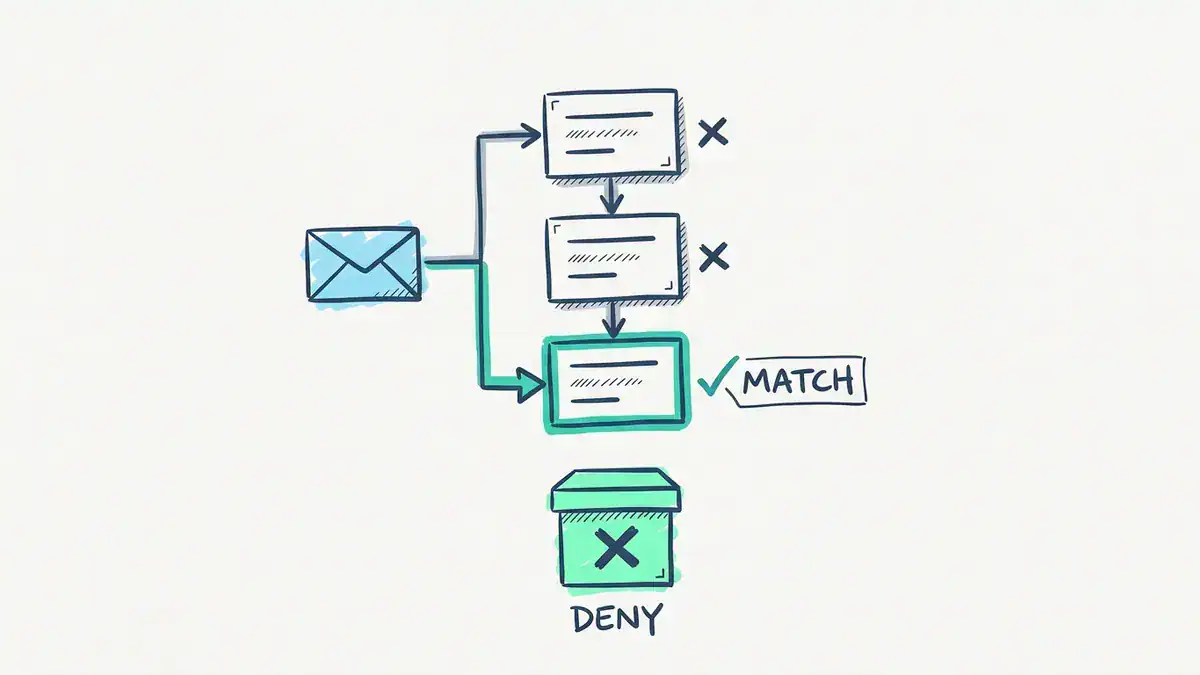
A packet is compared to the ACL one line at a time. The first line that matches decides permit or deny. A packet that matches nothing is dropped by the implicit deny at the end.
Wildcard masks in 60 seconds
ACLs don’t use subnet masks. They use wildcard masks, and the logic is flipped. In Cisco’s words, each 0 bit means “this bit must match exactly” and each 1 bit means “this bit can be ignored”.
The quick way to get one is to subtract the subnet mask from 255.255.255.255. A /24 mask of 255.255.255.0 becomes a wildcard of 0.0.0.255.
| You want to match | Address and wildcard | Shortcut |
|---|---|---|
| One host, 10.1.1.2 | 10.1.1.2 0.0.0.0 | host 10.1.1.2 |
| Subnet 192.168.10.0/24 | 192.168.10.0 0.0.0.255 | none |
| Subnet 172.16.0.0/16 | 172.16.0.0 0.0.255.255 | none |
| Every address | 0.0.0.0 255.255.255.255 | any |
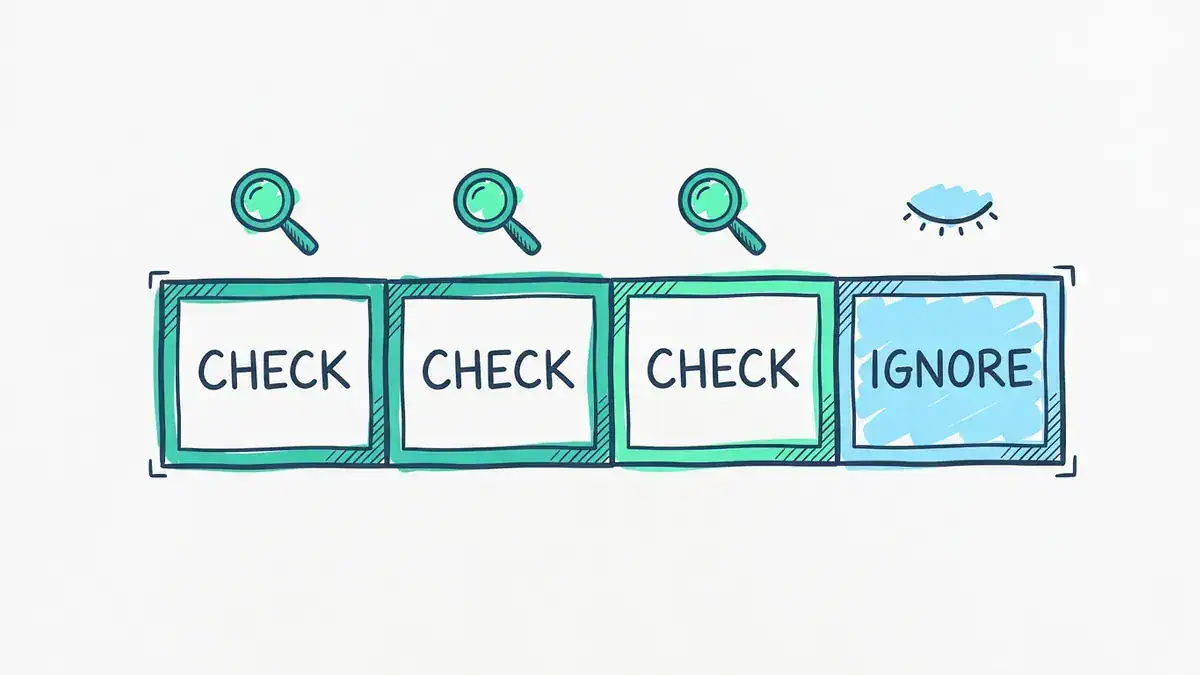
Wildcard 0.0.0.255: the three 0 octets must match exactly (CHECK), the 255 octet can be anything (IGNORE). That matches a whole /24 subnet.
Rusty on masks? Our subnet mask cheat sheet lists every prefix with its mask, and you can flip each one into a wildcard with the subtraction above.
Types of access control list on Cisco
On Cisco IOS there are two main types of access control list for IPv4: standard and extended. Each one can be written two ways, numbered or named. That gives you four combinations.
| Type | Matches on | Numbered range | Named form |
|---|---|---|---|
| Standard | Source IP only | 1-99, 1300-1999 | ip access-list standard NAME |
| Extended | Source and destination IP, protocol, ports, more | 100-199, 2000-2699 | ip access-list extended NAME |
Those ranges come straight from Cisco’s Configure IP Access Lists document (updated 2025-10-15). Cisco says the second ranges (1300-1999 and 2000-2699) arrived in IOS 12.0.1.
Named ACLs are what you’ll use in real life. The names explain themselves (BLOCK-GUEST-TO-SERVERS beats access-list 117), and you can edit single lines by sequence number. Numbered ACLs still matter for the exam and for old configs you’ll inherit.
On switches you’ll also meet a few security access control list types that are about where the ACL is attached, not what it matches. Cisco’s Catalyst 9000 guide defines them like this:
- RACL (routed ACL): applied to a Layer 3 interface. The classic router ACL.
- PACL (port ACL): applied to a Layer 2 switch port.
- VACL (VLAN ACL): applied to a whole VLAN. More on this below.
Both standard and extended are on the CCNA. The CCNA 200-301 v2.0 exam topics list objective 4.6 as “Configure IPv4 access control lists (standard, extended, numbered, and named ACLs)”. So all four combinations are fair game.
Standard vs extended access control list
This is the comparison you came for. A standard access control list is a blunt tool. An extended access control list is a scalpel.
| Standard ACL | Extended ACL | |
|---|---|---|
| Matches | Source IP address only | Source IP, destination IP, protocol (IP, TCP, UDP, ICMP and others), source and destination ports, plus extras like established, DSCP and precedence |
| Numbered ranges | 1-99, 1300-1999 | 100-199, 2000-2699 |
| Can block one service (Telnet, HTTP)? | No. It’s all of a host’s traffic or none | Yes |
| Can block a host from one network but not another? | Only by where you place it | Yes, by destination |
| Where to place it | Close to the destination | Close to the source |
| Typical use | Limit SSH/Telnet to the device (VTY lines), NAT and route-map matches | Interface traffic filtering |
The core difference: a standard ACL can’t tell where a packet is going. It only knows where the packet came from. That one fact drives everything else, including where you put it.
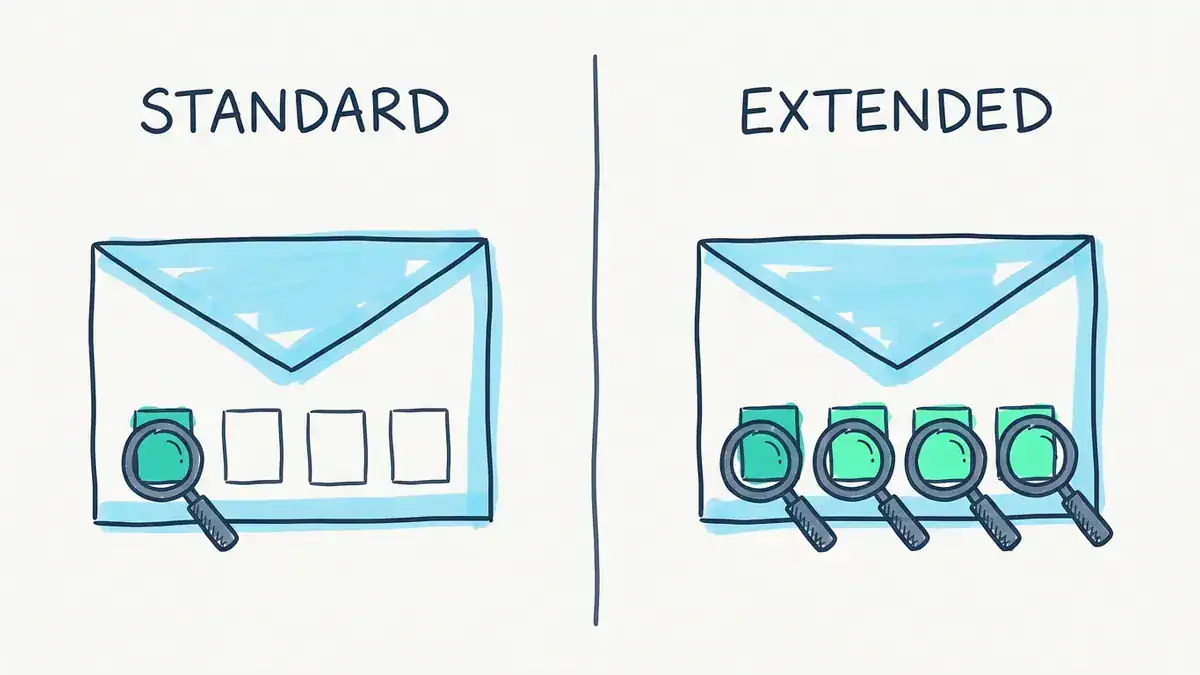
Standard ACLs read one field, the source IP. Extended ACLs read source IP, destination IP, protocol and port, so they can single out one service between two hosts.
So which should you use? For filtering traffic through a router, extended almost every time. For matching “these source addresses” (VTY access, NAT pools, route filtering), standard is simpler and perfectly fine.
Standard access control list configuration
A standard ACL has one job: match source addresses. Here’s the classic access control list example from Cisco’s own sample set, numbered style. It blocks one host and lets everyone else through:
access-list 1 deny host 192.168.10.1
access-list 1 permit any
!
interface GigabitEthernet0/0
 ip access-group 1 in
Line 2 matters. Without permit any, the implicit deny would drop every other host too.
The same thing as a named standard ACL:
ip access-list standard BLOCK-PC1
 10 deny host 192.168.10.1
 20 permit any
!
interface GigabitEthernet0/0
 ip access-group BLOCK-PC1 in
To permit a whole subnet instead of one host, use the network address and a wildcard: permit 192.168.20.0 0.0.0.255.
Use a standard ACL to lock down SSH access
This is where standard ACLs earn their keep. You don’t want every user subnet to reach the router’s login prompt. You want the admin subnet only.
ip access-list standard MGMT-ONLY
 10 permit 10.10.99.0 0.0.0.255
!
line vty 0 15
 access-class MGMT-ONLY in
 transport input ssh
access-class applies the ACL to the virtual terminal lines, not to an interface. It filters who can open an SSH session to the device itself, no matter which interface they come in on.
Picture an engineer doing this at 5 p.m. on a Friday over SSH from their laptop. They forget the laptop sits on 10.10.50.0, not the admin subnet. They type access-class MGMT-ONLY in, and the session doesn’t drop. Existing sessions stay up. Then they log out, try to log back in on Monday, and the router refuses them. Someone drives to the site with a console cable. Check your own source address before you apply any VTY ACL. Better yet, keep a console session open.
Practising this for the CCNA? The CCNA Workbook has ACL labs in its security section, alongside port security, DHCP snooping and NAT, so you can break and fix these configs in a lab instead of in production.
Extended access control list configuration
Extended ACLs are where most of the real filtering happens. Before the examples, here’s the syntax.
Cisco extended ACL syntax
Numbered:
access-list <100-199|2000-2699> {permit|deny} <protocol> <source> <source-wildcard> [operator port] <destination> <dest-wildcard> [operator port] [established] [log]Named:
ip access-list extended <NAME>
 [sequence] {permit|deny} <protocol> <source> <wildcard> [operator port] <destination> <wildcard> [operator port] [options]
The pieces, left to right:
- Protocol:
ip(everything),tcp,udp,icmp,ospf,espand others. - Source and destination: an address with a wildcard, or
host x.x.x.x, orany. - Operator and port:
eq 22,neq 80,lt 1024,gt 1023,range 20 21. You can also use names likeeq telnetoreq www. Ports only make sense withtcporudp. - Options:
established(matches TCP packets with the ACK or RST bit set, meaning a session already exists),log, DSCP and others.
Port numbers trip people up more than the syntax does. Keep our common ports cheat sheet open while you write rules.
An ip access-list extended example
Say the guest subnet is 192.168.30.0/24 and your servers live on 10.20.0.0/24. Guests can use the web server on 10.20.0.10 over HTTPS, nothing else on the server subnet, and they can still reach the internet.
ip access-list extended GUEST-IN
 10 permit tcp 192.168.30.0 0.0.0.255 host 10.20.0.10 eq 443
 20 deny   ip  192.168.30.0 0.0.0.255 10.20.0.0 0.0.0.255
 30 permit ip  192.168.30.0 0.0.0.255 any
!
interface GigabitEthernet0/1
 description Guest VLAN gateway
 ip access-group GUEST-IN in
Read it top-down. Line 10 lets HTTPS to one server through. Line 20 drops everything else headed for the server subnet. Line 30 lets guest traffic go anywhere else. Swap lines 10 and 20 and guests lose the web server, because the broader deny matches first.
Notice it sits on the guest gateway interface, inbound. That’s the source side, which is the right spot for an extended ACL. If the guest VLAN rides a trunk to the router, apply it on the guest subinterface, like the ones in our router on a stick guide.
Block one service, allow the rest
Cisco’s own sample blocks Telnet for everyone and lets all other traffic through:
access-list 102 deny tcp any any eq 23
access-list 102 permit ip any any
A standard ACL can’t do this. It doesn’t know what a port is.
Where should a standard access control list be placed?
Close to the destination. Extended ACLs go close to the source. That’s the rule Cisco’s CCNA course material has taught for years, and here’s why it works.
A standard ACL only sees the source address. Put one near the source and it blocks that host from reaching everything beyond that router, not just the one network you meant. So you push it as far toward the destination as you can, where the only thing it can block is access to that destination.
An extended ACL knows the destination and port, so it can be precise anywhere. Putting it near the source drops unwanted packets early, before they waste bandwidth crossing the rest of the network.
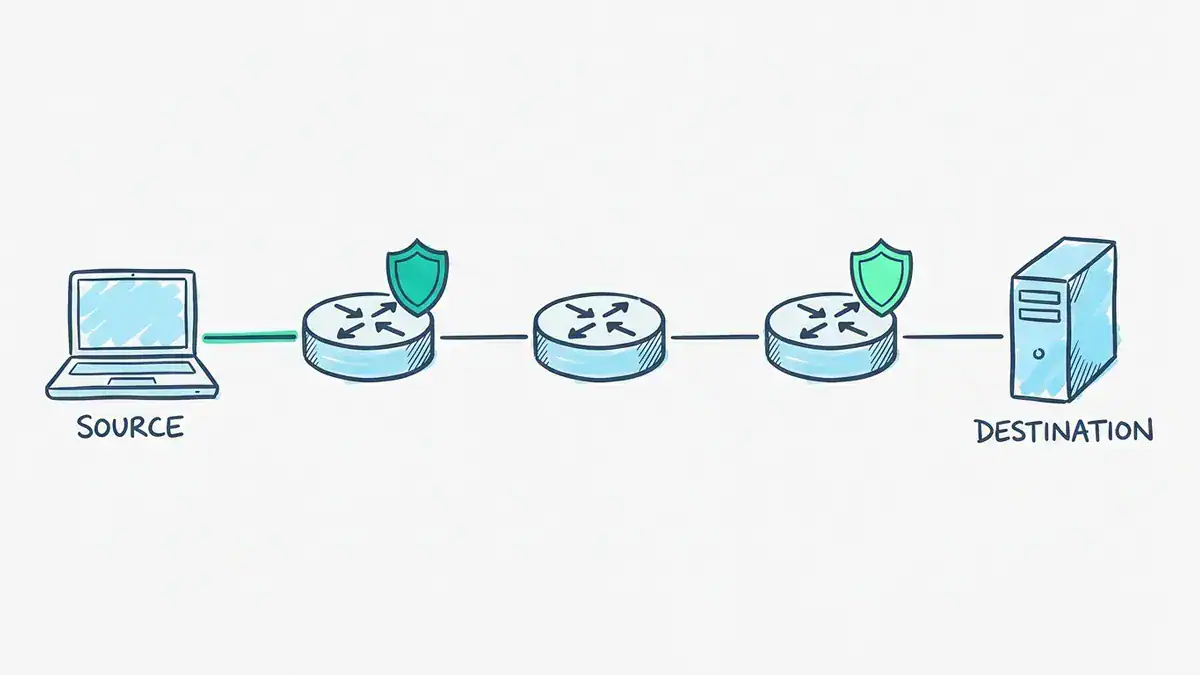
Extended ACLs filter near the SOURCE so unwanted packets die early. Standard ACLs sit near the DESTINATION so they can’t block traffic headed anywhere else.
Say PC1 on R1’s LAN shouldn’t reach the server on R3’s LAN, but should still reach the internet and R2’s LAN. Apply a standard ACL denying PC1 outbound on R1, and PC1 loses everything past R1. Apply it outbound on R3’s LAN interface instead, and PC1 loses only the server LAN. Or use an extended ACL inbound on R1’s LAN interface that denies PC1 to the server subnet only, and the blocked packets never leave R1. Two right answers, one wrong one.
Two more placement facts:
- One ACL per interface, per direction, per protocol. A second
ip access-groupcommand in the same direction replaces the first. You get one IPv4 ACL inbound and one outbound on each interface. - Inbound vs outbound. Inbound ACLs check packets before routing. Outbound ACLs check them after routing, as they leave. Cisco’s Configure IP Access Lists page also notes it’s good practice to apply an ACL on the interface closest to the source of the traffic, which matches the extended-ACL rule.
How to configure access control list rules on a Cisco router
Here’s the whole process, start to finish. This is how to use access control list entries without locking yourself out.
- Write down what you want in plain words. “Guests reach one web server and the internet, nothing else internal.”
- Pick the type. Need destination or port? Extended. Only source? Standard.
- Create the ACL. Most specific lines first, broad lines last, and a final permit if other traffic should pass.
- Apply it.
ip access-group NAME inorouton an interface, oraccess-class NAME inon VTY lines. - Verify it. Check the counters, then test from a real host, not from the router.
Access list Cisco commands cheat sheet
| Task | Command | |
|---|---|---|
| Create a named standard ACL | ip access-list standard NAME | |
| Create a named extended ACL | ip access-list extended NAME | |
| Add a comment line | remark Allow HTTPS to web server | |
| Apply to an interface | `ip access-group NAME {in\ | out}` |
| Remove from an interface | `no ip access-group NAME {in\ | out}` |
| Apply to SSH/Telnet lines | line vty 0 15 then access-class NAME in | |
| Show all ACLs with hit counters | show access-lists | |
| Show one ACL | show ip access-lists NAME | |
| See which ACL is on an interface | show ip interface GigabitEthernet0/1 | |
| Delete one line of a named ACL | ip access-list extended NAME then no 20 | |
| Insert a line between 10 and 20 | 15 permit tcp ... inside the ACL | |
| Renumber lines (start 10, step 10) | ip access-list resequence NAME 10 10 | |
| Reset hit counters | clear access-list counters |
Cisco notes that in early IOS releases out was the default if you left off the direction. Current releases make you type it. Always type it anyway.
Edit an ACL with sequence numbers
IOS numbers named ACL lines 10, 20, 30 and so on. That gap is the whole point. Need a new rule between line 10 and line 20? Type 15 permit ... inside the ACL and it lands in the right place. Before sequence numbers existed, the only way to insert a line was to delete the whole ACL and paste it back, and for those few seconds the interface ran with no filter at all.
R1# show access-lists GUEST-IN
Extended IP access list GUEST-IN
    10 permit tcp 192.168.30.0 0.0.0.255 host 10.20.0.10 eq 443 (412 matches)
    20 deny ip 192.168.30.0 0.0.0.255 10.20.0.0 0.0.0.255 (37 matches)
    30 permit ip 192.168.30.0 0.0.0.255 any (9810 matches)
The matches counters are your best friend. If a line you expect to hit shows zero, either no traffic arrived or an earlier line caught it first. (The counter values above are illustrative, they’ll differ on your router.)
VLAN access control list (VACL)
A VLAN access control list filters traffic inside a VLAN, not just traffic routed between VLANs. A router ACL can’t see two hosts in the same VLAN talking to each other, because that traffic never reaches the router. A VACL can.
VACLs live on Catalyst switches and use a VLAN access map, which pairs an ACL (for matching) with an action (forward or drop). Here’s the config from Cisco’s Catalyst 9000 ACL guide:
ip access-list extended TEST
 10 permit ip host 10.1.1.1 any
 20 permit ip any host 10.1.1.1
ip access-list extended ELSE
 10 permit ip any any
!
vlan access-map VACL 10
 match ip address TEST
 action forward
vlan access-map VACL 20
 match ip address ELSE
 action drop
!
vlan filter VACL vlan-list 10
Watch the logic flip. In a VACL, the ACL’s permit just means “this map entry matches”. The action line decides forward or drop. So this map forwards traffic to and from 10.1.1.1 and drops everything else in VLAN 10.
Cisco lists VACLs as applying in both directions at once. There’s no in or out. If you’ve ever wondered why two hosts on the same subnet can reach each other even though an ACL “should” stop them, this is the tool you were missing. Our VLAN vs subnet guide explains why that traffic never touches the router.
Access control list vs firewall
A Cisco ACL is a packet filter. It looks at each packet on its own and has no memory of the ones before it. That’s called stateless. A modern firewall is stateful: it tracks each connection and allows the return traffic automatically.
That difference is the whole access control list vs firewall question.
| ACL (stateless) | Stateful firewall | |
|---|---|---|
| Looks at | One packet at a time | Each packet plus the connection it belongs to |
| Return traffic | You must permit it with another rule (or established) | Allowed automatically for sessions it saw start |
| Application awareness | Ports only | Next-gen firewalls identify apps, users, URLs |
| Where it runs | Every router and switch interface | Dedicated appliance or VM |
| Cost | Free, built into IOS | Licensed product |
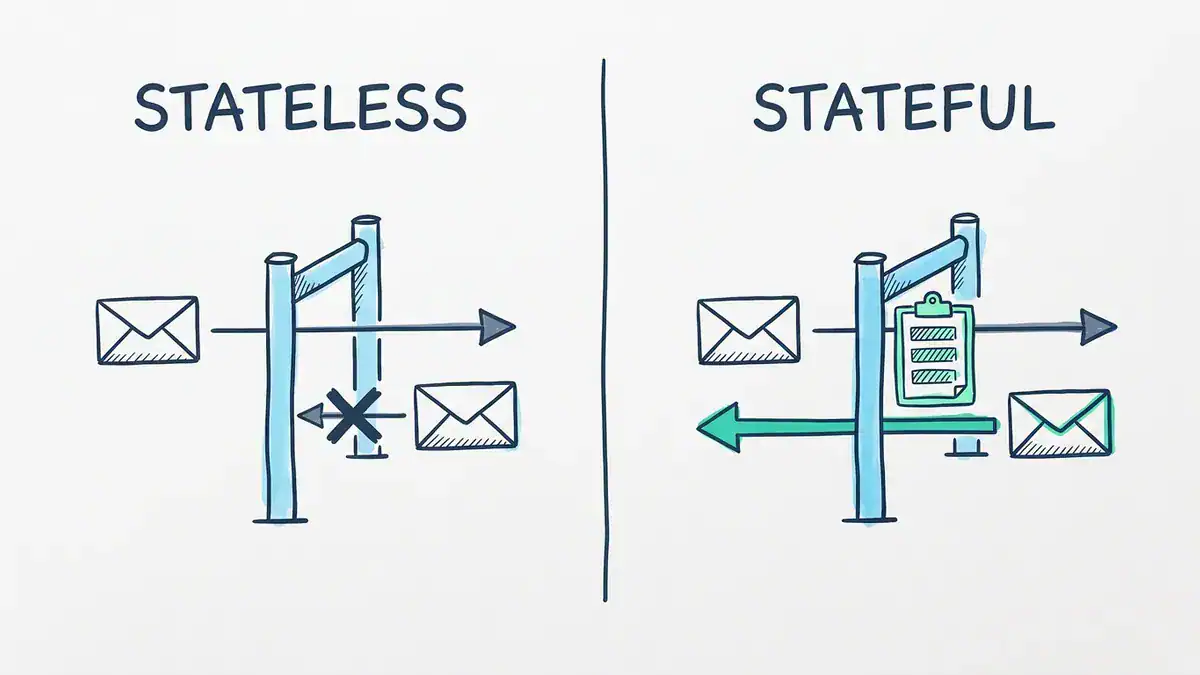
A stateless ACL judges every packet alone. A stateful firewall remembers each connection, so replies get in without an extra rule.
So is an access control list firewall a real thing? Kind of. Packet filters like ACLs were the first generation of firewalls, and an ACL on an edge router is still a basic packet-filtering firewall. Firewalls also use ACLs inside them: Cisco ASA and FTD access rules are still called ACLs. But an ACL by itself won’t stop attacks that look like valid traffic. Our types of firewalls guide walks from packet filters up to next-gen firewalls if you want the full picture.
Here’s where it bites. Say you write an inbound extended ACL on your internet-facing interface that permits only TCP 443 from anywhere to your web server, and nothing else. It works. Then someone on the inside opens a website, and the replies come back from port 443 to a random high port on the client. Your ACL drops them. The fix is a rule like permit tcp any any established, which matches packets with the ACK or RST bit set. It’s a rough stand-in for state, not the real thing, and a stateful firewall handles it properly.
ACLs outside Cisco: AWS, Windows and Linux
Search “access control list” and half the results aren’t about routers at all. Same idea, different resource.
Network access control list in AWS
In AWS, a network access control list (NACL) filters traffic in and out of a VPC subnet. It behaves a lot like a Cisco ACL, per the AWS VPC documentation:
- Rules are numbered 1 to 32766 and evaluated lowest number first. The first match wins.
- Every NACL ends with a
*rule that denies anything not matched. Sound familiar? - NACLs are stateless, so return traffic needs its own rule. Security groups, by contrast, are stateful.
- The default NACL allows all traffic in and out. A custom NACL denies everything until you add allow rules.
AWS even recommends numbering rules in steps of 10 or 100 so you can insert new rules later. Same trick as Cisco’s sequence numbers.
Access control list Windows and Linux: file permissions
In an operating system, an ACL controls who can read, write or run a file. If you’ve searched access control list Windows or access control list Linux, this is what you were looking at.
Windows. Microsoft’s access control list documentation describes two kinds. A DACL (discretionary ACL) lists who is allowed or denied access. A SACL (system ACL) lists which access attempts get logged. Each entry is an ACE naming a user or group and their access rights. You’ll see these access control list permissions on the Security tab of any file’s properties, or with the icacls command.
Linux. Standard Linux permissions only cover one owner, one group and everyone else. POSIX ACLs add extra named users and groups on top.
What is access control list in Linux?
It’s an extension to normal Unix permissions that lets you give a specific user or group their own rights on a file or directory. Directories can also carry a default ACL that new files inherit.
How to check ACL permissions in Linux
Run getfacl on the file. To add an entry, use setfacl:
getfacl report.txt
setfacl -m u:backup:rw report.txt
setfacl -x u:backup report.txt
A + at the end of the permission string in ls -l (like -rw-rw-r--+) tells you the file has an ACL beyond the basic bits.
What is access control list in OS terms?
In any operating system, it’s the list attached to an object (a file, a folder, a registry key) that names users or groups and what each can do. The router version names packets instead of people. Same shape.
Access control list vs role-based access control
An ACL attaches permissions to each resource: “this file lets the backup user read and the auditor write”. Role-based access control (RBAC) attaches permissions to roles, then puts people in roles: “Finance can read invoices”, and each new hire in Finance gets that right by joining the role.
ACLs are simple for a handful of resources. They get messy with thousands, because every change means editing every list. RBAC scales better for people. On network gear, you’ll meet both: ACLs for traffic, and RBAC (privilege levels, or TACACS+ command authorisation) for who can do what on the device.
Common ACL mistakes and how to fix them
Most ACL tickets come down to the same handful of errors.
| Symptom | Likely cause | Fix |
|---|---|---|
| All traffic stopped after applying the ACL | No permit line, so the implicit deny caught everything | Add a final permit for traffic that should pass |
| A deny line never matches | A broader permit above it matches first | Move the specific line up (use sequence numbers) |
| Wrong hosts blocked | Subnet mask used instead of a wildcard (0.0.0.255 vs 255.255.255.0) | Subtract the mask from 255.255.255.255 |
| Standard ACL blocks too much | Placed near the source | Move it toward the destination, or switch to extended |
| ACL “doesn’t work” when you test with ping from the router | Outbound ACLs don’t filter traffic the router itself generates | Test from a host behind the router |
| Locked out of SSH | VTY access-class doesn’t include your own subnet | Console in, fix the ACL, and test before logging out |
| ACL seems ignored | Applied in the wrong direction, or a second ip access-group replaced it | Check show ip interface for the in and out ACL |
| Routing neighbours drop after applying an inbound ACL | ACL blocks the routing protocol (OSPF, EIGRP) | Permit the protocol near the top, like permit ospf any any |
That router-generated traffic point catches a lot of people. Cisco Community engineers have confirmed for years that an outbound interface ACL doesn’t touch packets the router originates itself, so a ping from the router proves nothing about the ACL. Always test from a real host.
Want these failures in a safe lab first? Our free EVE-NG CCNA labs give you topologies to practise on, and the CCNA Workbook adds ACL labs you configure, break and troubleshoot.
Frequently asked questions
What is ACL (access control list) in simple words?
It’s a list of permit and deny rules. A router or switch reads the list from the top for each packet, does whatever the first matching rule says, and drops anything that matches no rule.
What are two uses of an access control list?
Filtering and classifying. An ACL can filter traffic on an interface or on VTY lines, permitting or dropping packets. It can also classify traffic for another feature, like telling NAT which addresses to translate or QoS which traffic to prioritise, without dropping anything.
What two functions describe uses of an access control list?
ACLs limit traffic to protect parts of the network, and they identify traffic so other features can act on it. In practice that means blocking a subnet or service, controlling who can log in to a device, and feeding NAT, QoS or route maps with matching traffic.
What’s the difference between a standard and extended access control list?
A standard ACL matches only the source IP address and uses numbers 1-99 or 1300-1999. An extended ACL matches source and destination IP, protocol and ports, and uses 100-199 or 2000-2699. Standard goes near the destination, extended near the source.
Where should a standard access control list be placed?
As close to the destination as possible. A standard ACL can’t see the destination address, so placing it near the source would block that source from reaching every network beyond, not just the one you meant to protect.
Does the order of ACL statements matter?
Yes, completely. IOS stops at the first line that matches. Put specific lines (one host, one port) above broad ones (a whole subnet, any), or the broad line will match first and the specific one never runs.
Is an ACL a firewall?
An ACL is a basic stateless packet filter, which is the simplest kind of firewall. It doesn’t track connections, so it can’t allow return traffic automatically the way a stateful firewall does, and it can’t inspect applications.
Are ACLs still on the CCNA exam?
Yes. The CCNA 200-301 v2.0 exam topics list objective 4.6, “Configure IPv4 access control lists (standard, extended, numbered, and named ACLs)”. Cisco’s v2.0 exam replaces the current version on 2027-02-03. Our CCNA v2.0 breakdown covers what else changes.
Bottom line
Access control lists look simple, and the syntax is. The behaviour is where people slip.
- An ACL is read top-down, first match wins, and anything unmatched hits the implicit deny.
- Standard ACLs match source only. Extended ACLs match source, destination, protocol and port.
- Standard goes near the destination, extended near the source, one ACL per interface per direction.
- Named ACLs with sequence numbers are easier to read and edit than numbered ones.
- An ACL is a stateless filter. It’s not a stateful firewall, and outbound ACLs don’t filter the router’s own traffic.
The fastest way to make this stick is to break it. Build three routers in EVE-NG, write a standard ACL in the wrong place on purpose, watch what disappears, then fix it with an extended one. When you’re ready for structured practice, the CCNA Workbook walks you through ACLs alongside NAT, DHCP snooping and port security, the way the exam and the job both test them.