LAN vs WAN comes down to distance and ownership. A LAN (local area network) connects devices in one home, office or campus over Ethernet and Wi-Fi that you own. A WAN (wide area network) connects LANs across cities or countries over links you rent from a carrier. The internet is the biggest WAN there is.
That’s the textbook answer. The useful part is in the details: where the LAN actually stops on your own router, which port the cable goes in, and why a fast link between two offices can still feel slow. So this post walks through two real networks with real addresses, a representative Cisco config, and the latency maths behind “WANs are slower”.
LAN vs WAN: what’s the difference at a glance?
| LAN | WAN | |
|---|---|---|
| Reach | One building, home or campus | Cities, countries, continents |
| Who owns the links | You do | Usually a carrier or ISP. You rent capacity |
| Common technology | Ethernet and Wi-Fi | Fibre broadband, cable, DSL, Metro Ethernet, MPLS, LTE/5G, VPN tunnels over the internet |
| Speed | Set by your own gear: 1 Gb/s to the desk is normal, 10 Gb/s or more between switches | Set by the plan or circuit you pay for |
| Latency | Well under a microsecond per 100 m of cable | About 6 µs per km, so tens of milliseconds across a country |
| Addressing | Private addresses, one subnet per LAN or VLAN | Public addresses, or tiny /30 or /31 link subnets |
| Main devices | Switches, access points, PCs, printers | Routers, modems or ONTs, carrier equipment |
| On a home router | The numbered LAN ports and the Wi-Fi | The single port marked WAN or Internet |
Pretty much every other difference falls out of the first two rows. If you own every cable, you can make it fast and cheap. If the link crosses a province, someone else owns it, and physics takes its cut.
What is a LAN?
A LAN is a group of devices in one place that can reach each other directly, without crossing anyone else’s link. Your home network is a LAN. So is the office floor where every desk plugs into the same stack of switches.
Inside a LAN, switches move Ethernet frames by MAC address, and access points bring Wi-Fi clients onto the same network. Copper twisted-pair runs top out at 100 m (328 ft) per segment, which is the limit Cisco lists for its Catalyst switch copper ports. Fibre takes you further between closets and buildings.
One more thing. A LAN doesn’t need the internet to work. Pull the WAN cable and your laptop can still print, reach the NAS and copy files to the PC next to it. Bigger LANs get split into several logical networks with VLANs, each with its own subnet.
What is a WAN in networking?
A WAN is a network that links LANs over distances you can’t cable yourself, so the links belong to someone else. A bank with 40 branches runs a WAN. So does any company with a head office and one remote site. And when your home router talks to your ISP, that link is your WAN.
In any WAN network, the router is the device that sits on the edge, with one leg in the LAN and one leg in the WAN. What carries the WAN link varies a lot:
- Broadband: fibre, cable or DSL from an ISP. Cheap, best effort, no guaranteed speed.
- Metro Ethernet and MPLS: carrier services that connect your sites privately, with a contract behind them.
- Leased lines: a dedicated point-to-point circuit. Old-school, still around.
- VPN tunnels over the internet: IPsec, DMVPN or similar. A VPN isn’t a separate kind of WAN, it’s a way to build a private WAN link on top of the public one.
- Cellular and satellite: more on that next.
What is wireless WAN?
A wireless WAN uses a carrier’s radio network, usually LTE or 5G, as the WAN link. Think of a branch router with a SIM card as its backup connection, or a pop-up site with no wired service at all. Don’t mix it up with wireless LAN. Wi-Fi is a wireless LAN: it covers your building and you own the access points. Cellular is a wireless WAN: it covers the country and the carrier owns the towers.
Where does SD-WAN fit?
SD-WAN isn’t a new kind of link. It’s software that treats several WAN links, say a fibre circuit plus an LTE backup, as one pool, and sends each application down whichever path is healthiest right now. Our SD-WAN beginner’s guide covers how that works.
Example 1: where does the LAN end and the WAN start in your home?
Start with the network you already have. A laptop on Wi-Fi, a console on a cable, one router, and a line from the ISP that ends in a cable modem or, for fibre, an ONT (optical network terminal).
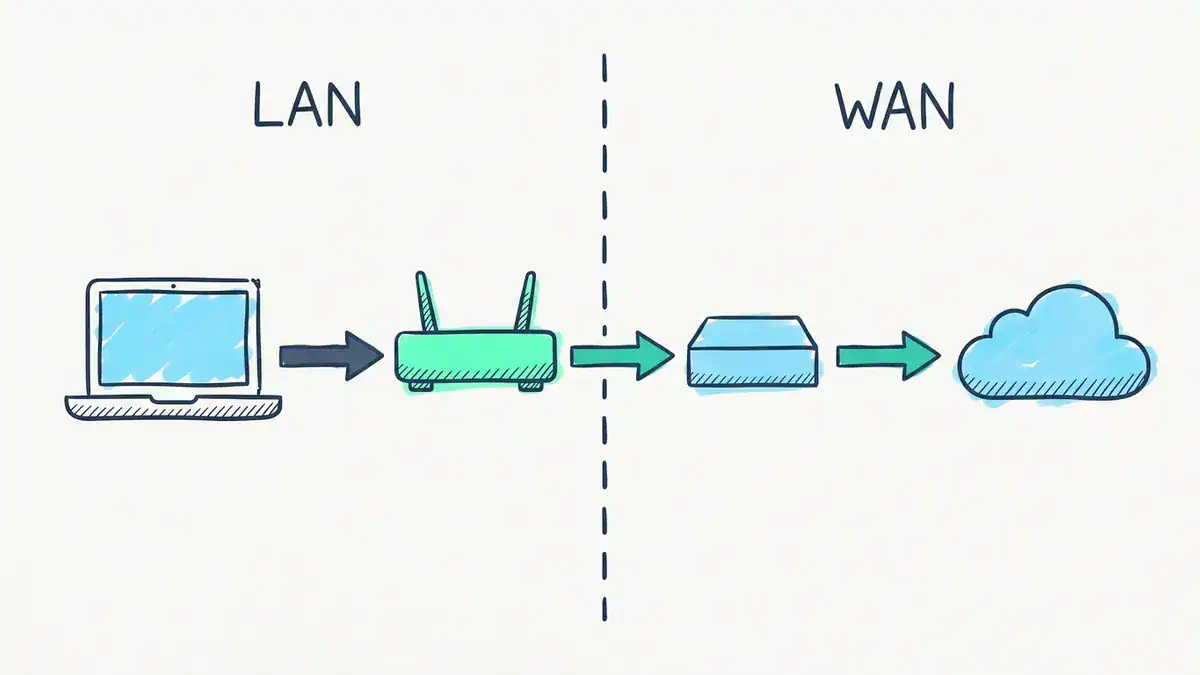
The router is the boundary. Everything on its left lives in 192.168.1.0/24: the laptop at 192.168.1.23 and the router’s LAN side at 192.168.1.1. Everything on its right is WAN, starting with the router’s WAN address (203.0.113.45 in this example). Turquoise is the path a web request takes out.
Here’s how the addressing usually looks:
| Thing | Address | Side |
|---|---|---|
| Laptop | 192.168.1.23/24 | LAN |
| Router, LAN side (the laptop’s default gateway) | 192.168.1.1 | LAN |
| Router, WAN side | 203.0.113.45, assigned by the ISP | WAN |
| Everything on the internet | Public addresses | WAN |
(203.0.113.0/24 is a range reserved for documentation by RFC 5737. Your real WAN address will be something your ISP hands out.)
Follow one web request. The laptop sees that the destination isn’t in 192.168.1.0/24, so it sends the packet to its gateway, 192.168.1.1. The router swaps the private source address for its WAN address, 203.0.113.45, notes the port it used, and sends the packet out the WAN port. When the reply comes back, it reverses the swap and hands the packet to the laptop. That swap is PAT, the overload form of NAT. It’s why 20 devices in your house can share one public address.
The router also runs a DHCP server on the LAN side, which is how the laptop got 192.168.1.23 in the first place. If that server ever goes quiet, Windows falls back to a 169.254 APIPA address, and you’ll see the LAN half of this picture fall apart.
LAN IP vs WAN IP: what’s the difference?
Your LAN IP is the private address a device uses inside your network. Your WAN IP is the one address the internet sees for your whole household.
LAN IPs come from the private ranges in RFC 1918: 10.0.0.0/8, 172.16.0.0/12 and 192.168.0.0/16. Nobody routes those on the public internet, so every home on your street can use 192.168.1.0/24 without a clash. A /24 gives you 254 usable host addresses, which is plenty for a house.
Your WAN IP is normally public and unique, and your router gets it from the ISP over DHCP or PPPoE. Look at your router’s status page and you’ll find it, usually labelled “WAN IP” or “Internet IP”.
How do you know you’re behind CGNAT?
Compare that router WAN IP with what a “what is my IP” website shows you. If they match, the address on your WAN port is genuinely public. If they don’t, there’s another NAT upstream at the ISP, called carrier-grade NAT (CGNAT).
The giveaway is a WAN address inside 100.64.0.0/10, something like 100.72.14.9. RFC 6598 set that range aside for exactly this: 4,194,304 addresses that ISPs use between their NAT and your router. It isn’t private in the RFC 1918 sense, and it isn’t public either.
Why care? Port forwarding stops working. You can forward port 443 on your router all day, but inbound connections die at the ISP’s NAT, which you don’t control. Self-hosting, some game servers and remote access to a home lab all hit this wall. The fix is a public IPv4 address from your ISP (sometimes a paid add-on), IPv6, or an outbound tunnel.
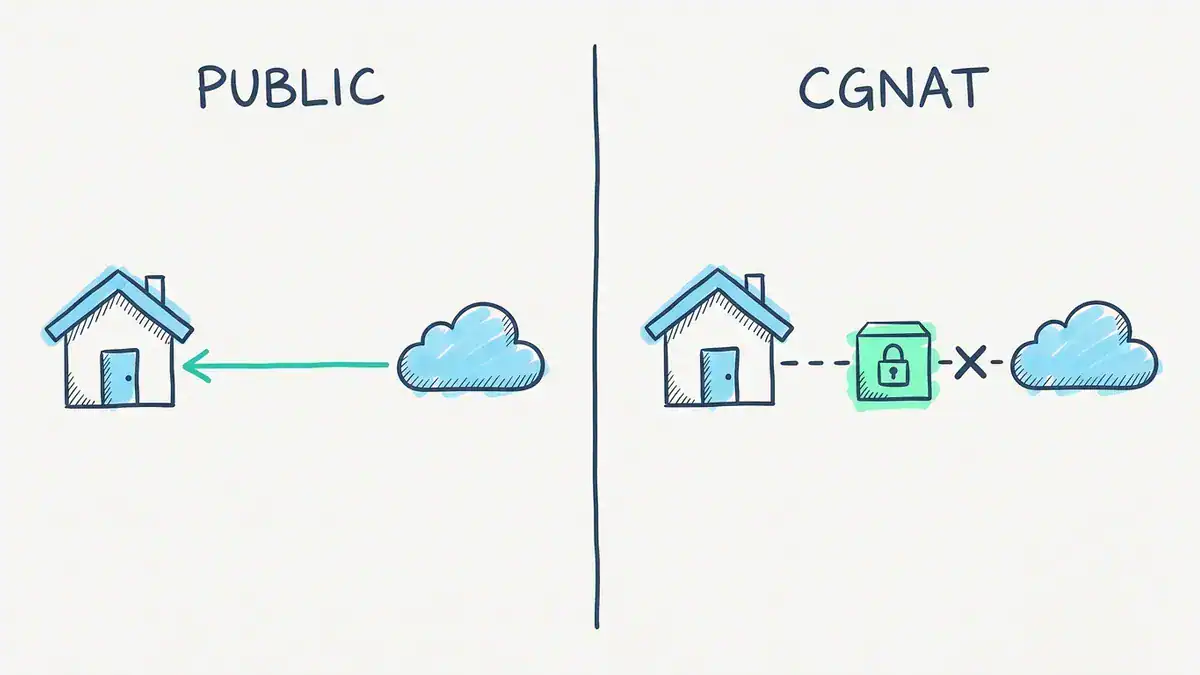
With a public WAN address, a forwarded port such as TCP 443 lets an inbound connection reach your house. Behind CGNAT, your router’s WAN address sits in 100.64.0.0/10 and the connection stops at the ISP’s NAT, which you can’t configure.
WAN port vs LAN port: what does each one do on a router?
On the back of a home router, the WAN port and the LAN ports look identical. Same RJ45 socket, same cable. The difference is entirely in what the router does with each one.
| WAN port | LAN ports | |
|---|---|---|
| Faces | The ISP, through a modem or ONT | Your devices |
| Gets its address by | DHCP client or PPPoE login, from the ISP | Static, the router is the gateway |
| DHCP | Asks for an address | Hands out addresses |
| NAT role | Outside | Inside |
| Firewall default | Drops connections nobody asked for | Trusted |
| How many | Usually one | Usually four, plus Wi-Fi, all one switch |
The LAN ports are really a small built-in switch. That’s why it doesn’t matter which one you use: LAN 1 and LAN 3 are on the same network. So LAN vs WAN on a router isn’t about the hardware at all. It’s about which side of the NAT and firewall each port sits on.
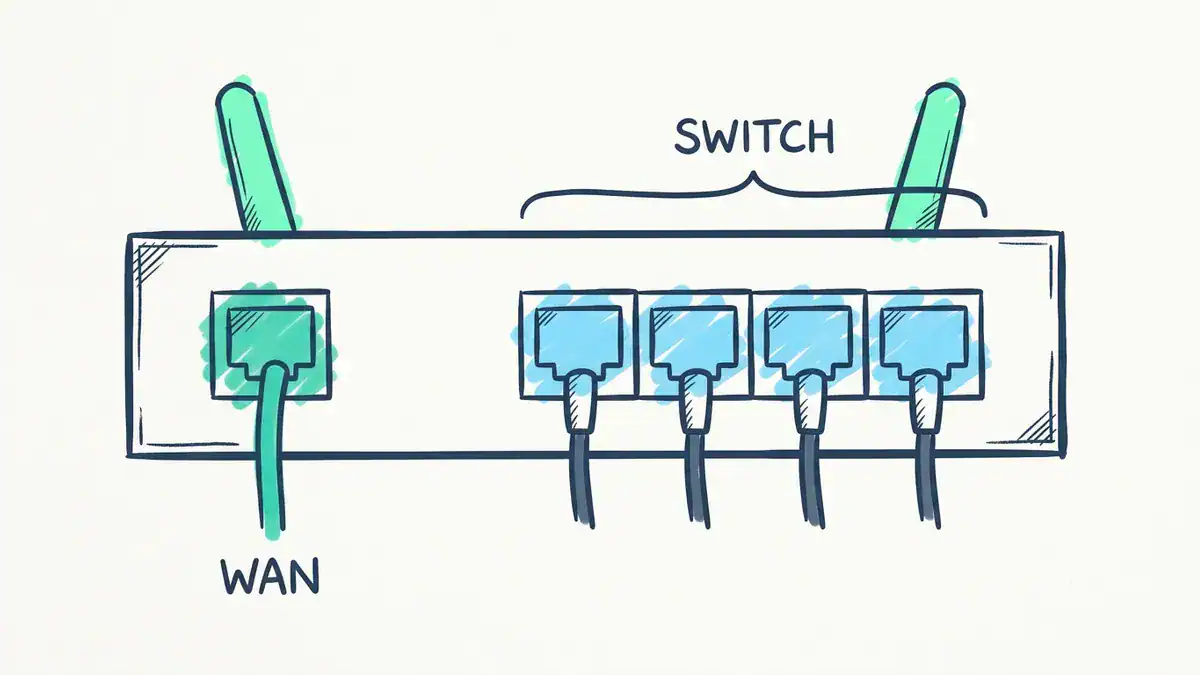
One WAN port faces the modem or ONT. The four LAN ports are one small built-in switch, all on the same network (192.168.1.0/24 here), so it doesn’t matter which one you plug into.
On a Cisco router there’s no port printed “WAN”. Any routed interface becomes the WAN interface by config. Here’s a representative config that builds the same home setup, with the WAN learning its address from the ISP and the LAN handing out addresses and getting PAT:
interface GigabitEthernet0/0/0
 description WAN to ISP
 ip address dhcp
 ip nat outside
 no shutdown
!
interface GigabitEthernet0/0/1
 description LAN
 ip address 192.168.1.1 255.255.255.0
 ip nat inside
 no shutdown
!
ip dhcp excluded-address 192.168.1.1 192.168.1.99
ip dhcp pool HOME-LAN
 network 192.168.1.0 255.255.255.0
 default-router 192.168.1.1
!
access-list 1 permit 192.168.1.0 0.0.0.255
ip nat inside source list 1 interface GigabitEthernet0/0/0 overload
ip address dhcp makes the WAN interface a DHCP client, which is what your home router does on its WAN port. The last line is the overload rule from Cisco’s IOS XE NAT configuration guide: translate anything matching ACL 1 to whatever address the WAN interface holds. The DHCP pool works exactly like the one in our DHCP walkthrough. Add a dns-server line with your resolver and you’re done.
Do I plug Ethernet into WAN or LAN?
The cable from your modem or ONT goes into WAN. Everything else goes into LAN: PCs, consoles, TVs, a switch, a NAS.
Get it backwards and the symptoms are quick. A PC in the WAN port gets no address, because the router is waiting for an ISP on that port, not a laptop. A modem in a LAN port means the router never learns its WAN address, so nothing on your network reaches the internet.
What happens when you add a second router?
You’ve got two ways to cable it, and they do very different things.
- LAN to LAN. Cable from a LAN port on router 1 to a LAN port on router 2, and turn off router 2’s DHCP server. Router 2 now acts as a switch and access point on the same subnet. One network, one NAT. This is usually what you want for extending Wi-Fi.
- LAN to WAN. Cable from router 1’s LAN port to router 2’s WAN port. Router 2 builds a second network behind its own NAT. Now you’ve got double NAT, two subnets, and devices on one side can’t easily discover printers or casting targets on the other.
On whether you can use the WAN port as an extra LAN port: some consumer firmware lets you reassign it, many don’t. Check the settings page before you plan around it.
Is a WAN cable different from a LAN cable?
No. On a home router both ends take the same Cat5e or Cat6 Ethernet patch cable. “Ethernet WAN” just means the WAN port speaks Ethernet to the modem or ONT, which is how nearly every router works today. If your service is fibre to the home, the fibre stops at the ONT, and the ONT hands your router plain Ethernet.
Example 2: how do two offices share one WAN?
Now scale up. A small company has a head office in Toronto and a branch in Vancouver. Each office has its own LAN. One router at each end, joined by a WAN link.
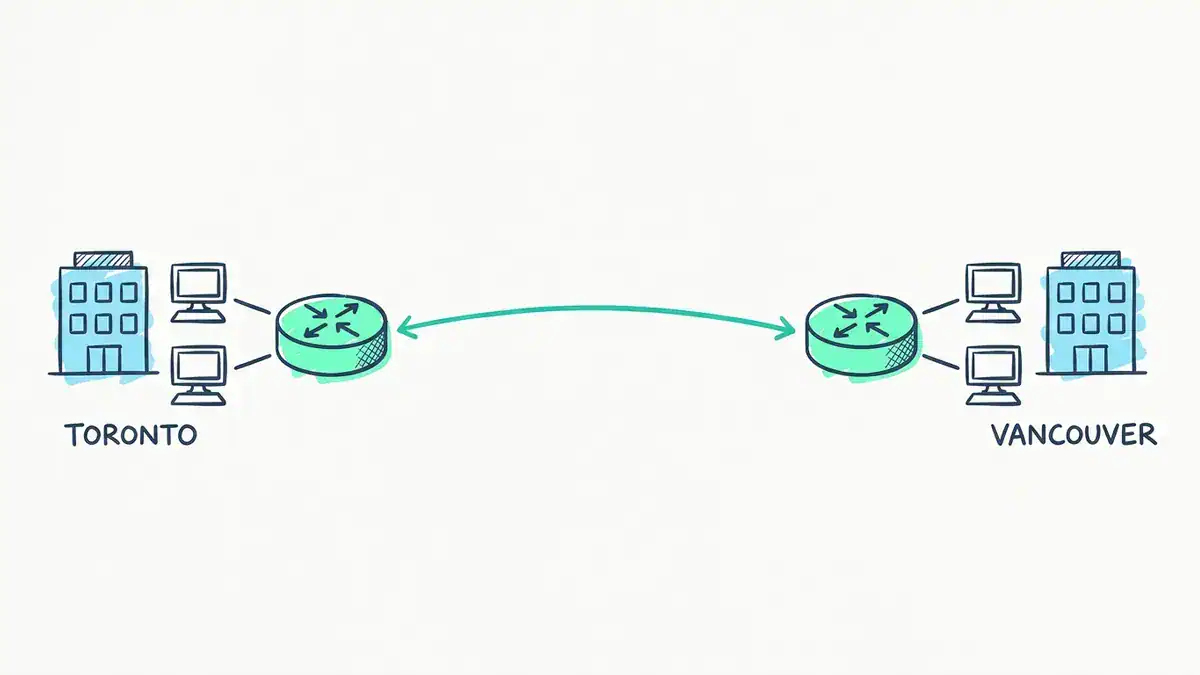
Two LANs, one WAN link. Toronto is 10.10.10.0/24 behind R1, Vancouver is 10.20.20.0/24 behind R2, and the turquoise WAN link is 172.16.0.0/30 (R1 at .1, R2 at .2). Each router has one static route pointing across it.
| Toronto (R1) | Vancouver (R2) | |
|---|---|---|
| LAN subnet | 10.10.10.0/24 | 10.20.20.0/24 |
| LAN interface (gateway) | G0/0/1 10.10.10.1 | G0/0/1 10.20.20.1 |
| WAN interface | G0/0/0 172.16.0.1/30 | G0/0/0 172.16.0.2/30 |
Representative config for both routers:
! R1 - Toronto
interface GigabitEthernet0/0/0
 description WAN to Vancouver
 ip address 172.16.0.1 255.255.255.252
 no shutdown
interface GigabitEthernet0/0/1
 description Toronto LAN
 ip address 10.10.10.1 255.255.255.0
 no shutdown
ip route 10.20.20.0 255.255.255.0 172.16.0.2

! R2 - Vancouver
interface GigabitEthernet0/0/0
 description WAN to Toronto
 ip address 172.16.0.2 255.255.255.252
 no shutdown
interface GigabitEthernet0/0/1
 description Vancouver LAN
 ip address 10.20.20.1 255.255.255.0
 no shutdown
ip route 10.10.10.0 255.255.255.0 172.16.0.1
A PC at 10.10.10.23 in Toronto wants to reach a file server at 10.20.20.50 in Vancouver. It checks: is 10.20.20.50 inside my own 10.10.10.0/24? No. So it sends the packet to its gateway, R1. R1 matches the static route, pushes the packet across the WAN to 172.16.0.2, and R2 delivers it onto the Vancouver LAN. Two LANs, one WAN. That’s the whole design.
The WAN subnet is a /30 because only two routers live on it: four addresses, two usable. RFC 3021 lets you go one better with a /31, two addresses and no waste on a point-to-point link. Our subnet mask cheat sheet has both sizes on one page.
In production that link would be an MPLS or Metro Ethernet circuit from a carrier, or a tunnel over two ordinary internet connections. And past a handful of sites, you’d swap the static routes for OSPF.
What breaks if both offices use the same subnet?
Everything that crosses the WAN.
Say Vancouver was also built on 10.10.10.0/24, because someone copied the Toronto template. The Toronto PC now checks 10.10.10.50 against its own subnet, and the answer is yes, it’s local. So the PC never sends the packet to R1. It ARPs for 10.10.10.50 on the Toronto LAN, nobody answers (or the wrong box does), and the connection fails. R1 is no help either: it already has a connected route for 10.10.10.0/24 on its LAN side, and a connected route beats a static one.
The rule is simple. Every LAN in a WAN gets its own subnet. It’s the same idea as one subnet per VLAN, which our VLAN vs subnet post covers in detail.
LAN vs WAN speed: why does a WAN feel slower than its bandwidth?
Because speed and delay aren’t the same thing. Your LAN can run at 1 Gb/s and so can a fibre WAN circuit. The WAN still loses on distance.
The planning figure Cisco quotes for propagation delay, from ITU-T G.114, is about 6 µs per km (Cisco: Understanding Delay in Packet Voice Networks). Run the two examples through it:
| Path | Distance | One-way delay | Round trip |
|---|---|---|---|
| Across your LAN, one full copper run | 100 m | 0.6 µs | 1.2 µs |
| Toronto to Vancouver, straight line | 3,359 km | 20.2 ms | 40.3 ms |
Treat that WAN figure as a planning estimate, and an optimistic one. Real fibre follows highways and rail lines, not the great circle, and every router and queue on the way adds more. What no bandwidth upgrade can do is shrink it. The WAN path is about 33,600 times longer, and the delay scales with it.
Bandwidth only changes how long it takes to clock a packet onto the wire. A 1,500-byte packet takes 12 µs at 1 Gb/s, 120 µs at 100 Mb/s and 600 µs at 20 Mb/s. On a long WAN, those are rounding errors next to 20 ms of travel time.
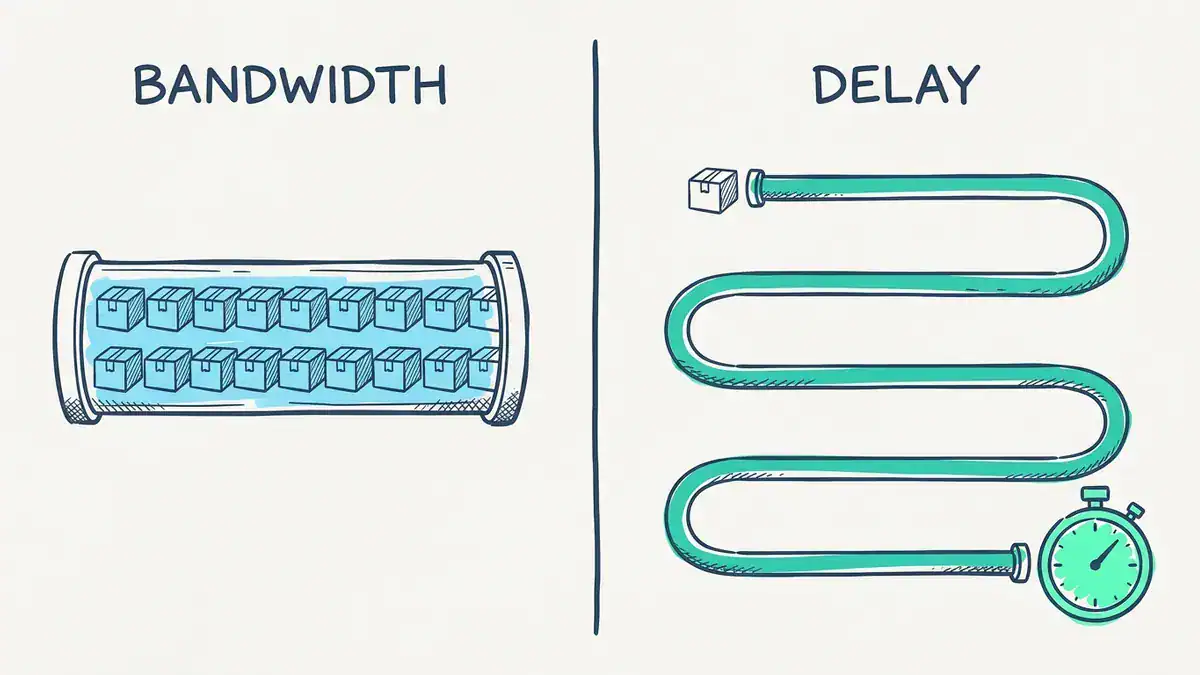
Bandwidth is how much fits through at once: a 1,500-byte packet takes 12 µs to send at 1 Gb/s. Delay is how far it has to travel: about 0.6 µs across a 100 m LAN cable, and an estimated 20 ms from Toronto to Vancouver. A wider pipe doesn’t make a long one shorter.
Here’s where it bites. To keep a 1 Gb/s link busy across a 40 ms round trip, about 5 MB of data has to be in flight before the first acknowledgement comes back. A TCP connection stuck with a 65,535-byte window, which is the ceiling without window scaling (RFC 7323), can’t move more than about 13.1 Mb/s on that path. Doesn’t matter how fat the pipe is. Modern operating systems scale the window, but old apps, some VPN clients and badly tuned servers still hit this. So when a WAN feels slow, check the round trip before you buy more bandwidth.
10GE LAN vs 10GE WAN: why isn’t 10 gig always 10 gig?
There are two flavours of 10 Gigabit Ethernet physical layer, and the WAN one is slower on purpose.
- 10GE LAN PHY (10GBASE-R) runs at a line rate of 10.3125 Gb/s. After 64b/66b encoding, that’s exactly 10.000 Gb/s of Ethernet data.
- 10GE WAN PHY (10GBASE-W) runs at 9.95328 Gb/s so it fits inside a SONET OC-192 / SDH STM-64 frame, and carriers can carry it on their existing optical gear.
Both line rates are in Cisco’s 10GE XFP module data sheet. The catch is what’s left for Ethernet. Once the SONET overhead comes out, the payload is 9.58464 Gb/s. After 64b/66b encoding inside that, the MAC gets about 9.294 Gb/s, the figure in the IEEE 802.3ae working-group material. That’s 7.1% less than a LAN PHY port. If you ever see a “10G” link reporting 9.294 Gb/s, that’s why.
LAN vs WAN vs MAN, PAN and the rest
The “area network” family is mostly about scale, with one odd one out.
| Type | Scale | Example |
|---|---|---|
| PAN (personal) | Around one person | Phone to earbuds over Bluetooth |
| LAN (local) | One building or home | Your office floor’s switches |
| WLAN (wireless LAN) | The Wi-Fi part of a LAN | Access points on that floor |
| CAN (campus) | Several buildings, one owner | A university or hospital site |
| MAN (metropolitan) | One city | A carrier’s metro fibre ring linking offices across town |
| WAN (wide) | Regions, countries, the world | Toronto to Vancouver, or the internet |
| SAN (storage) | Not a distance class | A dedicated network between servers and storage arrays |
In practice, network engineers rarely say CAN or MAN out loud. A campus is “the LAN” and a metro link is “a WAN circuit”. The CCNA cares about LAN vs WAN, and treats the rest as vocabulary. For how these networks get wired internally (star, mesh, ring), grab the network topology types PDF.
How does LAN vs WAN show up on the CCNA exam?
It depends on which version you sit, and that matters right now.
CCNA 200-301 v1.1 is the current exam. Its exam topics PDF names this material directly: 1.2.d WAN and 1.2.e small office/home office (SOHO) under topology architectures, plus 1.3 cabling, 1.7 private IPv4 addressing, 4.1 inside source NAT and 4.6 DHCP client and relay. Example 1 above is basically 1.2.e, 1.7, 4.1 and 4.6 in one diagram.
CCNA v2.0 takes over with a first test date of February 3, 2027. Its exam topics PDF drops the topology-architecture objective completely. The words “LAN” and “WAN” vanish, but the skills don’t. They move into hands-on objectives, mostly troubleshooting: 1.3 IPv4 addressing (public and private), 1.7 DHCPv4 client, server and relay, 3.1 and 3.2 reading routing tables and default and static routes, 4.3 NAT/PAT, and 4.5 site-to-site VPNs. Example 2 is that list.
So for v1.1 you need to describe a WAN. For v2.0 you need to fix one. If you’re starting now, study both examples hands-on, not just the definitions. Our free CCNA 200-301 PDF is a good place to start.
Frequently asked questions
Is the internet a LAN or a WAN?
The internet is a WAN, the biggest one there is. It’s thousands of separate networks run by ISPs and carriers, joined together and covering the whole planet. Your home LAN connects to it through your router’s WAN port.
Can a LAN work without the internet?
Yes. A LAN works fine on its own: devices still reach each other, file shares and printers keep working, and a local game server stays up. Losing the WAN link only cuts you off from things outside your building.
Should I use LAN or WAN for gaming?
Plug your console or PC into a LAN port. The WAN port is only for the cable from your modem or ONT. A wired LAN connection takes Wi-Fi interference out of the path. Your ping to the game server mostly depends on the WAN side, meaning your ISP and the distance to the server.
Is Wi-Fi a LAN or a WAN?
Wi-Fi is a LAN, a wireless LAN (WLAN) to be exact. It covers your home or office and you own the access points. Mobile data over LTE or 5G is the wireless WAN equivalent.
Is a VLAN a LAN or a WAN?
A VLAN is a LAN, split out in software. It’s a separate logical network inside your switches, with its own subnet and broadcast domain. It doesn’t stretch across a carrier link unless you deliberately extend it.
Bottom line
A LAN is the network you own in one place. A WAN is the rented link that joins your LANs to each other and to the internet. On a home router, the LAN ports face your devices and the WAN port faces the ISP. In a company, every site is a LAN with its own subnet, and the routers at the edges carry traffic across the WAN. And no circuit upgrade buys back the delay that distance costs.
The fastest way to make this stick is to build both examples yourself. The CCNA workbook has a branch-office scenario with a WAN, OSPF, static routes and NAT between HQ and remote branches, built for EVE-NG and Packet Tracer. If you work on MikroTik gear, the MTCNA workbook opens with an ISP CPE rollout: WAN DHCP client, LAN DHCP server and NAT, the home router from Example 1 in RouterOS v7.