
What Is FortiGate Packet Flow?
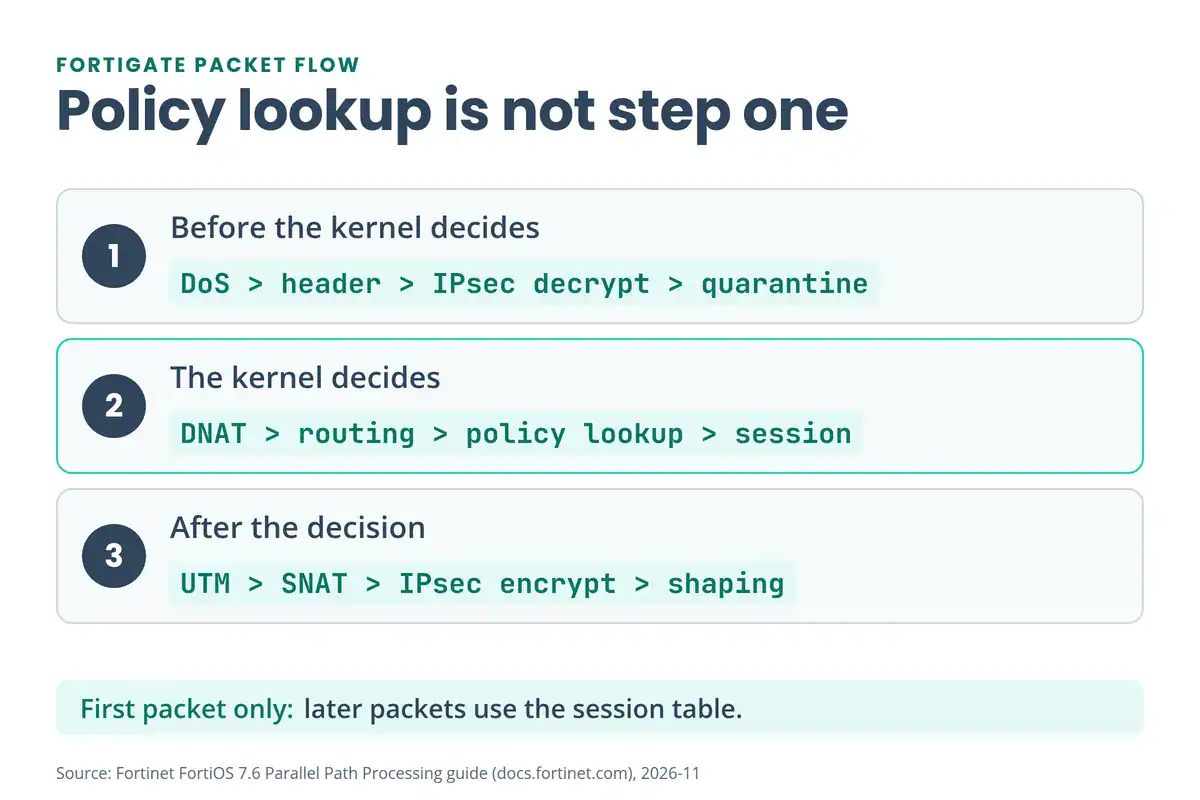
FortiGate packet flow is the fixed order of checks FortiOS runs on every packet. It starts at the interface and the TCP/IP stack, then runs DoS policy, header checks, IPsec decryption and admission control. The kernel comes next: destination NAT, routing, policy lookup and session handling. After that come security inspection, source NAT, IPsec encryption, traffic shaping and exit. Fortinet calls this the “life of a packet” in its Parallel Path Processing guide.
Here’s the FortiOS 7.6 order (Fortinet docs):
- Interface and TCP/IP stack. Every accepted packet enters through a network interface and the TCP/IP stack.
- DoS policy. If you’ve configured one, it runs early. Suspected attacks are blocked and other packets continue.
- IP integrity header checking. The header length of a TCP, UDP, ICMP, SCTP or GRE packet must be valid, or the packet is dropped.
- IPsec decryption. Packets that match a configured tunnel are decrypted here.
- Admission control. The quarantine check, plus captive portal authentication when a policy asks for it.
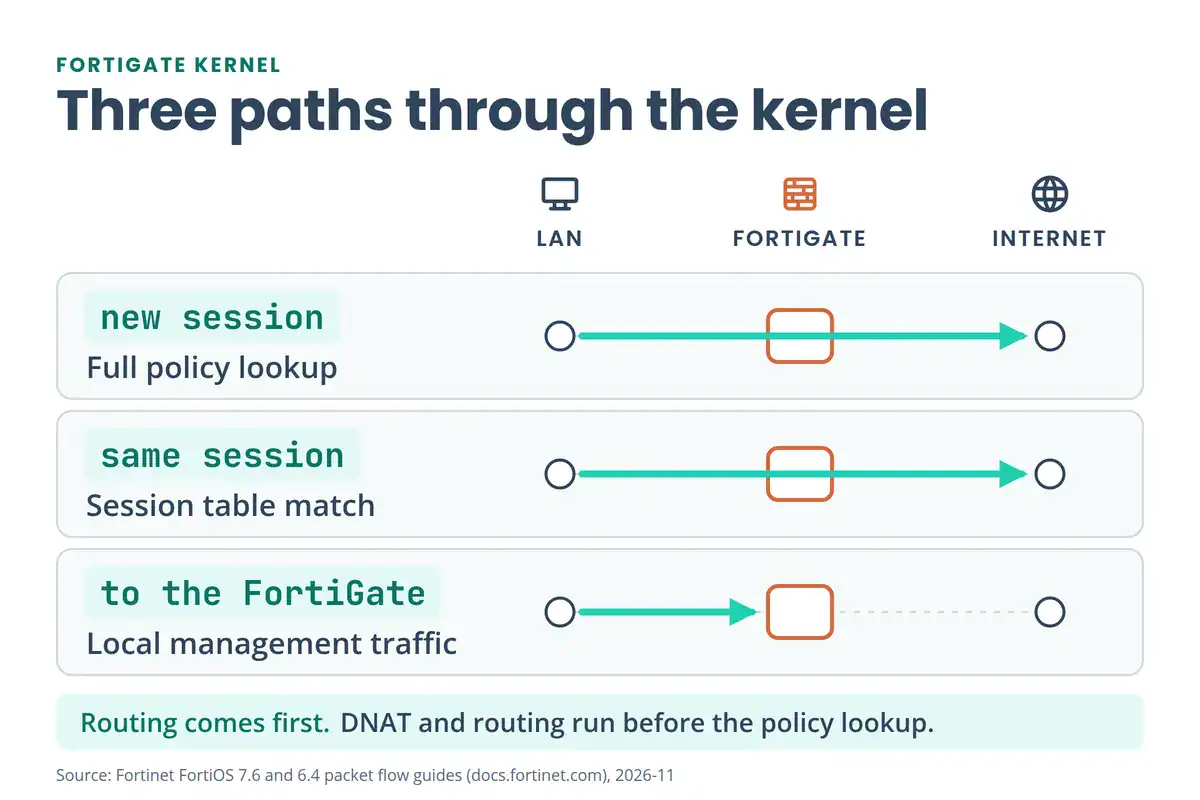
- Kernel decisions. Destination NAT, routing (including SD-WAN), stateful inspection, policy lookup and session management.
- UTM/NGFW inspection. Security profiles run when the matching policy has them.
- Kernel egress. The kernel routes the packet to the exit interface and checks the NAT table for source NAT.
- IPsec encryption, traffic shaping and exit. Tunnel traffic is encrypted, shaping applies if configured, and the TCP/IP stack sends the packet out.
Policy lookup isn’t step one. It sits inside step 6, after the DoS, header, IPsec and admission checks, and after destination NAT and routing. That one fact explains a lot of “why did it get dropped there?” moments.
What Happens on Ingress Before the Policy Check?
Four checks run before the kernel decides anything.
DoS policy. DoS policies look for anomalous traffic arriving on an interface. Fortinet says they’re checked before security policies, so an attack doesn’t trigger heavier inspection (DoS policy). The anomalies are predefined Layer 3 and Layer 4 sensors: floods, scans and concurrent-session counts. You can’t add new ones. Each sensor can be set to Disable, Block or Monitor in the GUI, and to pass or block in the CLI. Flood sensors track traffic toward one destination IP. Scan sensors track one source IP.
Fortinet’s recommended starting thresholds include 2000 packets per second for tcp_syn_flood, 1000 for tcp_port_scan and 250 for icmp_flood. Create a policy at Policy & Objects > IPv4 DoS Policy. If the menu is missing, enable DoS Policy under Feature Visibility.
config firewall DoS-policy
    edit 1
        set name "wan-dos"
        set interface "wan1"
        set srcaddr "all"
        set dstaddr "all"
        set service "ALL"
        config anomaly
            edit "tcp_syn_flood"
                set status enable
                set action block
                set threshold 2000
            next
        end
    next
end
The fields come from Fortinet’s DoS policy page: name, interface, addresses and service, then one config anomaly entry per sensor. Start with Monitor and a log entry if you’re unsure of your normal traffic rate. On NP7 and NP6XLite hardware, tcp_syn_flood protection can run in hardware with SYN cookies, but DoS offloading has to be switched on first.
IP integrity header checking. The FortiGate checks the protocol header length. A packet with a bad header is dropped here and never reaches a policy.
IPsec decryption. A packet that arrives inside a tunnel is decrypted before the kernel sees it. Fortinet says this step is offloaded to and accelerated by CP9 or CP10 processors where the hardware has them. If the tunnel itself won’t come up, our IPsec VPN troubleshooting guide walks through Phase 1, Phase 2, NAT-T and MTU checks.
Admission control. The FortiGate checks that the packet isn’t from, or headed to, an address on the quarantine list. It can also impose captive portal authentication. Older Fortinet guides list FortiTelemetry here too. The version table further down shows what changed.
What Does the FortiGate Kernel Decide?
The kernel makes the forwarding decision. In order, it does these things:
- Destination NAT. The NAT table is checked to see whether the destination IP must change. Fortinet’s guide places this before routing. Destination NAT on a FortiGate means a virtual IP (VIP) object. If you want the basics first, our what is NAT guide covers static, dynamic and PAT.
- Routing, including SD-WAN. The routing table picks the egress interface and tells local traffic from forwarded traffic. SD-WAN can pick the route using internet service and application control. Our FortiGate SD-WAN PDF shows how zones, health checks and rules feed this step.
- Stateful inspection, policy lookup and session management. The first packet of a session is matched against the policy table and a session entry is created. Later packets are handled by a session table lookup. A stateful firewall keeps that table so replies match without a second policy check, as our types of firewalls guide explains.
- Session helpers. Protocols such as SIP, FTP and H.323 carry addresses or ports inside the payload. Helpers read them so the related traffic can pass.
- User authentication, device identification, Agentless VPN and local management traffic. These apply as the matching policy needs them. Traffic addressed to the FortiGate itself, such as an admin login, ends here. Older guides call the VPN item SSL VPN.
How does FortiGate match firewall policies?
Top to bottom, and the first match wins. The By Sequence view shows policies in the order they’re checked (Firewall policy). Fortinet’s best-practices guide says that once traffic matches a policy, the later ones aren’t processed, so put the most specific policies at the top (Policies). If no IPv4 policy matches, the traffic hits the implicit deny and is dropped.
One exception catches people. Policies that include a VIP, or that have match-vip enabled, take priority over other policies. A deny policy meant to block VIP traffic needs match-vip on. From FortiOS 7.2.4, new deny policies have it enabled by default.
Replies are simpler. A reply packet matches the session that its first packet created, so it skips the policy lookup. You’ll see this in debug flow as a line that says it found an existing session in the reply direction.
Go deeper
This page shows the path a packet follows.
Build it yourself in the FortiGate NSE4 Lab Workbook on EVE-NG.
See the FortiGate NSE4 Lab Workbook →How Does FortiGate Inspect Traffic in Flow Mode and Proxy Mode?
Step 7 is where security profiles run. Each firewall policy picks an inspection mode, and flow-based inspection is the default on new policies (Inspection modes). Fortinet calls flow mode the recommended choice unless you need proxy-specific features.
| Flow mode | Proxy mode | |
|---|---|---|
| Buffering | None. The FortiGate inspects packet by packet and holds only the last packet until the scan returns a verdict | Buffers the traffic and holds the payload until the whole thing is inspected |
| When it finds a violation | Sends a reset to the receiver, which ends the connection | Drops the traffic and replaces it with a replacement message |
| How the modules run | All applicable flow-based modules run at once in a single pass | Rebuilds the content, then applies features such as antivirus, web filtering, DLP, email filtering and ICAP |
| Needs this mode | Nothing. It’s the default | SSL offloading, explicit web proxy and ZTNA. Video Filter, inline CASB, WAF and CDR are proxy-mode capabilities |
Sources: flow mode, proxy mode and the 6.4 packet-flow page for the proxy feature list. Fortinet’s own advice is to check the capabilities you need before you choose a mode. Hardware helps in both: the 7.6 guide says flow-mode pattern matching is accelerated by CP8 or CP9 processors, and that some UTM/NGFW processes can be offloaded to CP9 or CP10.
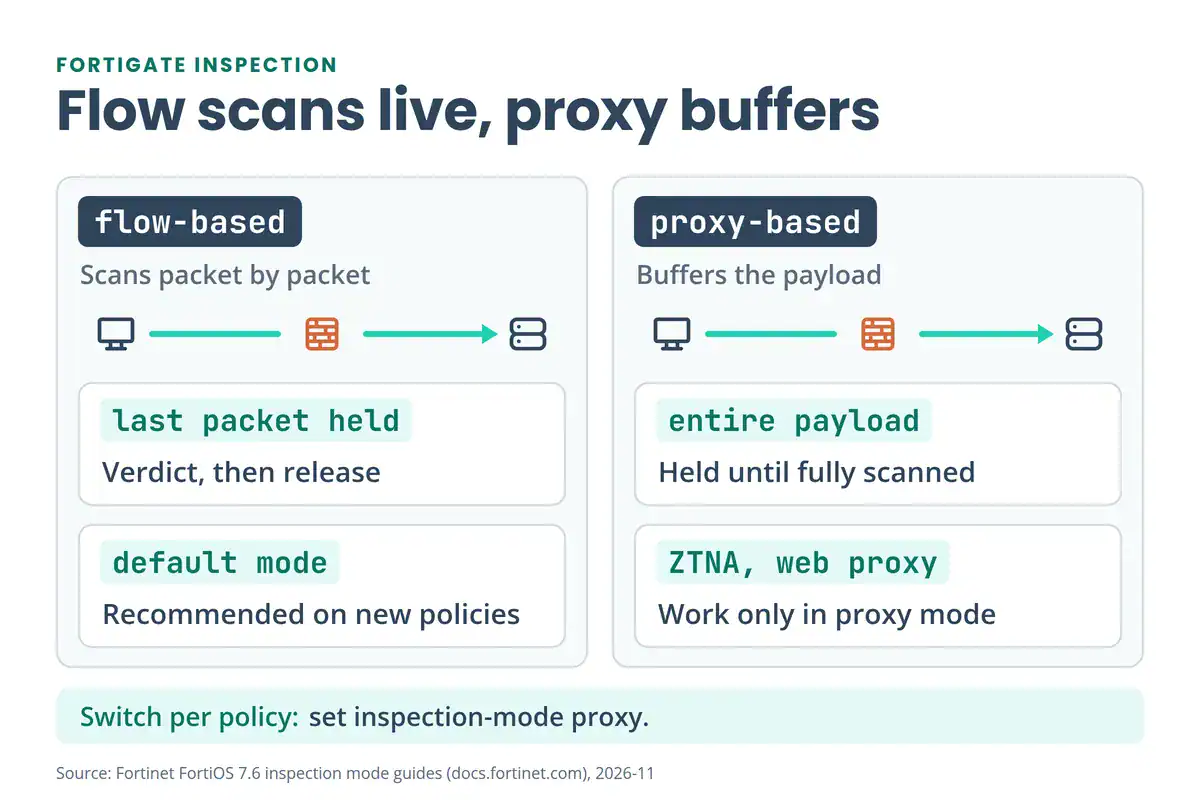
To switch one policy to proxy mode in the CLI:
config firewall policy
    edit 1
        set inspection-mode proxy
    next
end
Proxy mode has a feature called client comforting. It sends small portions of the payload to the user during a long scan, so the download doesn’t time out.
Both modes run inline, in the path of the traffic. If you want the theory behind inline prevention, read our IDS vs IPS guide. The Security Profiles topic in the FortiGate NSE4 Lab Workbook is where you turn these profiles on and test them in a lab.
The 7.6 guide also splits this stage into NGFW Profile mode and NGFW Policy mode, with its own packet-flow page for each.
What Happens on Egress?
After inspection, the packet still has three jobs to finish.
- Routing and source NAT. The kernel routes the packet to the exit interface and checks the NAT table for source NAT. You can set source NAT in the policy (NAT on, with the outgoing interface address or an IP pool) or in a central SNAT map. With central NAT on, the NAT option inside the policy is skipped and source NAT comes from the
central-snat-maprules, matched top to bottom (Central SNAT). The Firewall Policy and NAT topics in the FortiGate NSE4 Lab Workbook cover central NAT and VIP/DNAT on a topology. - IPsec encryption. A packet entering a tunnel is encrypted and encapsulated just before it leaves.
- Traffic shaping and exit. Shaping applies if you’ve configured it. Then the TCP/IP stack sends the packet out of the egress interface.
Older guides also list WAN Optimization on this path. The 7.6 version of the page lists traffic shaping only.
What Do NP7 and CP9 Processors Do in Packet Flow?
A FortiGate can send part of this path to dedicated chips, called SPUs (security processing units). Two kinds matter here.
Network processors (NP) offload sessions. Fortinet describes NP7 as fastpath acceleration that offloads communication sessions from the CPU (NP7 acceleration). It works in three steps:
- The first packet of a new session goes to the CPU, which matches it against the policy.
- If the policy accepts the session and it can be offloaded, its session key is copied to the NP7 that received the packet.
- The remaining packets are fast-pathed by the NP7 and don’t touch the CPU.
An NP7 can also take on some CPU-heavy work, such as IPsec encryption and decryption. Once it hits its session limit, extra sessions go to the CPU. On FortiGates with a hyperscale licence, session and NAT setup can happen on the NP7 itself. The 7.6 guide notes that much of the traffic that needs no UTM/NGFW processing can be offloaded to NP7 processors.
NP6 is the older generation. Its guide says the first packet of a session decides whether the session can be offloaded, and that most sessions can be offloaded as long as there’s no proxy-based UTM/NGFW (NP6 sessions). Check which processor your model has before you read a diagram, because the offload rules differ.
Content processors (CP) speed up specific steps. They accelerate IPsec decryption and encryption (CP9 or CP10) and the pattern matching used by flow-based inspection (CP8 or CP9). Think of the NP as taking whole sessions off the CPU, and the CP as shortening the heavy steps inside a session.
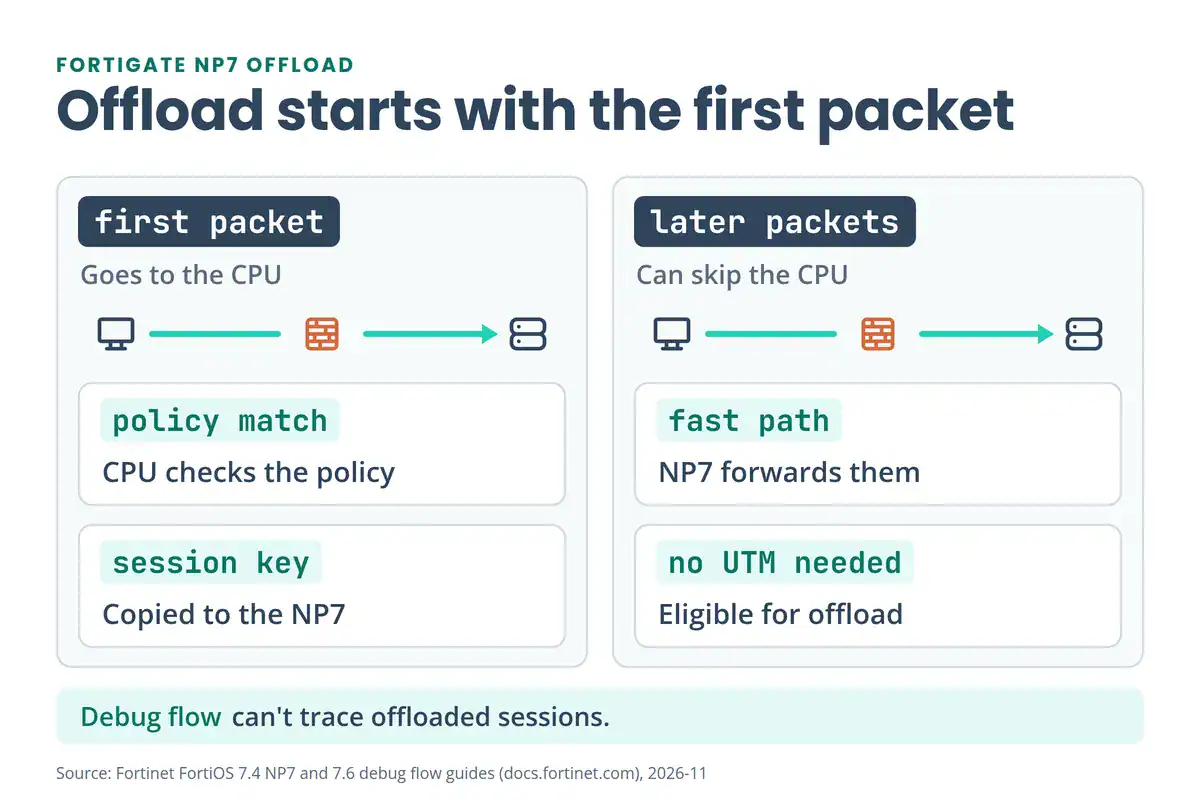
This matters for troubleshooting. Debug flow can’t trace a session that an NP has offloaded, as the next section explains.
How Do You Trace a Packet With FortiGate Debug Flow?
Debug flow prints what the FortiGate does to a packet, one decision at a time. Fortinet recommends it when traffic isn’t entering or leaving the way you expect. Each command sets part of the trace, and the last command starts it (Debugging the packet flow).
diagnose debug enable
diagnose debug flow filter addr 203.0.113.10
diagnose debug flow show function-name enable
diagnose debug flow trace start 100
diagnose debug flow trace stop
diagnose debug flow filter clear
Swap in your own address. The start 100 limits the trace to 100 packets. Stop it as soon as you have what you need.
The filter takes these variables:
| Variable | Matches |
|---|---|
addr | An IPv4 or IPv6 address |
saddr, daddr | The source or destination address |
port | A port |
sport, dport | The source or destination port |
proto | A protocol number |
vd | A virtual domain index (-1 matches all) |
negate | Inverts the IPv4 or IPv6 filter |
clear | Clears the filter |
Fortinet’s sample trace of an HTTP session shows lines like these. Read each one against the stages above:
| Line in the trace | What it tells you |
|---|---|
vd-root received a packet(proto=6, ...) from port5. | The packet arrived on that interface (step 1) |
allocate a new session-00000e90 | A new session was created for the first packet |
find a route: gw-192.168.11.254 via port6 | The routing lookup chose a next hop and an exit interface |
find SNAT: IP-192.168.11.59, port-31925 | Source NAT picked an address and a port |
Allowed by Policy-3: SNAT | Policy 3 matched and allowed the session |
Find an existing session, id-00000e90, reply direction | The reply matched the session, so no new policy lookup |
The exact wording and line order change between releases. Match the meaning, not the text.
Three cautions:
- Don’t leave it running. If the FortiGate sends logs to FortiAnalyzer or FortiCloud, the debug output is recorded as event logs there. Fortinet says not to run the command longer than necessary because it generates a significant amount of data.
- Offloaded traffic doesn’t show. Fortinet says flow monitoring doesn’t work for traffic offloaded to NP6 or NP7 processors. Test with ICMP, which isn’t offloaded, or turn offloading off. On NP6 hardware Fortinet gives
diagnose npu {np6 | np6xlite | np6lite} fastpath disableas a temporary option. On NP7 hardware you turn offloading off in the firewall policy that accepts the traffic (set auto-asic-offload disable), then turn it back on afterwards. - Set a filter first. Our FortiGate CLI Commands PDF makes the point: an unfiltered flow debug on a busy firewall floods the console and makes the output useless.
Prefer the GUI? Fortinet also has a Debug Flow tool under Network > Diagnostics, with basic and advanced filters (Using the debug flow tool). For packets on the wire rather than decisions, see the packet sniffer commands in the same CLI PDF.
Coming from Cisco? The ASA has its own simulation command, packet-tracer, covered in our Cisco ASA commands PDF. To practise on a FortiGate without hardware, follow our guide to adding a FortiGate VM to EVE-NG.
Has FortiGate Packet Flow Changed Between FortiOS Versions?
Yes, in the names of some steps and in which chips get mentioned. Many diagrams online still use the older layout. Here’s what differs between Fortinet’s 6.4 and 7.6 guides:
| Stage | FortiOS 6.4 guide | FortiOS 7.6 guide |
|---|---|---|
| Admission control | Quarantine and FortiTelemetry. FortiTelemetry requires a device to have FortiClient installed before its packets are allowed | Quarantine (source or destination) and captive portal. FortiTelemetry isn’t described in the body |
| Kernel VPN item | SSL VPN | Agentless VPN |
| IPsec acceleration | CP8 or CP9 | CP9 or CP10 |
| Egress | Traffic shaping and WAN Optimization | Traffic shaping |
Sources: the 6.4 ingress and egress page and the 7.6 Parallel Path Processing page. Check the guide for the exact release you run before you trust a diagram from another version.
What Does the Free FortiGate Packet Flow PDF Cover?
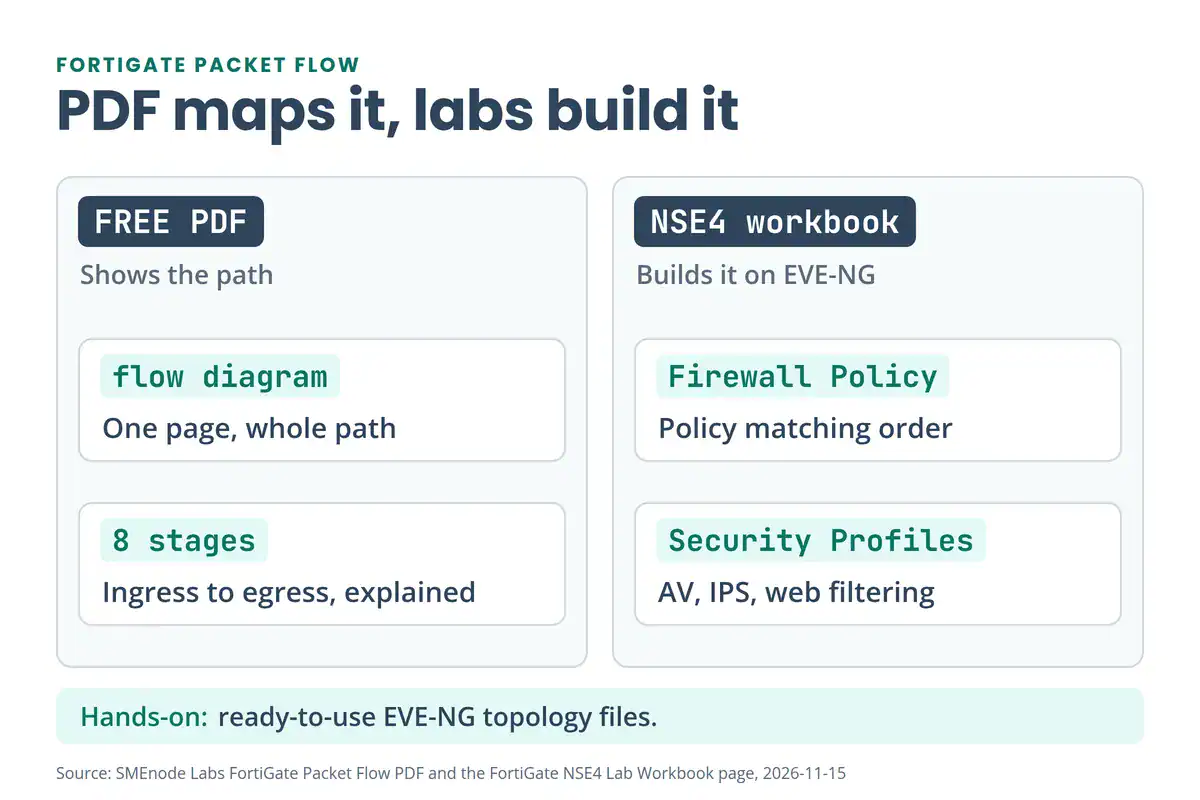
The PDF is a short reference for the path. It opens with a one-page flow diagram, then walks the same eight stages in plain words: ingress, admission control, kernel processing, UTM/NGFW, kernel egress, egress encryption, traffic optimization and shaping, and the outbound interface. It adds a short note on the CP content processors and on what a network processor is, and it defines the terms it uses, such as DoS threshold, quarantine list, botnet, proxy-based inspection and kernel.
Some step names in it, such as FortiTelemetry, SSL VPN and WAN Optimization, come from older FortiOS guides. The version table above shows what changed in 7.6.
It stops at the order of the steps. There are no commands, no lab and no version tags. This page fills the gap with debug flow, inspection modes, NP7 offload and the 7.6 differences. The FortiGate NSE4 Lab Workbook goes further and builds the whole thing as labs on EVE-NG: firewall policy, user identification, NAT, security profiles, site-to-site and remote access VPN, HA, SD-WAN, VDOM and logging.
Where Should You Go Next?
- What Is FortiGate? covers the platform this path runs on.
- FortiGate CLI Commands is the quick reference for diagnose and get commands, including the sniffer.
- FortiGate SD-WAN goes deep on the SD-WAN part of the routing step.
- IPsec VPN Troubleshooting covers the decryption and encryption steps when a tunnel misbehaves.
- FortiGate HA Setup and Troubleshooting adds a second firewall to the same path.
- Fortinet NSE 4 Exam Cost helps if you’re planning the certification.



No questions yet. Ask the first one.