To fix NAT or PAT on a Cisco ASA, check before you change anything. Run show nat detail and show xlate to see which rule matches, test the path with packet-tracer, then fix the NAT rule or the ACL, clear stale translations and save with write memory. This free 14-page PDF lists the commands for each of those eight steps on a Cisco ASA firewall, and this page explains when to run them.
Cisco ASA commands: the 8-step NAT fix at a glance
The PDF follows one order, and the order matters. Read first, clear second, build objects and rules third, then check ACLs, inspection and tests, and save last.
| Step | Commands | When to run it |
|---|---|---|
| 1. Diagnose | show nat, show nat detail, show xlate, show conn, show access-list | First, before any change |
| 2. Clear xlate | clear xlate, clear conn | After diagnosing, before new NAT rules |
| 3. Objects | object network ... | Before you define NAT rules |
| 4. NAT rules | nat (inside,outside) ... | The core fix |
| 5. Zones and ACLs | interface, access-list, access-group | When translated traffic still doesn’t pass |
| 6. Inspection | policy-map, service-policy | When one protocol (FTP, SIP, DNS) breaks |
| 7. Test | packet-tracer, show logging | After your changes |
| 8. Save | write memory | Last, once everything works |
The commands assume ASA software 8.3 or later, the release that moved NAT to network objects. That covers every 9.x version. The addresses are lab examples, so replace them with yours, and make changes in a maintenance window.
Cisco ASA show commands for NAT troubleshooting
Start with read-only commands. They change nothing and show where the failure sits.
| Command | What it tells you |
|---|---|
show nat | The NAT rules, in the order the ASA evaluates them |
show nat detail | The same rules with hit counters (translate_hits and untranslate_hits) |
show xlate | Active translation entries. No entry for a host you expect means NAT isn’t happening for it |
show conn | Active connections, so you can tell if sessions are being built at all |
show access-list | ACL hit counts, so you can see if traffic is permitted or silently dropped |
show running-config nat | Only the NAT lines of the configuration |
show running-config object | The network and service objects the NAT rules depend on |
show interface ip brief | Each interface’s IP address and up/up state |
show route | The routing table. A missing default route stops NATted traffic from leaving |
show nat detail
show xlate
show conn
show access-list
show running-config nat
show running-config object
show interface ip brief
show route
A rule whose hit count stays at 0 isn’t matching your traffic. According to Cisco’s NAT troubleshooting TechNote, those counters rise once per connection, not once per packet, so test with a fresh session. If the counters rise but the user still fails, the problem is further along: the ACL, the route or the inspection policy.
These are ASA commands. For the IOS equivalents, keep our Cisco Commands Cheat Sheet open next to this one.
How to clear NAT translations on a Cisco ASA (clear xlate)
Run clear xlate after you add or change a NAT rule, because existing translation entries can keep using the old rule. Run clear conn as well when you want a completely clean slate for testing.
clear xlate
clear conn
Both commands drop active NATted connections for a moment. Warn users first and don’t run them on a busy production firewall outside a maintenance window.

Cisco ASA NAT configuration: objects and the rules that fix most problems
Since 8.3, ASA NAT rules use network objects, so define them first. If NAT itself is new to you, read our guide What Is NAT? Static, Dynamic and PAT With Cisco Configs before the rules below.
object network INSIDE_LAN
 subnet 192.168.1.0 255.255.255.0
 description Internal LAN hosts
object network DMZ_SUBNET
 subnet 10.10.10.0 255.255.255.0
 description DMZ servers
object network OBJ_PAT_OUTSIDE
 host 203.0.113.1
 description Public IP for PAT
Dynamic PAT: many inside hosts, one public IP
Dynamic PAT lets every inside host share one public address, and the ASA tells the sessions apart by port number. The standard rule uses the outside interface’s own address:
nat (inside,outside) source dynamic INSIDE_LAN interfaceIf you have a separate public address for PAT, use this rule instead of the one above, not as well as it:
nat (inside,outside) source dynamic INSIDE_LAN OBJ_PAT_OUTSIDEStatic NAT: expose one server on its own public IP
Static NAT is a permanent one-to-one mapping. Use it when outside users must start connections to an inside server on a predictable public address.
object network INTERNAL_SERVER
 host 192.168.1.100
object network PUBLIC_SERVER_IP
 host 203.0.113.10
nat (inside,outside) source static INTERNAL_SERVER PUBLIC_SERVER_IP
Static PAT: forward one port, such as HTTPS, to an inside server
Static PAT (port forwarding) lets one public address serve several inside servers by destination port. Cisco’s NAT and ACL guide shows the object-NAT form, which looks like this for HTTPS:
object network PUBLIC_WEB_IP
 host 203.0.113.11
object network WEBSERVER
 host 192.168.1.101
 nat (inside,outside) static PUBLIC_WEB_IP service tcp https https
Use a public address that isn’t already in a static NAT rule, so the two mappings don’t overlap.

Identity NAT: leave VPN traffic untranslated
Without an identity NAT rule, traffic for a VPN peer can get translated, and the far end then drops it. This rule keeps the real addresses:
object network VPN_REMOTE
 subnet 10.20.0.0 255.255.255.0
nat (inside,outside) source static INSIDE_LAN INSIDE_LAN destination static VPN_REMOTE VPN_REMOTE no-proxy-arp route-lookup
no-proxy-arp stops the ASA answering ARP for those addresses. route-lookup makes it use the routing table to pick the exit interface. Cisco’s NAT reference explains both.
In what order does the ASA check NAT rules?
The ASA checks NAT in three sections, and the first match wins. Manual (twice) NAT comes first, in configuration order. Auto (object) NAT comes second, with static rules before dynamic ones. Manual NAT marked “after auto” comes last. Cisco’s TechNote describes the same three sections.
Want to rebuild these rules until they’re routine? The CCIE Security Workbook covers Cisco ASA and Firepower deployment and firewall features and policies in its Perimeter Security chapter, and its hands-on list includes ASA and FTD high availability with NAT.
Cisco ASA security levels and ACL configuration: why translated traffic still gets dropped
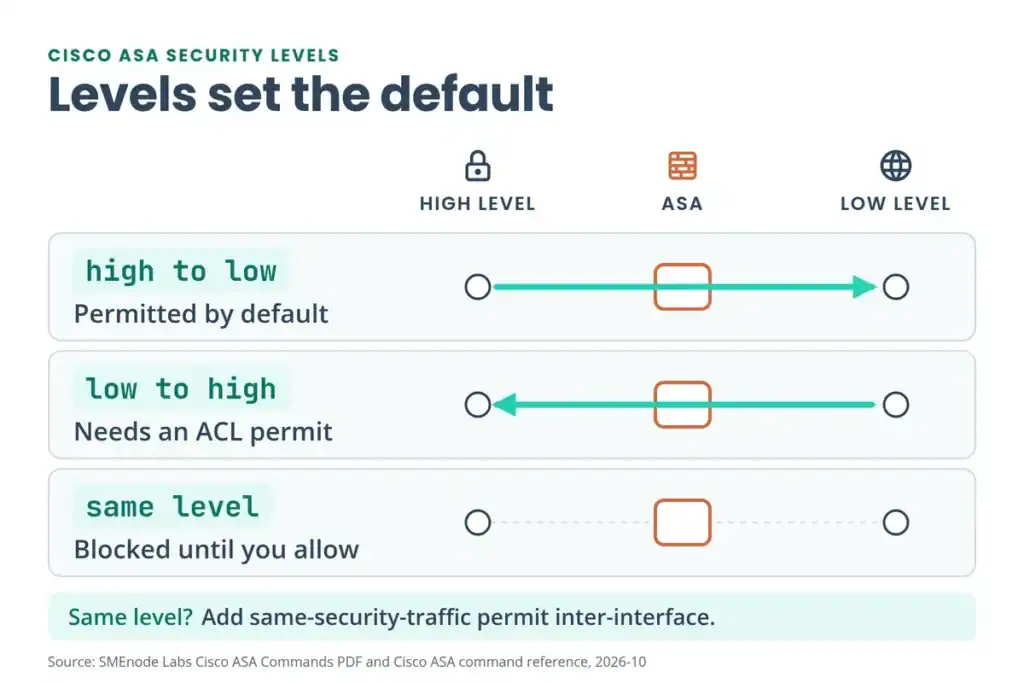
If NAT matches but users still can’t connect, the ACL or the security levels are usually next. Every ASA interface gets a security level from 0 (lowest) to 100 (highest). According to Cisco’s command reference, there’s an implicit permit from a higher level to a lower one, and interfaces at the same level can’t talk unless you enable same-security-traffic permit inter-interface.
interface GigabitEthernet0/0
 nameif outside
 security-level 0
 ip address 203.0.113.1 255.255.255.0
 no shutdown
interface GigabitEthernet0/1
 nameif inside
 security-level 100
 ip address 192.168.1.1 255.255.255.0
 no shutdown
interface GigabitEthernet0/2
 nameif dmz
 security-level 50
 ip address 10.10.10.1 255.255.255.0
 no shutdown
Inside (100) can reach outside (0) and the DMZ (50) by default. The DMZ can reach outside but not inside. Outside can’t start anything toward inside or the DMZ without an ACL permit.
Here’s the rule that catches many people: write the ACL against the real address of the server, not the public one. Cisco’s access rules guide says access rules “always use the real IP addresses” when matching, even with NAT configured, and the NAT and ACL guide says the same for 8.3 and later. For the static NAT server above (192.168.1.100) and the port-forwarded server (192.168.1.101), the inbound ACL looks like this:
access-list OUTSIDE_IN extended permit tcp any host 192.168.1.100 eq 80
access-list OUTSIDE_IN extended permit tcp any host 192.168.1.100 eq 443
access-list OUTSIDE_IN extended permit tcp any host 192.168.1.101 eq 443
access-list OUTSIDE_IN extended deny ip any any log
access-group OUTSIDE_IN in interface outside
ACLs end with an implicit deny, so the explicit deny ip any any log is there to record what gets blocked. The inside and DMZ ACLs follow the same pattern:
access-list INSIDE_OUT extended permit ip 192.168.1.0 255.255.255.0 any
access-list INSIDE_OUT extended deny ip any any log
access-group INSIDE_OUT in interface inside
access-list DMZ_IN extended permit tcp 10.10.10.0 255.255.255.0 192.168.1.0 255.255.255.0 eq 3306
access-list DMZ_IN extended deny ip any any log
access-group DMZ_IN in interface dmz
The DMZ ACL lets DMZ servers reach only the database port (3306) on the inside network. It also blocks everything else leaving the DMZ, so add permits if those servers need DNS or updates. Our Common Ports Cheat Sheet lists the ports you’ll be permitting.
The Cisco ASA and Firepower labs in the CCIE Security Workbook are the place to practise these ACLs and security levels on a real topology, which is the fastest way to remember the real-address rule.
Cisco ASA inspection: when NAT works but FTP, SIP or DNS breaks
Some protocols carry IP addresses inside their payload. Without application inspection, the ASA rewrites the outer address and leaves the embedded one alone, so the session fails even though NAT is correct.
Check before you add anything. According to Cisco’s inspection guide, the default global policy already enables several inspections, including DNS, FTP, SIP, TFTP, NetBIOS, RTSP, SQL*Net and Sun RPC, and the list depends on your software version. ICMP isn’t in the default set, so you add it yourself. Run show running-config policy-map and show service-policy first, then add only what’s missing:
policy-map global_policy
 class inspection_default
  inspect icmp
  inspect icmp error
service-policy global_policy global
service-policy global_policy global applies the policy to every interface. If an interface has its own policy, that one takes over for the interface, as the PDF notes.
Cisco ASA packet-tracer command: test NAT without live traffic
packet-tracer is the most useful single command in this guide. It sends a made-up packet through the ASA’s processing steps and tells you where it would be dropped and why, without touching real traffic. This is the ASA command, not Cisco’s Packet Tracer simulator app.
packet-tracer input inside tcp 192.168.1.10 12345 8.8.8.8 80 detailed
packet-tracer input outside tcp 1.2.3.4 54321 203.0.113.10 443 detailed
The first line tests outbound web traffic from an inside host. The second tests inbound HTTPS to the public address. The word after input is the interface where the packet enters. According to Cisco’s command reference, the tool walks through phases such as UN-NAT, ACL, NAT, IP options and flow creation, and the result is ALLOW if nothing drops the packet. Look for the phase where it stops. One catch: on an existing connection, packet-tracer doesn’t check ACLs, so test with a source and port that have no live session.
Use the logs when packet-tracer says ALLOW but real traffic still fails:
show logging | include Deny
show logging | include nat
show logging | include xlate
Denied entries usually mean an ACL is dropping the traffic before NAT matters. Debug output can slow a busy firewall, and packet-tracer plus show nat detail answer most NAT questions without it. For the path before the ASA, our Network Troubleshooting Commands PDF covers ping, traceroute and the checks around them.
Cisco ASA packet capture: see what the firewall really receives
When packet-tracer says ALLOW but users still fail, capture real packets. A capture records the traffic that reaches an interface, so you can see whether the SYN arrives, which address it carries and whether a reply leaves.
capture CAPIN interface inside match tcp host 192.168.1.10 any eq 80
show capture CAPIN
capture ASPDROP type asp-drop all
show capture ASPDROP
no capture CAPIN
no capture ASPDROP
The first line captures web traffic from one inside host. The asp-drop capture records packets the ASA drops in its accelerated security path. According to Cisco’s troubleshooting guide, capture handles IP traffic only (no ARP) and stops when its buffer is full. Remove each capture with no capture when you finish.
Cisco ASA NAT not working? Three mistakes Cisco’s docs warn about
Most broken ASA NAT comes down to three causes, all listed in Cisco’s NAT troubleshooting TechNote.
- Rules out of order. A broad manual rule near the top matches traffic meant for a more specific rule below it. Reorder the rules or narrow the object.
- Objects that are too broad. A short prefix in a NAT object can match traffic you never meant to translate.
- A NAT RPF failure. If packet-tracer or the logs show “Asymmetric NAT rules matched for forward and reverse flows”, traffic is usually aimed at the real address instead of the mapped one. Point clients at the public address and check the rules.
A NAT rule can also send traffic out a different interface than the routing table would. If that’s your problem, use route-lookup on the rule, as in the identity NAT example above.
Save the configuration with write memory
Changes live only in the running configuration until you save them, so an unsaved fix disappears at the next reload. Save only after everything works, and keep a copy of show running-config from before you started so you can restore it if a change goes wrong.
write memory
copy running-config startup-config
show startup-config | include nat
show startup-config | include access-list
show startup-config | include object
write memory is the short form of copy running-config startup-config. The three include lines confirm the saved file has your NAT rules, ACLs and objects.
Go deeper
Reading show xlate is easy. Fixing NAT with an outage clock running isn’t.
The CCIE Security Workbook: 125 EVE-NG labs across 1,950 pages for ASA, FTD, ISE, AnyConnect and Umbrella. Break NAT in the lab, not on your edge firewall.
Get the CCIE Security Workbook →Where does this free Cisco ASA PDF stop?
This PDF fixes NAT on one ASA. It doesn’t cover failover, VPNs, Firepower or packet capture, and you can’t practise on it without your own firewall. The CCIE Security lab workbook fills that gap. It comes as a PDF workbook plus an EVE-NG image bundle with every topology pre-loaded, and its page says there are no separate downloads for ASA or ISE images. There’s a free sample before you decide.
Still running an older ASA? Check the dates in our Cisco ASA End of Life guide, then read what replaces it in our Cisco Firepower Threat Defense guide. If you also run Fortinet firewalls, our FortiGate CLI Commands PDF is the same kind of cheat sheet for that platform.