
What Is FortiGate SD-WAN?
FortiGate SD-WAN is a FortiOS feature that bundles your internet and VPN links into one logical interface, probes the health of each link, and sends every session over the best one. It runs on the firewall itself. A branch with two ISPs gets failover, load balancing and application-based steering without a separate router.
Fortinet describes SD-WAN as a software-defined way to manage a WAN. It consolidates the physical transport links, called underlays, then monitors and load-balances traffic across them. VPN overlays can be built on top (Fortinet docs). Four pieces do the work:
| Piece | What it is | Where you set it |
|---|---|---|
| SD-WAN members | The interfaces that carry traffic: a port, VLAN, LAG or IPsec tunnel | Network > SD-WAN > SD-WAN Zones |
| SD-WAN zones | Groups of members. Policies, static routes and rules point at a zone | Network > SD-WAN > SD-WAN Zones |
| Performance SLAs | Health checks that measure latency, jitter and packet loss per link | Network > SD-WAN > Performance SLAs |
| SD-WAN rules | The decision: which member carries which traffic | Network > SD-WAN > SD-WAN Rules |
SD-WAN isn’t a VPN. It chooses paths. An IPsec tunnel can be one of the members, but plain ISP links work just as well.
Licensing is simple. Fortinet’s SD-WAN FAQ says no licensing is required based on bandwidth, data transfer or service tiering (Fortinet Secure SD-WAN). Security services you attach to the same policy, such as IPS or web filtering, still depend on your FortiGuard subscription.
The core commands in this guide (members, zones, health checks, the default route and diagnose sys sdwan health-check) appear in Fortinet’s administration guides from FortiOS 7.0 to 7.6. Where a feature needs a newer release, the text says so.
How Does FortiGate SD-WAN Pick a Link?
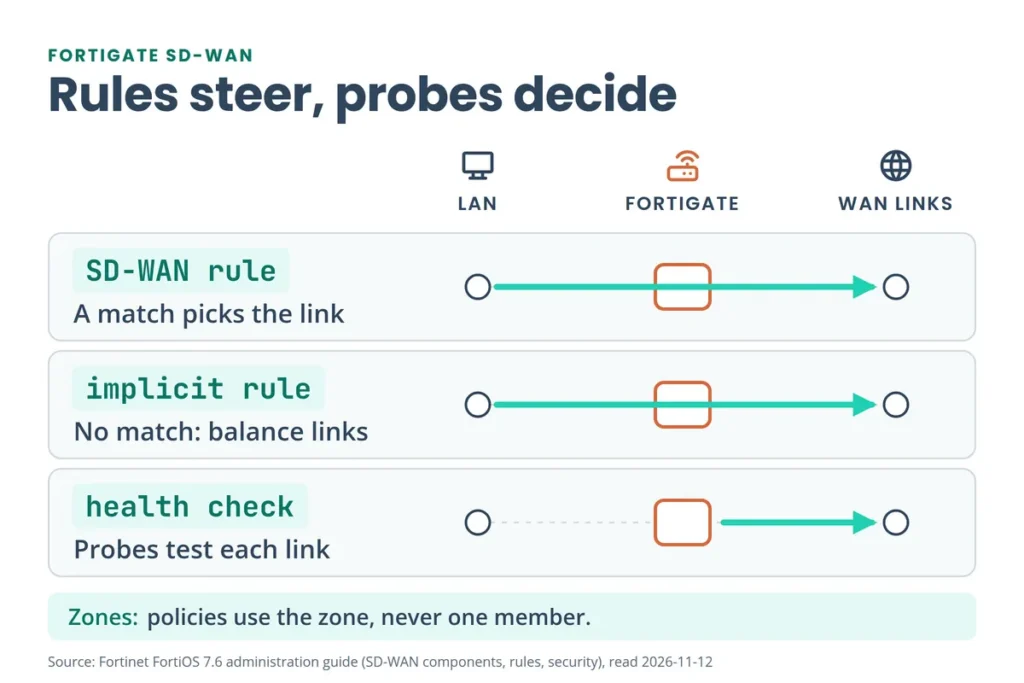
Routing builds the list of possible paths, SD-WAN rules choose between them, and health checks decide which links are allowed. Fortinet’s guide puts it the same way: SD-WAN uses traditional routing to build the basic routing table, then uses SD-WAN rules to steer traffic (SD-WAN components). In order:
- A firewall policy sends LAN traffic to the SD-WAN zone. Policies use zones, never single members.
- A default route points at that zone. The FortiGate balances over the members with ECMP, based on distance and priority.
- An SD-WAN rule matches the session (by destination, internet service or application) and picks a member by its strategy.
- No rule matches? The implicit rule applies. It balances sessions with one of five algorithms, and source-ip-based is the default.
- Health checks run all the time. With Update static route on, a member that fails its check loses its routes and drops out of the choice.
SD-WAN is one stage in a longer path. Our FortiGate packet flow guide shows where routing sits relative to NAT and the policy lookup.
What Should You Check Before You Configure FortiGate SD-WAN?
Five checks save most of the rework:
- Two links or more. One member is enough for SD-WAN to run, but failover and balancing need at least two (Fortinet docs).
- Free the interfaces. A member can be a physical port, VLAN, LAG, IPsec, GRE or IPIP tunnel, or a FortiExtender interface. Fortinet says it must first be removed from any other configuration, so delete or repoint the policies and static routes that name it (members and zones).
- Look for a default config. From FortiOS 7.6.5, some FortiGate models with two WAN ports ship with SD-WAN built: a zone named
sd-wanholding wan1 and wan2, a default policy from lan to sd-wan, and an SLA calledDefault_Pingthat probes 1.1.1.1 and 9.9.9.9 (Fortinet docs). Runshow system sdwanbefore you build a second one. - Set the DHCP distance. A DHCP interface has an administrative distance of 5 by default and static routes use 10. For an even 50/50 split, set the DHCP interface’s distance to 10 (Underlay).
- Write down each link. Note its bandwidth, quality (loss, latency, jitter) and cost. You’ll need those numbers for the health check and the rules.
show system sdwanHow Do You Configure FortiGate SD-WAN?
Follow Fortinet’s quick-start order: members, zone, default route, policy. Then add the health check and the rules.
Step 1: Add the SD-WAN members
Go to Network > SD-WAN, open the SD-WAN Zones tab, and click Create New > SD-WAN Member.
| Field | CLI | What it does |
|---|---|---|
| Interface | interface | The port, VLAN, LAG or tunnel to use |
| SD-WAN Zone | zone | The zone for this member. If you set none, it joins virtual-wan-link |
| Gateway | gateway | The ISP gateway. Leave 0.0.0.0 on a DHCP link |
| Cost | cost | 0 to 4294967295, default 0. Lowest Cost (SLA) rules use it, and lower wins |
| Priority | priority | 1 to 65535, default 1. Lower wins, in the member’s static route and in rules, including the implicit rule. Newer GUIs call it Fallback priority |
| Status | status | Enable or disable the member |
config system sdwan
    set status enable
    config members
        edit 1
            set interface "wan1"
        next
        edit 2
            set interface "wan2"
            set gateway 10.100.20.2
        next
    end
end
This is Fortinet’s own example. wan1 gets its address and gateway from DHCP, so it has no gateway line. wan2 is static.
Step 2: Group the members into zones
Zones are what you point policies, static routes and rules at. You can move a member between zones at any time, and a zone can hold a single member when that link needs its own treatment. A common layout is an Underlay zone for ISP links and an Overlay zone for VPN tunnels (members and zones).
config system sdwan
    config zone
        edit "Underlay"
        next
    end
    config members
        edit 1
            set interface "wan1"
            set zone "Underlay"
        next
        edit 2
            set interface "wan2"
            set zone "Underlay"
        next
    end
end
Step 3: Point the default route at the zone
Go to Network > Static Routes > Create New. Set Destination to Subnet 0.0.0.0/0.0.0.0, set Interface to the SD-WAN zone, and keep Status enabled.
config router static
    edit 1
        set sdwan-zone "Underlay"
    next
end
A route out of an SD-WAN zone has an administrative distance of 1 by default. You don’t add each member’s gateway to the static routes table. The FortiGate balances with ECMP using distance and priority (Routing).
Step 4: Allow traffic to the zone
Go to Policy & Objects > Firewall Policy > Create New and set:
| Setting | Value |
|---|---|
| Incoming Interface | Your LAN interface (internal in Fortinet’s example) |
| Outgoing Interface | The SD-WAN zone |
| Source, Destination | all to start, then tighten |
| Action | ACCEPT |
| NAT | On, with IP Pool Configuration set to Use Outgoing Interface Address |
| Logging | Log Allowed Traffic, All Sessions, so you can verify later |
The policy applies to every member in the zone. Fortinet is explicit that individual members can’t be used in policies (Security).
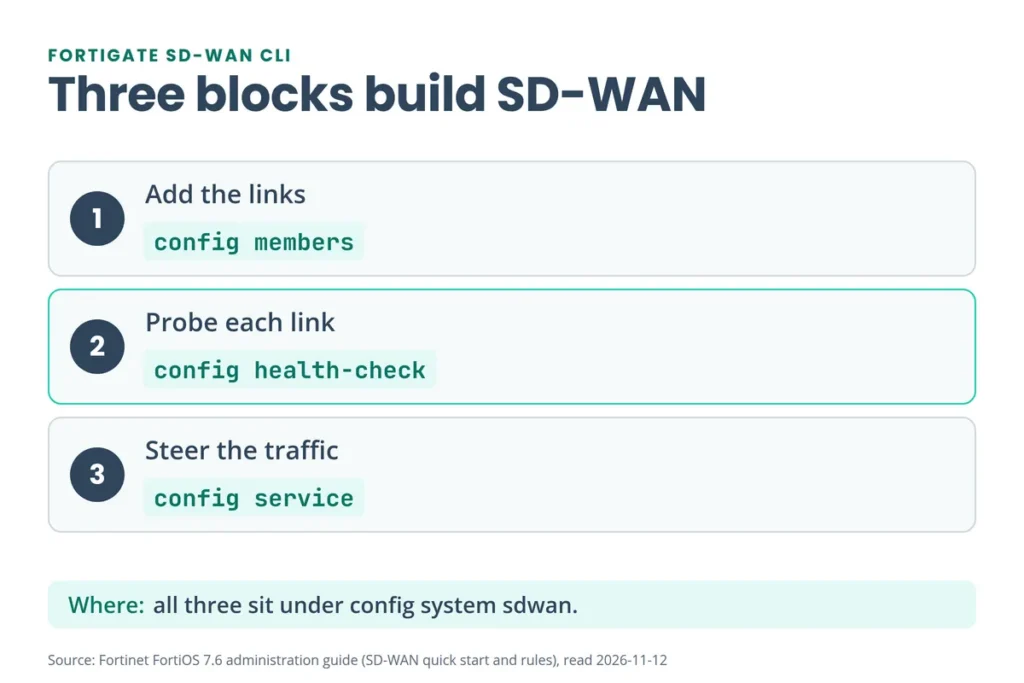
Three blocks sit under config system sdwan: the members, a health check and a rule. You’ve built the first. The next two sections build the other two.
How Do You Set Up a FortiGate SD-WAN Performance SLA?
A performance SLA, also called a health check, sends probes through each member and measures latency, jitter and packet loss. With Update static route on, a member that fails has its routes withdrawn and traffic uses the other links. When the link recovers, the routes come back (Performance SLAs).
Go to Network > SD-WAN, open the Performance SLAs tab, and click Create New.
config system sdwan
    config health-check
        edit "Ping"
            set server "8.8.8.8" "8.8.4.4"
            set protocol ping
            set members 1 2
            set update-static-route enable
        next
    end
end
Each line comes from Fortinet’s examples. The two-server set server form is the one in the default config. Here are the settings and defaults that matter (Performance SLA overview):
| Setting | Default or rule |
|---|---|
| Probe mode | Active (probes), Passive (uses live sessions, no extra traffic) or Prefer Passive |
| Protocol | GUI: Ping, HTTP, DNS. CLI adds tcp-echo, udp-echo, https, twamp, tcp-connect and ftp |
| Server | Up to two. Both must fail before the health check fails. A server can sit in only one SLA |
| Participants | SD-WAN members only. They don’t have to share a zone |
| Check interval | 500 ms (range 20 to 3,600,000). HTTP and HTTPS checks jump to 120,000 ms |
| Failures before inactive | 5 |
| Restore link after | 5 good checks |
| SLA target | Latency 5 ms, jitter 5 ms, packet loss 0% |
Four details trip people up:
- Timers. At the defaults, 5 failed checks at 500 ms each is about 2.5 seconds before a member shows inactive. That’s arithmetic from the defaults, not a Fortinet promise, because probe timeouts add to it. Failures and restore counts exist to stop flapping.
- SLA targets are optional for link failure. Fortinet says targets aren’t required for link monitoring. You need them when a rule steers by quality. Lowest Cost (SLA) rules require one.
- The defaults are tight. Fortinet’s advice is to set a target just under what the application tolerates. If it needs under 100 ms, use 90 ms. Too tight and traffic flips between links. Too loose and the FortiGate does nothing when quality drops.
- Probe a real resource. A server that reflects the service you care about tests the real path. Fortinet highly recommends an address or FQDN that reflects the resource, so the traffic path counts.
On a factory reset or a new VDOM, FortiGate also creates five predefined SLAs: DNS, FortiGuard, Gmail, Google Search and Office 365. Add the participants and adjust the values.
The SD-WAN lab in the FortiGate NSE4 Lab Workbook builds this SLA on EVE-NG and then verifies it.
Go deeper
This page gets SD-WAN running.
Build the rules and the SLA yourself in the FortiGate NSE4 Lab Workbook on EVE-NG.
See the FortiGate NSE4 Lab Workbook →How Do FortiGate SD-WAN Rules Work?
SD-WAN rules decide which member carries which traffic. A rule matches on source, destination, internet service or application, then uses a strategy to pick the member. If no rule matches, the implicit rule applies (SD-WAN rules). Create one at Network > SD-WAN > SD-WAN Rules > Create New.
| Strategy | CLI mode | How it picks a link | SLA target |
|---|---|---|---|
| Manual | manual (the default) | The order you list the members. No health checks | Not used |
| Best Quality | priority | The best latency, jitter, packet loss or bandwidth | Optional |
| Lowest Cost (SLA) | sla | The lowest-cost member that meets the SLA | Required |
Fortinet also lists Automatic (a legacy rule you can only set in the CLI), Spillover, Weight-based spillover and a hybrid of priority and SLA modes (Strategy).
Best Quality. Fortinet’s example sends Gmail over whichever of wan1 and wan2 has the lowest latency to a probe server. In the GUI: Internet Service Google-Gmail, Strategy Best Quality, Interface preference wan1 and wan2, Measured SLA google, Quality criteria Latency.
config system sdwan
    config service
        edit 1
            set name "gmail"
            set mode priority
            set internet-service enable
            set internet-service-id 65646
            set health-check "google"
            set link-cost-factor latency
            set priority-members 1 2
        next
    end
end
The link-cost factors are latency, jitter, packet-loss, inbandwidth, outbandwidth, bibandwidth and custom-profile-1. By default the member first in the interface preference list gets a 10% advantage (link-cost-threshold 10). With two links at 200 ms, that member counts as about 182 ms and wins (Best Quality).
Lowest Cost (SLA). Here the cost you set on each member matters. Fortinet’s example gives wan1 cost 10 and wan2 cost 5, with an SLA target of 10 ms latency and 5 ms jitter (Lowest Cost).
config system sdwan
    config members
        edit 1
            set interface "wan1"
            set cost 10
        next
        edit 2
            set interface "wan2"
            set cost 5
        next
    end
    config health-check
        edit "google"
            set server "google.com"
            set members 1 2
            config sla
                edit 1
                    set latency-threshold 10
                    set jitter-threshold 5
                next
            end
        next
    end
    config service
        edit 1
            set name "gmail"
            set mode sla
            set internet-service enable
            set internet-service-id 65646
            config sla
                edit "google"
                    set id 1
                next
            end
            set priority-members 1 2
        next
    end
end
The outcome, in Fortinet’s words: when both links meet the SLA, Gmail uses only wan2. If only wan1 meets it, Gmail uses wan1 even though it costs more. If neither meets it, wan2 is used.
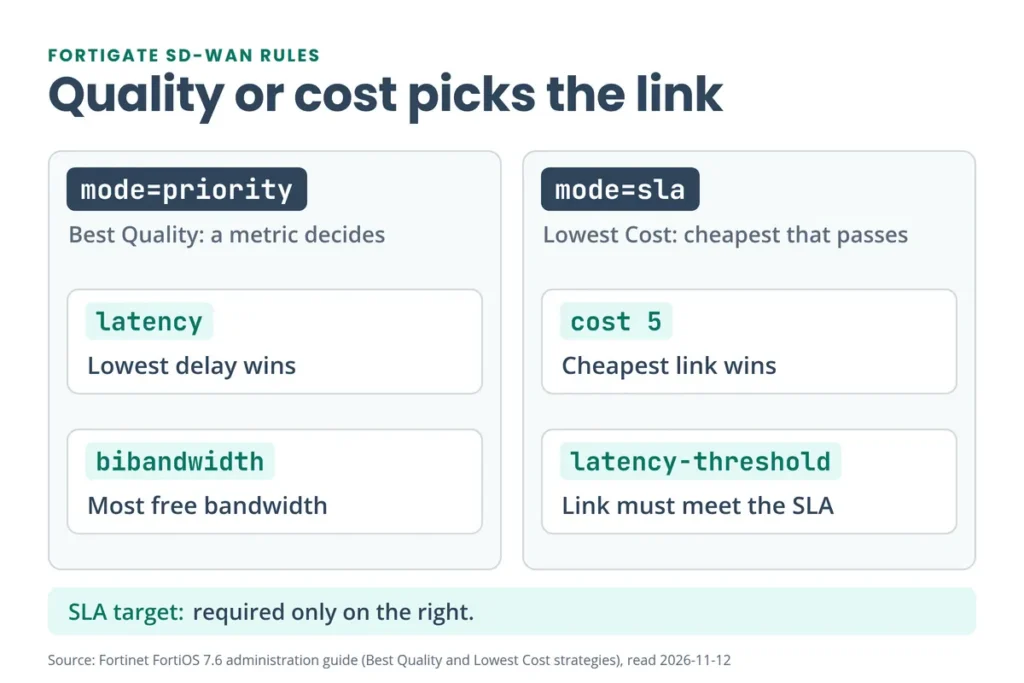
Cost or priority? Cost only matters in Lowest Cost (SLA) rules. The cheapest member that meets the SLA wins, and equal costs fall back to the order of the interface preference list. Priority orders members in the static route and in rules, including the implicit rule. In both, the lower number wins.
Manual rules skip health checks. They work like policy routes with application awareness added. set priority-members 2 1 puts wan2 first, and set hold-down-time 60 controls how long the FortiGate waits before switching back to the primary link after a failover.
Rules are where SD-WAN gets hard to learn from screenshots alone. The workbook’s SD-WAN lab includes the SD-WAN Rules topic, and its SD-WAN with Security Profiles chapter adds traffic steering with AV, IPS, web filtering and application control.
How Do You Set Up FortiGate SD-WAN Load Balancing and Failover?
Basic failover needs only members and a performance SLA with Update static route on. When a link fails, its routes are removed and sessions use the healthy link. Load balancing is what the implicit rule does for traffic no rule matches. You pick one of five algorithms (Implicit rule):
| Algorithm | CLI load-balance-mode | How it splits traffic |
|---|---|---|
| Source IP | source-ip-based (default) | A source IP always takes the same path |
| Sessions | weight-based | By session ratio, using each member’s weight |
| Source-Destination IP | source-dest-ip-based | A source and destination pair always takes the same path |
| Volume | measured-volume-based | By traffic volume ratio, using each member’s volume ratio |
| Spillover | usage-based | Fills one link, then spills the rest onto the next |
For an 80/20 session split between two links:
config system sdwan
    set load-balance-mode weight-based
    config members
        edit 1
            set interface "wan1"
            set weight 80
        next
        edit 2
            set interface "wan2"
            set weight 20
        next
    end
end
Spillover suits a metered second link. Fortinet’s example uses a wan1 with 10 Mbps down and 2 Mbps up, with an ingress threshold of 10000 and an egress threshold of 2000 (ingress-spillover-threshold and spillover-threshold on the member). It also notes that auto-asic-offload must be off in the firewall policy.
Want one link preferred, with the other as a backup? Use a Lowest Cost (SLA) rule like the one above. The cheaper link carries the traffic while it meets the SLA, and the other takes over when it doesn’t. Since FortiOS 7.4.1, load balancing also lives inside Manual and Lowest Cost (SLA) rules (set load-balance enable).
SD-WAN covers ISP and link failures. It doesn’t replace a second firewall. For that, pair it with HA: our FortiGate HA setup and troubleshooting PDF covers the cluster side, and it recommends an independent second WAN with SD-WAN health checks for the ISP side.
How Do You Check That FortiGate SD-WAN Is Working?
Start in the GUI. Open Network > SD-WAN > Performance SLAs, pick the SLA, and read packet loss, latency and jitter per member. The SD-WAN Zones tab shows bandwidth, volume and sessions per member. Then confirm the same things in the CLI (Results):
get router info routing-table all
diagnose sys sdwan health-check
diagnose sys sdwan service4 1
diagnose sys sdwan sla-log Ping 1
get router info routing-table allshows the default route with one entry per active member, asS* 0.0.0.0/0via wan1 and via wan2 in Fortinet’s example.diagnose sys sdwan health-checklists each member asstate(alive)with its packet loss, latency and jitter. Fortinet’s example shows 15.247 ms and 13.621 ms latency with 0% loss.diagnose sys sdwan service4 1shows which members rule 1 selected.diagnose sys sdwan sla-log Ping 1replays the last 10 minutes of that health check for member 1.
Then test it. Pull one WAN cable and run diagnose sys sdwan health-check again. At default timers you should see that member stop showing as alive after a few seconds, and its route leave the routing table. Reconnect it, and after 5 good checks the route returns. Our FortiGate CLI Commands PDF lists more of these diagnose commands.
What Are the Most Common FortiGate SD-WAN Mistakes?
| Symptom | Cause | Fix |
|---|---|---|
| Can’t add an interface as a member | It’s still used in a policy, static route or other config | Remove or repoint those references first |
| Can’t pick wan1 in a firewall policy | Policies take zones, not members | Select the SD-WAN zone |
| A DHCP link and a static link don’t split 50/50 | DHCP distance defaults to 5, static is 10 | Set the DHCP interface’s distance to 10 |
| Traffic flips between ISPs | The SLA target is too tight, or failures and restore counts are too low | Set targets just under the app’s limit. Keep the 5 and 5 defaults to start |
| A slow link keeps getting traffic | There’s no SLA target, or no rule uses one. Without them the health check only spots a dead link | Add an SLA target and use it in a Best Quality or Lowest Cost (SLA) rule |
| A Lowest Cost (SLA) rule doesn’t pick links as expected | It requires an SLA target on the health check | Enable SLA Target on the health check |
| The second SLA won’t use your probe server | A server can be used in only one performance SLA | Pick a different probe server |
| Spillover never starts | auto-asic-offload is on in the firewall policy | Turn it off in that policy |
Each row traces back to a statement in Fortinet’s SD-WAN guide, linked in the sections above.
What Does the Free FortiGate SD-WAN PDF Show?
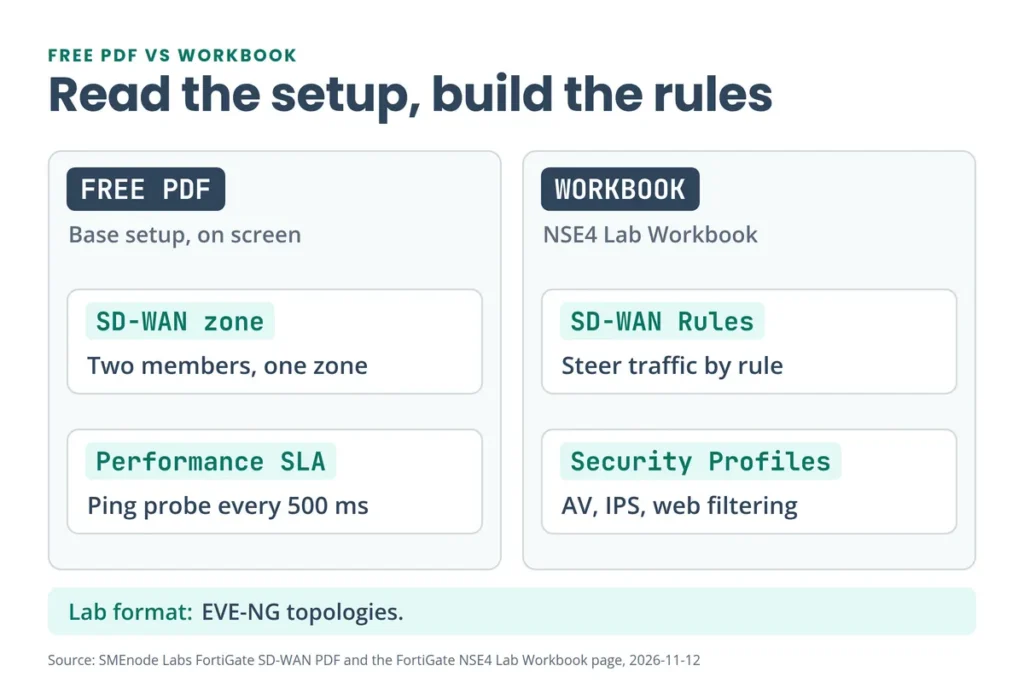
The PDF’s SD-WAN lab screens come from a FortiGate-VM running FortiOS 7.0.15. They cover the base setup you just read about:
- Zone. An SD-WAN zone named
SD-WAN-Cairo. - Members. Two members: Orange (port1) with the static gateway 192.168.40.2, and WE (port2) with a dynamic gateway. Both use cost 0 and priority 1.
- Performance SLA. A health check named Ping: Active mode, ping protocol, servers 8.8.8.8 and 8.8.4.4, both members as participants. It uses the 500 ms interval and the 5 and 5 counts, with Update static route on.
- Default route. 0.0.0.0/0 pointing at the zone.
- Zones view. The SD-WAN Zones tab with download and upload for each member.
It stops at the base setup. The SLA target is off, there are no SD-WAN rules, and there’s no failover test. Fortinet’s guides, summarized above, cover those. The FortiGate NSE4 Lab Workbook builds the whole thing as a lab: topology, IP addressing, lab setup, SD-WAN zone, Performance SLA, SD-WAN rules and verification.
To build the lab yourself, our guide to adding FortiGate VM to EVE-NG walks through the setup.
Where Should You Go Next?
- What Is FortiGate? covers the platform SD-WAN runs on.
- What Is SD-WAN? explains the vendor-neutral idea.
- IPsec VPN Troubleshooting helps when an IPsec member of your zone won’t come up.
- FortiGate HA Setup and Troubleshooting adds firewall redundancy to your link redundancy.
- FortiGate CLI Commands is the quick reference for diagnose and get commands.



No questions yet. Ask the first one.