
What Is SNMP and What Is It Used For?
SNMP stands for Simple Network Management Protocol. It’s an application-layer protocol, so it sits at Layer 7 of the OSI model. A manager (usually called the NMS, for network management system) sends requests to an agent, which is the software running on a router, switch, firewall or printer. The agent answers with a value or an error.
In practice, a monitoring tool asks every device the same few questions every few minutes. Is this interface up? How busy is the CPU? How many bytes crossed port Gi0/1?
The device can also speak first. When a link drops or someone fails a login, it sends the manager an alert on its own.
Three facts explain most SNMP behaviour:
- Polling always starts at the manager. The device never decides to be polled.
- SNMP is stateless. Each request stands alone, and the device doesn’t know why you asked.
- The agent doesn’t log what was polled unless you turn debugging on.
That last point matters when something breaks. The troubleshooting section below shows four ways to catch a bad poller without guessing.
SNMP Components: Manager, Agent, MIB and OID
SNMP has four parts. Learn these and every diagram makes sense.
| Part | What it is | Example |
|---|---|---|
| Manager (NMS) | The monitoring server, script or tool that sends requests | A polling server at 192.0.2.50 |
| Agent | The SNMP software on the device that answers | A Cisco router or switch |
| MIB | The tree of objects the agent can report, like a directory | The system and interfaces groups |
| OID | The numeric address of one object in that tree | 1.3.6.1.2.1.1.3.0 |
What Is an OID in SNMP?
An OID (object identifier) is the numeric path to one value in the MIB tree. The example 1.3.6.1.2.1.1.3.0 is the device’s uptime, called sysUpTime.0 in the standard system group (RFC 3418). The trailing .0 means a single value rather than a table row.
The MIB is the translator. It maps names like sysUpTime to those numbers, so tools show you names while the packets carry numbers.
SNMP Ports: UDP 161 vs 162
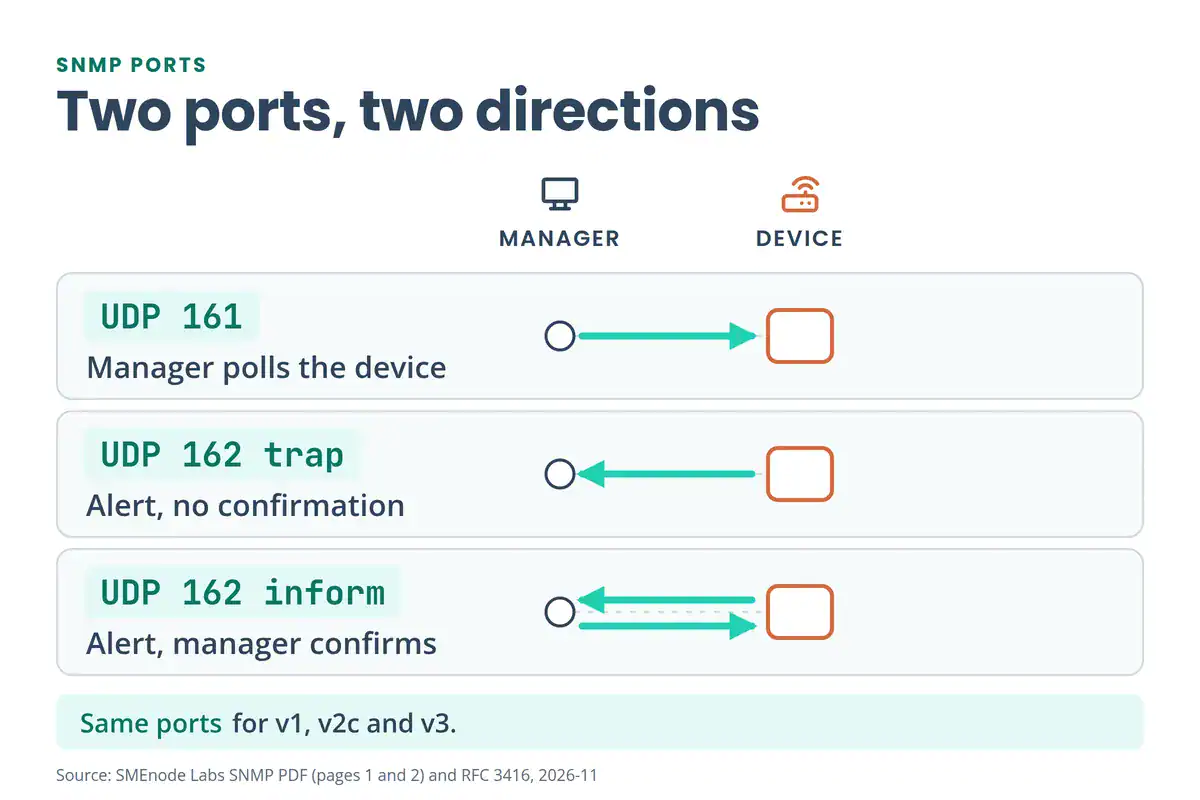
SNMP uses UDP, not TCP. Port 161 carries the manager’s requests to the device and the device’s replies back. Port 162 carries the device’s alerts to the manager. All three versions use the same two ports.
| Port | Transport | Direction | Carries |
|---|---|---|---|
| 161 | UDP | Manager to device (replies come back) | Get, GetNext, GetBulk and Set requests, plus the responses |
| 162 | UDP | Device to manager | Traps and informs |
SNMP over TCP exists but is rare. The secure transports, SNMP over TLS and DTLS, use ports 10161 and 10162 (Wikipedia, SNMP).
For a firewall rule, allow UDP 161 from the poller to the device and UDP 162 from the device to the manager. Don’t open 161 to the whole network. Need the full list of well-known ports? The common ports and protocols cheat sheet has them in one table.
SNMP Message Types: Get, GetNext, GetBulk, Set, Trap and Inform
SNMP has seven message types you’ll meet in a capture or a textbook. Five go from the manager to the device or back as a pair, and two are alerts.
| Message | Direction | What it does | Reply |
|---|---|---|---|
| GetRequest | Manager to device | Reads one specific OID | Response |
| GetNextRequest | Manager to device | Reads the next OID in order, used to walk tables | Response |
| GetBulkRequest (v2c, v3) | Manager to device | Reads many rows in one request | Response |
| SetRequest | Manager to device | Writes a value, so it needs write access | Response |
| Response | Device to manager | Returns the values or an error | None |
| Trap | Device to manager | Sends an alert | None |
| Inform (v2c, v3) | Device to manager | Sends an alert and asks for confirmation | Manager confirms |
GetNext can cost the device a lot of CPU on big tables, because it asks for one row at a time. GetBulk fixes that. RFC 3416 says its purpose is “to request the transfer of a potentially large amount of data”, which is why monitoring tools prefer it for table walks.
SNMP Trap vs Inform: What’s the Difference?
A trap is an unsolicited alert. The device sends it to UDP 162 and never learns whether it arrived. RFC 3416 states that there’s no confirmation for this delivery method.
An inform carries the same kind of alert, but the manager confirms it. If the confirmation doesn’t arrive, the device sends the alert again. Informs need v2c or v3, because v1 has traps only. The trade-off, as Cisco’s IOS SNMP documentation puts it, is reliability against extra traffic: every retry uses bandwidth.
SNMP Versions: v1 vs v2c vs v3
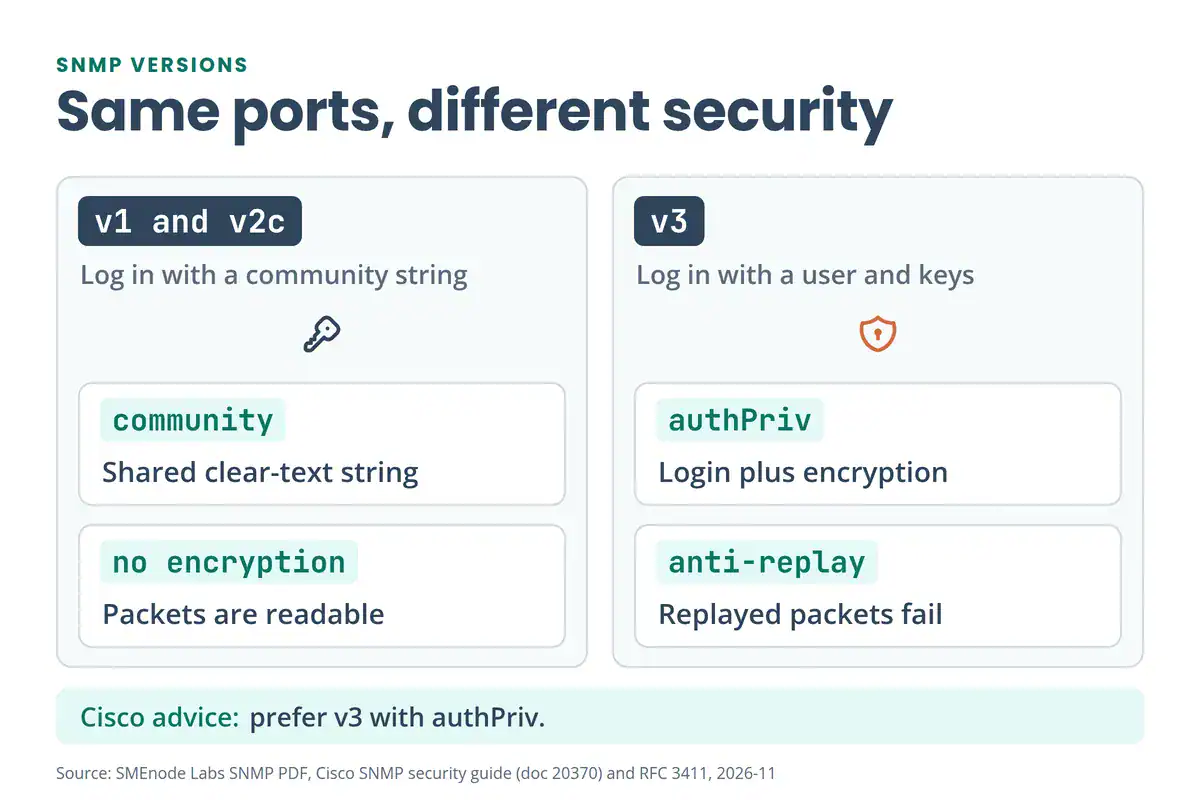
The three versions differ in one thing above all: how they check who you are.
| Version | Login | Encryption | Worth knowing |
|---|---|---|---|
| v1 | Community string, sent in clear text | None | The original. Traps only, no informs |
| v2c | Community string, sent in clear text | None | Adds GetBulk and informs, and performs better than v1 |
| v3 | Username plus an authentication protocol | Optional | Adds replay protection, plus groups and views for access control |
SNMPv3 has three security levels, defined in RFC 3411:
- noAuthNoPriv: no authentication and no privacy. It’s a username and nothing else.
- authNoPriv: authentication, but the data isn’t encrypted.
- authPriv: authentication and encryption. This is the level to aim for.
So which one should you run? Cisco’s SNMP security guide says to prefer v3 with authPriv, and to avoid noAuthNoPriv, authNoPriv, MD5 and DES where stronger options exist. If a device only speaks v2c, keep it behind an ACL and a view. The next sections show both.
v2c is simpler to set up. v3 is safer, but it takes more configuration and more places to make a typo.
Go deeper
The exam asks you to describe SNMP.
Build and break it yourself in the CCNA Lab Workbook: SNMP, DHCP, DNS and NTP on a multi-VLAN topology.
See the CCNA Lab Workbook →SNMP Community Strings: Authentication vs Authorization
A community string is the shared, password-like text that v1 and v2c use to authenticate a request. It travels in clear text, so anyone who captures the packet can read it.
SNMP keeps two questions apart, and mixing them up causes most troubleshooting detours:
| Question | v1 and v2c | v3 |
|---|---|---|
| Who are you? (authentication) | Community string | Username plus keys |
| What can you reach? (authorization) | ACL, view and RO or RW | Views and groups |
A request can pass authentication and still fail authorization. You send the right string from the wrong IP address. Or you ask for an OID your view hides. Or you try a Set with a read-only string.
In each case the string is fine and the request still dies.
Cisco’s guide adds four habits worth copying:
- Avoid well-known strings like “public” and “private”. Use long, hard-to-guess ones.
- Use a separate string for traps, so a leaked trap string can’t be used to poll the device.
- Avoid read-write communities unless you need one, and tie it to a single management station.
- Remove community strings you don’t use.
How to Configure SNMP on a Cisco Device
These examples use Cisco IOS syntax. 192.0.2.50 is a documentation address, so swap in your poller’s real IP. Build them on a lab router first. The CCNA Lab Workbook has a scenario that runs SNMP, NTP, DHCP and DNS across several VLANs, which makes a safe place to practise.
How Do You Configure SNMPv2c With an ACL?
snmp-server community MONITOR RO 10
access-list 10 permit 192.0.2.50
snmp-server enable traps snmp authentication
RO means read-only. The 10 at the end binds the community to ACL 10, so only 192.0.2.50 can use it. The last line turns on authentication-failure traps, which stay silent until you add a trap destination (shown below). Replace MONITOR with a long random string before you use this anywhere real.
How Do You Limit What a Community Can See With an SNMP View?
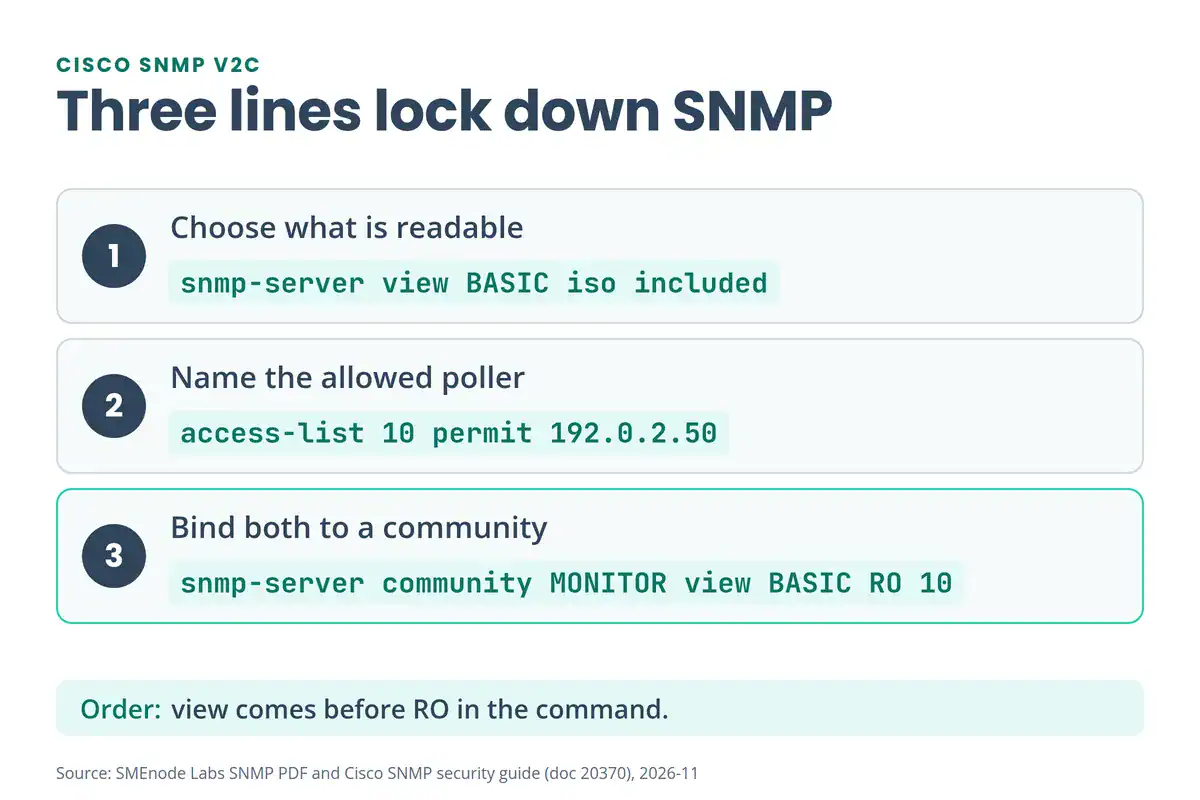
snmp-server view BASIC iso included
snmp-server view BASIC ifTable excluded
snmp-server community MONITOR view BASIC RO 10
A view is a filter on the MIB tree. iso included opens the whole tree, and ifTable excluded hides the interface table. The view keyword goes before RO in the community line. Cisco’s own example follows the same order: snmp-server community C1sc03xample view myview RO 11.
Views stop a poller from walking expensive tables, and they shrink what a stolen string can reveal. Most monitoring tools do read interface counters, so exclude only what you don’t poll.
How Do You Configure SNMPv3 With authPriv?
snmp-server group MONITORS v3 priv read BASIC access 10
snmp-server user poller MONITORS v3 auth sha AUTH-PASSPHRASE priv aes 128 PRIV-PASSPHRASE
The group sets the security level (priv means authPriv), the view the group can read and the ACL. The user sits inside that group with SHA authentication and AES encryption. Use long passphrases and keep them different from each other. AES 128 is the baseline, and some platforms also offer AES 192 and 256, so check what yours supports.
How Do You Send SNMP Traps to Your Monitoring Server?
snmp-server host 192.0.2.50 version 2c TRAP-COMMUNITY
snmp-server enable traps snmp authentication
Two commands do two jobs. snmp-server enable traps picks which events the device reports. snmp-server host picks who receives them.
Cisco’s IOS documentation notes that if you don’t enter a host line, no notifications are sent, so the first command alone does nothing. Use a different string for traps than for polling.
How Do You Check SNMP on a Cisco Device?
These commands only read state, so they’re safe to run on a live device.
| Command | What it shows |
|---|---|
show snmp | Packet counters, including Get-request and Get-next counts, “Unknown community name” and “Bad SNMP version errors” |
show running-config | section snmp | Everything SNMP in the running config |
show snmp view | The views you defined |
show snmp host | Where traps and informs go |
show snmp group and show snmp user | v3 groups and users |
show access-lists | The ACL that guards each community, with match counts |
A quick test: run show snmp, wait a minute, run it again. If “Unknown community name” climbs, something is polling with the wrong string. The Cisco commands cheat sheet lists the other show commands you’ll want next to these.
Why Does SNMP Authentication Fail and How Do You Fix It?
Most SNMP failures happen after authentication, not during it. The string is right, and something else blocks the request.
v1 and v2c failures, in the order to check:
- Wrong community string
- Right string, wrong source address (the ACL blocks it)
- Right string, but the OID sits outside the view
- Version mismatch (the poller speaks v1 and the device expects v2c, or the reverse)
- A read-only string used for a Set
v3 failures:
- Wrong username
- Wrong authentication protocol or password
- Wrong privacy password
- Engine ID mismatch
- Time window failure (the clocks differ too much)
- User not bound to a group or a view
The fix order follows from the list. Run show snmp first. If the counter for an unknown community climbs, correct the string on the poller. If the string is right, check the ACL, then the view, then the version, then whether the request was a Set.
How Do You Find the Device Polling With the Wrong Community String?
Four methods, safest first:
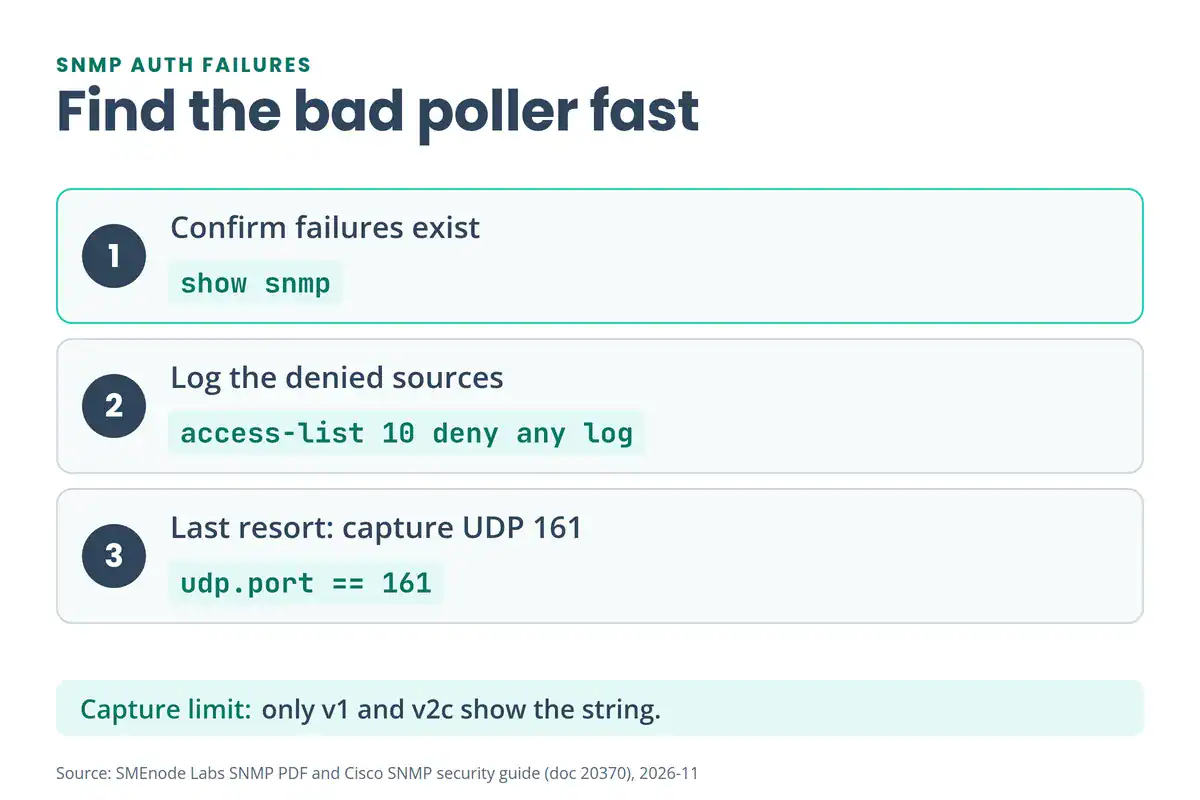
- Read the counters.
show snmptells you failures exist, but not who caused them. - Check the log. Many IOS releases log an authentication failure with the polling host’s address, as a
%SNMP-3-AUTHFAILmessage. The wording varies by release, so look in your log buffer rather than waiting for an exact line. - Log the ACL denials. Add
access-list 10 deny any logas the last line of the community’s ACL. Cisco’s guide recommends this, and the log shows the source of every denied packet. - Capture the traffic. Mirror the port facing the poller with a SPAN session and filter for UDP 161 in Wireshark. You get the source, the OIDs and the message types with zero CPU cost on the device. For v1 and v2c you’ll also see the community string. For v3 with authPriv, the payload is encrypted.
The network troubleshooting commands cheat sheet covers the wider routine for when SNMP isn’t the only thing misbehaving.
Is debug snmp packets Safe to Run?
Debugging doesn’t crash a device by default. Under heavy polling, though, it can overload the CPU and the logging. Treat it as the last resort and keep it short:
no logging console
terminal monitor
debug snmp packets
! wait for one or two poll cycles, then stop:
undebug all
Four rules go with it:
- Use SSH, not the console.
- Turn off console logging first, so the console isn’t flooded.
- Run
terminal monitorso your SSH session actually shows the debug lines. - Capture one or two poll cycles, then stop.
The output format varies by IOS release, so try it on a lab device before you rely on it. Don’t count on it to print the community string.
SNMP High CPU on a Cisco Device: Causes and Fixes
SNMP can push a device’s CPU up without anything being misconfigured. Four causes show up most:
- Poll intervals that are too short
- Large table walks, such as
ifTable,entPhysicalandcbQos - Several monitoring systems polling the same device
- GetNext used where GetBulk would do
The fixes match the causes:
- Poll less often.
- Use views to keep pollers out of the big tables.
- Restrict the pollers with an ACL, so only the systems you know can ask.
- Switch the poller to GetBulk where it supports it.
Moving to v3 is a security fix, not a CPU fix. It adds authentication and encryption work, so don’t expect it to lower the load.
SNMP Security Best Practices
Cisco’s guide and the practical habits above add up to a short checklist:
- Prefer v3 with authPriv. Avoid noAuthNoPriv and authNoPriv.
- Bind every community to an ACL that names the poller.
- Use views to limit what each community can read.
- Use a separate string for traps, and never use “public” or “private”.
- Don’t enable read-write access unless you have a specific need, and then dedicate it to one management station.
- Watch for authentication-failure traps (
snmp-server enable traps snmp authentication). - Remove community strings and users you no longer use.
SNMP controls monitoring access. For who can log in to the device itself, see TACACS+ vs RADIUS.
SNMP vs Syslog vs NetFlow: Which One Answers What?
The three protocols look similar in a monitoring design, but each answers a different question.
| Protocol | Ports | Question it answers | Direction |
|---|---|---|---|
| SNMP | UDP 161 and 162 | What is the CPU doing right now? | Manager polls, device alerts |
| Syslog | UDP 514 | What happened, and when? | Device streams text logs to a server |
| NetFlow | Configurable | Who talked to whom, and how much? | Device exports flow records |
Most networks run all three. SNMP is a monitoring tool far more than a configuration tool. NETCONF and YANG cover the configuration side that SNMP never handled well.
How Do You Test SNMP From Linux With snmpwalk and snmpget?
The Net-SNMP tools let you poll a device from any Linux box. Use them to prove the string, the ACL and the view work before you point a monitoring tool at the device.
snmpget -v2c -c MONITOR 192.0.2.1 sysUpTime.0
snmpwalk -v2c -c MONITOR 192.0.2.1 system
snmpget -v3 -l authPriv -u poller -a SHA -A AUTH-PASSPHRASE -x AES -X PRIV-PASSPHRASE 192.0.2.1 sysUpTime.0
Here 192.0.2.1 is the device. snmpget reads one OID, and snmpwalk walks a whole branch. In the v3 line, -l sets the security level, -u the user, -a and -A the authentication protocol and passphrase, and -x and -X the privacy protocol and passphrase (Net-SNMP tutorial).
Is SNMP on the CCNA 200-301 Exam?
Yes. In the v1.1 blueprint it’s objective 4.4, “Explain the function of SNMP in network operations” (Cisco v1.1 exam topics). In the v2.0 blueprint it moves to objective 5.4, “Describe the function of SNMP in network operations” (Cisco v2.0 exam topics).
Both versions word it as a question about what SNMP does, not how to configure it. So expect questions on the manager and agent roles, the ports, traps versus informs, and why v3 beats v2c. The configuration in this page goes beyond the exam, and it’s what you’ll use at work.
The CCNA Lab Workbook walks through SNMP in its network services chapter, on a live topology. For exam practice, try the free CCNA 200-301 study guide and the CCNA practice test.
SNMP Cheat Sheet: Commands at a Glance
! Configure (v2c, read-only, locked to one poller)
snmp-server view BASIC iso included
access-list 10 permit 192.0.2.50
snmp-server community MONITOR view BASIC RO 10
snmp-server enable traps snmp authentication
snmp-server host 192.0.2.50 version 2c TRAP-COMMUNITY

! Check
show snmp
show running-config | section snmp
show snmp view
show snmp host
show access-lists

! Troubleshoot (last resort, keep it short)
no logging console
terminal monitor
debug snmp packets
undebug all
What’s Inside the Free SNMP PDF?
The free PDF is a six-page reference for Cisco devices. It covers:
- Pages 1 and 2: what SNMP is, the manager, agent, MIB and OID, the ports, the three versions and the message types
- Pages 2 and 3: authentication versus authorization, and why requests fail
- Pages 3 and 4: the Cisco v2c configuration, ACLs and views, and the show commands
- Pages 4 and 5: debugging, packet capture and the causes of high CPU
- Page 6: a troubleshooting decision tree, security habits and a one-page command sheet
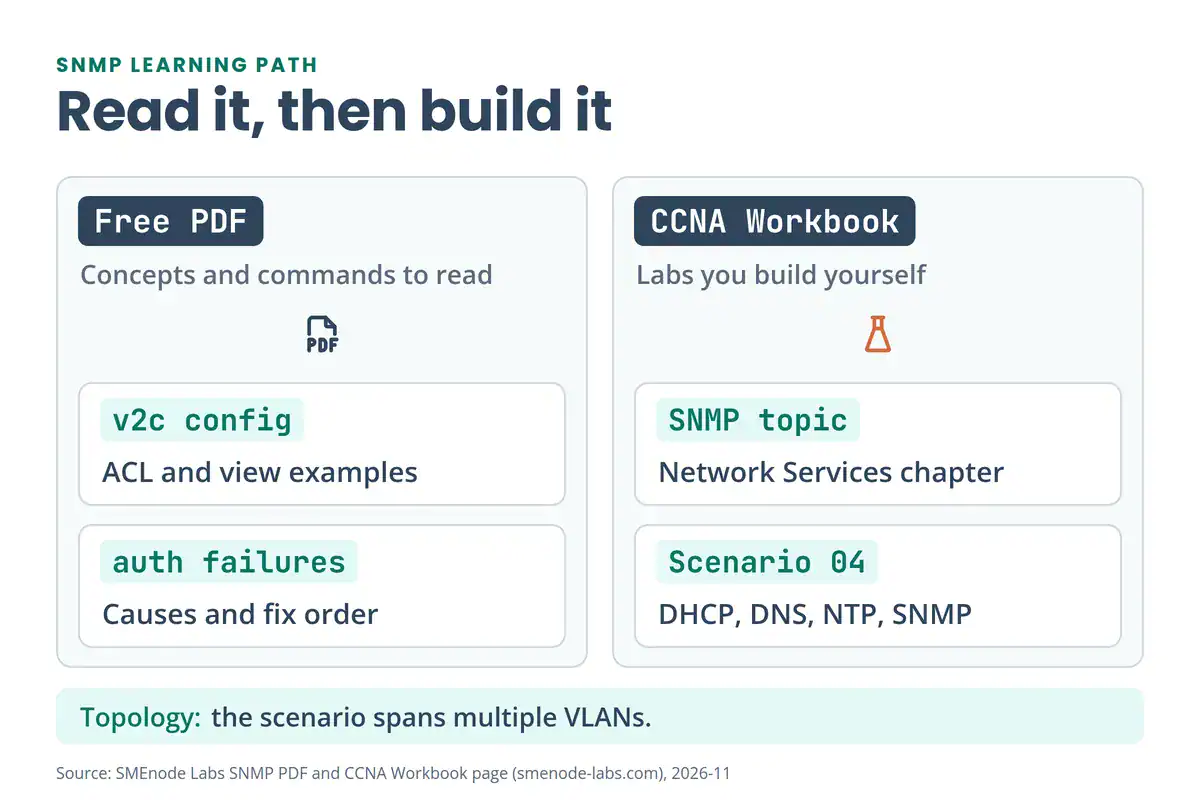
Where does it stop? The PDF explains why SNMP fails and how to fix it, but it doesn’t walk through SNMPv3 configuration, trap destinations or snmpwalk. This page does. For hands-on practice, the CCNA Lab Workbook builds SNMP into a multi-VLAN topology you can break on purpose.
Working on other vendors? The Huawei HCNA Workbook covers SNMP v1, v2c and v3 in its network management chapter, and the MikroTik MTCNA Workbook lists SNMP in its final phase.



No questions yet. Ask the first one.