
What Is VRRP?
VRRP (Virtual Router Redundancy Protocol) lets two or more routers share one virtual IP address, so hosts keep a working default gateway when a router fails. One router, the master, answers for the address and sends hellos. A backup takes over after it misses three. VRRP is an open IETF standard. RFC 9568 (April 2024) now defines it and replaces RFC 5798.
Hosts have one default gateway. If that router dies, they can reach their own LAN and nothing else. VRRP removes the single point of failure without touching the hosts. They keep using the same gateway address.
| Term | Meaning |
|---|---|
| VRID | Virtual router ID, 1 to 255. You set it, there’s no default |
| Virtual IP (VIP) | The gateway address the hosts use |
| Master | The router forwarding for the VIP. RFC 9568 calls it the Active router, but Cisco output still says Master |
| Backup | A router waiting to take over |
| Address owner | The router whose own interface IP is the VIP. Its priority is 255 |
The free PDF on this page covers these terms on pages 1 and 2 and draws the two-router topology in Figure 1.
How Does VRRP Work?
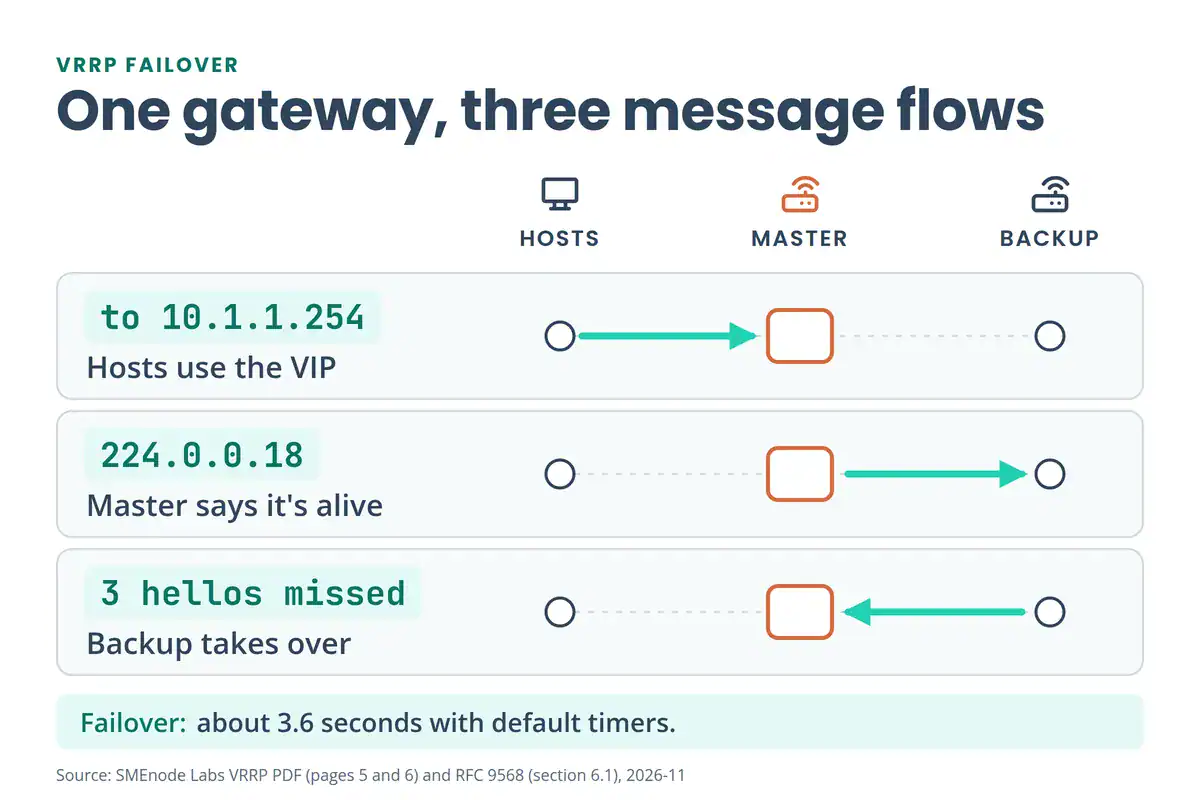
Hosts send traffic for the gateway to the VIP. The master answers ARP for it with a virtual MAC address, 0000.5e00.01xx for IPv4, where xx is the VRID in hex (RFC 9568). IPv6 uses 0000.5e00.02xx.
Only the master talks. It sends an advertisement every second to 224.0.0.18 (IPv4) or ff02::12 (IPv6). VRRP isn’t TCP or UDP. It runs on IP protocol 112, with TTL 255, and a router must discard any VRRP packet whose TTL isn’t 255. A routed hop lowers the TTL, so only routers on the same LAN can join the group.
Backups stay silent and listen. When the advertisements stop, a backup waits for its down interval, then becomes master:
- Down interval = 3 x advertisement interval + skew time
- Skew time = (256 – priority) / 256 x advertisement interval
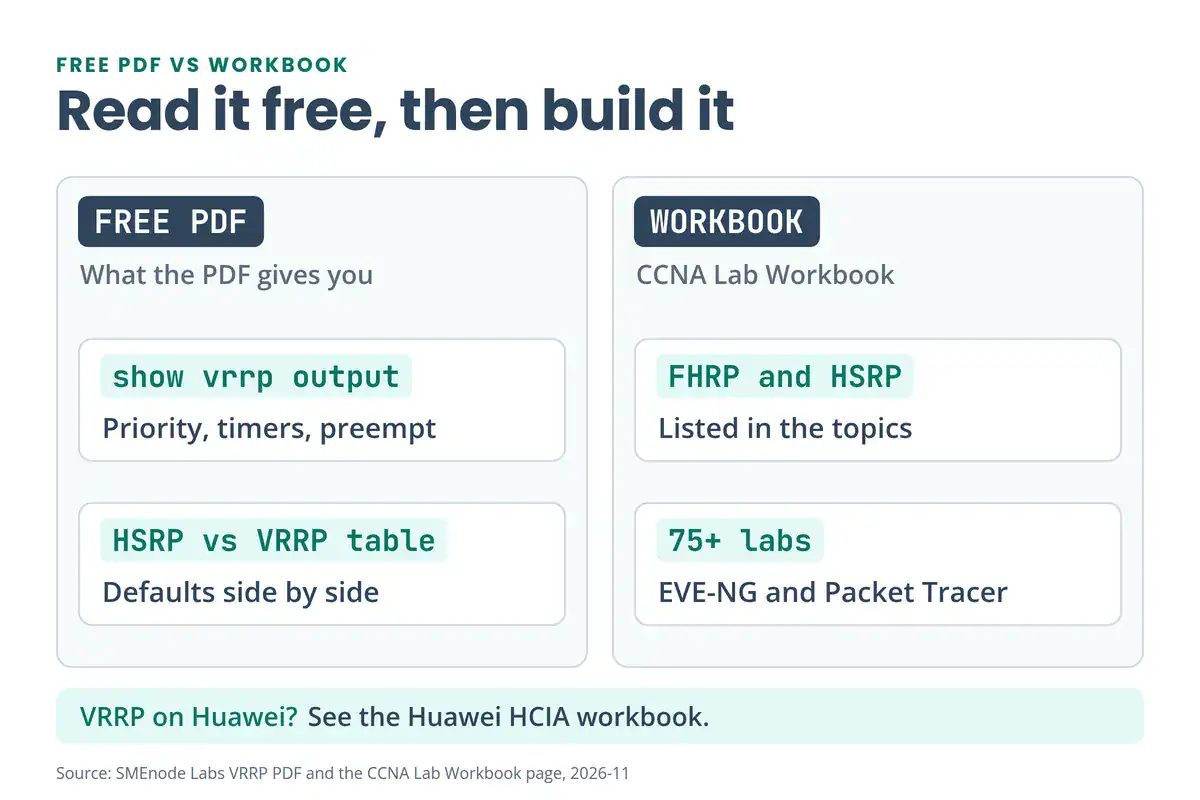
A backup with priority 100 and a 1 second interval waits 3 + 0.609 = 3.609 seconds. The PDF’s show vrrp output on page 5 shows exactly that figure. Failover takes about 3.6 seconds with defaults. HSRP’s default hold time is 10 seconds (Cisco Catalyst 9000 HSRP guide).
VRRP is a Layer 3 protocol with a Layer 2 virtual MAC. You configure it on the interface the hosts use as their gateway: a routed port, a VLAN interface or a dot1Q subinterface, as in our router-on-a-stick guide. For the VLAN side of that design, see VLAN vs subnet.
How Is the VRRP Master Elected?
Priority decides. Higher wins. The rules from RFC 9568, section 5.2.4:
- Backups use 1 to 254. The default is 100.
- The address owner is always 255. You can’t configure 255 with the priority command.
- Priority 0 means the master has stopped participating, so a backup takes over.
- On a tie, the router with the higher primary IP address wins.
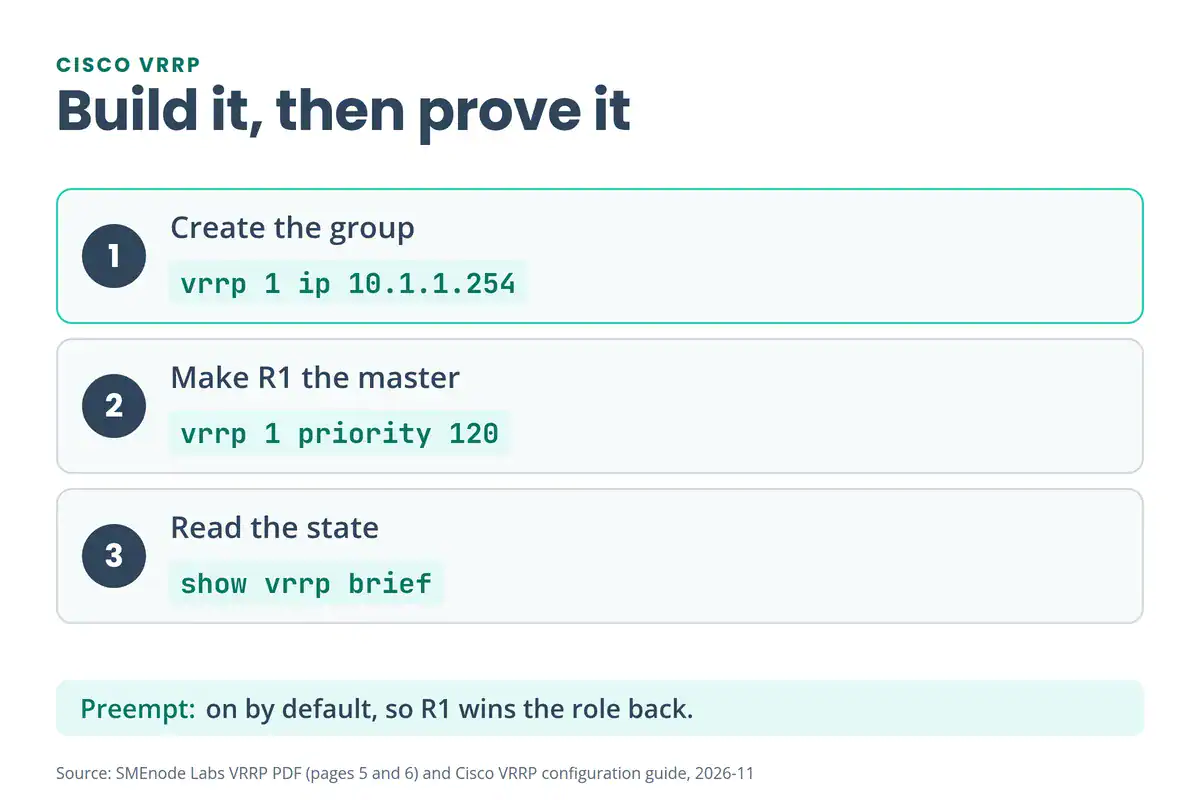
Preemption is on by default. A router that comes back with a higher priority takes the master role again, and the address owner always does. That has a catch. Give two routers the same priority and the higher IP preempts as soon as it’s configured. Set different values, such as 120, 110 and 100. A preempt delay helps too. Cisco’s VRRPv3 guide shows preempt delay minimum 30.
Go deeper
The PDF explains the protocol.
Build a gateway failover yourself in the CCNA Lab Workbook: 75+ labs for EVE-NG and Packet Tracer.
See the CCNA Lab Workbook →VRRP vs HSRP: What Are the Differences?
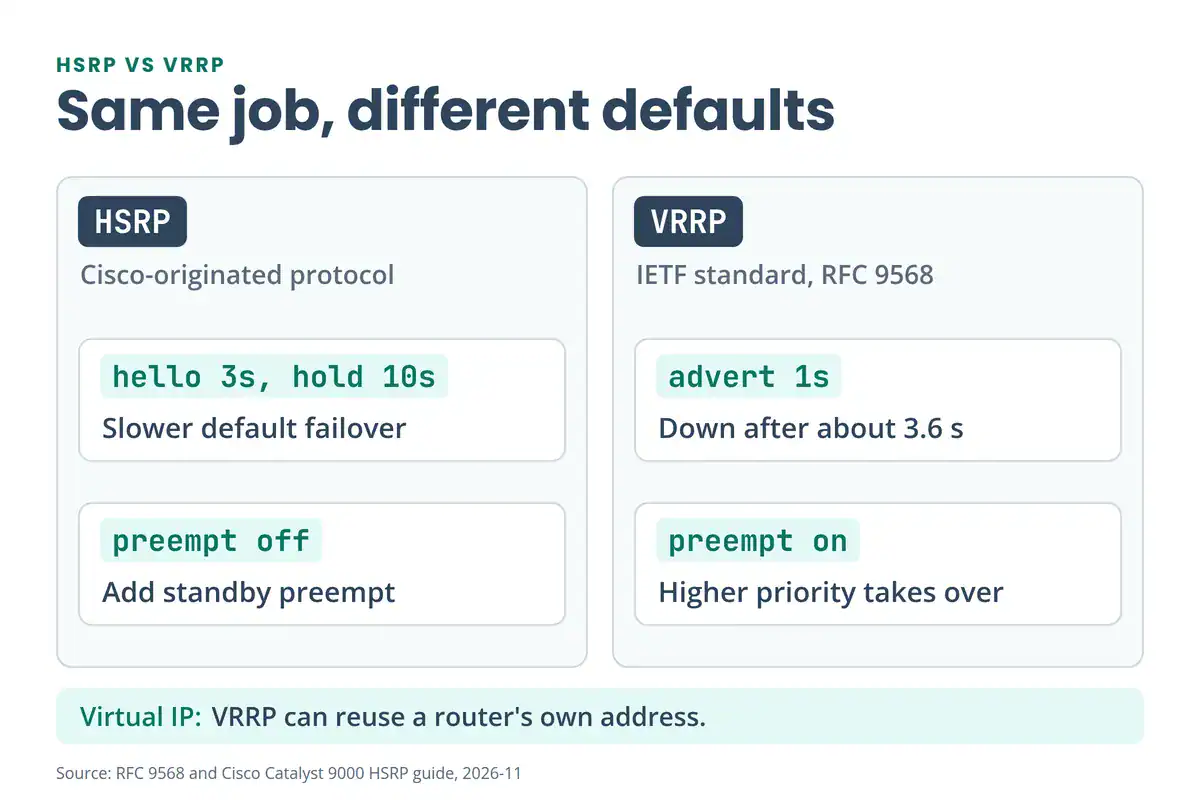
HSRP is Cisco’s first-hop redundancy protocol. Cisco documents it in an Informational RFC (RFC 2281), not an IETF standard. VRRP is the standard. Both do the same job.
| HSRP | VRRP | |
|---|---|---|
| Origin | Cisco, RFC 2281 (Informational) | IETF standard, RFC 9568 |
| Role names | Active, Standby | Master (Active in RFC 9568), Backup |
| Hello | 3 seconds | 1 second |
| Hold or down time | 10 seconds | 3 x hello + skew, about 3.6 seconds |
| Preemption | Off until you add standby preempt | On by default |
| Virtual IP | Cisco’s examples use a separate address | Can be the router’s own IP (priority 255) |
| Groups | 0 to 255 (v1), 0 to 4095 (v2) | VRID 1 to 255 |
| Transport | UDP 1985 | IP protocol 112 |
| Multicast | 224.0.0.2 (v1), 224.0.0.102 (v2) | 224.0.0.18, ff02::12 |
| Virtual MAC | 0000.0c07.acXX (v1), 0000.0c9f.fXXX (v2) | 0000.5e00.01XX (IPv4), 0000.5e00.02XX (IPv6) |
| IPv6 | Yes, needs HSRPv2 | Yes, VRRPv3 |
Sources: Cisco’s HSRP configuration guide and Catalyst 9000 HSRP guide, and RFC 9568.
So which one? Most designs pick by hardware. An all-Cisco network can use either. Mixed vendors need VRRP, because it’s the only one of the two every vendor can run. The PDF’s comparison table sits on page 4.
What’s the Difference Between VRRPv2 and VRRPv3?
| VRRPv2 (RFC 3768) | VRRPv3 (RFC 5798, now RFC 9568) | |
|---|---|---|
| IP versions | IPv4 only | IPv4 and IPv6 |
| Interval unit | Seconds, default 1 | Centiseconds in the RFC (default 100). Cisco’s CLI uses milliseconds, default 1000 |
| Authentication | Removed from the RFC | None defined (RFC 9568, section 9) |
| Cisco syntax | vrrp 1 ip ... | fhrp version vrrp v3, then address-family |
RFC 3768 removed the authentication methods of the older RFC 2338. RFC 9568 says VRRP “does not currently include any type of authentication”, and Cisco’s VRRPv3 guide says the same of VRRPv3. Cisco says that when VRRPv3 is in use, VRRPv2 is unavailable, so a router runs one or the other.
How Do You Configure VRRP on Cisco?
Two routers, one VIP, 10.1.1.254. R1 gets the higher priority:
! R1: master (priority 120)
interface GigabitEthernet0/0
 ip address 10.1.1.1 255.255.255.0
 vrrp 1 ip 10.1.1.254
 vrrp 1 priority 120

! R2: backup (default priority 100)
interface GigabitEthernet0/0
 ip address 10.1.1.2 255.255.255.0
 vrrp 1 ip 10.1.1.254
The PDF’s lab (page 5) uses R1’s own address, 10.1.1.1, as the VIP. That makes R1 the address owner with priority 255, and it needs no priority command. Both ways work. That syntax is the legacy VRRPv2 style, and Cisco’s Catalyst 9000 VRRP guide still uses it. The VRRPv3 version of R1:
fhrp version vrrp v3
!
interface GigabitEthernet0/0
 vrrp 1 address-family ipv4
  address 10.1.1.254 primary
  priority 120
  preempt delay minimum 30
Check your platform first. Cisco’s Catalyst 9000 VRRP guide ties support to the C9350 and C9610 (IOS XE 17.18.1) and the C9550 (IOS XE 26.2.1ea), not to every model. To build this on a full topology, the CCNA Lab Workbook has first-hop redundancy labs for EVE-NG and Packet Tracer.
How Do You Verify VRRP?
Run show vrrp brief for a one-line summary, then show vrrp for the detail. This is Cisco’s own sample from the VRRP configuration guide, trimmed. The values are examples, not defaults:
State is Master
Virtual IP address is 10.0.0.5
Virtual MAC address is 0000.5e00.010a
Advertisement interval is 10.000 sec
Preemption enabled, delay min 380 secs
Priority is 110
Master Router is 10.0.0.2 (local), priority is 110
Master Down interval is 30.570 sec
Read it top to bottom. The state says who’s master. The virtual MAC ends in 0a, which is VRID 10. The down interval checks out against the formula: 3 x 10 + 146/256 = 30.570. The show vrrp output tells you which router forwards and when a backup would take over.
That matters for the exam. CCNA v2.0 topic 3.4 reads “Interpret the operational status of First Hop Redundancy Protocols (HSRP and VRRP)” (v2.0 topics). The v1.1 topic is 3.5, “Describe the purpose, functions, and concepts of first hop redundancy protocols”, with no protocol named (v1.1 topics). v2.0 testing starts on 2027-02-03 (Cisco blog). Practise reading output with the free CCNA 200-301 PDF and the CCNA practice test PDF. The v2.0 Layer 2 security topic has its own guide, DHCP snooping, and so does TACACS+ vs RADIUS.
How Do VRRP Tracking and Load Sharing Work?
Tracking. VRRP only watches the LAN side. If the master’s uplink dies but its LAN port stays up, it keeps the role and drops traffic. Tracking fixes that. Cisco’s legacy syntax is vrrp group track object-number [decrement priority]. A tracked failure lowers the master’s priority, and a backup with preemption on takes over:
track 10 interface GigabitEthernet0/1 line-protocol
interface GigabitEthernet0/0
 vrrp 1 track 10 decrement 30
R1’s 120 drops to 90, below R2’s 100, so R2 preempts.
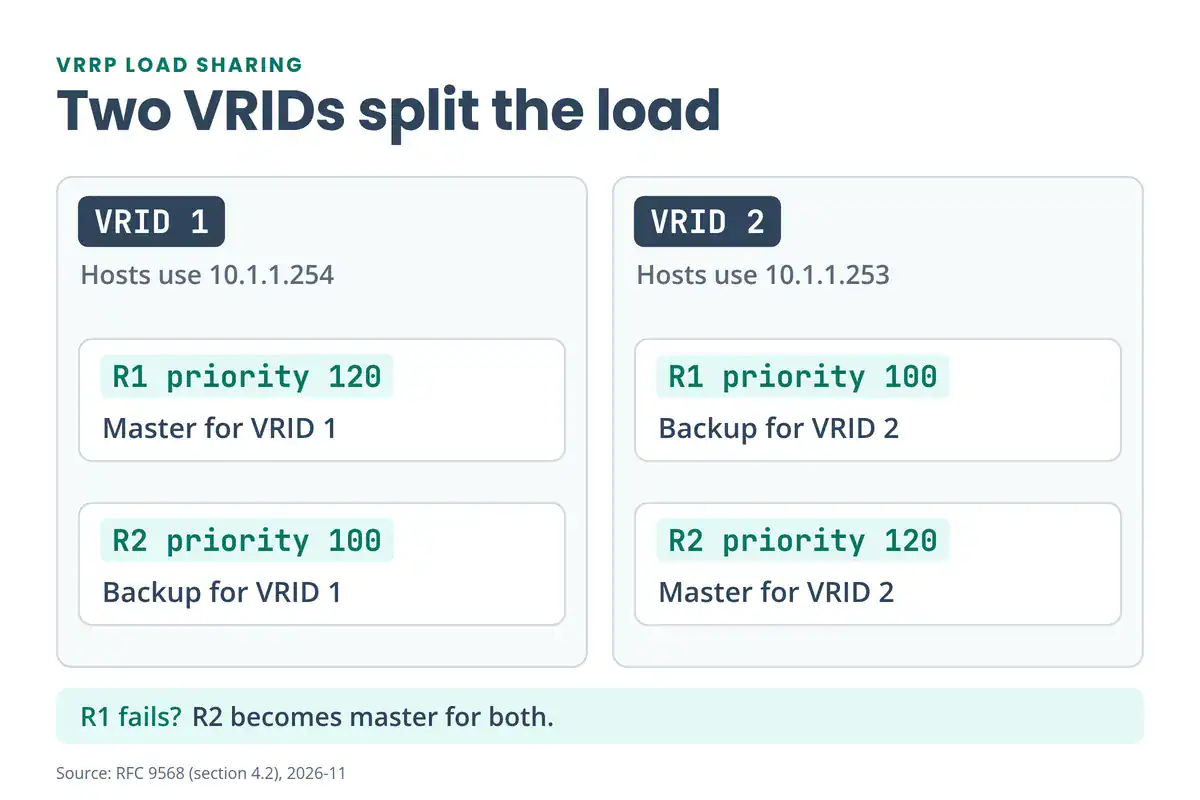
Load sharing. One VRID leaves the backup idle. RFC 9568 section 4.2 shows two virtual routers splitting the hosts. Each router is master for one VRID and backup for the other:
! R1, on GigabitEthernet0/0
vrrp 1 ip 10.1.1.254
vrrp 1 priority 120
vrrp 2 ip 10.1.1.253

! R2, on GigabitEthernet0/0
vrrp 1 ip 10.1.1.254
vrrp 2 ip 10.1.1.253
vrrp 2 priority 120
Point half the hosts at 10.1.1.254 and half at 10.1.1.253. If either router fails, the other becomes master for both.
Why Isn’t VRRP Failing Over?
Work through these in order:
- Hellos don’t arrive. A switch, VLAN or ACL that drops 224.0.0.18 or IP protocol 112 leaves both routers thinking they’re master. Check
show vrrpon each. Two Master lines mean the hellos aren’t crossing. - A routed hop sits between them. The TTL must be 255, so the routers must share a LAN.
- VRID or VIP differs. A different VRID or virtual address makes two separate groups.
- Intervals differ. Use the same advertisement interval on every router in the group. MikroTik’s VRRP docs warn about mismatched intervals.
- Equal priorities. The higher IP wins the tie, and it may not be the router you meant.
- Version mismatch. Cisco’s VRRPv3 guide has a
vrrpv2sub-command for peers that only speak VRRPv2. - Platform. Confirm VRRP exists on that model and interface.
Our network troubleshooting commands PDF and Cisco commands cheat sheet cover the rest of the toolkit. VRRP also won’t fix a Layer 2 loop, which is what Spanning Tree is for.
What’s Inside the Free VRRP PDF?
It’s a 7-page lesson:
- Page 1: what VRRP is, with the two-router topology (Figure 1)
- Page 2: terms, the address owner, history and versions
- Pages 3 and 4: VRRPv2 vs VRRPv3, and VRRPv3 vs HSRPv2 tables
- Page 5: the basic
vrrp 1 ipconfig andshow vrrpoutput - Page 6: election, priority 0 and 255, timers, preemption
- Page 7: preemption side effects and use cases
It has no HSRP config, tracking, load sharing or troubleshooting. This page covers them. Two things differ from the PDF. The page follows RFC 9568 on authentication, because VRRPv3 defines none. And it shows the VRRPv3 syntax next to the legacy vrrp 1 ip form the PDF’s lab uses.
The CCNA Lab Workbook lists HSRP and first-hop redundancy among its topics, across 75+ labs and 950+ pages. VRRP isn’t on that list. On Huawei S-series switches, the Huawei HCIA Datacom Workbook names VRRP in its campus LAN build.

No questions yet. Ask the first one.