
What Is the Difference Between JSON and XML?
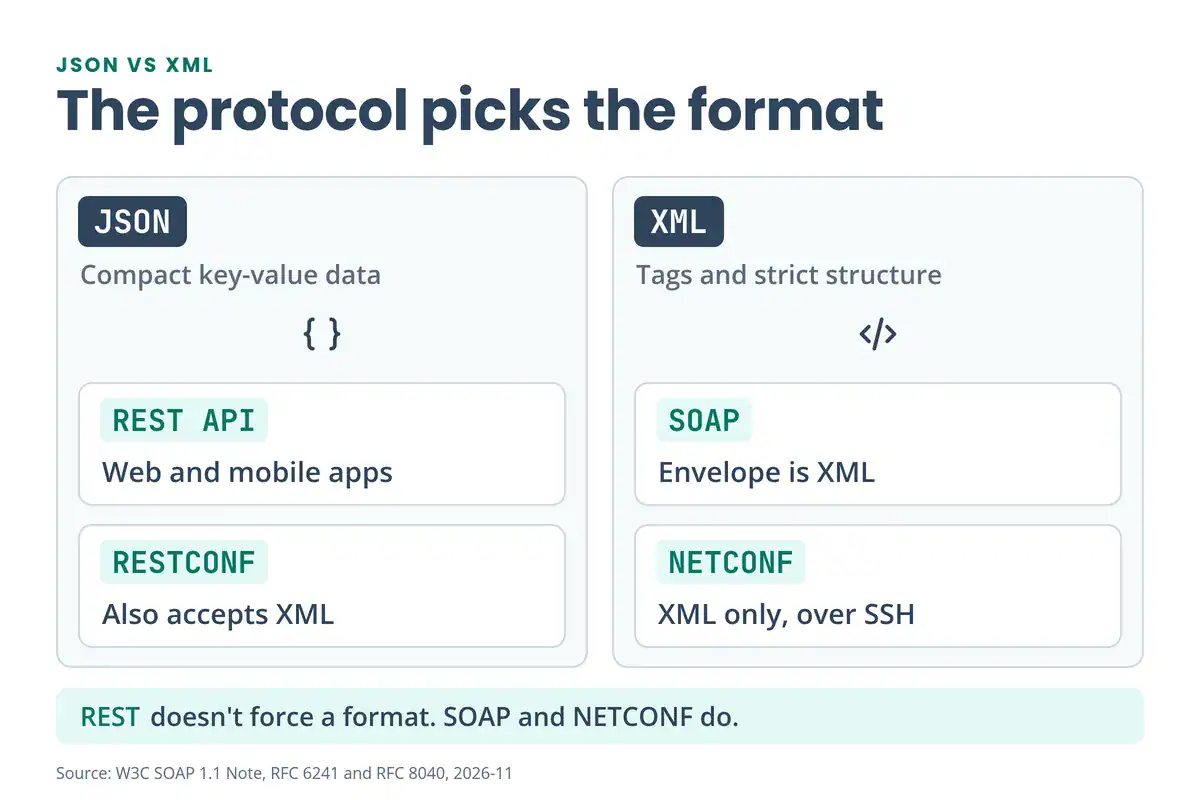
JSON vs XML comes down to shape and strictness. JSON writes data as key-value pairs inside braces and square brackets. XML wraps every value in opening and closing tags. JSON is shorter and is the usual pick for REST APIs. XML is stricter, and SOAP and NETCONF are built on it.
The table adds YAML, because Cisco’s CCNA Automation exam compares all three.
| JSON | XML | YAML | |
|---|---|---|---|
| Stands for | JavaScript Object Notation | Extensible Markup Language | YAML Ain’t Markup Language |
| Shape | Objects {} and arrays [] | A tree of elements and attributes | Indentation, : and - |
| Comments | None (RFC 8259 defines no comment syntax) | <!-- note --> | # note |
| Data types | String, number, boolean, null, object, array | Everything is text unless a schema says otherwise | Scalars, lists and maps |
| Lists | Native, [ ] | Repeated elements | Native, - item |
| Validation | JSON Schema, a separate standard | XSD or DTD, part of the XML family | No built-in validation language |
| Namespaces | No | Yes | No |
| Typical use | REST APIs, web and mobile apps | SOAP, NETCONF, documents | Config files such as Ansible and Docker Compose |
The formal definitions are short: RFC 8259 for JSON, the W3C XML 1.0 specification, and the YAML 1.2.2 specification.
JSON vs XML vs YAML: The Same Router Record in Each Format
Here’s one record written three ways. I loaded all three in a parser and they produce identical data.
JSON:
{
  "hostname": "edge-rtr-01",
  "mgmt_ip": "192.0.2.10",
  "enabled": true,
  "interfaces": ["GigabitEthernet1", "GigabitEthernet2"]
}
XML:
<device>
  <hostname>edge-rtr-01</hostname>
  <mgmt_ip>192.0.2.10</mgmt_ip>
  <enabled>true</enabled>
  <interfaces>
    <interface>GigabitEthernet1</interface>
    <interface>GigabitEthernet2</interface>
  </interfaces>
</device>
YAML:
# Edge router record
hostname: edge-rtr-01
mgmt_ip: 192.0.2.10
enabled: true
interfaces:
  - GigabitEthernet1
  - GigabitEthernet2
Pretty-printed with two-space indents, the JSON file is 136 bytes, the XML file is 231 bytes and the YAML file is 131 bytes (that includes its comment line). XML runs about 70% larger here because every value repeats its name in a closing tag. With all whitespace stripped, the gap is 117 bytes for JSON against 204 for XML.
One small record isn’t a benchmark. Test your own payloads before you choose on size alone.
Go deeper
Exam topic 1.1 compares JSON, XML and YAML.
Practice them in the CCNA Automation Workbook: parse all three in Python and send RESTCONF requests.
See the CCNA Automation Workbook →When Should You Use JSON vs XML?
Use JSON when:
- You’re building or calling a REST API.
- A web or mobile app reads the data. JavaScript turns a JSON string into an object with
JSON.parse(). - You want the least markup around your data.
- You’re on Spring. JSON works with the default Jackson setup, while XML needs the
jackson-dataformat-xmldependency (Spring reference).
Use XML when:
- The service speaks SOAP. Every SOAP message is an XML envelope.
- The protocol is NETCONF. RFC 6241 defines an XML-based data encoding for it.
- You need strict validation with an XSD, or namespaces to mix vocabularies in one document.
- You’re marking up documents. SVG images and RSS feeds are XML.
Use YAML when a person edits the file by hand and wants comments. Ansible playbooks and inventories and Docker Compose files are YAML.
One more rule of thumb: REST doesn’t force a data format, but SOAP and NETCONF do. So XML vs JSON isn’t a contest with one winner. The protocol and the person editing the file decide.
Where Do Network Engineers Use JSON, XML and YAML?
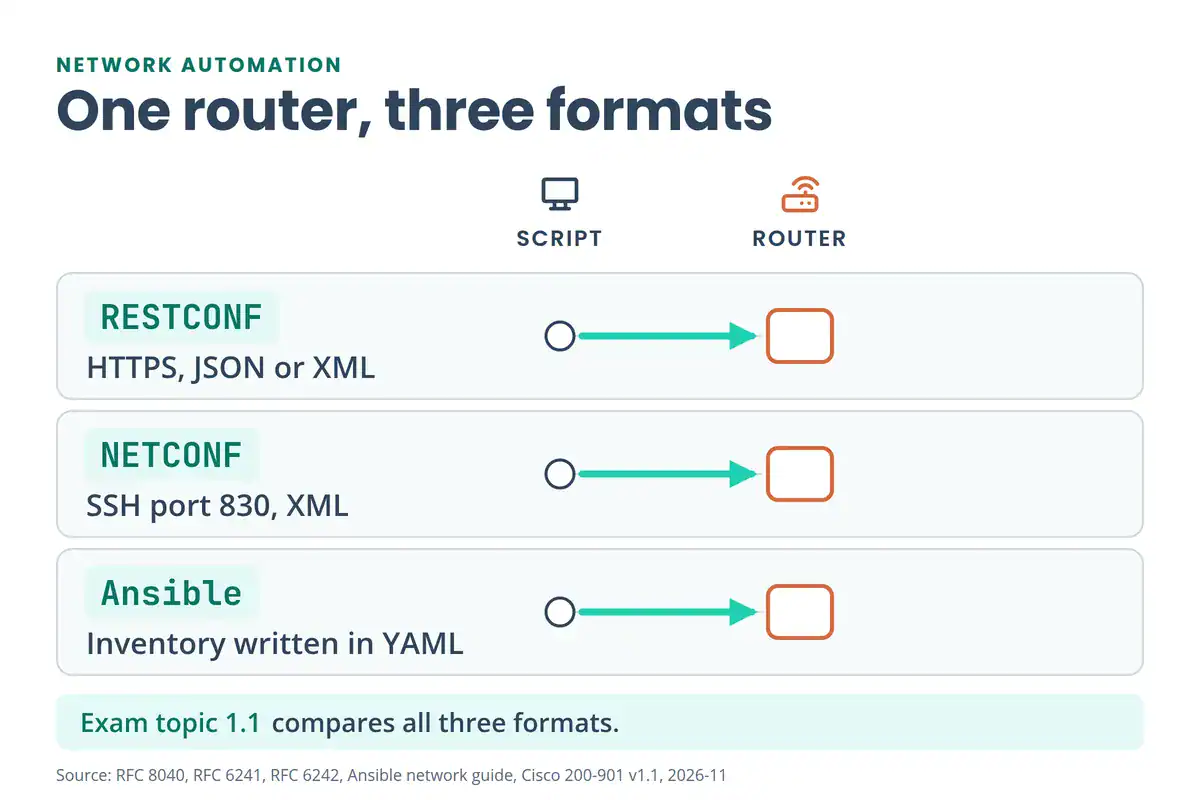
On a Cisco IOS XE router you can meet all three in one week. NETCONF sends XML over SSH on TCP port 830 (RFC 6242). RESTCONF runs over HTTPS and accepts JSON or XML (RFC 8040). Ansible reads YAML files that you write by hand.
The NETCONF and YANG PDF covers the XML side in detail. The Ansible commands cheat sheet covers the YAML side. Need port numbers like 830 and 443 in one table? Use the common ports cheat sheet.
RESTCONF: One Interface, Two Encodings
With RESTCONF the client picks the format using the Accept header. RFC 8040 defines two media types for it: application/yang-data+json and application/yang-data+xml.
GET /restconf/data/ietf-interfaces:interfaces/interface=GigabitEthernet1 HTTP/1.1
Host: 192.0.2.10
Accept: application/yang-data+json
The same interface node, trimmed, comes back in either encoding. JSON prefixes the node with its YANG module name. XML declares a namespace instead. The JSON rules for YANG data are in RFC 7951.
{
  "ietf-interfaces:interface": {
    "name": "GigabitEthernet1",
    "description": "Uplink to core",
    "type": "iana-if-type:ethernetCsmacd",
    "enabled": true
  }
}
<interface xmlns="urn:ietf:params:xml:ns:yang:ietf-interfaces"
xmlns:ianaift="urn:ietf:params:xml:ns:yang:iana-if-type">
<name>GigabitEthernet1</name>
<description>Uplink to core</description>
<type>ianaift:ethernetCsmacd</type>
<enabled>true</enabled>
</interface>A real reply has more leaves, and the exact path depends on the device and the YANG models it ships.
Ansible: YAML You Write by Hand
An Ansible inventory is a YAML file. It has no schema to read, only indentation, so a misaligned line is the usual failure.
# inventory.yml
all:
  hosts:
    edge-rtr-01:
      ansible_host: 192.0.2.10
      ansible_network_os: cisco.ios.ios
Is XML Obsolete?
No. It’s older than JSON and it’s no longer the default for new web APIs, but it’s still the format underneath SOAP, NETCONF and SVG. Many enterprise and banking systems still exchange XML, so you’ll meet it on the job.
XML does carry one risk that JSON doesn’t. An XML parser can resolve external entities from untrusted input, called XXE injection, which can expose local files or trigger server-side requests (OWASP). The fix is a parser setting: disable DTD processing and external entities. If you accept XML from outside your network, check that setting first.
How Do You Send JSON or XML in Postman?
Postman sends either format from the Body tab.
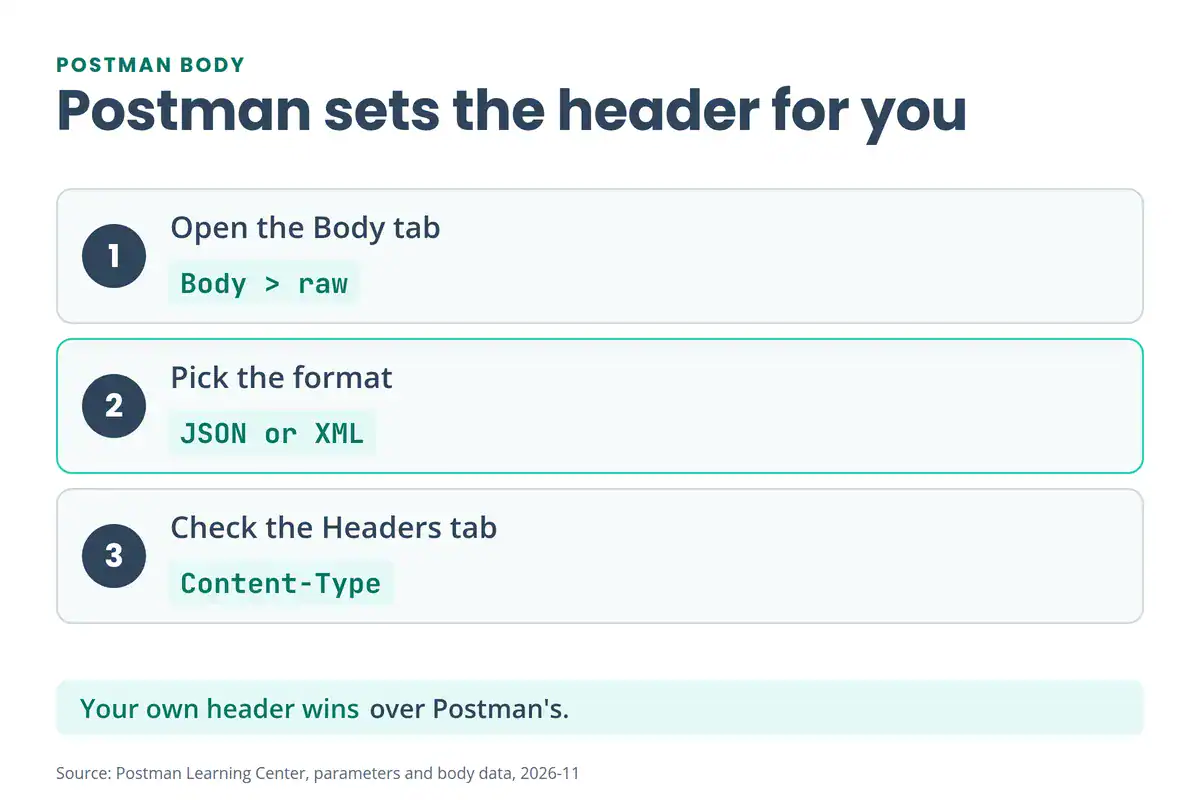
- Open the Body tab and choose raw.
- In the dropdown on the right, pick JSON or XML.
- Open the Headers tab. Postman sets
Content-Typefrom the type you picked, and a header you add yourself takes precedence (Postman docs).
A JSON login body looks like this. Use placeholders, and don’t save real passwords in a collection you share.
{
  "username": "demo-user",
  "password": "CHANGE_ME"
}
What Changes for a SOAP Request?
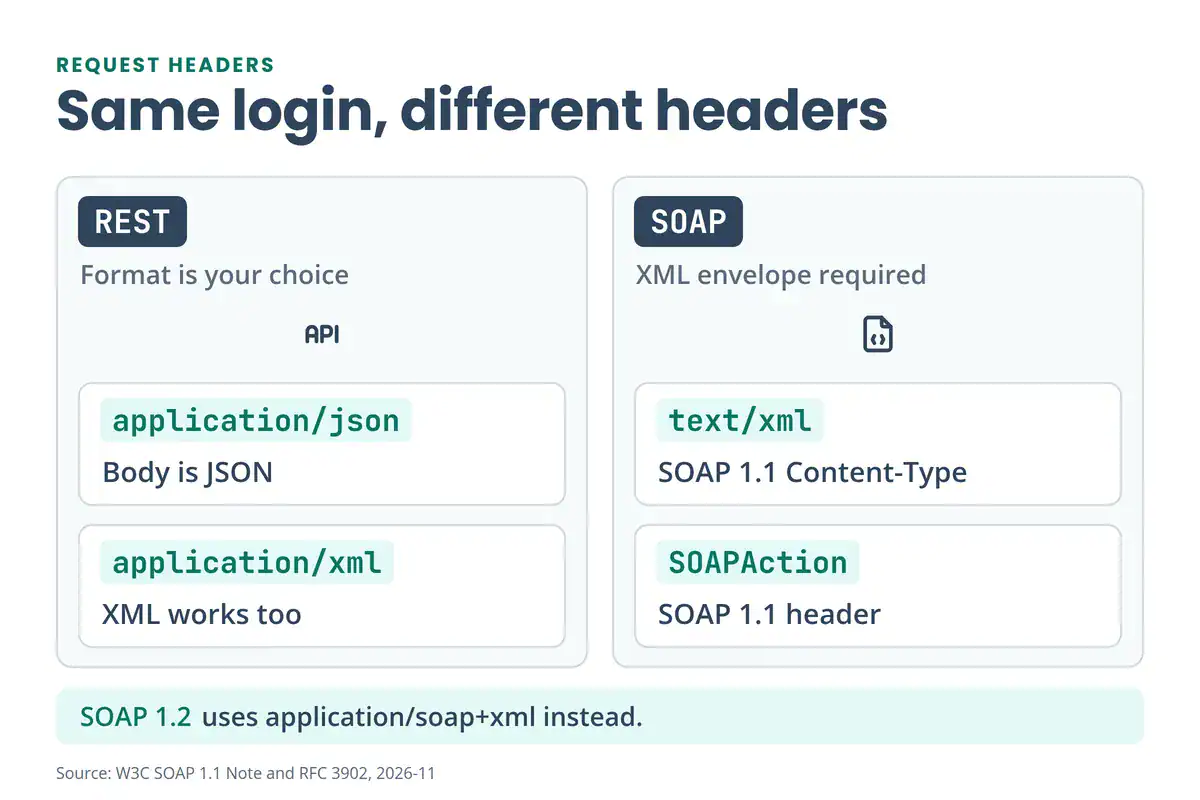
SOAP wraps the same fields in an envelope. SOAP 1.1 sends Content-Type: text/xml plus a SOAPAction header (W3C SOAP 1.1 Note). SOAP 1.2 uses application/soap+xml instead (RFC 3902). If your service needs text/xml, add your own Content-Type header in Postman, because yours wins.
POST /auth HTTP/1.1
Content-Type: text/xml; charset=utf-8
SOAPAction: "urn:example:auth/Login"
<soap:Envelope xmlns:soap="http://schemas.xmlsoap.org/soap/envelope/">
<soap:Body>
<LoginRequest xmlns="urn:example:auth">
<username>demo-user</username>
<password>CHANGE_ME</password>
</LoginRequest>
</soap:Body>
</soap:Envelope>The SOAPAction value comes from the service’s WSDL. The URN above is a placeholder.
Which Syntax Mistakes Break JSON, XML and YAML?
Each format fails in its own way. I ran every case below through Python’s json, xml.etree and PyYAML parsers, and each one raised an error.
| Format | Mistake | Why it fails |
|---|---|---|
| JSON | A comma after the last item | JSON has no trailing commas |
| JSON | Single quotes around a string or key | Strings and keys need double quotes |
| JSON | A // comment | JSON has no comment syntax |
| JSON | A key with no quotes | Keys must be strings |
| XML | A start tag with no end tag | The document isn’t well-formed |
| XML | <Name> closed by </name> | XML is case-sensitive |
| XML | Two root elements | A document has exactly one root |
| XML | A bare & in text | & must be written & |
| YAML | A tab used to indent | The spec says tabs must not be used in indentation |
| YAML | One line indented differently from its siblings | Indentation is the structure |
Which Format Does the CCNA Automation Exam Test?
Cisco’s 200-901 v1.1 blueprint lists topic 1.1 as “Compare data formats (XML, JSON, and YAML)”. It sits in section 1.0, Software Development and Design, which carries 15% of the exam (Cisco exam topics PDF).
The topic is a comparison, so the table at the top and the mistakes list above are your study material. For the rest of the exam, the blog post on Python skills for CCNA 200-901 and the guide to Python for network engineers show where these formats turn up in scripts.
What’s in the Free JSON vs XML PDF, and Where Does It Stop?
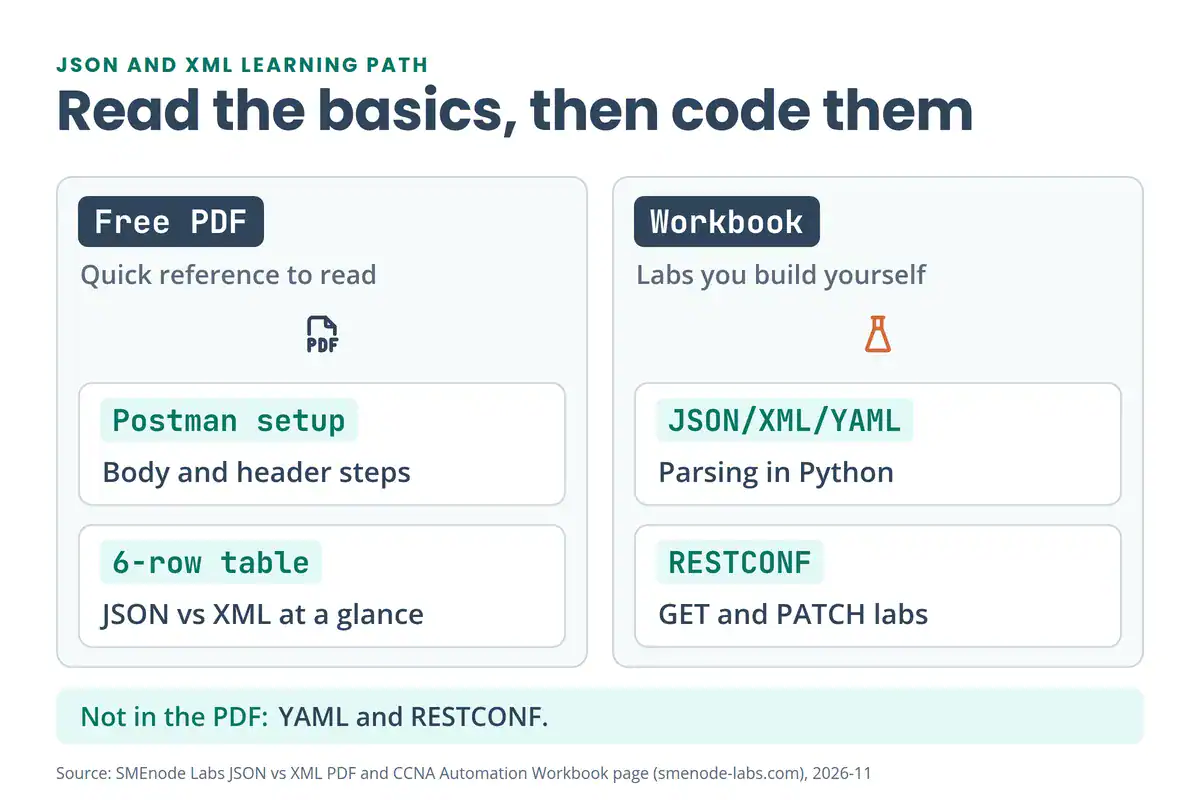
The PDF is a three-page quick reference. It explains what Postman is used for, defines JSON and XML with one example each, says when to use each, lists the Postman body settings, shows a JSON login body and an XML login body, compares the two in a six-row table and ends with a two-sentence interview answer.
It stops at the basics. There’s no YAML, no RESTCONF or NETCONF, and no link to the exam. The CCNA Automation Workbook picks up from there, with Python fundamentals that include JSON, XML and YAML parsing, plus RESTCONF GET and PATCH requests.
Download the PDF with the form on this page, then try the table and the mistakes list on your own data.

No questions yet. Ask the first one.