Your VoIP deployment just went live. The routers are up, routing tables are clean, and the WAN links have plenty of headroom. But calls are choppy. Jitter is spiking. Users are already filing tickets.
You’ve probably seen this. Or you will.
QoS is one of those topics that makes sense when you read about it but gets messy fast in real networks. And expedited forwarding, specifically DSCP 46 and the EF PHB, is where most of the confusion sits. Too many engineers know what it is but don’t know how to deploy it correctly, or what goes wrong when they don’t.
This guide covers the full picture. What expedited forwarding actually is. How DSCP 46 fits into the DiffServ model. How EF differs from assured forwarding. How to configure it on Cisco gear. What you need to know for CCNA and CCNP exams. And the policing mistake that most guides skip entirely.
What Is Expedited Forwarding?
Expedited forwarding (EF) is a per-hop behavior (PHB) in the DiffServ QoS model. It has one job: deliver traffic with low delay, low jitter, and low loss.
Three properties. All of them matter.
The EF PHB is formally defined in RFC 3246 by the IETF. It maps to DSCP value 46, which in binary is 101110. You’ll see it written as both “EF” and “DSCP 46” in documentation and vendor configs. Same thing.
Think of EF as a VIP lane on a congested highway. Regular traffic waits in queues. Sometimes it gets dropped. EF traffic gets a dedicated lane with strict priority. Packets move as soon as they arrive. No waiting. No queuing behind lower-priority traffic.
The Three Expedited Forwarding Properties
Traffic marked as EF should receive:
- Low delay. Packets spend as little time in queues as possible.
- Low jitter. The variation in packet arrival time stays minimal.
- Low loss. Under normal conditions, EF packets aren’t dropped.
These three properties make expedited forwarding the right choice for real-time applications that can’t handle variability. VoIP is the clearest example. A voice call with 200ms one-way delay sounds terrible. With 50ms of jitter, it’s worse. EF is the mechanism that prevents both.
A common real-world pattern worth knowing: phones default to marking their own RTP packets as DSCP 46 correctly out of the box, but if no QoS policy exists anywhere on the path, the routers simply ignore that marking. Call quality problems in a fresh VoIP rollout are very often a missing service-policy, not a routing or bandwidth issue. The fix is usually a basic MQC policy matching DSCP 46 into a priority queue, applied outbound on every WAN interface.
How Expedited Forwarding Uses DSCP 46 in the DiffServ Model
To understand EF, you need to understand DiffServ. They’re inseparable.
DiffServ (Differentiated Services) is a QoS architecture defined in RFC 2474. The core idea: each packet carries a marking in its IP header, and every router along the path reads that marking and applies specific local treatment.
That marking lives in a 6-bit field called the DSCP field. It sits in the first 6 bits of the ToS byte in IPv4, or the Traffic Class byte in IPv6. The remaining 2 bits handle Explicit Congestion Notification (ECN).
+------------------------------------------------------------+
| DSCP (6 bits)                     | ECN (2 bits)          |
+------------------------------------------------------------+
The DSCP field can hold values from 0 to 63. Each value maps to a per-hop behavior. DSCP 46 maps to EF. When a Cisco IP phone sends a voice call, it marks the RTP media packets with DSCP 46. Each router along the path reads that 6-bit value and applies its local EF policy.
EF is the recommended marking for voice media (RTP), while SIP and SCCP call signaling uses CS3 (DSCP 24).
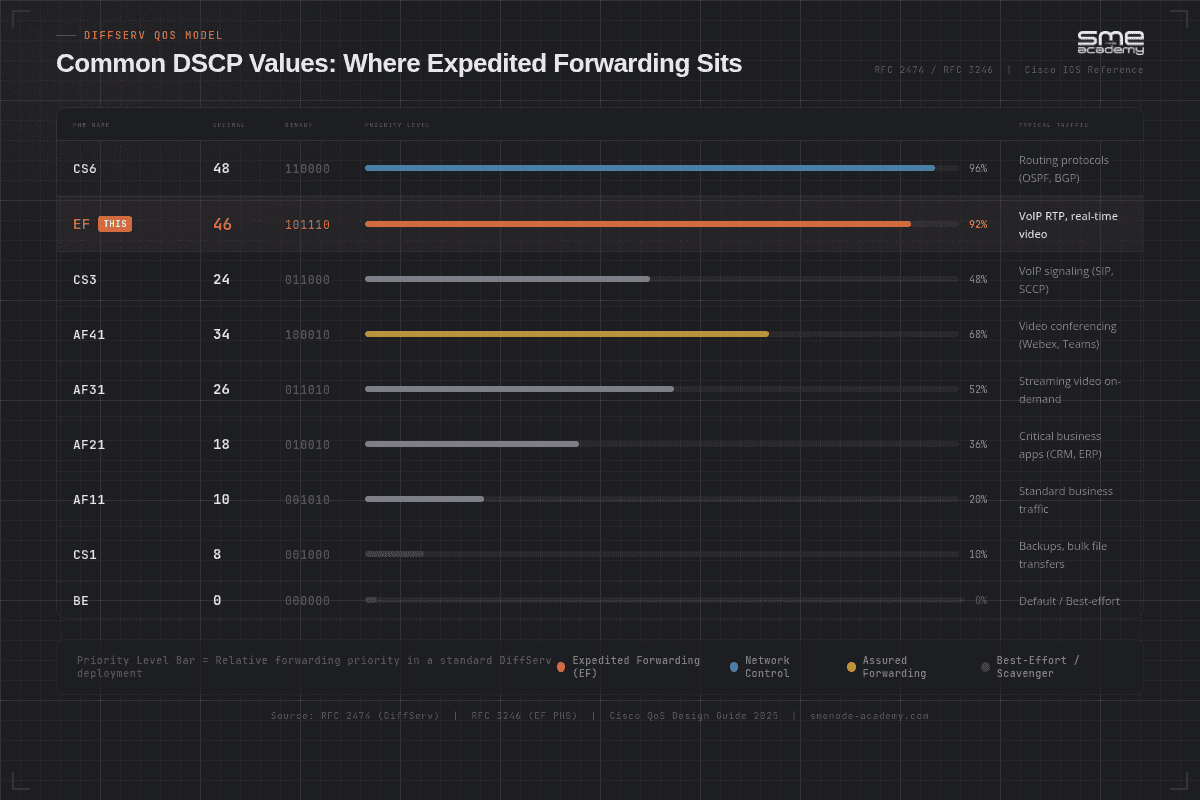
Common DSCP Values: Where Expedited Forwarding Sits
| Traffic Type | DSCP Name | Decimal Value | Typical Use |
|---|---|---|---|
| Voice media (RTP) | EF | 46 | VoIP, VoLTE |
| Network control | CS6 | 48 | Routing protocols (OSPF, BGP) |
| Voice signaling | CS3 | 24 | SIP, SCCP, H.323 |
| Interactive video | AF41 | 34 | Video conferencing |
| Streaming video | AF31 | 26 | Video-on-demand |
| Business apps | AF21 | 18 | CRM, ERP |
| Standard data | AF11 | 10 | Normal business traffic |
| Scavenger | CS1 | 8 | Backups, bulk file transfer |
| Best effort | BE | 0 | Default (no marking) |
EF at 46 sits just below CS6 (network control at 48). It’s the second-highest priority in a standard DiffServ deployment.
What “Per-Hop Behavior” Really Means
There’s no global QoS state shared across routers. Each device makes its own forwarding decision at each hop based on the DSCP marking. It reads the value, applies the local policy, and forwards the packet.
This is different from IntServ (Integrated Services), which used RSVP to signal resource reservations across every device in the path. DiffServ doesn’t need that signaling. It scales much better for large networks.
But it only works if every router in the path honours the DSCP markings.
If one hop ignores DSCP 46, your EF traffic gets default treatment at that router. Low delay, low jitter, low loss? Gone at that point. This is why consistent QoS policies across all devices matter so much in production.
Expedited Forwarding vs Assured Forwarding: What’s the Real Difference?
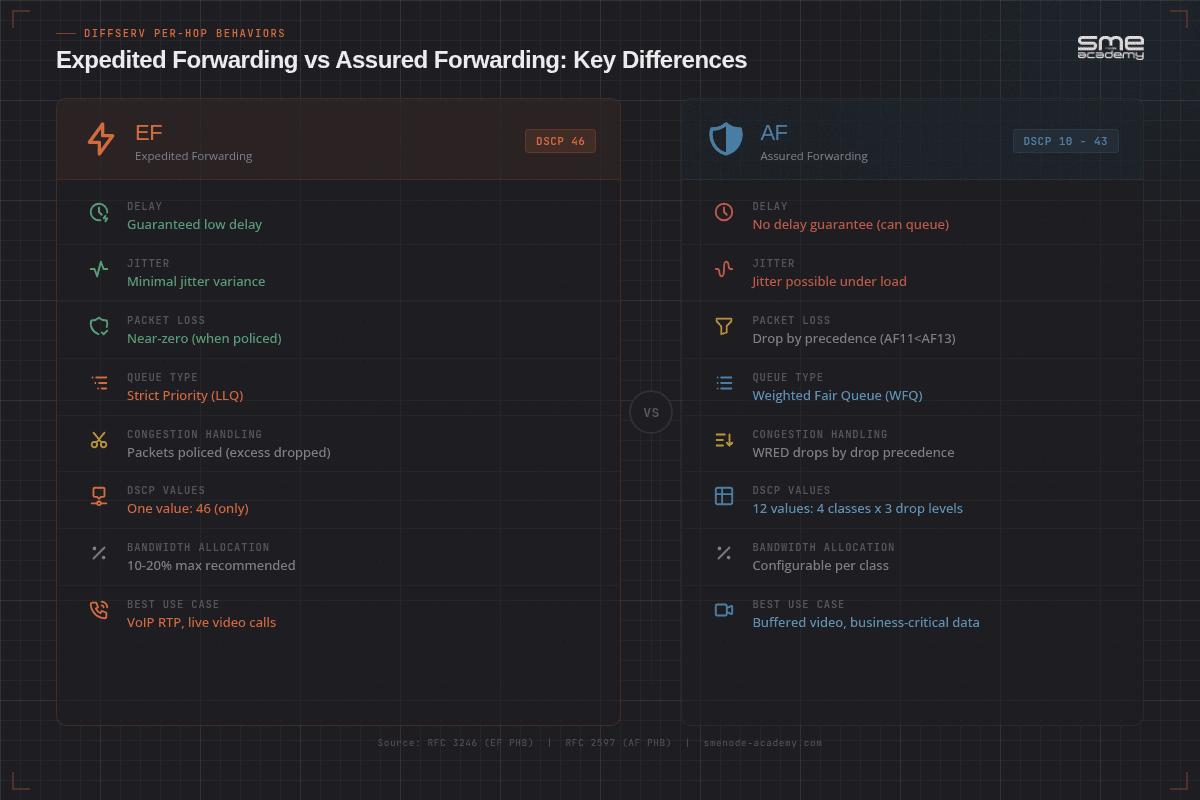
This comparison comes up constantly, both in real networks and in certification exams. EF and AF are both DiffServ PHBs, but they serve completely different purposes.
Assured Forwarding at a Glance
Assured Forwarding (AF) provides conditional delivery assurance. If your traffic stays within a subscribed rate, AF guarantees delivery. If you exceed that rate during congestion, packets face higher drop probability.
AF divides traffic into four classes, each with three drop precedence levels:
| Class | DSCP Values | Drop Precedence Options |
|---|---|---|
| AF1 | AF11 (10), AF12 (12), AF13 (14) | Low, Medium, High |
| AF2 | AF21 (18), AF22 (20), AF23 (22) | Low, Medium, High |
| AF3 | AF31 (26), AF32 (28), AF33 (30) | Low, Medium, High |
| AF4 | AF41 (34), AF42 (36), AF43 (38) | Low, Medium, High |
Higher drop precedence means higher chance of being dropped under congestion. AF11 is safer than AF13 within Class 1. The higher the last digit in an AF class, the more likely it gets dropped first.
Expedited Forwarding vs Assured Forwarding: Side by Side
| Feature | Expedited Forwarding (EF) | Assured Forwarding (AF) |
|---|---|---|
| DSCP value | 46 | 10 to 43 |
| Delay guarantee | Yes | No |
| Jitter protection | Yes | No |
| Queue type | Strict priority (LLQ) | Weighted fair queuing |
| Drop under congestion | Rarely (policed) | Yes, by drop precedence |
| Best use case | VoIP RTP, live video | Business apps, buffered video |
The simplest way to remember it: EF is for traffic that can’t wait. AF is for traffic that should be delivered reliably but can tolerate some queuing delay.
Use EF for a live phone call. Use AF4 for a video stream that can buffer. Use AF2 or AF3 for business-critical data that needs better-than-best-effort treatment but isn’t latency-sensitive.
Real-World Use Cases for Expedited Forwarding
EF isn’t abstract. Here’s where it actually shows up in production.
VoIP and Unified Communications. This is the original and most common use case. Cisco IP phones mark RTP media packets as DSCP 46 by default. Signaling (SIP or SCCP) goes to CS3 (DSCP 24). If you’re running Cisco Unified Communications, the phones are already doing their part. Your routers just need a QoS policy that honours those markings.
Real-Time Video Conferencing. Live video has similar latency requirements to voice. Webex, Teams, and Zoom real-time traffic can be marked as EF. Some organisations reserve EF strictly for voice RTP and use AF41 for video. Either approach works, as long as it’s consistent across every device in the path.
Financial Trading Platforms. In high-frequency trading environments, a few milliseconds of queuing delay can affect trade execution. Some firms mark their most time-sensitive order traffic as EF on internal networks to bypass standard queuing entirely.
5G and Carrier Networks. VoLTE (Voice over LTE) traffic maps to DSCP 46. In 5G core architectures, certain control plane traffic uses EF-equivalent treatment. The same PHB concept carries directly into telecom network design.
How to Configure Expedited Forwarding on Cisco Routers
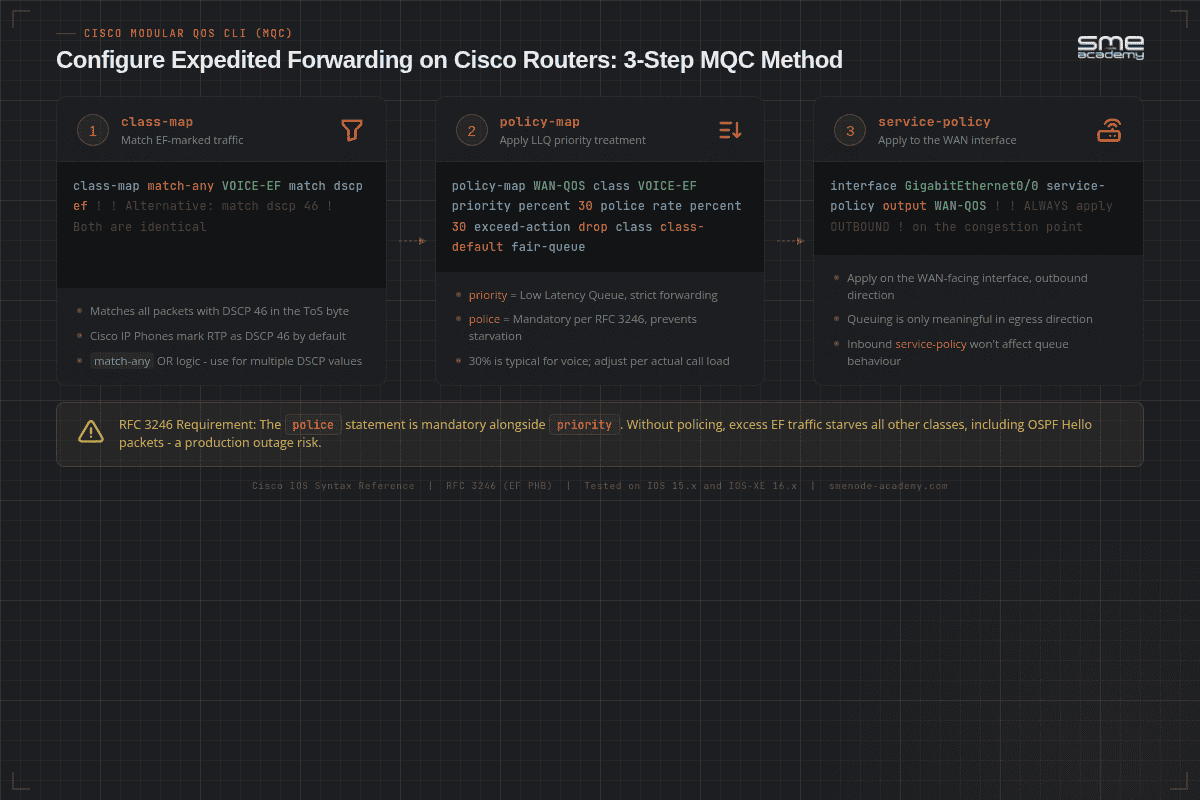
Cisco uses the Modular QoS CLI (MQC) for all QoS configuration. Three steps: create a class-map to identify EF traffic, build a policy-map defining how that traffic is treated, apply the policy-map to an interface.
Step 1: Create the Class-Map
class-map match-any VOICE-EF
 match dscp ef
This matches any packet marked with DSCP 46. You can also write match dscp 46 and it’s identical.
Step 2: Build the Policy-Map
policy-map WAN-QOS
 class VOICE-EF
  priority percent 30
 class class-default
  fair-queue
The priority command places VOICE-EF traffic in a Low Latency Queue (LLQ). The percent 30 reserves 30% of the interface bandwidth for EF traffic. Traffic exceeding that rate is dropped, not queued. That’s intentional. More on this shortly.
Step 3: Apply to the Interface
interface GigabitEthernet0/0
 service-policy output WAN-QOS
Apply the policy outbound on the WAN-facing interface. QoS for queuing is applied in the egress direction at the point where congestion occurs.
That’s the foundation. Real deployments add more classes for different traffic types, WRED for AF queues, and DSCP remarking at trust boundaries. But this pattern covers the base for most production QoS deployments.
Why Does Expedited Forwarding Require Policing?
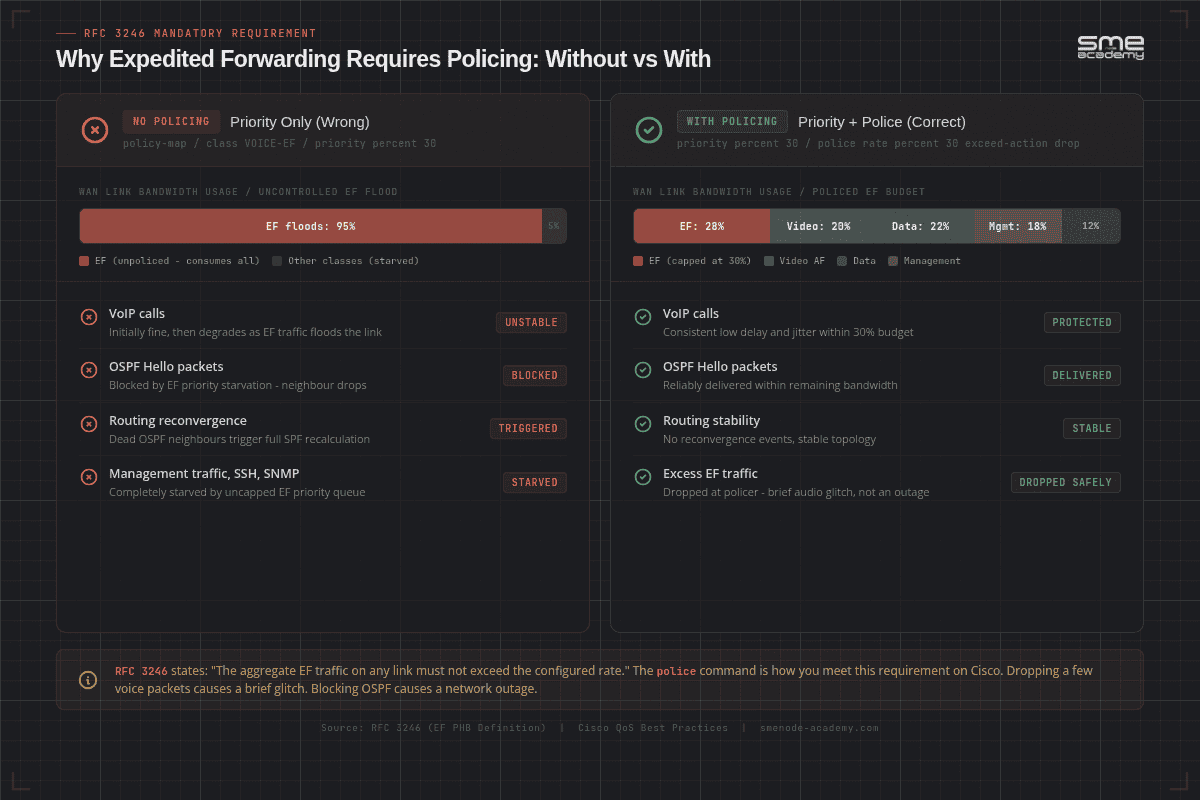
Here’s something that doesn’t get enough attention in most QoS writeups.
EF traffic must be policed. Not just prioritised. Policed.
If you give expedited forwarding strict priority queuing with no policing, and that EF traffic exceeds the allocated bandwidth, it starves every other traffic class. Routing protocol updates stop. Management traffic stops. The network becomes unstable. You’ve solved a voice quality problem by creating a network availability problem.
RFC 3246 is explicit: the aggregate EF traffic on any link must remain below that link’s capacity. The way you control this is policing. Traffic marked EF that exceeds the configured rate gets dropped rather than queued.
This seems wrong at first. Why drop high-priority voice packets? Because dropping a few voice packets causes a brief audio glitch. Blocking OSPF Hello messages can trigger a topology reconvergence that drops far more than just voice. The trade-off is obvious once you think it through.
A policer added to the EF class looks like this:
policy-map WAN-QOS
 class VOICE-EF
  priority percent 30
  police rate percent 30
   exceed-action drop
 class class-default
  fair-queue
EF traffic gets strict priority up to 30% of the link. Anything above that gets dropped. Everything else gets its fair share. In a lab test with no policer, flooding the EF class to several times normal voice load is enough to stall unrelated best-effort traffic and OSPF Hello packets on the same link entirely, since the unpoliced priority queue consumes the full interface. Adding the police line is the difference between a contained problem and an outage, and it’s exactly the kind of detail CCNP candidates frequently miss on the exam.
Expedited Forwarding in CCNA and CCNP Exams
QoS appears in both CCNA 200-301 and CCNP ENCOR 350-401. The depth required is different at each level.
What CCNA 200-301 Tests on Expedited Forwarding
At CCNA level, QoS is tested conceptually. You won’t write full MQC configurations, but you will answer questions about:
- Which DSCP value maps to voice media (answer: 46, EF)
- The difference between EF and AF PHBs
- The four QoS mechanisms: marking, queuing, policing, shaping
- When to use DiffServ vs IntServ vs best-effort
- Basic scenarios where QoS is needed and why
A common CCNA exam format: “A network administrator is experiencing poor VoIP quality on a WAN link. Which QoS mechanism should be applied to voice RTP traffic?” The correct answer involves EF and priority queuing.
What CCNP ENCOR 350-401 Tests on Expedited Forwarding
CCNP goes much further. You need hands-on ability to:
- Write class-maps and policy-maps using MQC
- Configure LLQ with the
prioritycommand - Set up DSCP remarking at trust boundaries
- Configure EF policing alongside priority queuing
- Troubleshoot QoS misconfigurations from symptoms
- Explain WRED and how it interacts with AF drop precedence
The biggest challenge for CCNP candidates is hands-on speed, not conceptual understanding. It’s possible to explain EF, LLQ, WRED, and DSCP correctly and still lose time on the simulation questions if the commands aren’t typed enough times under pressure beforehand. That gap, between knowing the theory and typing it fast enough under a timer, is exactly what dedicated QoS lab time closes.
Common Mistakes with Expedited Forwarding
Even engineers who understand EF in theory make these mistakes in practice.
Marking too much traffic as EF. EF isn’t a general “make this important” marker. If you mark your CRM, backup jobs, and database traffic as EF alongside VoIP, you’ve destroyed the queue. EF should represent 10-20% of total bandwidth at most. Voice RTP and possibly live video. That’s the scope.
No policing on the EF class. Priority queuing without policing is a production risk. Always pair priority with a police statement on the EF class.
Inconsistent marking across the path. If your phones mark traffic correctly but a downstream router doesn’t match on DSCP 46, EF treatment stops at that router. Every hop needs to honour the marking. Check trust boundaries, especially on WAN links where carriers may remark your traffic.
Confusing IP Precedence with DSCP. Older networks used IP Precedence, a 3-bit field. Modern networks use DSCP, a 6-bit field. They overlap at certain values but aren’t the same. Make sure your class-maps use match dscp, not match ip precedence, unless the devices genuinely use IP Precedence.
Applying service-policy in the wrong direction. QoS policies for queuing go outbound on the congestion point. Applying them inbound, or on the wrong interface, produces no effect and no error. The config looks right but does nothing.
Does Expedited Forwarding Guarantee End-to-End Performance?
Not exactly. Worth being clear about this.
EF guarantees that your router treats those packets with priority. It doesn’t guarantee end-to-end performance across infrastructure you don’t control.
If your voice traffic crosses a carrier network that ignores or remarks your DSCP markings, EF treatment ends at your network edge. This is one reason enterprise SD-WAN solutions have become popular: they maintain QoS policies end-to-end across the organisation’s own overlay, regardless of what the underlying carrier does with DSCP.
EF is one component of a QoS strategy. It works best alongside proper bandwidth sizing, call admission control, traffic shaping at ingress, consistent marking policies at trust boundaries, and monitoring.
What DSCP value is used for expedited forwarding?
Expedited forwarding uses DSCP 46. In binary, that’s 101110. You’ll see it written as “EF” in Cisco configurations and as “DSCP 46” in documentation. Both refer to the same per-hop behavior. DSCP 46 is also backward-compatible with IP Precedence 5 (Critical), which is why it sits at that position in the 6-bit field.
What is the difference between expedited forwarding and assured forwarding?
Expedited forwarding (EF) provides strict priority queuing for low-delay, low-jitter delivery. It’s designed for real-time traffic that can’t tolerate queuing, like VoIP RTP. Assured Forwarding (AF) provides conditional delivery assurance based on a subscribed rate, with four classes and three drop precedence levels each. AF traffic can be queued and dropped under congestion. EF traffic should not be queued. Use EF for live calls. Use AF4 for video that can buffer.
What traffic uses expedited forwarding?
Voice media (RTP) is the primary use case. By default, Cisco IP Phones mark RTP packets as DSCP 46. VoLTE traffic in LTE and 5G networks also maps to EF. Some organisations mark real-time video conferencing as EF, though many use AF41 for video and reserve EF strictly for voice RTP.
Does expedited forwarding guarantee no packet loss?
Under normal conditions, yes. EF traffic in a correctly configured LLQ experiences near-zero packet loss. But “normal conditions” means EF traffic is policed and stays within its allocated bandwidth. If EF floods the link without policing, other traffic gets starved, routing can break, and the network becomes unstable. EF only delivers its guarantees when combined with proper policing and admission control.
Why does expedited forwarding need policing?
EF uses strict priority queuing. Without policing, if EF traffic exceeds the allocated bandwidth on a link, it will consume 100% of the link and starve every other class, including routing protocols. RFC 3246 explicitly requires that aggregate EF traffic be kept below link capacity. On a WAN link that also carries an eBGP session, that’s exactly how you lose the peering: keepalives get starved, the hold timer expires, and the session tears down.
How do I configure expedited forwarding on a Cisco router?
Use the Modular QoS CLI (MQC): create a class-map matching dscp ef, create a policy-map applying priority percent 30 to that class, and apply the policy-map outbound with service-policy output. Always add police rate percent 30 exceed-action drop to the EF class.
Bottom Line: What You Need to Know About Expedited Forwarding
Expedited forwarding is the DiffServ PHB for real-time, latency-sensitive traffic. DSCP 46. Low delay, low jitter, low loss. Strict priority queue.
Key points:
- DSCP 46 is EF. No other value. Binary 101110.
- EF needs policing. Priority queuing without a policer can starve all other traffic.
- EF is for real-time traffic only. VoIP RTP, live video. Not for general “important” apps.
- Every hop matters. DiffServ treatment stops wherever a router ignores the marking.
- CCNA tests the concept. CCNP tests hands-on configuration under exam conditions.
If QoS is where you keep losing marks on CCNA or CCNP, the path forward is the same as always: hands-on practice. Reading about expedited forwarding gets you part of the way there. Configuring it under time pressure gets you the rest.