The Huawei router commands you’ll use most on an AR router are system-view, sysname, interface, ip address, ospf 1, display ip routing-table and save. This free PDF puts them in paste-ready order for two Huawei AR routers: SSH login, a PPP link with CHAP, OSPF area 0 and a full ping test.
What are the basic Huawei router commands?
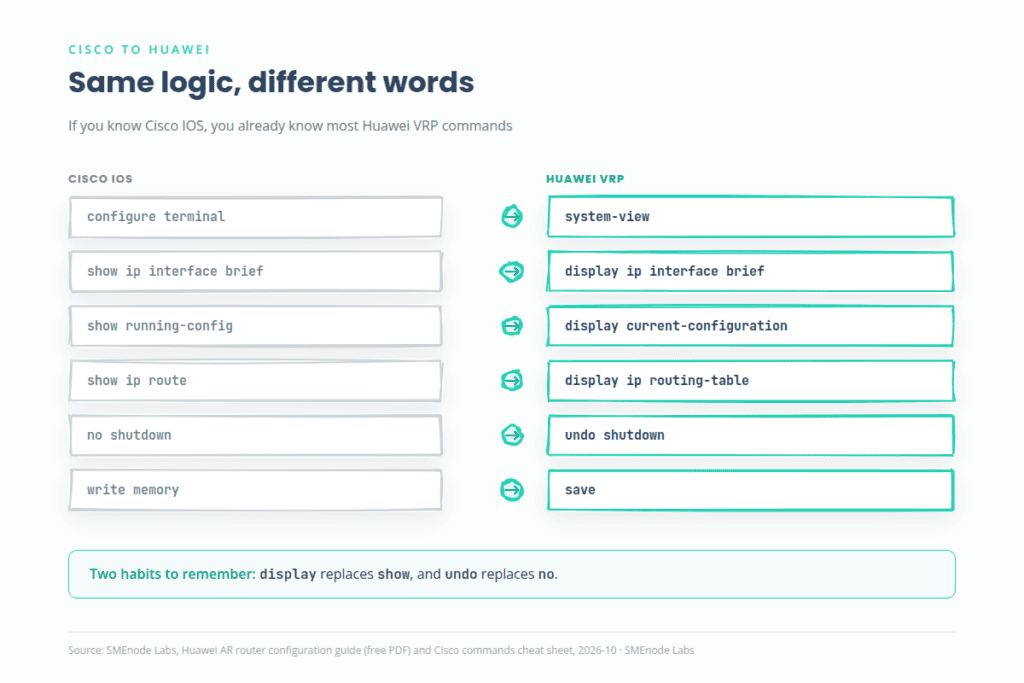
Huawei routers run VRP, and its commands follow one pattern: display shows things, undo removes things, and save writes them to flash. Here’s the short list.
| Task | Command |
|---|---|
| Enter configuration mode | system-view |
| Set the router name | sysname AR1 |
| Show interface status | display ip interface brief |
| Show the running config | display current-configuration |
| Show the saved config | display saved-configuration |
| Show the routing table | display ip routing-table |
| Show OSPF neighbours | display ospf peer brief |
| Show PPP state on a serial link | display interface Serial 1/0/0 |
| Bring an interface up | undo shutdown |
| Save the config | save |
| Wipe the saved config | reset saved-configuration, then reboot |
Run reset saved-configuration before you start a lab on a used router. Old config causes strange conflicts.
Huawei vs Cisco commands: what’s the equivalent?
If you know Cisco IOS, you already know the logic. Only the words change. Our Cisco commands cheat sheet PDF is a good side-by-side partner for this table.
| Task | Cisco IOS | Huawei VRP |
|---|---|---|
| Enter config mode | configure terminal | system-view |
| Set hostname | hostname R1 | sysname AR1 |
| Interface summary | show ip interface brief | display ip interface brief |
| Running config | show running-config | display current-configuration |
| Saved config | show startup-config | display saved-configuration |
| Routing table | show ip route | display ip routing-table |
| OSPF neighbours | show ip ospf neighbor | display ospf peer brief |
| Enable an interface | no shutdown | undo shutdown |
| Save config | write memory | save |
| Reboot | reload | reboot |
What’s inside the free Huawei router configuration PDF?
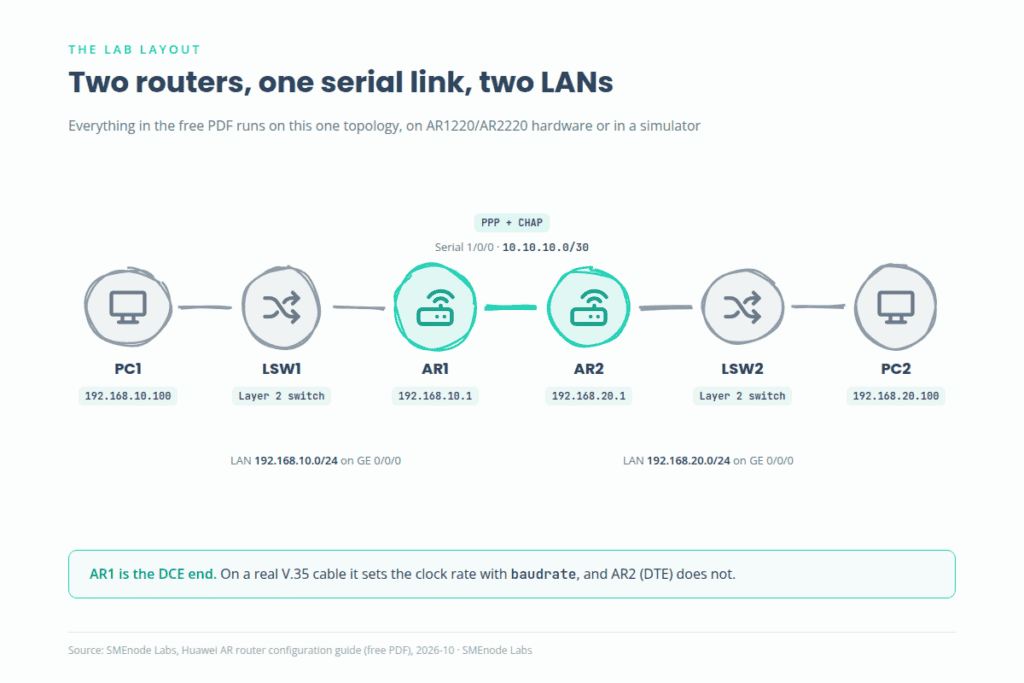
The PDF walks through one working lab, start to finish. Two Huawei AR routers (AR1220 or AR2220, or the same lab in eNSP) sit back to back over a serial WAN link. Each router serves a LAN through a Layer 2 switch and one PC.
| Device | Interface | IP address | Role |
|---|---|---|---|
| AR1 | GE 0/0/0 | 192.168.10.1/24 | LAN gateway |
| AR1 | Serial 1/0/0 | 10.10.10.1/30 | WAN, DCE side |
| AR2 | GE 0/0/0 | 192.168.20.1/24 | LAN gateway |
| AR2 | Serial 1/0/0 | 10.10.10.2/30 | WAN, DTE side |
| PC1 | NIC | 192.168.10.100/24 | Gateway 192.168.10.1 |
| PC2 | NIC | 192.168.20.100/24 | Gateway 192.168.20.1 |
You get nine sections: topology and addressing, console access, SSH, interface IPs, PPP with CHAP, OSPF, end-to-end tests, saving the config and a one-page quick reference. Every block is written to copy and paste.
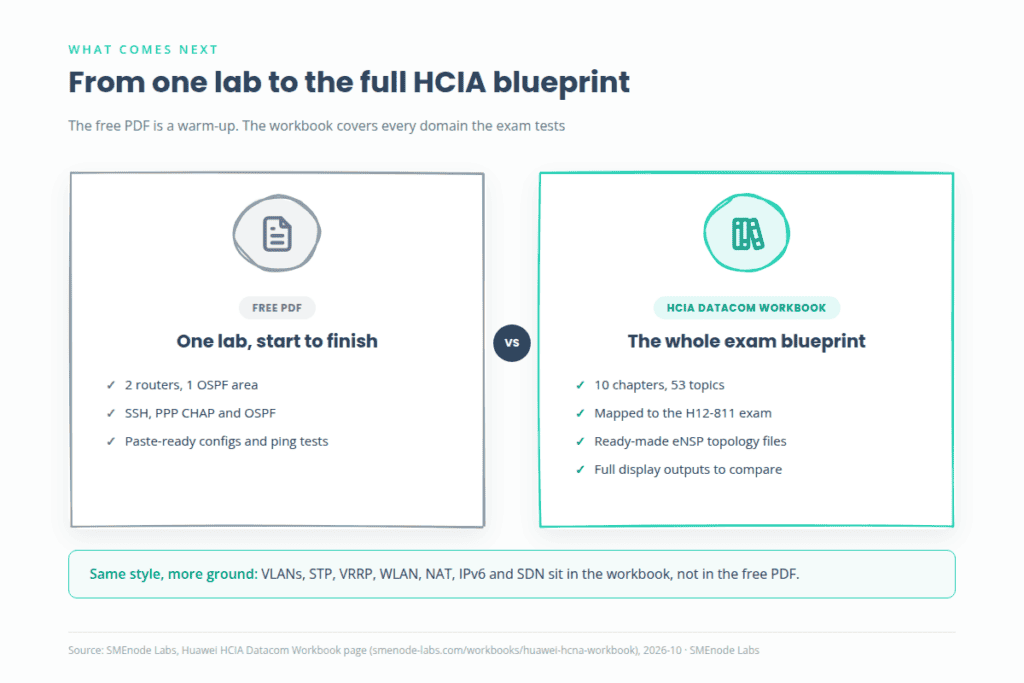
Studying for HCIA Datacom? This lab is one scenario. The Huawei HCIA Datacom Workbook is built from 10 chapters and 53 topics mapped to the H12-811 exam, so you practise the whole blueprint and not just one topology.
How do you configure SSH on a Huawei router?
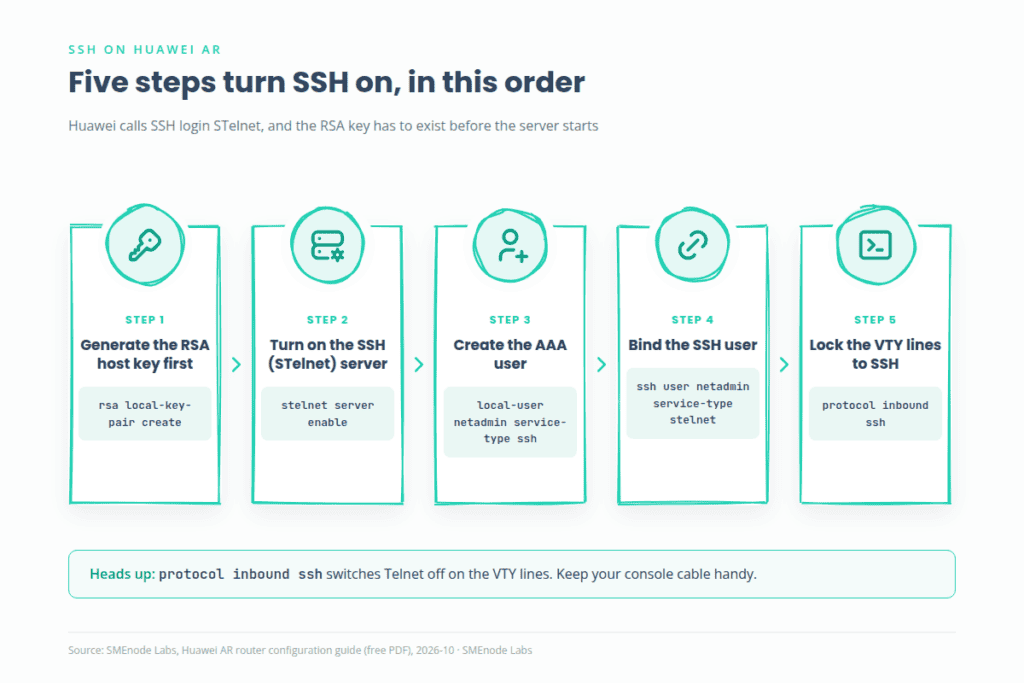
Huawei calls SSH login STelnet. The order matters: generate the RSA key first, then enable the server, then create the user and lock the VTY lines to SSH.
<Huawei> system-view
[Huawei] sysname AR1
[AR1] rsa local-key-pair create
  (type 2048 when it asks for the modulus bits)
[AR1] stelnet server enable
[AR1] aaa
[AR1-aaa] local-user netadmin password irreversible-cipher <YourStrongPassword>
[AR1-aaa] local-user netadmin service-type ssh
[AR1-aaa] local-user netadmin privilege level 15
[AR1-aaa] quit
[AR1] ssh user netadmin authentication-type password
[AR1] ssh user netadmin service-type stelnet
[AR1] user-interface vty 0 4
[AR1-ui-vty0-4] authentication-mode aaa
[AR1-ui-vty0-4] protocol inbound ssh
[AR1-ui-vty0-4] quit
Three things to know before you paste:
protocol inbound sshswitches Telnet off on the VTY lines. That’s the point, but keep your console cable handy.- SSH 2.0 is the default server version, so you don’t need a version command. Only turn on
ssh server compatible-ssh1x enableif an old client needs it. - The lab passwords in the PDF are samples. Replace them with your own before you use any of this on a live router.
To test, run display ssh server status, then connect from the other router with stelnet 192.168.10.1. Huawei’s own CLI login guide for AR1200 and AR2200 shows the same flow. You can also tune retries (range 1 to 5, default 3) with the ssh server authentication-retries command.
Want to see SSH, Telnet and AAA practised in more than one scenario? Chapters 4 and 5 of the HCIA Datacom lab workbook cover AAA, RADIUS and remote login with full display outputs.
How do you set up PPP with CHAP on a Huawei serial link?
PPP is the link protocol, and CHAP is the handshake that proves each side knows a shared secret. The link comes up only if LCP and IPCP both open.
[AR1] interface Serial 1/0/0
[AR1-Serial1/0/0] link-protocol ppp
[AR1-Serial1/0/0] ip address 10.10.10.1 255.255.255.252
[AR1-Serial1/0/0] ppp authentication-mode chap
[AR1-Serial1/0/0] ppp chap user AR1
[AR1-Serial1/0/0] ppp chap password cipher <SharedSecret>
[AR1-Serial1/0/0] undo shutdown
Do the mirror on AR2 with ppp chap user AR2 and the same secret. Then check the result:
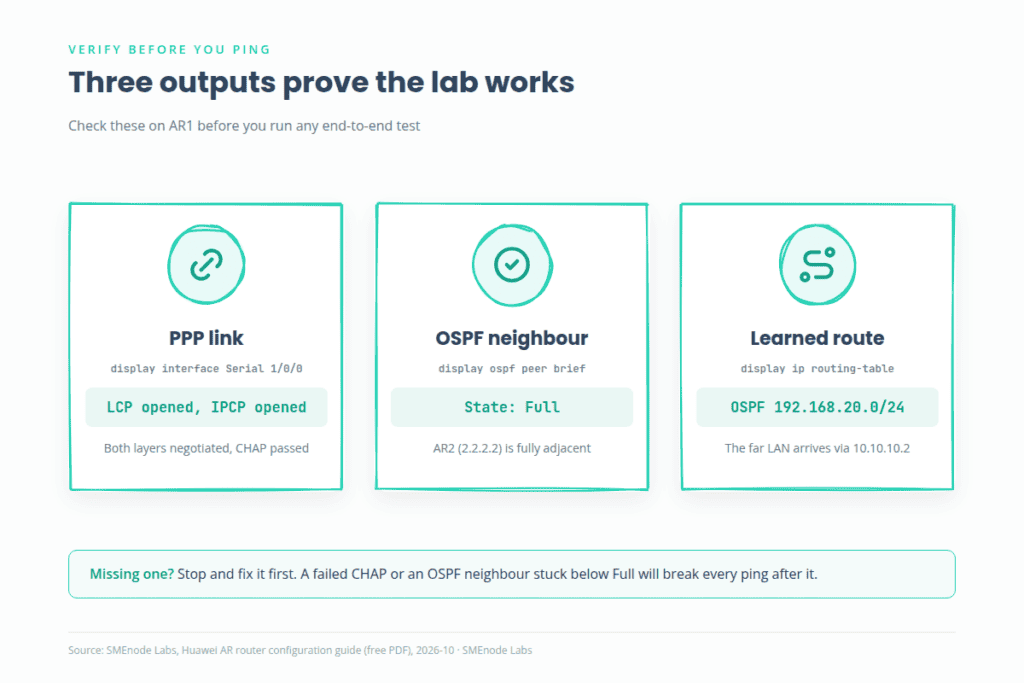
display interface Serial 1/0/0should showLCP opened, IPCP opened.ping 10.10.10.2from AR1 should answer.
Two serial details trip people up. On a real V.35 cable, only the DCE end takes physical-mode synchronous and baudrate. The default baud rate is 64000 bit/s, and baudrate works only when the router acts as DCE. If the serial port stays down, check the cable end and the clock first.
On Huawei AR routers the router that authenticates its peer also needs that peer’s name and password in AAA, with service type PPP. Huawei’s CHAP authentication guide for AR1200 and AR2200 lists this step. If CHAP won’t come up, that’s the first thing to check. For the protocol rules behind it, read RFC 1661 (PPP) and RFC 1994 (CHAP).
How do you configure OSPF on a Huawei router?
Put both routers in OSPF process 1, area 0, and advertise the LAN and the WAN subnet. Huawei uses a wildcard mask in the network command, so a /24 is 0.0.0.255 and a /30 is 0.0.0.3. If wildcard masks feel shaky, our subnet mask cheat sheet fixes that in five minutes.
[AR1] ospf 1 router-id 1.1.1.1
[AR1-ospf-1] area 0
[AR1-ospf-1-area-0.0.0.0] network 192.168.10.0 0.0.0.255
[AR1-ospf-1-area-0.0.0.0] network 10.10.10.0 0.0.0.3
[AR1-ospf-1-area-0.0.0.0] quit
[AR1-ospf-1] silent-interface GigabitEthernet 0/0/0
[AR1-ospf-1] quit
silent-interface stops Hello packets going out the LAN port. The subnet is still advertised, but no one tries to form a neighbour with a PC.
Verify in this order:
display ospf peer briefshows the neighbour in state Full.display ip routing-tablelists 192.168.20.0/24 as an OSPF route.display ospf lsdb briefshows the link-state database.
No neighbour? Check that area 0 is on both routers and the network statements match. The full protocol is defined in RFC 2328 (OSPFv2). For a deeper look at how OSPF behaves in service provider networks, grab our OSPF and MPLS LDP free PDF.
How do you test that the Huawei lab works end to end?
Run five pings in order, and stop at the first failure. Don’t skip ahead.
ping 192.168.10.1from AR1 (the LAN interface is up).ping 10.10.10.2from AR1 (the PPP link works).ping 192.168.20.1from AR1 (OSPF learned the far LAN).ping 192.168.20.100from AR1 (the path reaches PC2).ping 192.168.20.100from PC1 (full end-to-end).
Then run tracert 192.168.20.100 on PC1. You should see three hops: AR1, AR2 and PC2. When it all works, run return and then save on both routers. An unsaved config disappears on a power cycle. If the ping tests fail, our network troubleshooting commands PDF gives you a checklist to work through.
Where does this free PDF stop?
It’s one lab: two routers, one OSPF area, plain Layer 2 switches. You’ll hit its limits fast.
- No VLANs, STP or Eth-Trunk on the switches.
- No WLAN, NAT or IPv6.
- No break-and-fix labs where you hunt a hidden fault.
- No exam mapping, so you can’t tell which skills the H12-811 test checks.
The Huawei HCIA Datacom Certification Workbook fills those gaps. You get 10 chapters covering VLANs, STP, VRRP, OSPF, WLAN, AAA, ACLs, NAT, IPv6 and SDN, ready-made eNSP topology files, copy-ready configs, and full display outputs so you can compare your result line by line. There’s a 30-day money-back guarantee. Use the free PDF to warm up, then move to the workbook when you want the whole exam blueprint.
More free networking PDFs
- Cisco commands cheat sheet PDF
- Network troubleshooting commands PDF
- OSPF and MPLS LDP free PDF
- Subnet mask cheat sheet
- Network topology types PDF
Answer the main question in two or three sentences here, then expand below.