Studying for AWS Cloud Practitioner? Prepping for a Solutions Architect interview? Or just tired of re-opening the same AWS docs page for the third time this week? This AWS services cheat sheet covers the 9 services you’ll actually touch first: IAM, VPC, EC2, S3, RDS, Lambda, DynamoDB, CloudWatch and CloudTrail, plus the cloud fundamentals underneath them.
Grab the PDF for the quick-reference version. Keep reading for the explanations, the parts most cheat sheets skip.
Why an AWS cheat sheet still saves you time
Here’s the thing. AWS documentation is accurate. It’s also spread across dozens of separate pages, written for people who already know which service they need. When you’re studying for an exam or debugging a production issue at 11pm, you don’t want ten browser tabs. You want one page that tells you what EC2 pricing models exist, or whether a Security Group is stateful, without a scavenger hunt.
A cheat sheet isn’t a replacement for the docs. It’s what you keep open next to them. Most people search for one right before an exam, a job interview, or the moment they realize they’ve forgotten the difference between a Security Group and a NACL for the second time.
Cloud computing basics: service and deployment models
Before AWS-specific services, three ideas explain almost everything else on this page.
Service models describe how much you manage versus how much the provider manages:
- IaaS (Infrastructure as a Service): you rent raw infrastructure, VMs, storage, networks, and manage the OS, runtime and app yourself. EC2 is IaaS.
- PaaS (Platform as a Service): the provider manages the OS and runtime, you manage code and data. Elastic Beanstalk is PaaS.
- SaaS (Software as a Service): fully managed software you just use. Gmail, Salesforce.
Deployment models describe where the infrastructure lives: public cloud (shared), private cloud (dedicated), hybrid (a mix of on-prem and cloud), or multi-cloud (more than one provider at once).
Two distinctions trip people up on exams specifically. Elasticity is automatic grow-or-shrink with demand, right now, without you doing anything. Scalability is the capacity to grow over time, either vertically (a bigger machine) or horizontally (more machines). And CapEx vs OpEx describes the actual business case for cloud: it shifts spend from a large upfront capital expense to an ongoing operational one, which is most of why AWS frames its “six advantages of cloud” around variable expense, economies of scale, and not guessing capacity.
AWS global infrastructure: Regions, AZs and shared responsibility
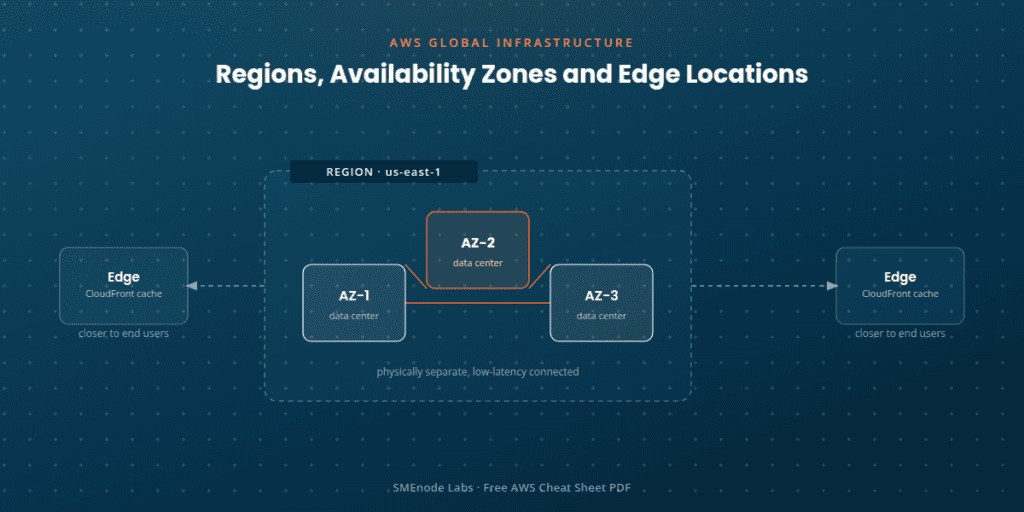
AWS runs on three layers of physical geography, and knowing which one solves which problem matters more than memorizing the definitions.
- Regions (like
us-east-1) are fully independent. Your data stays in-region unless you configure it otherwise, which is exactly why regions matter for compliance. - Availability Zones (AZs) are physically separate data centers within a region, low-latency connected to each other. Every region has at least two. Deploy across AZs and you survive a single data center going down.
- Edge locations are part of the CloudFront CDN, caching content close to end users to cut latency. Not for compute, just for getting cached content closer to people.
The shared responsibility model is the single most tested concept in this section: AWS secures the cloud (physical hardware, facilities, the network). You secure what’s in the cloud (your data, your access configuration, patching your own software). That split isn’t fixed either, with EC2 you handle more (OS patching, network config), with managed services like Lambda or S3, AWS handles more of the stack for you.
The AWS Well-Architected Framework wraps all of this into six pillars: Operational Excellence, Security, Reliability, Performance Efficiency, Cost Optimization, and Sustainability. Worth memorizing outright, it comes up constantly on the Solutions Architect exam and in real architecture reviews.
AWS IAM cheat sheet: identity and access management essentials
IAM controls who can do what in your AWS account, and it’s the first thing every AWS exam and every real security review checks.
Four entities do the work:
- Users: a person or app with long-term credentials. Minimize these in favor of roles.
- Groups: collections of users sharing permissions. Groups can’t be nested.
- Roles: temporary credentials issued via STS, no long-term keys. This is what EC2 instances, Lambda functions, and cross-account access actually use.
- Policies: JSON documents defining Effect (Allow/Deny), Action, Resource, and Condition.
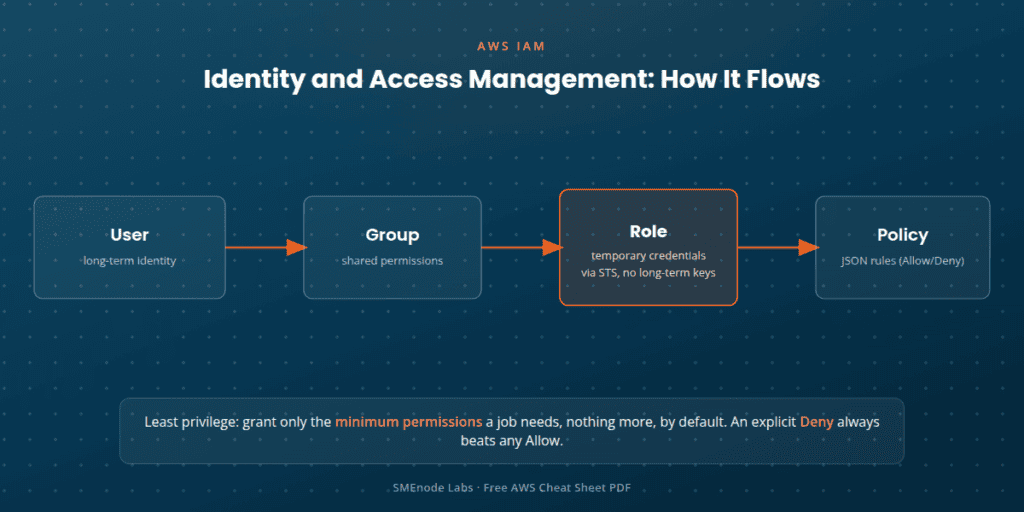
The core principle is least privilege: grant only the minimum permissions a job needs, nothing more, by default. Policies come in two flavors, identity-based (attached to a user, group, or role) and resource-based (attached directly to a resource, like an S3 bucket policy). One rule overrides everything else: an explicit Deny always beats any Allow, no matter how many policies say yes elsewhere.
A handful of security practices show up on every exam and every real audit: enable MFA, especially for root and privileged users. IAM is global, not region-specific, unlike almost every other AWS service. Rotate access keys regularly and never hardcode or commit them. And never use the root account for day-to-day work, it should log in once to set things up and then stay locked away.
VPC and networking: subnets, security groups and NAT gateways
A VPC (Virtual Private Cloud) is a private network you control completely inside AWS, carved into public and private subnets across Availability Zones.
The networking basics: a VPC has an IP range defined by a CIDR block (like 10.0.0.0/16), and subnets carve smaller ranges out of it. An Internet Gateway (IGW) attaches to the VPC and lets public subnet resources reach the internet. A NAT Gateway sits in a public subnet and lets private subnet resources go outbound (say, to download a security patch) without being reachable from outside. Route tables decide which subnet is public and which is private, based on whether traffic routes through the IGW.
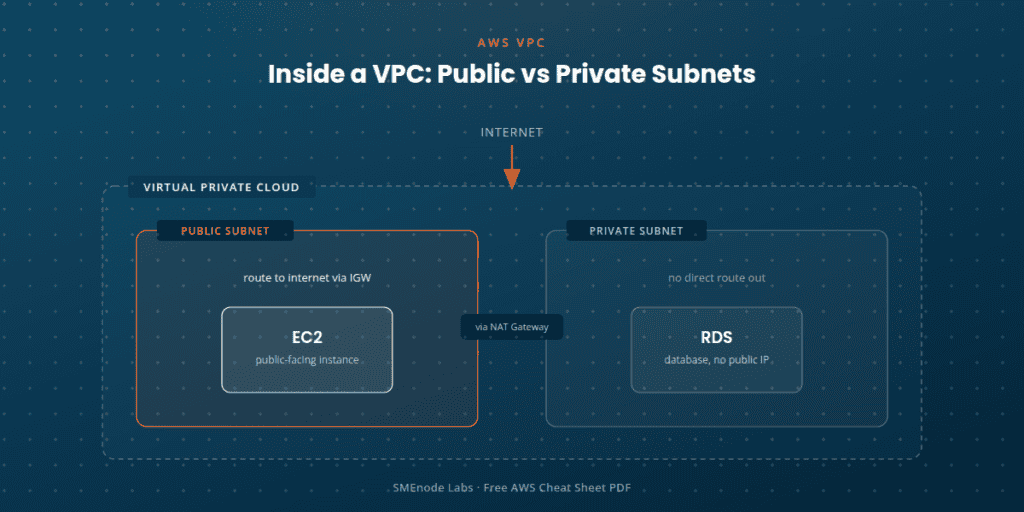
The distinction that catches almost everyone at least once: Security Groups are stateful (allow the request in, and the response is automatically allowed back out), operate at the instance level, and support allow rules only. NACLs are stateless (you have to explicitly allow both directions), operate at the subnet level, and support both allow and deny rules. Security Groups handle most day-to-day cases; NACLs are for when you need an explicit deny at the subnet boundary.
Two connectivity notes worth knowing cold: VPC Peering connects two VPCs privately, but it isn’t transitive, if A peers with B and B peers with C, A still can’t reach C. And VPC Endpoints give you a private connection to AWS services like S3, bypassing the public internet entirely.
EC2: instance types, pricing models and storage
EC2 (Elastic Compute Cloud) is a virtual server you rent by the second, and how you pay for it is a bigger decision than which instance type you pick.
Instance families group by what they’re optimized for: general purpose (T/M series), compute optimized (C series), memory optimized (R/X series), storage optimized (I/D series), and GPU (P/G series).
Four pricing models, ranked from most flexible to cheapest:
- On-Demand: pay per second or hour, no commitment. Most flexible, most expensive.
- Reserved Instances: a 1 or 3-year commitment for up to roughly 75% off.
- Savings Plans: commit to a dollar-per-hour usage level for a discount, more flexible than Reserved.
- Spot Instances: bid on unused capacity. Cheapest option by far, but AWS can reclaim it with short notice.
Storage matters more than people expect here. EBS is persistent block storage that survives a stop or terminate (unless you’ve set it to delete on termination), and it’s snapshot-able. Instance store is temporary storage attached to the physical host, and it’s gone the moment you stop or terminate. Stop versus terminate isn’t a small detail either, it materially changes both your bill and whether your data survives.
For scale, Auto Scaling Groups (ASGs) add or remove instances based on demand or a schedule, using a Launch Template, and an Elastic Load Balancer (ELB) spreads traffic across them (Application for L7, Network for L4, Gateway for specialized cases). Access to an instance runs through key pairs: the public key lives on the instance, the private key stays with you.
S3: storage classes, versioning and access control
S3 (Simple Storage Service) stores objects inside buckets, addressed by key, and it’s built for durability first: AWS designs for 99.999999999% (“11 nines”) durability, with strong read-after-write consistency on every operation.
Storage classes trade cost against access speed:
- Standard: frequent access
- Intelligent-Tiering: automatically moves data between tiers based on how it’s actually accessed
- Standard-IA / One Zone-IA: infrequent access, cheaper, with a retrieval fee
- Glacier / Glacier Deep Archive: archival storage, minutes to hours to retrieve, the lowest cost tier
For data protection: Versioning keeps prior versions of an object on overwrite or delete, and once you enable it, you can suspend it but not fully turn it off again. Lifecycle policies automatically transition or expire objects between storage classes over time, so you’re not paying Standard rates for a file nobody’s touched in a year. Encryption comes in four flavors, SSE-S3, SSE-KMS, SSE-C, or client-side.
Access control layers stack: IAM policies, bucket policies, ACLs (legacy, rarely used now), and account-level Block Public Access, which is on by default. S3 can also serve a static website directly, HTML, JS and CSS, with no separate web server involved.
RDS: managed databases, Multi-AZ and read replicas
RDS (Relational Database Service) gives you a managed SQL database, backups, patching and failover handled for you. You still write the SQL, you just don’t handle the maintenance.
Supported engines: MySQL, PostgreSQL, MariaDB, Oracle, SQL Server, plus Amazon Aurora, AWS’s own high-performance engine, compatible with MySQL and PostgreSQL, and claiming up to 5x the throughput of standard MySQL with auto-scaling storage.
The distinction worth memorizing: Multi-AZ is synchronous replication to a standby database in another Availability Zone, and it exists for failover, not for scaling reads. Read Replicas use asynchronous replication to offload read traffic, and unlike a Multi-AZ standby, a read replica can be promoted to a standalone database. Mixing these two up is one of the most common wrong answers on the Solutions Architect exam.
On operations: automated backups give you point-in-time recovery for up to 35 days. Manual DB snapshots, by contrast, persist indefinitely until you delete them. Parameter and option groups let you configure engine settings without direct server access, and RDS instances typically live in a private subnet, reachable only through security groups from the application tier, never directly from the internet.
Lambda: serverless functions and triggers
Lambda runs your code only when something triggers it, and you’re billed only for the milliseconds it actually runs, no server to patch, provision, or leave idling.
Common triggers include API Gateway, S3 events, DynamoDB Streams, EventBridge (for scheduled or cron-style jobs), SQS and SNS.
The execution model has a few numbers worth remembering: a maximum 15-minute timeout, and configurable memory from 128 MB up to 10 GB (CPU scales automatically with memory). A cold start happens when AWS provisions a brand new execution environment, adding latency. A warm start reuses an existing one and is fast, and Provisioned Concurrency lets you pre-warm functions so users never hit a cold start. Concurrency means every simultaneous invocation gets its own environment, up to account and function-level limits.
Two design notes matter in practice: Layers let you share common code or libraries across functions without duplicating them in every deployment package, and Lambda functions are stateless, nothing persists locally between invocations, so you reach for S3, DynamoDB or EFS if you need to keep anything around. Every function also needs its own IAM execution role defining exactly what it’s allowed to touch, which ties straight back to the least-privilege principle from the IAM section above.
DynamoDB: NoSQL keys, indexes and capacity modes
DynamoDB is fully managed NoSQL, built for single-digit millisecond latency at any scale, and it works fundamentally differently from RDS.
The core design principle: model the table around your known access patterns first. Denormalization, duplicating data across items instead of joining tables, is normal in DynamoDB. It’s the opposite instinct from relational design, and it’s the thing people coming from a SQL background get wrong first.
Primary keys come in two shapes: Simple (a partition key alone, unique per item) or Composite (a partition key plus a sort key, letting multiple items share a partition key and be queried by sort key). For querying beyond the primary key, a Global Secondary Index (GSI) uses a different partition and sort key entirely, while a Local Secondary Index (LSI) keeps the same partition key but a different sort key.
Capacity comes in two modes: On-demand (pay per request, auto-scales with no planning) or Provisioned (you set read/write capacity units, with optional auto scaling on top). DynamoDB Streams captures item-level changes and can trigger a Lambda function directly. By default, reads are eventually consistent (cheaper), though strongly consistent reads are available when you need them. TTL automatically deletes expired items, handy for session data or anything with a natural expiry.
CloudWatch and CloudTrail: monitoring and audit
These two answer different questions. CloudWatch tells you what’s happening. CloudTrail tells you who did it.
CloudWatch collects metrics (numeric time-series data like CPU or request count, with default metrics automatic and custom metrics pushed from your own code) and logs (from Lambda, EC2 via an agent, ECS and more, searchable through Logs Insights). Alarms watch a metric against a threshold over time, sitting in one of three states, OK, ALARM, or INSUFFICIENT_DATA, and they can notify you or trigger auto scaling automatically. Dashboards combine multiple metrics and logs into custom visual widgets. EventBridge (formerly CloudWatch Events) handles rule-based routing of events and schedules to targets like Lambda.
CloudTrail is your account’s audit trail, logging who did what, when, and from where. Every AWS account has it on by default, with a 90-day event history visible in the console with zero setup. Management events (creating or deleting resources, IAM changes) log automatically. Data events (like an S3 GetObject or a Lambda invoke) are higher volume and must be explicitly enabled. A trail delivers events to an S3 bucket, and optionally CloudWatch Logs, for longer storage and analysis, and it can cover a single region or all of them. Log file integrity validation cryptographically confirms nobody’s tampered with the logs after the fact, which matters for both security investigations and compliance audits.
AWS CLI cheat sheet: quick command reference
The source material for this cheat sheet doesn’t cover the CLI in depth, so here’s a working set of commands people actually reach for, verified against current AWS CLI documentation rather than pulled from memory.
Setup
aws configure                 # interactive setup: access key, secret, region, output format
aws configure list            # show the active credentials and region
aws configure list-profiles   # list all configured named profiles
S3
aws s3 ls                              # list all buckets
aws s3 ls s3://my-bucket               # list objects in a bucket
aws s3 cp file.txt s3://my-bucket/     # upload a file
aws s3 sync ./dist s3://my-bucket --delete   # sync a local folder to a bucket, deleting removed files
EC2
aws ec2 describe-instances                          # list instances and their state
aws ec2 start-instances --instance-ids i-0123abcd    # start a stopped instance
aws ec2 stop-instances --instance-ids i-0123abcd     # stop a running instance
aws ec2 run-instances --image-id ami-xxxx --instance-type t3.micro --key-name my-key
IAM
aws iam list-users                     # list IAM users
aws iam list-roles                     # list IAM roles
aws iam create-user --user-name jsmith # create a new IAM user
Lambda
aws lambda list-functions                                  # list deployed functions
aws lambda invoke --function-name my-func out.json          # invoke synchronously
aws lambda invoke --function-name my-func --invocation-type Event out.json  # invoke asynchronously
CloudWatch Logs
aws logs tail /aws/lambda/my-func --follow # stream logs live, useful for debugging a Lambda mid-deployWhat’s inside the PDF
- 11 pages, one AWS concept or service per page: Cloud computing basics, AWS global infrastructure, IAM, VPC, EC2, S3, RDS, Lambda, DynamoDB, CloudWatch, CloudTrail
- A simple flow diagram at the top of each page showing how the pieces connect (for example, User → Group → Role → Policy for IAM)
- A callout box per page with the one idea worth remembering first (shared responsibility, least privilege, “design around your queries,” and so on)
- A bullet breakdown underneath covering the practical distinctions, pricing models, storage classes, policy types, that actually get tested or actually bite you in production
- Format: print-ready, one topic per page, built to sit next to you while you study or work, not to be read cover to cover
Who it’s for
- AWS Cloud Practitioner cheat sheet users studying for the CLF-C02 exam who want the whole syllabus’s worth of services on one page instead of nine open documentation tabs
- AWS Solutions Architect cheat sheet users prepping for the SAA-C03 exam who already know the basics and want a fast refresher on the distinctions that show up as trick questions, Multi-AZ vs Read Replicas, Security Groups vs NACLs, GSI vs LSI
- Developers and engineers who touch AWS occasionally and need a fast sanity check before reaching for the full docs
- Anyone prepping for an AWS-focused job interview and short on time before it starts, our Free DevOps Interview Questions PDF has a dedicated AWS and cloud section (EC2, VPC, IAM, S3, auto scaling, CloudWatch) that pairs directly with the services on this page Beginner-friendly. You don’t need any prior AWS experience to follow this one, it’s built to be a first pass at the platform as much as a refresher. If you’re just starting out, SMEnode Academy’s AWS Cloud Practitioner course is the fastest structured entry point, 6 weeks of live training with unlimited lab access. If you’re past that and aiming for Solutions Architect Associate, SMEnode Academy’s AWS Solutions Architect course builds the full SAA-C03 path.
Want hands-on labs instead of just the reference sheet? Our AWS Solutions Architect Associate Workbook gives you 80+ labs across 1,500+ pages on the exact services covered here, IAM, EC2, VPC, S3, RDS, DynamoDB, Lambda and the Well-Architected Framework, so you’re not just reading about a NAT Gateway, you’re building one.